
讨伐Cucumber行为驱动
Cucumber行为驱动,
简称BDD,
其核心思想是把自然语言转换成代码;
但在敏捷开发的过程中,
这种东西极大的束缚了测试人员的手脚,
感觉它像封建时代的八股文,
要遵守严格的韵律,
反正我个人十分反感;
就像在做功能测试的时候,
那种基于Excel文档的测试;
自动化测试的目的是解放双手、提高效率,
而不是跳入另外一个坑。
Cucumber行为驱动的本意是想让各方:
如业务人员、运营人员、产品经理、开发工程师和普通用户都参与到测试用例的设计与执行中来,
让各方都能读懂,
所以才规定了严格的语法,
不允许测试人员去修改格式;
但是现实生活中,
其实只有测试人员在做测试工作,
当你的自动化用例达到100个以上时,
你还采用这种结构,
那要写到什么时候?
敏捷开发的过程中,
开发周期短,
测试周期就更短了。
综上所述,
Cucumber不适合甲方公司!
用Maven构建Cucumber依赖:
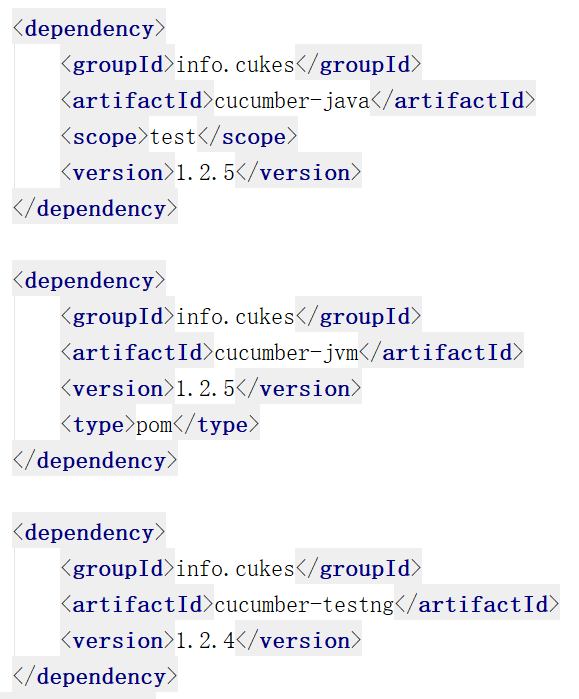
    <dependency>
        <groupId>info.cukes</groupId>
        <artifactId>cucumber-java</artifactId>
        <scope>test</scope>
        <version>1.2.5</version>
    </dependency>

    <dependency>
        <groupId>info.cukes</groupId>
        <artifactId>cucumber-jvm</artifactId>
        <version>1.2.5</version>
        <type>pom</type>
    </dependency>

    <dependency>
        <groupId>info.cukes</groupId>
        <artifactId>cucumber-testng</artifactId>
        <version>1.2.4</version>
    </dependency>

baiduSearch.feature配置文件:

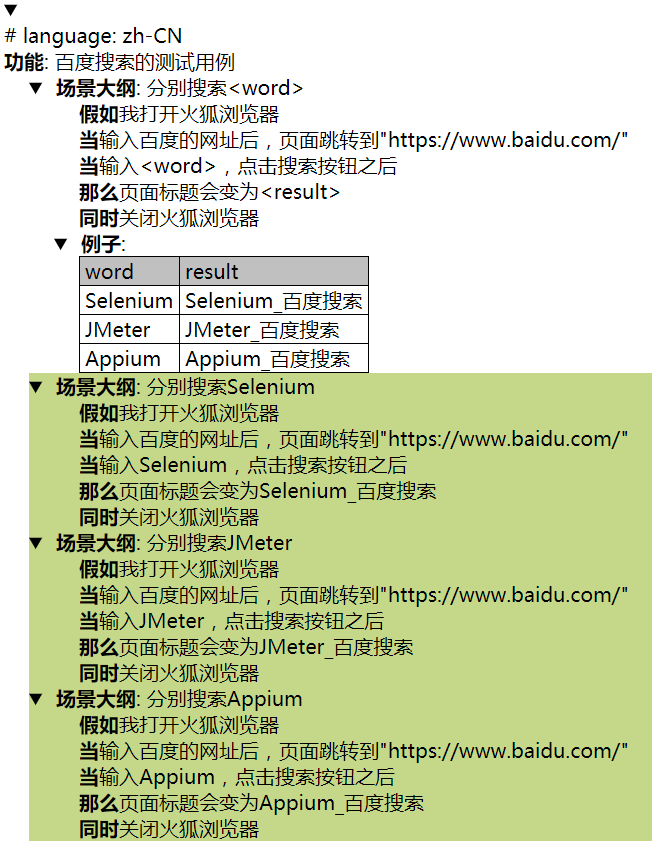
# language: zh-CN

功能: 百度搜索的测试用例
  场景大纲: 分别搜索<word>
    假如我打开火狐浏览器
    当输入百度的网址后,页面跳转到"https://www.baidu.com/"
    当输入<word>,点击搜索按钮之后
    那么页面标题会变为<result>
    同时关闭火狐浏览器
    例子:
      |word       |result            |
      |Selenium  |Selenium_百度搜索 |
      |JMeter    |JMeter_百度搜索   |
      |Appium    |Appium_百度搜索   |
这个文件是可以直接运行的,会在控制台输出:
Undefined step: 假如 我打开火狐浏览器
Undefined step: 当 输入百度的网址后,页面跳转到"https://www.baidu.com/"
Undefined step: 当 输入Selenium,点击搜索按钮之后
Undefined step: 那么 页面标题会变为Selenium_百度搜索
Undefined step: 同时 关闭火狐浏览器
Undefined step: 假如 我打开火狐浏览器
Undefined step: 当 输入百度的网址后,页面跳转到"https://www.baidu.com/"
Undefined step: 当 输入JMeter,点击搜索按钮之后
Undefined step: 那么 页面标题会变为JMeter_百度搜索
Undefined step: 同时 关闭火狐浏览器
Undefined step: 假如 我打开火狐浏览器
Undefined step: 当 输入百度的网址后,页面跳转到"https://www.baidu.com/"
Undefined step: 当 输入Appium,点击搜索按钮之后
3 Scenarios (3 undefined)
15 Steps (15 undefined)
0m0.000s
You can implement missing steps with the snippets below:
@假如("^我打开火狐浏览器$")
public void 我打开火狐浏览器() throws Throwable {
// Write code here that turns the phrase above into concrete actions
throw new PendingException();
}
@当("^输入百度的网址后,页面跳转到\"([^\"]*)\"$")
public void 输入百度的网址后_页面跳转到(String arg1) throws Throwable {
Undefined step: 那么 页面标题会变为Appium_百度搜索
// Write code here that turns the phrase above into concrete actions
throw new PendingException();
}
@当("^输入Selenium,点击搜索按钮之后$")
public void 输入selenium_点击搜索按钮之后() throws Throwable {
// Write code here that turns the phrase above into concrete actions
throw new PendingException();
}
@那么("^页面标题会变为Selenium_百度搜索$")
public void 页面标题会变为selenium_百度搜索() throws Throwable {
// Write code here that turns the phrase above into concrete actions
throw new PendingException();
}
@那么("^关闭火狐浏览器$")
public void 关闭火狐浏览器() throws Throwable {
// Write code here that turns the phrase above into concrete actions
throw new PendingException();
}
@当("^输入JMeter,点击搜索按钮之后$")
public void 输入jmeter_点击搜索按钮之后() throws Throwable {
// Write code here that turns the phrase above into concrete actions
throw new PendingException();
}
@那么("^页面标题会变为JMeter_百度搜索$")
public void 页面标题会变为jmeter_百度搜索() throws Throwable {
// Write code here that turns the phrase above into concrete actions
throw new PendingException();
}
@当("^输入Appium,点击搜索按钮之后$")
public void 输入appium_点击搜索按钮之后() throws Throwable {
Undefined step: 同时 关闭火狐浏览器
// Write code here that turns the phrase above into concrete actions
throw new PendingException();
}
@那么("^页面标题会变为Appium_百度搜索$")
public void 页面标题会变为appium_百度搜索() throws Throwable {
// Write code here that turns the phrase above into concrete actions
throw new PendingException();}
测试用例类CucumberBaidu.java:
import cucumber.api.java.zh_cn.假如;
import cucumber.api.java.zh_cn.同时;
import cucumber.api.java.zh_cn.当;
import cucumber.api.java.zh_cn.那么;
import org.openqa.selenium.WebDriver;
import org.openqa.selenium.WebElement;
import org.openqa.selenium.firefox.FirefoxDriver;
import org.openqa.selenium.support.FindBy;
import org.openqa.selenium.support.PageFactory;
import org.testng.Assert;

public class CucumberBaidu {

    private static WebDriver driver;

    @FindBy(xpath = ".//*[@id='kw']")
    private WebElement inputBox;
    //输入框

    @FindBy(xpath = ".//*[@id='su']")
    private WebElement searchButton;
    //搜索按钮

    @假如("^我打开火狐浏览器$")
    public void openFirefox() throws Throwable{
        System.setProperty("webdriver.firefox.marionette",
                "src/main/resourcec/geckodriver.exe");
        driver = new FirefoxDriver();
        PageFactory.initElements(driver, this);
        driver.manage().window().maximize();
    }

    @当("^输入百度的网址后,页面跳转到\"(.*)\"$")
    public void openBaiduHomePage(String url) throws Throwable{
        driver.get(url);
        //不需要去声明百度首页的地址,因为它会从配置文件里面读取
    }

    @当("^输入(.*),点击搜索按钮之后$")
    public void searchChina(String searchWord) throws Throwable{
        inputBox.sendKeys(searchWord);
        searchButton.click();
        Thread.sleep(2000);
    }

    @那么("^页面标题会变为(.*)$")
    public void keyword(String searchResult) throws Throwable{
        Assert.assertEquals(driver.getTitle(), searchResult);
        Thread.sleep(2000);
    }

    @同时("^关闭火狐浏览器$")
    public void quit(){
        driver.close();
        driver.quit();
    }
}
驱动类CucumberDriver.java:
import cucumber.api.CucumberOptions;
import cucumber.api.testng.AbstractTestNGCucumberTests;

@CucumberOptions(
        features = "baiduSearch.feature",
        format = {"pretty",
                "html:target/cucumber-html-report",
                "json:target/cucumber-json-report.json"}
        )
/*指定cucumber.feature文件,在工程的根目录下
  命令行/控制台输出日志
  生成html测试报告
  生成json测试报告*/

public class CucumberDriver extends AbstractTestNGCucumberTests {

}

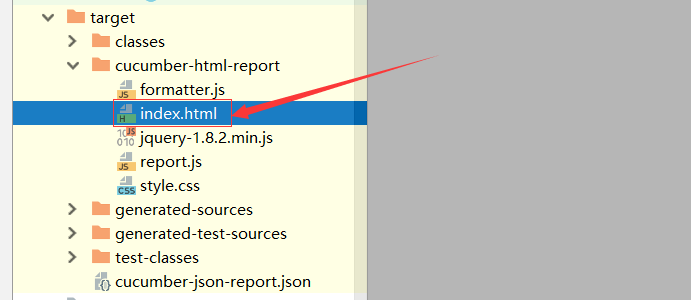
运行一把,查看测试报告:
讨伐Cucumber行为驱动的更多相关文章
- Cucumber 行为驱动开发简介
Cucumber 是一个能够理解用普通语言 描述的测试用例的支持行为驱动开发(BDD)的自动化测试工具,用Ruby编写,支持Java和.Net等多种开发语言. 现在看看Cucumber中用到的术语 . ...
- Cucumber测试驱动开发
Cucumber是一种BDD实践开发工具,属于敏捷开发的组成部分. 在敏捷开发中,对用户进行需求分析时,不是像传统的P&D的开发方式,首先编写大量的用户需求分析文档,而是通过一个个 ...
- 行为驱动:Cucumber + Selenium + Java(一) - 环境搭建
1.1 什么是行为驱动测试 说起行为驱动,相信很多人听说过. 行为驱动开发-BDD(Behavior Driven Development)是一个诞生于2003年的软件开发理念.其关键思想在于通过与利 ...
- 行为驱动:BDD框架之Cucumber初探
1.cucumber cucumber早在ruby环境下应用广泛,作为BDD框架的先驱,cucumber后来被移植到了多平台,简单来说cucumber是一个测试框架,就像是juint或是rspec一样 ...
- 行为驱动:Cucumber + Selenium + Java(五) - 使用maven来实现cucumber测试和报告
在上一篇中,我们介绍了Selenium + Cucumber + Java框架下的测试用例参数化/数据驱动,这一篇我们来使用maven去搭建cucumber框架以及实现测试报告. 5.1 为什么要用m ...
- 行为驱动:Cucumber + Selenium + Java(四) - 实现测试用例的参数化
在上一篇中,我们介绍了Selenium + Cucumber + Java框架下的使用Tags对测试用例分组的实现方法,这一篇我们用数据表格来实现测试用例参数化. 4.1 什么是用例参数化 实际测试中 ...
- 行为驱动:Cucumber + Selenium + Java(三) - 使用标签实现测试分组
在上一篇中,我们写出了Selenium + Cucumber + Java环境下的第一个BDD自动化测试用例,这一篇我们说说怎么用标签对用例进行分组. 3.1 Cucumber标签 实际工作中,我们的 ...
- 行为驱动:Cucumber + Selenium + Java(二) - 第一个测试
在上一篇中,我们搭建好了Selenium + Cucumber + Java的自动化测试环境,这一篇我们就赶紧开始编写我们的第一个BDD测试用例. 2.1 创建features 我们在新建的java项 ...
- 行为驱动:Cucumber + Selenium + Java(二) - extentreports 测试报告+jenkins持续集成
1.extentreports 测试报告 pom文件 <dependency> <groupId>com.vimalselvam</groupId> <art ...
随机推荐
- 2018.12.16 struts.xml 结果集方式分析 && 源码查看
1.结果集 转发 重定向 转发Action 重定向Action <?xml version="1.0" encoding="UTF-8"?> < ...
- VirtualBox改变虚拟硬盘位置
原本放虚拟硬盘的位置容量不足,因此将原来的虚拟硬盘放到了一个相对空闲的分区.设置虚拟硬盘位置时出现一点小问题,解决过程记录如下. 1. 将虚拟硬盘复制到目标位置后,假设为“F:\Ubuntu 16.0 ...
- php如何实现登陆后返回原页面
访问网站页面时,有的页面需要授权才能访问,这时候就会要求用户登录,跳转到登录页面login.php,怎么实现登录后返回到刚才访问的页面项目需求 访问网站页面时,有的页面需要授权才能访问,这时候就会要求 ...
- mysql自连接
自连接: -- 求7369员工编号,姓名,经理编号和经理姓名 select e1.empno,e1.ename,e2.empno,e2.ename from emp e1,emp e2 where e ...
- webapi是如何绑定参数的(How WebAPI does Parameter Binding)
原文地址 由于工作原因,要使用ASP.NET WEBAPI(非mvc webapi),前几天时间一直很紧张,所以webapi一直将就用,今天下午好不容易有时间终于看了下,解决了自己一直疑惑的问题,在此 ...
- 在VS2010 中使用subversion 进行代码的分支与合并
在实际开发总,遇到了这种情况: 开发版本1,开发版本2 ,更新产品时要求1在前,2在后. 但是因为时间要求,必须2个版本同时开发.这时就想到了在svn的版本分支合并. 创建分支之前,首先把当前版本代码 ...
- data-ng-show 指令
<!DOCTYPE html><html><head><meta http-equiv="Content-Type" content=&q ...
- Unity 游戏框架搭建 (八) 减少加班利器-QLog
为毛要实现这个工具? 在我小时候,每当游戏到了测试阶段,交给QA测试,QA测试了一会儿拿着设备过来说游戏闪退了....当我拿到设备后测了好久Bug也没有复现,排查了好久也没有头绪,就算接了Bugly拿 ...
- 分布式id生成
2016年08月09日 14:15:21 yuanyuanispeak 阅读数:318 编辑 一.需求缘起 几乎所有的业务系统,都有生成一个记录标识的需求,例如: (1)消息标识:message-id ...
- Golang学习笔记(一)
一段基础的go语言代码解析 package main import "fmt" func main(){ fmt.Println("hello golang") ...