
solr6.6 solrJ索引富文本(word/pdf)文件
1、文件配置
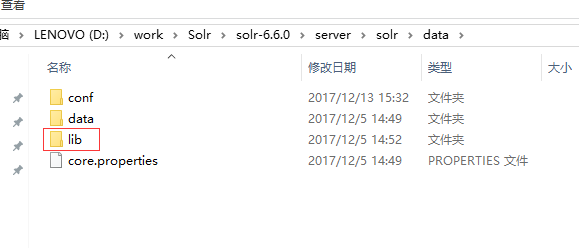
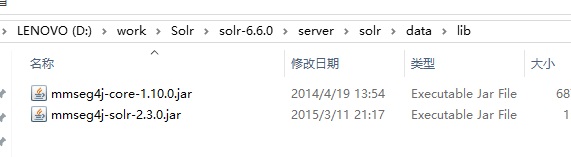
在core下面新建lib文件夹,存放相关的jar包,如图所示:
修改solrconfig.xml
<lib dir="${solr.install.dir:../../../..}/contrib/extraction/lib" regex=".*\.jar" />

  <lib dir="${solr.install.dir:../../../..}/dist/" regex="solr-cell-\d.*\.jar" />

  <lib dir="${solr.install.dir:../../../..}/contrib/clustering/lib/" regex=".*\.jar" />

  <lib dir="${solr.install.dir:../../../..}/dist/" regex="solr-clustering-\d.*\.jar" />

  <lib dir="${solr.install.dir:../../../..}/contrib/langid/lib/" regex=".*\.jar" />

  <lib dir="${solr.install.dir:../../../..}/dist/" regex="solr-langid-\d.*\.jar" />

  <lib dir="${solr.install.dir:../../../..}/contrib/velocity/lib" regex=".*\.jar" />

  <lib dir="${solr.install.dir:../../../..}/dist/" regex="solr-velocity-\d.*\.jar" />

  <lib dir="${solr.install.dir:../../../..}/dist/" regex="solr-dataimporthandler-.*\.jar" />

  <lib dir="${solr.install.dir:../../../..}/dist/" regex="solr-dataimporthandler-.*\.jar" />

  <lib dir="./lib" regex=".*\.jar"/>
增加配置,如果有则不用添加:
 <requestHandler name="/update/extract"

                  startup="lazy"

                  class="solr.extraction.ExtractingRequestHandler" >

    <lst name="defaults">

      <str name="fmap.content">text</str>

      <str name="fmap.meta">ignored_</str>

      <str name="lowernames">true</str>

      <str name="uprefix">attr_</str>

      <str name="captureAttr">true</str>

    </lst>

  </requestHandler>
配置managed-schema文件:
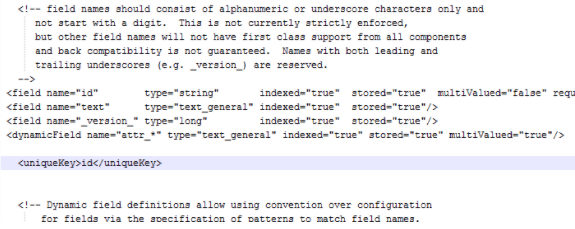
修改managed-schema文件,增加字段:
  <field name="path"      type="string"   indexed="true"  stored="true"  multiValued="false" />

  <field name="pathftype"      type="string"   indexed="true"  stored="true"  multiValued="false" />

  <field name="pathuploaddate"      type="string"   indexed="true"  stored="true"  multiValued="false" />

  <field name="pathsummary"      type="string"   indexed="true"  stored="true"  multiValued="false" />

  <field name="attr_content"      type="text_general"   indexed="true"  stored="true"  multiValued="false" />
2、Java代码solrj操作(6.6.0版本)
import java.io.File;

import java.io.IOException;

import java.text.SimpleDateFormat;

import java.util.Date;

import org.apache.solr.client.solrj.SolrClient;

import org.apache.solr.client.solrj.SolrQuery;

import org.apache.solr.client.solrj.SolrServerException;

import org.apache.solr.client.solrj.impl.HttpSolrClient;

import org.apache.solr.client.solrj.request.AbstractUpdateRequest.ACTION;

import org.apache.solr.client.solrj.request.ContentStreamUpdateRequest;

import org.apache.solr.client.solrj.response.QueryResponse;

/**

 * @Author:sks

 * @Description:索引pdf等富文本文件

 * @Date:Created in 15:16 2017/12/13

 * @Modified by:

 **/

public class solr_pdf {

    public static void main(String[] args)

    {

        String fileName = "D:/work/Solr/ImportData/20160229001cn.pdf";

        String solrId = "20160229001cn.pdf";

        try

        {

            indexFilesSolrCell(solrId, solrId,fileName);

        }

        catch (IOException e)

        {

            e.printStackTrace();

        }

        catch (SolrServerException e)

        {

            e.printStackTrace();

        }

    }

    /**

     * @Author:sks

     * @Description:获取系统当天日期yyyy-mm-dd

     * @Date:

     */

    private static String GetCurrentDate(){

        Date dt = new Date();

        //最后的aa表示“上午”或“下午”    HH表示24小时制    如果换成hh表示12小时制

//        SimpleDateFormat sdf = new SimpleDateFormat("yyyy-MM-dd HH:mm:ss aa");

        SimpleDateFormat sdf = new SimpleDateFormat("yyyy-MM-dd");

        String day =sdf.format(dt);

        return day;

    }

    public static void indexFilesSolrCell(String fileName, String solrId, String path)

            throws IOException, SolrServerException

    {

        String urlString = "http://localhost:8983/solr/test";

        SolrClient solr = new HttpSolrClient.Builder(urlString).build();

        ContentStreamUpdateRequest up = new ContentStreamUpdateRequest("/update/extract");

        String contentType = getFileContentType(fileName);

        up.addFile(new File(path), contentType);

        String fileType = fileName.substring(fileName.lastIndexOf(".")+1);

        up.setParam("literal.id", fileName);

        up.setParam("literal.path", path);//文件路径

        up.setParam("literal.pathuploaddate", GetCurrentDate());//文件上传时间

        up.setParam("literal.pathftype", fileType);//文件类型,doc,pdf

        up.setParam("fmap.content", "attr_content");//文件内容

        up.setAction(ACTION.COMMIT, true, true);

        solr.request(up);

    }

    /**

    * @Author:sks

    * @Description:根据文件名获取文件的ContentType类型

    * @Date:

    */

    public static String getFileContentType(String filename) {

        String contentType = "";

        String prefix = filename.substring(filename.lastIndexOf(".") + 1);

        if (prefix.equals("xlsx")) {

            contentType = "application/vnd.openxmlformats-officedocument.spreadsheetml.sheet";

        } else if (prefix.equals("pdf")) {

            contentType = "application/pdf";

        } else if (prefix.equals("doc")) {

            contentType = "application/msword";

        } else if (prefix.equals("txt")) {

            contentType = "text/plain";

        } else if (prefix.equals("xls")) {

            contentType = "application/vnd.ms-excel";

        } else if (prefix.equals("docx")) {

            contentType = "application/vnd.openxmlformats-officedocument.wordprocessingml.document";

        } else if (prefix.equals("ppt")) {

            contentType = "application/vnd.ms-powerpoint";

        } else if (prefix.equals("pptx")) {

            contentType = "application/vnd.openxmlformats-officedocument.presentationml.presentation";

        }

        else {

            contentType = "othertype";

        }

        return contentType;

    }

}
solr6.6 solrJ索引富文本(word/pdf)文件的更多相关文章
- 搜索引擎Solr6.2.1 索引富文本(word/pdf/txt/html)
一:首先建立Core 在core下面新建lib文件夹,存放相关的jar包,如图所示: lib文件夹打开所示,这些类库在solr6.2.1解压之后都能找到: 修改solrconfig.xml,把刚刚建的 ...
- 利用 Pandoc 将 Markdown 生成 Word/PDF 文件
Pandoc 是一个格式转化工具,可以用于各(luan)种(qi)各(ba)样(zao)的文件转换, 反正我是认不全官网上的那个图(傲娇脸), 之前一直使用它将 Markdown 文件转换成 Html ...
- SolrCloud索引富文本数据
solrconfig配置文件: schema配置文件: 执行目录: /opt/solr-5.5.4/server/scripts/cloud-scripts -- 下载配置文件 ./zkcli.sh ...
- 个人永久性免费-Excel催化剂功能第88波-批量提取pdf文件信息(图片、表格、文本等)
日常办公场合中,除了常规的Excel.Word.PPT等文档外,还有一个不可忽略的文件格式是pdf格式,而对于想从pdf文件中获取信息时,常规方法将变得非常痛苦和麻烦.此篇给大家送一pdf文件提取信息 ...
- 富文本编辑器UEditor的配置使用方法
将下载的富文本编辑器的文件解压后放到 webcontent 下 如果 文件中的jsp文件夹下的controller.java文件报错的话 就将jsp下的lib文件夹中的文件都复制到 web-i ...
- iOS - 开发中加载本地word/pdf文档说明
最近项目中要加载一个本地的word/pdf等文件比如<用户隐私政策><用户注册说明>,有两种方法加载 > 用QLPreviewController控制器实现 步骤 : & ...
- uedit富文本编辑器及图片上传控件
微力后台 uedit富文本编辑器及文件上传控件的使用,无时间整理,暂略,参考本地代码.能跑起来.
- 给Django后台富文本编辑器添加上传文件的功能
使用富文本编辑器上传的文件是要放到服务器上的,所以这是一个request.既然是一个request,就需要urls.py进行转发请求views.py进行处理.views.py处理完了返回一个文件所在的 ...
- 「Python实用秘技04」为pdf文件批量添加文字水印
本文完整示例代码及文件已上传至我的Github仓库https://github.com/CNFeffery/PythonPracticalSkills 这是我的系列文章「Python实用秘技」的第4期 ...
随机推荐
- Linux core dump file详解
Linux core dump file详解 http://www.cnblogs.com/langqi250/archive/2013/03/05/2944931.html
- Spring JdbcTemplate框架搭建及其增删改查使用指南
Spring JdbcTemplate框架搭建及其增删改查使用指南 前言: 本文指在介绍spring框架中的JdbcTemplate类的使用方法,涉及基本的Spring反转控制的使用方法和JDBC的基 ...
- JavaScript秘密花园
译文地址 bonsaiden.github.io/JavaScript-Garden/zh/#intro.authors 之前被人问到JS一些概念性的东西,感觉很模糊,可能层次比较浅,偏理论的东西实践 ...
- Selenium2+python自动化66-装饰器之运行失败截图【转载】
前言 对于用例失败截图,很多小伙伴都希望在用例执行失败的时候能自动截图,想法是很好的,实现起来并不是那么容易. 这里分享下我的一些思路,当然目前还没找到完美的解决方案,我的思路是用装饰器去解决,希望有 ...
- docker从零开始 存储(一)存储概述
管理Docker中的数据 默认情况下,在容器内创建的所有文件都存储在可写容器层中.这意味着: 当该容器不再运行时,数据不会持久存在,如果另一个进程需要,则可能很难从容器中获取数据. 容器的可写层紧密耦 ...
- python 如何将JSON数据原封不动的转为字符串(顺序不能变动)?
最好是采用 OrderedDict + json.dumps方案 1. 在存储 content 的时候就使用 OrderedDict 而非用默认的 dict from collections impo ...
- mysql:functional dependency
0down vote First, a functional dependency in the form A->B means that, given one value for A, we ...
- 自定义的一个JDBC工具类
package JDBCutils; import java.io.File;import java.io.FileInputStream;import java.sql.Connection;imp ...
- selenium 定位
一 . chrome的调试工具 1)在chrome界面,按F12快捷键,弹出chrome的调试工具 2)找出登录按钮的id和username.password的id 二.XPath工具 安装 为了提 ...
- mysql:把DB1中A表a字段替换为DB2中B表b字段
UPDATE DB1.A SET a = ( SELECT b FROM DB2.B WHERE B.Id = A.id) 实例: UPDATE wordpress.`wp_posts` SET po ...