
【LABVIEW到C#】1》ini的操作

using System;

using System.IO;

using System.Drawing;

using System.Collections;

using System.ComponentModel;

using System.Data;

using System.Runtime.InteropServices;

using System.Text;

namespace File_IO

{

    public class inifile

    {

        public string Path;

        public string Section;

        public string Key;

        public string value;

        public inifile(string path)

        {

            this.Path=path;

        }

#region 声明读写INI的API函数

        [DllImport("kernel32")]

        private static extern long WritePrivateProfileString(string section, string key, string val, string filePath);

        [DllImport("kernel32")]

        private static extern int GetPrivateProfileString(string section, string key, string defVal, StringBuilder retVal, int size, string filePath);

        [DllImport("kernel32")]

        private static extern int GetPrivateProfileString(string section, string key, string defVal, Byte[] retVal, int size, string filePath);

#endregion
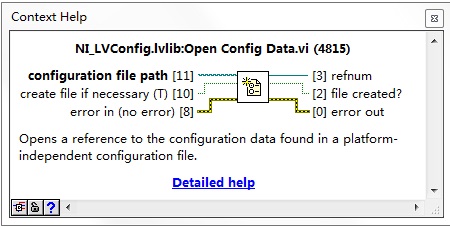
C#代码实现如下
 public void openorcreat()

        {

            if (File.Exists(Path))

            {

            }

            else

            {

                File.Create(Path);

            }

        }
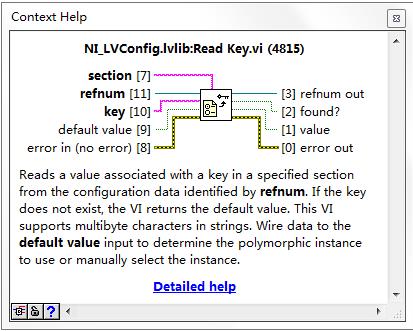
C#代码实现
public string IniReadValue(string Section, string Key)

        {

            StringBuilder temp = new StringBuilder();

            int i = GetPrivateProfileString(Section, Key, "", temp, , this.Path);

            return temp.ToString();

        }

 public string IniReadValue()

        {

            return IniReadValue(Section, Key);

        }
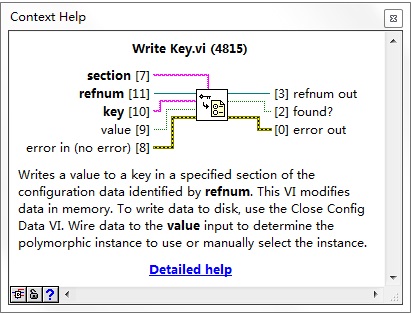
c#代码实现
 public void IniWriteValue()

        {

            IniWriteValue(Section, Key, value);

        }

        public void IniWriteValue(string Section, string Key, string value)

        {

            WritePrivateProfileString(Section, Key, value, this.Path);

        }
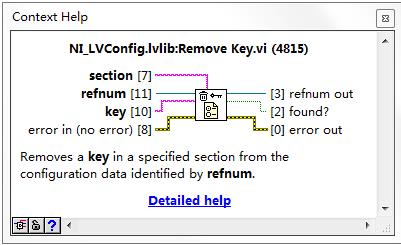
C#代码实现
 public void removeKey(string Section, string Key)

        {

            IniWriteValue(Section, Key, null);

        }

C#代码实现
public string[] GetKeyNames(string Section)

        {

            byte[] allKeys = IniReadValues(Section, null);

            string[] keylist;

            string keynames;

            ASCIIEncoding scii = new ASCIIEncoding();

            keynames = scii.GetString(allKeys);

            keylist = keynames.Split(new char[] { '\0' });

            return keylist;

        }
C#实现
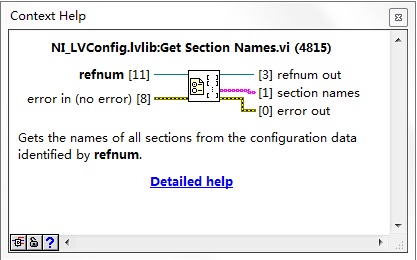
public string[] GetSectionNames()

       {

           byte[] allSection = IniReadValues(null, null);

           string[] sectionList;

           string sections;

           ASCIIEncoding ascii = new ASCIIEncoding();

           sections = ascii.GetString(allSection);

           sectionList = sections.Split(new char[] { '\0' });

           return sectionList;

       }
C#代码实现
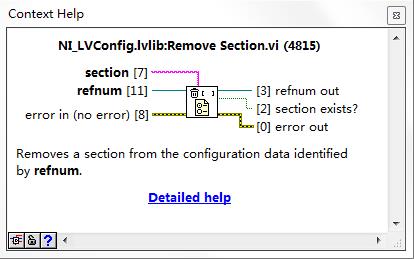
public void removeSection(string Section)

        {

            IniWriteValue(Section, null, null);

        }
【LABVIEW到C#】1》ini的操作的更多相关文章
- LabVIEW之生产者/消费者模式--队列操作 彭会锋
LabVIEW之生产者/消费者模式--队列操作 彭会锋 本文章主要是对学习LabVIEW之生产者/消费者模式的学习笔记,其中涉及到同步控制技术-队列.事件.状态机.生产者-消费者模式,这几种技术在在本 ...
- ini文件操作
Config.ini 文件操作 [SYS] sysname=hy company=hyhy tel=2 using System; using System.Collections.Generic; ...
- ini 文件操作记要(1): 使用 TIniFile
ini 文件操作记要(1): 使用 TIniFile unit Unit1; interface uses Windows, Messages, SysUtils, Variants, Class ...
- winform INI文件操作辅助类
using System;using System.Runtime.InteropServices;using System.Text; namespace connectCMCC.Utils{ // ...
- Ini文件操作类
/// <summary> /// Ini文件操作类 /// </summary> public class Ini { // 声明INI文件的写操作函数 WritePriva ...
- LabVIEW之生产者/消费者模式--队列操作
LabVIEW之生产者/消费者模式--队列操作 彭会锋 本文章主要是对学习LabVIEW之生产者/消费者模式的学习笔记,其中涉及到同步控制技术-队列.事件.状态机.生产者-消费者模式,这几种技术在在本 ...
- python基础——15(加密、excel操作、ini文件操作、xml操作模块及数据格式分类)
一.加密模块 1.有解密的加密方式(base64) #base64加密 import base64 str_encrypt = input("输入要加密的字符串:\n") base ...
- C# ini配置文件操作类
/// <summary> /// INI文件操作类 /// </summary> public class IniFileHelper { /// <summary&g ...
- C# ini文件操作【源码下载】
介绍C#如何对ini文件进行读写操作,C#可以通过调用[kernel32.dll]文件中的 WritePrivateProfileString()和GetPrivateProfileString()函 ...
随机推荐
- 如何避免升级 Linux 实例内核后无法启动
如何避免升级 Linux 实例内核后无法启动_系统配置_操作运维 Linux_常见问题_云服务器 ECS-阿里云 https://help.aliyun.com/knowledge_detail/59 ...
- Centos中查询目录中内容命名ls(六)
首先解释下这块, root代表当前登录用户,localhost代表主机名, ~代表当前主机目录,#代表用户权限 #表示超级用户,$表示普通用户: 查询目录中内容命令 ls (list缩写) 格式 l ...
- Vue表格中时间的处理
Vue中表格的数据应该来自后台数据库,然后从数据库中读取到的数据,时间格式可能有些不同,我们可以根据实际需要来对这个时间进行转化. 这里介绍一个js库,它提供了强大的日期处理功能,功能强大且只有2k大 ...
- Linux中的日志功能
配置文件 /etc/logrotate.conf daily 日志的轮替周期是每天weekly 日志的轮替周期是每周monthly 日志的轮替周期是每月rotate 数字 保留的日志文件的个数comp ...
- 使用openresty + lua 搭建api 网关(一)安装openresty ,并添加lua模块
openresty 有点不多说,网上各种介绍,先安装吧. 官方操作在此,http://openresty.org/cn/installation.html, tar -xzvf openresty-V ...
- New Moto X 2014 全版本RSD&Fastboot刷官方底包教程
本来我是不想写教程的,因为这样的教程实在是太多了,基本上大家也都会了,为什么还要多次一举,发来发去的呢?实在没什么意义!但是我觉得吧,别人的教程写的都太过简单,太过明了了,有时候我们很难理解,这到底是 ...
- 试着利用BAPI 寻找F-59创建凭证的函数
功能块代码 F-59开发类 FIBP事务说明 支付请求 事物:FBP1Screen 0BKPF-BLART = AB________________________________________从程 ...
- HAProxy的访问控制
HAProxy的ACL用于实现基于请求报文首部.响应报文的内容或其他的环境状态信息来做出转发决策,这大大增强了其配置弹性,其配置法则通常分为两步,首先去定义ACL,即定义一个测试条件,而后在条件得到满 ...
- Python基础(8)_迭代器、生成器、列表解析
一.迭代器 1.什么是迭代 1 重复 2 下次重复一定是基于上一次的结果而来 l=[,,,] count= while count < len(l): print(l[count]) count ...
- Pacemaker详解
一.前言 云计算与集群系统密不可分,作为分布式计算和集群计算的集大成者,云计算的基础设施必须通过集群进行管理控制,而作为拥有大量资源与节点的集群,必须具备一个强大的集群资源管理器(Cluster sy ...