
【LABVIEW到C#】1》ini的操作

using System;

using System.IO;

using System.Drawing;

using System.Collections;

using System.ComponentModel;

using System.Data;

using System.Runtime.InteropServices;

using System.Text;

namespace File_IO

{

    public class inifile

    {

        public string Path;

        public string Section;

        public string Key;

        public string value;

        public inifile(string path)

        {

            this.Path=path;

        }

#region 声明读写INI的API函数

        [DllImport("kernel32")]

        private static extern long WritePrivateProfileString(string section, string key, string val, string filePath);

        [DllImport("kernel32")]

        private static extern int GetPrivateProfileString(string section, string key, string defVal, StringBuilder retVal, int size, string filePath);

        [DllImport("kernel32")]

        private static extern int GetPrivateProfileString(string section, string key, string defVal, Byte[] retVal, int size, string filePath);

#endregion
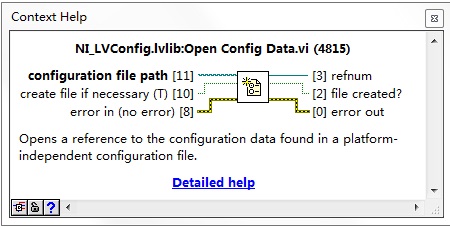
C#代码实现如下
 public void openorcreat()

        {

            if (File.Exists(Path))

            {

            }

            else

            {

                File.Create(Path);

            }

        }
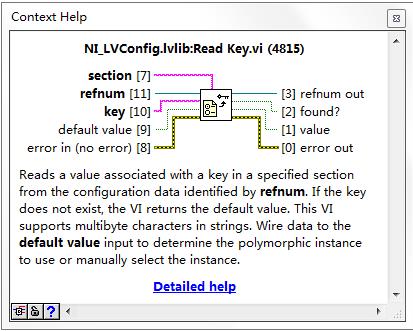
C#代码实现
public string IniReadValue(string Section, string Key)

        {

            StringBuilder temp = new StringBuilder();

            int i = GetPrivateProfileString(Section, Key, "", temp, , this.Path);

            return temp.ToString();

        }

 public string IniReadValue()

        {

            return IniReadValue(Section, Key);

        }
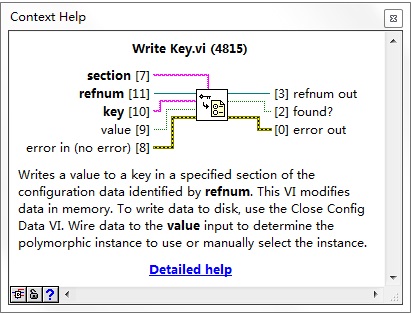
c#代码实现
 public void IniWriteValue()

        {

            IniWriteValue(Section, Key, value);

        }

        public void IniWriteValue(string Section, string Key, string value)

        {

            WritePrivateProfileString(Section, Key, value, this.Path);

        }
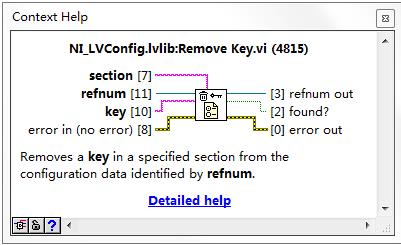
C#代码实现
 public void removeKey(string Section, string Key)

        {

            IniWriteValue(Section, Key, null);

        }

C#代码实现
public string[] GetKeyNames(string Section)

        {

            byte[] allKeys = IniReadValues(Section, null);

            string[] keylist;

            string keynames;

            ASCIIEncoding scii = new ASCIIEncoding();

            keynames = scii.GetString(allKeys);

            keylist = keynames.Split(new char[] { '\0' });

            return keylist;

        }
C#实现
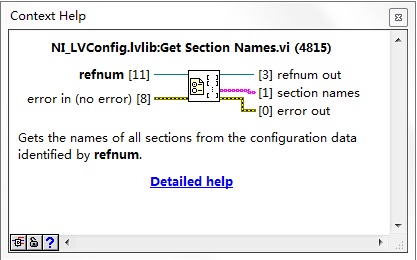
public string[] GetSectionNames()

       {

           byte[] allSection = IniReadValues(null, null);

           string[] sectionList;

           string sections;

           ASCIIEncoding ascii = new ASCIIEncoding();

           sections = ascii.GetString(allSection);

           sectionList = sections.Split(new char[] { '\0' });

           return sectionList;

       }
C#代码实现
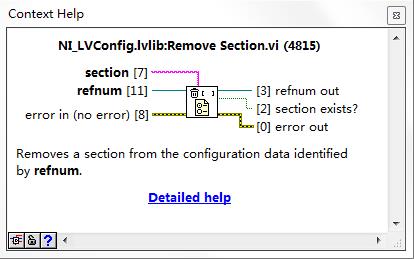
public void removeSection(string Section)

        {

            IniWriteValue(Section, null, null);

        }
【LABVIEW到C#】1》ini的操作的更多相关文章
- LabVIEW之生产者/消费者模式--队列操作 彭会锋
LabVIEW之生产者/消费者模式--队列操作 彭会锋 本文章主要是对学习LabVIEW之生产者/消费者模式的学习笔记,其中涉及到同步控制技术-队列.事件.状态机.生产者-消费者模式,这几种技术在在本 ...
- ini文件操作
Config.ini 文件操作 [SYS] sysname=hy company=hyhy tel=2 using System; using System.Collections.Generic; ...
- ini 文件操作记要(1): 使用 TIniFile
ini 文件操作记要(1): 使用 TIniFile unit Unit1; interface uses Windows, Messages, SysUtils, Variants, Class ...
- winform INI文件操作辅助类
using System;using System.Runtime.InteropServices;using System.Text; namespace connectCMCC.Utils{ // ...
- Ini文件操作类
/// <summary> /// Ini文件操作类 /// </summary> public class Ini { // 声明INI文件的写操作函数 WritePriva ...
- LabVIEW之生产者/消费者模式--队列操作
LabVIEW之生产者/消费者模式--队列操作 彭会锋 本文章主要是对学习LabVIEW之生产者/消费者模式的学习笔记,其中涉及到同步控制技术-队列.事件.状态机.生产者-消费者模式,这几种技术在在本 ...
- python基础——15(加密、excel操作、ini文件操作、xml操作模块及数据格式分类)
一.加密模块 1.有解密的加密方式(base64) #base64加密 import base64 str_encrypt = input("输入要加密的字符串:\n") base ...
- C# ini配置文件操作类
/// <summary> /// INI文件操作类 /// </summary> public class IniFileHelper { /// <summary&g ...
- C# ini文件操作【源码下载】
介绍C#如何对ini文件进行读写操作,C#可以通过调用[kernel32.dll]文件中的 WritePrivateProfileString()和GetPrivateProfileString()函 ...
随机推荐
- ECMAScript6重复字符串方法repeat()
repeat() 1.定义 repeat()方法返回一个新字符串,新字符串将对象字符串重复指定次数. 2.语法 str.repeat(count) count:表示新构造的字符串把原字符串重复的次数, ...
- 一个Browser的HTTP请求(一)
本文主要是分析一个简单的web服务器是如何工作的. 若有不恰当或不对之处,请指正! Tomcat和web服务器的关系 我们常说Tomcat是一个web容器,也常说用户通过浏览器向web服务器进行请求, ...
- Linux 路径与命令搜寻顺序
以相对/绝对路径运行命令,例如『 /bin/ls 』或『 ./ls 』: 由 alias 找到该命令来运行: 由 bash 内建的 (builtin) 命令来运行: 透过 $PATH 这个变量的顺序搜 ...
- IP地址处理模块IPy
IP地址规划是网络设计中非常重要的一个环节,规划的好坏会直接影响路由协议算法的效率,包括网络性能.可扩展性等方面. 在这个过程中,免不了要计算大量的IP地址,包括网段.网络掩码.广播地址.子网数.IP ...
- PAT 天梯赛 L1-038. 新世界 【水】
题目链接 https://www.patest.cn/contests/gplt/L1-038 AC代码 #include <iostream> #include <cstdio&g ...
- arcgis for flex map遮罩
效果1:map的遮罩(对整个map进行遮罩) 效果2:对某个图层进行遮罩
- 教你在树莓派使用上RTC实时时钟,不用再担心断电后时间归零的问题,开机后自动同步RTC时钟!!!
准备工作:1.系统建议使用官方最新的镜像文件 2.RTC时钟模块板(I2C接口)建议使用DS1307时钟模块,或者RTC时钟模块RTC时钟模块: 大家知道arduino的电平是5V,树莓派是3.3V, ...
- 定制AIX操作系统的shell环境
操作系统与外部最主要的接口就叫做shell.shell是操作系统最外面的一层.shell管理你与操作系统之间的交互:等待你输入,向操作系统解释你的输入,并且处理各种各样的操作系统的输出结果. shel ...
- ETL应用:使用shell实现文件级校验的方法
BI应用中,对接口规范性约束很重要,接口文件提供需要配套提供该文件的校验文件,校验文件格式如下: 序号 信息内容 数据类型及长度 说明 1 接口数据文件名称 CHAR(50) 2 文件的大小(字节数) ...
- 【HackerRank】Lonely Integer
There are N integers in an array A. All but one integer occur in pairs. Your task is to find out the ...