
Integrating Google Sign-In into Your Android App
To integrate Google Sign-In into your Android app, configure Google Sign-In and add a button to your app's layout that starts the sign-in flow.
Before you begin
Configure a Google Developers Console project and set up your Android Studio project.
Add the configuration file to your project
Copy the google-services.json file you just downloaded into the app/ or mobile/ directory of your Android Studio project. Open the Android Studio Terminal pane:
$ mv path-to-download/google-services.json app/
Add the Google Services plugin
The Google Services plugin for Gradle parses configuration information from the google-services.json file. Add the plugin to your project by updating your top-level build.gradle and your app-level build.gradle files as follows:
- Add the dependency to your project-level
build.gradle:classpath 'com.google.gms:google-services:2.0.0-alpha6'
- Add the plugin to your app-level
build.gradle:apply plugin: 'com.google.gms.google-services'
Configure Google Sign-In and the GoogleApiClient object
In your sign-in activity's
onCreatemethod, configure Google Sign-In to request the user data required by your app. For example, to configure Google Sign-In to request users' ID and basic profile information, create aGoogleSignInOptionsobject with theDEFAULT_SIGN_INparameter. To request users' email addresses as well, create theGoogleSignInOptionsobject with therequestEmailoption.If you need to request additional scopes to access Google APIs, specify them with
requestScopes.Then, also in your sign-in activity's
onCreatemethod, create aGoogleApiClientobject with access to the Google Sign-In API and the options you specified.Note: To use
enableAutoManage, your activity must extendFragmentActivityorAppCompatActivity(a subclass ofFragmentActivity), both of which are part of the Android Support Library. You can useGoogleApiClientin aFragment; however, the fragment's parent activity must be aFragmentActivity. If you can't extendFragmentActivity, you must manually manage theGoogleApiClientconnection lifecycle.
Add the Google Sign-In button to your app
 Add the
 SignInButtonin your application's layout:<com.google.android.gms.common.SignInButton
android:id="@+id/sign_in_button"
android:layout_width="wrap_content"
android:layout_height="wrap_content" />Optional: If you are using the default sign-in button graphic instead of providing your own sign-in button assets, you can customize the button's size and color scheme with the
setSizeandsetScopesmethods. Also, if you specify a Google+ social scope tosetScopes, the sign-in button will be rendered with the red Google+ branding.In the Android activity (for example, in the
onCreatemethod), register your button'sOnClickListenerto sign in the user when clicked:findViewById(R.id.sign_in_button).setOnClickListener(this);
Start the sign-in flow
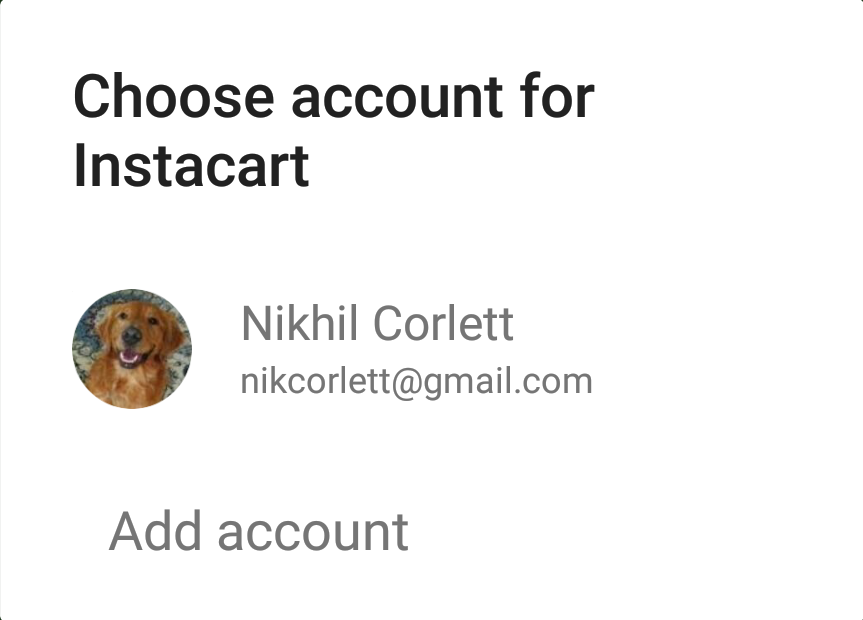 In the activity's
 onClickmethod, handle sign-in button taps by creating a sign-in intent with thegetSignInIntentmethod, and starting the intent withstartActivityForResult.@Override
public void onClick(View v) {
switch (v.getId()) {
case R.id.sign_in_button:
signIn();
break;
// ...
}
}Starting the intent prompts the user to select a Google account to sign in with. If you requested scopes beyond
profile,email, andopenid, the user is also prompted to grant access to the requested resources.In the activity's
onActivityResultmethod, retrieve the sign-in result withgetSignInResultFromIntent.After you retrieve the sign-in result, you can check if sign-in succeeded with the
isSuccessmethod. If sign-in succeeded, you can call thegetSignInAccountmethod to get aGoogleSignInAccountobject that contains information about the signed-in user, such as the user's name.You can also get the user's email address with
getEmail, the user's Google ID (for client-side use) withgetId, and an ID token for the user with withgetIdToken. If you need to pass the currently signed-in user to a backend server, send the ID token to your backend server and validate the token on the server.
Cross-platform single sign on
You can use silentSignIn to automatically sign the user in if the user previously granted authorization to your app on another platform. This allows the user to be signed in to your app immediately, if your project clients are configured to meet the following requirements:
- The OAuth 2.0 client IDs must be in the same Google Developers Console project.
- The OAuth scopes must be the same in both clients.
If the user signed in to your web app previously, silent sign-in succeeds. You can proceed to access Google APIs to retrieve the user's info and bypass the need for the user to sign in to your app again.
Localization
The SDK provides localized strings for the com.google.android.gms.common.SignInButton button and these are automatically available to users of your app. To view a full list of languages, you can examine the following directory in the SDK: <android-sdk-folder>/extras/google/google_play_services/libproject/google-play-services_lib/res/. In that location, you will find directories named values-<langcode>.
Except as otherwise noted, the content of this page is licensed under the Creative Commons Attribution 3.0 License, and code samples are licensed under the Apache 2.0 License. For details, see our Site Policies. Java is a registered trademark of Oracle and/or its affiliates.
Integrating Google Sign-In into Your Android App的更多相关文章
- android app性能优化大汇总
这里根据网络上各位大神已经总结的知识内容做一个大汇总,作为记录,方便后续“温故知新”. 性能指标: (1)使用流畅度: 图片处理器每秒刷新的帧数(FPS),可用来指示页面是否平滑的渲染.高的帧率可以 ...
- 谷歌发布基于机器学习的Android APP安全检测系统:Google Play Protect
Google Play作为众所周知的在线应用市场,因为审查制度的松散,经常会有一些恶意软件伪装成其他应用混入其中.此前阿里聚安全小编就报道了2例关于恶意软件伪装在Google Play上的事件:< ...
- Android App在Google App Store中搜不到
情景:Android App在Google App Store上架成功,三星手机可以在Google App Store中搜索到,但是三星tablet却无法在Google App Store中搜索到,目 ...
- Unity上线google商店 用IL2Cpp打包64位版本和Android APP Bundle优化 及产生的bug
ios刚上线,这边着手改成android版本,我开始使用的是unity2017.4.1版本 上传谷歌商店是出现这两个警告: 要支持64位,但是在2017版本上没有找到64位的打包选项,猜测应该是版本的 ...
- 【Unity3D】Android App Bundle(aab)打包上架Google Play介绍
总体说来,Android App Bundle打包有3种方式,每种方式都有成功上架Google Play进行测试通过,因此实用程度还是挺高的.能够理解以下内容的前提是会打apk包,知道如何生成Asse ...
- 第三篇:gradle 编译 Android app 概览
引言:经过上两篇的论述,我们已经从代码到架构都简单的熟悉了一遍,理论上,只要知道android app的编译过程,我们大可以自己写一份用gradle编译app的插件,插件内将将整个流程用Task的依赖 ...
- MAC安裝《Genymotion Android模擬器》大玩Android APP (神魔之塔)
链接地址:http://www.minwt.com/mac/10083.html/comment-page-2 MAC» 智慧型裝罝» Android | 2014/02/12 Android是一個開 ...
- google+ sign in and get the oauth token 转摘:https://gist.github.com/ianbarber/5170508
package com.example.anothersignintest; import java.io.IOException; import com.google.android.gms ...
- Migrating Your Android App from Eclipse to Android Studio
By: Jason Snell | Posted in: Mobile, Performance Tech Tips, Top Post, Jun. 7th, 2013 12 inShare One ...
随机推荐
- Ubuntu下kafka集群环境搭建及测试
kafka介绍: Kafka[1是一种高吞吐量[2] 的分布式发布订阅消息系统,有如下特性: 通过O(1)的磁盘数据结构提供消息的持久化,这种结构对于即使数以TB的消息存储也能够保持长时间的稳定性能 ...
- 全局axios默认值 和 自定义实例默认值
首先说了一下情况, 登录后成功返回token 然后在带着token去继续下面的请求, 奇怪的是都是当前页面起作用,刷新和跳转之后就token 就消失了. 查了 axios文档发现 被自己坑了 我设置了 ...
- LCD实验学习笔记(二):head.S
ARM加电后从0地址开始取指执行. 连接为bin文件时时,连接脚本lcd.lds指定将head.o放在开头,所以head.S就是系统起步的地方. head.S开头就是异常向量定义,0地址就是reset ...
- HDU3910(数学期望题,题目难懂)
Liang Guo Sha Time Limit: 2000/1000 MS (Java/Others) Memory Limit: 32768/32768 K (Java/Others)Tot ...
- android 调试 native 程序的方法
一.背景 首先说需求,这个需求非常常见,就是android上需要的一个功能,linux已经有开源代码而且非常稳定,希望能直接porting过去使用,这个程序是pure c 的代码,也就是说,跟andr ...
- C# 获取存在DataTable1不存在DataTable2的数据的快速方法
通过合并和获得改变两个方法获得差异的部分: dataTable1.AcceptChanges();dataTable1.Merge(dataTable2);DataTable changesTable ...
- Oracle基础 09 概要文件 profile
--创建 profile 概要文件create profile profile123 limit failed_login_attempts 2; --修改用户的 profile 文件alter u ...
- AC日记——Card Game codeforces 808f
F - Card Game 思路: 题意: 有n张卡片,每张卡片三个值,pi,ci,li: 要求选出几张卡片使得pi之和大于等于给定值: 同时,任意两两ci之和不得为素数: 求选出的li的最小值,如果 ...
- sonarQube6.1 升级至6.2
在使用sonarQube6.1一段时间后,今天才发现sonarQube6.2已经更新,为了尝鲜,我决定在本机先尝试一下,如何升级至6.2 在这里,根据站点提示的升级步骤 1.下载新版本sonarQub ...
- HDU 2547 无剑无我(数学)
#include<cstdio> #include<iostream> #include<cmath> int main() { double a,b,c,d,m; ...