
Canvas俄罗斯方块
写在前面
潜水博客园多年,从未写过博客。最近才注册博客,遂将很久前写的俄罗斯方块分享出来。第一次写博客,不喜勿喷。。。
游戏说明
- 游戏操作:J向左,L向右,I旋转,K快速下降
- 游戏基于HTML canvas开发,请在支持HTML5的浏览器中运行(IE9+, Chrome, Firefox...)
- 目前通过CodePen嵌入到页面中存在一个小BUG,请在页面加载完成后5秒左右在开始游戏(codepen的配置问题,已修复)。
数据结构
- 将整个游戏区域视为一个n*m的二维数组,数组中的每一个元素对应游戏区域中长为h的小正方形。如arr[3][4]对应左上角顶点坐标为(3*h,4*h)边长为h的正方形。数组中元素的值由0或1构成,0表示对应游戏区域没有方块1表示对应游戏区域已有方块。
- 游戏中的图形由若干个小方块构成,每一种图形有4种状态,可通过改变构成图形的小方块的坐标切换图形的状态。每一种图形有一个基点坐标,根据该基点坐标设置对应状态个小方块的坐标。代码如下所示:
var Shape = function () { };

    Shape.prototype.Init = function () {

        this.blocks = [];

        var random = parseInt(Math.random() * 100);

        this.status = random % 4;

        this["st"+this.status]();//random status

        this.fillStyle = _config.blockColors[random % _config.blockColors.length];//random color

    }

    Shape.prototype.Down = function () {

        this.x += 1;

        for (var i = 0; i < this.blocks.length; i++) {

            this.blocks[i].x += 1;

        }

    }

    Shape.prototype.Left = function () {

        this.y -= 1;

        for (var i = 0; i < this.blocks.length; i++) {

            this.blocks[i].y -= 1;

        }

    }

    Shape.prototype.Right = function () {

        this.y += 1

        for (var i = 0; i < this.blocks.length; i++) {

            this.blocks[i].y += 1;

        }

    }

    Shape.prototype.st0 = function () { };//abstract method

    Shape.prototype.st1 = function () { };

    Shape.prototype.st2 = function () { };

    Shape.prototype.st3 = function () { };

    Shape.prototype.Rotate = function (i) {//rotate to target status

        var st = (this.status + i+4) % 4;

        this.status = st;

        this["st"+this.status]()

    }
图形抽象类
var Triangle = function (x, y) {

        this.x = x;

        this.y = y;

        this.Init();

    };

    Triangle.InheritFrom(Shape, null, null);

    ShapeFactory.AddShape(Triangle);

    Triangle.prototype.st0 = function () {

        this.blocks[0] = new Block(this.x - 1, this.y, 1);

        this.blocks[1] = new Block(this.x, this.y - 1, 1);

        this.blocks[2] = new Block(this.x, this.y, 1);

        this.blocks[3] = new Block(this.x, this.y + 1, 1);

    }

    Triangle.prototype.st1 = function () {

        this.blocks[0] = new Block(this.x, this.y + 1, 1);

        this.blocks[1] = new Block(this.x - 1, this.y, 1);

        this.blocks[2] = new Block(this.x, this.y, 1);

        this.blocks[3] = new Block(this.x + 1, this.y, 1);

    }

    Triangle.prototype.st2 = function () {

        this.blocks[0] = new Block(this.x + 1, this.y, 1);

        this.blocks[1] = new Block(this.x, this.y + 1, 1);

        this.blocks[2] = new Block(this.x, this.y, 1);

        this.blocks[3] = new Block(this.x, this.y - 1, 1);

    }

    Triangle.prototype.st3 = function () {

        this.blocks[0] = new Block(this.x, this.y - 1, 1);

        this.blocks[1] = new Block(this.x + 1, this.y, 1);

        this.blocks[2] = new Block(this.x, this.y, 1);

        this.blocks[3] = new Block(this.x - 1, this.y, 1);

    }
图形子类(L)
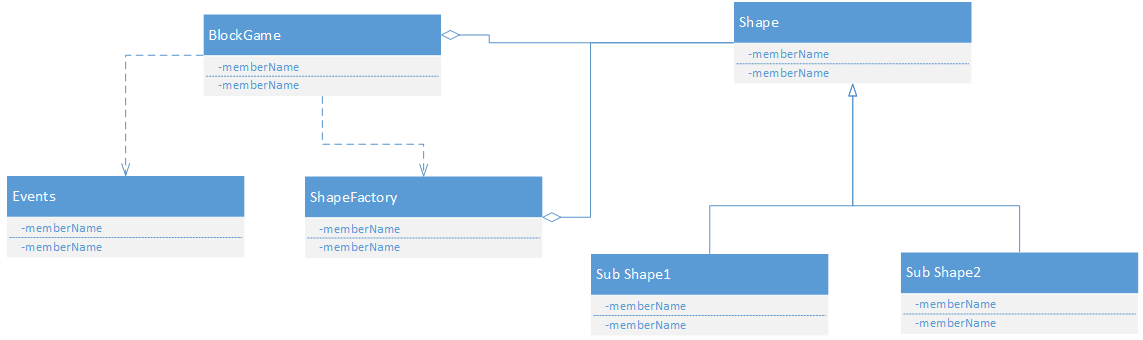
类关系图
游戏中的设计模式
发布订阅模式
用于实现游戏中的事件通知,如得分、游戏结束等。
_events = (function () {//Pub&Sub

        var topics = {},

         uuid = 0,

         event = function () {

             this.listen = function (topic, callback) {

                 if (typeof topic !== "string" || typeof callback !== "function")

                     return this;

                 if (!topics[topic]) {

                     topics[topic] = [];

                 }

                 callback.uuid = uuid++;

                 topics[topic].push(callback);

                 return this;

             };

             this.trigger = function (src, topic, data) {

                 if (!topics[topic] || topics[topic].length === 0)

                     return this;

                 var callbacks = topics[topic],

                     i = 0,

                     length = callbacks.length;

                 for (; i < length; i++) {

                     callbacks[i].call(src, data);

                 }

                 return this;

             };

             this.remove = function (topic, callback) {

                 if (!topics[topic] || topics[topic].length === 0)

                     return this;

                 var callbacks = topics[topic],

                     i = 0,

                     length = callbacks.length;

                 for (; i < length; i++) {

                     if (callback.uuid === callbacks[i].uuid)

                         callbacks.splice(i, 1);

                 }

                 return this;

             };

         };

        return event;

    })();
事件对象
BlockGame.prototype.ListenNewShapeEvents = function (fn) {

        this.events.listen(_eventEnum.newShape, fn);

        return this;

    }
事件对象应用
工厂模式
用于随机的创建下一个图形。
var ShapeFactory = (function () {//absolute factory

        var ShapeArr = [];

        return {

            CreateShape: function (x, y) {//create a random shape

                var random = Math.floor(Math.random() * 100);

                return new ShapeArr[random % ShapeArr.length](x, y);

            },

            AddShape: function (shape) {

                ShapeArr.push(shape);

            }

        };

    })();
工厂模式
游戏效果
See the Pen JGodp by victor zhang (@viczha) on CodePen.
Canvas俄罗斯方块的更多相关文章
- canvas 俄罗斯方块
<!doctype html> <html> <body> <canvas id="can" width="360px" ...
- canvas实现俄罗斯方块
好久没使用canvas了,于是通过写小游戏"俄罗斯方块"再次熟悉下canvas,如果有一定的canvas基础,要实现还是不难的.实际完成的Demo请看:canvas俄罗斯方块 . ...
- canvas版《俄罗斯方块》
试玩(没有考虑兼容低版本浏览器): See the Pen Canvas俄罗斯方块 by 王美建 (@wangmeijian) on CodePen. ************************ ...
- H5版俄罗斯方块(2)---游戏的基本框架和实现
前言: 上文中谈到了H5版俄罗斯方块的需求和目标, 这次要实现一个可玩的版本. 但饭要一口一口吃, 很多东西并非一蹴而就. 本文将简单实现一个可玩的俄罗斯方块版本. 下一步会引入AI, 最终采用coc ...
- x01.Tetris: 俄罗斯方块
最强大脑有个小孩玩俄罗斯方块游戏神乎其技,那么,就写一个吧,玩玩而已. 由于逻辑简单,又作了一些简化,所以代码并不多. using System; using System.Collections.G ...
- 【自己给自己题目做】:如何在Canvas上实现魔方效果
最终demo -> 3d魔方 体验方法: 浮动鼠标找到合适的位置,按空格键暂停 选择要翻转的3*3模块,找到相邻两个正方体,鼠标点击第一个正方体,并且一直保持鼠标按下的状态直到移到第二个正方体后 ...
- [原创]html5_PC游戏_图片俄罗斯方块
PC游戏_图片俄罗斯方块 以前的了,快一年了... 使用了离线canvas复制的方法,启动预览效果需要服务器支持 另外,AC娘图片可以自己做加载功能,这样游戏图片显示更顺畅 效果: --- 代码: h ...
- 自己写了个H5版本的俄罗斯方块
在实习公司做完项目后,实在无聊.就用H5写了几个游戏出来玩一下.从简单的做起,就搞了个经典的俄罗斯方块游戏. 先上效果: 上面的数字是得分,游戏没有考虑兼容性,只在chrome上测试过,不过大部分现代 ...
- H5实现俄罗斯方块(一)
这几天一直忙于公司的项目,涉及到流程问题,(有时间会写成博客的)...一直没有更新... 为了更加巩固js的基础,自己封装类似于JQuery的操作库来对dom进行操作. 一:前度页面的绘制. < ...
随机推荐
- plsql快速选中一行的快捷键
实际工作中,经常用到pl/sql,在sql window中,经常性的用到选中一行然后按F8执行这条sql语句.用鼠标选中一行不是特别方便.用快捷键就快多了. 1.使用home键(不是windows键奥 ...
- 解析网络json数据,模拟美团界面显示。
<?xml version="1.0" encoding="UTF-8"?> <RelativeLayout xmlns:android=&q ...
- 判断是否是iOS8
判断是否是iOS8 //判断是否是iOS8 if ([[UIDevice currentDevice].systemVersion doubleValue]>=8.0) { NSLog(@&qu ...
- WinForm 中 VScrollBar Maximum 问题
最近在做一个鼠标经过弹出 TreeView 面板功能 , 要求鼠标离开TreeView区域,隐藏面板. 功能如期开发,其中当TreeView 出现滚动条时,鼠标经过TreeView中的滚动条时,提前 ...
- hashmap and hashtable
①继承不同. public class Hashtable extends Dictionary implements Map public class HashMap extends Abstrac ...
- xlistview的XML(脚)xlistview_footer
<?xml version="1.0" encoding="utf-8"?><LinearLayout xmlns:android=" ...
- 【转】clang warning 警告清单(备查,建议直接command + F 速查 )
Warning Message -WCFString-literal input conversion stopped due to an input byte that does not belon ...
- java批量插入数据进数据库中
方式1: for循环,每一次进行一次插入数据. 方式2: jdbc的preparedStatement的batch操作 PreparedStatement.addBatch(); ...... Pre ...
- JEvaluator Jscript.net
using Microsoft.JScript; using System; using System.CodeDom.Compiler; using System.Collections.Gener ...
- linux命令存放 bash: xxx command not found
参考资料:http://blog.sina.com.cn/s/blog_688077cf01013qrk.html 提示:bash: xxx command not found 首先就要考虑root ...