
TPLink 备份文件bin文件解析[续]
Most routers allow to save and restore configuration from files. This is cool because you can edit the configuration file and upload to the router again enabling some "hidden" configuration options.
For example on my D-Link DSL-2640B I managed to get higher download speed disabling DSL QoS (it was broken) by setting X_BROADCOM_COM_ATMEnbQos to FALSE!
So, I get a TP-Link wireless access point and, sadly, I found that they encrypted the configuration file, so I decided to reverse engineer it.
First of all I needed a dump of the filesystem to get the binaries, so I soldered a serial port on the router to get a serial console.
The bootloader didn't allow to interrupt the boot process but fortunately I knew that you can get a prompt by typing the secret word tpltpltpl
AP93 (ar7240) U-boot

DRAM:

sri

#### TAP VALUE  = ,  =

 MB

id read 0x100000ff

flash size , sector count =

Flash:   MB

Using default environment

In:    serial

Out:   serial

Err:   serial

Net:   ag7240_enet_initialize...

No valid address in Flash. Using fixed address

: cfg1 0xf cfg2 0x7014

eth0: ::7f::0b:ad

eth0 up

No valid address in Flash. Using fixed address

: cfg1 0xf cfg2 0x7214

eth1: ::7f::0b:ad

ATHRS26: resetting s26

ATHRS26: s26 reset done

eth1 up

eth0, eth1

Autobooting in  seconds

ar7240>
I've compiled an OpenWrt (you know OpenWrt, right??) firmware with initramfs, and I loaded it from RAM without flashing the firmware:
ar7240> tftp 0x81000000 openwrt-ar71xx-generic-tl-wr841n-v8-initramfs-uImage.bin

ar7240> bootm
After that making the dump was easy, just "dd" the mtdblock device with the firmware and copy to the computer via scp.
# dd if=/dev/block/mtd2 of=/tmp/rootfs

# scp /tmp/rootfs matteo@192.168.1.2:
I needed to compile an old version of squashfs tools to extract the files, and finally I extracted the whole filesystem.
$ unsquashfs rootfs
I looked at the web page which handled the configuration load/save and I noticed that there were many references to some sort of embedded functions which most likely are handled by the webserver itself. The webserver is a single blob which handled many system utilities, indeed there were many executables symlinked to the httpd binary. This is a common practice in embedded firmwares, like OpenWrt's Busybox and Android's toolbox
I started IDA to look at this binary, clearly httpConfUpload was the function to start hacking from.

Due to a reference to des_min_do and some string starting with DES_ I suspected that DES was used as cypher.

des_min_do was a galore of bitwise operators and nasty loops, clearly it was an inlined cryptographic function, and before calling it a pointer to a fixed null terminated string was pushed to the stack. It could be some salt or key passed to the encryption function so I'll note this string which was 478DA50BF9E3D2CF.
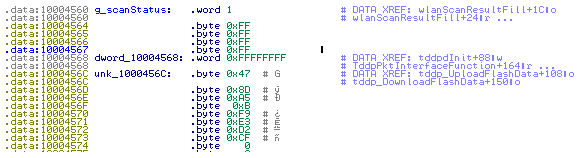
I tried to decrypt it with mdecrypt using that string as key but without success:
$ mdecrypt -b -a des -f key <config.bin
I looked again at the binary and I searching for the _des string I found md5_des which suggested me to use the md5 hash function:
$ mdecrypt -b -a des -f key -o mcrypt-md5 <config.bin
again with no luck, so I tried all the block modes available until I found the correct one:
$ mdecrypt -b -a des -m ecb -f key -o mcrypt-md5 <config.bin

????????????????lan_ip 192.168.1.254

lan_msk 255.255.255.0

lan_gateway 0.0.0.0
The file is decrypted! Note that the trailing 16 bytes are the md5 sum of the files without trailing zeroes:

the same can be done with openssl:
$ openssl enc -d -des-ecb -nopad -K 478DA50BF9E3D2CF -in config.bin
Have fun!
原文:http://teknoraver.net/software/hacks/tplink/
TPLink 备份文件bin文件解析[续]的更多相关文章
- TPLink 备份文件bin文件解析
TPLink 路由器备份文件bin文件 测试路由器 WR885,备份文件加密方式DES,密钥:478DA50BF9E3D2CF linux端: openssl enc -d -des-ecb -nop ...
- paper 37 : WINCE的BIB文件解析
WINCE的BIB文件解析 BIB的全称为Binary Image Builder,在Wince编译过程中的最后MakeImage阶段会用到BIB文件,BIB文件的作用是指示构建系统如何构建二进制映像 ...
- bin文件和elf文件
ELF文件格式是一个开放标准,各种UNIX系统的可执行文件都采用ELF格式,它有三种不同的类型: 可重定位的目标文件(Relocatable,或者Object File) 可执行文件(Executab ...
- Module、__init__.py 文件解析
一.什么是Module? 一个python Module就是一个模块,本质就是一个.py文件,其中包含了python对象的定义和python语句. 在模块内部,模块名存储在全局变量__name__中, ...
- S03_CH12_基于UDP的QSPI Flash bin文件网络烧写
S03_CH12_基于UDP的QSPI Flash bin文件网络烧写 12.1概述 为了满足不同的需求,本例程在"基于TCP的QSPI Flash bin文件网络烧写"上进行修改 ...
- S03_CH11_基于TCP的QSPI Flash bin文件网络烧写
S03_CH11_基于TCP的QSPI Flash bin文件网络烧写 11.1概述 针对ZYNQ中使用QSPI BOOT的应用,将BOOT.bin文件烧写至QSPI Flash基本都是通过USB C ...
- Json文件解析(下)
Json文件解析(下) 代码地址:https://github.com/nlohmann/json 从STL容器转换 任何序列容器(std::array,std::vector,std::dequ ...
- Linux下关于用户账户的几个文件解析
Linux下关于用户账户的几个文件解析 Linux是一个多用户系统,但是对于一个多用户共存的系统中,当然不能够出现用户相互越权等一系列的安全问题,所以如何正确的管理账户成为了Linux系统中至关重要的 ...
- CocosStudio文件解析工具CsdAnalysis
起因 因为工作需要,所以需要使用CocosStudio来制作界面动画什么的.做完了发现需要找里边对象的时候会有很长一串代码,感觉不是很爽.之前写OC代码的时候可以吧程序中的对象指针跟编辑器中的对象相对 ...
随机推荐
- windows 下使用 Filezilla server 搭建 ftp 服务器
windows 下使用 Filezilla server 搭建 ftp 服务器 1. Filezilla server 免费,开源, ftp 服务端 2. 下载安装, windows https:/ ...
- JavaScript自定义类和对象的方法
备注:JavaScript中没有类class的概念,一般把原型对象看作类 1. 工厂方法--使用new Object创建对象并添加相关属性 var Obj = new Object; ...
- python 循环设计
for循环 1.range()用法 for循环后的in跟随一个序列的画,循环每次使用的序列元素而不是序列的下标 例:s='abcdefg' for i in range(0,len(s),3): pr ...
- 20145236 冯佳 《Java程序设计》第1周学习总结
20145236 冯佳 <Java程序设计>第1周学习总结 教材学习内容总结 因为假期在家的时候并没有提前自学Java,所以,这周算是真正开始第一次接触Java.我对Java的了解也仅仅停 ...
- 后Hadoop时代的大数据架构(转)
原文:http://zhuanlan.zhihu.com/donglaoshi/19962491 作者: 董飞 提到大数据分析平台,不得不说Hadoop系统,Hadoop到现在也超过10年 ...
- DOM中元素节点、属性节点、文本节点的理解
DOM中元素节点.属性节点.文本节点的理解 节点信息 每个节点都拥有包含着关于节点某些信息的属性.这些属性是:nodeName(节点名称) nodeValue(节点值) nodeType(节点类型) ...
- Zookeeper注册节点的掉线自动重新注册及测试方法
转载:http://www.codelast.com/ 在一套分布式的online services系统中,各service通常不会放在一台服务器上,而是通过Zookeeper这样的东西,将自己的se ...
- 使用2个MR计算
转载:http://www.cnblogs.com/sharpxiajun/p/5205496.html 最近做了一个小的mapreduce程序,主要目的是计算环比值最高的前5名,本来打算使用spar ...
- BZOJ2280 [Poi2011]Plot
恩..这题真是sxbk 我们先二分答案,然后判断答案是否满足要求 判断方法是二分当前段的长度一直做到底,当然我们可以用倍增这样快一点,直接随机增量就可以了 然后就是卡常..... 然后就是卡精度QAQ ...
- tar 排除指定目录 –exclude
假设 test目录下有 1 2 3 4 5 这5个目录, 1下有6 7两个目录, 现在要将3 4 5 6目录tar打包,2和1下的6这两个目录不要.命令如下: Example[www]#cd test ...