
【AGC】如何使用认证服务与云数据库处理用户信息
使用场景
华为 AGC认证服务可以为应用快速构建安全可靠的用户认证系统,可以实现多种方式关联认证登录。而如何处理这些多种登录方式的用户信息,例如在应用中发布一个活动,哪些用户参加了哪一个活动,这些信息都可以记录下来。这样AGC的云数据库服务就派上了用场,无需搭建服务器就可以使用的端云协同的数据库产品。结合认证服务与云数据库服务,就可以简单轻松地完成用户信息录入和修改。下面就将带来一个简单的示例,快速集成认证服务与云数据库实现用户数据处理。
集成准备
在开发功能前,需要开通服务、集成SDK等准备。
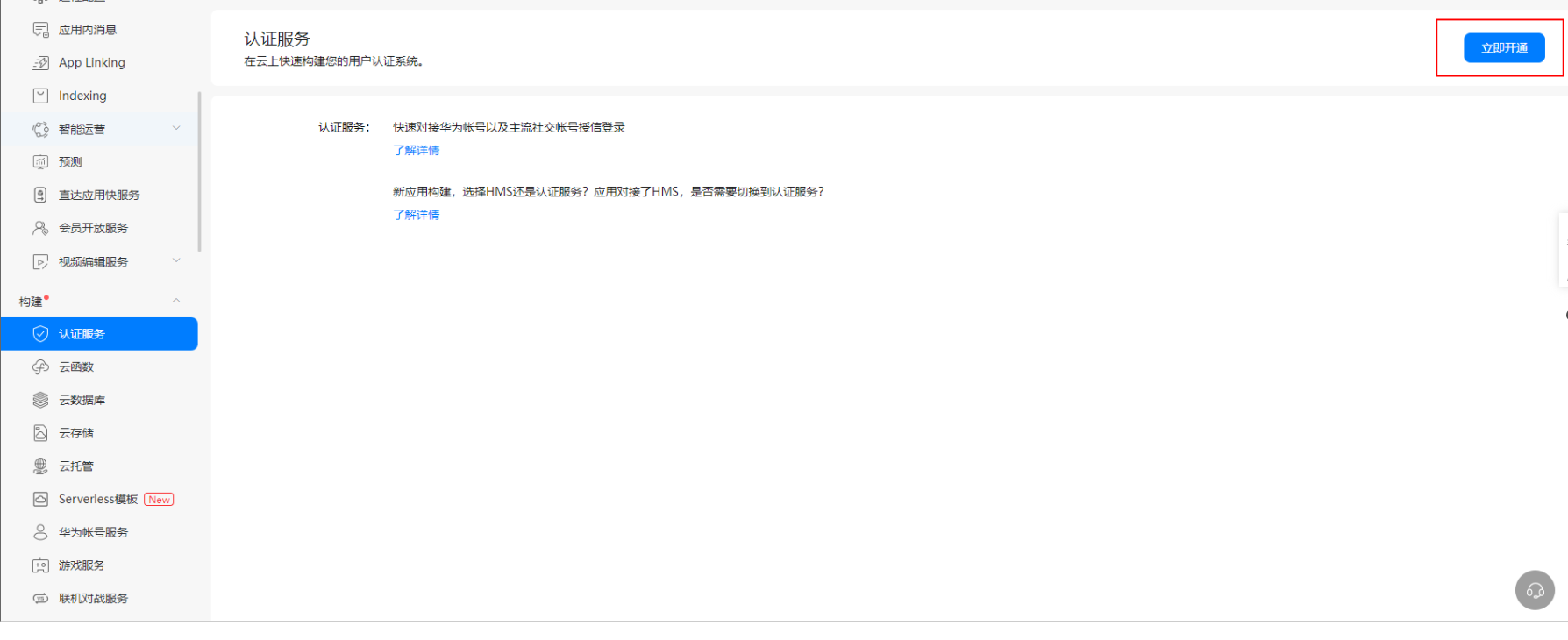
1、登录AppGallery Connect网站,点击“我的项目”。在导航选择“构建 > 认证”。如果是首次使用认证服务,请点击“立即开通”开通服务。
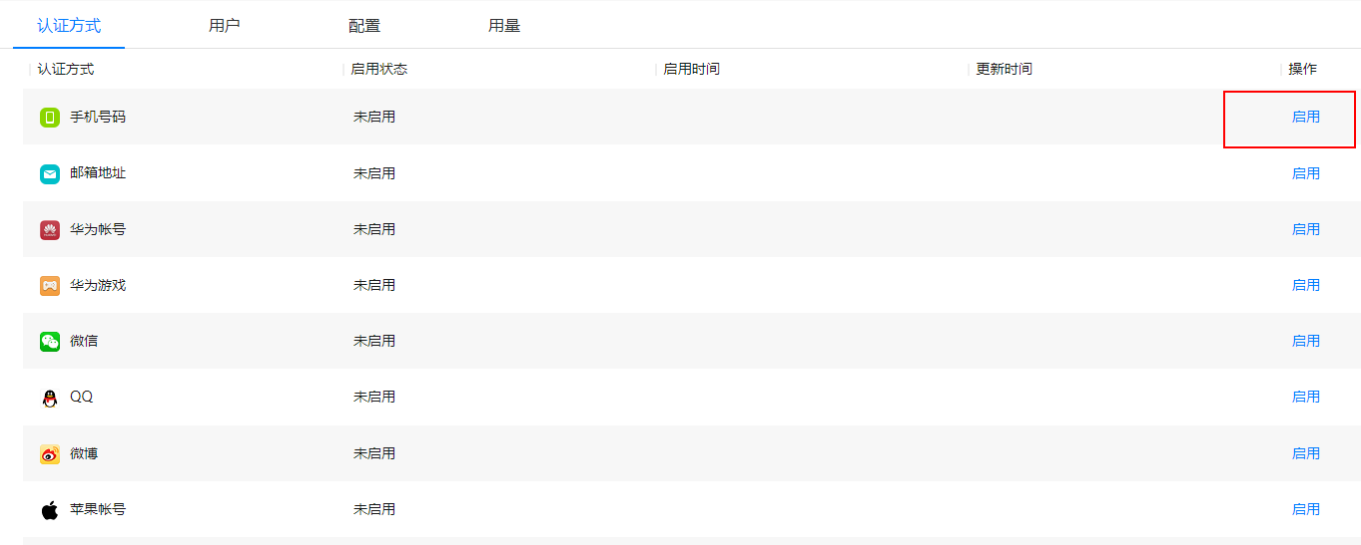
2、本次示例以手机号登录为例,所以点击启用手机号码认证方式。
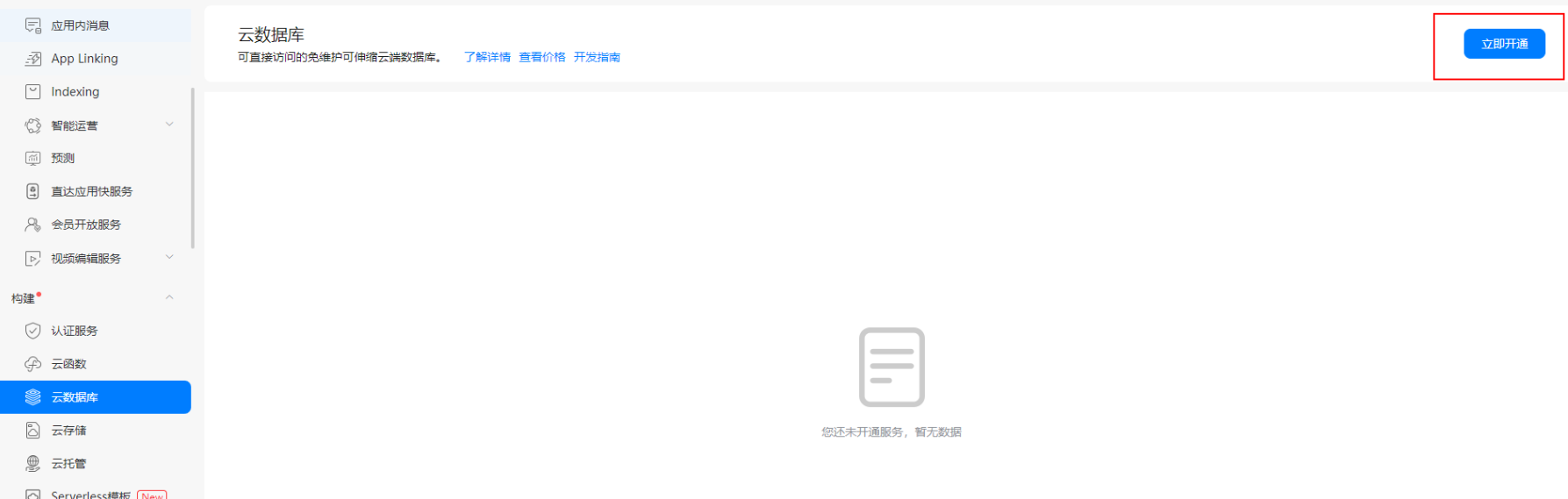
3、登录AppGallery Connect网站,点击“我的项目”。在导航选择“构建 > 云数据库”。如果是首次使用云数据库,请点击“立即开通”开通服务。
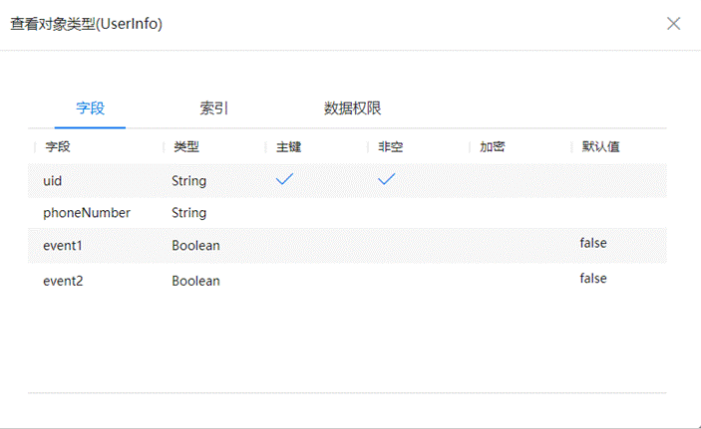
4、新增并导出对象类型,本次创建的对象类型示例如图。
5、点击“存储区”,新增存储区“UsecaseDemo”。

6、集成认证服务SDK。
7、集成云数据库SDK并导入对象类型。
布局设计
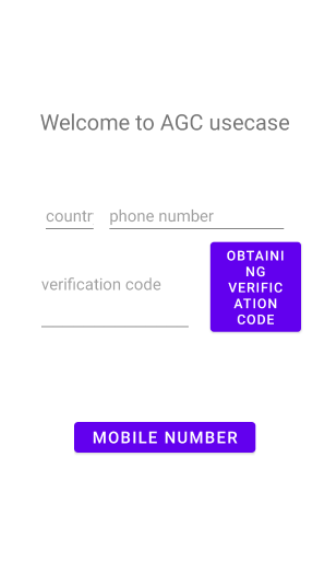
1、参考如下设置布局,具备输入手机号码、获取验证码、输入验证码登录、登出的功能。
<?xml version="1.0" encoding="utf-8"?>

<androidx.constraintlayout.widget.ConstraintLayout xmlns:android="http://schemas.android.com/apk/res/android"

    xmlns:app="http://schemas.android.com/apk/res-auto"

    xmlns:tools="http://schemas.android.com/tools"

    android:layout_width="match_parent"

    android:layout_height="match_parent"

    tools:context=".LoginActivity">

    <TextView

        android:layout_width="wrap_content"

        android:layout_height="wrap_content"

        android:text="Welcome to AGC usecase"

        android:textSize="24dp"

        android:textAlignment="center"

        app:layout_constraintBottom_toBottomOf="parent"

        app:layout_constraintLeft_toLeftOf="parent"

        app:layout_constraintRight_toRightOf="parent"

        app:layout_constraintTop_toTopOf="parent"

        app:layout_constraintVertical_bias="0.2" />

    <LinearLayout

        android:layout_width="wrap_content"

        android:layout_height="wrap_content"

        android:orientation="horizontal"

        app:layout_constraintBottom_toBottomOf="parent"

        app:layout_constraintHorizontal_bias="0.5"

        app:layout_constraintLeft_toLeftOf="parent"

        app:layout_constraintRight_toRightOf="parent"

        app:layout_constraintTop_toTopOf="parent"

        app:layout_constraintVertical_bias="0.35">

        <EditText

            android:id="@+id/et_countryCode"

            android:layout_width="60dp"

            android:layout_height="40dp"

            android:layout_marginRight="10dp"

            android:hint="country code"

            android:layout_marginLeft="20dp"

            android:inputType="number"

            />

        <EditText

            android:id="@+id/et_phoneNumber"

            android:layout_width="200dp"

            android:layout_height="40dp"

            android:layout_marginRight="20dp"

            android:hint="phone number"

            android:inputType="number"/>

    </LinearLayout>

    <LinearLayout

        android:layout_width="wrap_content"

        android:layout_height="wrap_content"

        app:layout_constraintBottom_toBottomOf="parent"

        app:layout_constraintHorizontal_bias="0.5"

        app:layout_constraintLeft_toLeftOf="parent"

        app:layout_constraintRight_toRightOf="parent"

        app:layout_constraintTop_toTopOf="parent"

        app:layout_constraintVertical_bias="0.45">

        <EditText

            android:id="@+id/et_verifyCode"

            android:layout_width="170dp"

            android:layout_height="match_parent"

            android:layout_marginLeft="20dp"

            android:hint="verification code"

            android:inputType="number" />

        <Button

            android:id="@+id/bt_obtain"

            android:layout_width="100dp"

            android:layout_height="wrap_content"

            android:layout_marginRight="10dp"

            android:layout_marginLeft="20dp"

            android:textSize="15sp"

            android:text="Obtaining Verification Code" />

    </LinearLayout>

    <LinearLayout

        android:layout_width="200dp"

        android:layout_height="45dp"

        android:gravity="center_horizontal"

        app:layout_constraintBottom_toBottomOf="parent"

        app:layout_constraintHorizontal_bias="0.5"

        app:layout_constraintLeft_toLeftOf="parent"

        app:layout_constraintRight_toRightOf="parent"

        app:layout_constraintTop_toTopOf="parent"

        app:layout_constraintVertical_bias="0.7">

        <Button

            android:id="@+id/bt_phoneLogin"

            android:layout_width="match_parent"

            android:layout_height="match_parent"

            android:layout_gravity="center_horizontal"

            android:text="Mobile number login"

            android:textSize="18sp" />

    </LinearLayout>

</androidx.constraintlayout.widget.ConstraintLayout>
2、效果展示:
功能实现
用户打开应用后将会提示登录,使用的是认证服务的手机登录功能,输入手机号,获取验证码登录成功后跳转至主页。
1、在应用的登录界面,初始化AGConnectAuth实例,获取AGC的用户信息,检查是否有已经登录的用户。如果有则可以直接进入用户界面,否则显示登录界面。
AGConnectUser user = AGConnectAuth.getInstance().getCurrentUser();

 if (user != null){

     Toast.makeText(this,"已检测到用户,等待自动登录",Toast.LENGTH_SHORT).show();

     new Handler().postDelayed(new Runnable() {

         @Override

         public void run() {

             String uid = user.getUid();

             String phoneNumber = user.getPhone();

             Intent intent = new Intent(LoginActivity.this, MainActivity.class);

             intent.putExtra("uid", uid);

             intent.putExtra("phoneNumber", phoneNumber);

             //intent.setFlags(Intent.FLAG_ACTIVITY_CLEAR_TASK|Intent.FLAG_ACTIVITY_NEW_TASK);

             startActivity(intent);

             finish();

         }

     },1000*2);

 }
2、申请手机注册的验证码,在使用手机注册之前,需要先验证您的手机,确保该手机归您所有。通过VerifyCodeSettings.Builder生成settings ,然后调用AGConnectAuth.requestVerifyCode申请验证码。
VerifyCodeSettings settings = VerifyCodeSettings.newBuilder()

         .action(VerifyCodeSettings.ACTION_REGISTER_LOGIN)

         .sendInterval(30)

         .locale(Locale.SIMPLIFIED_CHINESE)

         .build();

 String countryCode = et_countryCode.getText().toString().trim();

 String phoneNumber = et_phoneNumber.getText().toString().trim();

 if (notEmptyString(countryCode) && notEmptyString(phoneNumber)) {

     Task<VerifyCodeResult> task = PhoneAuthProvider.requestVerifyCode(countryCode, phoneNumber, settings);

     task.addOnSuccessListener(TaskExecutors.uiThread(), new OnSuccessListener<VerifyCodeResult>() {

         @Override

         public void onSuccess(VerifyCodeResult verifyCodeResult) {

             Toast.makeText(LoginActivity.this, "验证码已发送。",

                     Toast.LENGTH_SHORT).show();

         }

     }).addOnFailureListener(TaskExecutors.uiThread(), new OnFailureListener() {

         @Override

         public void onFailure(Exception e) {

             Toast.makeText(LoginActivity.this, "发送验证码失败。" + e,

                     Toast.LENGTH_SHORT).show();

             Log.e(TAG, "requestVerifyCode fail:" + e);

         }

     });

 } else {

     Toast.makeText(LoginActivity.this, "请输入电话号码和国家码。",

             Toast.LENGTH_SHORT).show();

 }
3、调用PhoneAuthProvider.credentialWithVerifyCode采用验证码方式创建手机帐号凭证。
AGConnectAuthCredential credential = PhoneAuthProvider.credentialWithVerifyCode(

         countryCode,

         phoneNumber,

         null, // password, can be null

         verifyCode);
4、获取credential成功后,调用AGConnectAuth.signIn实现登录。
AGConnectAuth.getInstance().signIn(credential)

         .addOnSuccessListener(new OnSuccessListener<SignInResult>() {

             @Override

             public void onSuccess(SignInResult signInResult) {

                 //获取登录信息

                 String uid = signInResult.getUser().getUid();

                 String phoneNumber = signInResult.getUser().getPhone();

                 redirect(uid,phoneNumber);

             }

         })

         .addOnFailureListener(new OnFailureListener() {

             @Override

             public void onFailure(Exception e) {

                 Toast.makeText(LoginActivity.this, "登录失败。" +e.getMessage(),

                         Toast.LENGTH_SHORT).show();

                 Log.e(TAG, "Login error, error:" + e.getMessage());

             }

         });
5、通过initialize()方法初始化AGConnectCloudDB。
public static void initAGConnectCloudDB(Context context) {

        AGConnectCloudDB.initialize(context);

}
6、使用createObjectType()创建对象类型。
public void createObjectType() {

    try {

        mCloudDB.createObjectType(ObjectTypeInfoHelper.getObjectTypeInfo());

        Log.i(TAG,"createObjectType: success" );

    } catch (AGConnectCloudDBException e) {

        Log.e(TAG, "createObjectType: " + e.getMessage());

    }

}
7、创建Cloud DB zone配置对象,并打开该Cloud DB zone。
mConfig = new CloudDBZoneConfig("UsecaseDemo",

        CloudDBZoneConfig.CloudDBZoneSyncProperty.CLOUDDBZONE_CLOUD_CACHE,

        CloudDBZoneConfig.CloudDBZoneAccessProperty.CLOUDDBZONE_PUBLIC);

mConfig.setPersistenceEnabled(true);

Task<CloudDBZone> openDBZoneTask = mCloudDB.openCloudDBZone2(mConfig, true);

openDBZoneTask.addOnSuccessListener(cloudDBZone -> {

    Log.i(TAG, "Open cloudDBZone success");

    mCloudDBZone = cloudDBZone;

    addSubscription();

}).addOnFailureListener(e -> {

    Log.e(TAG, "Open cloudDBZone failed for " + e.getMessage());

});
8、通过executeUpsert()将用户信息插入到云数据库。
public void upsertUserInfo(UserInfo userInfo) {

    if (mCloudDBZone == null) {

        Log.w(TAG, "CloudDBZone is null, try re-open it");

        return;

    }

    Task<Integer> upsertTask = mCloudDBZone.executeUpsert(userInfo);

    upsertTask.addOnSuccessListener(cloudDBZoneResult -> {

        ArrayList<UserInfo> userInfos = new ArrayList<>();

        userInfos.add(userInfo);

        Log.i(TAG, "Upsert " + cloudDBZoneResult + " records");

    }).addOnFailureListener(e -> {

        Log.e(TAG, "upsert Error: " + e.getMessage());

    });

}
9、查询所有用户的信息。
public void queryUserInfo(CloudDBZoneQuery<UserInfo> query) {

    if (mCloudDBZone == null) {

        Log.w(TAG, "CloudDBZone is null, try re-open it");

        return;

    }

    Task<CloudDBZoneSnapshot<UserInfo>> queryTask = mCloudDBZone.executeQuery(query,

            CloudDBZoneQuery.CloudDBZoneQueryPolicy.POLICY_QUERY_FROM_CLOUD_ONLY);

    queryTask.addOnSuccessListener(new OnSuccessListener<CloudDBZoneSnapshot<UserInfo>>() {

        @Override

        public void onSuccess(CloudDBZoneSnapshot<UserInfo> snapshot) {

            Log.w(TAG, "Query list from cloud userInfos success");

            processQueryResult(snapshot);

        }

    }).addOnFailureListener(new OnFailureListener() {

        @Override

        public void onFailure(Exception e) {

            Log.e(TAG, "Query list from cloud failed Error: " + e.getMessage());

        }

    });

}
功能测试
将项目打包后测试,使用手机号认证登录,选择某一预置的活动参加,在AGC控制台云数据库中就可以查看登录用户的信息。

这样就可以快速实现认证服务登录用户信息的增删改查。
参考文档
欲了解更多更全技术文章,欢迎访问https://developer.huawei.com/consumer/cn/forum/?ha_source=zzh
【AGC】如何使用认证服务与云数据库处理用户信息的更多相关文章
- python实现用户登陆(sqlite数据库存储用户信息)
python实现用户登陆(sqlite数据库存储用户信息) 目录 创建数据库 数据库管理 简单登陆 有些地方还未完善. 创建数据库 import sqlite3 #建一个数据库 def create_ ...
- servlet+jsp+jdbc实现从数据库查询用户信息到页面
工程创建这里就不在累述了,直接从显示User信息列表开始. 备注:我用的是servlet3的注解功能实现的,所以不需要配置web.xml 这是我的工程目录: 首先我们创建实体类: public cla ...
- oracle查询数据库所有用户信息
看到网上说的查询用户的语句: SELECT * FROM dba_users;这句好像只能系统管理员才能成功执行,普通用户无法执行 SELECT count(*) FROM all_users; , ...
- freeswitch用户整合(使用mysql数据库的用户表)
转:freeswitch用户整合(使用mysql数据库的用户表) freeswitch是一款强大的voip服务器,可以语音和视频.但是它默认是采用/directory文件夹下的xml来配置用户的,对于 ...
- GreenPlum 数据库创建用户、文件空间、表空间、数据库
前几篇文章介绍了GreenPlum数据库的安装.启动.关闭.状态检查.登录等操作,数据库已经创建好了,接下来介绍如何使用数据库.按照习惯,需要先创建测试用户.表空间.数据库.先创建测试用户dbdrea ...
- 华为云函数中使用云数据库的JavaScript SDK基础入门
背景介绍 使用云数据库Server端的SDK,此处我以华为提供的官方Demo为例,他们的Demo也已经开源放在了GitHub上,大家需要的可以自行下载. https://github.com/AppG ...
- 阿里云产品介绍(三):云数据库RDS
写完云服务器ECS,本来想先写负载均衡的. 因为发现很多客户,都是直接将单台云服务器应用对外提供访问,如果云服务器宕机,应用就会停止服务.云服务器标称有99.95%的可用率,一年下来宕机四个多小时也是 ...
- 阿里云数据库RDS环境搭建
前言 现在云数据库越来越流行,国外的亚马逊AWS微软Azure,国内的BAT和京东都推出了自己的云数据库服务,各自优劣不表,个人推荐国外的用AWS,国内的用阿里云,这是我这几天刚申请的阿里云的过程的一 ...
- 云数据库 Bmob
/**************************************************************************************** * 云数据库 Bmo ...
随机推荐
- ElasticSearch6.4.2
做一个简单的API记录 1.依赖为6.4.2 比较老的版本 2.指定ES集群,可接多个Put(); Setting setting=Setting.builder().put("clust ...
- 【Nginx】Windows平台下配置Nginx服务实现负载均衡
前言:废话不多说了,直接上步骤. 系统环境:win10 测试用的开发环境和服务类型:VS2022 + DotNet 6 + WebApi 1.本地先创建一个webapi项目,用于测试使用. 2.新建一 ...
- 深入理解 happens-before 原则
在前面的文章中,我们深入了解了 Java 内存模型,知道了 Java 内存模型诞生的意义,以及其要解决的问题.最终我们知道:Java 内存模型就是定义了 8 个基本操作以及 8 个规则,只要遵守这些规 ...
- ansible-playbook批量修改密码
1. 将服务器ip写到ansible hosts文件中 2. 实现免密登录服务器 将ansible服务器公钥拷贝到目标服务器用户目录下的.ssh/authorized_keys 手动连接一次或者自己写 ...
- SQL报了一个不常见的错误,让新来的实习生懵了
摘要:前些天一个很简单的SQL报了一个不常见的错误. 本文分享自华为云社区<记一次mysql关联查询格式冲突问题[五月04]>,作者: KevinQ . 问题起源 作为CRUD程序员,最常 ...
- 令你瞠目结舌的 Python 代码技巧
0. for-else 在 Python 中,else 不仅可以与 if 搭配使用,还可以与 for 结合. python答疑 咨询 学习交流群2:660193417### for x in rang ...
- 零基础学Java(1)初识Java程序
前言 就国内来说,Java毫无疑问是后端语言中的No.1没有之一,所以今天我们也来0基础学习Java!!! Java的好处(针对测试工程师) 面试加分->涨薪 大多数公司服务端用的都是Java, ...
- 交替方向乘子法(Alternating Direction Multiplier Method,ADMM)
交替方向乘子法(Alternating Direction Multiplier Method,ADMM)是一种求解具有可分结构的凸优化问题的重要方法,其最早由Gabay和Mercier于1967年提 ...
- 异常概念&异常体系和异常分类
异常概念 异常:指的是程序在执行过程中,出现的非正常的情况,最终会导致JVM的非正常停止. 在Java等面向对象的编程语言中,异常本身是一个类,产生异常就是创建异常对象并抛出了一个异常对象.Java处 ...
- Java开发学习(十一)----基于注解开发bean作用范围与生命周期管理
一.注解开发bean作用范围与生命周期管理 前面使用注解已经完成了bean的管理,接下来将通过配置实现的内容都换成对应的注解实现,包含两部分内容:bean作用范围和bean生命周期. 1.1 环境准备 ...