
tomcat线程池
tomcat线程池和普通的线程池设计上有所区别,下面主要来看看它是如何设计的
tomcat中线程池的创建
org.apache.tomcat.util.net.AbstractEndpoint#createExecutor
tomcat创建线程池

public void createExecutor() {

  internalExecutor = true;

  // 任务队列和普通的队列有所区别,后续分析

  TaskQueue taskqueue = new TaskQueue();

  // 线程工厂用于创建线程  本地项目name=http-nio-port-exec-序号

  TaskThreadFactory tf = new TaskThreadFactory(getName() + "-exec-", daemon, getThreadPriority());

  // 创建线程池,注意这个ThreadPoolExecutor和java.util.concurrent包下的ThreadPoolExecutor有所区别

  executor = new ThreadPoolExecutor(getMinSpareThreads(), getMaxThreads(), 60, TimeUnit.SECONDS,taskqueue, tf);

  // 给任务队列设置线程池,用于后续任务来了判断是创建线程执行还是将线程添加到任务队列

  taskqueue.setParent( (ThreadPoolExecutor) executor);

}
tomcat的ThreadPoolExecutor
tomcat的ThreadPoolExecutor实际上继承了java包的ThreadPoolExecutor再其上定制了一些功能
submittedCount:记录了线程池中正有多少线程在执行任务(还没执行完)
lastContextStoppedTime:记录上次上下文停止的时间
lastTimeThreadKilledItself:记录线程上一次为防止内存泄漏自我kill的时间
构造方法:调用了父类ThreadPoolExecutor,同时调用了prestartAllCoreThreads方法,再完成线程池的创建后预热核心线程,使得任务到来时能够直接执行任务,不用再花时间去创建线程,提高了效率。
execute方法:执行executor方法时首先将submittedCount加1,再调用父类的executor方法执行任务。若抛出RejectedExecutionException异常则再回尝试将任务添加到任务队列汇中
afterExecute:重写父类方法,任务执行完成后调用afterExecute钩子方法将submittedCount减1,再尝试停止线程
contextStopping:若容器上下文停止,则会记录lastContextStoppedTime为当前时间并中断正在运行的线程。调用currentThreadShouldBeStopped方法的时候会判断线程TaskThread创建的时间是否在lastContextStoppedTime之前,表示当前线程是在上一个上下文运行期间创建,则会尝试kill线程
public class ThreadPoolExecutor extends java.util.concurrent.ThreadPoolExecutor {

    /**

     * The string manager for this package.

     */

    protected static final StringManager sm = StringManager

            .getManager("org.apache.tomcat.util.threads.res");

    /**

     * The number of tasks submitted but not yet finished. This includes tasks

     * in the queue and tasks that have been handed to a worker thread but the

     * latter did not start executing the task yet.

     * This number is always greater or equal to {@link #getActiveCount()}.

     */

    private final AtomicInteger submittedCount = new AtomicInteger(0);

    private final AtomicLong lastContextStoppedTime = new AtomicLong(0L);

    /**

     * Most recent time in ms when a thread decided to kill itself to avoid

     * potential memory leaks. Useful to throttle the rate of renewals of

     * threads.

     */

    private final AtomicLong lastTimeThreadKilledItself = new AtomicLong(0L);

    /**

     * Delay in ms between 2 threads being renewed. If negative, do not renew threads.

     */

    private long threadRenewalDelay = Constants.DEFAULT_THREAD_RENEWAL_DELAY;

    public ThreadPoolExecutor(int corePoolSize, int maximumPoolSize, long keepAliveTime, TimeUnit unit, BlockingQueue<Runnable> workQueue, RejectedExecutionHandler handler) {

        super(corePoolSize, maximumPoolSize, keepAliveTime, unit, workQueue, handler);

        prestartAllCoreThreads();

    }

    public ThreadPoolExecutor(int corePoolSize, int maximumPoolSize, long keepAliveTime, TimeUnit unit, BlockingQueue<Runnable> workQueue, ThreadFactory threadFactory,

            RejectedExecutionHandler handler) {

        super(corePoolSize, maximumPoolSize, keepAliveTime, unit, workQueue, threadFactory, handler);

        prestartAllCoreThreads();

    }

    public ThreadPoolExecutor(int corePoolSize, int maximumPoolSize, long keepAliveTime, TimeUnit unit, BlockingQueue<Runnable> workQueue, ThreadFactory threadFactory) {

        super(corePoolSize, maximumPoolSize, keepAliveTime, unit, workQueue, threadFactory, new RejectHandler());

        prestartAllCoreThreads();

    }

    public ThreadPoolExecutor(int corePoolSize, int maximumPoolSize, long keepAliveTime, TimeUnit unit, BlockingQueue<Runnable> workQueue) {

        super(corePoolSize, maximumPoolSize, keepAliveTime, unit, workQueue, new RejectHandler());

        prestartAllCoreThreads();

    }

    public long getThreadRenewalDelay() {

        return threadRenewalDelay;

    }

    public void setThreadRenewalDelay(long threadRenewalDelay) {

        this.threadRenewalDelay = threadRenewalDelay;

    }

    @Override

    protected void afterExecute(Runnable r, Throwable t) {

        submittedCount.decrementAndGet();

        if (t == null) {

            stopCurrentThreadIfNeeded();

        }

    }

    /**

     * If the current thread was started before the last time when a context was

     * stopped, an exception is thrown so that the current thread is stopped.

     */

    protected void stopCurrentThreadIfNeeded() {

        if (currentThreadShouldBeStopped()) {

            long lastTime = lastTimeThreadKilledItself.longValue();

            if (lastTime + threadRenewalDelay < System.currentTimeMillis()) {

                if (lastTimeThreadKilledItself.compareAndSet(lastTime,

                        System.currentTimeMillis() + 1)) {

                    // OK, it's really time to dispose of this thread

                    final String msg = sm.getString(

                                    "threadPoolExecutor.threadStoppedToAvoidPotentialLeak",

                                    Thread.currentThread().getName());

                    throw new StopPooledThreadException(msg);

                }

            }

        }

    }

    protected boolean currentThreadShouldBeStopped() {

        if (threadRenewalDelay >= 0

            && Thread.currentThread() instanceof TaskThread) {

            TaskThread currentTaskThread = (TaskThread) Thread.currentThread();

            if (currentTaskThread.getCreationTime() <

                    this.lastContextStoppedTime.longValue()) {

                return true;

            }

        }

        return false;

    }

    public int getSubmittedCount() {

        return submittedCount.get();

    }

    /**

     * {@inheritDoc}

     */

    @Override

    public void execute(Runnable command) {

        execute(command,0,TimeUnit.MILLISECONDS);

    }

    /**

     * Executes the given command at some time in the future.  The command

     * may execute in a new thread, in a pooled thread, or in the calling

     * thread, at the discretion of the <code>Executor</code> implementation.

     * If no threads are available, it will be added to the work queue.

     * If the work queue is full, the system will wait for the specified

     * time and it throw a RejectedExecutionException if the queue is still

     * full after that.

     *

     * @param command the runnable task

     * @param timeout A timeout for the completion of the task

     * @param unit The timeout time unit

     * @throws RejectedExecutionException if this task cannot be

     * accepted for execution - the queue is full

     * @throws NullPointerException if command or unit is null

     */

    public void execute(Runnable command, long timeout, TimeUnit unit) {

        submittedCount.incrementAndGet();

        try {

            super.execute(command);

        } catch (RejectedExecutionException rx) {

            if (super.getQueue() instanceof TaskQueue) {

                final TaskQueue queue = (TaskQueue)super.getQueue();

                try {

                    if (!queue.force(command, timeout, unit)) {

                        submittedCount.decrementAndGet();

                        throw new RejectedExecutionException("Queue capacity is full.");

                    }

                } catch (InterruptedException x) {

                    submittedCount.decrementAndGet();

                    throw new RejectedExecutionException(x);

                }

            } else {

                submittedCount.decrementAndGet();

                throw rx;

            }

        }

    }

    public void contextStopping() {

        this.lastContextStoppedTime.set(System.currentTimeMillis());

        // save the current pool parameters to restore them later

        int savedCorePoolSize = this.getCorePoolSize();

        TaskQueue taskQueue =

                getQueue() instanceof TaskQueue ? (TaskQueue) getQueue() : null;

        if (taskQueue != null) {

            // note by slaurent : quite oddly threadPoolExecutor.setCorePoolSize

            // checks that queue.remainingCapacity()==0. I did not understand

            // why, but to get the intended effect of waking up idle threads, I

            // temporarily fake this condition.

            taskQueue.setForcedRemainingCapacity(Integer.valueOf(0));

        }

        // setCorePoolSize(0) wakes idle threads

        this.setCorePoolSize(0);

        // TaskQueue.take() takes care of timing out, so that we are sure that

        // all threads of the pool are renewed in a limited time, something like

        // (threadKeepAlive + longest request time)

        if (taskQueue != null) {

            // ok, restore the state of the queue and pool

            taskQueue.setForcedRemainingCapacity(null);

        }

        this.setCorePoolSize(savedCorePoolSize);

    }

    private static class RejectHandler implements RejectedExecutionHandler {

        @Override

        public void rejectedExecution(Runnable r,

                java.util.concurrent.ThreadPoolExecutor executor) {

            throw new RejectedExecutionException();

        }

    }

}
tomcat的TaskQueue
首先简单翻一下注释,为线程池运行专门设计的队列,使用该队列线程池如果有空闲队列则会创建线程池执行任务而不是将任务放到任务队列中。
它继承了LinkedBlockingQueue无界队列,容量为Integer.MAX_VALUE。
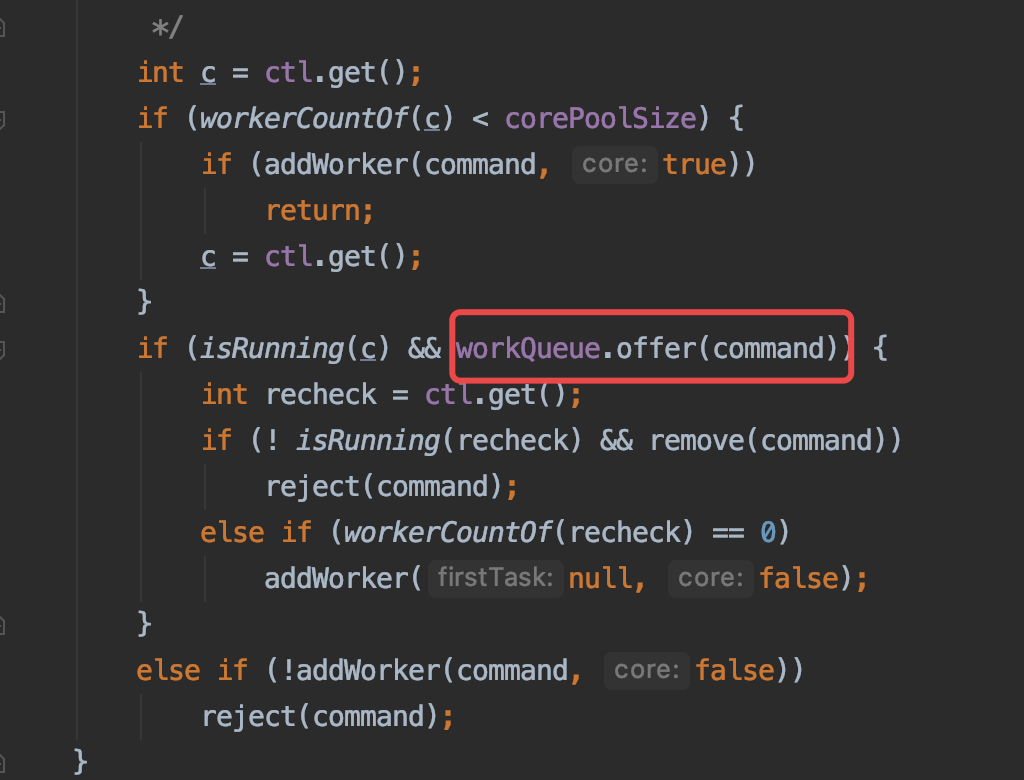
在execute方法中可以看到,当线程池线程大于核心数量的时候,会执行任务队列的offer方法,下来来分析下TaskQueue的offer方法:
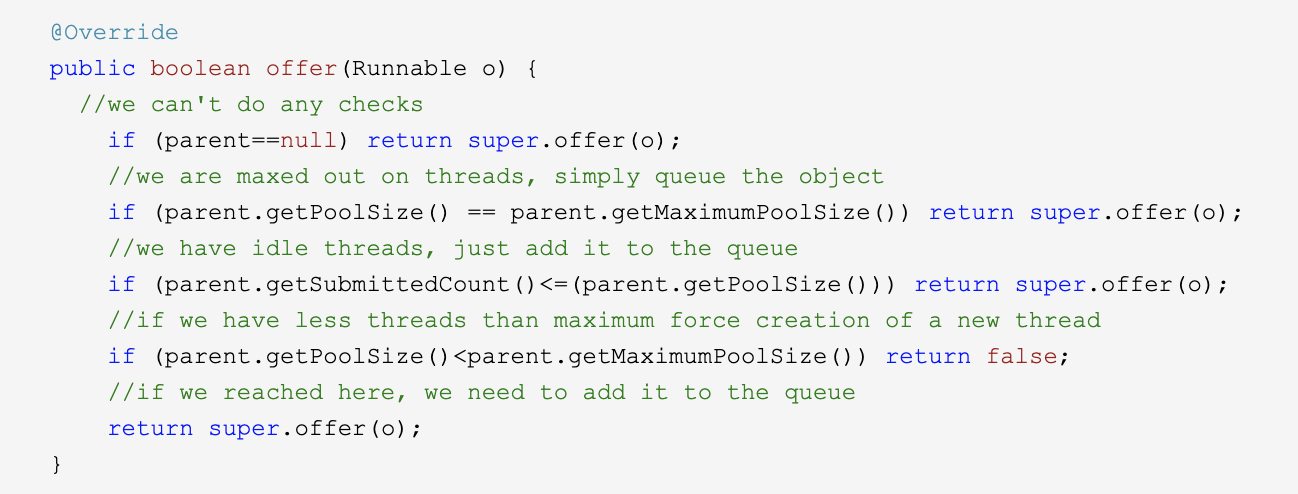
1.若parent为空也就是未给队列设置线程池,则调用父类offer方法,将任务添加到队列中
2.线程池当前线程数量等于线程池最大数量,无法添加更多的线程,调用父类offer方法,将任务添加到队列中
3.线程池正在执行任务的线程数量小于等于线程池已有的线程数量,说明当前线程池有空闲线程,调用父类offer方法,将任务添加到队列中,等待线程从队列中取任务运行
4.线程池线程数量小于线程池最大数量说明还可以增加线程,返回false,运行addWorker(command,false)向线程池添加非核心线程运行任务
5.都不满足,调用父类offer方法,将任务添加到队列中
从上面的分析我们可以看到该任务队列TaskQueue和普通的任务队列不一样,当线程池的线程数量小于最大线程数量时,任务不会添加到任务队列中,而是会添加非核心线程来运行任务,当线程池线程数量达到最大数量时,才会将任务添加到任务队列中
当然TaskQueue也有force方法直接调用父类offer方法将任务添加到任务队列中
/**

 * As task queue specifically designed to run with a thread pool executor. The

 * task queue is optimised to properly utilize threads within a thread pool

 * executor. If you use a normal queue, the executor will spawn threads when

 * there are idle threads and you wont be able to force items onto the queue

 * itself.

 */

public class TaskQueue extends LinkedBlockingQueue<Runnable> {

    private static final long serialVersionUID = 1L;

    private transient volatile ThreadPoolExecutor parent = null;

    // No need to be volatile. This is written and read in a single thread

    // (when stopping a context and firing the  listeners)

    private Integer forcedRemainingCapacity = null;

    public TaskQueue() {

        super();

    }

    public TaskQueue(int capacity) {

        super(capacity);

    }

    public TaskQueue(Collection<? extends Runnable> c) {

        super(c);

    }

    public void setParent(ThreadPoolExecutor tp) {

        parent = tp;

    }

    public boolean force(Runnable o) {

        if (parent == null || parent.isShutdown()) throw new RejectedExecutionException("Executor not running, can't force a command into the queue");

        return super.offer(o); //forces the item onto the queue, to be used if the task is rejected

    }

    public boolean force(Runnable o, long timeout, TimeUnit unit) throws InterruptedException {

        if (parent == null || parent.isShutdown()) throw new RejectedExecutionException("Executor not running, can't force a command into the queue");

        return super.offer(o,timeout,unit); //forces the item onto the queue, to be used if the task is rejected

    }

    @Override

    public boolean offer(Runnable o) {

      //we can't do any checks

        if (parent==null) return super.offer(o);

        //we are maxed out on threads, simply queue the object

        if (parent.getPoolSize() == parent.getMaximumPoolSize()) return super.offer(o);

        //we have idle threads, just add it to the queue

        if (parent.getSubmittedCount()<=(parent.getPoolSize())) return super.offer(o);

        //if we have less threads than maximum force creation of a new thread

        if (parent.getPoolSize()<parent.getMaximumPoolSize()) return false;

        //if we reached here, we need to add it to the queue

        return super.offer(o);

    }

    @Override

    public Runnable poll(long timeout, TimeUnit unit)

            throws InterruptedException {

        Runnable runnable = super.poll(timeout, unit);

        if (runnable == null && parent != null) {

            // the poll timed out, it gives an opportunity to stop the current

            // thread if needed to avoid memory leaks.

            parent.stopCurrentThreadIfNeeded();

        }

        return runnable;

    }

    @Override

    public Runnable take() throws InterruptedException {

        if (parent != null && parent.currentThreadShouldBeStopped()) {

            return poll(parent.getKeepAliveTime(TimeUnit.MILLISECONDS),

                    TimeUnit.MILLISECONDS);

            // yes, this may return null (in case of timeout) which normally

            // does not occur with take()

            // but the ThreadPoolExecutor implementation allows this

        }

        return super.take();

    }

    @Override

    public int remainingCapacity() {

        if (forcedRemainingCapacity != null) {

            // ThreadPoolExecutor.setCorePoolSize checks that

            // remainingCapacity==0 to allow to interrupt idle threads

            // I don't see why, but this hack allows to conform to this

            // "requirement"

            return forcedRemainingCapacity.intValue();

        }

        return super.remainingCapacity();

    }

    public void setForcedRemainingCapacity(Integer forcedRemainingCapacity) {

        this.forcedRemainingCapacity = forcedRemainingCapacity;

    }

}
当有请求来时,从socket获取到可读事件并将socket封装成一个任务(任务主要是解析请求然后下发到servlet执行),然后调用线程池的execute方法
    /**

     * Process the given SocketWrapper with the given status. Used to trigger

     * processing as if the Poller (for those endpoints that have one)

     * selected the socket.

     *

     * @param socketWrapper The socket wrapper to process

     * @param event         The socket event to be processed

     * @param dispatch      Should the processing be performed on a new

     *                          container thread

     *

     * @return if processing was triggered successfully

     */

    public boolean processSocket(SocketWrapperBase<S> socketWrapper,

            SocketEvent event, boolean dispatch) {

        try {

            if (socketWrapper == null) {

                return false;

            }

            SocketProcessorBase<S> sc = processorCache.pop();

            if (sc == null) {

                sc = createSocketProcessor(socketWrapper, event);

            } else {

                sc.reset(socketWrapper, event);

            }

            Executor executor = getExecutor();

            if (dispatch && executor != null) {

                executor.execute(sc);

            } else {

                sc.run();

            }

        } catch (RejectedExecutionException ree) {

            getLog().warn(sm.getString("endpoint.executor.fail", socketWrapper) , ree);

            return false;

        } catch (Throwable t) {

            ExceptionUtils.handleThrowable(t);

            // This means we got an OOM or similar creating a thread, or that

            // the pool and its queue are full

            getLog().error(sm.getString("endpoint.process.fail"), t);

            return false;

        }

        return true;

    }
tomcat线程池的更多相关文章
- 详解Tomcat线程池原理及参数释义
omcat线程池有如下参数: maxThreads, 最大线程数,tomcat能创建来处理请求的最大线程数 maxSpareTHreads, 最大空闲线程数,在最大空闲时间内活跃过,但现在处于空闲,若 ...
- Tomcat线程池的深入理解
1.工作机制: Tomcat启动时如果没有请求过来,那么线程数(都是指线程池的)为0: 一旦有请求,Tomcat会初始化minSpareThreads设置的线程数: 2.线程池作用: Tomcat的线 ...
- 05 - Tomcat 线程池的配置与优化
添加 Executor 在server.xml中的Service节点里面,增加executor节点,然后配置connector的executor属性,如下: <Executor name=&qu ...
- Tomcat线程池,更符合大家想象的可扩展线程池
因由 说起线程池,大家可能受连接池的印象影响,天然的认为,它应该是一开始有core条线程,忙不过来了就扩展到max条线程,闲的时候又回落到core条线程,如果还有更高的高峰,就放进一个缓冲队列里缓冲一 ...
- Tomcat线程池配置
简介 线程池作为提高程序处理数据能力的一种方案,应用非常广泛.大量的服务器都或多或少的使用到了线程池技术,不管是用Java还是C++实现,线程池都有如下的特点:线程池一般有三个重要参数: 最大线程数 ...
- tomcat 线程池
web server允许的最大线程连接数还受制于操作系统的内核参数设置,通常Windows是2000个左右,Linux是1000个左右. 1.编辑tomcat安装目录下的conf目录下的server. ...
- 如何计算tomcat线程池大小?
背景 在我们的日常开发中都涉及到使用tomcat做为服务器,但是我们该设置多大的线程池呢?以及根据什么原则来设计这个线程池呢? 接下来,我将介绍本人是怎么设计以及计算的. 目标 确定tomcat服务器 ...
- Tomcat 线程池配置
线程池 Executor代表了一个线程池,可以在Tomcat组件之间共享.使用线程池的好处在于减少了创建销毁线程的相关消耗,而且可以提高线程的使用效率.要想使用线程池,首先需要在 Service标签中 ...
- Tomcat线程池实现
目前市场上常用的开源Java Web容器有Tomcat.Resin和Jetty.其中Resin从V3.0后需要购买才能用于商业目的,而其他两种则是纯开源的.可以分别从他们的网站上下载最新的二进制包和源 ...
随机推荐
- Fail2ban 配置详解 动作配置
### # 包含配置 ### [INCLUDES] before = iptables-common.conf ### # 定义动作 ### [Definition] actionstart = &l ...
- 第24章 Java 数据类型转换
每日一句 井底点灯深烛伊,共郎长行莫围棋. 每日一句 What we call "failure" is not falling down, but the staying dow ...
- JS - 使用 html2canvas 将页面转PDF
JS - 使用 html2canvas 将页面转PDF 本方法可以将页面元素块转为pdf. 网站地址 jspdf.js 官网地址:http://jspdf.com GitHub 主页:https:// ...
- [学习笔记]使用Docker+Jenkin自动化流水线发布.Net应用
使用Docker容器方案可以快速安全地将项目部署到客户的服务器上,作为公司项目,需要解决两个问题: 1. 需要搭建一个私有的Docker仓库,以便安全的存储镜像 2. 需要一套自动化发布方案,实现代 ...
- 48. ResNet为什么能训练出1000层的模型
先回顾一下resnet怎么处理它的梯度消失,使得能处理训练1000层:
- c++ 超长整数加法 高精度加法
c++ 超长整数加法 高精度加法 实现思路 不能直接使用加法,因为int和long long都已超出最大数据表示范围 数据读入采用string类型,读入后将数据的每一位存储到vector中 vecto ...
- Python中的类变量和成员变量
类变量 定义 在类里面定义,且不位于构造或者成员函数里面,同时没有" self. " 的前缀:或者在类外定义,用 类名.类变量名 来新增加类变量. 使用 两种使用方法: (1)类名 ...
- 你真的懂Python命名吗?
转载请注明出处️ 作者:测试蔡坨坨 原文链接:caituotuo.top/7417a7f0.html 大家好,我是测试蔡坨坨. 今天,我们来聊一下Python命名那些事儿. 名为万物之始,万物始于无名 ...
- Linux远程连接工具和运行级别
常用的Linux远程连接工具: xshell MobaXterm windows的命令行工具 Linux的运行级别 linux有七个运行级别 0----所有的服务都不开启,代表的式关机 1---代表的 ...
- 动画 ---Animejs 简单使用与源码解析
Anime是什么 Anime有什么用 Anime是作何做的 requireAnimationFrame() engine(){ // 处理让多个帧运动起来 play() step()} ani ...