
spring-boot-learning-监听事件
Springboot扩展了Spring的ApplicatoionContextEvent,提供了事件:
ApplicationStartingEvent:框架启动事件
ApplicationEnvironmentPreparedEvent: springboot 对应Evironment已经准备完毕了,但是上下文还没有创建。
ApplicationContextInitializedEvent: 上下文初始化
ApplicationPreparedEvent: springboot 上下文context创建完成,但是bean没有完全加载
ApplicationStartedEvent: springboot 启动开始执行的事件
ApplicationReadyEvent : 调用Runners接口完毕
ApplicationFailedEvent:启动异常执行事件
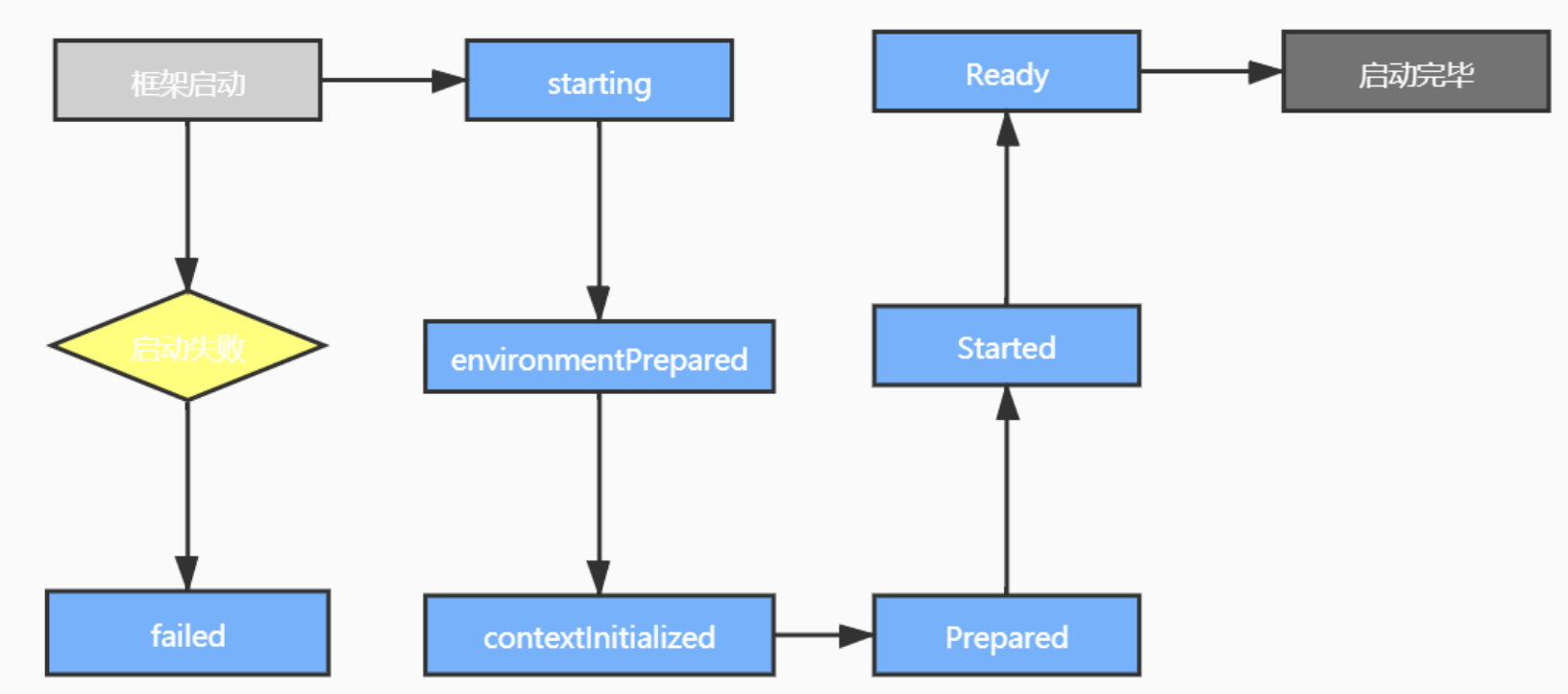
 * springboot自带的事件。

 * ApplicationStartingEvent

 * Spring Application启动事件。事件产生的时机为ApplicationListeners注册之后,Environment或ApplicationContext可用之前,
    事件源为Spring Application自身,ApplicationStartingEvent在生命周期过程中可能会被修改,请谨慎使用。


 * ApplicationEnvironmentPreparedEvent

 * 事件产生的时机为Spring Application已经启动,Environment第一次可用。


 * ApplicationPreparedEvent

 * 事件产生的时机为Spring Application已经启动,Application Context已经完全准备好但是还没有进行刷新,在该阶段已经开始加载Bean定义并且Environment已经完全可用。


 * ApplicationStartedEvent

 * 事件产生的时机为Application Context已经完成刷新,ApplicationRunner application和CommandLineRunner调用之前。


 * ApplicationReadyEvent

 * Spring Application已经准备好对外提供服务。


 * ApplicationFailedEvent

 * 应用启动失败
自定义监听器的步骤:
1,建立监听类继承ApplicationListener
2, 继承方法onApplicationEvent
3, 在resource建立文件夹/META-INF/spring.factories
4, 文件里写入:
org.springframework.context.ApplicationListener=\

com.quan.sbrabbit.Listener.QuanListenerEnvPreparedEvent ,com.quan.sbrabbit.Listener.QuanListenerStartedEvent,com.quan.sbrabbit.Listener.QuanListenerPreparedEvent
/**

 * spring boot 对应Enviroment已经准备完毕,但此时上下文context还没有创建。在该监听中获取到ConfigurableEnvironment

 * 后可以对配置信息做操作,例如:修改默认的配置信息

 */

public class QuanListenerEnvPreparedEvent implements ApplicationListener<ApplicationEnvironmentPreparedEvent> {

    @Override

    public void onApplicationEvent(ApplicationEnvironmentPreparedEvent event) {

        ConfigurableEnvironment environment = event.getEnvironment();

        MutablePropertySources sources =environment.getPropertySources();

        if (sources != null){

            Iterator<PropertySource<?>> iterator = sources.iterator();

            while (iterator.hasNext()){

                PropertySource<?> propertySource = iterator.next();

                System.out.println(propertySource.getName());

                System.out.println(propertySource.getSource());

                System.out.println(propertySource.getClass());

            }

            System.out.println("监听到ApplicationEnvironmentPreparedEvent");

//            for (PropertySource<?> p :

//                    sources) {

//                System.out.println(p.getName());

//                System.out.println(p.getSource());

//                System.out.println(p.getClass());

//            }

        }

    }

}
/**

 * pring boot上下文context创建完成,但此时spring中的bean是没有完全加载完成的。

 * 在获取完上下文后,可以将上下文传递出去做一些额外的操作。

 * 值得注意的是:在该监听器中是无法获取自定义bean并进行操作的。

 */

public class QuanListenerPreparedEvent implements ApplicationListener<ApplicationPreparedEvent> {

    @Override

    public void onApplicationEvent(ApplicationPreparedEvent event) {

        ConfigurableApplicationContext context = event.getApplicationContext();

        context.toString();

        System.out.println("监听到ApplicationPreparedEvent");

    }

}
public class QuanListenerStartedEvent implements ApplicationListener<ApplicationStartedEvent> {

    @Override

    public void onApplicationEvent(ApplicationStartedEvent event) {

        SpringApplication application = event.getSpringApplication();

        System.out.println(application);

        //控制台或日志中会默认显示一个Banner,关闭这个东西

        application.setBannerMode(Banner.Mode.OFF);

        System.out.println("监听到applicationStartedEvent");

    }

}
加入:
org.springframework.context.ApplicationListener=\

com.quan.sbrabbit.Listener.QuanListenerEnvPreparedEvent ,com.quan.sbrabbit.Listener.QuanListenerStartedEvent,com.quan.sbrabbit.Listener.QuanListenerPreparedEvent
运行输出:
监听到ApplicationEnvironmentPreparedEvent

  .   ____          _            __ _ _

 /\\ / ___'_ __ _ _(_)_ __  __ _ \ \ \ \

( ( )\___ | '_ | '_| | '_ \/ _` | \ \ \ \

 \\/  ___)| |_)| | | | | || (_| |  ) ) ) )

  '  |____| .__|_| |_|_| |_\__, | / / / /

 =========|_|==============|___/=/_/_/_/

 :: Spring Boot ::        (v2.3.3.RELEASE)

2020-09-01 14:10:32.063  WARN 99192 --- [           main] o.s.boot.StartupInfoLogger               : InetAddress.getLocalHost().getHostName() took 5004 milliseconds to respond. Please verify your network configuration (macOS machines may need to add entries to /etc/hosts).

2020-09-01 14:10:37.067  INFO 99192 --- [           main] com.quan.sbrabbit.SbrabbitApplication    : Starting SbrabbitApplication on quandeMacBook-Pro.local with PID 99192 (/Users/quan/Desktop/ALLLL/sbrabbit/target/classes started by quan in /Users/quan/Desktop/ALLLL/sbrabbit)

2020-09-01 14:10:37.068  INFO 99192 --- [           main] com.quan.sbrabbit.SbrabbitApplication    : No active profile set, falling back to default profiles: default

监听到ApplicationPreparedEvent

2020-09-01 14:10:37.491  INFO 99192 --- [           main] .s.d.r.c.RepositoryConfigurationDelegate : Bootstrapping Spring Data Elasticsearch repositories in DEFAULT mode.

2020-09-01 14:10:37.505  INFO 99192 --- [           main] .s.d.r.c.RepositoryConfigurationDelegate : Finished Spring Data repository scanning in 11ms. Found 0 Elasticsearch repository interfaces.

2020-09-01 14:10:37.509  INFO 99192 --- [           main] .s.d.r.c.RepositoryConfigurationDelegate : Bootstrapping Spring Data Reactive Elasticsearch repositories in DEFAULT mode.

2020-09-01 14:10:37.511  INFO 99192 --- [           main] .s.d.r.c.RepositoryConfigurationDelegate : Finished Spring Data repository scanning in 2ms. Found 0 Reactive Elasticsearch repository interfaces.

2020-09-01 14:10:37.762  INFO 99192 --- [           main] o.s.b.w.embedded.tomcat.TomcatWebServer  : Tomcat initialized with port(s): 9898 (http)

2020-09-01 14:10:37.768  INFO 99192 --- [           main] o.apache.catalina.core.StandardService   : Starting service [Tomcat]

2020-09-01 14:10:37.769  INFO 99192 --- [           main] org.apache.catalina.core.StandardEngine  : Starting Servlet engine: [Apache Tomcat/9.0.37]

2020-09-01 14:10:37.838  INFO 99192 --- [           main] o.a.c.c.C.[Tomcat].[localhost].[/]       : Initializing Spring embedded WebApplicationContext

2020-09-01 14:10:37.839  INFO 99192 --- [           main] w.s.c.ServletWebServerApplicationContext : Root WebApplicationContext: initialization completed in 740 ms

2020-09-01 14:10:38.006  INFO 99192 --- [           main] o.s.s.concurrent.ThreadPoolTaskExecutor  : Initializing ExecutorService 'applicationTaskExecutor'

2020-09-01 14:10:38.502  WARN 99192 --- [           main] o.s.data.convert.CustomConversions       : Registering converter from class org.springframework.data.geo.Point to interface java.util.Map as writing converter although it doesn't convert to a store-supported type! You might want to check your annotation setup at the converter implementation.

2020-09-01 14:10:38.502  WARN 99192 --- [           main] o.s.data.convert.CustomConversions       : Registering converter from interface java.util.Map to class org.springframework.data.geo.Point as reading converter although it doesn't convert from a store-supported type! You might want to check your annotation setup at the converter implementation.

2020-09-01 14:10:38.503  WARN 99192 --- [           main] o.s.data.convert.CustomConversions       : Registering converter from class org.springframework.data.elasticsearch.core.geo.GeoPoint to interface java.util.Map as writing converter although it doesn't convert to a store-supported type! You might want to check your annotation setup at the converter implementation.

2020-09-01 14:10:38.503  WARN 99192 --- [           main] o.s.data.convert.CustomConversions       : Registering converter from interface java.util.Map to class org.springframework.data.elasticsearch.core.geo.GeoPoint as reading converter although it doesn't convert from a store-supported type! You might want to check your annotation setup at the converter implementation.

2020-09-01 14:10:38.604  INFO 99192 --- [           main] o.s.d.elasticsearch.support.VersionInfo  : Version Spring Data Elasticsearch: 4.0.3.RELEASE

2020-09-01 14:10:38.604  INFO 99192 --- [           main] o.s.d.elasticsearch.support.VersionInfo  : Version Elasticsearch Client in build: 7.6.2

2020-09-01 14:10:38.605  INFO 99192 --- [           main] o.s.d.elasticsearch.support.VersionInfo  : Version Elasticsearch Client used: 7.6.2

2020-09-01 14:10:38.605  INFO 99192 --- [           main] o.s.d.elasticsearch.support.VersionInfo  : Version Elasticsearch cluster: 6.8.4

2020-09-01 14:10:38.605  WARN 99192 --- [           main] o.s.d.elasticsearch.support.VersionInfo  : Version mismatch in between Elasticsearch Client and Cluster: 7.6.2 - 6.8.4

2020-09-01 14:10:38.688  INFO 99192 --- [           main] o.s.b.w.embedded.tomcat.TomcatWebServer  : Tomcat started on port(s): 9898 (http) with context path ''

2020-09-01 14:10:38.698  INFO 99192 --- [           main] com.quan.sbrabbit.SbrabbitApplication    : Started SbrabbitApplication in 16.941 seconds (JVM running for 22.495)

org.springframework.boot.SpringApplication@4a163575

监听到applicationStartedEvent
自定义事件:必须继承抽象类ApplicationEvent
public class QuanEvent extends ApplicationEvent {

    /**

     * Create a new {@code ApplicationEvent}.

     *

     * @param source the object on which the event initially occurred or with

     *               which the event is associated (never {@code null})

     */

    public QuanEvent(String source) {

        super(source);

        System.out.println("事件  "+source);

    }

}
自定义监听器:监听自己定义的事件
public class QuanListenerQuanEvent implements ApplicationListener<QuanEvent> {

    @Override

    public void onApplicationEvent(QuanEvent event) {

        System.out.println("监听到QuanEvent");

    }

}
在完成springboot启动事件ApplicationStaredEvent中发布事件:
public class QuanListenerStartedEvent implements ApplicationListener<ApplicationStartedEvent> {

    @Override

    public void onApplicationEvent(ApplicationStartedEvent event) {

        event.getApplicationContext().publishEvent(new QuanEvent("hello"));

    }

}
最后加上监听器的配置:
在spring.factories追加:
,com.quan.sbrabbit.Listener.QuanListenerQuanEvent
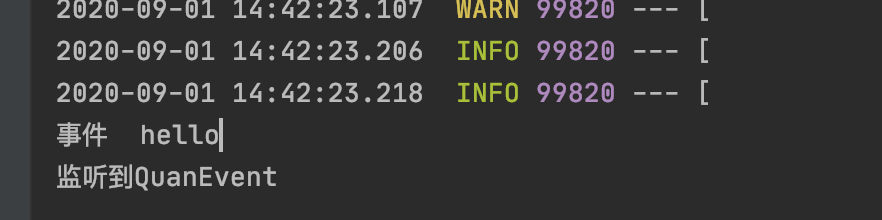
运行结果:
也可以使用注解进行监听器的编写(这时候只需要将监听器加载到bean容器里面就行,)
使用注解@EventListener
@Component

public class QuanListenerQuanEvent  {

    @EventListener

    public void onApplicationEvent(QuanEvent event) {

        System.out.println("监听到QuanEvent");

    }

}
监听事件的原理:
@FunctionalInterface

public interface ApplicationListener<E extends ApplicationEvent> extends EventListener {

    /**

     * Handle an application event.

     * @param event the event to respond to

     */

    void onApplicationEvent(E event);

}
监听器触发机制:
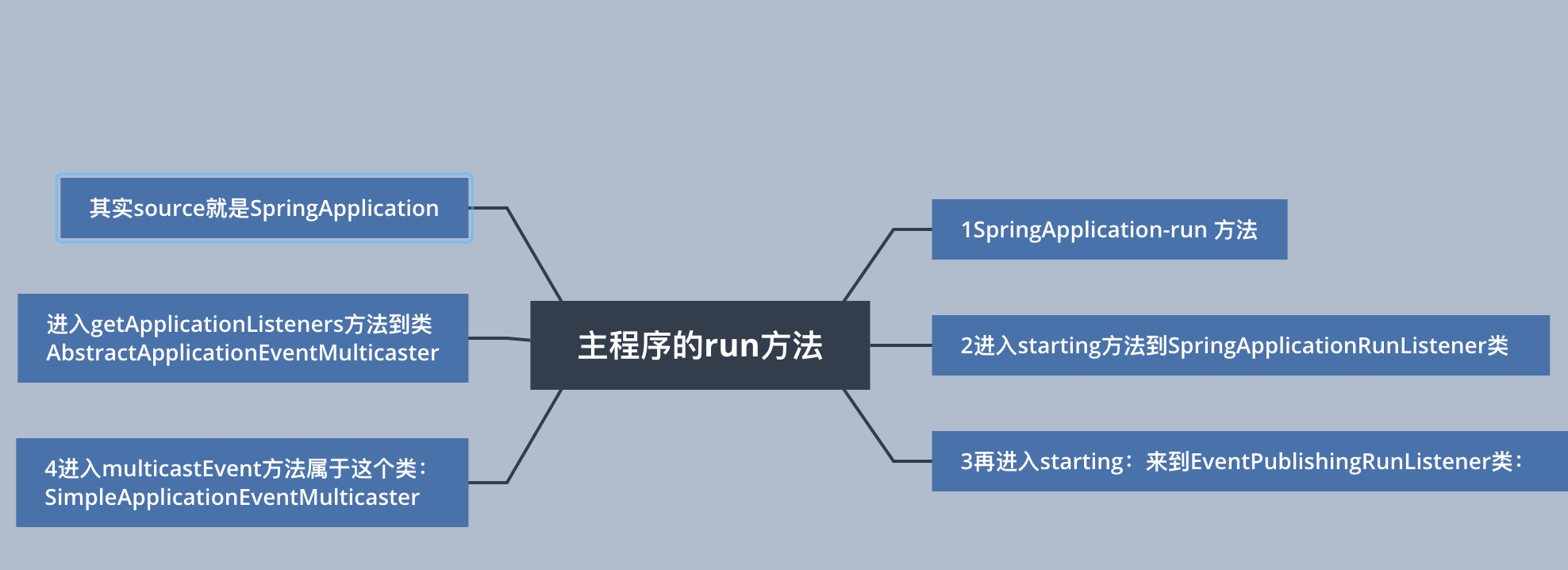
SpringApplication-run 方法

public ConfigurableApplicationContext run(String... args){

    SpringApplicationRunListeners listeners = getRunListeners(args);

    listeners.starting();

}

进入starting方法到SpringApplicationRunListener类

    void starting() {

        for (SpringApplicationRunListener listener : this.listeners) {

            listener.starting();

        }

    }

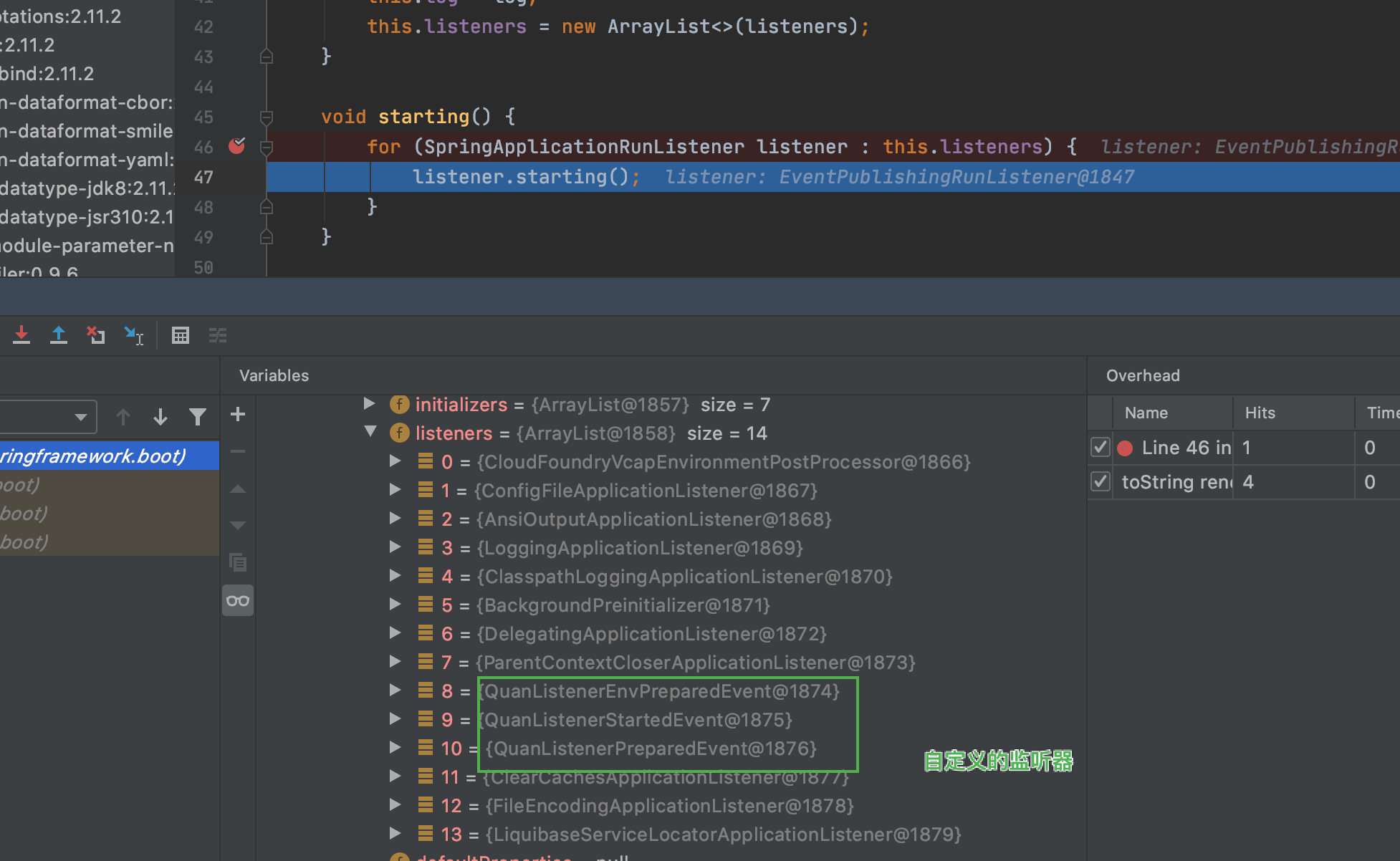
    遍历所有的SpringApplicationRunListener

再进入starting:来到EventPublishingRunListener类:

    @Override

    public void starting() {

        this.initialMulticaster.multicastEvent(new ApplicationStartingEvent(this.application, this.args));

    }

调用广播器发送

进入multicastEvent方法属于这个类:SimpleApplicationEventMulticaster

@Override

    public void multicastEvent(final ApplicationEvent event, @Nullable ResolvableType eventType) {

        ResolvableType type = (eventType != null ? eventType : resolveDefaultEventType(event));

        Executor executor = getTaskExecutor(); //获得线程池

        for (ApplicationListener<?> listener : getApplicationListeners(event, type)) {//获取对当前event感兴趣的监听器列表

            if (executor != null) {

                executor.execute(() -> invokeListener(listener, event));

            }

            else {

                invokeListener(listener, event);

            }

        }

    }

进入getApplicationListeners方法到类AbstractApplicationEventMulticaster

protected Collection<ApplicationListener<?>> getApplicationListeners(

            ApplicationEvent event, ResolvableType eventType) {

        Object source = event.getSource();//获得事件来源

其实source就是SpringApplication
spring-boot-learning-监听事件的更多相关文章
- Spring boot实现监听Redis key失效事件实现和其它方式
需求: 处理订单过期自动取消,比如下单30分钟未支付自动更改订单状态 用户绑定隐私号码当订单结束取消绑定等 解决方案1: 可以利用redis自带的key自动过期机制,下单时将订单id写入redis,过 ...
- 【Redis系列】Spring boot实现监听Redis key失效事件
talk is cheap, show me the code. 一.开启Redis key过期提醒 方式二:修改配置文件 redis.conf # 默认 notify-keyspace-events ...
- spring boot实战(第二篇)事件监听
http://blog.csdn.net/liaokailin/article/details/48186331 前言 spring boot在启动过程中增加事件监听机制,为用户功能拓展提供极大的便利 ...
- spring扩展点之三:Spring 的监听事件 ApplicationListener 和 ApplicationEvent 用法,在spring启动后做些事情
<spring扩展点之三:Spring 的监听事件 ApplicationListener 和 ApplicationEvent 用法,在spring启动后做些事情> <服务网关zu ...
- 利用spring的ApplicationListener监听某一类事件的发生
1.ApplicationListener在使用过程中可以监听某一事件的发生,可以做出相应的处理,这个方式不常用,但是在特殊情况下面还是有用的. 2.导包pom.xml <project xml ...
- springboot13 发布和监听事件
spring中的事件驱动模型Event(也叫发布订阅模式),是观察者模式的一个典型的应用 好处:业务解耦,在不影响原来业务逻辑的情况下,加入其它业务 场景: app上线后已实现用户注册功能,现需要在用 ...
- zookeeper 监听事件 PathChildrenCacheListener
zookeeper 监听事件 PathChildrenCacheListener PathChildrenCacheListener一次父节点注册,监听每次子节点操作,不监听自身和查询. 1.测试类: ...
- zookeeper 监听事件 NodeCacheListener
zookeeper 监听事件 NodeCacheListener NodeCacheListener一次注册,每次监听,但是监听不到操作类型,不知道是增加?删除?还是修改? 1.测试类: packag ...
- zookeeper 监听事件 CuratorWatcher
zookeeper 监听事件 CuratorWatcher CuratorWatcher一次注册只监听一次,不监听查询. 1.监听测试类 package com.qy.learn.zk.curator ...
- Redis集群环境下的键值空间监听事件实现方案
一直想记录工作中遇到的问题和解决的方法,奈何没有找到一方乐土,最近经常反思,是否需要记录平时的点滴,后台还是决定下定决心记录一些,以便以后用到的时候找不着,实现这样的一个功能主要也是业务所需要的. 需 ...
随机推荐
- vivo全球商城全球化演进之路——多语言解决方案
一.背景 随着经济全球化的深入,许多中国品牌纷纷开始在海外市场开疆扩土.实现全球化意味着你的产品或者应用需要能够在全球各地的语言环境使用,我们在进行海外业务的推进时,需要面对的最大挑战就是多语言问题. ...
- TensorFlow 关闭日志打印
ubuntu 中打开命令行,执行如下指令 vim ~/.bashrc 进入配置文件后在文件末尾加上: export TF_CPP_MIN_LOG_LEVEL=2 保存退出,再使用下面命令使刚才修改的配 ...
- 解决overlay2存储驱动的磁盘配额问题
为啥要用overlay2 docker centos(内核3.10)上默认存储驱动是devicemapper 的loop-lvm模式,这种模式是用文件模拟块设备,不推荐生产使用direct lvm又不 ...
- python中的list, dict, tuple以及collections模块的基本用法
1.关于list的一些基本用法 # 创建没有初值的列表 list1=[] # 创建有初值的列表 list2=['this','is','a','list'] # 创建给定长度但初值不确定的列表 lis ...
- 小程序swiper高度自适应解决方案
scroll-view 里面继续套一个 scroll-view ,设置纵向允许滚动 <swiper class="swiper"> <swiper-item> ...
- 二进制部署1.23.4版本k8s集群-1-系统安装及环境准备
1. 致谢 这篇文章参考了老男孩王导的视频,在此表示感谢和致敬! 2. 安装CentOS操作系统 系统镜像:CentOS-7-x86_64-DVD-2009.iso 安装过程略. 3. 环境准备 3. ...
- 【转载】深入浅出SQL Server中的死锁
essay from:http://www.cnblogs.com/CareySon/archive/2012/09/19/2693555.html 简介 死锁的本质是一种僵持状态,是多个主体对于资源 ...
- EasySwoole-ElasticSearch-Head启动
- nginx 配置 https,及加载配置文件夹
首先需要去申请一个域名签名证书,在腾讯云,阿里云都有免费版,然后下载下来按如下配置,请根据自己路径更改 server { listen 80; server_name xxx.xxx.cn; root ...
- 神奇的 CSS,让文字智能适配背景颜色
最近几天,有好几个同学都问了同样一个问题. 页面上有一段文本,能否实现这段文本在不同背景色下展示不同的颜色?也就是俗称的智能变色.像是下面这样: 文本在黑色底色上表现为白色,在白色底色上表现为黑色.看 ...