
vue横向滑动
代码
<template>

  <div>

 <!-- 左侧的滑动模块 -->

         <div

          class="scroll-box"

          :style="{width: 1106*screenWidth/1920+'px', height:336.52*screeHeight/1080+'px',top:130*screeHeight/1080+'px'}"

        >

          <div class="item" v-for="(item,index) of book" :key="index">

            <div

              class="boximg1"

              :style="{width: 285.51*screenWidth/1920+'px', height:315.52*screeHeight/1080+'px',top:10*screeHeight/1080+'px',marginLeft:50*screenWidth/1920+'px'}"

            >

                <div

                  class="boximg3"

                  :style="{width: 166.92*screenWidth/1920+'px', height:223.15*screeHeight/1080+'px',top:12*screeHeight/1080+'px'}"

                >

                  <img

                    :src="item.bookImg"

                    :width="166.92*screenWidth/1920+'px'"

                    :height="223.15*screeHeight/1080+'px'"

                  >

                </div>

              <div class="text" :style="{top:25*screeHeight/1080+'px'}">{{item.bookName}}</div>

            </div>

          </div>

        </div>

  </div>

</template>

<script>

export default {

  data() {

    return {

      screenWidth: 1000, //宽屏幕尺寸

      screeHeight: 1000,

      book: [

        {

          id: 1,

          zm: "A",

          dc: "A",

          dcfy: "ə",

          zwfy: "a字母",

          zwpy: "a",

          dctp: "图片",

          dcyp: "音频",

          fiex01: null,

          fiex02: null

        },

        {

          id: 2,

          zm: "A",

          dc: "Alligator",

          dcfy: "ˈælɪɡeɪtər",

          zwfy: "鳄鱼",

          zwpy: "è yú",

          dctp: null,

          dcyp: null,

          fiex01: null,

          fiex02: null

        },

        {

          id: 3,

          zm: "A",

          dc: "Ant",

          dcfy: "ænt",

          zwfy: "蚂蚁",

          zwpy: "mǎ yǐ",

          dctp: null,

          dcyp: null,

          fiex01: null,

          fiex02: null

        },

        {

          id: 4,

          zm: "A",

          dc: "Apple",

          dcfy: "ˈæpl",

          zwfy: "苹果",

          zwpy: "píng guǒ",

          dctp: null,

          dcyp: null,

          fiex01: null,

          fiex02: null

        }

      ]

    };

  },

  mounted() {

    //获取屏幕长宽

    (this.screenWidth = document.documentElement.clientWidth),

      (this.screeHeight = document.documentElement.clientHeight),

      (window.onresize = () => {

        //屏幕尺寸变化就重新赋值

        return (() => {

          this.screenWidth = document.documentElement.clientWidth;

          this.screeHeight = document.documentElement.clientHeight;

        })();

      });

  }

};

</script>

<!-- Add "scoped" attribute to limit CSS to this component only -->

<style scoped>

.scroll-box {

  /* 给父盒子设置相对定位 */

  position: relative;

  /* position: relative; */

  box-shadow: 0 0 5px 2px #25c985;

  text-align: center;

  white-space: nowrap;

  overflow-y: scroll;

  overflow-x: hidden;

  /* 让父盒子水平居中

  margin: 0 auto; */

}

/* 隐藏滚动条 */

   ::-webkit-scrollbar {

     width: 0 !important;

   }

   ::-webkit-scrollbar {

     width: 0 !important;height: 0;

   }

/* 横线滑动 */

.item {

  white-space: nowrap;

  display: inline-block;

}

.boximg1 {

  /* 给父盒子设置相对定位 */

  position: relative;

  box-shadow: 0 0 0 1px #0f0b00;

  /* background: #f7aa05; */

  /* margin:0 20px */

  /* 边框圆角 */

  border-top-right-radius: 10px;

  border-top-left-radius: 10px;

  border-bottom-right-radius: 10px;

  border-bottom-left-radius: 10px;

}

.boximg3 {

  /* 给父盒子设置相对定位 */

  position: relative;

  display: flex;

  /* 给父盒子设置相对定位 */

  box-shadow: 0 0 0 2px #a09e9ee3;

  background: hsl(60, 9%, 98%);

  margin: 0 auto;

  /* margin:0 20px */

}

.text {

  /* 给父盒子设置相对定位 */

  position: relative;

  color: hsl(60, 9%, 98%);

  font-size: 20px;

  -webkit-text-stroke: 0.2px rgb(15, 15, 15);

}

</style>
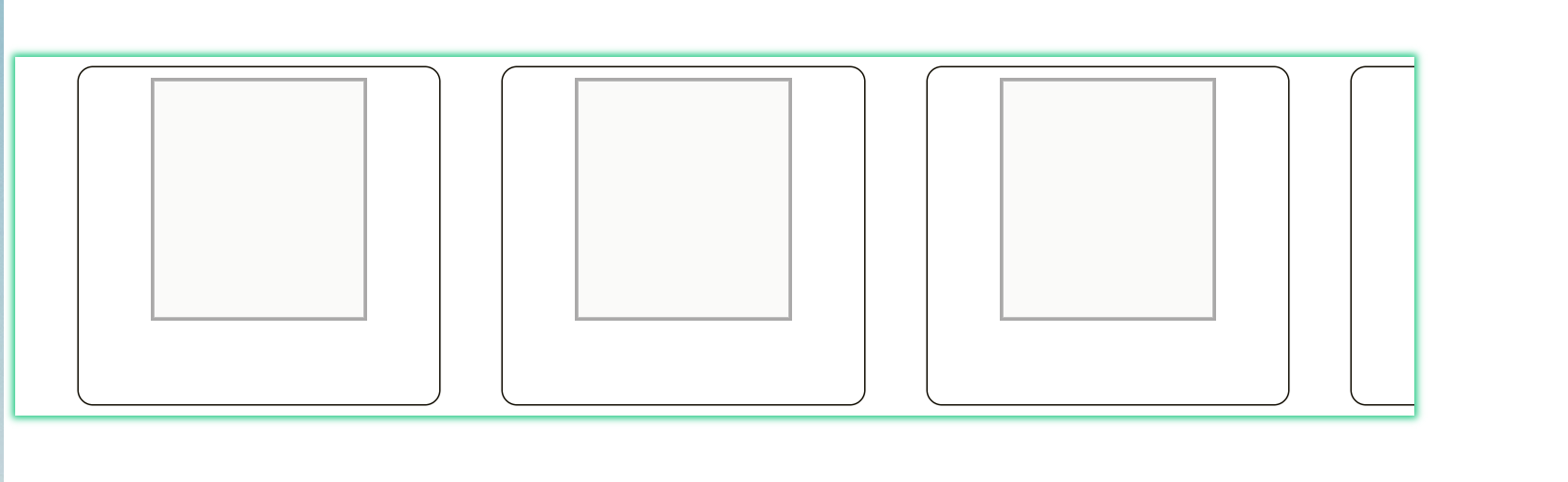
效果
vue横向滑动的更多相关文章
- 横向滑动页面,导航条滑动居中的 js 实现思路
最近在做新闻咨询页的项目,各个新闻频道通过横向滑动切换,顶部的导航active栏需要跟着切换到对应频道,并且active到达中部时,要一直处在中间. 类似效果就是uc浏览器<UC头条>的导 ...
- 横向滑动的HorizontalListView滑动指定位置的解决方法
项目中用到了自定义横向滑动的控件:HorizontalListView,点击其中一项,跳转到另外一个大图界面,大图界面也是HorizontalListView,想使用setSelection方法设定 ...
- UICollectionView 图片横向滑动居中偏移量的解决
1.在使用UICollectionView 来显示横向滑动图片的时候,cell与cell之间有间隙,每次滑动后cell都会向左偏移,在使用过这两个方法才解决每次向左偏移的部分. 2.使用方法前不要开启 ...
- 使GridView可以单行横向滑动
最近做的练手的小项目中存在一个横向滑动的问题,需要HorizontalScroll中嵌套GridView,但是GridView默认是竖直排放的item,况且HorizontalScroll与GridV ...
- ios7中使用scrollview来横向滑动图片,自动产生偏移竖向的偏移 问题
ios7中使用scrollview来横向滑动图片,自动产生偏移竖向的偏移 问题 如图红色为scrollview的背景色,在scrollview上加了图片之后,总会有向下的偏移 设置conten ...
- android--解--它们的定义tabhost(动态添加的选项+用自己的主动性横向滑动标签+手势切换标签页和内容特征)
在本文中,解决他们自己的定义tabhost实现,并通过代码集成动态加入标签功能.自己主动标签横向滑动功能.和手势标签按功能之间切换. 我完成了这个完美的解决方案一起以下: 1.定义tabwidget布 ...
- overflow-x: scroll;横向滑动详细讲解
overflow-x: scroll;横向滑动(移动端使用详解) css3 , ie8以上 <!DOCTYPE html> <html lang="en"> ...
- 一个 Vue 的滑动按钮组件
git 地址:https://github.com/SyMind/vue-sliding-button vue-better-slider 一个 Vue 的滑动按钮组件,有关滑动方面的处理借鉴 bet ...
- UITableView 的横向滑动实现
UITableView 的横向滑动实现 概述 为了实现横向滑动的控件,可以继承类 UIScrollView 或类 UIView 自定义可以横向滑动的控件,这里通过 UITableView 的旋转,实现 ...
- 用css巧妙实现移动端横向滑动展示功能
前言:记得以前处理移动端横向滑动展示都是去用js去解决的,要用js进行蛮多处理,要算li的宽度,然后还要用js设置ul盒子的宽度,又要设置最大滑动距离,最小滑动距离等等.......但是现在发现用cs ...
随机推荐
- 递归分批次插入数据(An I/O error occurred while sending to the backend报错解决方案)
//递归插入public void add(List<Object> all, long start, long limit){ //截取 List<Object> colle ...
- 宽字符集(unicode)操作函数 (转)
字符分类: 宽字符函数 普通C函数 描述 iswalnum() isalnum() 测试字符是否为数字或字母 iswalpha() isalpha() 测试字符是否是字母 iswcntrl() isc ...
- fio - IO测试工具
目前主流的第三方IO测试工具有fio.iometer和Orion,这三种工具各有千秋. fio在Linux系统下使用比较方便,iometer在window系统下使用比较方便,Orion是oracle的 ...
- C++ push_back()函数应用
最近在学习Opencv,用C++写程序,做了一个虚拟画笔的项目,即通过摄像头采集视频图像信息,识别视频中的画笔,并画笔在空中的划痕显示在视频图像上.在进行到划痕显示的,由于视频是实时采集的,检测到的画 ...
- 第08组Beta冲刺(2/4)
队名 八组评分了吗 组长博客链接(2分) 组员1李昕晖(组长) 过去两天完成了哪些任务 文字/口头描述 12月9号了解各个小组的进度与难以攻破的地方,晚上安排开会,安排新的冲刺任务. 重新分配小组及个 ...
- 关于Java字符串、字符与数字之间的相互转换
一.数字转字符串 //将整个数字转化为字符串 int i=456; //方法一 String str1=Integer.toString(i); System.out.println(str1); / ...
- iOS App转让/转移详细步骤(配图)
参考:https://www.jianshu.com/p/57bc6d229be2
- 【pytest】pytest.mark.dependency用例依赖标签,并解决依赖失效的问题
pytest第三方插件,用来解决用例之间的依赖关系.如果依赖的用例执行失败后 后续的用例会被跳过执行,相当于智能执行了pytest.mark.skip, 首先要安装插件:pip install pyt ...
- 使用 nvm 管理 node.js 版本
简介 在实际的前端开发过程中,可能会经常遇见 node.js 的版本问题,不同的项目需要使用不同的 node.js 版本. 直接安装的话,只能安装和使用 node.js 的一个版本.可以使用 nvm ...
- CSS手册
3. CSS背景 1. 颜色 body {background-color:#b0c4de;} 十六进制 - 如:"#ff0000" RGB - 如:"rgb(255,0 ...