
MVC中使用CKEditor01-基础
本篇体验在MVC中使用CKEditor,仅仅算思路、基础,暂没有把验证等与CKEditor结合在一起考虑。
□ 1 使用NUGET引入CKEditor
PM> Install-Package CKEditor
引入后在Scripts中有了CKEditor的相关文件: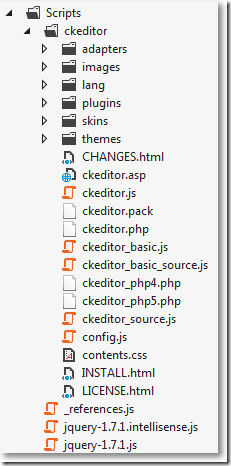
□ 2 View Model
using System.ComponentModel.DataAnnotations;
namespace MvcCKEditor.Models
{
public class Article
{
public int ID { get; set; }
[Required]
[Display(Name = "主题")]
public string Subject { get; set; }
[Required]
[Display(Name = "内容")]
public string Content { get; set; }
}
}
.csharpcode, .csharpcode pre
{
font-size: small;
color: black;
font-family: consolas, "Courier New", courier, monospace;
background-color: #ffffff;
/*white-space: pre;*/
}
.csharpcode pre { margin: 0em; }
.csharpcode .rem { color: #008000; }
.csharpcode .kwrd { color: #0000ff; }
.csharpcode .str { color: #006080; }
.csharpcode .op { color: #0000c0; }
.csharpcode .preproc { color: #cc6633; }
.csharpcode .asp { background-color: #ffff00; }
.csharpcode .html { color: #800000; }
.csharpcode .attr { color: #ff0000; }
.csharpcode .alt
{
background-color: #f4f4f4;
width: 100%;
margin: 0em;
}
.csharpcode .lnum { color: #606060; }
□ 3 不管在哪里引用,必须引用以下有关CKEditor的js文件
<script src="@Url.Content("~/Scripts/ckeditor/ckeditor.js")" type="text/javascript"></script>
□ 4 HomeController
有关显示添加视图和接收添加内容:
接收添加内容时,是通过把Dictionary<string,string>,把所有错误以键值对的形式放到这个字典集合里,再使用Newtonsoft.Json把这个集合转换成json字符串,最后让前台jquery判断。但在实际做项目中,可能用ModelState在后台验证,并把需要验证的部分放在部分视图里,可能更方便一些,暂不深究。
就像在ASP.NET WebForm开发的时,如果页面没有设置ValidateInput=false,就会出现警告。在MVC中如果不设置,也会报如下错: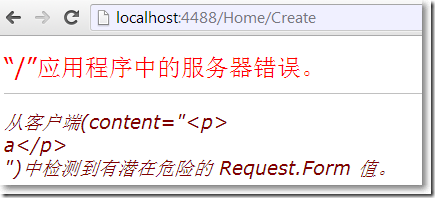
设置允许CKEditor有2种方式:
1、在控制器方法
[ValidateInput(false)]
public ActionResult Create(string subject, string content)
.csharpcode, .csharpcode pre
{
font-size: small;
color: black;
font-family: consolas, "Courier New", courier, monospace;
background-color: #ffffff;
/*white-space: pre;*/
}
.csharpcode pre { margin: 0em; }
.csharpcode .rem { color: #008000; }
.csharpcode .kwrd { color: #0000ff; }
.csharpcode .str { color: #006080; }
.csharpcode .op { color: #0000c0; }
.csharpcode .preproc { color: #cc6633; }
.csharpcode .asp { background-color: #ffff00; }
.csharpcode .html { color: #800000; }
.csharpcode .attr { color: #ff0000; }
.csharpcode .alt
{
background-color: #f4f4f4;
width: 100%;
margin: 0em;
}
.csharpcode .lnum { color: #606060; }
2、Scripts/ckeditor/config.js中做全局设置
CKEDITOR.editorConfig = function( config )
{
// Define changes to default configuration here. For example:
// config.language = 'fr';
// config.uiColor = '#AADC6E';
//也可以在这里做全局设置
//config.htmlEncodeOutput = true;
};
.csharpcode, .csharpcode pre
{
font-size: small;
color: black;
font-family: consolas, "Courier New", courier, monospace;
background-color: #ffffff;
/*white-space: pre;*/
}
.csharpcode pre { margin: 0em; }
.csharpcode .rem { color: #008000; }
.csharpcode .kwrd { color: #0000ff; }
.csharpcode .str { color: #006080; }
.csharpcode .op { color: #0000c0; }
.csharpcode .preproc { color: #cc6633; }
.csharpcode .asp { background-color: #ffff00; }
.csharpcode .html { color: #800000; }
.csharpcode .attr { color: #ff0000; }
.csharpcode .alt
{
background-color: #f4f4f4;
width: 100%;
margin: 0em;
}
.csharpcode .lnum { color: #606060; }
控制器与方法:
展开using System.Web.Mvc;

using MvcCKEditor.Models;

using Newtonsoft.Json;

namespace MvcCKEditor.Controllers

{

    public class HomeController : Controller

    {

        private List<Article> articles = null;

        public HomeController()

        {

            articles = new List<Article>

            {

                new Article(){ID =1,Subject = "主题1",Content = "内容1"},

                new Article(){ID = 2,Subject = "主题2",Content = "内容2"}

            };

        }

        public ActionResult Index()

        {

            return View(articles);

        }

        public ActionResult Create()

        {

            return View();

        }

        [HttpPost]

        //[ValidateAntiForgeryToken]

        [ValidateInput(false)]

        public ActionResult Create(string subject, string content)

        {

            Dictionary<string,string> jo = new Dictionary<string, string>();

            if (string.IsNullOrEmpty(subject))

            {

                jo.Add("Msg","没有输入标题 ");

                return Content(JsonConvert.SerializeObject(jo), "application/json");

            }

            if (string.IsNullOrEmpty(content))

            {

                jo.Add("Msg", "没有输入内容 ");

                return Content(JsonConvert.SerializeObject(jo), "application/json");

            }

            try

            {

                Article article = new Article();

                article.Subject = subject;

                article.Content = content;

                articles.Add(article);

                jo.Add("Result","Success");

            }

            catch (Exception ex)

            {

                jo.Add("Result","Failure");

                jo.Add("ResultMessage", ex.Message);

            }

            return Content(JsonConvert.SerializeObject(jo), "application/json");

        }

    }

}
□ 5 Create.cshtml视图
获取CKEditor内容:
不能用var content = $('#content').val();获取CKEditor的内容。
因为TextArea的内容已经被CKEdtor替换掉了:var editor = CKEDITOR.editor.replace('content', { skin: 'kama', width: '800px' });
应该使用如下方式来获取CKEditor的内容:var content = editor.getData();
展开@model MvcCKEditor.Models.Article

@{

    ViewBag.Title = "Create";

    Layout = "~/Views/Shared/_Layout.cshtml";

}

<h2>Create</h2>

@using (Html.BeginForm("Create","Home",FormMethod.Post,new {id = "FormCreate"}))

{

    @Html.ValidationSummary(true)

    @Html.AntiForgeryToken()

    <fieldset>

        <legend>Article</legend>

        <div class="editor-label">

            @Html.LabelFor(model => model.Subject)

        </div>

        <div class="editor-field">

            @Html.TextBox("subject",null,new {id="subject",style="width:400px",MaxLength="100"})

            @Html.ValidationMessageFor(model => model.Subject)

        </div>

        <div class="editor-label">

            @Html.LabelFor(model => model.Content)

        </div>

        <div class="editor-field">

            @Html.TextArea("content",new {id="content", @name="content"})

            @Html.ValidationMessageFor(model => model.Content)

        </div>

        <p>

            <input type="button" value="创建" id="ButtonCreate" />

            @*<input type="submit" value="创建"/>*@

        </p>

    </fieldset>

}

<div>

    @Html.ActionLink("Back to List", "Index")

</div>

@section Scripts {

    @Scripts.Render("~/bundles/jqueryval")

    <script type="text/javascript">

        var editor = CKEDITOR.editor.replace('content', {

            skin: 'kama',

            width: '800px'

        });

        $(function () {

            $('#ButtonCreate').click(function () {

                createArticle();

            });

        });

        function createArticle() {

            var subject = $.trim($('#subject').val());

            var content = editor.getData();

            if (subject.length == 0) {

                alert('请输入标题');

                return false;

            }

            if (content.length == 0) {

                alert('请输入内容');

                return false;

            }

            $.ajax({

                url: '@Url.Action("Create", "Home")',

                type: 'post',

                data: { subject: subject, content: content },

                cache: false,

                async: false,

                dataType: 'json',

                success: function(data) {

                    if (data.Msg) {

                        alert(data.Msg);

                        return false;

                    } else {

                        if (data.Result == 'Success') {

                            alert('Success');

                            location.href = '@Url.Action("Index", "Home")';

                        } else {

                            alert(data.ResultMessage);

                            return false;

                        }

                    }

                }

            });

        }

    </script>

}
结果: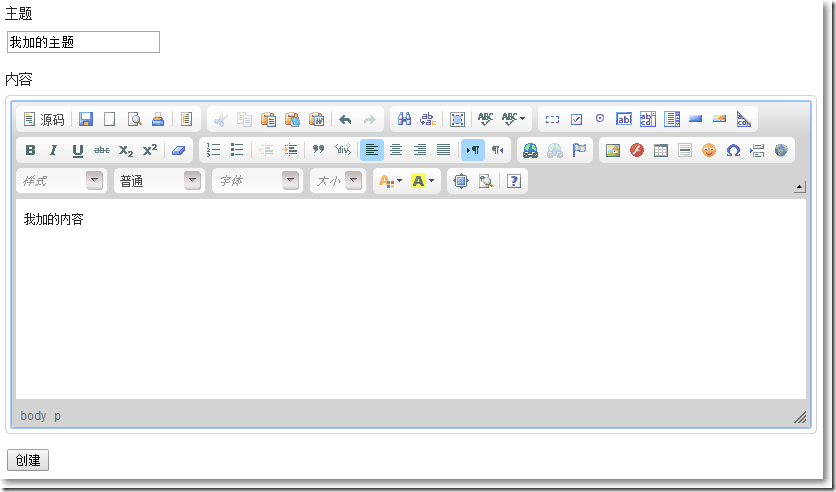
参考资料:
※ ASP.NET MVC 3 使用CKEditor
MVC中使用CKEditor01-基础的更多相关文章
- .NetCore MVC中的路由(1)路由配置基础
.NetCore MVC中的路由(1)路由配置基础 0x00 路由在MVC中起到的作用 前段时间一直忙于别的事情,终于搞定了继续学习.NetCore.这次学习的主题是MVC中的路由.路由是所有MVC框 ...
- Mvc中使用MvcSiteMapProvider实现站点地图之基础篇
MvcSiteMapProvider 是针对 ASP.NET MVC 中,提供菜单. 网站地图. 站点地图路径功能,以及更多的工具.它提供配置使用一个可插入的体系结构,可以是 XML. 数据库或动态生 ...
- js基础 js自执行函数、调用递归函数、圆括号运算符、函数声明的提升 js 布尔值 ASP.NET MVC中设置跨域
js基础 目录 javascript基础 ESMAScript数据类型 DOM JS常用方法 回到顶部 javascript基础 常说的js包括三个部分:dom(文档document).bom(浏览器 ...
- .net 开源模板引擎jntemplate 教程:基础篇之在ASP.NET MVC中使用Jntemplate
在ASP.NET MVC 中使用Jntemplate 上一篇我们详细介绍了jntemplate的标签语法,本篇文章将继续介绍如何在ASP.NET MVC 中使用Jntemplate. 一.使用Jnte ...
- 4.在MVC中使用仓储模式进行增删查改
原文链接:http://www.c-sharpcorner.com/UploadFile/3d39b4/crud-using-the-repository-pattern-in-mvc/ 系列目录: ...
- 如何在ASP.NET Core中实现一个基础的身份认证
注:本文提到的代码示例下载地址> How to achieve a basic authorization in ASP.NET Core 如何在ASP.NET Core中实现一个基础的身份认证 ...
- MVC中使用Entity Framework 基于方法的查询学习笔记 (二)
解释,不解释: 紧接上文,我们在Visual Studio2012中看到系统为我们自动创建的视图(View)文件Index.cshtml中,开头有如下这句话: @model IEnumerable&l ...
- [转]如何在ASP.NET Core中实现一个基础的身份认证
本文转自:http://www.cnblogs.com/onecodeonescript/p/6015512.html 注:本文提到的代码示例下载地址> How to achieve a bas ...
- AspNet MVC中各种上下文理解
0 前言 AspNet MVC中比较重要的上下文,有如下: 核心的上下文有HttpContext(请求上下文),ControllerContext(控制器上下文) 过滤器有关有五个的上下文Actio ...
- MVC5+EF6 入门完整教程十一:细说MVC中仓储模式的应用
摘要: 第一阶段1~10篇已经覆盖了MVC开发必要的基本知识. 第二阶段11-20篇将会侧重于专题的讲解,一篇文章解决一个实际问题. 根据园友的反馈, 本篇文章将会先对呼声最高的仓储模式进行讲解. 文 ...
随机推荐
- 让你的 JMeter 像 LoadRunner 那样实时查看每秒事务数(TPS)、事务响应时间(TRT)
熟悉 LoadRunner 的朋友一定不会对其 TPS(每秒事务数).TRT(事务响应时间) 等视图感到陌生,因为这是压力测试最为关键的两个指标.JMeter 以其开源.轻巧.灵活.扩展性高等特性赢得 ...
- Linux学习笔记:pwd与dirs的区别
在Linux中可以使用pwd和dirs进行当前目录查看,分别用于显示当前目录和显示完整目录记录.具体如下: 1.pwd 显示当前目录 2.dirs 显示目录堆叠中的记录 END 2018-08-21 ...
- 最大子段和(Max Sum)
Max Sum. The following is an instance. a) (-2,11,-4,13,-5,-2) 思路: 最大子段和:给定一个序列(元素可正可负),找出其子序列中元素和 ...
- 机械加工行业计划排程:中车实施应用易普优APS
一.机械加工行业现状 机械制造业在生产管理上的主要特点是:离散为主.流程为辅.装配为重点.机械制造业的基本加工过程是把原材料分割,大部分属于多种原材料平行加工,逐一经过车.铣.刨.磨或钣金成型等加工工 ...
- ubuntu12.04上的mongodb卸载
如果您需要卸载 mongodb,然后有几种方法来完成这取决于你想实现. 一.卸载只是 mongodb 这将删除只是 mongodb 包本身. 1 sudo apt-get remove mongodb ...
- DDR3调试记录
FPGA采集视频数据并写到DDR3,然后从DDR3读出并送给显示终端显示.不能稳定显示.但用FPGA内部逻辑产生color bar写到DDR3后读出来显示正常.因此DDR3部分逻辑没有问题 ...
- 组装者模式在React Native项目中的一个实战案例
前言 在实际的开发中,如果遇到多个组件有一些共性,我们可以提取一个BaseItem出来,然后在多个组件中进行复用,一种方式是通过继承的方式,而今天我们要说的是另一种方式--组装者模式. 什么是组装者模 ...
- POJ - 3111 K Best 0-1分数规划 二分
K Best Time Limit: 8000MS Memory Limit: 65536K Total Submissions: 12812 Accepted: 3290 Case Time ...
- Java—集合工具类
集合中的元素工具类排序: Java提供了一个操作Set.List和Map等集合的工具类:Collections,该工具类提供了大量方法对集合进行排序.查询和修改等操作,还提供了将集合对象置为不可变.对 ...
- PHP代码为什么不能直接保存HTML文件——>PHP生成静态页面教程
1.服务器会根据文件的后缀名去进行解析,如果是HTML文件则服务器不会进行语法解析,而是直接输出到浏览器. 2.如果一个页面中全部都是HTML代码而没有需要解析的PHP语法,则没有必要保存为PHP文件 ...