
C#基础-代码部署数据库及IIS站点
一、前言
最近忙里偷闲,做了一个部署数据库及IIS网站站点的WPF应用程序工具。
二、内容
此工具的目的是:
- 根据.sql文件在本机上部署数据库
- 在本机部署IIS站点,包括新建站点,新建应用程序池。只新建而不会对本机上原有的程序池或站点做修改操作
最终样式:(Check按钮的作用是防止与本机已有的站点或程序池有冲突)
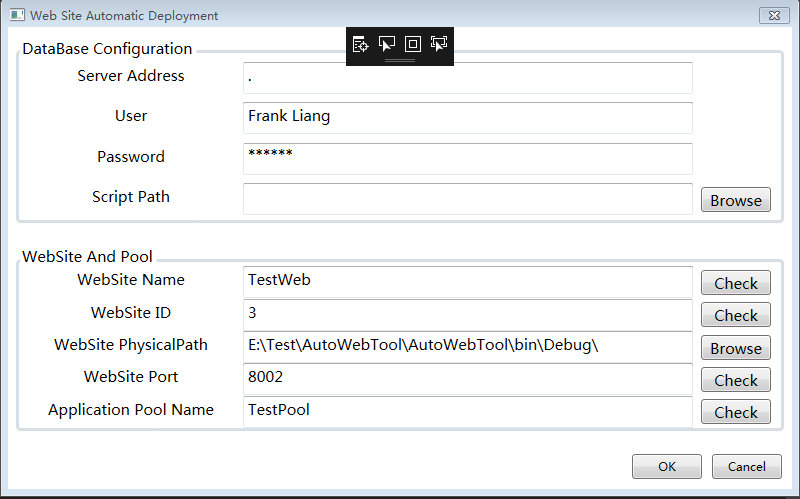
View:
<Window x:Class="AutoWebTool.MainWindow"

        xmlns="http://schemas.microsoft.com/winfx/2006/xaml/presentation"

        xmlns:x="http://schemas.microsoft.com/winfx/2006/xaml"

        xmlns:d="http://schemas.microsoft.com/expression/blend/2008"

        xmlns:mc="http://schemas.openxmlformats.org/markup-compatibility/2006"

        xmlns:i="http://schemas.microsoft.com/expression/2010/interactivity"

        xmlns:local="clr-namespace:AutoWebTool"

        Title="Web Site Automatic Deployment" Height="" Width="" WindowStartupLocation="CenterScreen" ResizeMode="NoResize">

    <Grid>

        <Grid.RowDefinitions>

            <RowDefinition Height="0.5*"/>

            <RowDefinition Height="0.5*"/>

            <RowDefinition Height="Auto"/>

        </Grid.RowDefinitions>

        <GroupBox Header="DataBase Configuration" FontSize="" BorderThickness="" Margin="5,10" Grid.Row="">

            <Grid>

                <Grid.RowDefinitions>

                    <RowDefinition/>

                    <RowDefinition/>

                    <RowDefinition/>

                    <RowDefinition/>

                </Grid.RowDefinitions>

                <Grid.ColumnDefinitions>

                    <ColumnDefinition Width="65*"/>

                    <ColumnDefinition Width="133*"/>

                    <ColumnDefinition Width="Auto"/>

                </Grid.ColumnDefinitions>

                <TextBlock Grid.Row="" Grid.Column="" Text="Server Address" HorizontalAlignment="Center" VerticalAlignment="Center" FontSize="" Height="" />

                <TextBlock Grid.Row="" Grid.Column="" Text="User" HorizontalAlignment="Center" VerticalAlignment="Center" FontSize="" Height="" />

                <TextBlock Grid.Row="" Grid.Column="" Text="Password" HorizontalAlignment="Center" VerticalAlignment="Center" FontSize="" Height="" />

                <TextBlock Grid.Row="" Grid.Column="" Text="Script Path" HorizontalAlignment="Center" VerticalAlignment="Center" FontSize="" Height="" />

                <TextBox Grid.Row="" Grid.Column="" Text="{Binding ServerAddress, Mode=TwoWay, UpdateSourceTrigger=PropertyChanged}"

                     HorizontalAlignment="Left" VerticalAlignment="Center" FontSize="" Width="" Height="" />

                <TextBox Grid.Row="" Grid.Column="" Text="{Binding User, Mode=TwoWay, UpdateSourceTrigger=PropertyChanged}"

                     HorizontalAlignment="Left" VerticalAlignment="Center" FontSize="" Width="" Height="" />

                <PasswordBox Grid.Row="" Grid.Column="" PasswordChar="*" local:PasswordBoxHelper.Password="{Binding Password, Mode=TwoWay, UpdateSourceTrigger=PropertyChanged}"

                     HorizontalAlignment="Left" VerticalAlignment="Center" FontSize="" Width="" Height="">

                    <i:Interaction.Behaviors>

                        <local:PasswordBoxBehavior />

                    </i:Interaction.Behaviors>

                </PasswordBox>

                <TextBox Grid.Row="" Grid.Column="" Text="{Binding SqlPath, Mode=TwoWay, UpdateSourceTrigger=PropertyChanged}"

                     HorizontalAlignment="Left" VerticalAlignment="Center" FontSize="" Width="" Height="" />

                <Button Grid.Row="" Grid.Column="" Width="" Height="" Margin="0,0,10,0"

                        HorizontalAlignment="Left" VerticalAlignment="Center" Content="Browse" Click="FilePathBrowse_Click"/>

            </Grid>

        </GroupBox>

        <GroupBox Header="WebSite And Pool" FontSize="" BorderThickness="" Margin="5,10" Grid.Row="">

            <Grid>

                <Grid.RowDefinitions>

                    <RowDefinition/>

                    <RowDefinition/>

                    <RowDefinition/>

                    <RowDefinition/>

                    <RowDefinition/>

                </Grid.RowDefinitions>

                <Grid.ColumnDefinitions>

                    <ColumnDefinition Width="65*"/>

                    <ColumnDefinition Width="133*"/>

                    <ColumnDefinition Width="Auto"/>

                </Grid.ColumnDefinitions>

                <TextBlock Grid.Row="" Grid.Column="" Text="WebSite Name" HorizontalAlignment="Center" VerticalAlignment="Center" FontSize="" Height="" />

                <TextBlock Grid.Row="" Grid.Column="" Text="WebSite ID" HorizontalAlignment="Center" VerticalAlignment="Center" FontSize="" Height="" />

                <TextBlock Grid.Row="" Grid.Column="" Text="WebSite PhysicalPath" HorizontalAlignment="Center" VerticalAlignment="Center" FontSize="" Height="" />

                <TextBlock Grid.Row="" Grid.Column="" Text="WebSite Port" HorizontalAlignment="Center" VerticalAlignment="Center" FontSize="" Height="" />

                <TextBlock Grid.Row="" Grid.Column="" Text="Application Pool Name" HorizontalAlignment="Center" VerticalAlignment="Center" FontSize="" Height=""/>

                <TextBox Grid.Row="" Grid.Column="" Text="{Binding WebSiteName, Mode=TwoWay, UpdateSourceTrigger=PropertyChanged}"

                     HorizontalAlignment="Left" VerticalAlignment="Center" FontSize="" Width="" Height="" />

                <TextBox Grid.Row="" Grid.Column="" Text="{Binding WebSiteID, Mode=TwoWay, UpdateSourceTrigger=PropertyChanged}"

                     HorizontalAlignment="Left" VerticalAlignment="Center" FontSize="" Width="" Height="" />

                <TextBox Grid.Row="" Grid.Column="" Text="{Binding PhysicalPath, Mode=TwoWay, UpdateSourceTrigger=PropertyChanged}"

                     HorizontalAlignment="Left" VerticalAlignment="Center" FontSize="" Width="" Height="" />

                <TextBox Grid.Row="" Grid.Column="" Text="{Binding WebSitePort, Mode=TwoWay, UpdateSourceTrigger=PropertyChanged}"

                     HorizontalAlignment="Left" VerticalAlignment="Center" FontSize="" Width="" Height="" />

                <TextBox Grid.Row="" Grid.Column="" Text="{Binding PoolName, Mode=TwoWay, UpdateSourceTrigger=PropertyChanged}"

                     HorizontalAlignment="Left" VerticalAlignment="Center" FontSize="" Width="" Height="" />

                <Button Grid.Row="" Grid.Column="" Width="" Height="" Margin="0,0,10,0"

                        HorizontalAlignment="Left" VerticalAlignment="Center" Content="Check" Click="WebSiteNameCheck_Click"/>

                <Button Grid.Row="" Grid.Column="" Width="" Height="" Margin="0,0,10,0"

                        HorizontalAlignment="Left" VerticalAlignment="Center" Content="Check" Click="WebSiteIDCheck_Click"/>

                <Button Grid.Row="" Grid.Column="" Width="" Height="" Margin="0,0,10,0"

                        HorizontalAlignment="Left" VerticalAlignment="Center" Content="Browse" Click="PathBrowse_Click"/>

                <Button Grid.Row="" Grid.Column="" Width="" Height="" Margin="0,0,10,0"

                        HorizontalAlignment="Left" VerticalAlignment="Center" Content="Check" Click="WebSitePortCheck_Click"/>

                <Button Grid.Row="" Grid.Column="" Width="" Height="" Margin="0,0,10,0"

                        HorizontalAlignment="Left" VerticalAlignment="Center" Content="Check" Click="PoolNameCheck_Click"/>

            </Grid>

        </GroupBox>

        <StackPanel Grid.Row="" Orientation="Horizontal" HorizontalAlignment="Right" VerticalAlignment="Center" Margin="">

            <Button Width="" Height="" Content="OK" Click="Deploy_Click"/>

            <Button Width="" Height="" Content="Cancel" Margin="10,0,0,0" Click="Close_Click"/>

        </StackPanel>

    </Grid>

</Window>
View的后台文件:
using System.Windows;

using System.Windows.Controls;

using System.Windows.Interactivity;

namespace AutoWebTool

{

    /// <summary>

    /// MainWindow.xaml 的交互逻辑

    /// </summary>

    public partial class MainWindow : Window

    {

        private AutoGenerationVM _vm;

        public MainWindow()

        {

            InitializeComponent();

            DataContext = new AutoGenerationVM();

            _vm = DataContext as AutoGenerationVM;

        }

        private bool sqlPath;

        private void FilePathBrowse_Click(object sender, RoutedEventArgs e)

        {

            sqlPath = _vm.GetSqlFilePath();

        }

        private void WebSiteNameCheck_Click(object sender, RoutedEventArgs e)

        {

            var isInUse = _vm.CheckNameAndID();

            if (isInUse)

            {

                MessageBox.Show("1.This name is Empty \r\n2.This name is in use,please change name!");

            }

            else

            {

                MessageBox.Show("No Problem!");

            }

        }

        private void WebSiteIDCheck_Click(object sender, RoutedEventArgs e)

        {

            var isInUse = _vm.CheckNameAndID();

            if (isInUse)

            {

                MessageBox.Show("1.This ID is Empty \r\n2.This ID is in use,please change ID!");

            }

            else

            {

                MessageBox.Show("No Problem!");

            }

        }

        private bool physicalPath;

        private void PathBrowse_Click(object sender, RoutedEventArgs e)

        {

            physicalPath = _vm.GetFolderPath();

        }

        private void WebSitePortCheck_Click(object sender, RoutedEventArgs e)

        {

            var isInUse = _vm.CheckWebPort();

            if (isInUse)

            {

                MessageBox.Show("1.This port is Empty \r\n2.This port is in use,please change port!");

            }

            else

            {

                MessageBox.Show("No Problem!");

            }

        }

        private void PoolNameCheck_Click(object sender, RoutedEventArgs e)

        {

            var isInUse = _vm.CkeckPoolName();

            if (isInUse)

            {

                MessageBox.Show("1.This pool name is Empty \r\n2.This name is in use,please change name!");

            }

            else

            {

                MessageBox.Show("No Problem!");

            }

        }

        private void Deploy_Click(object sender, RoutedEventArgs e)

        {

            var dataBaseServerAddressChecked = string.IsNullOrEmpty(_vm.ServerAddress);

            var dataBaseUserChecked = string.IsNullOrEmpty(_vm.User);

            var dataBasePasswordChecked = string.IsNullOrEmpty(_vm.Password);

            var dataBaseScriptChecked = sqlPath;

            var dataBaseCondition = !dataBaseServerAddressChecked && !dataBaseUserChecked && !dataBasePasswordChecked && !dataBaseScriptChecked;

            var webSiteNameAndIDChecked = _vm.CheckNameAndID();

            var webSitePortChecked = _vm.CheckWebPort();

            var applicationPoolNameChecked = _vm.CkeckPoolName();

            var webSiteCondition = !webSiteNameAndIDChecked && !physicalPath && !webSitePortChecked && !applicationPoolNameChecked;

            if (dataBaseCondition&& webSiteCondition)

            {

                _vm.Execute();

            }

            else {

                MessageBox.Show("Please Check Your Input!");

            }

        }

        private void Close_Click(object sender, RoutedEventArgs e)

        {

            Close();

        }

    }

    public static class PasswordBoxHelper

    {

        public static readonly DependencyProperty PasswordProperty =

            DependencyProperty.RegisterAttached("Password",

            typeof(string), typeof(PasswordBoxHelper),

            new FrameworkPropertyMetadata(string.Empty, OnPasswordPropertyChanged));

        private static void OnPasswordPropertyChanged(DependencyObject sender, DependencyPropertyChangedEventArgs e)

        {

            var passwordBox = sender as PasswordBox;

            string password = (string)e.NewValue;

            if (passwordBox != null && passwordBox.Password != password)

            {

                passwordBox.Password = password;

            }

        }

        public static string GetPassword(DependencyObject dp)

        {

            return (string)dp.GetValue(PasswordProperty);

        }

        public static void SetPassword(DependencyObject dp, string value)

        {

            dp.SetValue(PasswordProperty, value);

        }

    }

    public class PasswordBoxBehavior : Behavior<PasswordBox>

    {

        protected override void OnAttached()

        {

            base.OnAttached();

            AssociatedObject.PasswordChanged += OnPasswordChanged;

        }

        private static void OnPasswordChanged(object sender, RoutedEventArgs e)

        {

            var passwordBox = sender as PasswordBox;

            string password = PasswordBoxHelper.GetPassword(passwordBox);

            if (passwordBox != null && passwordBox.Password != password)

            {

                PasswordBoxHelper.SetPassword(passwordBox, passwordBox.Password);

            }

        }

        protected override void OnDetaching()

        {

            base.OnDetaching();

            AssociatedObject.PasswordChanged -= OnPasswordChanged;

        }

    }

}
ViewModel:
using System;

using System.DirectoryServices;

using System.ComponentModel;

using System.Linq;

using System.Net;

using System.Net.NetworkInformation;

using Microsoft.Web.Administration;

using System.Windows.Forms;

using System.Diagnostics;

using System.Data.SqlClient;

using System.IO;

namespace AutoWebTool

{

    public class AutoGenerationVM : INotifyPropertyChanged

    {

        public AutoGenerationVM()

        {

            _physicalPath = AppDomain.CurrentDomain.BaseDirectory;

        }

        //DataBase ServerAddress

        private string _serverAddress = string.Empty;

        public string ServerAddress

        {

            get { return _serverAddress; }

            set

            {

                if (_serverAddress != value)

                {

                    _serverAddress = value;

                    NotifyPropertyChanged("ServerAddress");

                }

            }

        }

        //DataBase User

        private string _user = string.Empty;

        public string User

        {

            get { return _user; }

            set

            {

                if (_user != value)

                {

                    _user = value;

                    NotifyPropertyChanged("User");

                }

            }

        }

        //DataBase Password

        private string _password = string.Empty;

        public string Password

        {

            get { return _password; }

            set

            {

                if (_password != value)

                {

                    _password = value;

                    NotifyPropertyChanged("Password");

                }

            }

        }

        //DataBase SQLPath

        private string _sqlPath = string.Empty;

        public string SqlPath

        {

            get { return _sqlPath; }

            set

            {

                if (_sqlPath != value)

                {

                    _sqlPath = value;

                    NotifyPropertyChanged("SqlPath");

                }

            }

        }

        public bool GetSqlFilePath() {

            var openFileDialog = new OpenFileDialog();

            openFileDialog.Filter = "数据库脚本文件|*.sql";

            if (openFileDialog.ShowDialog() == DialogResult.OK)

            {

                SqlPath = openFileDialog.FileName;

            }

            return false;

        }

        //+++++++++++++++++++++++++++++++++++++++++++++++++++++++++++++++

        //WebSite Name

        private string _webSiteName = string.Empty;

        public string WebSiteName

        {

            get { return _webSiteName; }

            set

            {

                if (_webSiteName != value)

                {

                    _webSiteName = value;

                    NotifyPropertyChanged("WebSiteName");

                }

            }

        }

        //WebSite ID

        private string _webSiteID = string.Empty;

        public string WebSiteID

        {

            get { return _webSiteID; }

            set

            {

                if (_webSiteID != value)

                {

                    _webSiteID = value;

                    NotifyPropertyChanged("WebSiteID");

                }

            }

        }

        /// <summary>

        /// Check WebSite Name and ID

        /// </summary>

        /// <returns></returns>

        public bool CheckNameAndID()

        {

            if (string.IsNullOrEmpty(WebSiteName) || string.IsNullOrEmpty(WebSiteID)) return true;

            DirectoryEntry rootEntry = new DirectoryEntry("IIS://localhost/w3svc");

            foreach (DirectoryEntry entry in rootEntry.Children)

            {

                if (entry.SchemaClassName.Equals("IIsWebServer", StringComparison.OrdinalIgnoreCase))

                {

                    if (WebSiteID == entry.Name) {

                        return true;

                    }

                    if (entry.Properties["ServerComment"].Value.ToString() == WebSiteName)

                    {

                        return true;

                    }

                }

            }

            return false;

        }

        //Physical Path

        private string _physicalPath = string.Empty;

        public string PhysicalPath

        {

            get { return _physicalPath; }

            set

            {

                if (_physicalPath != value)

                {

                    _physicalPath = value;

                    NotifyPropertyChanged("PhysicalPath");

                }

            }

        }

        /// <summary>

        /// Get Path for WebSite

        /// </summary>

        public bool GetFolderPath()

        {

            if (string.IsNullOrEmpty(PhysicalPath)) return true;

            var openFolderDialog = new FolderBrowserDialog();

            if (openFolderDialog.ShowDialog() == DialogResult.OK)

            {

                PhysicalPath = openFolderDialog.SelectedPath;

            }

            return false;

        }

        //WebSite Port

        private string _webSitePort = string.Empty;

        public string WebSitePort

        {

            get { return _webSitePort; }

            set

            {

                if (_webSitePort != value)

                {

                    _webSitePort = value;

                    NotifyPropertyChanged("WebSitePort");

                }

            }

        }

        /// <summary>

        /// Check WebSite Port

        /// </summary>

        /// <returns></returns>

        public bool CheckWebPort()

        {

            try

            {

                IPGlobalProperties ipProperties = IPGlobalProperties.GetIPGlobalProperties();

                IPEndPoint[] ipEndPoints = ipProperties.GetActiveTcpListeners();

                foreach (IPEndPoint endPoint in ipEndPoints)

                {

                    if (endPoint.Port == Convert.ToInt32(WebSitePort))

                    {

                        return true;

                    }

                }

                return false;

            }

            catch {

                return true;

            }

        }

        //Pool Name

        private string _poolName = string.Empty;

        public string PoolName

        {

            get { return _poolName; }

            set

            {

                if (_poolName != value)

                {

                    _poolName = value;

                    NotifyPropertyChanged("PoolName");

                }

            }

        }

        /// <summary>

        /// Check Application Pool Name

        /// </summary>

        /// <returns></returns>

        public bool CkeckPoolName()

        {

            if (string.IsNullOrEmpty(PoolName)) return true;

            var manager = new ServerManager();

            var list = manager.ApplicationPools;

            var matchedItem =  list.FirstOrDefault(x => x.Name == PoolName);

            if (matchedItem != null)

                return true;

            return false;

        }

        /// <summary>

        /// Execute Script

        /// </summary>

        public void Execute()

        {

            //Deploy DataBase

            var tmpConn = new SqlConnection();

            tmpConn.ConnectionString = "SERVER = " + ServerAddress +"; DATABASE = master; User ID = " + User+ "; Pwd = " + Password+ ";";

            var scriptFile = new FileInfo(SqlPath);

            var sqlCreateDBQuery = scriptFile.OpenText().ReadToEnd();

            SqlCommand myCommand = new SqlCommand(sqlCreateDBQuery, tmpConn);

            try

            {

                tmpConn.Open();

                myCommand.ExecuteNonQuery();

                MessageBox.Show("Database has been created successfully!","Create Database", MessageBoxButtons.OK,MessageBoxIcon.Information);

            }

            catch (Exception ex)

            {

                MessageBox.Show(ex.ToString(), "Create Database", MessageBoxButtons.OK, MessageBoxIcon.Information);

                return;

            }

            finally

            {

                tmpConn.Close();

            }

            try

            {

                //Deploy WebSite and Application Pool

                var script = "net start w3svc " +

                             "& cd c:/Windows/System32/inetsrv " +

                             "& appcmd add site /name:" + WebSiteName + " /id:" + WebSiteID +

                             " /physicalPath:" + PhysicalPath + " /bindings:http/*:" + WebSitePort + ":" + WebSiteName +

                             " & appcmd add apppool /name:" + PoolName + " /managedRuntimeVersion:v4.0 /managedPipelineMode:Integrated" +

                             " & appcmd set site /site.name:" + WebSiteName + " /[path='/'].applicationPool:" + PoolName;

                ProcessStartInfo startInfo = new ProcessStartInfo();

                startInfo.WorkingDirectory = @"C:\Windows\System32";

                startInfo.FileName = @"C:\Windows\System32\cmd.exe";

                startInfo.RedirectStandardInput = true;

                startInfo.RedirectStandardOutput = true;

                startInfo.RedirectStandardError = true;

                startInfo.UseShellExecute = false;

                startInfo.Verb = "RunAs";

                Process process = new Process();

                process.StartInfo = startInfo;

                process.Start();

                process.StandardInput.WriteLine(script);

                process.StandardInput.WriteLine("&exit");

                process.StandardInput.Flush();

                process.StandardInput.Close();

                process.WaitForExit();

                MessageBox.Show("IIS WebSite and Application Pool Deployed Successfully!", "Create WebSite and Application Pool", MessageBoxButtons.OK, MessageBoxIcon.Information);

            }

            catch (Exception ex)

            {

                MessageBox.Show(ex.ToString(), "Exception", MessageBoxButtons.OK, MessageBoxIcon.Information);

            }

        }

        public event PropertyChangedEventHandler PropertyChanged;

        private void NotifyPropertyChanged(string name)

        {

            PropertyChanged?.Invoke(this, new PropertyChangedEventArgs(name));

        }

    }

}
C#基础-代码部署数据库及IIS站点的更多相关文章
- ASP.NET Boilerplate 学习 AspNet Core2 浏览器缓存使用 c#基础,单线程,跨线程访问和线程带参数 wpf 禁用启用webbroswer右键菜单 EF Core 2.0使用MsSql/MySql实现DB First和Code First ASP.NET Core部署到Windows IIS QRCode.js:使用 JavaScript 生成
ASP.NET Boilerplate 学习 1.在http://www.aspnetboilerplate.com/Templates 网站下载ABP模版 2.解压后打开解决方案,解决方案目录: ...
- iis 站点部署后 Microsof .Net Framework异常
最近在部署站点到 iis 中时,遇到 iis 崩溃的问题,一打开部署好 的站点后,就出现 Microsoft .Net Framework 异常的消息提示,具体的 异常情况如下: 于是在网上查找了很多 ...
- 通过代码动态创建IIS站点
对WebApi进行单元测试时,一般需要一个IIS站点,一般的做法,是通过写一个批处理的bat脚本来实现,其实通过编码,也能实现该功能. 主要有关注三点:应用程序池.Web站点.绑定(协议类型:http ...
- 将php代码部署到新浪云测试(简单方法,包含数据库的连接)
很多人做项目都是先在本地测试然后上传到服务器运行,如果包含了操作数据库的信息往往需要进行一番调试,这里我总结一下把php代码包含数据库的连接如何上传到新浪云服务器的步骤. 1.在新浪云应用SAE的控制 ...
- 记一次 IIS 站点配置文件备份和还原,物理路径文件批量备份
前言 上一篇文章实现了数据库的批量备份和还原,当然部署在服务器中的IIS站点备份也是一个十分繁琐的事,三四个数量不多的还好,像有一些服务器用了许久,承载几十个站点甚至更多,一个一个备份,再一个一个还原 ...
- 使用delphi+intraweb进行微信开发2—intraweb以.net方式发布(以asp.net mvc4模式部署)在IIS(.net虚拟主机)上
在第一讲使用delphi+intraweb进行微信开发1--微信平台接入中我们编写了一个简单的微信接口程序,这个程序我是用Stand Alone Server / Service 方式编译的程序,并且 ...
- 在IIS站点中Adomd.net集成认证账号问题
最近在做一个Asp.net项目的时候 ,在C#代码里面用到了Adomd.net去连接SSAS服务器做MDX查询,开发完成后将Asp.net代码部署到IIS后发现Adomd.net老是连接不到SSAS服 ...
- OpenStack实践系列①openstack简介及基础环境部署
OpenStack实践系列①openstack简介及基础环境部署 一.OpenStack初探1.1 OpenStack简介 OpenStack是一整套开源软件项目的综合,它允许企业或服务提供者建立.运 ...
- asp.net中 使用Nginx 配置 IIS站点负载均衡
这是一偏初学者入门的内容,发现有问题的地方,欢迎留言,一起学习,一起进步 本文主要记录一下在Windows平台中,IIS站点如何使用Nginx 做一个简单的负载均衡 一. 准备工作: 官网下载安装包 ...
随机推荐
- Azure-如何排查应用程序网关返回 HTTP Code 502 或客户端得到应用程序网关响应慢的问题(二)
问题描述 经过如何排查应用程序网关返回 HTTP Code 502 或客户端得到应用程序网关响应慢的问题(一)中的排查步骤,可以判断出是由于 Web 服务器自身问题导致的响应异常. 那么可以在 IIS ...
- IE10不能显示JSON文件内容
IE7,8,9下Ajax返回后,再执行跳转,会弹出阻止提示框. 所以我采用WebForm 提交思想: //导出 jv.postOpen = jv.PostOpen = jv.Export = func ...
- pycharm连接服务器
python其他知识目录 1. pycharm当做xshell等远程工具,远程连接服务器步骤: 2.pycharm结合Linux服务器进行代码学习: 2.2使用pycharm远程在服务器上修改和执行代 ...
- flume handler
1.classpath classpath中需要这两项:Flume Agent configuration file and the second are the Flume client jars ...
- jdk8 Optional使用详解
思考: 调用一个方法得到了返回值却不能直接将返回值作为参数去调用别的方法. 原来解决方案: 我们首先要判断这个返回值是否为null,只有在非空的前提下才能将其作为其他方法的参数.这正是一些类似Guav ...
- React Native (0.57)开发环境搭建(注意:Node不要随便更新到最新版,更新完后莫名其妙的问题一大堆)
搭建开发环境 一.安装依赖 必须安装的依赖有:Node.Watchman 和 React Native 命令行工具以及 Xcode. 1.首先安装 Homebrew 2.安装 Node, Watchm ...
- idea最常使用的快捷键
撤销 反撤销 : Ctrl+Z / Ctrl+Shift+Z 删除一行 : Ctrl+Y 跳到实现类 : Ctrl+Alt+B 重命名文件: shift+F6 控制台放大缩小: ctrl+shif ...
- web项目中nicedit富文本编辑器的使用
web项目中nicedit富文本编辑器的使用 一.为什么要用富文本编辑器? 先说什么是富文本编辑器吧,普通的html中input或textarea标签只能进行简单的输入,而做不到其他的文本调整功能,甚 ...
- Scrum立会报告+燃尽图(Final阶段第二次)
此作业要求参见:https://edu.cnblogs.com/campus/nenu/2018fall/homework/2481 项目地址:https://coding.net/u/wuyy694 ...
- (第十周)Beta Review会议
项目名:食物链教学工具 组名:奋斗吧兄弟 组长:黄兴 组员:李俞寰.杜桥.栾骄阳.王东涵 Beta Review会议 时间:2016.11.14 10:00——11:30.13:30——15:00 ...