
nginx+tomcat实现Windows系统下的负载均衡搭建的案例
刚入行没多久就听过‘负载均衡’的大名,到现在因为工作接触的少,所以没什么太多的认识。但自己又对其非常的好奇,所以前两天通过查资料,在自己的笔记本上就搭建了一个超简单的案例(工作中没有时间,晚上到家了条件又不够,只能用自己的笔记本将就一下了,重在理解思想。。)
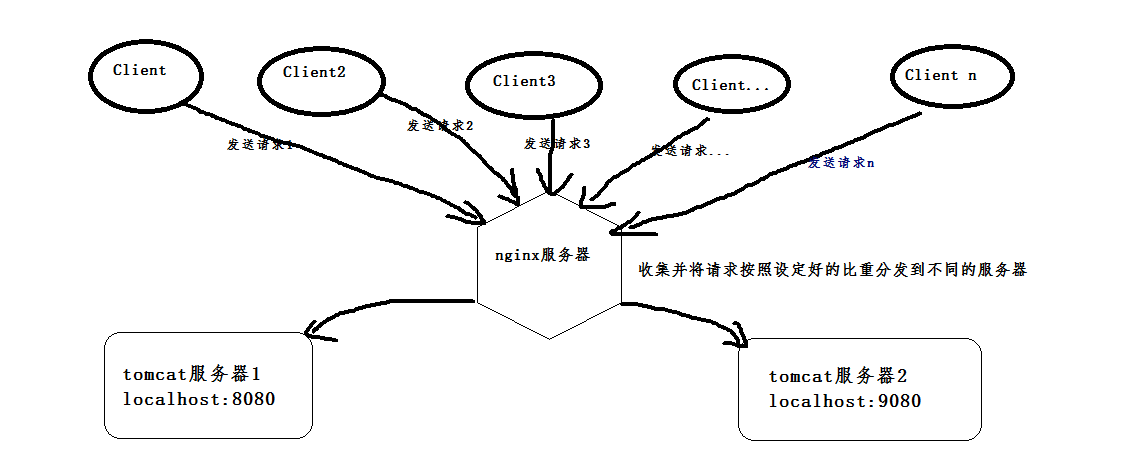
通俗点将,负载均衡就是因为访问流量太大,导致项目访问不流畅、甚至宕掉,所以通过一种分流的方式来缓解这种情况。
首先,安装两个tomcat,可以是同一个复制成两个,也可以下载两个不同版本的tomcat,我就是下载了两个不同版本的。下载地址:https://tomcat.apache.org/download-80.cgi
(这是8.0版本的,随便找两个不是特别老的版本的就行)。
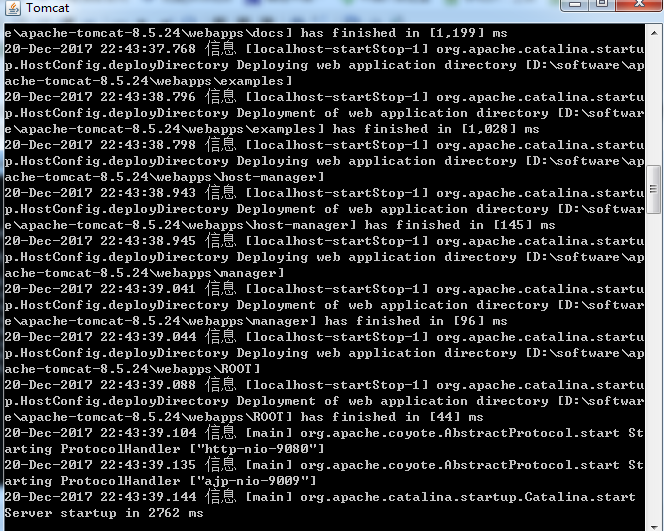
然后启动两个tomcat,在启动前,先更改其中一个的端口号,使得两个tomcat启动时不会端口冲突,一个是本身的8080端口,一个是改成了9080端口。配好以后,打开cmd命令窗口,我的tomcat一个放在D:\software\apache-tomcat-8.5.24目录下,按照如下命令即可启动,启动成功会弹出另一个窗口,显示如下:

打开浏览器,输入http://localhost:9080/,出现如下界面即tomcat启动成功。另一个采用同样的步骤即可。
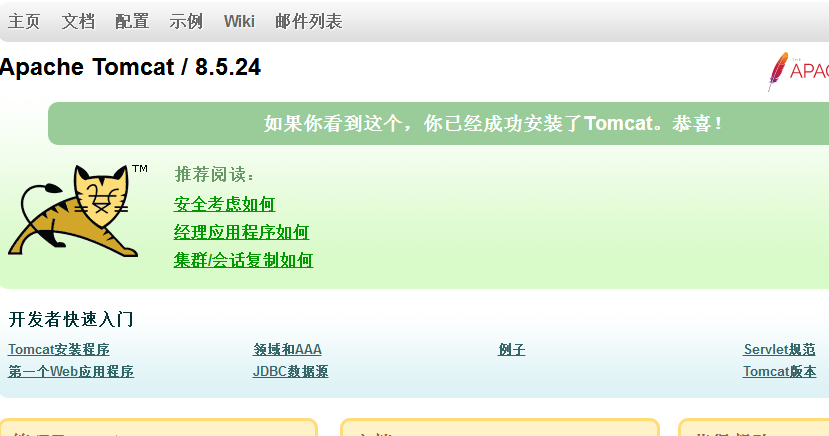
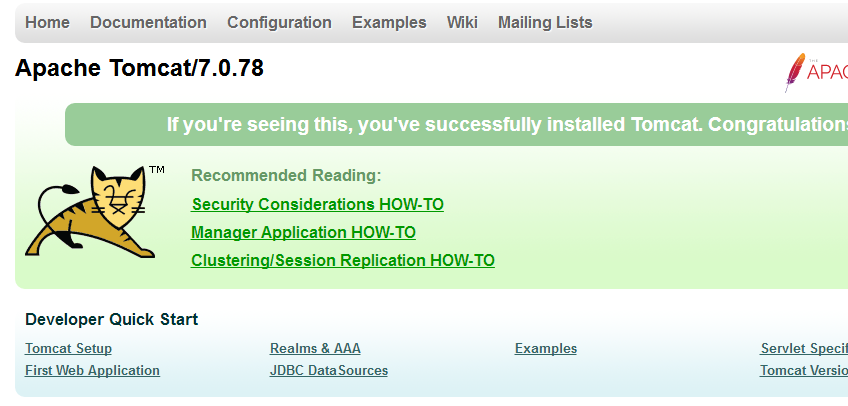
图1:tomcat8 图2:tomcat7
再之后,安装一个nginx,我装的是稳定版的nginx,下载地址:http://nginx.org/download/nginx-1.12.2.zip,解压即可使用
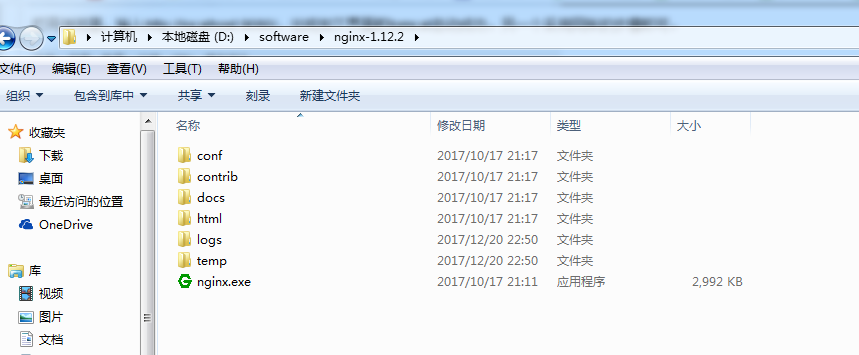
在启动前,必须要对nginx进行一下配置才可实现负载均衡的功能,打开conf文件夹,下面有一个nginx.conf文件,配置如下:
#user nobody;
worker_processes 1;
#error_log logs/error.log;
#error_log logs/error.log notice;
#error_log logs/error.log info;
#pid logs/nginx.pid;
events {
worker_connections 1024;
}
http {
include mime.types;
default_type application/octet-stream;
#log_format main '$remote_addr - $remote_user [$time_local] "$request" '
# '$status $body_bytes_sent "$http_referer" '
# '"$http_user_agent" "$http_x_forwarded_for"';
#access_log logs/access.log main;
sendfile on;
#tcp_nopush on;
#keepalive_timeout 0;
keepalive_timeout 65;
gzip on;
#以下四行是新添加的,两个IP是两个tomcat的访问地址,weight表示分给该服务器的请求比重,两个都是1,则按照1:1来分配,
upstream netitcast.com{
server 127.0.0.1:8080 weight=1;
server 127.0.0.1:9080 weight=2;
}
server {
listen 80;
server_name localhost;
#charset koi8-r;
#access_log logs/host.access.log main;
#一下两行是进行修改的,http://netitcast.com和上面添加的要保持一致
location / {
proxy_pass http://netitcast.com;
proxy_redirect default;
}
#error_page 404 /404.html;
# redirect server error pages to the static page /50x.html
#
error_page 500 502 503 504 /50x.html;
location = /50x.html {
root html;
}
# proxy the PHP scripts to Apache listening on 127.0.0.1:80
#
#location ~ \.php$ {
# proxy_pass http://127.0.0.1;
#}
# pass the PHP scripts to FastCGI server listening on 127.0.0.1:9000
#
#location ~ \.php$ {
# root html;
# fastcgi_pass 127.0.0.1:9000;
# fastcgi_index index.php;
# fastcgi_param SCRIPT_FILENAME /scripts$fastcgi_script_name;
# include fastcgi_params;
#}
# deny access to .htaccess files, if Apache's document root
# concurs with nginx's one
#
#location ~ /\.ht {
# deny all;
#}
}
# another virtual host using mix of IP-, name-, and port-based configuration
#
#server {
# listen 8000;
# listen somename:8080;
# server_name somename alias another.alias;
# location / {
# root html;
# index index.html index.htm;
# }
#}
# HTTPS server
#
#server {
# listen 443 ssl;
# server_name localhost;
# ssl_certificate cert.pem;
# ssl_certificate_key cert.key;
# ssl_session_cache shared:SSL:1m;
# ssl_session_timeout 5m;
# ssl_ciphers HIGH:!aNULL:!MD5;
# ssl_prefer_server_ciphers on;
# location / {
# root html;
# index index.html index.htm;
# }
#}
}
还是打开cmd窗口,进入到以上目录,执行命令:start nginx 即启动成功,然后输入网址:http://localhost/index.jsp,不断的进行访问,就会发现,上方显示的图1和图2在交互的显示。因为以上的配置weight是以1:2的比重来分配的,所以9080端口的比重就大一些,访问到图一(9080端口)的几率就比较大,访问到图二(8080端口)的几率比较小,这个概率一个是三分之二,一个是三分之一。
当然,这只是一个简单的示例,在生产环境中开发,肯定还要解决许多问题,比如‘会话保持’等,这个以后明白了再来补充。写这个的目的就是让自己对负载均衡更加熟悉,希望大家以后一起努力,加油!!!
nginx+tomcat实现Windows系统下的负载均衡搭建的案例的更多相关文章
- 通过Nginx+tomcat+redis实现反向代理 、负载均衡及session同步
一直对于负载均衡比较陌生,今天尝试着去了解了一下,并做了一个小的实验,对于这个概念有一些认识,在此做一个简单的总结 什么是负载均衡 负载均衡,英文 名称为Load Balance,指由多台服务器以对称 ...
- Windows系统下Android开发环境搭建
“工具善其事,必先利其器”.要想学好Android,搭建好Android开发环境是一个良好的开端. Windows系统下Android开发环境主要有4个大的步骤.分别是: 1.JDK的安装 2.ecl ...
- windows系统下Python环境的搭建及Selenium的安装
1.首先访问http://www.python.org/download/去下载最新的python版本: 2.下载安装包,一路安装完毕: 3.为计算机添加安装目录搭到环境变量,如图把python的安装 ...
- (转)windows系统下Python环境的搭建
原博文地址:http://www.cnblogs.com/windinsky/archive/2012/09/20/2695520.html 这段时间在做python,觉得这个配置环境的帖子还不错,分 ...
- Windows系统下JAVA开发环境搭建
首先我们需要下载JDK(JAVA Development Kit),JDK是整个java开发的核心,它包含了JAVA的运行环境,JAVA工具和JAVA基础的类库. 下载地址:http://www.or ...
- windows系统下Python环境的搭建
1.下载最新的Python版本3.5.0.
- tomact在windows系统下安装
一.下载 下载地址: https://tomcat.apache.org/download-90.cgi 7,8,9的版本都可以下,这里下载最新版本 注意:Binary是编译好的,可以直接使用的版本, ...
- windows系统下nginx+tomcat+redis做负载均衡和session粘滞附整套解决方案
Nginx: 在nginx-1.8.0\conf目录下找到nginx.conf文件,打开文件修改文件中http{}中的内容,在http{}中加入 upstream localhost { serve ...
- Nginx + Tomcat Windows下的负载均衡配置
Nginx + Tomcat Windows下的负载均衡配置 一.为什么需要对Tomcat服务器做负载均衡? Tomcat服务器作为一个Web服务器,其并发数在300-500之间,如果超过50 ...
随机推荐
- django orm 以列表作为筛选条件进行查询
在Django的orm中进行查询操作时,可以通过传入列表,列表内的元素为索引值,作为一个筛选条件来进行行查询 from .models import UserInfo user_obj = UserI ...
- hdoj2604 Queuing(矩阵快速幂)
此题如果直接利用递推关系,处理不好会超内存的. 首先找出递推关系式,先给出递推关系式:( L )=( L - 1 ) + ( L - 3 ) + ( L - 4 ):可以先尝试推导一下,推不出来再看下 ...
- 创建一个vue项目,vue-cli,webpack
,换成淘宝源: npm config set registry https://registry.npm.taobao.org/ 检查是否修改成功 npm config get registry ,安 ...
- Zookeeper原理分析之存储结构ZkDatabase
ZKDatabase在内存中维护了zookeeper的sessions, datatree和commit logs集合. 当zookeeper server启动的时候会将txnlogs和snapsho ...
- java.lang.IllegalStateException: BeanFactory not initialized or already closed - call 'refresh' before accessing beans via the ApplicationContext
spring的项目中有时候会报错:java.lang.IllegalStateException: BeanFactory not initialized or already closed - ca ...
- Jmeter Cannot load JDBC driver class 'com.mysql.jdbc.Driver'问题解决方案
1.下载 mysql-connector-java-5.1.44-bin.jar,哪个版本都可以,按自己的mysql版本来 2.将jar包放到jmeter安装路径下的 apache-jmeter-3. ...
- 使用 spring.profiles.active 及 @profile 注解 动态化配置内部及外部配置
引言:使用 spring.profiles.active 参数,搭配@Profile注解,可以实现不同环境下(开发.测试.生产)配置参数的切换 一.根据springboot的配置文件命名约定,结合ac ...
- 微信小程序开发笔记2,底部导航栏tablebar
底部导航(要在app.js里面配置,也就是把导航的代码写到app.js) 官方文档说最少2个导航最多5个 , "tabBar": { "color": &quo ...
- Java之集合(二)ArrayDeque
转载请注明源出处:http://www.cnblogs.com/lighten/p/7283928.html 1.前言 上章讲解了Java中的集合接口和相关实现抽象类,本章开始介绍一些具体的实现类,第 ...
- 再学Java 之 foreach循环
从Java 5 之后,Java提供了一种新的循环:foreach循环,这种循环遍历数组和集合更加简洁. foreach循环语法格式如下: for ( type variableName : array ...