1. //MainActivity.java
  2.  
  3. public class MainActivity extends TabActivity  
  4. {  
  5.     @Override  
  6.     public void onCreate(Bundle savedInstanceState)  
  7.     {  
  8.         super.onCreate(savedInstanceState);  
  9.         setContentView(R.layout.main);  
  10.         // 获取该Activity里面的TabHost组件  
  11.         TabHost tabHost = getTabHost();  
  12.         // 创建第一个Tab页  
  13.         TabHost.TabSpec tab1 = tabHost.newTabSpec("tab1")  
  14.                 .setIndicator("已接电话") // 设置标题  
  15.                 .setContent(R.id.tab01); //设置内容  
  16.         // 添加第一个标签页  
  17.         tabHost.addTab(tab1);  
  18.         TabHost.TabSpec tab2 = tabHost.newTabSpec("tab2")  
  19.                 // 在标签标题上放置图标  
  20.                 .setIndicator("呼出电话", getResources()  
  21.                         .getDrawable(R.drawable.tiger))  
  22.                 .setContent(R.id.tab02);  
  23.         // 添加第二个标签页  
  24.         tabHost.addTab(tab2);  
  25.         TabHost.TabSpec tab3 = tabHost.newTabSpec("tab3")  
  26.                 .setIndicator("未接电话")  
  27.                 .setContent(R.id.tab03);  
  28.         // 添加第三个标签页  
  29.         tabHost.addTab(tab3);  
  30.     }  
  31. }  
  32.     
  33.  
  34. //XML文件  
  35.  
  36. <?xml version="1.0" encoding="utf-8"?>  
  37. <TabHost  
  38.    xmlns:android="http://schemas.android.com/apk/res/android"  
  39.    android:id="@android:id/tabhost"  
  40.    android:layout_width="match_parent"  
  41.    android:layout_height="match_parent"  
  42.    android:layout_weight="1">  
  43.    <LinearLayout  
  44.       android:layout_width="match_parent"  
  45.       android:layout_height="match_parent"  
  46.       android:orientation="vertical">  
  47.       <TabWidget  
  48.          android:id="@android:id/tabs"  
  49.          android:layout_width="match_parent"  
  50.          android:layout_height="wrap_content"/>  
  51.       <FrameLayout  
  52.          android:id="@android:id/tabcontent"  
  53.          android:layout_width="match_parent"  
  54.          android:layout_height="match_parent">  
  55.          <!-- 定义第一个标签页的内容 -->  
  56.          <LinearLayout  
  57.             android:id="@+id/tab01"  
  58.             android:orientation="vertical"  
  59.             android:layout_width="match_parent"  
  60.             android:layout_height="match_parent">  
  61.             <TextView  
  62.                android:layout_width="wrap_content"  
  63.                android:layout_height="wrap_content"  
  64.                android:text="女儿国国王 - 2012/12/12"  
  65.                android:textSize="11pt" />  
  66.             <TextView  
  67.                android:layout_width="wrap_content"  
  68.                android:layout_height="wrap_content"  
  69.                android:text="东海龙女 - 2012/12/18"  
  70.                android:textSize="11pt" />  
  71.          </LinearLayout>  
  72.          <!-- 定义第二个标签页的内容 -->  
  73.          <LinearLayout  
  74.             android:id="@+id/tab02"  
  75.             android:orientation="vertical"  
  76.             android:layout_width="match_parent"  
  77.             android:layout_height="match_parent">  
  78.             <TextView  
  79.                android:layout_width="wrap_content"  
  80.                android:layout_height="wrap_content"  
  81.                android:text="白骨精  - 2012/08/12"  
  82.                android:textSize="11pt" />  
  83.             <TextView  
  84.                android:layout_width="wrap_content"  
  85.                android:layout_height="wrap_content"  
  86.                android:text="蜘蛛精 - 2012/09/20"  
  87.                android:textSize="11pt" />  
  88.          </LinearLayout>  
  89.          <!-- 定义第三个标签页的内容 -->  
  90.          <LinearLayout  
  91.             android:id="@+id/tab03"  
  92.             android:orientation="vertical"  
  93.             android:layout_width="match_parent"  
  94.             android:layout_height="match_parent"  
  95.             android:textSize="11pt">  
  96.             <TextView  
  97.                android:layout_width="wrap_content"  
  98.                android:layout_height="wrap_content"  
  99.                android:text="孙悟空 - 2012/09/19"  
  100.                android:textSize="11pt" />  
  101.             <TextView  
  102.                android:layout_width="wrap_content"  
  103.                android:layout_height="wrap_content"  
  104.                android:text="猪八戒  - 2012/10/12"  
  105.                android:textSize="11pt" />  
  106.          </LinearLayout>  
  107.       </FrameLayout>  
  108.    </LinearLayout>  
  109. </TabHost>  

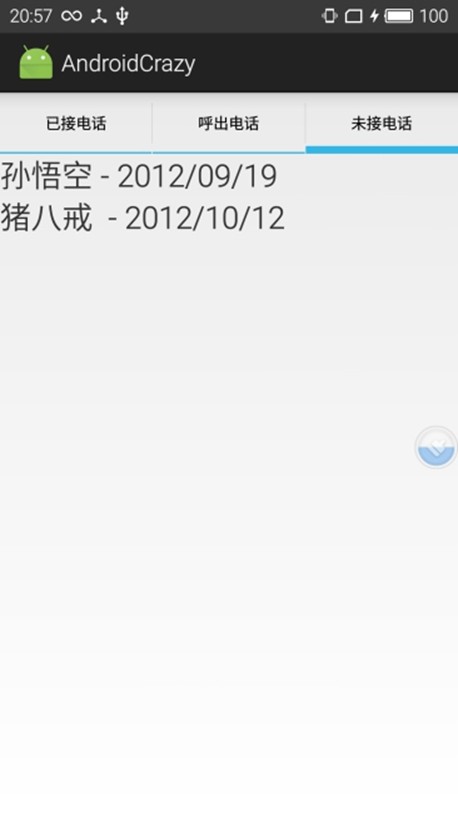
效果:

TabHost实现通话记录界面的更多相关文章

  1. Android通讯录管理(获取联系人、通话记录、短信消息)

    前言:前阵子主要是记录了如何对联系人的一些操作,比如搜索,全选.反选和删除等在实际开发中可能需要实现的功能,本篇博客是小巫从一个别人开源的一个项目抽取出来的部分内容,把它给简化出来,可以让需要的朋友清 ...

  2. Android-读取操作系统通话记录并/拨打电话/发送短信/复制号码到拨号盘

    apps目录的contacts应用(有读取通话记录功能),是访问provider目录的provider.contacts应用(有暴露通话记录),所以要阅读Android操作系统源码-->pack ...

  3. CSipSimple通话记录分组

    为了便于查看通话记录,通常要对通话记录进行分组.本质上来说这没什么难度,只需要用ContentResolver去读数据库,剩下的就是策略问题.代码在com/csipsimple/ui/calllog/ ...

  4. hadoop处理Excel通话记录

    前面我们所写mr程序的输入都是文本文件,但真正工作中我们难免会碰到需要处理其它格式的情况,下面以处理excel数据为例 1.项目需求 有刘超与家庭成员之间的通话记录一份,存储在Excel文件中,如下面 ...

  5. 内容观察者 ContentObserver 监听短信、通话记录数据库 挂断来电

    Activity public class MainActivity extends ListActivity {     private TextView tv_info;     private  ...

  6. android 获取通话记录

    在manifest添加以下权限<uses-permission android:name="android.permission.READ_CALL_LOG" />&l ...

  7. 建立一个类似于天眼的Android应用程序:第4部分 - 持久收集联系人,通话记录和短信(SMS)

    建立一个类似于天眼的Android应用程序:第4部分 - 持久收集联系人,通话记录和短信(SMS) 电话黑客android恶意软件编程黑客入侵linux 随着我们继续我们的系列,AMUNET应用程序变 ...

  8. 越狱的 ios 如何 获取 读取 提取 手机上的 短信 通话记录 联系人 等信息

    http://willson.sinaapp.com/2011/12/iphone 获取短信脚本.html  Iphone获取短信脚本http://bbs.9ria.com/thread-209349 ...

  9. 【Android】Android6.0读取通话记录

    需求:读取通话记录,然后列表显示,每条记录的数据包括姓名.号码.类型(来电.去电.未接,字体颜色分别为绿.蓝.红),然后长按条目弹出一个列表弹窗,显示[复制号码到拨号盘].[发短信].[打电话]. 先 ...

随机推荐

  1. 14 MySQL--事务&函数与流程控制

    一.事务 事务用于将某些操作的多个SQL作为原子性操作,一旦有某一个出现错误,即可回滚到原来的状态,从而保证数据库数据完整性. 一堆sql语句:要么同时执行成功,要么同时失败 # 事务的原子性 场景: ...

  2. 19 网络编程--Socket 套接字方法

    1.Socket(也称套接字)介绍 socket这个东东干的事情,就是帮你把tcp/ip协议层的各种数据封装啦.数据发送.接收等通过代码已经给你封装好了 ,你只需要调用几行代码,就可以给别的机器发消息 ...

  3. tensorflow笔记之softmax_cross_enropy

    tf.nn.sparse_softmax_cross_entropy_with_logits() 当正确结果只有一个时,可以加速计算,比如MNIST数字识别,每张图片中仅包含一个数字,所以可以使用这个 ...

  4. mysql的collation-字符集

    utf8_general_ci               :排序规则 utf8 -- UTF-8 Unicode     :字符集 一.通过my.cnf文件增加(一劳永逸)两个参数:1.在[mysq ...

  5. 全面解析PHP面向对象的三大特征

    PHP面向对象的三大特征: 继承,封装,多态 一.继承 1.如何实现继承? 给子类使用extends关键字,让子类继承父类: class Student extends Person{} 2.实现继承 ...

  6. JS 相关

    计算高度: var a = document.body.clientHeight/2;console.log(a) window.scrollTo(0, document.body.clientHei ...

  7. Redis启动与使用

    在redis文件夹下,启动redis服务端的命令如下: .\redis-server 也可以指定要加载的配置文件,如下: .\redis-server ..\redis.conf 启动redis客户端 ...

  8. CNN、RNN、DNN

    一:神经网络 技术起源于上世纪五.六十年代,当时叫感知机(perceptron),包含有输入层.输出层和一个隐藏层.输入的特征向量通过隐藏层变换到达输出层,由输出层得到分类结果.但早期的单层感知机存在 ...

  9. SpringMVC入门(基于XML方式实现)

    ----------------------siwuxie095 SpringMVC 入门(基于 XML 方式实现) (一)搭建 SpringMVC 环境 1.先下载相关库文件,下载链接: (1)ht ...

  10. Maven项目整合SSH框架

    ---------------------siwuxie095                                         Maven 项目整合 SSH 框架         创建 ...