
在动态组件上使用 keep-alive
----------------------html、js、style-----------------------------------------------
<!DOCTYPE html>
<html>
<head>
<meta charset="utf-8"/>
<link rel="stylesheet" type="text/css" href="index.css"/>
<script src="vue.js"></script>
</head>
<body>
<div>
<h1>--在动态组件上使用 keep-alive--</h1>
<div id="example1" class="demo">
<button
class="dynamic-component-demo-tab-button"
v-for="tab in tabs"
v-bind:class="{ 'dynamic-component-demo-active' : tab === 'Posts' }"
v-on:click="currentTab = tab"
>
{{ tab }}
</button>
<!--如果去掉keep-alive标签,在Posts和Archive直接切换时,将不会缓存另外一个-->
<keep-alive>
<component v-bind:is="currentTabComponent"></component>
</keep-alive>
</div>
<script>
Vue.component('tab-posts', {
data: function () {
return {
posts: [
{
id: 1,
title: 'Cat Ipsum',
content: '<p>Dont wait for the storm to pass, dance in the rain kick up litter decide to want nothing to do with my owner today demand to be let outside at once, and expect owner to wait for me as i think about it cat cat moo moo lick ears lick paws so make meme, make cute face but lick the other cats. Kitty poochy chase imaginary bugs, but stand in front of the computer screen. Sweet beast cat dog hate mouse eat string barf pillow no baths hate everything stare at guinea pigs. My left donut is missing, as is my right loved it, hated it, loved it, hated it scoot butt on the rug cat not kitten around.</p>'
},
{
id: 2,
title: 'Hipster Ipsum',
content: '<p>Bushwick blue bottle scenester helvetica ugh, meh four loko. Put a bird on it lumbersexual franzen shabby chic, street art knausgaard trust fund shaman scenester live-edge mixtape taxidermy viral yuccie succulents. Keytar poke bicycle rights, crucifix street art neutra air plant PBR&B hoodie plaid venmo. Tilde swag art party fanny pack vinyl letterpress venmo jean shorts offal mumblecore. Vice blog gentrify mlkshk tattooed occupy snackwave, hoodie craft beer next level migas 8-bit chartreuse. Trust fund food truck drinking vinegar gochujang.</p>'
},
{
id: 3,
title: 'Cupcake Ipsum',
content: '<p>Icing dessert soufflé lollipop chocolate bar sweet tart cake chupa chups. Soufflé marzipan jelly beans croissant toffee marzipan cupcake icing fruitcake. Muffin cake pudding soufflé wafer jelly bear claw sesame snaps marshmallow. Marzipan soufflé croissant lemon drops gingerbread sugar plum lemon drops apple pie gummies. Sweet roll donut oat cake toffee cake. Liquorice candy macaroon toffee cookie marzipan.</p>'
},
],
selectedPost: null
}
},
template: '\
<div class="dynamic-component-demo-posts-tab">\
<ul class="dynamic-component-demo-posts-sidebar">\
<li\
v-for="post in posts"\
v-bind:key="post.id"\
v-bind:class="{ \'dynamic-component-demo-active\' : post === selectedPost }"\
v-on:click="selectedPost = post"\
>\
{{ post.title }}\
</li>\
</ul>\
<div class="dynamic-component-demo-post-container">\
<div\
v-if="selectedPost"\
class="dynamic-component-demo-post"\
>\
<h3>{{ selectedPost.title }}</h3>\
<div v-html="selectedPost.content"></div>\
</div>\
<strong v-else>\
Click on a blog title to the left to view it.\
</strong>\
</div>\
</div>\
'
})
Vue.component('tab-archive', {
template: '<div>Archive component.</div>'
})
var example1 = new Vue({
el:'#example1',
data: {
currentTab: 'Posts',
tabs: ['Posts', 'Archive']
},
computed: {
currentTabComponent: function () {
return 'tab-' + this.currentTab.toLowerCase()
}
}
})
</script>
<style>
.dynamic-component-demo-tab-button {
padding: 6px 10px;
border-top-left-radius: 3px;
border-top-right-radius: 3px;
border: 1px solid #ccc;
cursor: pointer;
background: #f0f0f0;
margin-bottom: -1px;
margin-right: -1px;
}
.dynamic-component-demo-tab-button:hover {
background: #e0e0e0;
}
.dynamic-component-demo-tab-button.dynamic-component-demo-active {
background: #e0e0e0;
}
.dynamic-component-demo-tab {
border: 1px solid #ccc;
padding: 10px;
}
.dynamic-component-demo-posts-tab {
display: flex;
}
.dynamic-component-demo-posts-sidebar {
max-width: 40vw;
margin: 0 !important;
padding: 0 10px 0 0 !important;
list-style-type: none;
border-right: 1px solid #ccc;
}
.dynamic-component-demo-posts-sidebar li {
white-space: nowrap;
text-overflow: ellipsis;
overflow: hidden;
cursor: pointer;
}
.dynamic-component-demo-posts-sidebar li:hover {
background: #eee;
}
.dynamic-component-demo-posts-sidebar li.dynamic-component-demo-active {
background: lightblue;
}
.dynamic-component-demo-post-container {
padding-left: 10px;
}
.dynamic-component-demo-post > :first-child {
margin-top: 0 !important;
padding-top: 0 !important;
}
</style>
</div>
</body>
</html>
-----------------------分割线-----------------------------
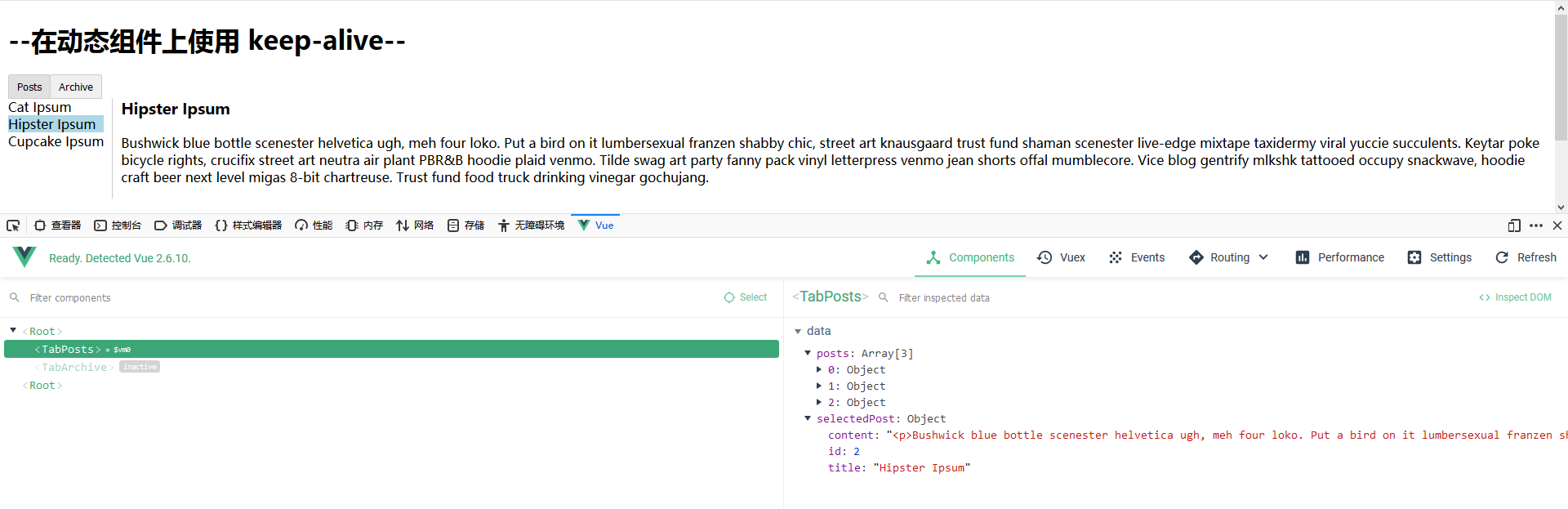
运行效果图:
在动态组件上使用 keep-alive的更多相关文章
- vue深入了解组件——动态组件&异步组件
一.在动态组件上使用 keep-alive 我们之前曾经在一个多标签的界面中使用 is 特性来切换不同的组件: <component v-bind:is="currentTabComp ...
- vue组件---动态组件&异步组件
(1)在动态组件上使用keep-alive 之前曾经在一个多标签的界面中使用 is 特性来切换不同的组件.接下来简单回顾下 <component>元素是vue 里面的一个内置组件.在里面使 ...
- Vue动态组件&异步组件
在动态组件上使用keep-alive 我们之前曾经在一个多标签的界面中使用is特性来切换不同的组件: Vue.js的动态组件模板 <component v-bind:is="curre ...
- 学习笔记:Vue——动态组件&异步组件
动态组件 01.在动态组件上使用keep-alive,保持组件的状态,以避免反复重渲染导致的性能问题. <!-- 失活的组件将会被缓存!--> <keep-alive> < ...
- 深入了解组件- -- 动态组件 & 异步组件
gitHub地址:https://github.com/huangpna/vue_learn/example里面的lesson11 一 在动态组件上使用keep-alive 在这之前我们已经有学习过用 ...
- vue组件上动态添加和删除属性
1.vue组件上动态添加和删除属性 // 添加 this.$set(this.obj, 'propName', val) // 删除 this.$delete(this.obj, 'propName' ...
- C++ 类的动态组件化技术
序言: N年前,我们曾在软件开发上出现了这样的困惑,用VC开发COM组件过于复杂,用VB开发COM组件发现效率低,而且不能实现面向对象的很多特性,例如,继承,多态等.更况且如何快速封装利用历史遗留的大 ...
- vue2入坑随记(二) -- 自定义动态组件
学习了Vue全家桶和一些UI基本够用了,但是用元素的方式使用组件还是不够灵活,比如我们需要通过js代码直接调用组件,而不是每次在页面上通过属性去控制组件的表现.下面讲一下如何定义动态组件. Vue.e ...
- Vue动态组件
前面的话 让多个组件使用同一个挂载点,并动态切换,这就是动态组件.本文将详细介绍Vue动态组件 概述 通过使用保留的 <component> 元素,动态地绑定到它的 is 特性,可以实现动 ...
随机推荐
- 运维笔记之yum,rpm,挂载,磁盘管理和raid详解
yum 与 rpm centos6,7 主要有rpm和yum这两种包管理软件,两种包的管理各有用处,其中最主要区别是: yum使用简单但需要联网,yum会去网上的yum包源去获取所需要的软件包.而r ...
- Spring Batch(0)——控制Step执行流程
Conditional Flow in Spring Batch I just announced the new Learn Spring course, focused on the fundam ...
- Linux 下使用rtcwake实现定时休眠和唤醒设备
查看是否安装rtcwake whereis rtcwake rtcwake: /usr/sbin/rtcwake /usr/share/man/man8/rtcwake.8.gz 查看rtcwake帮 ...
- 【力扣】95. 不同的二叉搜索树 II
二叉查找树(Binary Search Tree),(又:二叉搜索树,二叉排序树)它或者是一棵空树,或者是具有下列性质的二叉树: 若它的左子树不空,则左子树上所有结点的值均小于它的根结点的值: 若它的 ...
- 【VSCode】检测到 #include 错误。请更新 includePath。已为此翻译单元(C:\mingw-w64\i686-8.1.0-posix-dwarf-rt_v6-rev0\mingw32\i686-
win+r 运行cmd 输入"gcc -v -E -x c -"获取mingw路径: 我的: #include "..." search starts here ...
- 避免警报疲劳:每个 K8s 工程团队的 8 个技巧
避免警报疲劳:每个 K8s 工程团队的 8 个技巧 监控 Kubernetes 集群并不容易,警报疲劳通常是一个问题.阅读这篇文章,了解减少警报疲劳的有用提示. 如果您是随叫随到团队的一员,您可能知道 ...
- 转:android相对布局
android相对布局 Activity布局初步 - 相对布局 1. 相对布局的基本概念 一个控件的位置它决定于它和其他控件的关系,好处:比较灵活:缺点:掌握比较复杂. 2. 相对布局常用属性介绍 这 ...
- android studio出现 Could not initialize class com.android.sdklib.repository.AndroidSdkHandler
新的android studio (4.2)已经不支持旧有的 com.android.tools.build:gradle:2.3.3 了,有些方法和类会找不到. 去build.gradle中把这个 ...
- 在react项目中使用require引入图片不生效
如果使用create-react-app和require导入图像,require返回一个ES模块而不是字符串.这是因为在file-loader中,esModule选项是默认启用的. 用以下方式之一导入 ...
- Mybatis-Plus一键生成代码
Mybatis-Plus一键生成代码 一.闲言碎语 闲来无事看了看了MP的官网看到一键生成的代码更新了! 整个Ui风格都变了,遂决定瞅一眼新的代码生成器 官网地址~~ 二.引入依赖 新的代码生成只有在 ...