
在动态组件上使用 keep-alive
----------------------html、js、style-----------------------------------------------
<!DOCTYPE html>
<html>
<head>
<meta charset="utf-8"/>
<link rel="stylesheet" type="text/css" href="index.css"/>
<script src="vue.js"></script>
</head>
<body>
<div>
<h1>--在动态组件上使用 keep-alive--</h1>
<div id="example1" class="demo">
<button
class="dynamic-component-demo-tab-button"
v-for="tab in tabs"
v-bind:class="{ 'dynamic-component-demo-active' : tab === 'Posts' }"
v-on:click="currentTab = tab"
>
{{ tab }}
</button>
<!--如果去掉keep-alive标签,在Posts和Archive直接切换时,将不会缓存另外一个-->
<keep-alive>
<component v-bind:is="currentTabComponent"></component>
</keep-alive>
</div>
<script>
Vue.component('tab-posts', {
data: function () {
return {
posts: [
{
id: 1,
title: 'Cat Ipsum',
content: '<p>Dont wait for the storm to pass, dance in the rain kick up litter decide to want nothing to do with my owner today demand to be let outside at once, and expect owner to wait for me as i think about it cat cat moo moo lick ears lick paws so make meme, make cute face but lick the other cats. Kitty poochy chase imaginary bugs, but stand in front of the computer screen. Sweet beast cat dog hate mouse eat string barf pillow no baths hate everything stare at guinea pigs. My left donut is missing, as is my right loved it, hated it, loved it, hated it scoot butt on the rug cat not kitten around.</p>'
},
{
id: 2,
title: 'Hipster Ipsum',
content: '<p>Bushwick blue bottle scenester helvetica ugh, meh four loko. Put a bird on it lumbersexual franzen shabby chic, street art knausgaard trust fund shaman scenester live-edge mixtape taxidermy viral yuccie succulents. Keytar poke bicycle rights, crucifix street art neutra air plant PBR&B hoodie plaid venmo. Tilde swag art party fanny pack vinyl letterpress venmo jean shorts offal mumblecore. Vice blog gentrify mlkshk tattooed occupy snackwave, hoodie craft beer next level migas 8-bit chartreuse. Trust fund food truck drinking vinegar gochujang.</p>'
},
{
id: 3,
title: 'Cupcake Ipsum',
content: '<p>Icing dessert soufflé lollipop chocolate bar sweet tart cake chupa chups. Soufflé marzipan jelly beans croissant toffee marzipan cupcake icing fruitcake. Muffin cake pudding soufflé wafer jelly bear claw sesame snaps marshmallow. Marzipan soufflé croissant lemon drops gingerbread sugar plum lemon drops apple pie gummies. Sweet roll donut oat cake toffee cake. Liquorice candy macaroon toffee cookie marzipan.</p>'
},
],
selectedPost: null
}
},
template: '\
<div class="dynamic-component-demo-posts-tab">\
<ul class="dynamic-component-demo-posts-sidebar">\
<li\
v-for="post in posts"\
v-bind:key="post.id"\
v-bind:class="{ \'dynamic-component-demo-active\' : post === selectedPost }"\
v-on:click="selectedPost = post"\
>\
{{ post.title }}\
</li>\
</ul>\
<div class="dynamic-component-demo-post-container">\
<div\
v-if="selectedPost"\
class="dynamic-component-demo-post"\
>\
<h3>{{ selectedPost.title }}</h3>\
<div v-html="selectedPost.content"></div>\
</div>\
<strong v-else>\
Click on a blog title to the left to view it.\
</strong>\
</div>\
</div>\
'
})
Vue.component('tab-archive', {
template: '<div>Archive component.</div>'
})
var example1 = new Vue({
el:'#example1',
data: {
currentTab: 'Posts',
tabs: ['Posts', 'Archive']
},
computed: {
currentTabComponent: function () {
return 'tab-' + this.currentTab.toLowerCase()
}
}
})
</script>
<style>
.dynamic-component-demo-tab-button {
padding: 6px 10px;
border-top-left-radius: 3px;
border-top-right-radius: 3px;
border: 1px solid #ccc;
cursor: pointer;
background: #f0f0f0;
margin-bottom: -1px;
margin-right: -1px;
}
.dynamic-component-demo-tab-button:hover {
background: #e0e0e0;
}
.dynamic-component-demo-tab-button.dynamic-component-demo-active {
background: #e0e0e0;
}
.dynamic-component-demo-tab {
border: 1px solid #ccc;
padding: 10px;
}
.dynamic-component-demo-posts-tab {
display: flex;
}
.dynamic-component-demo-posts-sidebar {
max-width: 40vw;
margin: 0 !important;
padding: 0 10px 0 0 !important;
list-style-type: none;
border-right: 1px solid #ccc;
}
.dynamic-component-demo-posts-sidebar li {
white-space: nowrap;
text-overflow: ellipsis;
overflow: hidden;
cursor: pointer;
}
.dynamic-component-demo-posts-sidebar li:hover {
background: #eee;
}
.dynamic-component-demo-posts-sidebar li.dynamic-component-demo-active {
background: lightblue;
}
.dynamic-component-demo-post-container {
padding-left: 10px;
}
.dynamic-component-demo-post > :first-child {
margin-top: 0 !important;
padding-top: 0 !important;
}
</style>
</div>
</body>
</html>
-----------------------分割线-----------------------------
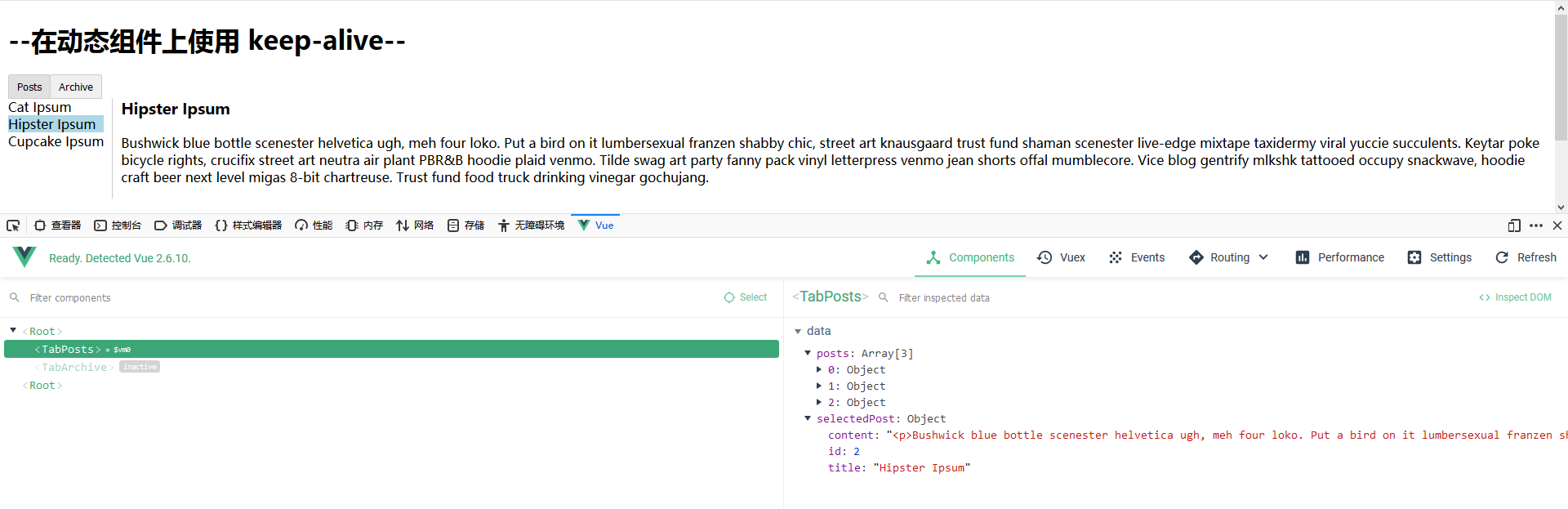
运行效果图:
在动态组件上使用 keep-alive的更多相关文章
- vue深入了解组件——动态组件&异步组件
一.在动态组件上使用 keep-alive 我们之前曾经在一个多标签的界面中使用 is 特性来切换不同的组件: <component v-bind:is="currentTabComp ...
- vue组件---动态组件&异步组件
(1)在动态组件上使用keep-alive 之前曾经在一个多标签的界面中使用 is 特性来切换不同的组件.接下来简单回顾下 <component>元素是vue 里面的一个内置组件.在里面使 ...
- Vue动态组件&异步组件
在动态组件上使用keep-alive 我们之前曾经在一个多标签的界面中使用is特性来切换不同的组件: Vue.js的动态组件模板 <component v-bind:is="curre ...
- 学习笔记:Vue——动态组件&异步组件
动态组件 01.在动态组件上使用keep-alive,保持组件的状态,以避免反复重渲染导致的性能问题. <!-- 失活的组件将会被缓存!--> <keep-alive> < ...
- 深入了解组件- -- 动态组件 & 异步组件
gitHub地址:https://github.com/huangpna/vue_learn/example里面的lesson11 一 在动态组件上使用keep-alive 在这之前我们已经有学习过用 ...
- vue组件上动态添加和删除属性
1.vue组件上动态添加和删除属性 // 添加 this.$set(this.obj, 'propName', val) // 删除 this.$delete(this.obj, 'propName' ...
- C++ 类的动态组件化技术
序言: N年前,我们曾在软件开发上出现了这样的困惑,用VC开发COM组件过于复杂,用VB开发COM组件发现效率低,而且不能实现面向对象的很多特性,例如,继承,多态等.更况且如何快速封装利用历史遗留的大 ...
- vue2入坑随记(二) -- 自定义动态组件
学习了Vue全家桶和一些UI基本够用了,但是用元素的方式使用组件还是不够灵活,比如我们需要通过js代码直接调用组件,而不是每次在页面上通过属性去控制组件的表现.下面讲一下如何定义动态组件. Vue.e ...
- Vue动态组件
前面的话 让多个组件使用同一个挂载点,并动态切换,这就是动态组件.本文将详细介绍Vue动态组件 概述 通过使用保留的 <component> 元素,动态地绑定到它的 is 特性,可以实现动 ...
随机推荐
- "delete this" in C++
Ideally delete operator should not be used for this pointer. However, if used, then following points ...
- Linux 双网卡绑定及Bridge
Linux 双网卡绑定及Bridge 阅读(5,202) 一:linux操作系统下双网卡绑定有七种模式.现在一般的企业都会使用双网卡接入,这样既能添加网络带宽,同时又能做相应的冗余,可以说是好处多多. ...
- oracle name
1.db_name 数据库名 SQL> connect xys/manager as sysdba 已连接. SQL> show user USER 为 "SYS" S ...
- 【C/C++】从矩阵左上角走到右下角
tx的笔试,但是只过了10%,就离谱 #include <bits/stdc++.h> using namespace std; const int maxn = 1010; long d ...
- Python模块和函数
目录 一.基础 二.特殊函数 一.基础 #导入模块 import xxx #调用 xxx.dd() from xxx import xx as dd #导入某个函数,as给函数加别名,调用xx() ...
- cmd窗口连接mongodb服务端
1----->配置环境变量,将mongodb\bin目录配置到path 2----->打开cmd窗口,进入到bin目录,测试mongodb服务端是否在运行:net start mongod ...
- 位置式PID讲解
table { margin: auto } 一.公式拆解 \(PID\)公式展示: \[u(t)=K_p(e(t)+\frac{1}{T_t } ∫_0^te(t)dt+T_D \frac {de( ...
- 资源的批量删除与替换(Project)
<Project2016 企业项目管理实践>张会斌 董方好 编著 资源分配好以后,嗯,很满意! 可是!有人看了不满意,或者自己手贱分配错了,要改? 改就改呗,和分配有什么区别吗? 没有啊! ...
- ViewModel的创建
ViewModel的创建 ViewModel本身只是ViewModel这个类的子类: class MainViewModel: ViewModel() { } 在屏幕旋转UI重建的时候, 它是如何拥有 ...
- 移动端适配文件(引入scss)
把此下代码放入scss文件 使用时候引入scss文件 @charset "UTF-8"; $yh:"Microsoft yahei"; @function rm ...