
Spring Security 基于URL的权限判断
1. FilterSecurityInterceptor 源码阅读
org.springframework.security.web.access.intercept.FilterSecurityInterceptor
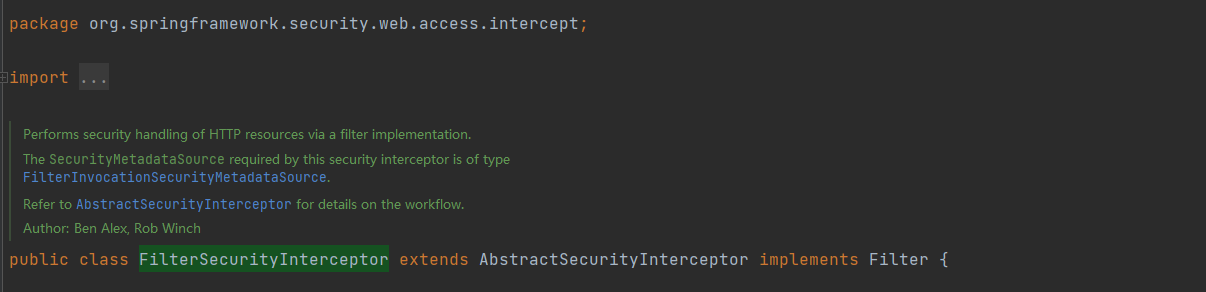
通过过滤器实现对HTTP资源进行安全处理。
该安全拦截器所需的 SecurityMetadataSource 类型为 FilterInvocationSecurityMetadataSource。
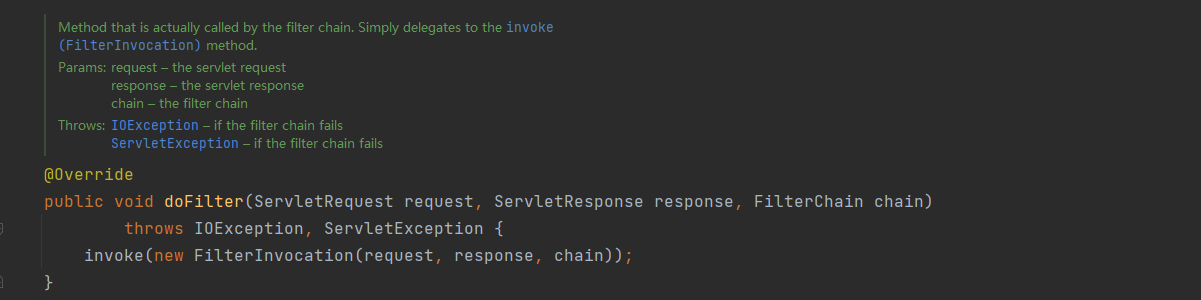
doFilter方法中直接调用invoke方法
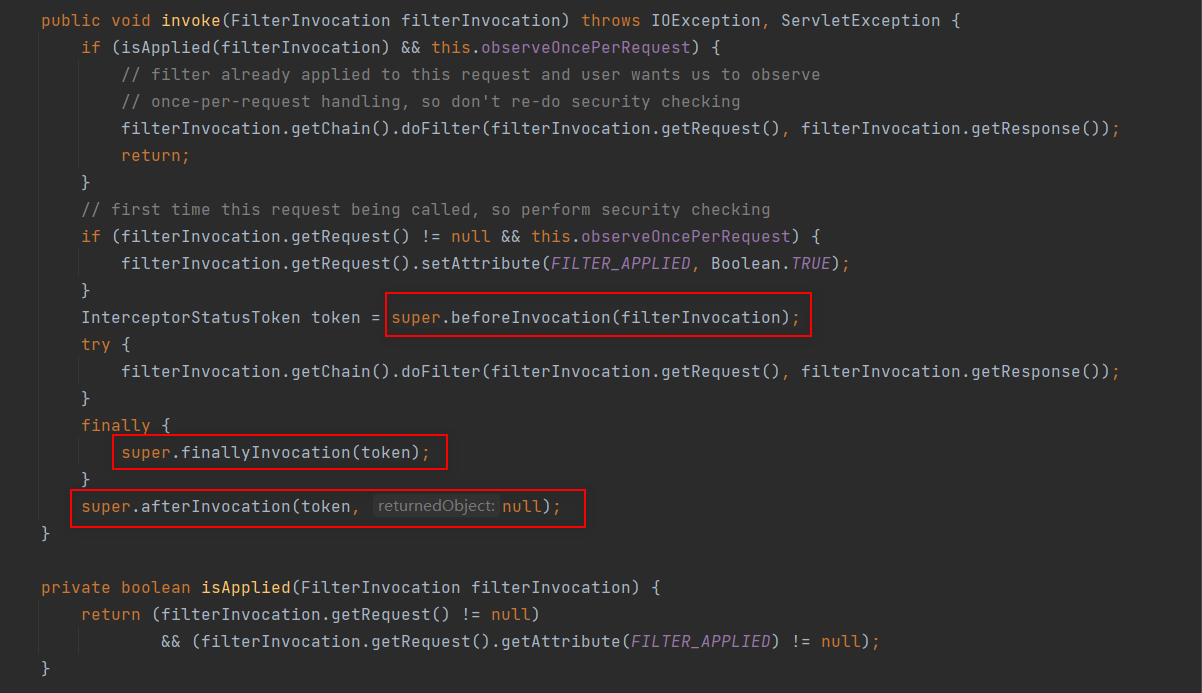
基本都是调用父类的方法,那下面就重点看下父类 AbstractSecurityInterceptor 中相关方法

为安全对象实现安全拦截的抽象类。
AbstractSecurityInterceptor 将确保安全拦截器的正确启动配置。 它还将实现对安全对象调用的正确处理,即:
- 从 SecurityContextHolder 获取 Authentication 对象。
- 通过在SecurityMetadataSource中查找安全对象请求,确定请求是与安全调用还是公共调用相关(PS:简单地来讲,就是看一下请求的资源是不是受保护的,受保护的就是安全调用,就要权限,不受保护的就不需要权限就可以访问)。
- 对于受保护的调用(有一个用于安全对象调用的 ConfigAttributes 列表):
- 如果 Authentication.isAuthenticated() 返回 false,或者 alwaysReauthenticate 为 true,则根据配置的 AuthenticationManager 对请求进行身份验证。 通过身份验证后,将 SecurityContextHolder 上的 Authentication 对象替换为返回值。
- 根据配置的AccessDecisionManager授权请求。
- 通过配置的RunAsManager执行任何run-as替换。
- 将控制权传递回具体的子类,它实际上将继续执行对象。返回一个 InterceptorStatusToken 以便在子类完成对象的执行后,其 finally 子句可以确保 AbstractSecurityInterceptor 被调用并使用 finallyInvocation(InterceptorStatusToken) 正确处理。
- 具体的子类将通过 afterInvocation(InterceptorStatusToken, Object) 方法重新调用 AbstractSecurityInterceptor。
- 如果 RunAsManager 替换了 Authentication 对象,则将 SecurityContextHolder 返回到调用 AuthenticationManager 后存在的对象。
- 如果定义了AfterInvocationManager,则调用它并允许它替换将要返回给调用者的对象。
- 对于公开的调用(安全对象调用没有 ConfigAttributes):
- 如上所述,具体的子类将返回一个 InterceptorStatusToken,在执行完安全对象后,该 InterceptorStatusToken 随后被重新呈现给 AbstractSecurityInterceptor。 AbstractSecurityInterceptor 在它的 afterInvocation(InterceptorStatusToken, Object) 被调用时不会采取进一步的行动。
- 控制再次返回到具体的子类,以及应该返回给调用者的对象。然后子类会将该结果或异常返回给原始调用者。
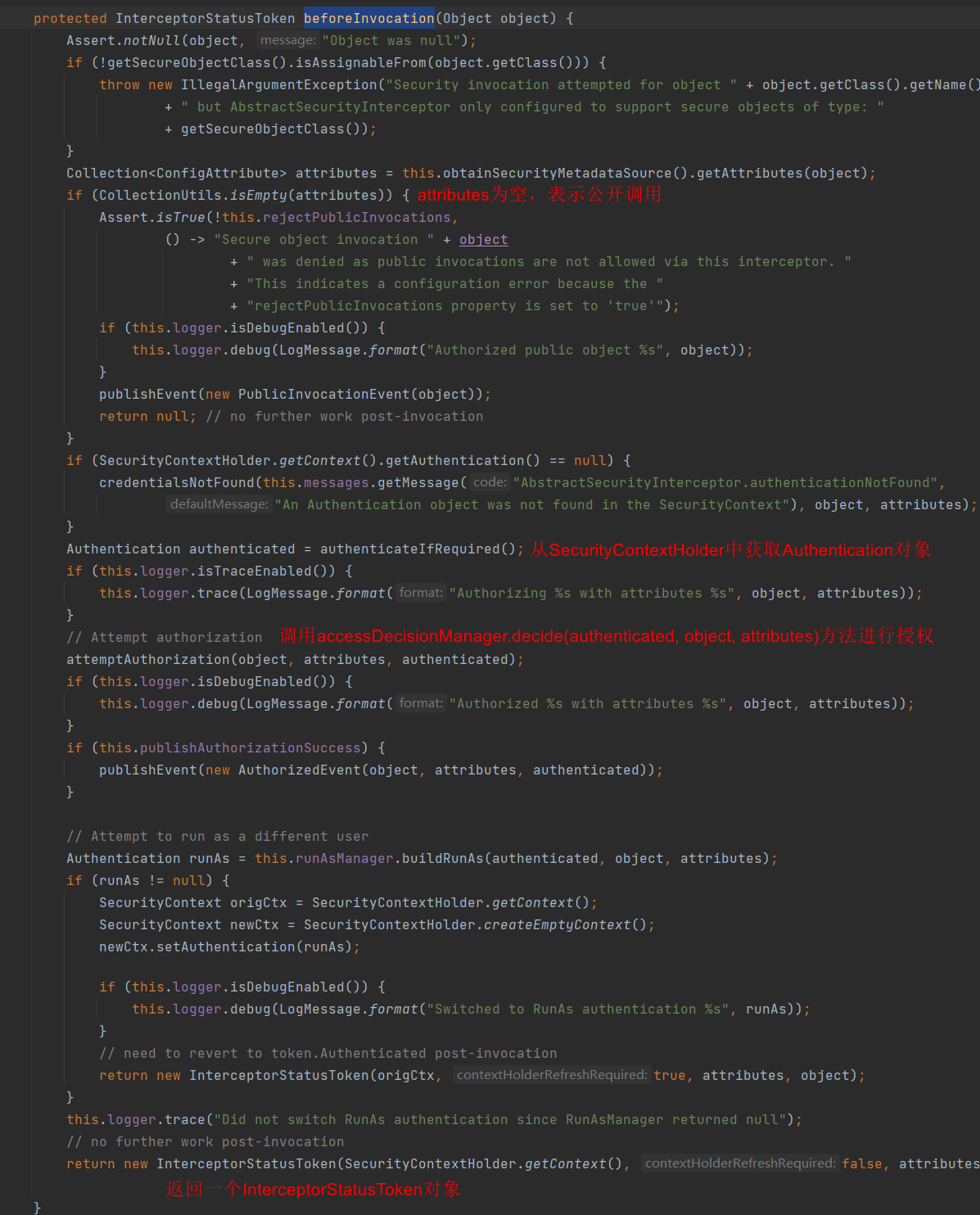
下面具体来看
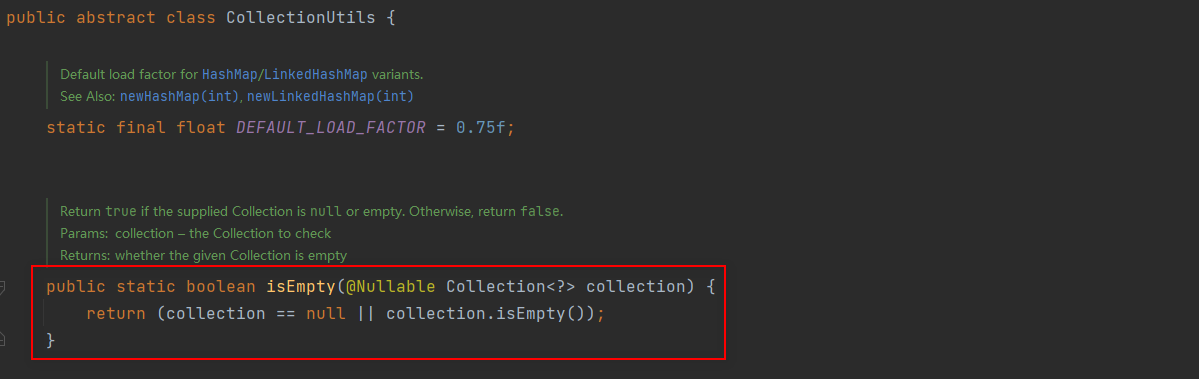
从这里我们可以知道返回null和空集合是一样的。
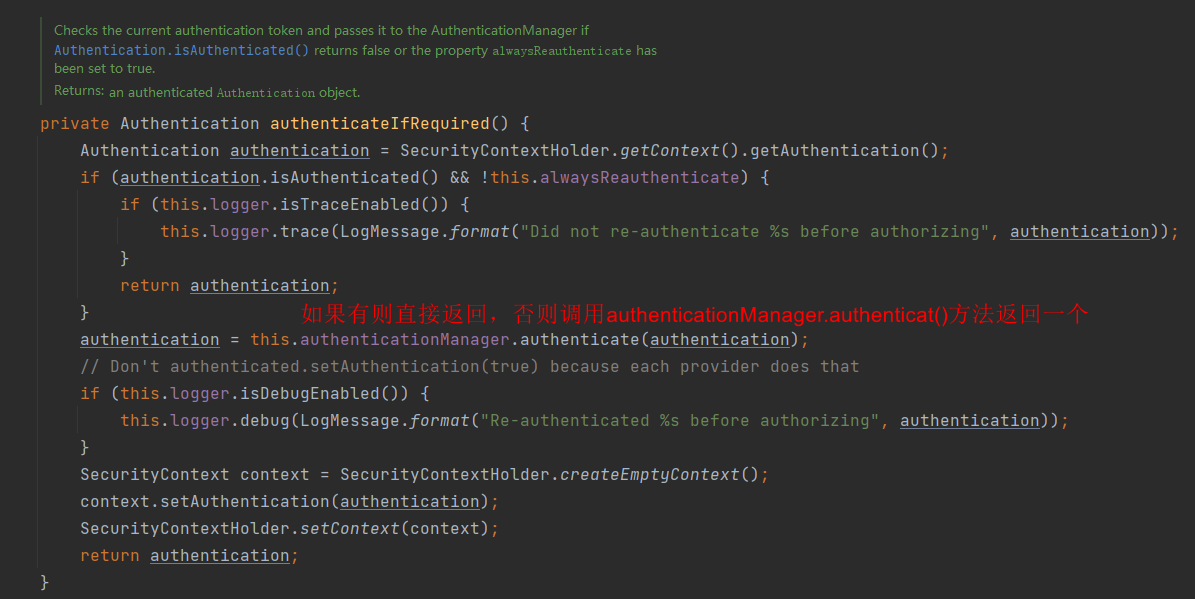
接下来看授权

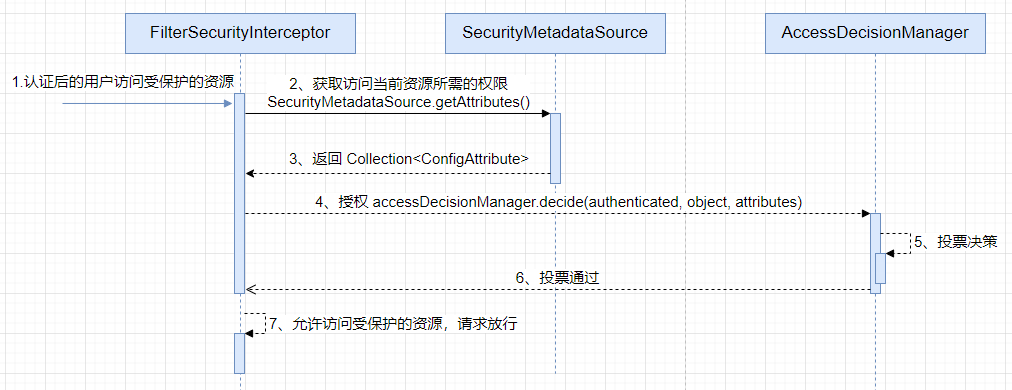
这是我们要重点关注的,可以看到,授权靠的是 accessDecisionManager.decide(authenticated, object, attributes)
因此,我们想要实现自己的基于请求Url的授权只需自定义一个 AccessDecisionManager 即可
接下来,我们来具体实现一下
2. 自定义基于url的授权
先把Spring Security授权的大致流程流程摆在这儿:
自定义FilterInvocationSecurityMetadataSource
package com.example.security.core;

import com.example.security.service.SysPermissionService;

import org.springframework.beans.factory.annotation.Autowired;

import org.springframework.security.access.ConfigAttribute;

import org.springframework.security.access.SecurityConfig;

import org.springframework.security.web.FilterInvocation;

import org.springframework.security.web.access.intercept.FilterInvocationSecurityMetadataSource;

import org.springframework.stereotype.Component;

import org.springframework.util.AntPathMatcher;

import java.util.ArrayList;

import java.util.Collection;

import java.util.List;

import java.util.Map;

/**

 * @Author ChengJianSheng

 * @Date 2021/12/2

 */

@Component

public class MyFilterSecurityMetadataSource implements FilterInvocationSecurityMetadataSource {

    @Autowired

    private SysPermissionService sysPermissionService;

    private final AntPathMatcher antPathMatcher = new AntPathMatcher();

    @Override

    public Collection<ConfigAttribute> getAttributes(Object object) throws IllegalArgumentException {

        FilterInvocation fi = (FilterInvocation) object;

        String url = fi.getRequestUrl();

        String httpMethod = fi.getRequest().getMethod();

        List<ConfigAttribute> attributes = new ArrayList<>();

        Map<String, String> urlRoleMap = sysPermissionService.getAllUrlRole();

        for (Map.Entry<String, String> entry : urlRoleMap.entrySet()) {

            if (antPathMatcher.match(entry.getKey(), url)) {

                return SecurityConfig.createList(entry.getValue());

            }

        }

        // 返回null和空列表是一样的,都表示当前访问的资源不需要权限,所有人都可以访问

        return attributes;

//        return null;

    }

    @Override

    public Collection<ConfigAttribute> getAllConfigAttributes() {

        return null;

    }

    @Override

    public boolean supports(Class<?> clazz) {

        return FilterInvocation.class.isAssignableFrom(clazz);

    }

}
这里需要说明一下,其实Spring Security里面说的role不一定表示的是我们自己建的那个角色表,我们可以这样理解,就是它这里的所谓role只是一个权限标识。我们在建表的时候,通常最基本的是5张表(用户表、角色表、权限表、用户角色关系表、角色权限关系表),我们可以把受保护的资源(通常是一个url)与角色关联起来,建立哪些角色可以访问哪些资源,也可以直接判断资源的权限(通常是权限编码/标识)。
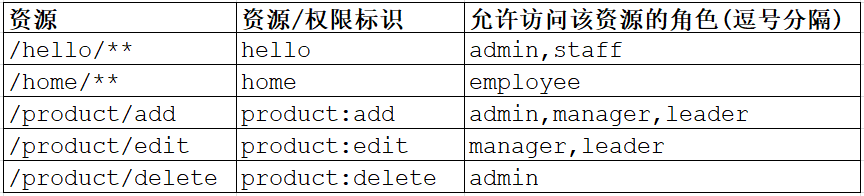
只要有这个关系,剩下的就是写法不同而已。如果你把role理解成资源的权限标识的话,那么返回的Collection<ConfigAttribute>中就最多有一个元素,如果理解成角色的话,那么可能有多个元素。就这么点儿东西,写法不同而已,本质是一样的。
自定义AccessDecisionManager
package com.example.security.core;

import org.springframework.security.access.AccessDecisionManager;

import org.springframework.security.access.AccessDeniedException;

import org.springframework.security.access.ConfigAttribute;

import org.springframework.security.authentication.InsufficientAuthenticationException;

import org.springframework.security.core.Authentication;

import org.springframework.security.core.GrantedAuthority;

import org.springframework.stereotype.Component;

import java.util.Collection;

/**

 * @Author ChengJianSheng

 * @Date 2021/12/2

 */

@Component

public class MyAccessDecisionManager implements AccessDecisionManager {

    @Override

    public void decide(Authentication authentication, Object object, Collection<ConfigAttribute> configAttributes) throws AccessDeniedException, InsufficientAuthenticationException {

        Collection<? extends GrantedAuthority> authorities = authentication.getAuthorities();

        System.out.println(authorities);

        System.out.println(configAttributes);

        //  查看当前用户是否有对应的权限访问该保护资源

        for (ConfigAttribute attribute : configAttributes) {

            for (GrantedAuthority authority : authorities) {

                if (authority.getAuthority().equals(attribute.getAttribute())) {

                    return;

                }

            }

        }

        throw new AccessDeniedException("Access is denied");

    }

    @Override

    public boolean supports(ConfigAttribute attribute) {

        return true;

    }

    @Override

    public boolean supports(Class<?> clazz) {

        return true;

    }

}
decide方法的三个参数,依次表示:
- 调用者(非空)
- 被调用的安全对象
- 与被调用的安全对象关联的配置属性
配置WebSecurityConfig
package com.example.security.config;

import com.example.security.core.MyAccessDecisionManager;

import com.example.security.core.MyFilterSecurityMetadataSource;

import com.example.security.core.MyUserDetailsService;

import org.springframework.beans.factory.annotation.Autowired;

import org.springframework.context.annotation.Bean;

import org.springframework.context.annotation.Configuration;

import org.springframework.security.config.annotation.ObjectPostProcessor;

import org.springframework.security.config.annotation.authentication.builders.AuthenticationManagerBuilder;

import org.springframework.security.config.annotation.web.builders.HttpSecurity;

import org.springframework.security.config.annotation.web.configuration.WebSecurityConfigurerAdapter;

import org.springframework.security.crypto.bcrypt.BCryptPasswordEncoder;

import org.springframework.security.crypto.password.PasswordEncoder;

import org.springframework.security.web.access.intercept.FilterSecurityInterceptor;

/**

 * @Author ChengJianSheng

 * @Date 2021/12/6

 */

@Configuration

public class WebSecurityConfig extends WebSecurityConfigurerAdapter {

    @Autowired

    private MyUserDetailsService myUserDetailsService;

    @Autowired

    private MyAccessDecisionManager myAccessDecisionManager;

    @Autowired

    private MyFilterSecurityMetadataSource myFilterSecurityMetadataSource;

    @Override

    protected void configure(AuthenticationManagerBuilder auth) throws Exception {

        auth.userDetailsService(myUserDetailsService).passwordEncoder(passwordEncoder());

    }

    @Override

    protected void configure(HttpSecurity http) throws Exception {

        http.formLogin()

                .and()

                .authorizeRequests()

                .withObjectPostProcessor(new ObjectPostProcessor<FilterSecurityInterceptor>() {

                    @Override

                    public <O extends FilterSecurityInterceptor> O postProcess(O object) {

                        object.setSecurityMetadataSource(myFilterSecurityMetadataSource);

                        object.setAccessDecisionManager(myAccessDecisionManager);

                        return object;

                    }

                })

                .anyRequest().authenticated();

    }

    @Bean

    public PasswordEncoder passwordEncoder() {

        return new BCryptPasswordEncoder();

    }

}
其它不重要的就直接贴出来了
pom.xml
<?xml version="1.0" encoding="UTF-8"?>

<project xmlns="http://maven.apache.org/POM/4.0.0" xmlns:xsi="http://www.w3.org/2001/XMLSchema-instance"

         xsi:schemaLocation="http://maven.apache.org/POM/4.0.0 https://maven.apache.org/xsd/maven-4.0.0.xsd">

    <modelVersion>4.0.0</modelVersion>

    <parent>

        <groupId>org.springframework.boot</groupId>

        <artifactId>spring-boot-starter-parent</artifactId>

        <version>2.6.1</version>

        <relativePath/> <!-- lookup parent from repository -->

    </parent>

    <groupId>com.example</groupId>

    <artifactId>security-demo</artifactId>

    <version>0.0.1-SNAPSHOT</version>

    <name>security-demo</name>

    <properties>

        <java.version>1.8</java.version>

    </properties>

    <dependencies>

        <dependency>

            <groupId>org.springframework.boot</groupId>

            <artifactId>spring-boot-starter-data-jpa</artifactId>

        </dependency>

        <dependency>

            <groupId>org.springframework.boot</groupId>

            <artifactId>spring-boot-starter-security</artifactId>

        </dependency>

        <dependency>

            <groupId>org.springframework.boot</groupId>

            <artifactId>spring-boot-starter-web</artifactId>

        </dependency>

        <dependency>

            <groupId>mysql</groupId>

            <artifactId>mysql-connector-java</artifactId>

            <scope>runtime</scope>

        </dependency>

        <dependency>

            <groupId>org.projectlombok</groupId>

            <artifactId>lombok</artifactId>

            <optional>true</optional>

        </dependency>

        <dependency>

            <groupId>org.springframework.boot</groupId>

            <artifactId>spring-boot-starter-test</artifactId>

            <scope>test</scope>

        </dependency>

        <dependency>

            <groupId>org.springframework.security</groupId>

            <artifactId>spring-security-test</artifactId>

            <scope>test</scope>

        </dependency>

    </dependencies>

    <build>

        <plugins>

            <plugin>

                <groupId>org.springframework.boot</groupId>

                <artifactId>spring-boot-maven-plugin</artifactId>

                <configuration>

                    <excludes>

                        <exclude>

                            <groupId>org.projectlombok</groupId>

                            <artifactId>lombok</artifactId>

                        </exclude>

                    </excludes>

                </configuration>

            </plugin>

        </plugins>

    </build>

</project>
application.yml
spring:

  datasource:

    url: jdbc:mysql://localhost:3306/demo126?serverTimezone=Asia/Shanghai&characterEncoding=utf8&useSSL=false

    driver-class-name: com.mysql.cj.jdbc.Driver

    username: root

    password: 123456

  jpa:

    database: mysql

    show-sql: true
SysPermissionEntity.java
package com.example.security.entity;

import lombok.Getter;

import lombok.Setter;

import javax.persistence.*;

import java.io.Serializable;

/**

 * @Author ChengJianSheng

 * @Date 2021/12/6

 */

@Getter

@Setter

@Entity

@Table(name = "sys_permission")

public class SysPermissionEntity implements Serializable {

    @Id

    @GeneratedValue(strategy = GenerationType.AUTO)

    private Integer id;

    /** 权限编码(标识) */

    private String code;

    /** 权限名称 */

    private String name;

    /** 权限URL */

    private String url;

}
SysRoleEntity.java
package com.example.security.entity;

import lombok.Getter;

import lombok.Setter;

import javax.persistence.*;

import java.io.Serializable;

import java.util.Set;

/**

 * @Author ChengJianSheng

 * @Date 2021/12/6

 */

@Getter

@Setter

@Entity

@Table(name = "sys_role")

public class SysRoleEntity implements Serializable {

    @Id

    @GeneratedValue(strategy = GenerationType.AUTO)

    private Integer id;

    /** 角色编码 */

    private String code;

    /** 角色名称 */

    private String name;

    @ManyToMany

    @JoinTable(name = "sys_role_permission", joinColumns = {@JoinColumn(name = "role_id")}, inverseJoinColumns = {@JoinColumn(name = "permission_id")})

    private Set<SysPermissionEntity> permissions;

}
SysUserEntity.java
package com.example.security.entity;

import lombok.Getter;

import lombok.Setter;

import javax.persistence.*;

import java.io.Serializable;

import java.util.Set;

/**

 * @Author ChengJianSheng

 * @Date 2021/12/6

 */

@Getter

@Setter

@Entity

@Table(name = "sys_user")

public class SysUserEntity implements Serializable {

    @Id

    @GeneratedValue(strategy = GenerationType.AUTO)

    private Integer id;

    /** 用户名 */

    private String username;

    /** 密码 */

    private String password;

    @ManyToMany

    @JoinTable(name = "sys_user_role",

            joinColumns = {@JoinColumn(name = "user_id")},

            inverseJoinColumns = {@JoinColumn(name = "role_id")})

    private Set<SysRoleEntity> roles;

}
SysUserRepository.java
package com.example.security.repository;

import com.example.security.entity.SysUserEntity;

import org.springframework.data.jpa.repository.JpaRepository;

import org.springframework.data.jpa.repository.JpaSpecificationExecutor;

/**

 * @Author ChengJianSheng

 * @Date 2021/12/6

 */

public interface SysUserRepository extends JpaRepository<SysUserEntity, Integer>, JpaSpecificationExecutor<SysUserEntity> {

    SysUserEntity findByUsername(String username);

}
SysPermissionServiceImpl.java
package com.example.security.service.impl;

import com.example.security.entity.SysPermissionEntity;

import com.example.security.repository.SysPermissionRepository;

import com.example.security.service.SysPermissionService;

import org.springframework.stereotype.Service;

import javax.annotation.Resource;

import java.util.List;

import java.util.Map;

import java.util.stream.Collectors;

/**

 * @Author ChengJianSheng

 * @Date 2021/12/6

 */

@Service

public class SysPermissionServiceImpl implements SysPermissionService {

    @Resource

    private SysPermissionRepository sysPermissionRepository;

    @Override

    public Map<String, String> getAllUrlRole() {

        List<SysPermissionEntity> list = sysPermissionRepository.findAll();

        return list.stream().collect(Collectors.toMap(SysPermissionEntity::getUrl, SysPermissionEntity::getCode));

    }

}
MyUserDetails.java
package com.example.security.domain;

import lombok.AllArgsConstructor;

import lombok.NoArgsConstructor;

import org.springframework.security.core.GrantedAuthority;

import org.springframework.security.core.authority.SimpleGrantedAuthority;

import org.springframework.security.core.userdetails.UserDetails;

import java.util.Collection;

import java.util.Set;

/**

 * @Author ChengJianSheng

 * @Date 2021/12/6

 */

@NoArgsConstructor

@AllArgsConstructor

public class MyUserDetails implements UserDetails {

    private String username;

    private String password;

    private boolean enabled;

    private Set<SimpleGrantedAuthority> authorities;

    @Override

    public Collection<? extends GrantedAuthority> getAuthorities() {

        return authorities;

    }

    @Override

    public String getPassword() {

        return password;

    }

    @Override

    public String getUsername() {

        return username;

    }

    @Override

    public boolean isAccountNonExpired() {

        return true;

    }

    @Override

    public boolean isAccountNonLocked() {

        return true;

    }

    @Override

    public boolean isCredentialsNonExpired() {

        return true;

    }

    @Override

    public boolean isEnabled() {

        return enabled;

    }

}
MyUserDetailsService.java
package com.example.security.core;

import com.example.security.domain.MyUserDetails;

import com.example.security.entity.SysPermissionEntity;

import com.example.security.entity.SysUserEntity;

import com.example.security.repository.SysUserRepository;

import org.springframework.security.core.authority.SimpleGrantedAuthority;

import org.springframework.security.core.userdetails.UserDetails;

import org.springframework.security.core.userdetails.UserDetailsService;

import org.springframework.security.core.userdetails.UsernameNotFoundException;

import org.springframework.stereotype.Service;

import javax.annotation.Resource;

import javax.transaction.Transactional;

import java.util.Set;

import java.util.stream.Collectors;

/**

 * @Author ChengJianSheng

 * @Date 2021/12/6

 */

@Transactional

@Service

public class MyUserDetailsService implements UserDetailsService {

    @Resource

    private SysUserRepository sysUserRepository;

    @Override

    public UserDetails loadUserByUsername(String username) throws UsernameNotFoundException {

        SysUserEntity sysUserEntity = sysUserRepository.findByUsername(username);

        if (null == sysUserEntity) {

            throw new UsernameNotFoundException("用户不存在");

        }

        Set<SimpleGrantedAuthority> authorities = sysUserEntity.getRoles().stream()

                .flatMap(roleId->roleId.getPermissions().stream())

                .map(SysPermissionEntity::getCode)

                .map(SimpleGrantedAuthority::new)

                .collect(Collectors.toSet());

        return new MyUserDetails(sysUserEntity.getUsername(), sysUserEntity.getPassword(), true, authorities);

    }

}
HelloController.java
package com.example.security.controller;

import org.springframework.web.bind.annotation.GetMapping;

import org.springframework.web.bind.annotation.RequestMapping;

import org.springframework.web.bind.annotation.RestController;

/**

 * @Author ChengJianSheng

 * @Date 2021/12/6

 */

@RestController

@RequestMapping("/hello")

public class HelloController {

    @GetMapping("/sayHello")

    public String sayHello() {

        return "Hello";

    }

    @GetMapping("/sayHi")

    public String sayHi() {

        return "Hi";

    }

}
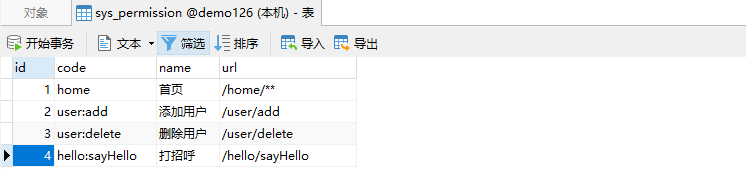

数据库脚本如下
SET NAMES utf8mb4;

SET FOREIGN_KEY_CHECKS = 0;

-- ----------------------------

-- Table structure for sys_permission

-- ----------------------------

DROP TABLE IF EXISTS `sys_permission`;

CREATE TABLE `sys_permission`  (

  `id` int(11) NOT NULL AUTO_INCREMENT,

  `code` varchar(255) CHARACTER SET utf8 COLLATE utf8_general_ci NOT NULL COMMENT '权限编码(标识)',

  `name` varchar(255) CHARACTER SET utf8 COLLATE utf8_general_ci NOT NULL COMMENT '权限名称',

  `url` varchar(255) CHARACTER SET utf8 COLLATE utf8_general_ci NOT NULL COMMENT '权限URL',

  PRIMARY KEY (`id`) USING BTREE

) ENGINE = InnoDB AUTO_INCREMENT = 5 CHARACTER SET = utf8 COLLATE = utf8_general_ci ROW_FORMAT = Dynamic;

-- ----------------------------

-- Records of sys_permission

-- ----------------------------

INSERT INTO `sys_permission` VALUES (1, 'home', '首页', '/home/**');

INSERT INTO `sys_permission` VALUES (2, 'user:add', '添加用户', '/user/add');

INSERT INTO `sys_permission` VALUES (3, 'user:delete', '删除用户', '/user/delete');

INSERT INTO `sys_permission` VALUES (4, 'hello:sayHello', '打招呼', '/hello/sayHello');

-- ----------------------------

-- Table structure for sys_role

-- ----------------------------

DROP TABLE IF EXISTS `sys_role`;

CREATE TABLE `sys_role`  (

  `id` int(11) NOT NULL AUTO_INCREMENT,

  `code` varchar(255) CHARACTER SET utf8 COLLATE utf8_general_ci NOT NULL COMMENT '角色编码',

  `name` varchar(255) CHARACTER SET utf8 COLLATE utf8_general_ci NOT NULL COMMENT '角色名称',

  PRIMARY KEY (`id`) USING BTREE

) ENGINE = InnoDB AUTO_INCREMENT = 4 CHARACTER SET = utf8 COLLATE = utf8_general_ci ROW_FORMAT = Dynamic;

-- ----------------------------

-- Records of sys_role

-- ----------------------------

INSERT INTO `sys_role` VALUES (1, 'employee', '员工');

INSERT INTO `sys_role` VALUES (2, 'engineer', '工程师');

INSERT INTO `sys_role` VALUES (3, 'leader', '组长');

-- ----------------------------

-- Table structure for sys_role_permission

-- ----------------------------

DROP TABLE IF EXISTS `sys_role_permission`;

CREATE TABLE `sys_role_permission`  (

  `id` int(11) NOT NULL AUTO_INCREMENT,

  `role_id` int(11) NOT NULL COMMENT '角色ID',

  `permission_id` int(11) NOT NULL COMMENT '权限ID',

  PRIMARY KEY (`id`) USING BTREE

) ENGINE = InnoDB AUTO_INCREMENT = 8 CHARACTER SET = utf8 COLLATE = utf8_general_ci ROW_FORMAT = Dynamic;

-- ----------------------------

-- Records of sys_role_permission

-- ----------------------------

INSERT INTO `sys_role_permission` VALUES (1, 1, 1);

INSERT INTO `sys_role_permission` VALUES (2, 2, 1);

INSERT INTO `sys_role_permission` VALUES (3, 2, 2);

INSERT INTO `sys_role_permission` VALUES (4, 3, 1);

INSERT INTO `sys_role_permission` VALUES (5, 3, 2);

INSERT INTO `sys_role_permission` VALUES (6, 3, 3);

INSERT INTO `sys_role_permission` VALUES (7, 3, 4);

-- ----------------------------

-- Table structure for sys_user

-- ----------------------------

DROP TABLE IF EXISTS `sys_user`;

CREATE TABLE `sys_user`  (

  `id` int(11) NOT NULL AUTO_INCREMENT,

  `username` varchar(255) CHARACTER SET utf8 COLLATE utf8_general_ci NOT NULL COMMENT '用户名',

  `password` varchar(255) CHARACTER SET utf8 COLLATE utf8_general_ci NOT NULL COMMENT '密码',

  PRIMARY KEY (`id`) USING BTREE

) ENGINE = InnoDB AUTO_INCREMENT = 2 CHARACTER SET = utf8 COLLATE = utf8_general_ci ROW_FORMAT = Dynamic;

-- ----------------------------

-- Records of sys_user

-- ----------------------------

INSERT INTO `sys_user` VALUES (1, 'zhangsan', '$2a$10$e4wFsFHQCNjPe5tTJMPkRuKGwmMGC45pfjMupY9nwbTuoKQ0bKc/u');

-- ----------------------------

-- Table structure for sys_user_role

-- ----------------------------

DROP TABLE IF EXISTS `sys_user_role`;

CREATE TABLE `sys_user_role`  (

  `id` int(11) NOT NULL AUTO_INCREMENT,

  `user_id` int(11) NOT NULL COMMENT '用户ID',

  `role_id` int(11) NOT NULL COMMENT '角色ID',

  PRIMARY KEY (`id`) USING BTREE

) ENGINE = InnoDB AUTO_INCREMENT = 4 CHARACTER SET = utf8 COLLATE = utf8_general_ci ROW_FORMAT = Dynamic;

-- ----------------------------

-- Records of sys_user_role

-- ----------------------------

INSERT INTO `sys_user_role` VALUES (1, 1, 1);

INSERT INTO `sys_user_role` VALUES (2, 1, 2);

INSERT INTO `sys_user_role` VALUES (3, 1, 3);

SET FOREIGN_KEY_CHECKS = 1;
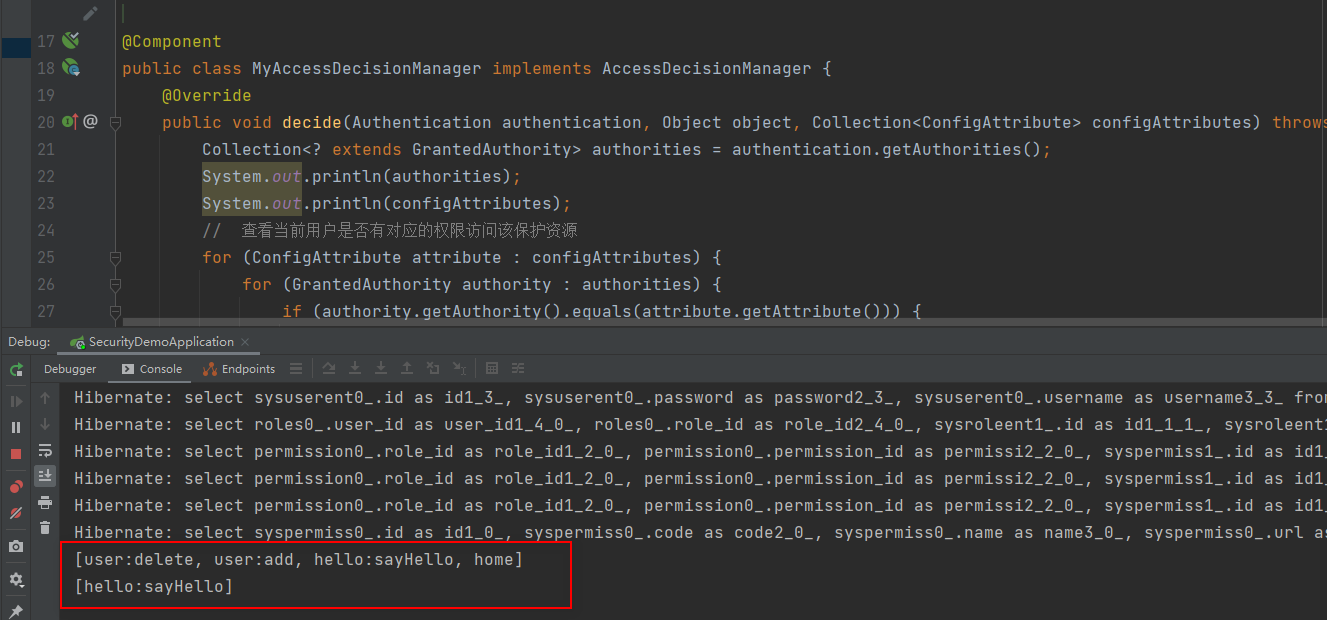
浏览器访问 http://localhost:8080/hello/sayHi 正常返回,不用登录,因为没有在sys_permission表中配置该资源,也就是说它不是一个受保护的资源(公开资源)
访问http://localhost:8080/hello/sayHello则需要先登录,用zhangsan登录成功以后正确返回

项目结构如下

Spring Security 基于URL的权限判断的更多相关文章
- Spring Security 动态url权限控制(三)
一.前言 本篇文章将讲述Spring Security 动态分配url权限,未登录权限控制,登录过后根据登录用户角色授予访问url权限 基本环境 spring-boot 2.1.8 mybatis-p ...
- spring security 3.1 实现权限控制
spring security 3.1 实现权限控制 简单介绍:spring security 实现的权限控制,能够分别保护后台方法的管理,url连接訪问的控制,以及页面元素的权限控制等, secur ...
- 在ASP.NET MVC中实现基于URL的权限控制
本示例演示了在ASP.NET MVC中进行基于URL的权限控制,由于是基于URL进行控制的,所以只能精确到页.这种权限控制的优点是可以在已有的项目上改动极少的代码来增加权限控制功能,和项目本身的耦合度 ...
- 基于Spring Security和 JWT的权限系统设计
写在前面 关于 Spring Security Web系统的认证和权限模块也算是一个系统的基础设施了,几乎任何的互联网服务都会涉及到这方面的要求.在Java EE领域,成熟的安全框架解决方案一般有 A ...
- springboot整合security实现基于url的权限控制
权限控制基本上是任何一个web项目都要有的,为此spring为我们提供security模块来实现权限控制,网上找了很多资料,但是提供的demo代码都不能完全满足我的需求,因此自己整理了一版. 在上代码 ...
- spring boot系列--spring security (基于数据库)登录和权限控制
先说一下AuthConfig.java Spring Security的主要配置文件之一 AuthConfig 1 @Configuration 2 @EnableWebSecurity 3 publ ...
- Spring Security(15)——权限鉴定结构
目录 1.1 权限 1.2 调用前的处理 1.2.1 AccessDecisionManager 1.2.2 基于投票的AccessDecisionManager实 ...
- Spring Security(14)——权限鉴定基础
目录 1.1 Spring Security的AOP Advice思想 1.2 AbstractSecurityInterceptor 1.2.1 ConfigAttribute ...
- Spring Security基于Java配置
Maven依赖 <dependencies> <!-- ... other dependency elements ... --> <dependency> < ...
随机推荐
- 用Python画如此漂亮的专业插图 ?简直So easy!
本文整理自知乎问答,仅用于学术分享,著作权归作者所有.如有侵权,请联系我删文处理.多多转发,多多学习! 方法一 强烈推荐 Python 的绘图模块 matplotlib: python plottin ...
- Python SyntaxError: Missing parentheses in call to 'print'
下面的代码 print "hello world" 会出现下面的错误 SyntaxError: Missing parentheses in call to 'print' 因为写 ...
- Obsidian中使用Calendar插件快捷建立日记、周记
Calendar插件 Calendar插件是我第一个安装使用的插件,插件可以帮助我们很便捷的记录每天的工作 插件效果图 插件下载 下载地址 插件安装 # Obsidian如何手动下载并安装插件-以看板 ...
- Gitee图床设置
https://gitee.com/ 创建新仓库 点击右上角加号->新建仓库,填写基本信息后点击下面的创建即可 https://gitee.com/projects/new 创建新令牌 点击设置 ...
- Linux环境下安装中山大学东校区iNode客户端
在中山大学登录校园网有两种方式,一种是连接WiFi,另一种是连接网线.这两种上网方式都需要用到NetID,但是连接网线的话还需要使用到iNode客户端(指东校区). Windows下iNode客户端的 ...
- 【python+postman接口自动化测试】(1)网络基础知识
一.IP地址 就像每个人都有一个身份证号码 IP地址是IP协议提供的一种统一的地址格式,它为互联网上的每一个网络和每一台主机分配一个逻辑地址. 查看IP命令: Windows: ipconfig Li ...
- Spark中的两种模式
两种模式 client-了解 cluster模式-开发使用 操作 1.需要Yarn集群 2.历史服务器 3.提交任务的的客户端工具-spark-submit命令 4.待提交的spark任务/程序的字节 ...
- 从环境搭建到回归神经网络案例,带你掌握Keras
摘要:Keras作为神经网络的高级包,能够快速搭建神经网络,它的兼容性非常广,兼容了TensorFlow和Theano. 本文分享自华为云社区<[Python人工智能] 十六.Keras环境搭建 ...
- 【JavaScript实用技巧(二)】Js操作DOM(由问题引发的文章改版,新人大佬都可)
[JavaScript实用技巧(二)]Js操作DOM(由问题引发的文章改版,新人大佬都可!) 博客说明 文章所涉及的资料来自互联网整理和个人总结,意在于个人学习和经验汇总,如有什么地方侵权,请联系本人 ...
- JAVA学习(七)
今天讲师又讲了一个多小时类的注意点,例如书写格式什么的,这些我c++中都学过了,所以很快看完. 然后又讲了IDE,我选择的是IntelliJ IDEA. 刚开始官网登不上去,花了一个小时,从网上翻了各 ...