
Python+Requests+Xpath实现动态参数获取实战
1、古诗文网直接登录时,用浏览器F12抓取登录接口的入参,我们可以看到框起来的key对应的value是动态参数生成的,需获取到;
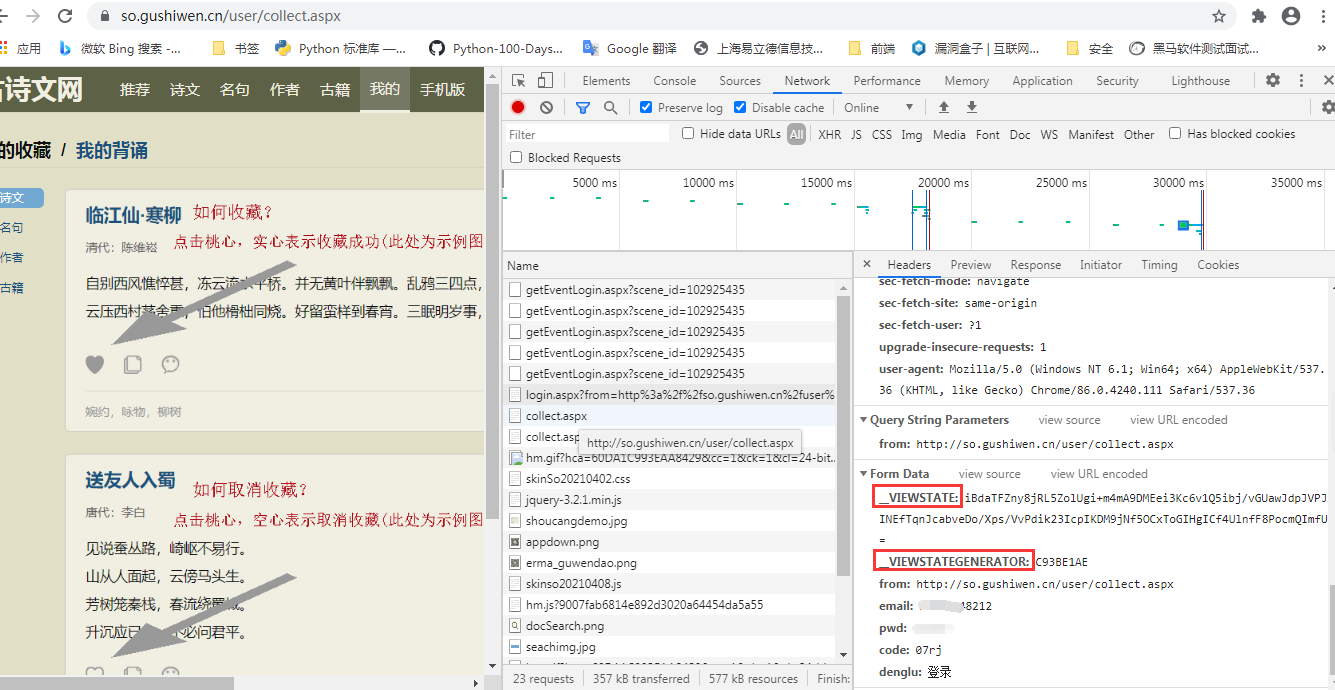
2、登录接口入参的值一般是登录接口返回的原数据值,若刷新后接口与对应源码(element)的值存在一个为空一个有值,那么久看下是否存在ajax请求,再获取动态参数的值
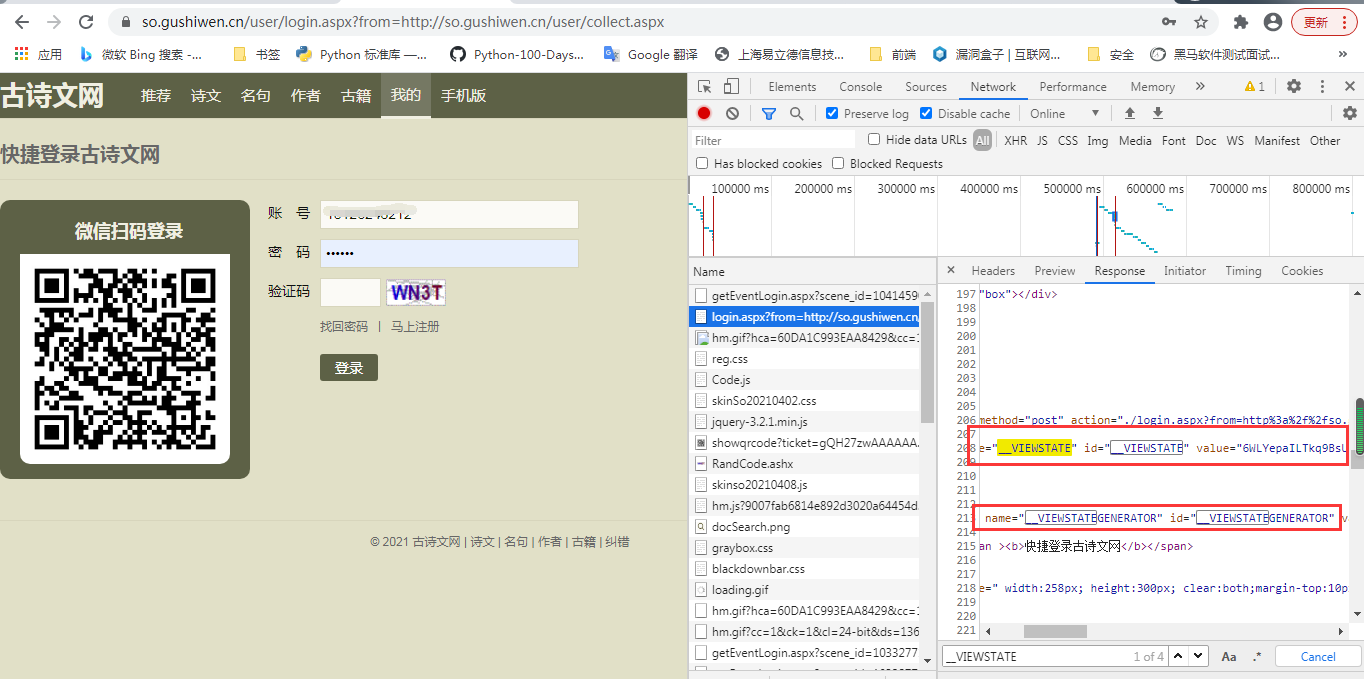
3、我们获取动态参数的值,使用到etree中的xpath进行解析
from TestCase.Api_Review.ClassCode import Chaojiying_Client
from lxml import etree
import requests
import os
s = requests.Session()

# 新建文件夹
if not os.path.exists('./gushiwenLibs'):
    os.makedirs('./gushiwenLibs')
# 对验证码图片进行抓捕及识别
url = 'https://so.gushiwen.cn/user/login.aspx?from=http://so.gushiwen.cn/user/collect.aspx'
headers = {
    'User-Agent':'Mozilla/5.0 (Windows NT 6.1; Win64; x64) AppleWebKit/537.36 (KHTML, like Gecko) Chrome/86.0.4240.111 Safari/537.36'
}
page_text = s.get(url=url,headers=headers,proxies=None).text
tree = etree.HTML(page_text)
img_url = "https://so.gushiwen.cn/RandCode.ashx"+tree.xpath('//*[@id="imgCode"]/@src')[0]
__VIEWSTATE = tree.xpath('//*[@id="__VIEWSTATE"]/@value')[0]
__VIEWSTATEGENERATOR = tree.xpath('//*[@id="__VIEWSTATEGENERATOR"]/@value')[0]

4、登录界面的图片验证码,我们先获取对应的图形验证码,下载到本地,然后再使用第三方平台进行提取
参考此链接:Python+Request库+第三方平台实现验证码识别示例
img_src = s.get(url=img_url,headers=headers).content
# 图片存储的路径
fileName = './gushiwenLibs/'+'code_img_data.jpg'
with open(fileName, 'wb') as fp:
    fp.write(img_src)
# 使用超级鹰平台实现验证码识别
chaojiying = Chaojiying_Client('TeacherTao', 'TeacherTao', '96001')
with open(fileName, 'rb') as fp:
     img = fp.read()
result = chaojiying.PostPic(img, 1004)['pic_str']
# print(result)
5、最后再使用登录接口发起请求,我们使用Session进行登录的,因为请求头中携带Cookies进行登录了
# 登录Url
url_login = 'https://so.gushiwen.cn/user/login.aspx?from=http://so.gushiwen.cn/user/collect.aspx'
data = {
    '__VIEWSTATE': __VIEWSTATE,
    '__VIEWSTATEGENERATOR': __VIEWSTATEGENERATOR,
    'from': 'http://so.gushiwen.cn/user/collect.aspx',
    'email': '18126248212',
    'pwd': 'qqq123',
    'code': result,
    'denglu': '登录',
}

post_text = s.post(url_login,data=data,headers=headers)
# print(post_text.text)
fileName1 = './gushiwenLibs/'+'gushiren.html'
with open(fileName1, 'w',encoding='utf-8') as fp:
    fp.write(post_text.text)

6、整个项目的源码:
from TestCase.Api_Review.ClassCode import Chaojiying_Client
from lxml import etree
import requests
import os

s = requests.Session()

# 新建文件夹
if not os.path.exists('./gushiwenLibs'):
    os.makedirs('./gushiwenLibs')
# 对验证码图片进行抓捕及识别
url = 'https://so.gushiwen.cn/user/login.aspx?from=http://so.gushiwen.cn/user/collect.aspx'
headers = {
    'User-Agent':'Mozilla/5.0 (Windows NT 6.1; Win64; x64) AppleWebKit/537.36 (KHTML, like Gecko) Chrome/86.0.4240.111 Safari/537.36'
}
page_text = s.get(url=url,headers=headers,proxies=None).text
tree = etree.HTML(page_text)
img_url = "https://so.gushiwen.cn/RandCode.ashx"+tree.xpath('//*[@id="imgCode"]/@src')[0]
__VIEWSTATE = tree.xpath('//*[@id="__VIEWSTATE"]/@value')[0]
__VIEWSTATEGENERATOR = tree.xpath('//*[@id="__VIEWSTATEGENERATOR"]/@value')[0]
img_src = s.get(url=img_url,headers=headers).content
# 图片存储的路径
fileName = './gushiwenLibs/'+'code_img_data.jpg'
with open(fileName, 'wb') as fp:
    fp.write(img_src)

# 使用超级鹰平台实现验证码识别
chaojiying = Chaojiying_Client('TeacherTao', 'TeacherTao', '96001')
with open(fileName, 'rb') as fp:
     img = fp.read()
result = chaojiying.PostPic(img, 1004)['pic_str']
print(result)

# 登录Url
url_login = 'https://so.gushiwen.cn/user/login.aspx?from=http://so.gushiwen.cn/user/collect.aspx'
data = {
    '__VIEWSTATE': __VIEWSTATE,
    '__VIEWSTATEGENERATOR': __VIEWSTATEGENERATOR,
    'from': 'http://so.gushiwen.cn/user/collect.aspx',
    'email': '账号',
    'pwd': '密码',
    'code': result,
    'denglu': '登录',
}

post_text = s.post(url_login,data=data,headers=headers)
# print(post_text.text)
fileName1 = './gushiwenLibs/'+'gushiren.html'
with open(fileName1, 'w',encoding='utf-8') as fp:
    fp.write(post_text.text)
Python+Requests+Xpath实现动态参数获取实战的更多相关文章
- Python+requests 发送简单请求--》获取响应状态--》获取请求响应数据
Python+requests 发送简单请求-->获取响应状态-->获取请求响应数据 1.环境:安装了Python和vscode编译器(Python自带的编译器也ok).fiddler抓包 ...
- 【学习笔记】--- 老男孩学Python,day10, 函数, 动态参数 命名空间\作用域 global nonlocal
1. 动态参数 位置参数的动态参数: *args 关键字参数的动态参数 : **kwargs 顺序:位置---*args---默认值---**kwargs 在形参上*聚合, **聚合 在实参上*打散, ...
- python函数知识二 动态参数、函数的注释、名称空间、函数的嵌套、global,nonlocal
6.函数的动态参数 *args,**kwargs:能接受动态的位置参数和动态的关键字参数 *args -- tuple *kwargs -- dict 动态参数优先级:位置参数 > 动态位置参数 ...
- python requests + xpath 获取分页详情页数据存入到txt文件中
直接代码,如有不懂请加群讨论# *-* coding:utf-8 *-* #import jsonimport requestsimport pytesseractimport timeimport ...
- Python+Requests+Xpath(解析)爬取某站点简历图片(数据分析三)
1.环境安装 pip install lxml 2.解析原理 使用通用爬虫爬取网页数据 实例化etree对象,且将页面数据加载到该对象中 使用xpath函数结合xpath表达式进行标签定位和指定数据提 ...
- python+requests传两种参数体
在JMeter请求参数中,我们了解到,在做接口测试时,发送请求的参数有两种格式,一种是Parameters,一种是JSON.怎么区分请看 https://www.cnblogs.com/testlea ...
- 跟着太白老师学python 10day 函数的动态参数 *args, **kwargs, 形参的位置顺序
1. *args 接收实参的位置参数, **kwargs接收实参的关键字参数 def func(*args, **kwargs): print(args, kwargs) func(1, 2, 3, ...
- python 函数动态参数,名称空间,global,nonlocal
##################################总结######################################动态参数 *args:位置参数动态传参,接收到的是元 ...
- python 函数 动态参数 和嵌套
1.动态参数 是可以接收任意的参数.一种方式, 1,位置的动态传参, 写法是: *参数名 接收的参数是tuple类型举个例子:def yue(*food): print(food)yue(" ...
随机推荐
- 编译ONNX模型Compile ONNX Models
编译ONNX模型Compile ONNX Models 本文是一篇介绍如何使用Relay部署ONNX模型的说明. 首先,必须安装ONNX包. 一个快速的解决方案是安装protobuf编译器,然后 pi ...
- 解决:ImportError: DLL load failed while importing _sqlite3: 找不到指定的模块。
Django框架学习第一步,创建一个Django工程. 本次采用的是创建虚拟环境来创建Django工程.本地解释器采用anaconda ,内置Python3.8 在pycharm中报错: 内容如下:I ...
- Eclipse修改默认的语言编码设置,处理乱码
Eclipse中设置:
- python 数据写入json文件时中文显示Unicode编码问题
一.问题描述 import json dir = { '春晓':'asfffa', '春眠不觉晓' : '处处闻啼鸟', '夜来风雨声' : 56789, 'asdga':'asdasda' } fp ...
- Python中xml.etree.ElementTree读写xml文件实例
import osimport xml.etree.ElementTree as ET'''Python 标准库中,提供了6种可以用于处理XML的包,本文举实例说明第6种1.xml.dom2.xml. ...
- Nginx 配置文件介绍
目录 1.1 常用命令 1.2 Nginx的配置文件结构 1.3 Nginx的全局配置 1.4 HTTP服务器配置 1.5 HttpGzip配置 1.6 负载均衡配置 1.7 server虚拟主机配置 ...
- css--常见左右盒子高度自适应布局
前言 前端开发工程师最基础的技能要求是根据 ui 设计稿还原网页,这就缺少不了必要的网页布局,首先看下最近小伙伴问我的一个问题,他说一个网页有左右两个部分,左右两个部分的高度都不固定,要使得右部分的宽 ...
- JavaScript中基本数据类型和引用数据类型的区别(栈——堆)
JavaScript中基本数据类型和引用数据类型的区别 1.基本数据类型和引用数据类型 ECMAScript包括两个不同类型的值:基本数据类型和引用数据类型. 基本数据类型指的是简单的数据段,引用数据 ...
- csps前小结
冒着题没改完颓废被发现的风险来写博客 好像离csps只剩两天了,然而没啥感觉 最近考试有时考得还算可以,有时也会很炸 今天考试事实上心态啥崩,因为T1结论题一直没思路,想了一个小时连暴力都没打 过了一 ...
- 【题解】Luogu p2964 BZOJ 2017[Usaco2009 Nov]硬币游戏
题目描述 Farmer John's cows like to play coin games so FJ has invented with a new two-player coin game c ...