
Semaphore 类 的使用理解C#
示例
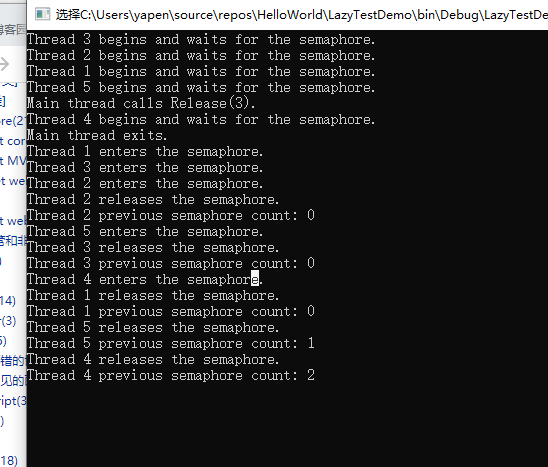
下面的代码示例创建一个信号量,其最大计数为3,初始计数为零。 该示例启动五个线程,这会阻止等待信号量。 主线程使用 Release(Int32) 方法重载将信号量计数增加到其最大值,从而允许三个线程进入信号量。 每个线程使用 Thread.Sleep 方法等待一秒,以模拟工作,然后调用 Release() 方法重载以释放信号量。 每次释放信号灯时,都将显示以前的信号量计数。 控制台消息跟踪信号量使用。 每个线程的模拟工作时间间隔略有增加,使输出更易于读取。
using System;

using System.Threading;

public class Example

{

    // A semaphore that simulates a limited resource pool.

    //

    private static Semaphore _pool;

    // A padding interval to make the output more orderly.

    private static int _padding;

    public static void Main()

    {

        // Create a semaphore that can satisfy up to three

        // concurrent requests. Use an initial count of zero,

        // so that the entire semaphore count is initially

        // owned by the main program thread.

        //

        _pool = new Semaphore(0, 3);

        // Create and start five numbered threads.

        //

        for(int i = 1; i <= 5; i++)

        {

            Thread t = new Thread(new ParameterizedThreadStart(Worker));

            // Start the thread, passing the number.

            //

            t.Start(i);

        }

        // Wait for half a second, to allow all the

        // threads to start and to block on the semaphore.

        //

        Thread.Sleep(500);

        // The main thread starts out holding the entire

        // semaphore count. Calling Release(3) brings the

        // semaphore count back to its maximum value, and

        // allows the waiting threads to enter the semaphore,

        // up to three at a time.

        //

        Console.WriteLine("Main thread calls Release(3).");

        _pool.Release(3);

        Console.WriteLine("Main thread exits.");

    }

    private static void Worker(object num)

    {

        // Each worker thread begins by requesting the

        // semaphore.

        Console.WriteLine("Thread {0} begins " +

            "and waits for the semaphore.", num);

        _pool.WaitOne();

        // A padding interval to make the output more orderly.

        int padding = Interlocked.Add(ref _padding, 100);

        Console.WriteLine("Thread {0} enters the semaphore.", num);

        // The thread's "work" consists of sleeping for

        // about a second. Each thread "works" a little

        // longer, just to make the output more orderly.

        //

        Thread.Sleep(1000 + padding);

        Console.WriteLine("Thread {0} releases the semaphore.", num);

        Console.WriteLine("Thread {0} previous semaphore count: {1}",

            num, _pool.Release());

    }

}
注解
使用 Semaphore 类控制对资源池的访问。 线程通过调用从类继承的方法进入信号量, WaitOne WaitHandle 并通过调用方法释放信号量 Release 。
每次线程进入信号量时,信号量的计数都将减少,并在线程释放信号量时递增。 如果计数为零,则后续请求会阻塞,直到其他线程释放信号量。 当所有线程都已释放信号量后,计数将达到创建信号量时指定的最大值。
Semaphore 类 的使用理解C#的更多相关文章
- 转 关于C#中派生类调用基类构造函数的理解
关于C#中派生类调用基类构造函数的理解 .c#class 本文中的默认构造函数是指在没有编写构造函数的情况下系统默认的无参构造函数 1. 当基类中没有自己编写构造函数时,派生类默认的调用 ...
- C++中 类的构造函数理解(一)
C++中 类的构造函数理解(一) 写在前面 这段时间完成三个方面的事情: 1.继续巩固基础知识(主要是C++ 方面的知识) 2.尝试实现一个iOS的app,通过完成app,学习iOS开发中要用到的知识 ...
- (转)regex类(个人理解)
regex类(个人理解) C#regex是正则表达式类用于string的处理,查找匹配的字符串.1,先看一个例子Regex regex=new Regex(@”OK“)://我们要在目标字符串中找 ...
- 浅谈Semaphore类
Semaphore类有两个重要方法 1.semaphore.acquire(); 请求一个信号量,这时候信号量个数-1,当减少到0的时候,下一次acquire不会再执行,只有当执行一个release( ...
- 类之间关系理解:组合>聚合>关联>依赖;实现,继承
类之间关系理解:组合>聚合>关联>依赖:实现,继承 1. 从类之间的关系来看,不外乎以下几种 组合>聚合>关联>依赖:实现,继承 且可以分为以下两类: (1)实现, ...
- Java中Class和单例类的作用与类成员的理解
Java中Class类的作用与深入理解 在程序运行期间,Java运行时系统始终为所有的对象维护一个被称为运行时的类型标识.这个信息跟踪着每个对象所属的类.JVM利用运行时信息选择相应的方法执行.而保存 ...
- 浅谈Semaphore类-示例
Semaphore类有两个重要方法 1.semaphore.acquire(); 请求一个信号量,这时候信号量个数-1,当减少到0的时候,下一次acquire不会再执行,只有当执行一个release( ...
- python中元类(metaclass)的理解
原文地址:http://www.cnblogs.com/tkqasn/p/6524879.html 一:类也是对象 类就是一组用来描述如何生成一个对象的代码. 类也是一个对象,只要你使用关键字clas ...
- 线程同步工具 Semaphore类的基础使用
推荐好文: 线程同步工具(一) 线程同步工具(二)控制并发访问多个资源 并发工具类(三)控制并发线程数的Semaphore 简介 Semaphore是基于计数的信号量,可以用来控制同时访问特定资源的线 ...
随机推荐
- C语言:整数取值范转及溢出
short.int.long 是C语言中常用的三种整数类型,分别称为短整型.整型.长整型.在现代操作系统中,short.int.long 的长度分别是 2.4.4 或者 8,它们只能存储有限的数值,当 ...
- C语言:模拟密码输入显示星号
一个安全的程序在用户输入密码时不应该显示密码本身,而应该回显星号或者点号,例如······或******,这在网页.PC软件.ATM机.POS机上经常看到.但是C语言没有提供类似的功能,控制台上只能原 ...
- C语言变量类型
#include <stdio.h> // C 语言中,任何数据类型都不可以直接存储一个字符串.那么字符串如何存储? //在 C 语言中,字符串有两种存储方式,一种是通过字符数组存储,另一 ...
- facade层,service 层,domain层,dao 层设计
转自http://fei-6666.iteye.com/blog/446247,记录下来 一,Service->DAO,只能在Service中注入DAO. 二,DAO只能操作但表数据,跨表操作放 ...
- 【LeetCode】12. 整数转罗马数字
12. 整数转罗马数字 知识点:字符串 题目描述 罗马数字包含以下七种字符: I, V, X, L,C,D 和 M. 字符 数值 I 1 V 5 X 10 L 50 C 100 D 500 M 100 ...
- 第二十一篇 -- QTimer实现秒表功能
效果图: 程序一开始就开始计时,当完成了相关功能(在线程中完成)之后,就触发停止信号,停止定时器. time.py #!/usr/bin/env python # _*_ coding: UTF-8 ...
- 深入刨析tomcat 之---第14篇 对应19章,使用manager管理 web应用
writedby 张艳涛 第19章讲的是管理程序,当一个tomcat启动的时候,能通过远程浏览器能访问tomcat,启动web应用,关闭web应用,查看web应用 怎么实现的呢? 在webapp 文件 ...
- Vue--el-menu 的自动跳转功能与自己的click事件冲突
一\先看elementUI说明 项目实际 此时点击活导航时以 index 作为 path 进行路由跳转 那么此时不要onclik事件了 如果此时有在有click 就
- jquery设置下拉框selected不起作用
在js中设置下拉框被选中: 最初写法: //移出selected $("#selected option").removeAttr("selected"); / ...
- Elasticsearch(9300、9200)未授权访问
下载地址https://artifacts.elastic.co/downloads/elasticsearch/elasticsearch-5.5.0.zip 检测 http://localhost ...