
移动端框架篇-控制子容器的滑屏框架-fullPage.js
控制子容器法
方法是只显示其中一个子元素,其它隐藏,滑屏时隐藏当前元素,并显示当前元素的下一个同辈元素~
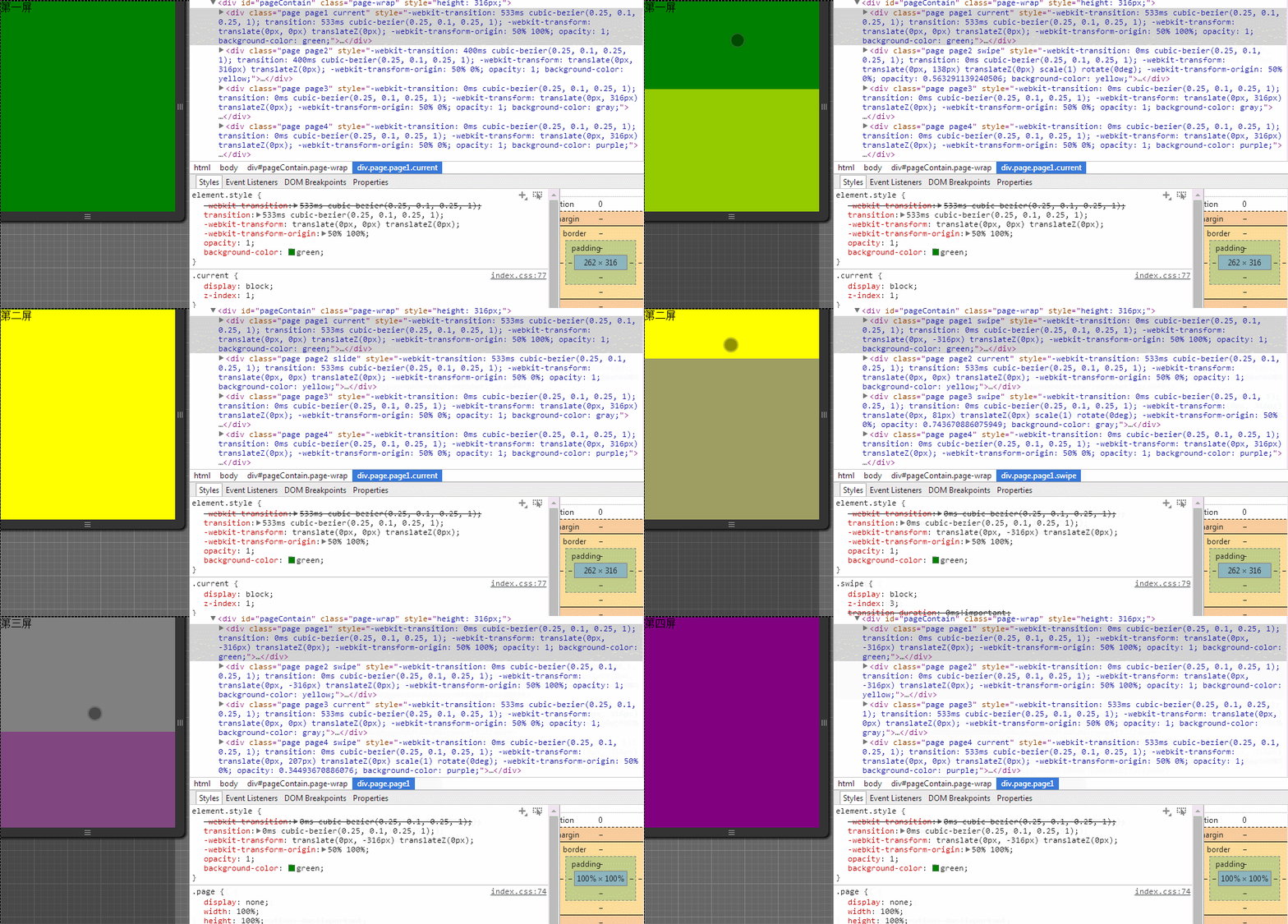
这里采用fullPage框架,库大小7.69K~
fullPage框架的页面样式无需自定义,已有写好的
兼容ios5+、android2.3+、winphone 8系统,其滑屏功能,效果比较丰富,支持缩放、旋转、透明度、自动滑屏等动画效果~如果你需要设计精彩的滑屏效果,可考虑它~
fullPage框架更多详细的功能猛击这里https://github.com/powy1993/fullpage
<!DOCTYPE html>

<html>

<head>

<meta charset="utf-8">

<meta content="width=device-width,initial-scale=1.0,maximum-scale=1.0,user-scalable=no" name="viewport">

<meta content="yes" name="apple-mobile-web-app-capable">

<meta content="black" name="apple-mobile-web-app-status-bar-style">

<meta content="telephone=no" name="format-detection">

<meta content="email=no" name="format-detection">

<title>fullPage</title>

<style>

*{padding: 0;margin: 0;}

/*框架*/

body{overflow: hidden;}

.page-wrap{overflow:hidden}

.page{display:none;width:100%;height:100%;overflow:hidden;position:absolute;top:0;left:0}

.contain{width:100%;height:100%;display:none;position:relative;z-index:0}

.current .contain,.slide .contain{display:block}

.current{display:block;z-index:1}

.slide{display:block;z-index:2}

.swipe{display:block;z-index:3;transition-duration:0ms!important;-webkit-transition-duration:0ms!important}

</style>

</head>

<!--[if lte IE 7]>

<body scroll="no">

<![endif]-->

<!--[if gt IE 7]><!-->

<body>

<!--<![endif]-->

<!-- 框架[[ -->

<div id="pageContain" class="page-wrap">

    <div class="page page1 current" style="background-color: green;">

        <div class="contain">

            第一屏

        </div>

    </div>

    <div class="page page2" style="background-color: yellow;">

        <div class="contain">

            第二屏

        </div>

    </div>

    <div class="page page3" style="background-color: gray;">

        <div class="contain">

            第三屏

        </div>

    </div>

    <div class="page page4" style="background-color: purple;">

        <div class="contain">

            第四屏

        </div>

    </div>

</div>

<!-- 框架]] -->

</body>

<script type="text/javascript" src="js/fullPage.min.js"></script>

<script type="text/javascript">

//禁止窗口的默认滑动

document.ontouchmove = function(e){

    e.preventDefault();

}

//框架

var runPage,

    interval,

    autoPlay;

autoPlay = function(to) {

    clearTimeout(interval);

    interval = setTimeout(function() {

        runPage.go(to);

    }, 5000);

}

runPage = new FullPage({

    id : 'pageContain',                            // id of contain

    slideTime : 800,                               // time of slide

    continuous : true,                             // create an infinite feel with no endpoints

    effect : {                                     // slide effect

        transform : {

            translate : 'Y',                       // 'X'|'Y'|'XY'|'none'

            scale : [1, 1],                       // [scalefrom, scaleto]

            rotate : [0, 0]                       // [rotatefrom, rotateto]

        },

        opacity : [0, 1]                           // [opacityfrom, opacityto]

    },

    mode : 'wheel,touch',               // mode of fullpage

    easing : 'ease',                                // easing('ease','ease-in','ease-in-out' or use cubic-bezier like [.33, 1.81, 1, 1] )

    // callback : function(index, thisPage) {

    //     index = index + 1 > 3 ? 0 : index + 1;

    //     autoPlay(index);

    // }

});

// interval = setTimeout(function() {

//     runPage.go(runPage.thisPage() + 1);

// }, 5000);

</script>

</html>
移动端框架篇-控制子容器的滑屏框架-fullPage.js的更多相关文章
- 移动端框架篇-控制父容器的滑屏框架-slip.js
设计滑屏框架的办法一般有2种 控制父容器法 控制子容器法 这个算是控制父容器法 通过控制父容器的transform: translateY或margin-top或top的值来上下滑动页面,每次的位移的 ...
- 小程序多端框架全面测评:chameleon、Taro、uni-app、mpvue、WePY
摘要: 微信小程序开发技巧. 作者:coldsnap 原文:小程序多端框架全面测评 Fundebug经授权转载,版权归原作者所有. 最近前端届多端框架频出,相信很多有代码多端运行需求的开发者都会产生一 ...
- 结合源码浅谈Spring容器与其子容器Spring MVC 冲突问题
容器是整个Spring 框架的核心思想,用来管理Bean的整个生命周期. 一个项目中引入Spring和SpringMVC这两个框架,Spring是父容器,SpringMVC是其子容器,子容器可以看见父 ...
- Spring - 父容器与子容器
一.Spring容器(父容器) 1.Mapper代理对象 2.Service对象 二.Springmvc(前端控制器)(子容器) Controller对象 1.标准的配置是这样的:Con ...
- CSS3 04. 伸缩布局、设置主轴,侧轴方向、主/侧轴对齐方式、 伸缩比例、元素换行、换行控制、覆盖父元素的align-items;控制子元素顺序、web字体、突变字体
CSS3 在布局方面做了非常大的改进,对块级元素的布局排列变得十分灵活,适应性非常强,其强大的伸缩性,在响应式开发中可以发挥极大的作用.(兼容性不好) 必要元素: 指定一个盒子为伸缩盒子 displa ...
- Go游戏服务端框架从零搭建(一)— 架构设计
五邑隐侠,本名关健昌,10年游戏生涯,现隐居海边. 本教程以Go语言分区游戏服务端框架搭建为例. Go语言是Google开发的一种静态强类型.编译型.并发型.具有垃圾回收功能的编程语言.语法上近似C语 ...
- IE9父容器overflow:auto时,子容器状态更改导致滚动条下出现额外空间的问题探讨
IE的每次跟新都会有一些奇葩的bug,我们默默承受了. 这个问题在项目中出现困扰了我近一个星期,这里记录一下.看下面实例 <style> .panel{ width: 200px; ove ...
- 父容器根据子容器高度自适应:设置父容器 height:100%;overflow:hidden;
父容器根据子容器高度自适应:设置父容器 height:100%;overflow:hidden;
- Dynamic CRM 2013学习笔记(十八)根据主表状态用JS控制子表自定义按钮
有时要根据主表的审批状态来控制子表上的按钮要不要显示,比如我们有一个需求审批通过后就不能再上传文件了. 首先打开Visual Ribbon Editor, 如下图,我们可以利用Enable Rules ...
随机推荐
- Eclipse 安装 jBPM 插件
下载jbpm-installer安装包并解压,找到 jbpm-installer\build.properties搜索eclipse.home 修改 eclipse.home=./eclipse 成 ...
- leetcode : Binary Tree Paths
Given a binary tree, return all root-to-leaf paths. For example, given the following binary tree: 1 ...
- POJ3281Dining[最大流]
Dining Time Limit: 2000MS Memory Limit: 65536K Total Submissions: 16352 Accepted: 7307 Descripti ...
- C#.NET 大型企业信息化系统 - 防黑客攻击 - SSO系统加固优化经验分享
好久没写文章了,突然间也不知道写什么好了一样,好多人可能以为我死了,写个文章分享一下.证明一下自己还在,很好的活着吧,刷个存在感. 放弃了很多娱乐.休闲.旅游.写文章.看书.陪伴家人,静心默默的用了接 ...
- bash/shell编程学习(1)
1)定义变量 myvar=abc #注:等号前后不能加空格 #或 myvar="abc" #或 myvar='abc' #注:如果变量后面的值中间本身没有空格,加不加引号都无所谓, ...
- 微信小程序之触控事件(四)
[未经作者本人同意,请勿以任何形式转载] >>>什么是事件 事件是视图层到逻辑层的通讯方式. 事件可以将用户的行为反馈到逻辑层进行处理. 事件可以绑定在组件上,当达到触发事件,就会执 ...
- AppBox升级进行时 - Entity Framework的增删改查
AppBox 是基于 FineUI 的通用权限管理框架,包括用户管理.职称管理.部门管理.角色管理.角色权限管理等模块. Entity Framework新增数据 以新增用户为例,作为对比,先来看下使 ...
- JS组件系列——表格组件神器:bootstrap table(二:父子表和行列调序)
前言:上篇 JS组件系列——表格组件神器:bootstrap table 简单介绍了下Bootstrap Table的基础用法,没想到讨论还挺热烈的.有园友在评论中提到了父子表的用法,今天就结合Boo ...
- Android四大组件之—— BroadcastReceiver的使用
BroadcastReceiver又名广播接收者.既然它用于接收广播,那一定就有人负责发送. Android系统中的广播: 在现实生活中,我们都知道广播是什么,用来做什么.例如公园里的广播,主要通知游 ...
- php 字符串和数字比较一些问题
本文章来给大家介绍关于php 字符串和数字比较一些问题,因为数字与字符在php中是不同的数据类型,所以在比较时可能会有很多的问题. ,1,2等等,其中0标示成功,其他表示不同的错误代码.程序通过 if ...