
Android中的AutoCompleteTextView的使用
最终的效果如下:
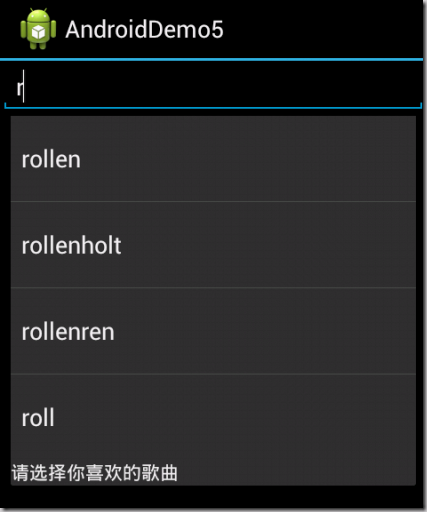
main.xml代码如下:
<?xml version="1.0" encoding="utf-8"?>
<LinearLayout xmlns:android="http://schemas.android.com/apk/res/android"

    android:layout_width="fill_parent"

    android:layout_height="fill_parent"

    android:orientation="vertical" >

    <AutoCompleteTextView

        android:id="@+id/autoCompleteTextView1"

        android:layout_width="match_parent"

        android:layout_height="wrap_content"

        android:completionHint="请选择你喜欢的歌曲"

        android:completionThreshold="1"

        android:dropDownHorizontalOffset="20dp"

        android:ems="10"

        android:text="AutoCompleteTextView" >

        <requestFocus />

    </AutoCompleteTextView>

</LinearLayout>
java代码为:
package android.demo;

import android.app.Activity;

import android.graphics.Bitmap;

import android.graphics.BitmapFactory;

import android.graphics.drawable.BitmapDrawable;

import android.os.Bundle;

import android.view.MotionEvent;

import android.view.View;

import android.view.View.OnClickListener;

import android.view.View.OnTouchListener;

import android.widget.ArrayAdapter;

import android.widget.AutoCompleteTextView;

import android.widget.Button;

import android.widget.ImageView;

public class AndroidDemo5Activity extends Activity {

	// 定义字符串数组作为提示的文本

	String[] books = new String[] { "rollen", "rollenholt", "rollenren", "roll" };

	@Override

	protected void onCreate(Bundle savedInstanceState) {

		// TODO Auto-generated method stub

		super.onCreate(savedInstanceState);

		setContentView(R.layout.main);

		// 创建一个ArrayAdapter封装数组

		ArrayAdapter<String> av = new ArrayAdapter<String>(this,

				android.R.layout.simple_dropdown_item_1line, books);

		AutoCompleteTextView auto = (AutoCompleteTextView) findViewById(R.id.autoCompleteTextView1);

		auto.setAdapter(av);

	}

}
Android中的AutoCompleteTextView的使用的更多相关文章
- Android中的AutoCompleteTextView(随笔提示文本)组件的简单使用
Android中的随笔提示文本组件AutoCompleteTextView的使用,此组件用于输入文本,然后就会在所配置的适配器中的数据进行查找显示在组件下面. 这里值得注意的是AutoComplete ...
- Android 中常见控件的介绍和使用
1 TextView文本框 1.1 TextView类的结构 TextView 是用于显示字符串的组件,对于用户来说就是屏幕中一块用于显示文本的区域.TextView类的层次关系如下: java.la ...
- android中实现跑马灯效果以及AutoCompleteTestView与MultiAutoCompleteTextView的学习
跑马灯效果 1.用过属性的方式实现跑马灯效果 属性: android:singleLine="true" 这个属性是设置TextView文本中文字 ...
- Android中EditText显示明文与密文的两种方式
版权声明:本文为HaiyuKing原创文章,转载请注明出处! 前言 记录输入框显示.隐藏密码的简单布局以及实现方式. 效果图 代码分析 方式一 /**方式一:*/ private void sh ...
- Android学习之AutoCompleteTextView
AutoCompleteTextView有点类似于EditText和Spinner的混合体.当用户在输入时,如果应用程序的文本输入框中使用了自动完成控件,预输入文本被看作是一个前缀过滤器,与用户当前输 ...
- Android——控件AutoCompleteTextView 自动提示
Android:控件AutoCompleteTextView 自动提示 在输入框中输入我们想要输入的信息就会出现其他与其相关的提示信息,这种效果在Android中是用AutoCompleteTextV ...
- Android中控件AutoCompleteTextView的使用方法和一些属性
<?xml version="1.0" encoding="utf-8"?> <LinearLayout xmlns:android=&quo ...
- Android中的LinearLayout布局
LinearLayout : 线性布局 在一般情况下,当有很多控件需要在一个界面列出来时,我们就可以使用线性布局(LinearLayout)了, 线性布局是按照垂直方向(vertical)或水平方向 ...
- Android中BroadcastReceiver的两种注册方式(静态和动态)详解
今天我们一起来探讨下安卓中BroadcastReceiver组件以及详细分析下它的两种注册方式. BroadcastReceiver也就是"广播接收者"的意思,顾名思义,它就是用来 ...
随机推荐
- ubuntu安装mysql数据库
http://www.cnblogs.com/zhuyp1015/p/3561470.html http://www.2cto.com/database/201401/273423.html http ...
- Combox下拉绑定DataGridView
这个Combox下拉很多人都在用 但其中绘制的语句如下: #endregion #region 方法 #region 绘制DataGridView以及下拉DataGridView private v ...
- Struts2--Global Result全局结果集
如果有很多action,有共同的result指向, 而且属于不同的包,那么可以继承上面的包, 然后写一个<global-results> 1. jsp显示文件: <ol> &l ...
- Sencha Touch学习(一)
一.Ext的内部类结构示意图 基类Ext.Base 该类是所有通过Ext.define定义出来的类的基类. 是所有Ext类的基石. 来自为知笔记(Wiz)
- STL中map的一个知识点
问题背景 在做USACO Section 1.1 Greedy Gift Givers的时候,我最初的想法是直接用一个map来进行数据处理.但是后来产生一个让我感到疑问的地方,后来我经过测试,发现了这 ...
- JS表单原生验证器
一.前言 最近在开发一个新项目,需要做登陆等一系列的表单提交页面.在经过“缜密”的讨论后,我们决定 不用外部流行的框架,如bootstrap,由于我负责的模块 仅仅是其中的一部分,因此少数服从多数,无 ...
- HDU 4008 Parent and son
树形DP+LCA+思路.这题可真是有点难度......所以准备详细写一下题解. 题意:给一颗无根树,有Q次询问,每次询问指定一个根节点X,然后让你计算Y节点的儿子和子孙中,编号最小的节点是多少. 我们 ...
- BZOJ 1106: [POI2007]立方体大作战tet
1106: [POI2007]立方体大作战tet Time Limit: 10 Sec Memory Limit: 162 MBSubmit: 682 Solved: 496[Submit][St ...
- 关于JAVA中hashCode
hash code 即散列码根据对象计算出的一个整型值,散列码是没有规律的. 如果两个对象相等(equal() 返回true),则hashCode一定相等,如果两个对象hashCode相等,则对象不一 ...
- LPC1788的外部中断和GPIO中断
首先是gpio中断,这一点和1768不同,1768使用的中断时和eint3共用中断通道,到了1788,专门为gpio开辟了中断 #ifndef __JOYPAD_H_ #define __JOYPAD ...