
支持Angular 2的表格控件
前端框架一直这最近几年特别火的一个话题,尤其是Angular 2拥有众多的粉丝。在2016年9月份Angular 2正式发布之后,大量的粉丝的开始投入到了Angular 2的怀抱。当然这其中也包括我。如果你想了解Angular 2,推荐官方网站:英文版、中文版。通过快速起步,可以快速体验Angular 2。
公司的一个项目想基于Angular 2的2.4 版本进行开发,目前还在进行前期的调研阶段。我担当的任务就是研究基于Angular 2的UI控件,在官方网站的资源中列出了很多支持Angular 2的资源。发现Wijmo的Flexgrid控件已经支持Angular 2的2.4版本,初步满足我们的需求。

一、环境搭建
Angular 2不仅是功能上和Angular 1有很多的差别,环境搭建也是区别很大。很多初学者反馈Angular 2的代码很难运行起来。Angular2是基于ES6来开发的,所以会有很多第三方依赖。由于很多浏览器还不支持ES6,所以Angular2引入了很多polyfill或者shim, 导致我们引入了第三方依赖。下面以FlexGrid为例来说明如何搭建运行环境。
1、 安装NodeJS
可以从Node官网下载 https://nodejs.org/en/download/。
2、 新建目录来存放项目
mkdir ng2-flexGrid
cd ng2-flexGrid
3、 配置文件
- package.json
用来标记项目需要使用的npm依赖包。
{
  "name": "wj-ng2-flexgrid",
  "version": "1.0.0",
  "scripts": {
    "start": "tsc && concurrently \"tsc -w\" \"lite-server\" ",
    "lite": "lite-server",
    "tsc": "tsc",
    "tsc:w": "tsc -w"
  },
  "licenses": [
    {
      "type": "MIT",
      "url": "https://github.com/angular/angular.io/blob/master/LICENSE"
    }
  ],
  "dependencies": {
    "@angular/common": "~2.1.1",
    "@angular/compiler": "~2.1.1",
    "@angular/core": "~2.1.1",
    "@angular/forms": "~2.1.1",
    "@angular/http": "~2.1.1",
    "@angular/platform-browser": "~2.1.1",
    "@angular/platform-browser-dynamic": "~2.1.1",
    "@angular/router": "~3.1.1",
    "@angular/upgrade": "~2.1.1",
    "angular-in-memory-web-api": "~0.1.13",
    "core-js": "^2.4.1",
    "reflect-metadata": "^0.1.8",
    "rxjs": "5.0.0-beta.12",
    "systemjs": "0.19.39",
    "zone.js": "^0.6.25"
  },
  "devDependencies": {
    "@types/core-js": "^0.9.34",
    "@types/node": "^6.0.45",
    "concurrently": "^3.0.0",
    "lite-server": "^2.2.2",
    "typescript": "^2.0.3"
  }
}
- tsconfig.json
TypeScript的配置文件,定义TypeScript 编译器如何从项目源文件生成 JavaScript 代码。
{
  "compilerOptions": {
    "target": "es5",
    "module": "commonjs",
    "moduleResolution": "node",
    "sourceMap": true,
    "emitDecoratorMetadata": true,
    "experimentalDecorators": true,
    "removeComments": false,
    "noImplicitAny": false
  }
}
- systemjs.config.js
为SystemJS(模块加载器)提供到哪里查找应用模块的信息,并注册了所有必备的依赖包。
/**
* System configuration for Angular samples
* Adjust as necessary for your application needs.
*/
(function (global) {
  System.config({
    paths: {
      // paths serve as alias
      'npm:': 'node_modules/'
    },
    // map tells the System loader where to look for things
    map: {
      // our app is within the app folder
      app: 'app',
      // angular bundles
      '@angular/core': 'npm:@angular/core/bundles/core.umd.js',
      '@angular/common': 'npm:@angular/common/bundles/common.umd.js',
      '@angular/compiler': 'npm:@angular/compiler/bundles/compiler.umd.js',
      '@angular/platform-browser': 'npm:@angular/platform-browser/bundles/platform-browser.umd.js',
      '@angular/platform-browser-dynamic': 'npm:@angular/platform-browser-dynamic/bundles/platform-browser-dynamic.umd.js',
      '@angular/http': 'npm:@angular/http/bundles/http.umd.js',
      '@angular/router': 'npm:@angular/router/bundles/router.umd.js',
      '@angular/forms': 'npm:@angular/forms/bundles/forms.umd.js',
      '@angular/upgrade': 'npm:@angular/upgrade/bundles/upgrade.umd.js',
      // other libraries
      'rxjs':                      'npm:rxjs',
      'angular-in-memory-web-api': 'npm:angular-in-memory-web-api/bundles/in-memory-web-api.umd.js'
    },
    // packages tells the System loader how to load when no filename and/or no extension
    packages: {
      app: {
        main: './main.js',
        defaultExtension: 'js'
      },
      rxjs: {
        defaultExtension: 'js'
      }
    }
  });
})(this);
4、 运行npm install
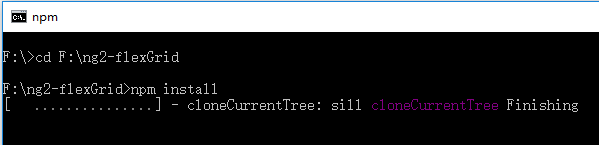
NPM会根据package.json中定义的包进行安装。会产生一个node_modules目录,将这些包放在这里。
至此环境搭建的任务就已经完成了。下面我们以FlexGrid为例说明支持Angular 2。
二、支持Angular 2的表格控件如何使用
1、HTML
<html>
<head>
    <meta charset="UTF-8">
    <title>使用 Angular 2 来创建FlexGrid控件</title>
    <!--angular 2 模块-->
    <!--用于填充旧版浏览器-->
    <script src="node_modules/core-js/client/shim.min.js"></script>
    <script src="node_modules/zone.js/dist/zone.js"></script>
    <script src="node_modules/reflect-metadata/Reflect.js"></script>
    <script src="node_modules/systemjs/dist/system.src.js"></script>
    <!--systemjs 配置-->
    <script src="systemjs.config.js"></script>

    <!--wijmo 模块-->
    <script src="scripts/vendor/wijmo.min.js"></script>
    <script src="scripts/vendor/wijmo.grid.min.js"></script>
    <link rel="stylesheet" href="styles/wijmo.min.css">
    <script src="scripts/vendor/wijmo.angular2.min.js"></script>
    <!--mine-->
    <script>
      System.import('./app/main').catch(function(err){ console.error(err); });
    </script>
</head>
<body>
    <!--申明根组件-->
    <app-cmp>
        Loading
    </app-cmp>
</body>
</html>
在HTML宿主页面中,除了Angular 2中必须的组件,还需要引入Wijmo脚本。
2、编写数据服务
'use strict'
import { Injectable } from '@angular/core';
@Injectable()
export class DataService {
    getData(count: number): wijmo.collections.ObservableArray {
        var countries = 'US,Germany,UK,Japan,Italy,Greece'.split(','),
            data = new wijmo.collections.ObservableArray();
        for (var i = 0; i < count; i++) {
            data.push({
                id: i,
                country: countries[i % countries.length],
                date: new Date(2014, i % 12, i % 28),
                amount: Math.random() * 10000,
                active: i % 4 == 0
            });
        }
        return data;
    }
}
3、编写根组件
现在我们编写应用的第一个组件:根组件 app.component ,也是这个程序唯一的组件。在这个组件中,需要引入两个元标记:Component, Inject。还需要注入定义的数据服务data.Service。
app.component.ts:
import { Component, Inject } from '@angular/core';
import { DataService } from '../services/data.service';
@Component ({
    selector:'app-cmp',
    templateUrl:'app/components/app.component.html',
})
export class  AppComponent{
    protected dataSvc:DataService;
    data: wijmo.collections.CollectionView;
    constructor(@Inject(DataService) dataSvc:DataService){
        this.dataSvc = dataSvc;
        this.data = new wijmo.collections.CollectionView(this.dataSvc.getData(50));
    }
}
app.component.html:
<div class="header">
    <h2>
        展示如何在angular 2上使用 Wijmo的FlexGrid。
    </h2>
</div>
<div>
<wj-flex-grid [itemsSource]="data">  </wj-flex-grid>
</div>
在这里仅仅需要引入wj-flex-grid标记,就可以创建FlexGrid控件。wj-flex-grid 组件是作为一个子组件存在,在app.module 模块中注入。itemsSource 绑定一个数据源,这个itemsSource是flexgrid已经封装完成的属性。
在Angular 2下使用FlexGrid的最大好处就是:Angular 2组件提供了使用标记语言来声明控件的能力。声明标记很好地遵循了MVVM设计模式,我们可以完全通过View(标记语言)来配置我们的组件。FlexGrid支持使用Angular 2标记语言来声明完整的API。你完全可以使用标记语言设置属性,附加事件,配置子组件。
4、编写根模块
在根模块中将组件注入,需要将引用的所有的组件和模块都要注入进来。
import { NgModule } from '@angular/core';
import { BrowserModule } from '@angular/platform-browser';
import { WjGridModule } from 'wijmo/wijmo.angular2.grid';
import { AppComponent } from './components/app.component';
import { DataService } from './services/data.service';
@NgModule({
    imports: [ WjGridModule, BrowserModule],
    declarations: [AppComponent],
    providers:[DataService],
    bootstrap: [AppComponent],
})
export class AppModule { }
5、引导程序
main.ts:
import { platformBrowserDynamic } from '@angular/platform-browser-dynamic';
import {enableProdMode} from '@angular/core';
import { AppModule } from './app.module';
enableProdMode();
platformBrowserDynamic().bootstrapModule(AppModule);
三、运行
在命令行执行 npm start,这时,程序会自动打开默认浏览器并渲染页面。
start 命令是执行定义在 package.json 文件中的scripts命令。 会将ts代码编译为原生js,并且会启动一个静态服务器。 这个服务器会检测文件的变化,当发现文件改动,那么会自动编译ts代码。
下面是运行的结果:
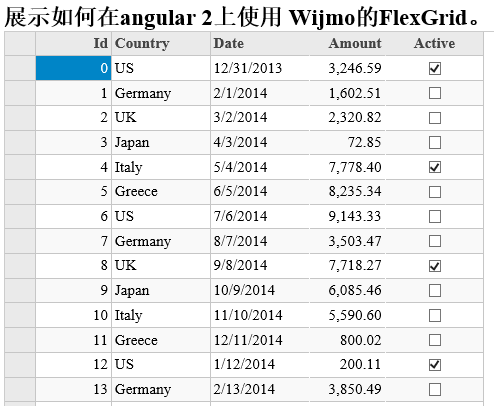
FlexGrid内置的基本功能比如:排序、过滤、分组、编辑等,也以通过可选的扩展来提供其他功能。FlexGrid和其它产品比较,性能还是不错的。它的文件尺寸比较小压缩后约25K。
支持Angular 2的表格控件的更多相关文章
- Angular 2的表格控件
Angular 2的表格控件 前端框架一直这最近几年特别火的一个话题,尤其是Angular 2拥有众多的粉丝.在2016年9月份Angular 2正式发布之后,大量的粉丝的开始投入到了Angular ...
- 自己实现的数据表格控件(dataTable),支持自定义样式和标题数据、ajax等各种自定义设置以及分页自定义
一.前言 也没什么好说的嘛,用了蛮多github上开源的能够实现dataTable功能的表格插件,不过都默认绑定样式啊,数据格式也设定的比较死,所以忍不住自己实现了一个简单的可自定义样式和自定义数据返 ...
- Qt实现表格控件-支持多级列表头、多级行表头、单元格合并、字体设置等
目录 一.概述 二.效果展示 三.定制表头 1.重写数据源 2.重写QHeaderView 四.设置属性 五.相关文章 原文链接:Qt实现表格控件-支持多级列表头.多级行表头.单元格合并.字体设置等 ...
- QRowTable表格控件-支持hover整行、checked整行、指定列排序等
目录 一.开心一刻 二.嘴一嘴 三.效果展示 四.浅谈实现 五.自定义数据源 1.data函数 2.flags函数 六.自定义视图 1.目的 2.问题分析 七.测试 八.相关文章 原文链接:QRowT ...
- QRowTable表格控件(五)-重写表头排序、支持第三次单击恢复默认排序
目录 一.原生表格 二.效果展示 三.实现方式 1.排序列定制 2.排序交互修改 四.相关文章 原文链接:QRowTable表格控件(五)-重写表头排序.支持第三次单击恢复默认排序 一.原生表格 开发 ...
- 最好的Angular2表格控件
现在市面上有大量的JavaScript数据表格控件,包括开源的第三方的和自产自销的.可以说Wijmo的Flexgrid是目前适应Angular 2的最好的表格控件. Angular 2数据表格基本要求 ...
- 分享12款 JavaScript 表格控件(DataGrid)
JavaScript 表格控件可以操作大数据集的 HTML 表格,提供各种功能,如分页.排序.过滤以及行编辑.在本文中,我们整理了13个最好的 JavaScript 表格插件分享给开发人员,开发者可以 ...
- 葡萄城首席架构师:前端开发与Web表格控件技术解读
讲师:Issam Elbaytam,葡萄城集团全球首席架构师(Chief Software Architect of GrapeCity Global).曾任 Data Dynamics.Inc 创始 ...
- SpreadJS 纯前端表格控件 V12.2 发布更新
用不到100行代码,在前端实现Excel的全部功能 千万前端开发者翘首企盼,SpreadJS V12.2 终发布更新:六大功能特性,带来更多便利,用不到100行代码,在前端实现Excel的全部功能! ...
随机推荐
- [iOS]C语言技术视频-04-程序循环结构(while{})
下载地址: 链接: http://pan.baidu.com/s/1o6imQ4U 密码: imuy
- ecos的app包管理
install 安装 install app_name1 app_name2 有时候要用-o参数,把所有安装过程需要的参数带入进去(安装过程的参数放在app/$app_name/task.php里in ...
- gulp用法
转载:http://segmentfault.com/blog/laopopo/1190000000372547 http://javascript.ruanyifeng.com/tool/gulp. ...
- (简单) POJ 2251 Dungeon Master,BFS。
Description You are trapped in a 3D dungeon and need to find the quickest way out! The dungeon is co ...
- uartz Spring与Spring Task总结
Spring对Quartz作了一个封装,同时,Spring自己也提供了一个任务定时器(spring-task),现把它总结一下. 对于Quartz,我们使用的时候主要是注重两个方面,一个是定时任 ...
- MySQL数据文件的导入、导出
1.导出整个数据库 mysqldump -u 用户名 -p 数据库名 > 导出的文件名 mysqldump -u wcnc -p smgp_apps_wcnc > wcnc.sql 2.导 ...
- 利用智能手机(Android)追踪一块磁铁(转)
利用智能手机(Android)追踪一块磁铁(一) 利用智能手机(Android)追踪一块磁铁(二) 利用智能手机(Android)追踪一块磁铁(三)
- iOS开发—— UIImagePickerController获取相册和拍照
一.简单的拍照显示,或是从相册中直接选取照片 #import "ViewController.h" @interface ViewController ()<UIImageP ...
- 友坚恒天.开发板(Cotex-A9 Exynos4412 开发板)
友坚恒天.开发板 Cotex-A9 Exynos4412 开发板
- Powerbuilder编程技巧 如何获取网页的HTML源码
直接使用的三种方式 1. PB内部对象 Inet object 2. API 函数 3. Ole中的Microsfot Web 游览器对象 一.Inet object: 1.Inet objec ...