
微信支付.net官方坑太多,我们来精简
微信支付官方坑太多,我们来精简
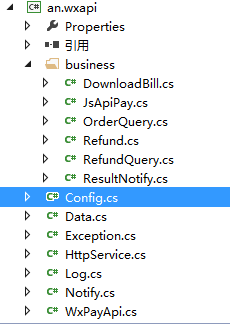
我把官方的代码,打包成了 an.wxapi.dll。
里面主要替换了下注释。呵呵。然后修改了几个地方。
修改一、Config.cs
 namespace an.wxapi

 {

     public class WxPayConfig

     {

         public static string AppKey(string key)

         {

             return System.Configuration.ConfigurationManager.AppSettings[key];

         }

         /// <summary>

         /// APPID:绑定支付的APPID(必须配置)

         /// </summary>

         public static string APPID {

             get

             {

                 return AppKey("wx_appid");

             }

         }

         /// <summary>

         /// KEY:商户支付密钥,参考开户邮件设置(必须配置)

         /// </summary>

         public static string KEY

         {

             get {

                 return AppKey("wx_key");

             }

         }

         /// <summary>

         /// 商户号(必须配置)

         /// </summary>

         public static string MCHID

         {

             get {

                 return AppKey("wx_mchid");

             }

         }

         /// <summary>

         /// APPSECRET:公众帐号secert(仅JSAPI支付的时候需要配置)

         /// </summary>

         public static string APPSECRET

         {

             get {

                 return AppKey("wx_appsecret");

             }

         }

         /// <summary>

         /// 证书路径,注意应该填写绝对路径(仅退款、撤销订单时需要)

         /// </summary>

         public static string SSLCERT_PATH

         {

             get

             {

                 return AppKey("wx_sslcert_path");

             }

         }

         /// <summary>

         /// 证书密码,默认商户号为密码

         /// </summary>

         public static string SSLCERT_PASSWORD

         {

             get

             {

                 return AppKey("wx_sslcert_password");

             }

         }

         /// <summary>

         ///  支付结果通知回调url,用于商户接收支付结果

         /// </summary>

         public static string NOTIFY_URL

         {

             get

             {

                 return AppKey("wx_notify_url");

             }

         }

         /// <summary>

         /// 商户系统后台机器IP,此参数可手动配置也可在程序中自动获取

         /// </summary>

         public static string IP = "8.8.8.8";

         /// <summary>

         /// 代理服务器设置,默认IP和端口号分别为0.0.0.0和0,此时不开启代理(如有需要才设置)

         /// </summary>

         public static string PROXY_URL = "http://10.152.18.220:8080";

         /// <summary>

         ///上报信息配置,测速上报等级,0.关闭上报; 1.仅错误时上报; 2.全量上报

         /// </summary>

         public static int REPORT_LEVENL = ;

         /// <summary>

         /// 日志等级,0.不输出日志;1.只输出错误信息; 2.输出错误和正常信息; 3.输出错误信息、正常信息和调试信息

         /// </summary>

         public static int LOG_LEVENL

         {

             get

             {

                 string log_levenl = "";

                 if(AppKey("log_leven")!="")

                 {

                     log_levenl = AppKey("log_leven");

                 }

                 return Convert.ToInt32(log_levenl);

             }

         }

     }

 }
只是把静态的替换成可以从web.config里面调用的。
修改二、HttpService.cs
 namespace an.wxapi

 {

     /// <summary>

     /// http连接基础类,负责底层的http通信

     /// </summary>

     public class HttpService

     {

         public static bool CheckValidationResult(object sender, X509Certificate certificate, X509Chain chain, SslPolicyErrors errors)

         {

             //直接确认,否则打不开

             return true;

         }

         public static string Post(string xml, string url, bool isUseCert, int timeout)

         {

             System.GC.Collect();//垃圾回收,回收没有正常关闭的http连接

             string result = "";//返回结果

             HttpWebRequest request = null;

             HttpWebResponse response = null;

             Stream reqStream = null;

             try

             {

                 //设置最大连接数

                 ServicePointManager.DefaultConnectionLimit = ;

                 //设置https验证方式

                 if (url.StartsWith("https", StringComparison.OrdinalIgnoreCase))

                 {

                     ServicePointManager.ServerCertificateValidationCallback =

                             new RemoteCertificateValidationCallback(CheckValidationResult);

                 }

                 /***************************************************************

                 * 下面设置HttpWebRequest的相关属性

                 * ************************************************************/

                 request = (HttpWebRequest)WebRequest.Create(url);

                 request.Method = "POST";

                 request.Timeout = timeout * ;

                 //设置代理服务器

                 //WebProxy proxy = new WebProxy();                          //定义一个网关对象

                 //proxy.Address = new Uri(WxPayConfig.PROXY_URL);              //网关服务器端口:端口

                 //request.Proxy = proxy;

                 //设置POST的数据类型和长度

                 request.ContentType = "text/xml";

                 byte[] data = System.Text.Encoding.UTF8.GetBytes(xml);

                 request.ContentLength = data.Length;

                 //是否使用证书

                 if (isUseCert)

                 {

                     string path = HttpContext.Current.Request.PhysicalApplicationPath;

                     X509Certificate2 cert = new X509Certificate2(path + WxPayConfig.SSLCERT_PATH, WxPayConfig.SSLCERT_PASSWORD);

                     request.ClientCertificates.Add(cert);

                     Log.Debug("WxPayApi", "PostXml used cert");

                 }

                 //往服务器写入数据

                 reqStream = request.GetRequestStream();

                 reqStream.Write(data, , data.Length);

                 reqStream.Close();

                 //获取服务端返回

                 response = (HttpWebResponse)request.GetResponse();

                 //获取服务端返回数据

                 StreamReader sr = new StreamReader(response.GetResponseStream(), Encoding.UTF8);

                 result = sr.ReadToEnd().Trim();

                 sr.Close();

             }

             catch (System.Threading.ThreadAbortException e)

             {

                 Log.Error("HttpService", "Thread - caught ThreadAbortException - resetting.");

                 Log.Error("Exception message: {0}", e.Message);

                 System.Threading.Thread.ResetAbort();

             }

             catch (WebException e)

             {

                 Log.Error("HttpService", e.ToString());

                 if (e.Status == WebExceptionStatus.ProtocolError)

                 {

                     Log.Error("HttpService", "StatusCode : " + ((HttpWebResponse)e.Response).StatusCode);

                     Log.Error("HttpService", "StatusDescription : " + ((HttpWebResponse)e.Response).StatusDescription);

                 }

                 throw new WxPayException(e.ToString());

             }

             catch (Exception e)

             {

                 Log.Error("HttpService", e.ToString());

                 throw new WxPayException(e.ToString());

             }

             finally

             {

                 //关闭连接和流

                 if (response != null)

                 {

                     response.Close();

                 }

                 if (request != null)

                 {

                     request.Abort();

                 }

             }

             return result;

         }

         /// <summary>

         /// 处理http GET请求,返回数据

         /// </summary>

         /// <param name="url">请求的url地址</param>

         /// <returns>http GET成功后返回的数据,失败抛WebException异常</returns>

         public static string Get(string url)

         {

             System.GC.Collect();

             string result = "";

             HttpWebRequest request = null;

             HttpWebResponse response = null;

             //请求url以获取数据

             try

             {

                 //设置最大连接数

                 ServicePointManager.DefaultConnectionLimit = ;

                 //设置https验证方式

                 if (url.StartsWith("https", StringComparison.OrdinalIgnoreCase))

                 {

                     ServicePointManager.ServerCertificateValidationCallback =

                             new RemoteCertificateValidationCallback(CheckValidationResult);

                 }

                 /***************************************************************

                 * 下面设置HttpWebRequest的相关属性

                 * ************************************************************/

                 request = (HttpWebRequest)WebRequest.Create(url);

                 request.Method = "GET";

                 //设置代理

                 //WebProxy proxy = new WebProxy();

                 //proxy.Address = new Uri(WxPayConfig.PROXY_URL);

                 //request.Proxy = proxy;

                 //获取服务器返回

                 response = (HttpWebResponse)request.GetResponse();

                 //获取HTTP返回数据

                 StreamReader sr = new StreamReader(response.GetResponseStream(), Encoding.UTF8);

                 result = sr.ReadToEnd().Trim();

                 sr.Close();

             }

             catch (System.Threading.ThreadAbortException e)

             {

                 Log.Error("HttpService", "Thread - caught ThreadAbortException - resetting.");

                 Log.Error("Exception message: {0}", e.Message);

                 System.Threading.Thread.ResetAbort();

             }

             catch (WebException e)

             {

                 Log.Error("HttpService", e.ToString());

                 if (e.Status == WebExceptionStatus.ProtocolError)

                 {

                     Log.Error("HttpService", "StatusCode : " + ((HttpWebResponse)e.Response).StatusCode);

                     Log.Error("HttpService", "StatusDescription : " + ((HttpWebResponse)e.Response).StatusDescription);

                 }

                 throw new WxPayException(e.ToString());

             }

             catch (Exception e)

             {

                 Log.Error("HttpService", e.ToString());

                 throw new WxPayException(e.ToString());

             }

             finally

             {

                 //关闭连接和流

                 if (response != null)

                 {

                     response.Close();

                 }

                 if (request != null)

                 {

                     request.Abort();

                 }

             }

             return result;

         }

     }

 }
主要注释掉了设置代理服务器,基本上就注释掉这个就可以用了。
前台页面,我只用了三个(JsApiPayPage.aspx,ProductPage.aspx,ResultNotifyPage.aspx)
因为我只需要做微信里面的网页支付,其他很多功能我都不需要。所以。BIN文件夹,也只需要LitJSON.dll,RestSharp.dll,an.wxapi.dll(我上面打包的)
ProductPage.aspx(主要获取用户的openid和access_token)
 <%@ Page Language="C#" Inherits="an.web" %>

 <%@ Import Namespace="an.wxapi" %>

 <script runat="server">

     protected override void OnLoad(EventArgs e)

     {

         JsApiPay jsApiPay = new JsApiPay(this);

         jsApiPay.GetOpenidAndAccessToken();

         wx_openid = jsApiPay.openid;

     }

 </script>

 <!DOCTYPE html>

 <html xmlns="http://www.w3.org/1999/xhtml">

 <head>

 <meta http-equiv="Content-Type" content="text/html; charset=utf-8"/>

     <title></title>

 </head>

 <body>

        <h2>商品一:价格为:1分</h2>

        <p><a href="JsApiPayPage.aspx?openid=<%=wx_openid %>&total_fee=1&showwxpaytitle=1">去支付</a></p>

 </body>

 </html>
我比较懒,所以,我一般不用.cs文件,我喜欢写到一起。呵呵,(这样有个好处,不需要编译,即可运行。)
基本上是拿官方的过来,没怎么修改。
 protected void Page_Load(object sender, EventArgs e)

         {

             Log.Info(this.GetType().ToString(), "page load");

             if (!IsPostBack)

             {

                 JsApiPay jsApiPay = new JsApiPay(this);

                 try

                 {

                     //调用【网页授权获取用户信息】接口获取用户的openid和access_token

                     jsApiPay.GetOpenidAndAccessToken();

                     //获取收货地址js函数入口参数

                     //wxEditAddrParam = jsApiPay.GetEditAddressParameters();

                     ViewState["openid"] = jsApiPay.openid;

                 }

                 catch (Exception ex)

                 {

                     Response.Write("<span style='color:#FF0000;font-size:20px'>" + "页面加载出错,请重试" +ex.Message +"</span>");

                     //Button1.Visible = false;

                     //Button2.Visible = false;

                     //Label1.Visible = false;

                     //Label2.Visible = false;

                 }

             }

         }
官方用的是ViewState这玩意,会产生庞大的垃圾代码,(反正我也不知道这玩意,有啥子用)
我的做法是:
 namespace an

 {

     public class web : System.Web.UI.Page

     {

         public string wx_openid { get; set; }

         public string wxJsApiParam { get; set; }

     }

 }
直接在an.web里面定义下属性,不完啦。
JsApiPayPage.aspx(这个页面用来提交支付请求)
 <%@ Page Language="C#" Inherits="an.web" %>

 <%@ Import Namespace="an.wxapi" %>

 <script runat="server">

     protected override void OnLoad(EventArgs e)

     {

         string openid = Request.QueryString["openid"];

         string total_fee = Request.QueryString["total_fee"];

         JsApiPay jsApiPay = new JsApiPay(this);

         jsApiPay.openid = openid;

         jsApiPay.total_fee = int.Parse(total_fee);

         WxPayData unifiedOrderResult = jsApiPay.GetUnifiedOrderResult();

         wxJsApiParam = jsApiPay.GetJsApiParameters();//获取H5调起JS API参数

     }

 </script>

 <!DOCTYPE html>

 <html xmlns="http://www.w3.org/1999/xhtml">

 <head>

     <meta http-equiv="content-type" content="text/html;charset=utf-8"/>

     <meta name="viewport" content="width=device-width, initial-scale=1"/>

     <title>微信支付样例-JSAPI支付</title>

 </head>

            <script type="text/javascript">

                //调用微信JS api 支付

                function jsApiCall()

                {

                    WeixinJSBridge.invoke(

                    'getBrandWCPayRequest',

                    <%=wxJsApiParam%>,//josn串

                     function (res)

                     {

                         WeixinJSBridge.log(res.err_msg);

                         alert(res.err_code + res.err_desc + res.err_msg);

                     }

                     );

                }

                function callpay()

                {

                    if (typeof WeixinJSBridge == "undefined")

                    {

                        if (document.addEventListener)

                        {

                            document.addEventListener('WeixinJSBridgeReady', jsApiCall, false);

                        }

                        else if (document.attachEvent)

                        {

                            document.attachEvent('WeixinJSBridgeReady', jsApiCall);

                            document.attachEvent('onWeixinJSBridgeReady', jsApiCall);

                        }

                    }

                    else

                    {

                        jsApiCall();

                    }

                }

      </script>

 <body>

     <input type="button" onclick="callpay()" value="立刻支付" />

 </body>

 </html>
ResultNotifyPage.aspx(回调)
 <%@ Page Language="C#" Inherits="an.web" %>

 <%@ Import Namespace="an.wxapi" %>

 <script runat="server">

     protected override void OnLoad(EventArgs e)

     {

         ResultNotify resultNotify = new ResultNotify(this);

         resultNotify.ProcessNotify();

     }

 </script>

 <!DOCTYPE html>

 <html xmlns="http://www.w3.org/1999/xhtml">

 <head>

 <meta http-equiv="Content-Type" content="text/html; charset=utf-8"/>

     <title></title>

 </head>

 <body>

 </body>

 </html>
很简单咯...
an.wxapi.dll 下载地址:http://files.cnblogs.com/files/ancms/an.wxapi.rar
本人很菜,希望以微薄之力帮助大家。
再次感谢:smallerpig
微信支付.net官方坑太多,我们来精简的更多相关文章
- 微信支付:微信支付遇到的坑:jssdk,phpdemo,微信支付提示{"errMsg":"chooseWXPay:fail"}
微信支付:微信支付遇到的坑:jssdk,phpdemo 使用微信支付,真是变态,如果不是微信用户多,我才不适配微信支付,我就在想:为什么没人用我支付宝的[点点虫]呢.一个小小的“/”的误差,都调不起微 ...
- 【Unity】微信支付SDK官方安卓Demo的使用问题
Unity3d使用微信支付是属于APP内发起支付调用的情况,其本质上是在安卓项目上使用微信SDK,安卓项目开发完成后再导入到Unity中作为Unity插件使用,即Unity中C#调用安卓(Java)代 ...
- 微信支付遇到的坑---缺少参数total_fee
今天在做微信砍价成功后支付,出现了这个报错 看到报错后,去找total_fee这个参数,调试了半天,total_fee是确定有值的 微信支付的步骤 ① 预支付 商户号,商户秘钥,appid,appse ...
- 微信小程序微信支付的一些坑
使用的是Node.js作为后端 统一下单: appid:这里的appid是调起微信支付的appid mch_id:商户号,需要注意的是商户号要与appid对应 nonce_str:Math.rando ...
- java中微信统一下单采坑(app微信支付)
app支付前java后台统一下单文档:https://pay.weixin.qq.com/wiki/doc/api/app/app.php?chapter=9_1 微信支付接口签名校验工具:https ...
- 微信支付中分账功能 填坑指南V1
公司是做电商的,近期开发了一款小程序,准备线上线下同步销售玩具.这里就涉及到微信支付的功能,网上有很多教程,官方也有文档和Demo,因此微信支付还是比较容易实现的. 由于我们公司是和其他公司合作运营的 ...
- asp.net 5.0微信支付
(原文出自:http://lib.csdn.net/article/wechat/46329) 微信支付官方坑太多,我们来精简 我把官方的代码,打包成了 an.wxapi.dll. 里面主要替换了下注 ...
- iOS集成微信支付
微信支付的开发 前言:之前听说过微信支付有很多坑,其实没有想象的那么坑,整体感觉很容易上手,按照它的流程来不会有错!PS:官方的流程看的TMD烦,好啦,废话有点多,进入开发.(ps:每个微信的版本一直 ...
- 微信支付之统一下单--JAVA版
都说微信支付有些坑,都抱怨微信支付的文档太烂,一会APPId,一会商户id,还有appsecret,支付API秘钥让你傻傻分不清楚,还有这里大写那里小写,几种标准,让你眼花缭乱.没错,这就是很多技术团 ...
随机推荐
- mysql双机热备的配置步骤
设置双机热备: 首先要在两台机器上建立同步用户: grant replication slave on *.* to 'repdcs'@'192.168.21.39' identified by '1 ...
- extjs_04_grid(弹出窗口&行编辑器 CRUD数据)
1.弹出窗口(添加.删除) watermark/2/text/aHR0cDovL2Jsb2cuY3Nkbi5uZXQvYWRhbV93enM=/font/5a6L5L2T/fontsize/400/f ...
- java运行脚本语言demo
public class Test { /** * @param args * @throws IOException */ public static void main(String[] arg ...
- 09-使用for循环输出空心菱形(循环)
/** * 使用for循环输出空心菱形 * */ public class Test7 { public static void main(String[] args) { for (int i = ...
- 论文阅读笔记 - Mesos: A Platform for Fine-Grained ResourceSharing in the Data Center
作者:刘旭晖 Raymond 转载请注明出处 Email:colorant at 163.com BLOG:http://blog.csdn.net/colorant/ 更多论文阅读笔记 http:/ ...
- 网页 css
css---- 层叠样式表(Cascading Style Sheet) 一,层叠样式表的分类 1,外部样式表:在外部定义样式表,然后在页面head里面附加该样式表 2,内嵌样式表:直接在网页head ...
- 0 and 1
Description Andrewid the Android is a galaxy-famous detective. In his free time he likes to think ab ...
- TWinControl.DefaultHandler处理WM_CTLCOLORMSGBOX..WM_CTLCOLORSTATIC消息的两个参数很有意思,两个都是传递句柄
procedure TWinControl.DefaultHandler(var Message); begin then begin with TMessage(Message) do begin ...
- POJ 1466 最大独立集入门
题意:n个学生,给你每个学生浪漫的学生学号(男女之间浪漫),问你找出一个最大的集合保证集合内的任意两个学生之间没有相互浪漫关系,输出最大集合的人数. 注意:这里的浪漫边是双向的,如果1对2浪漫, 那么 ...
- Bigcommerce:安装的出错解决方案
我们在本地安装时报错了,具体如下: 1. The database details you entered are incorrect: You have an error in your SQL s ...