
【译】Spring 4 + Hibernate 4 + Mysql + Maven集成例子(注解 + XML)
前言
译文链接:http://websystique.com/spring/spring4-hibernate4-mysql-maven-integration-example-using-annotations/
本文将基于注解配置, 集成Spring 4和Hibernate 4,开发一个增删改查应用,涉及以下内容:
- 创建Hibernate实体
- 保存数据到mysql数据库中
- 在事务
transaction内部执行增删改查操作 - 典型企业应用中不同层之间的交互
- 基于注解配置
当然,我们也会给出XML配置作为对比。
如果你的应用是基于Spring MVC开发,那么可以参考该链接:Spring4 MVC Hibernate and MySQL integration.
涉及的技术及开发工具
- Spring 4.0.6.RELEASE
- Hibernate Core 4.3.6.Final
- MySQL Server 5.6
- Joda-time 2.3
- Maven 3
- JDK 1.6
- Eclipse JUNO Service Release 2
工程结构目录
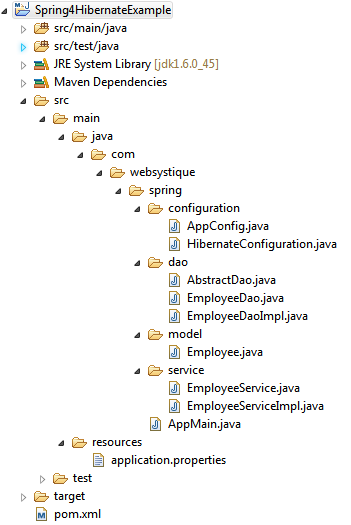
步骤一:往pom.xml中添加依赖
<project xmlns="http://maven.apache.org/POM/4.0.0" xmlns:xsi="http://www.w3.org/2001/XMLSchema-instance"

    xsi:schemaLocation="http://maven.apache.org/POM/4.0.0 http://maven.apache.org/xsd/maven-4.0.0.xsd">

    <modelVersion>4.0.0</modelVersion>

    <groupId>com.websystique.spring</groupId>

    <artifactId>Spring4HibernateExample</artifactId>

    <version>1.0.0</version>

    <packaging>jar</packaging>

    <name>Spring4HibernateExample</name>

    <properties>

        <springframework.version>4.0.6.RELEASE</springframework.version>

        <hibernate.version>4.3.6.Final</hibernate.version>

        <mysql.connector.version>5.1.31</mysql.connector.version>

        <joda-time.version>2.3</joda-time.version>

    </properties>

    <dependencies>

        <!-- Spring -->

        <dependency>

            <groupId>org.springframework</groupId>

            <artifactId>spring-core</artifactId>

            <version>${springframework.version}</version>

        </dependency>

        <dependency>

            <groupId>org.springframework</groupId>

            <artifactId>spring-context</artifactId>

            <version>${springframework.version}</version>

        </dependency>

        <dependency>

            <groupId>org.springframework</groupId>

            <artifactId>spring-tx</artifactId>

            <version>${springframework.version}</version>

        </dependency>

        <dependency>

            <groupId>org.springframework</groupId>

            <artifactId>spring-orm</artifactId>

            <version>${springframework.version}</version>

        </dependency>

        <!-- Hibernate -->

        <dependency>

            <groupId>org.hibernate</groupId>

            <artifactId>hibernate-core</artifactId>

            <version>${hibernate.version}</version>

        </dependency>

        <!-- MySQL -->

        <dependency>

            <groupId>mysql</groupId>

            <artifactId>mysql-connector-java</artifactId>

            <version>${mysql.connector.version}</version>

        </dependency>

        <!-- Joda-Time -->

        <dependency>

            <groupId>joda-time</groupId>

            <artifactId>joda-time</artifactId>

            <version>${joda-time.version}</version>

        </dependency>

        <!-- To map JodaTime with database type -->

        <dependency>

            <groupId>org.jadira.usertype</groupId>

            <artifactId>usertype.core</artifactId>

            <version>3.0.0.CR1</version>

        </dependency>

    </dependencies>

    <build>

        <pluginManagement>

            <plugins>

                <plugin>

                    <groupId>org.apache.maven.plugins</groupId>

                    <artifactId>maven-compiler-plugin</artifactId>

                    <version>3.2</version>

                    <configuration>

                        <source>1.6</source>

                        <target>1.6</target>

                    </configuration>

                </plugin>

            </plugins>

        </pluginManagement>

    </build>

</project>
很明显我们需要添加Spring、Hibernate和Mysql连接器相关依赖,另外,由于我们使用了joda-time库来处理时间,所以也引入了joda-time依赖。usertype-core库引入是为了提供数据库时间类型与joda-time LocalDate之间的映射。
步骤二:配置Hibernate
com.websystique.spring.configuration.HibernateConfiguration
package com.websystique.spring.configuration;

import java.util.Properties;

import javax.sql.DataSource;

import org.hibernate.SessionFactory;

import org.springframework.beans.factory.annotation.Autowired;

import org.springframework.context.annotation.Bean;

import org.springframework.context.annotation.ComponentScan;

import org.springframework.context.annotation.Configuration;

import org.springframework.context.annotation.PropertySource;

import org.springframework.core.env.Environment;

import org.springframework.jdbc.datasource.DriverManagerDataSource;

import org.springframework.orm.hibernate4.HibernateTransactionManager;

import org.springframework.orm.hibernate4.LocalSessionFactoryBean;

import org.springframework.transaction.annotation.EnableTransactionManagement;

@Configuration

@EnableTransactionManagement

@ComponentScan({ "com.websystique.spring.configuration" })

@PropertySource(value = { "classpath:application.properties" })

public class HibernateConfiguration {

    @Autowired

    private Environment environment;

    @Bean

    public LocalSessionFactoryBean sessionFactory() {

        LocalSessionFactoryBean sessionFactory = new LocalSessionFactoryBean();

        sessionFactory.setDataSource(dataSource());

        sessionFactory.setPackagesToScan(new String[] { "com.websystique.spring.model" });

        sessionFactory.setHibernateProperties(hibernateProperties());

        return sessionFactory;

     }

    @Bean

    public DataSource dataSource() {

        DriverManagerDataSource dataSource = new DriverManagerDataSource();

        dataSource.setDriverClassName(environment.getRequiredProperty("jdbc.driverClassName"));

        dataSource.setUrl(environment.getRequiredProperty("jdbc.url"));

        dataSource.setUsername(environment.getRequiredProperty("jdbc.username"));

        dataSource.setPassword(environment.getRequiredProperty("jdbc.password"));

        return dataSource;

    }

    private Properties hibernateProperties() {

        Properties properties = new Properties();

        properties.put("hibernate.dialect", environment.getRequiredProperty("hibernate.dialect"));

        properties.put("hibernate.show_sql", environment.getRequiredProperty("hibernate.show_sql"));

        properties.put("hibernate.format_sql", environment.getRequiredProperty("hibernate.format_sql"));

        return properties;

    }

    @Bean

    @Autowired

    public HibernateTransactionManager transactionManager(SessionFactory s) {

       HibernateTransactionManager txManager = new HibernateTransactionManager();

       txManager.setSessionFactory(s);

       return txManager;

    }

}
@Configuration注解表明该类包含了用@Bean标注的方法,这些被@Bean标注的方法可以生成bean并交由spring容器管理,在这里例子中,这个类代表了hibernate的配置。
@ComponentScan注解与xml配置中的“context:component-scan base-package="..."”等价,提供了扫描bean的包路径。
@EnableTransactionManagement注解与xml配置中Spring的tx:*命名空间等价,主要用于开启基于注解的事务管理。
@PropertySource注解用于在Spring运行时Environment中声明一组属性(在应用classpath路径下的properties文件中定义),可根据不同环境灵活改变属性值。
sessionFactory()方法创建了一个LocalSessionFactoryBean,与基于XML的配置类似,我们需要一个数据源dataSource和hibernate配置文件(如hibernate.properties)。
多亏了@PropertySource注解,我们可以从.properties文件中得到具体属性值,使用Spring的Environment接口获取对应项目的配置值。
一旦创建了SessionFactory,该bean将会被注入到transactionManager方法中,最终对sessionFactory创建的sessions提供事务支持功能。
如下是本文使用的属性配置文件:
/src/main/resources/application.properties
jdbc.driverClassName = com.mysql.jdbc.Driver

jdbc.url = jdbc:mysql://localhost:3306/websystique

jdbc.username = myuser

jdbc.password = mypassword

hibernate.dialect = org.hibernate.dialect.MySQLDialect

hibernate.show_sql = false

hibernate.format_sql = false
另外,对应的基于XML配置如下
<?xml version="1.0" encoding="UTF-8"?>

<beans xmlns="http://www.springframework.org/schema/beans"

        xmlns:xsi="http://www.w3.org/2001/XMLSchema-instance"

        xmlns:context="http://www.springframework.org/schema/context"

        xmlns:tx="http://www.springframework.org/schema/tx"

        xmlns:aop="http://www.springframework.org/schema/aop"

        xsi:schemaLocation="http://www.springframework.org/schema/beans http://www.springframework.org/schema/beans/spring-beans-4.0.xsd

                            http://www.springframework.org/schema/context http://www.springframework.org/schema/context/spring-context-4.0.xsd

                            http://www.springframework.org/schema/aop http://www.springframework.org/schema/aop/spring-aop-4.0.xsd

                            http://www.springframework.org/schema/tx  http://www.springframework.org/schema/tx/spring-tx-4.0.xsd">

    <context:property-placeholder location="classpath:application.properties" />

    <context:component-scan  base-package="com.websystique.spring" />

    <tx:annotation-driven transaction-manager="transactionManager"/>

    <bean id="dataSource" class="org.springframework.jdbc.datasource.DriverManagerDataSource">

        <property name="driverClassName" value="${jdbc.driverClassName}" />

        <property name="url" value="${jdbc.url}"/>

        <property name="username" value="${jdbc.username}" />

        <property name="password" value="${jdbc.password}"/>

    </bean>

    <bean id="sessionFactory" class="org.springframework.orm.hibernate4.LocalSessionFactoryBean" >

        <property name="dataSource" ref="dataSource"/>

        <property name="packagesToScan">

            <list>

                <value>com.websystique.spring.model</value>

            </list>

        </property>

        <property name="hibernateProperties">

            <props>

                <prop key="hibernate.dialect">${hibernate.dialect}</prop>

                <prop key="hibernate.show_sql">${hibernate.show_sql:false}</prop>

                <prop key="hibernate.format_sql">${hibernate.format_sql:false}</prop>

            </props>

        </property>

    </bean>

    <bean id="transactionManager"  class="org.springframework.orm.hibernate4.HibernateTransactionManager">

        <property name="sessionFactory" ref="sessionFactory" />

    </bean>

    <bean id="persistenceExceptionTranslationPostProcessor"

        class="org.springframework.dao.annotation.PersistenceExceptionTranslationPostProcessor"/>

</beans>
步骤三:Spring配置
com.websystique.spring.configuration.AppConfig
package com.websystique.spring.configuration;

import org.springframework.context.annotation.ComponentScan;

import org.springframework.context.annotation.Configuration;

@Configuration

@ComponentScan(basePackages = "com.websystique.spring")

public class AppConfig {

}
在我们这个示例中,即使该配置类内部是空的,但是使用了@ComponentScan注解,可以自动检测到对应包下所有的beans。
其实你可以完全去除以上的配置,将bean扫描功能放在application context级别去实现(main方法里)。
在成熟的应用里,你会发现使用配置类配置beans(如messageSource、PropertySourcesPlaceHolderConfigurer...)非常方便。
对应的基于XML的配置
<beans xmlns="http://www.springframework.org/schema/beans"

    xmlns:xsi="http://www.w3.org/2001/XMLSchema-instance"

    xmlns:context="http://www.springframework.org/schema/context"

    xsi:schemaLocation="http://www.springframework.org/schema/beans http://www.springframework.org/schema/beans/spring-beans-4.0.xsd

    http://www.springframework.org/schema/context http://www.springframework.org/schema/context/spring-context-4.0.xsd">

    <context:component-scan base-package="com.websystique.spring" />

</beans>
以上就是关于本工程的所有配置了,现在,为了让工程能跑起来,我们还需要添加service、dao层,实体对象,数据库。
步骤四:DAO层
com.websystique.spring.dao.AbstractDao
package com.websystique.spring.dao;

import org.hibernate.Session;

import org.hibernate.SessionFactory;

import org.springframework.beans.factory.annotation.Autowired;

public abstract class AbstractDao {

    @Autowired

    private SessionFactory sessionFactory;

    protected Session getSession() {

        return sessionFactory.getCurrentSession();

    }

    public void persist(Object entity) {

        getSession().persist(entity);

    }

    public void delete(Object entity) {

        getSession().delete(entity);

    }

}
注意,我们在步骤二创建的SessionFactory会被自动装配到这里,这个类将作为基类用于执行数据库相关操作。
com.websystique.spring.dao.EmployeeDao
package com.websystique.spring.dao;

import java.util.List;

import com.websystique.spring.model.Employee;

public interface EmployeeDao {

    void saveEmployee(Employee employee);

    List<Employee> findAllEmployees();

    void deleteEmployeeBySsn(String ssn);

    Employee findBySsn(String ssn);

    void updateEmployee(Employee employee);

}
com.websystique.spring.dao.EmployeeDaoImpl
package com.websystique.spring.dao;

import java.util.List;

import org.hibernate.Criteria;

import org.hibernate.Query;

import org.hibernate.criterion.Restrictions;

import org.springframework.stereotype.Repository;

import com.websystique.spring.model.Employee;

@Repository("employeeDao")

public class EmployeeDaoImpl extends AbstractDao implements EmployeeDao{

    public void saveEmployee(Employee employee) {

        persist(employee);

    }

    @SuppressWarnings("unchecked")

    public List<Employee> findAllEmployees() {

        Criteria criteria = getSession().createCriteria(Employee.class);

        return (List<Employee>) criteria.list();

    }

    public void deleteEmployeeBySsn(String ssn) {

        Query query = getSession().createSQLQuery("delete from Employee where ssn = :ssn");

        query.setString("ssn", ssn);

        query.executeUpdate();

    }

    public Employee findBySsn(String ssn){

        Criteria criteria = getSession().createCriteria(Employee.class);

        criteria.add(Restrictions.eq("ssn",ssn));

        return (Employee) criteria.uniqueResult();

    }

    public void updateEmployee(Employee employee){

        getSession().update(employee);

    }

}
步骤五:添加Service层代码
com.websystique.spring.service.EmployeeService
package com.websystique.spring.service;

import java.util.List;

import com.websystique.spring.model.Employee;

public interface EmployeeService {

    void saveEmployee(Employee employee);

    List<Employee> findAllEmployees();

    void deleteEmployeeBySsn(String ssn);

    Employee findBySsn(String ssn);

    void updateEmployee(Employee employee);

}
com.websystique.spring.service.EmployeeServiceImpl
package com.websystique.spring.service;

import java.util.List;

import org.springframework.beans.factory.annotation.Autowired;

import org.springframework.stereotype.Service;

import org.springframework.transaction.annotation.Transactional;

import com.websystique.spring.dao.EmployeeDao;

import com.websystique.spring.model.Employee;

@Service("employeeService")

@Transactional

public class EmployeeServiceImpl implements EmployeeService{

    @Autowired

    private EmployeeDao dao;

    public void saveEmployee(Employee employee) {

        dao.saveEmployee(employee);

    }

    public List<Employee> findAllEmployees() {

        return dao.findAllEmployees();

    }

    public void deleteEmployeeBySsn(String ssn) {

        dao.deleteEmployeeBySsn(ssn);

    }

    public Employee findBySsn(String ssn) {

        return dao.findBySsn(ssn);

    }

    public void updateEmployee(Employee employee){

        dao.updateEmployee(employee);

    }

}
以上比较引人注目的部分是@Transactional注解,配置了该注解的类会在每个类方法开启事务,并在方法结束的时候提交事务(或者在方法内部出错时回滚事务)。
注意,由于以上事务范围是方法级别的,我们在方法内部使用DAO,DAO方法会在同样的事物内部执行。
步骤六:创建实体类(POJO)
com.websystique.spring.model.Employee
package com.websystique.spring.model;

import java.math.BigDecimal;

import javax.persistence.Column;

import javax.persistence.Entity;

import javax.persistence.GeneratedValue;

import javax.persistence.GenerationType;

import javax.persistence.Id;

import javax.persistence.Table;

import org.hibernate.annotations.Type;

import org.joda.time.LocalDate;

@Entity

@Table(name="EMPLOYEE")

public class Employee {

    @Id

    @GeneratedValue(strategy = GenerationType.IDENTITY)

    private int id;

    @Column(name = "NAME", nullable = false)

    private String name;

    @Column(name = "JOINING_DATE", nullable = false)

    @Type(type="org.jadira.usertype.dateandtime.joda.PersistentLocalDate")

    private LocalDate joiningDate;

    @Column(name = "SALARY", nullable = false)

    private BigDecimal salary;

    @Column(name = "SSN", unique=true, nullable = false)

    private String ssn;

    public int getId() {

        return id;

    }

    public void setId(int id) {

        this.id = id;

    }

    public String getName() {

        return name;

    }

    public void setName(String name) {

        this.name = name;

    }

    public LocalDate getJoiningDate() {

        return joiningDate;

    }

    public void setJoiningDate(LocalDate joiningDate) {

        this.joiningDate = joiningDate;

    }

    public BigDecimal getSalary() {

        return salary;

    }

    public void setSalary(BigDecimal salary) {

        this.salary = salary;

    }

    public String getSsn() {

        return ssn;

    }

    public void setSsn(String ssn) {

        this.ssn = ssn;

    }

    @Override

    public int hashCode() {

        final int prime = 31;

        int result = 1;

        result = prime * result + id;

        result = prime * result + ((ssn == null) ? 0 : ssn.hashCode());

        return result;

    }

    @Override

    public boolean equals(Object obj) {

        if (this == obj)

            return true;

        if (obj == null)

            return false;

        if (!(obj instanceof Employee))

            return false;

        Employee other = (Employee) obj;

        if (id != other.id)

            return false;

        if (ssn == null) {

            if (other.ssn != null)

                return false;

        } else if (!ssn.equals(other.ssn))

            return false;

        return true;

    }

    @Override

    public String toString() {

        return "Employee [id=" + id + ", name=" + name + ", joiningDate="

                + joiningDate + ", salary=" + salary + ", ssn=" + ssn + "]";

    }

}
这是一个标准的实体类,基于JPA注解@Entity, @Table, @Column以及hibernate注解@Type(用于提供数据库类型与Joda-Time LocalDate的映射)。
步骤七:在数据库里创建Schema
CREATE TABLE EMPLOYEE(

    id INT NOT NULL auto_increment,

    name VARCHAR(50) NOT NULL,

    joining_date DATE NOT NULL,

    salary DOUBLE NOT NULL,

    ssn VARCHAR(30) NOT NULL UNIQUE,

    PRIMARY KEY (id)

);
步骤八:创建main方法执行程序
package com.websystique.spring;

import java.math.BigDecimal;

import java.util.List;

import org.joda.time.LocalDate;

import org.springframework.context.annotation.AnnotationConfigApplicationContext;

import org.springframework.context.support.AbstractApplicationContext;

import com.websystique.spring.configuration.AppConfig;

import com.websystique.spring.model.Employee;

import com.websystique.spring.service.EmployeeService;

public class AppMain {

    public static void main(String args[]) {

        AbstractApplicationContext context = new AnnotationConfigApplicationContext(AppConfig.class);

        EmployeeService service = (EmployeeService) context.getBean("employeeService");

        /*

         * Create Employee1

         */

        Employee employee1 = new Employee();

        employee1.setName("Han Yenn");

        employee1.setJoiningDate(new LocalDate(2010, 10, 10));

        employee1.setSalary(new BigDecimal(10000));

        employee1.setSsn("ssn00000001");

        /*

         * Create Employee2

         */

        Employee employee2 = new Employee();

        employee2.setName("Dan Thomas");

        employee2.setJoiningDate(new LocalDate(2012, 11, 11));

        employee2.setSalary(new BigDecimal(20000));

        employee2.setSsn("ssn00000002");

        /*

         * Persist both Employees

         */

        service.saveEmployee(employee1);

        service.saveEmployee(employee2);

        /*

         * Get all employees list from database

         */

        List<Employee> employees = service.findAllEmployees();

        for (Employee emp : employees) {

            System.out.println(emp);

        }

        /*

         * delete an employee

         */

        service.deleteEmployeeBySsn("ssn00000002");

        /*

         * update an employee

         */

        Employee employee = service.findBySsn("ssn00000001");

        employee.setSalary(new BigDecimal(50000));

        service.updateEmployee(employee);

        /*

         * Get all employees list from database

         */

        List<Employee> employeeList = service.findAllEmployees();

        for (Employee emp : employeeList) {

            System.out.println(emp);

        }

        context.close();

    }

}
注意,假如你想删除AppConfig文件,那么只需将
AbstractApplicationContext context = new AnnotationConfigApplicationContext(AppConfig.class);
替换为
AnnotationConfigApplicationContext context = new AnnotationConfigApplicationContext();context.scan("com.websystique.spring"); context.refresh();Employee [id=1, name=Han Yenn, joiningDate=2010-10-10, salary=10000, ssn=ssn00000001]
Employee [id=2, name=Dan Thomas, joiningDate=2012-11-11, salary=20000, ssn=ssn00000002]
Employee [id=1, name=Han Yenn, joiningDate=2010-10-10, salary=50000, ssn=ssn00000001]
工程代码
http://websystique.com/?smd_process_download=1&download_id=802
注:源码EmployeeDaoImpl类中有一处错误,将26行表名Employee改成EMPLOYEE即可。
【译】Spring 4 + Hibernate 4 + Mysql + Maven集成例子(注解 + XML)的更多相关文章
- Spring 4 MVC+Hibernate 4+MySQL+Maven使用注解集成实例
Spring 4 MVC+Hibernate 4+MySQL+Maven使用注解集成实例 转自:通过注解的方式集成Spring 4 MVC+Hibernate 4+MySQL+Maven,开发项目样例 ...
- Spring第12篇—— Spring对Hibernate的SessionFactory的集成功能
由于Spring和Hibernate处于不同的层次,Spring关心的是业务逻辑之间的组合关系,Spring提供了对他们的强大的管理能力, 而Hibernate完成了OR的映射,使开发人员不用再去关心 ...
- Spring3 + Spring MVC+ Mybatis 3+Mysql 项目整合(注解及源码)
Spring3 + Spring MVC+ Mybatis 3+Mysql 项目整合(注解及源码) 备注: 之前在Spring3 + Spring MVC+ Mybatis 3+Mysql 项目整合中 ...
- spring+struts2+hibernate框架搭建(Maven工程)
搭建Spring 1.porm.xml中添加jar包 <!-- spring3 --> <dependency> <groupId>org.springframew ...
- spring+springmvc+hibernate架构、maven分模块开发样例小项目案例
maven分模块开发样例小项目案例 spring+springmvc+hibernate架构 以用户管理做測试,分dao,sevices,web层,分模块开发測试!因时间关系.仅仅測查询成功.其它的准 ...
- Spring和Hibernate结合的一个小例子
1.新建一个SpringHibernate的maven项目 2.pom文件的依赖为 <dependency> <groupId>junit</groupId> &l ...
- Spring Boot (五)Spring Data JPA 操作 MySQL 8
一.Spring Data JPA 介绍 JPA(Java Persistence API)Java持久化API,是 Java 持久化的标准规范,Hibernate是持久化规范的技术实现,而Sprin ...
- Spring MVC Hibernate MySQL Integration(集成) CRUD Example Tutorial【摘】
Spring MVC Hibernate MySQL Integration(集成) CRUD Example Tutorial We learned how to integrate Spring ...
- Maven+Spring+Hibernate+Shiro+Mysql简单的demo框架(二)
然后是项目下的文件:完整的项目请看 上一篇 Maven+Spring+Hibernate+Shiro+Mysql简单的demo框架(一) 项目下的springmvc-servlet.xml配置文件: ...
随机推荐
- 在rem布局下使用背景图片以及sprite
现在移动端页面用rem布局已经是一大流派了,成熟的框架如淘宝的flexiable.js,以及我的好友@墨尘写的更轻量级的hotcss.用rem作单位使得元素能够自适应后,还有一块需要关注的,那就是背景 ...
- ASP.NET MVC Model绑定(四)
ASP.NET MVC Model绑定(四) 前言 前面的篇幅对于Model绑定器IModelBinder以及实现类型.Model绑定器提供程序都作了粗略的讲解,可以把Model绑定器想象成一个大的容 ...
- 构建Web API服务
返回总目录<一步一步使用ABP框架搭建正式项目系列教程> 构建动态Web API控制器 ABP可以自动地为应用层生成Web API 层.比如说我们之前创建的应用层: namespace N ...
- stm32GPIO的速度是什么意思
[引]: I/O口输出模式下,有3种输出速度可选(2MHz.10MHz和50MHz),这个速度是指I/O口驱动电路的响应速度而不是输出信号的速度,输出信号的速度与程序有关(芯片内部在I/O口的输出部分 ...
- TCP同步与异步,长连接与短连接【转载】
原文地址:TCP同步与异步,长连接与短连接作者:1984346023 [转载说明:http://zjj1211.blog.51cto.com/1812544/373896 这是今天看到的一篇讲到T ...
- CSS 定位之绝对与相对
static,relative,absolute,fixed含义 static(静态定位):元素框正常生成.块级元素生成一个矩形框,作为文档流的 的一部分,行内元素则会常见一个或多个行框,至于其父元素 ...
- 扫二维码下载apk并统计被扫描次数(及微信屏蔽下载解决方案)
转载请注明出处:http://www.cnblogs.com/Joanna-Yan/p/5395715.html 需求:想让用户扫描一个二维码就能下载APP,并统计被扫描次数. 两种实现方法: 1.一 ...
- 线程安全性:num++操作为什么也会出问题?
线程的安全性可能是非常复杂的,在没有充足同步的情况下,由于多个线程中的操作执行顺序是不可预测的,甚至会产生奇怪的结果(非预期的).下面的Tools工具类的plus方法会使计数加一,为了方便,这里的nu ...
- 利用rebase来压缩多次提交
我们可以用Git merge –squash来将分支中多次提交合并到master后,只保留一次提交历史.但是有些提交到github远程仓库中的commit信息如何合并呢? 历史记录 首先我们查看一下m ...
- react-native学习笔记--首次安装apk到小米5报错
本文直接引用大神文档: [WINDOWS环境 React Native初识]com.android.ddmlib.InstallException: Failed to establish sessi ...