
vue02 过滤器、计算和侦听属性、vue对象的生命周期、阻止事件冒泡和刷新页面
3. Vue对象提供的属性功能
3.1 过滤器
过滤器,就是vue允许开发者自定义的文本格式化函数,可以使用在两个地方:输出内容和操作数据中。
定义过滤器的方式有两种。
3.1.1 使用Vue.filter()进行全局定义
Vue.filter("RMB1", function(v){
//就是来格式化(处理)v这个数据的
if(v==0){
return v
}
return v+"元"
})
3.1.2 在vue对象中通过filters属性来定义
var vm = new Vue({

  el:"#app",

  data:{},

  filters:{

    RMB2:function(value){

      if(value==''){

        return;

      }else{

        return '¥ '+value;

      }

    }

    }

});
<!DOCTYPE html>

<html lang="en">

<head>

    <meta charset="UTF-8">

    <title>Title</title>

    <script src="js/vue.js"></script>

    <!--导入自定义的过滤器函数-->

    <script src="js/filters.js"></script>

</head>

<body>

    <div id="app">

        价格:{{price|keepdot2(3)|RMB}}<br>

        价格:{{price|keepdot2(3)|RMB}}<br>

        价格:{{price|keepdot2(3)|RMB}}<br>

        价格:{{price|keepdot2(3)}}<br>

        <!--以管道符将值传入后面的过滤器函数里-->

    </div>

    <script>

        var vm1 = new Vue({

            el:"#app",

            data:{

                price: 20.3

            },

            methods:{},

            // 普通过滤器[局部过滤器]

            filters:{

                keepdot2(value,dot){

                    return value.toFixed(dot)

                }

            }

        })

    </script>

</body>

</html>
HTML文件
// 全局过滤器

// Vue.filter("过滤器名称","调用过滤器时执行的函数")

Vue.filter("RMB",function(value){

    return value+"元";

})
自定义过滤器.js
3.4 计算和侦听属性
3.4.1 计算属性
我们之前学习过字符串反转,如果直接把反转的代码写在元素中,则会使得其他同事在开发时时不易发现数据被调整了,所以vue提供了一个计算属性(computed),可以让我们把调整data数据的代码存在在该属性中。
<!DOCTYPE html>

<html lang="en">

<head>

    <meta charset="UTF-8">

    <title>Title</title>

    <script src="js/vue.min.js"></script>

        <script>

        window.onload = function(){

        var vm = new Vue({

            el:"#app",

            data:{

                str1: "abcdefgh"

            },

            computed:{   //计算属性:里面的函数都必须有返回值

                strRevs: function(){

                    var ret = this.str1.split("").reverse().join("");

                    return ret

                }

            }

        });

    }

    </script>

</head>

<body>

    <div id="app">

         <p>{{ str1 }}</p>

         <p>{{ strRevs }}</p>

    </div>

</body>

</html>
<!DOCTYPE html>

<html lang="en">

<head>

    <meta charset="UTF-8">

    <title>Title</title>

    <script src="js/vue.js"></script>

    <!--<script src="js/filters.js"></script>-->

</head>

<body>

    <div id="app">

        原价格:{{price|k2}}<br>

        折扣价:{{new_price}}<br>

    </div>

    <script>

        var vm1 = new Vue({

            el:"#app",

            data:{

                price: 20.3,

                sale: 0.6,

            },

            // 过滤器

            filters:{

                k2(value){

                    return value.toFixed(2)

                }

            },

            // 计算属性

            computed:{

                new_price(){

                    return (this.price*this.sale).toFixed(2);

                }

            }

        })

    </script>

</body>

</html>
计算小栗子
3.4.2 监听属性
侦听属性,可以帮助我们侦听data某个数据的变化,从而做相应的自定义操作。
侦听属性是一个对象,它的键是要监听的对象或者变量,值一般是函数,当侦听的data数据发生变化时,会自定执行的对应函数,这个函数在被调用时,vue会传入两个形参,第一个是变化前的数据值,第二个是变化后的数据值。
<!DOCTYPE html>

<html lang="en">

<head>

    <meta charset="UTF-8">

    <title>Title</title>

    <script src="js/vue.min.js"></script>

    <script>

      window.onload = function(){

         var vm = new Vue({

            el:"#app",

            data:{

                num:20

            },

            watch:{

                num:function(newval,oldval){

                    //num发生变化的时候,要执行的代码

                    console.log("num已经发生了变化!");

                }

            }

        })

      }

    </script>

</head>

<body>

    <div id="app">

        <p>{{ num }}</p>

        <button @click="num++">按钮</button>

    </div>

</body>

</html>
<!DOCTYPE html>

<html lang="en">

<head>

    <meta charset="UTF-8">

    <title>Title</title>

    <script src="js/vue.js"></script>

    <script src="js/filters.js"></script>

</head>

<body>

    <div id="app">

        <form action="">

            账号:<input type="text" v-model="form.username"><span :style="user_style">{{user_text}}</span><br><br>

            密码:<input type="password" v-model="form.password"><br><br>

            确认密码:<input type="password" v-model="form.password2"><br><br>

        </form>

    </div>

    <script>

        var vm1 = new Vue({

            el:"#app",

            data:{

                form:{

                    username:"",

                    password:"",

                    password2:"",

                },

                user_style:{

                    color: "red",

                },

                user_text:"用户名长度只能是4-10位"

            },

            // 监听属性

            // 监听属性的变化

            watch:{

                "form.username":function(value){

                    if(value.length>=4 && value.length<=10){

                        this.user_style.color="blue";

                        this.user_text="用户名长度合法!";

                    }else{

                        this.user_style.color="red";

                        this.user_text="用户名长度只能是4-10位!";

                    }

                }

            }

        })

    </script>

</body>

</html>
监听小栗子
3.5 vue对象的生命周期
每个Vue对象在创建时都要经过一系列的初始化过程。在这个过程中Vue.js会自动运行一些叫做生命周期的的钩子函数,我们可以使用这些函数,在对象创建的不同阶段加上我们需要的代码,实现特定的功能。
<!DOCTYPE html>

<html lang="en">

<head>

    <meta charset="UTF-8">

    <title>Title</title>

    <script src="js/vue.min.js"></script>

    <script>

    window.onload = function(){

        var vm = new Vue({

            el:"#app",

            data:{

                num:0

            },

            beforeCreate:function(){

                console.log("beforeCreate,vm对象尚未创建,num="+ this.num);  //undefined

                this.name=10; // 此时没有this对象呢,所以设置的name无效,被在创建对象的时候被覆盖为0

            },

            created:function(){

                console.log("created,vm对象创建完成,设置好了要控制的元素范围,num="+this.num );  // 0

                this.num = 20;

            },

            beforeMount:function(){

                console.log( this.$el.innerHTML ); // <p>{{num}}</p>

                console.log("beforeMount,vm对象尚未把data数据显示到页面中,num="+this.num ); // 20

                this.num = 30;

            },

            mounted:function(){

                console.log( this.$el.innerHTML ); // <p>30</p>

                console.log("mounted,vm对象已经把data数据显示到页面中,num="+this.num); // 30

            },

            beforeUpdate:function(){

                // this.$el 就是我们上面的el属性了,$el表示当前vue.js所控制的元素#app

                console.log( this.$el.innerHTML );  // <p>30</p>

                console.log("beforeUpdate,vm对象尚未把更新后的data数据显示到页面中,num="+this.num); // beforeUpdate----31

            },

            updated:function(){

                console.log( this.$el.innerHTML ); // <p>31</p>

                console.log("updated,vm对象已经把过呢更新后的data数据显示到页面中,num=" + this.num ); // updated----31

            },

        });

    }

    </script>

</head>

<body>

    <div id="app">

        <p>{{num}}</p>

        <button @click="num++">按钮</button>

    </div>

</body>

</html>
总结:
在vue使用的过程中,如果要初始化操作,把初始化操作的代码放在 mounted 中执行。
mounted阶段就是在vm对象已经把data数据实现到页面以后。一般页面初始化使用。例如,用户访问页面加载成功以后,就要执行的ajax请求。
另一个就是created,这个阶段就是在 vue对象创建以后,把ajax请求后端数据的代码放进 created
<!DOCTYPE html>

<html lang="en">

<head>

    <meta charset="UTF-8">

    <title>Title</title>

    <script src="js/vue.js"></script>

    <script src="js/filters.js"></script>

</head>

<body>

    <div id="app">

        {{user_text}}

    </div>

    <script>

        // vm初始化时会有以下几个阶段

        // 1. vm对象创建

        // 2. vm对象把数据添加到data属性中

        // 3. vm对象显示数据到视图模板html页面中

        var vm1 = new Vue({

            el:"#app",

            data:{

                user_text:"用户名长度只能是4-10位"

            },

            // vm对象把数据添加到data属性之前

            beforeCreate(){

                console.log("--------beforeCreate---------");

                console.log("$data=",this.$data);

                console.log("$el",this.$el);

                console.log("user_text="+this.user_text)

            },

            // vm对象把数据添加到data属性之后

            created(){

                // 使用ajax到后端获取数据给data

                console.log("----------created-------------");

                console.log("$data=",this.$data);

                console.log("$el",this.$el);

                console.log("user_text="+this.user_text)

            },

            // vm对象显示数据到视图模板html页面之前

            // 如果执行 beforeMount,则表示vm对象已经获取到模板ID对象

            beforeMount(){

                console.log("----------beforeMount-------------");

                console.log("$el",this.$el);

            },

            // vm对象显示数据到视图模板html页面以后

            mounted(){

                // 使用ajax或者js在页面刷新前,完成页面修改的操作

                console.log("----------mounted-------------");

                console.log("$el",this.$el);

            }

        })

    </script>

</body>

</html>
生命周期小栗子
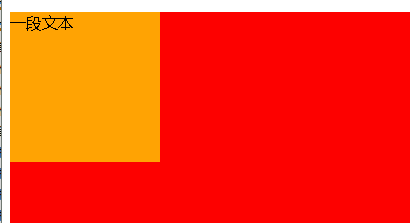
3.2 阻止事件冒泡和刷新页面
使用.stop阻止事件冒泡
<!DOCTYPE html>

<html lang="en">

<head>

    <meta charset="UTF-8">

    <title>Title</title>

    <script src="js/vue.js"></script>

    <!--<script src="js/filters.js"></script>-->

    <style>

    .box1{

        width: 400px;

        height: 400px;

        background: red;

    }

    .box2{

        width: 150px;

        height: 150px;

        background: orange;

    }

    </style>

</head>

<body>

    <div id="app">

        <div class="box1" @click="show1">

            <div class="box2" @click="show2">

                <p @click.stop="show3">一段文本</p>

            </div>

        </div>

    </div>

    <script>

        var vm1 = new Vue({

            el:"#app",

            data:{},

            methods:{

                show1(){

                    console.log("box1");

                },

                show2(){

                    console.log("box2");

                },

                show3(){

                    console.log("点击了p标签");

                }

            }

        })

    </script>

</body>

</html>
stop
使用.prevent阻止刷新页面

<!DOCTYPE html>

<html lang="en">

<head>

    <meta charset="UTF-8">

    <title>Title</title>

    <script src="js/vue.js"></script>

    <script src="js/filters.js"></script>

</head>

<body>

    <div id="app">

        <form action="">

        账号:<input type="text" v-model="user"><br><br>

        密码:<input type="password" v-model="pwd"><br><br>

        <button @click.prevent="loginhander">登录</button>

        </form>

    </div>

    <script>

        var vm1 = new Vue({

            el:"#app",

            data:{

                user:"",

                pwd:"",

            },

            methods:{

                loginhander(){

                    if(this.user.length<3 || this.pwd.length<3){

                        // 长度太短不能登录

                        alert("长度太短不能登录");

                    }else{

                        // 页面跳转

                        location.assign("http://www.baidu.com")

                    }

                }

            }

        })

    </script>

</body>

</html>
prevent
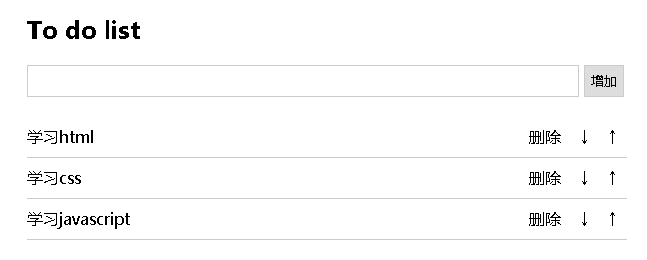
3.3 综合案例-todolist
我的计划列表
html代码: <!DOCTYPE html>
<html lang="en">
<head>
<meta charset="UTF-8">
<title>todolist</title>
<style type="text/css">
.list_con{
width:600px;
margin:50px auto 0;
}
.inputtxt{
width:550px;
height:30px;
border:1px solid #ccc;
padding:0px;
text-indent:10px;
}
.inputbtn{
width:40px;
height:32px;
padding:0px;
border:1px solid #ccc;
}
.list{
margin:0;
padding:0;
list-style:none;
margin-top:20px;
}
.list li{
height:40px;
line-height:40px;
border-bottom:1px solid #ccc;
}
.list li span{
float:left;
}
.list li a{
float:right;
text-decoration:none;
margin:0 10px;
}
</style>
</head>
<body>
<div class="list_con">
<h2>To do list</h2>
<input type="text" name="" id="txt1" class="inputtxt">
<input type="button" name="" value="增加" id="btn1" class="inputbtn">
<ul id="list" class="list">
<!-- javascript:; # 阻止a标签跳转 -->
<li>
<span>学习html</span>
<a href="javascript:;" class="up"> ↑ </a>
<a href="javascript:;" class="down"> ↓ </a>
<a href="javascript:;" class="del">删除</a>
</li>
<li><span>学习css</span><a href="javascript:;" class="up"> ↑ </a><a href="javascript:;" class="down"> ↓ </a><a href="javascript:;" class="del">删除</a></li>
<li><span>学习javascript</span><a href="javascript:;" class="up"> ↑ </a><a href="javascript:;" class="down"> ↓ </a><a href="javascript:;" class="del">删除</a></li>
</ul>
</div>
</body>
</html> 特效实现效果: <!DOCTYPE html>
<html lang="en">
<head>
<meta charset="UTF-8">
<title>todolist</title>
<style type="text/css">
.list_con{
width:600px;
margin:50px auto 0;
}
.inputtxt{
width:550px;
height:30px;
border:1px solid #ccc;
padding:0px;
text-indent:10px;
}
.inputbtn{
width:40px;
height:32px;
padding:0px;
border:1px solid #ccc;
}
.list{
margin:0;
padding:0;
list-style:none;
margin-top:20px;
}
.list li{
height:40px;
line-height:40px;
border-bottom:1px solid #ccc;
}
.list li span{
float:left;
}
.list li a{
float:right;
text-decoration:none;
margin:0 10px;
}
</style>
<script src="js/vue.js"></script>
</head>
<body>
<div id="todolist" class="list_con">
<h2>To do list</h2>
<input type="text" v-model="message" class="inputtxt">
<input type="button" @click="addItem" value="增加" class="inputbtn">
<ul id="list" class="list">
<li v-for="item,key in dolist">
<span>{{item}}</span>
<a @click="upItem(key)" class="up" > ↑ </a>
<a @click="downItem(key)" class="down"> ↓ </a>
<a @click="delItem(key)" class="del">删除</a>
</li>
</ul>
</div>
<script>
// 计划列表代码
let vm = new Vue({
el:"#todolist",
data:{
message:"",
dolist:[
"学习html",
"学习css",
"学习javascript",
]
},
methods:{
addItem(){
if(this.messsage==""){
return false;
}
this.dolist.push(this.message);
this.message = ""
},
delItem(key){
// 删除和替换
// 参数1: 开始下表
// 参数2: 元素长度,如果不填默认删除到最后
// 参数3: 表示使用当前参数替换已经删除内容的位置
this.dolist.splice(key, 1);
},
upItem(key){
if(key==0){
return false;
}
// 向上移动
let result = this.dolist.splice(key,1);
this.dolist.splice(key-1,0,result[0]);
},
downItem(key){
// 向下移动
let result = this.dolist.splice(key, 1);
console.log(result);
this.dolist.splice(key+1,0,result[0]);
}
}
})
</script>
</body>
</html>
<!DOCTYPE html>

<html lang="en">

<head>

    <meta charset="UTF-8">

    <title>todolist</title>

    <style type="text/css">

        .list_con{

            width:600px;

            margin:50px auto 0;

        }

        .inputtxt{

            width:550px;

            height:30px;

            border:1px solid #ccc;

            padding:0px;

            text-indent:10px; /*首行缩进10px*/

        }

        .inputbtn{

            width:40px;

            height:32px;

            padding:0px;

            border:1px solid #ccc;

        }

        .list{

            margin:0;

            padding:0;

            list-style:none;  /* list-style: none 设置列表标记的 默认会是实心圆点 设成none就是没有标记 */

            margin-top:20px;

        }

        .list li{

            height:40px;

            line-height:40px;

            border-bottom:1px solid #ccc;

        }

        .list li span{

            float:left;

        }

        .list li a{

            float:right;

            text-decoration:none; /* text-decoration 属性用来设置或删除文本的装饰。主要是用来删除链接的下划线 */

            margin:0 10px;

        }

    </style>

    <script src="js/vue.js"></script>

</head>

<body>

    <div id="todolist" class="list_con">

        <h2>To do list</h2>

        <input type="text" v-model="message" class="inputtxt">

        <input type="button" @click="addItem" value="增加" class="inputbtn">

        <ul id="list" class="list">

            <li v-for="item,key in dolist">

                <span>{{item}}</span>

                <a @click="upItem(key)" class="up" > ↑ </a>

                <a @click="downItem(key)" class="down"> ↓ </a>

                <a @click="delItem(key)" class="del">删除</a>

            </li>

        </ul>

    </div>

    <script>

    // 计划列表代码

    let vm = new Vue({

        el:"#todolist",

        data:{

            message:"",

            dolist:[

                "学习html",

                "学习css",

                "学习javascript",

            ]

        },

        methods:{

            addItem(){

                if(this.messsage==""){

                    return false;

                }

                this.dolist.push(this.message);

                this.message = ""

            },

            delItem(key){

                // 删除和替换

                // 参数1: 开始下表

                // 参数2: 元素长度,如果不填默认删除到最后

                // 参数3: 表示使用当前参数替换已经删除内容的位置

                //x. splice(start, deleteCount, value, ...)

                //使用注解

                //x代表数组对象

                //splice的主要用途是对数组指定位置进行删除和插入

                //start表示开始位置索引

                //deleteCount删除数组元素的个数

                //value表示在删除位置插入的数组元素

                //value参数可以省略

                this.dolist.splice(key, 1);

            },

            upItem(key){

                if(key==0){

                    return false;

                }

                // 向上移动

                let result = this.dolist.splice(key,1);   //放回数组["学习javascript"]

                console.log(result)

                this.dolist.splice(key-1,0,result[0]);  //value表示在删除位置插入的数组元素:result[0]

            },

            downItem(key){

                // 向下移动

                let result = this.dolist.splice(key, 1);

                console.log(result);

                this.dolist.splice(key+1,0,result[0]);

            }

        }

    })

    </script>

</body>

</html>
vue02 过滤器、计算和侦听属性、vue对象的生命周期、阻止事件冒泡和刷新页面的更多相关文章
- [vue]计算和侦听属性(computed&watch)
先看一下计算属性 vue只有data区的数据才具备响应式的功能. 计算和侦听属性 - v-text里可以写一些逻辑 <div id="example"> {{ mess ...
- Javascript - Vue - vue对象的生命周期
vue对象的生命周期 从vue的创建到销毁会经过一系列的事件,这是vue对象的生命周期. 创建期间的生命周期函数 <div id="box"> <h3 id ...
- Vue对象的生命周期
<!doctype html> <html lang="en"> <head> <meta charset="UTF-8&quo ...
- VUE 计算属性 vs 侦听属性
计算属性 vs 侦听属性 Vue 提供了一种更通用的方式来观察和响应 Vue 实例上的数据变动:侦听属性.当你有一些数据需要随着其它数据变动而变动时,你很容易滥用 watch——特别是如果你之前使用过 ...
- 计算属性 vs 侦听属性 当需要在数据变化时执行异步或开销较大的操作时,这个方式是最有用的
https://cn.vuejs.org/v2/guide/computed.html#基础例子 计算属性 vs 侦听属性 Vue 提供了一种更通用的方式来观察和响应 Vue 实例上的数据变动:侦听属 ...
- Vue01 Vue介绍、Vue使用、Vue实例的创建、数据绑定、Vue实例的生命周期、差值与表达式、指令与事件、语法糖
1 Vue介绍 1.1 官方介绍 vue是一个简单小巧的渐进式的技术栈,它提供了Web开发中常用的高级功能:视图和数据的解耦.组件的服用.路由.状态管理.虚拟DOM 说明:简单小巧 -> 压缩后 ...
- 浅谈vue中的计算属性和侦听属性
计算属性 计算属性用于处理复杂的业务逻辑 计算属性具有依赖性,计算属性依赖 data中的初始值,只有当初始值改变的时候,计算属性才会再次计算 计算属性一般书写为一个函数,返回了一个值,这个值具有依赖性 ...
- vue计算属性VS侦听属性
原文地址 Vue 提供了一种更通用的方式来观察和响应 Vue 实例上的数据变动:侦听属性.当你有一些数据需要随着其它数据变动而变动时,你很容易滥用 watch——特别是如果你之前使用过 Angular ...
- 计算属性、侦听属性、局部与全局组件使用、组件通信(父子互传)、ref属性、动态组件和keep-alive、插槽
今日内容概要 计算属性 侦听属性 局部组件和全局组件 组件通信之父传子 组件通信之子传父 ref属性(组件间通信) 动态组件和keep-alive 插槽 内容详细 1.计算属性 # 插值的普通函数,只 ...
随机推荐
- ZOJ 3201
id=15737" target="_blank">Tree of Tree Time Limit: 1000MS Memory Limit: 32768KB ...
- JavaScript设计模式 Item9 --适配器模式Adapter
适配器模式(转换器面模式),通常是为要使用的接口,不符本应用或本系统使用,而需引入的中间适配层类或对象的情况. 适配器模式的作用是解决两个软件实体间的接口不兼容的问题. 一.定义 适配器模式(Adap ...
- ios 使用第三方框架注意
在ios中使用第三方类库 在项目开发中经常会用到一些第三方类库,通常有两种方法来做到:一种方法是直接把所有的.h和.m文件复制到项目中:另一种方法是把.xcodeproj拖到项目中生成静 ...
- ios oc调用swift framework
1.oc 调用swift /*oc调用swift, project name为DeomOC: 1.oc工程DemoOC中显式创建一个swift文件,生成DemoOC-Bridging-Header.h ...
- Bing Maps进阶系列四:路由功能服务(RouteService)
Bing Maps进阶系列四:路由功能服务(RouteService) Bing Maps提供的路由功能服务(RouteService)可以实现多方位的计算地图上的路线指示,路径行程等功能,比如说实现 ...
- B. Trees in a Row(cf)
B. Trees in a Row time limit per test 1 second memory limit per test 256 megabytes input standard in ...
- jquery得到焦点和失去焦点
鼠标在搜索框中点击的时候里面的文字就消失了,经常会用到搜索框的获得焦点和失去焦点的事件,接下来介绍一下具体代码,感兴趣的朋友额可以参考下 input失去焦点和获得焦点 鼠标在搜索框中点击的时候里面 ...
- github fork项目更改后与原作者同步更新
1.进入你的GitHub发起Pull request 2.选择compare across forks 3.反向操作.base fork改为自己的,head fork改为原作者的 4.点击 creat ...
- jQuery 事件 - trigger() 方法 和 triggerHandler() 方法
trigger() 方法触发被选元素的指定事件类型. triggerHandler() 方法触发被选元素的指定事件类型.但不会执行浏览器默认动作,也不会产生事件冒泡. triggerHandler() ...
- JavaScript--编程挑战
小伙伴们,请编写"改变颜色"."改变宽高"."隐藏内容"."显示内容"."取消设置"的函数,点击相应 ...