
Designing a RESTful API with Python and Flask 201
rest服务器的搭建 - CSDN博客 http://blog.csdn.net/zhanghaotian2011/article/details/8760794
REST的架构设计
REST(Representational State Transfer)是一种轻量级的Web Service架构风格,其实现和操作明显比SOAP和XML-RPC更为简洁,可以完全通过HTTP协议实现,还可以利用缓存Cache来提高响应速度,性能、效率和易用性上都优于SOAP协议。
REST架构遵循了CRUD原则,CRUD原则对于资源只需要四种行为:Create(创建)、Read(读取)、Update(更新)和Delete(删除)就可以完成对其操作和处理。这四个操作是一种原子操作,即一种无法再分的操作,通过它们可以构造复杂的操作过程,正如数学上四则运算是数字的最基本的运算一样。
REST架构让人们真正理解我们的网络协议HTTP本来面貌,对资源的操作包括获取、创建、修改和删除资源的操作正好对应HTTP协议提供的GET、POST、PUT和DELETE方法,因此REST把HTTP对一个URL资源的操作限制在GET、POST、PUT和DELETE这四个之内。这种针对网络应用的设计和开发方式,可以降低开发的复杂性,提高系统的可伸缩性。
REST的设计准则
REST架构是针对Web应用而设计的,其目的是为了降低开发的复杂性,提高系统的可伸缩性。REST提出了如下设计准则:
网络上的所有事物都被抽象为资源(resource);
每个资源对应一个唯一的资源标识符(resource identifier);
通过通用的连接器接口(generic connector interface)对资源进行操作;
对资源的各种操作不会改变资源标识符;
所有的操作都是无状态的(stateless)。
使用REST架构
对于开发人员来说,关心的是如何使用REST架构,这里我们来简单谈谈这个问题。REST不仅仅是一种崭新的架构,它带来的更是一种全新的Web开发过程中的思维方式:通过URL来设计系统结构。REST是一套简单的设计原则、一种架构风格(或模式),不是一种具体的标准或架构。REST有很多成功的使用案例,著名的Delicious和Flickr都提供基于REST风格的API使用,客户端调用也极其方便。
Designing a RESTful API with Python and Flask - miguelgrinberg.com https://blog.miguelgrinberg.com/post/designing-a-restful-api-with-python-and-flask
使用python的Flask实现一个RESTful API服务器端[翻译] - Vovolie - 博客园 https://www.cnblogs.com/vovlie/p/4178077.html
# !flask/bin/python
from flask import Flask

myapp = Flask(__name__)

@myapp.route('/')
def index():
    return "Hello, World!"

if __name__ == '__main__':
    myapp.run(host='120.78.187.72', debug=True)

#指明调用的解释器
[root@bigdata-server-02 myrestserver]# cat app.py
from flask import Flask
myapp = Flask(__name__)
@myapp.route('/')
def index():
return "Hello, World!"
if __name__ == '__main__':
myapp.run(host='0.0.0.0', debug=True)
[root@bigdata-server-02 myrestserver]# python app.py
* Running on http://0.0.0.0:5000/ (Press CTRL+C to quit)
* Restarting with stat
* Debugger is active!
* Debugger PIN: 229-432-432
220.152.100.225 - - [04/Dec/2017 03:42:42] "GET / HTTP/1.1" 200 -
220.152.100.225 - - [04/Dec/2017 03:43:03] "GET / HTTP/1.1" 200 -
浏览器输入云服务器的外网IP
ip:5000
ok
[root@bigdata-server-02 myrestserver]# vim mytask.py
[root@bigdata-server-02 myrestserver]# cat mytask.py
from flask import Flask, jsonify
mytask = Flask(__name__)
tasks = [
{
'id': 1,
'title': 'Buy groceries',
'description': 'Milk, Cheese, Pizza, Fruit, Tylenol',
'done': False
},
{
'id': 2,
'title': 'Learn Python',
'description': 'Need to find a good Python tutorial on the web',
'done': False
}
]
tasks_try = [
{
'id': 111,
'title': 'Buy groceries',
'description': 'Milk, Cheese, Pizza, Fruit, Tylenol',
'done': False
},
{
'id': 222,
'title': 'Learn Python',
'description': 'Need to find a good Python tutorial on the web',
'done': False
}
]
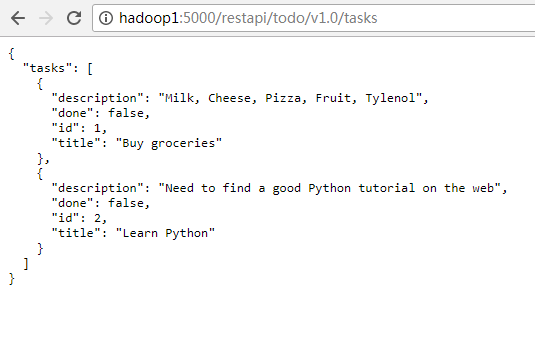
@mytask.route('/restapi/todo/v1.0/tasks', methods=['GET'])
def get_tasks():
return jsonify({'tasks': tasks})
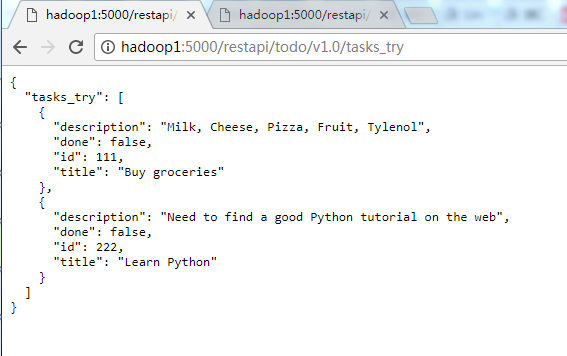
@mytask.route('/restapi/todo/v1.0/tasks_try', methods=['GET'])
def get_tasks_try():
return jsonify({'tasks_try': tasks_try})
if __name__ == '__main__':
mytask.run(host='0.0.0.0',debug=True)
[root@bigdata-server-02 myrestserver]# python mytask.py
* Running on http://0.0.0.0:5000/ (Press CTRL+C to quit)
* Restarting with stat
* Debugger is active!
* Debugger PIN: 229-432-432
220.152.200.225 - - [04/Dec/2017 04:19:46] "GET /restapi/todo/v1.0/tasks HTTP/1.1" 200 -
220.152.200.225 - - [04/Dec/2017 04:19:52] "GET /restapi/todo/v1.0/tasks HTTP/1.1" 200 -
220.152.200.225 - - [04/Dec/2017 04:19:53] "GET /restapi/todo/v1.0/tasks HTTP/1.1" 200 -
220.152.200.225 - - [04/Dec/2017 04:20:00] "GET /restapi/todo/v1.0/tasks_try HTTP/1.1" 200 -
220.152.200.225 - - [04/Dec/2017 04:20:07] "GET /restapi/todo/v1.0/tasks HTTP/1.1" 200 -
from flask import Flask, jsonify, abort, make_response, request

"""
考虑到后续的迁移以及后续的稳定性
此处密码临时至于此
"""
"""
tmp
"""

UidChkUrl = Flask(__name__)
UidChkUrl.config['JSON_AS_ASCII'] = False

@UidChkUrl.route('/RestApi/v1.0/UidChkUrl', methods=['POST'])
def uid_chk_url():
    if not request.json or not 'uid' in request.json:
        abort(400)
    task = {
        'uid': request.json['uid'],
        'no_open': 12,
        'no_ad': 34,
        'description': '该uid在ad_direct_order中共计123条当前未失效,其中12条打不开相应页面,34条页面中没有我司广告位',
        'cost_time': 123,
        'request_time': time.strftime('%Y%m%d_%H%M%S', time.localtime(time.time() - 123)),
        'current_time': time.strftime('%Y%m%d_%H%M%S', time.localtime(time.time()))
    }
    return jsonify({'status': '1', 'info': task}), 201

if __name__ == '__main__':
    UidChkUrl.run(host='0.0.0.0', debug=True)
request.json['uid']
class JSONMixin(object):

    """Common mixin for both request and response objects to provide JSON

    parsing capabilities.

    .. versionadded:: 1.0

    """

    _cached_json = (Ellipsis, Ellipsis)

    @property

    def is_json(self):

        """Check if the mimetype indicates JSON data, either

        :mimetype:`application/json` or :mimetype:`application/*+json`.

        .. versionadded:: 0.11

        """

        mt = self.mimetype

        return (

            mt == 'application/json'

            or (mt.startswith('application/')) and mt.endswith('+json')

        )

    @property

    def json(self):

        """This will contain the parsed JSON data if the mimetype indicates

        JSON (:mimetype:`application/json`, see :meth:`is_json`), otherwise it

        will be ``None``.

        """

        return self.get_json()
request.get_data()
    def get_data(self, cache=True, as_text=False, parse_form_data=False):

        """This reads the buffered incoming data from the client into one

        bytestring.  By default this is cached but that behavior can be

        changed by setting `cache` to `False`.

        Usually it's a bad idea to call this method without checking the

        content length first as a client could send dozens of megabytes or more

        to cause memory problems on the server.

        Note that if the form data was already parsed this method will not

        return anything as form data parsing does not cache the data like

        this method does.  To implicitly invoke form data parsing function

        set `parse_form_data` to `True`.  When this is done the return value

        of this method will be an empty string if the form parser handles

        the data.  This generally is not necessary as if the whole data is

        cached (which is the default) the form parser will used the cached

        data to parse the form data.  Please be generally aware of checking

        the content length first in any case before calling this method

        to avoid exhausting server memory.

        If `as_text` is set to `True` the return value will be a decoded

        unicode string.

        .. versionadded:: 0.9

        """

        rv = getattr(self, '_cached_data', None)

        if rv is None:

            if parse_form_data:

                self._load_form_data()

            rv = self.stream.read()

            if cache:

                self._cached_data = rv

        if as_text:

            rv = rv.decode(self.charset, self.encoding_errors)

        return rv
pip包检索
/usr/local/bin/pip3 search aliyun
/usr/local/bin/pip3 install aliyun-python-sdk-core-v3
/usr/local/bin/pip3 install aliyun-python-sdk-sts
import json

from flask import Flask, jsonify, abort, make_response, request

import time

from aliyunsdkcore import client

from aliyunsdksts.request.v20150401 import AssumeRoleRequest

def getSts(uid):

    # 通过管理控制后台-访问控制 https://help.aliyun.com/product/28625.html

    # RAM控制台 https://ram.console.aliyun.com/

    # STS授权相关信息获取步骤:

    # 1.RAM控制台用户管理创建子用户(User)同时点击该用户创建并获取AccessKeyID和AccessKeySecret https://help.aliyun.com/document_detail/28637.html

    # 2.对该子用户(User) 授予AliyunSTSAssumeRoleAccess策略(必须),如需自定义策略请看 https://help.aliyun.com/document_detail/28640.html

    # 3.RAM控制台角色管理创建角色role,进行自定义授权设置(控制操作的内容),获取Arn https://help.aliyun.com/document_detail/28649.html

    # 注意点:

    # 只有子用户(User)才能调用 AssumeRole 接口

    # 阿里云主用户(Root User)的AccessKeys不能用于发起AssumeRole请求

    # python sdk说明

    # 构建一个 Aliyun Client, 用于发起请求

    # 构建Aliyun Client时需要设置AccessKeyId和AccessKeySevcret

    # STS是Global Service, API入口位于华东 1 (杭州) , 这里Region填写"cn-hangzhou"

    # clt = client.AcsClient('<access-key-id>','<access-key-secret>','cn-hangzhou')

    AccessKeyID = "************************"

    AccessKeySecret = "************************"

    roleArn = "************************"

    kid, ks = '5', '55'

    AccessKeyID, AccessKeySecret = kid, ks

    roleArn = 'acs:ram::30646318:role/aliyunosstokengeneratorrole'

    clt = client.AcsClient(AccessKeyID, AccessKeySecret, 'cn-hangzhou')

    # 构造"AssumeRole"请求

    request___ = AssumeRoleRequest.AssumeRoleRequest()

    # 指定角色 需要在 RAM 控制台上获取

    request___.set_RoleArn(roleArn)

    # RoleSessionName 是临时Token的会话名称,自己指定用于标识你的用户,主要用于审计,或者用于区分Token颁发给谁

    # 但是注意RoleSessionName的长度和规则,不要有空格,只能有'-' '.' '@' 字母和数字等字符

    # 具体规则请参考API文档中的格式要求

    '''

    #AssumeRole_操作接口_API 参考(STS)_访问控制-阿里云 https://help.aliyun.com/document_detail/28763.html

    RoleSessionName

    类型:String

    必须:是

    描述:用户自定义参数。此参数用来区分不同的Token,可用于用户级别的访问审计。

    格式:^[a-zA-Z0-9\.@\-_]+$ 2-32个字符

    '''

    request___.set_RoleSessionName(uid)

    # OSS Policy settings  could not set by default

    # can read https://help.aliyun.com/document_detail/56288.html

    # case https://help.aliyun.com/knowledge_detail/39717.html?spm=5176.product28625.6.735.5etPTf

    # case https://help.aliyun.com/knowledge_detail/39712.html?spm=5176.7739717.6.729.aZiRgD

    # 发起请求,并得到response

    try:

        response = clt.do_action_with_exception(request___)

        ## { "ErrorDump": "the JSON object must be str, not 'bytes'", "StatusCode": "500" }

        #        text = json.loads(response) win ok  linux  + .decode('utf-8')  加后 win 依然ok

        text = json.loads(response.decode('utf-8'))

        stsDict = dict().fromkeys(['RequestId', 'uid', 'Expiration', 'SecurityToken', 'StatusCode'])

        stsDict["RequestId"] = text["RequestId"]

        stsDict["uid"] = uid

        stsDict['Expiration'] = text["Credentials"]['Expiration']

        stsDict['SecurityToken'] = text["Credentials"]['SecurityToken']

        stsDict["StatusCode"] = "200"

        # stsText = json.dumps(stsDict)

        print('-----------》')

        print(stsDict)

        print('《-----------')

        return stsDict

    except Exception as e:

        print(e)

        # errorDict = dict().fromkeys(['StatusCode', 'ErrorCode', 'ErrorMessage'])

        errorDict = dict().fromkeys(['StatusCode', 'ErrorDump'])

        errorDict["StatusCode"] = "500"

        # errorDict["ErrorMessage"] = e.message

        # errorDict["ErrorCode"] = e.error_code

        errorDict["ErrorDump"] = '{}'.format(e)

        # stsText = json.dumps(errorDict)

        return errorDict

    # return stsText

    pass

aliBridge = Flask(__name__)

aliBridge.config['JSON_AS_ASCII'] = False

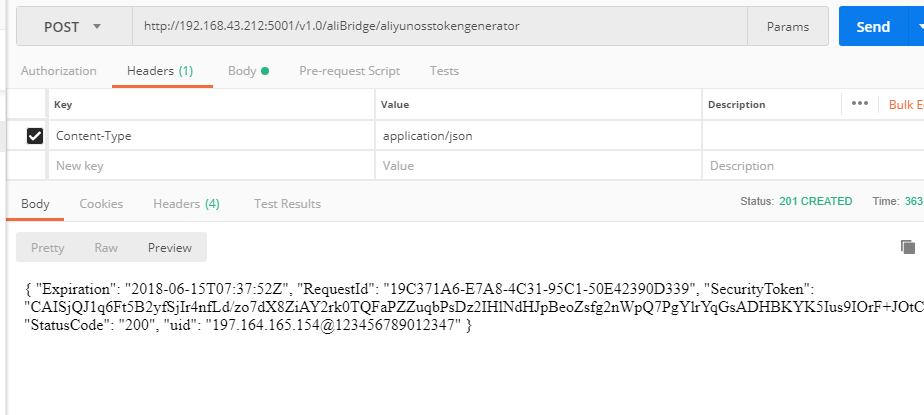
@aliBridge.route('/v1.0/aliBridge/aliyunosstokengenerator', methods=['POST'])

def aliyunosstokengeneratorrole():

    if not request.json:

        abort(400)

    chk_k = ['ipv4', 'imei', 'kid', 'ks']

    ipv4, imei, kid, ks = request.json['ipv4'], request.json['imei'], request.json['kid'], request.json['ks']

    #    ipv4, imei, kid, ks = request.json[0:4]

    uid = 'ipv4@{}@imei@{}'.format(ipv4, imei)

    uid = '{}@{}'.format(ipv4, imei)

    # uid ='ipv4__123__imei_123',

    if (kid, ks) != ('ourServerKeyId', 'ourServerKeyValue'):

        abort(400)

    for c in chk_k:

        if c not in request.json:

            abort(400)

    # task = {

    #     'uid': request.json['uid'],

    #     # 'uid': request,

    #     'no_open': 12,

    #     'no_ad': 34,

    #     'description': '该uid在ad_direct_order中共计123条当前未失效,其中12条打不开相应页面,34条页面中没有我司广告位',

    #     'cost_time': 123,

    #     'request_time': time.strftime('%Y%m%d_%H%M%S', time.localtime(time.time() - 123)),

    #     'current_time': time.strftime('%Y%m%d_%H%M%S', time.localtime(time.time()))

    # }

    # return jsonify({'status': '1', 'info': task}), 201

    task = getSts(uid)

    return jsonify(task), 201

'''

{

"ipv4":"197.164.165.154","imei":"123456789012347","kid":"ourServerKeyId","ks":"ourServerKeyValue"

}

'''

'''

{ "Expiration": "2018-06-15T07:04:29Z", "RequestId": "8F24601E-48E7-42F1-9128-2D631595DF9C", "SecurityToken": "CAISjQJ1q6Ft5B2yfSjIr4jhEer53pUV7bSaUWfFgk03QPxtubz91Dz2IHlNdHJpBeoZsfg2nWpQ7PgYlrYqGsADHBKYK5Ius9IOrF+JOtCa55HrsuxV0MT/QjTMU69uPTV6J7eXdsjUX9vwQXKm/3YB7NmXXDGmWEPfQv/toJV7b9MRcxClZD5dfrl/LRdjr8loXhm4d4zaUHjQj3HXEVBjtydllGp78t7f+MCH7QfEh1CIoY185aaRecD6M5c3ZcdFPo3rjLAsRM3oyzVN7hVGzqBygZFf9C3P1tPnWAAIs07fb7CLrYE2dVUhPPZgAd1NqPntiPt/offPkIf6zRlAO+xPWjjYXpqnxMbU3ksPUBqAATD+F5nQSnqFspyaLTywtxkTppmjCcCqTNDzRHG6X8umfz2IBECEIM8kWjmG9d/a6smkzgGiaZKGCy/AfzM06QWXyVmFZ8SdlBxJZxsW5qVKE0Hlbgx6rZao1Gm4uWF8r+1/4yTUd40cyjUjmoiaEj6iw6+oDWsS2RVG2hAjlaUN", "StatusCode": "200", "uid": "197.164.165.154@123456789012347" }

'''

if __name__ == '__main__':

    aliBridge.run(host='0.0.0.0', port=5001, debug=True)

《-----------

192.168.36.99 - - [/Jun/ ::] "POST /v1.0/aliBridge/aliyunosstokengenerator HTTP/1.1"  -

-----------》

{'SecurityToken': 'CAISjQJ1q6Ft5B2yfSjIr4nYPtPQnLpE5LKCaUj0o3lhf9lEjfPMjTz2IHlNdHJpBeoZsfg2nWpQ7PgYlrYqGsADHBKYK5Ius9IOrF+JOtCa55HrsuxV0MT/QjTMU5tTczR6J7eXdsjUX9vwQXKm/3YB7NmXXDGmWEPfQv/toJV7b9MRcxClZD5dfrl/LRdjr8loXhm4d4zaUHjQj3HXEVBjtydllGp78t7f+MCH7QfEh1CIoY185aaRecD6M5c3ZcdFPo3rjLAsRM3oyzVN7hVGzqBygZFf9C3P1tPnWAAIs07fb7CLrYE2dVUhPPZgAd1NqPntiPt/offPkIf6zRlAO+xPWjjYXpqnxMbU3ksPUBqAAaQv4QxLwoq6uvykmhGQJJNsH6gTnXcrLjhYUZ9G9lBNUV7NGq4hNJnpSWOw/5wBV3N+yZyO4ftTtLQG28tYa/EUy0zOri5xxB9t2GEfv2xNgtm5c5XsgZwAQEoiBvLHWWeBMDHkQGf+2tYWwQWf4IOa1Ij6lacZP6+BaFE7MG9h', 'StatusCode': '', 'Expiration': '2018-06-15T07:56:14Z', 'RequestId': 'BBD5B0B1-49DA-4931-98F2-029409656A8C', 'uid': '197.164.165.154@123456789012347'}

《-----------
https://graph.qq.com/oauth2.0/show?which=Login&display=pc&scope=get_user_info%2Cadd_share%2Cadd_t%2Cadd_pic_t%2Cget_info%2Cget_other_info%2Cget_fanslist%2Cget_idollist%2Cadd_idol%2Cget_repost_list&state=b4a42c9cisQBYRjEAXCpcXpvbmVfc25zxAFzxADEAXICxAFkAMQBdgLEAWkAxAFoxA5hcGkuc25zc2RrLmNvbcQBbQDEAW7ZZmh0dHBzOi8vc3NvLnRvdXRpYW8uY29tL2F1dGgvbG9naW5fc3VjY2Vzcy8_c2VydmljZT1odHRwczovL21wLnRvdXRpYW8uY29tL3Nzb19jb25maXJtLz9yZWRpcmVjdF91cmw9Lw%3D%3D&redirect_uri=http%3A%2F%2Fapi.snssdk.com%2Fauth%2Flogin_success%2F&response_type=code&client_id=100290348
在header中指明按照json解释,在body中按照json格式形成字符串

import requests

import json

url = 'http://192.168.3.212:5001/v1.0/aliBridge/aliyunosstokengenerator'

headers = {'Content-Type': 'application/json'}

d = {

    "ipv4": "197.164.165.154", "imei": "123456789012347", "kid": "ourServerKeyId", "ks": "ourServerKeyValue"

}

r=requests.post(url,data=json.dumps(d),headers=headers)

print(r)

dd=9
def dumps(obj, *, skipkeys=False, ensure_ascii=True, check_circular=True,

        allow_nan=True, cls=None, indent=None, separators=None,

        default=None, sort_keys=False, **kw):

    """Serialize ``obj`` to a JSON formatted ``str``.

    If ``skipkeys`` is true then ``dict`` keys that are not basic types

    (``str``, ``int``, ``float``, ``bool``, ``None``) will be skipped

    instead of raising a ``TypeError``.

    If ``ensure_ascii`` is false, then the return value can contain non-ASCII

    characters if they appear in strings contained in ``obj``. Otherwise, all

    such characters are escaped in JSON strings.

    If ``check_circular`` is false, then the circular reference check

    for container types will be skipped and a circular reference will

    result in an ``OverflowError`` (or worse).

    If ``allow_nan`` is false, then it will be a ``ValueError`` to

    serialize out of range ``float`` values (``nan``, ``inf``, ``-inf``) in

    strict compliance of the JSON specification, instead of using the

    JavaScript equivalents (``NaN``, ``Infinity``, ``-Infinity``).

    If ``indent`` is a non-negative integer, then JSON array elements and

    object members will be pretty-printed with that indent level. An indent

    level of 0 will only insert newlines. ``None`` is the most compact

    representation.

    If specified, ``separators`` should be an ``(item_separator, key_separator)``

    tuple.  The default is ``(', ', ': ')`` if *indent* is ``None`` and

    ``(',', ': ')`` otherwise.  To get the most compact JSON representation,

    you should specify ``(',', ':')`` to eliminate whitespace.

    ``default(obj)`` is a function that should return a serializable version

    of obj or raise TypeError. The default simply raises TypeError.

    If *sort_keys* is true (default: ``False``), then the output of

    dictionaries will be sorted by key.

    To use a custom ``JSONEncoder`` subclass (e.g. one that overrides the

    ``.default()`` method to serialize additional types), specify it with

    the ``cls`` kwarg; otherwise ``JSONEncoder`` is used.

    """

    # cached encoder

    if (not skipkeys and ensure_ascii and

        check_circular and allow_nan and

        cls is None and indent is None and separators is None and

        default is None and not sort_keys and not kw):

        return _default_encoder.encode(obj)

    if cls is None:

        cls = JSONEncoder

    return cls(

        skipkeys=skipkeys, ensure_ascii=ensure_ascii,

        check_circular=check_circular, allow_nan=allow_nan, indent=indent,

        separators=separators, default=default, sort_keys=sort_keys,

        **kw).encode(obj)
201 Created - HTTP | MDN https://developer.mozilla.org/zh-CN/docs/Web/HTTP/Status/201
在HTTP协议中,201 Created 是一个代表成功的应答状态码,表示请求已经被成功处理,并且创建了新的资源。新的资源在应答返回之前已经被创建。同时新增的资源会在应答消息体中返回,其地址或者是原始请求的路径,或者是 Location 首部的值。
这个状态码的常规使用场景是作为 PUT 请求的返回值。
Designing a RESTful API with Python and Flask 201的更多相关文章
- 用 Flask 来写个轻博客 (36) — 使用 Flask-RESTful 来构建 RESTful API 之五
目录 目录 前文列表 PUT 请求 DELETE 请求 测试 对一条已经存在的 posts 记录进行 update 操作 删除一条记录 前文列表 用 Flask 来写个轻博客 (1) - 创建项目 用 ...
- 用 Flask 来写个轻博客 (35) — 使用 Flask-RESTful 来构建 RESTful API 之四
Blog 项目源码:https://github.com/JmilkFan/JmilkFan-s-Blog 目录 目录 前文列表 POST 请求 身份认证 测试 前文列表 用 Flask 来写个轻博客 ...
- 【转】最佳Restful API 实践
原文转自:https://bourgeois.me/rest/ REST APIs are a very common topic nowaday; they are part of almost e ...
- 使用python的Flask实现一个RESTful API服务器端[翻译]
最近这些年,REST已经成为web services和APIs的标准架构,很多APP的架构基本上是使用RESTful的形式了. 本文将会使用python的Flask框架轻松实现一个RESTful的服务 ...
- 使用python的Flask实现一个RESTful API服务器端
使用python的Flask实现一个RESTful API服务器端 最近这些年,REST已经成为web services和APIs的标准架构,很多APP的架构基本上是使用RESTful的形式了. 本文 ...
- Flask 学习篇一: 搭建Python虚拟环境,安装flask,并设计RESTful API。
前些日子,老师给我看了这本书,于是便开始了Flask的学习 GitHub上的大神,于是我也在GitHub上建了一个Flask的项目. 有兴趣可以看看: https://github.com/Silen ...
- 转:使用python的Flask实现一个RESTful API服务器端
提示:可以学习一下flask框架中对于密码进行校验的部分.封装了太多操作. 最近这些年,REST已经成为web services和APIs的标准架构,很多APP的架构基本上是使用RESTful的形式了 ...
- Python Flask高级编程之RESTFul API前后端分离精讲 (网盘免费分享)
Python Flask高级编程之RESTFul API前后端分离精讲 (免费分享) 点击链接或搜索QQ号直接加群获取其它资料: 链接:https://pan.baidu.com/s/12eKrJK ...
- Python使用Flask实现RESTful API,使用Postman工具、requests库测试接口
RESTful是一种API设计规范.在RESTful架构中,主要使用POST,DELETE,PUT和GET四种HTTP请求方式分别对指定的URL资源进行增删改查操作. RESTful之前的做法: /u ...
随机推荐
- eclipse逆向生成实体类
(转自:http://blog.csdn.net/wangpeng047/article/details/6877720) 做项目必然要先进行数据库表设计,然后根据数据库设计建立实体类(VO),这是理 ...
- 【bzoj4383】[POI2015]Pustynia 线段树优化建图+差分约束系统+拓扑排序
题目描述 给定一个长度为n的正整数序列a,每个数都在1到10^9范围内,告诉你其中s个数,并给出m条信息,每条信息包含三个数l,r,k以及接下来k个正整数,表示a[l],a[l+1],...,a[r- ...
- JSONObject与JSONArray的使用(jackson)
1.创建一个JSONObject对象 package com.resource.controller.web; import java.util.ArrayList; import java.util ...
- 【Codevs1922】骑士共存问题(最小割,二分图最大独立集转最大匹配)
题意: 在一个n*n个方格的国际象棋棋盘上,马(骑士)可以攻击的棋盘方格如图所示.棋盘上某些方格设置了障碍,骑士不得进入. 对于给定的n*n个方格的国际象棋棋盘和障碍标志,计算棋盘上最多可以放置多少个 ...
- SQL 随机取出一条数据
今天遇到一需求,需要随机取出一条数据.网上找了下,sqlserver自带的有newID()这个函数,可以随机出来一个guid,用来取随机数还是蛮不错的. 直接上SQL: select top 1 *, ...
- 转自CSDN,关于状态机
有限状态机FSM思想广泛应用于硬件控制电路设计,也是软件上常用的一种处理方法(软件上称为FMM--有限消息机).它把 复杂的控制逻辑分解成有限个稳定状态,在每个状态上判断事件,变连续处理为离散数字处理 ...
- Objective-C NSString的常用用法
//1.创建常量字符串. NSString *astring = @"This is a String!"; //2.创建空字符串,给予赋值. NSString *astrin ...
- Codeforces Round #329 (Div. 2) D. Happy Tree Party(LCA+并查集)
题目链接 题意:就是给你一颗这样的树,用一个$y$来除以两点之间每条边的权值,比如$3->7$,问最后的y的是多少,修改操作是把权值变成更小的. 这个$(y<=10^{18})$除的权值如 ...
- P1540 机器翻译(STL 链表)
题目背景 小晨的电脑上安装了一个机器翻译软件,他经常用这个软件来翻译英语文章. 题目描述 这个翻译软件的原理很简单,它只是从头到尾,依次将每个英文单词用对应的中文含义来替换.对于每个英文单词,软件会先 ...
- Spring MVC集成Spring Data Reids和Spring Session实现Session共享
说明:Spring MVC中集成Spring Data Redis和Spring Session时版本是一个坑点,比如最新版本的Spring Data Redis已经不包含Jedis了,需要自行引入. ...