
四则运算结对编程(GUI)
四则运算GUI
coding地址:https://git.dev.tencent.com/qyj814/GUI.git
结对伙伴:李梦宇
一.题目要求
- 定制出题要求。每次出题时用户都可以在界面上定制如下参数:题目数量,算式数值范围(仅包括原始题目与最终结果的绝对值的数值范围),题目中最多有多少个运算符,题目中是否包含乘除法,题目中是否包含括号。在点击相应出题按钮后将生成题目文件(不包含答案)。参考界面如下所示:

2.做题功能。出题后,用户可以开始答题
3.判题功能。用户答题过程中或者全部完成后可以判断对错,并统计分数和时间。
4.请同学们在结对两人中选择一个更优秀的项目作为项目的起点,在其基础上进行增量修改,根据以上修改自己的四则运算软件。
5.本次界面可以用网页版或客户端任何一种形式完成。
二.代码分析
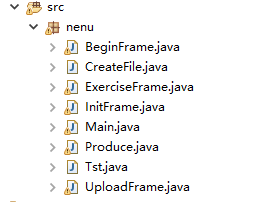
1.代码
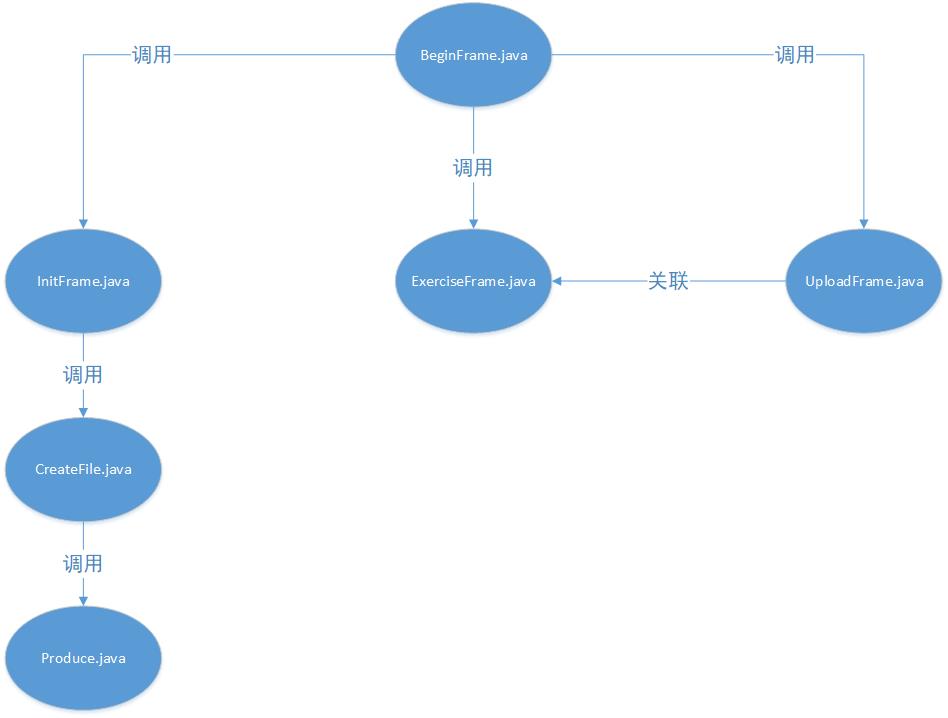
2.类调用关系图
3.核心代码
(1)开始界面
public class BeginFrame extends JFrame {

    private JButton createButton;

    private JButton uploadButton;

    public BeginFrame() {

        // TODO Auto-generated constructor stub

        JPanel panel = new JPanel();

        createButton = new JButton("生成题目文件");

        createButton.addActionListener(new ActionListener() {

            @Override

            public void actionPerformed(ActionEvent e) {

                // TODO Auto-generated method stub

                JFrame frame = new InitFrame();

            }

        });

        panel.add(createButton);

        uploadButton = new JButton("上传文件,开始答题");

        uploadButton.addActionListener(new ActionListener() {

            @Override

            public void actionPerformed(ActionEvent e) {

                // TODO Auto-generated method stub

                int result = 0;

                //File file2 = null;

                String path = null;

                Component chatFrame = null;

                JFileChooser fileChooser = new JFileChooser();

                FileSystemView fsv = FileSystemView.getFileSystemView();

                fileChooser.setCurrentDirectory(fsv.getHomeDirectory());

                fileChooser.setDialogTitle("请选择要上传文件的路径");

                fileChooser.setApproveButtonText("确定");

                fileChooser.setFileSelectionMode(JFileChooser.FILES_ONLY);

                result = fileChooser.showOpenDialog(chatFrame);

                if(JFileChooser.APPROVE_OPTION == result)

                {

                    path = fileChooser.getSelectedFile().getPath();

                    //System.out.println("path"+path);

                }

                ArrayList<String> arr = new ArrayList<String>();

                try {

                    String encoding = "utf-8";

                    File file = new File(path);

                    //File file = new File("result.txt");

                    if(file.isFile() && file.exists())

                    {

                        InputStreamReader reader = new InputStreamReader(new FileInputStream(file),encoding);

                        BufferedReader bufferedReader = new BufferedReader(reader);

                        String lineText = null;

                        while((lineText = bufferedReader.readLine()) != null)

                        {

                            arr.add(lineText);

                        }

                        reader.close();

                    }

                } catch (Exception ex) {

                    // TODO: handle exception

                }

                ExerciseFrame frame = new ExerciseFrame(arr);

            }

        });

        panel.add(uploadButton);

        JPanel jpanel2 = new JPanel();

        jpanel2.setSize(400, 200);

        this.setLayout(new BorderLayout());

        this.add(panel,BorderLayout.NORTH);

        this.add(jpanel2,BorderLayout.SOUTH);

        this.setSize(400, 300);

        this.setLocationRelativeTo(null);

        this.setDefaultCloseOperation(JFrame.EXIT_ON_CLOSE);

        this.setVisible(true);

        this.pack();

    }

}
(2)生成题目
public class InitFrame extends JFrame {

    private JComboBox<String> lbComboBox;

    private JComboBox<String> ubComboBox;

    private JTextField sumField;

    private JComboBox<String> maxLengthBox;

    private JCheckBox isMultDiv;

    private JCheckBox isBracket;

    private JButton submitButton;

    public InitFrame()

    {

        JPanel leftPanel = new JPanel();

        leftPanel.setLayout(new GridLayout(3, 3));

        //leftPanel.setSize(50,150);

        JLabel boundLabel = new JLabel("数值范围");

        lbComboBox = new JComboBox<String>();

        lbComboBox.addItem(String.valueOf(1));

        ubComboBox = new JComboBox<String>();

        ubComboBox.addItem(String.valueOf(10));

        ubComboBox.addItem(String.valueOf(100));

        ubComboBox.addItem(String.valueOf(1000));

        JLabel sumLabel = new JLabel("题目数量");

        sumField = new JTextField(10);

        JLabel maxLengthLabel = new JLabel("运算符上限");

        maxLengthBox = new JComboBox<String>();

        maxLengthBox.addItem(String.valueOf(5));

        maxLengthBox.addItem(String.valueOf(6));

        maxLengthBox.addItem(String.valueOf(7));

        leftPanel.add(boundLabel);

        leftPanel.add(lbComboBox);

        leftPanel.add(ubComboBox);

        leftPanel.add(sumLabel);

        leftPanel.add(sumField);

        leftPanel.add(new JLabel(""));

        leftPanel.add(maxLengthLabel);

        leftPanel.add(maxLengthBox);

        this.setLayout(new BorderLayout());

        this.add(leftPanel,BorderLayout.WEST);

        JPanel rightPanel = new JPanel();

        rightPanel.setLayout(new GridLayout(2, 2));

        JLabel isMultDivLabel = new JLabel("是否包含乘除法");

        isMultDiv = new JCheckBox();

        JLabel isBracketLabel = new JLabel("是否包含括号和乘除法");

        isBracket = new JCheckBox();

        //isBracketLabel.item

        rightPanel.add(isMultDivLabel);

        rightPanel.add(isMultDiv);

        rightPanel.add(isBracketLabel);

        rightPanel.add(isBracket);

        //rightPanel.add(tip);

        this.add(rightPanel,BorderLayout.EAST);

        JPanel underPanel = new JPanel();

        submitButton = new JButton("开始出题");

        submitButton.addActionListener(new ActionListener() {

            @Override

            public void actionPerformed(ActionEvent e) {

                // TODO Auto-generated method stub

                String minStr = lbComboBox.getSelectedItem().toString();

                //System.out.println(minStr);

                String maxStr = ubComboBox.getSelectedItem().toString();

                int min = Integer.parseInt(minStr);

                int max = Integer.parseInt(maxStr);

                if(max<=min)

                {

                    System.out.println("文件生成失败,数值范围不合法!");

                }

                else

                {

                    String sumStr = sumField.getText();

                    //if(sumStr)

                    try {

                        int sum = Integer.parseInt(sumStr);

                    } catch (Exception e2) {

                        System.out.println("文件生成失败,题目数量不合法");

                    }

                    int maxlen = Integer.parseInt(maxLengthBox.getSelectedItem().toString());

                    boolean flag1 = false;

                    boolean flag2 = false;

                    if(isMultDiv.isSelected())

                        flag1 = true;

                    if(isBracket.isSelected())

                    {

                        //flag1 = true;

                        flag2 = true;

                    }

                    if(flag2)

                    {

                        int sum2 = Integer.parseInt(sumStr);

                        //CreateFile.creater(sum2);

                        CreateFile.creater(min, max, sum2, maxlen,1);

                        System.out.println("文件生成成功!");

                    }

                    else if(flag1)

                    {

                        int sum2 = Integer.parseInt(sumStr);

                        //CreateFile.creater(sum2);

                        CreateFile.creater(min, max, sum2, maxlen,2);

                        System.out.println("文件生成成功!");

                    }

                    else

                    {

                        int sum2 = Integer.parseInt(sumStr);

                        //CreateFile.creater(sum2);

                        CreateFile.creater(min, max, sum2, maxlen,3);

                        System.out.println("文件生成成功!");

                    }

                }

            }

        });

        underPanel.add(submitButton);

        this.add(underPanel,BorderLayout.SOUTH);

        this.setSize(500, 400);

        this.setLocationRelativeTo(null);

        this.setDefaultCloseOperation(JFrame.EXIT_ON_CLOSE);

        this.setVisible(true);

        this.pack();

    }

}
(3)上传题目
public class UploadFrame extends JFrame{

    public UploadFrame() {

        // TODO Auto-generated constructor stub

        int result = 0;

        //File file = null;

        String path = null;

        Component chatFrame = null;

        JFileChooser fileChooser = new JFileChooser();

        FileSystemView fsv = FileSystemView.getFileSystemView();

        fileChooser.setCurrentDirectory(fsv.getHomeDirectory());

        fileChooser.setDialogTitle("请选择要上传文件的路径");

        fileChooser.setApproveButtonText("确定");

        fileChooser.setFileSelectionMode(JFileChooser.FILES_ONLY);

        result = fileChooser.showOpenDialog(chatFrame);

        if(JFileChooser.APPROVE_OPTION == result)

        {

            path = fileChooser.getSelectedFile().getPath();

            //System.out.println("path"+path);

        }

    }

}
(4)答题
public class ExerciseFrame extends JFrame {

    //private J

    private JButton nextBtn;

    private JButton submitBtn;

    private JLabel label;

    private JLabel timeLabel;

    private JLabel stateLabel1;

    private JLabel stateLabel2;

    private JTextField ansField;

    private int res;

    private int correct;

    private int curr;

    private int sum;

    private ArrayList<String> formu;

    private ArrayList<String> correctAns;

    public void setFormu(ArrayList<String> arr)

    {

        formu = new ArrayList<String>();

        correctAns = new ArrayList<String>();

        sum = 0;

        Iterator iterator = arr.iterator();

        ScriptEngineManager scriptEngineManager = new ScriptEngineManager();

        ScriptEngine se = scriptEngineManager.getEngineByName("JavaScript");

        while(iterator.hasNext())

        {

            sum++;

            String string = (String)(iterator.next());

            //System.out.println(string);

            String string2 = string.replace("/", "÷");

            formu.add(string2);

            //System.out.println(string2);

            try {

                //System.out.println(se.eval(string)).toString());

                correctAns.add((se.eval(string)).toString());

            } catch (Exception e) {

            }

        }

    }

    public ExerciseFrame(ArrayList<String> arr)

    {

        setFormu(arr);

        curr = 1;

        correct = 0;

        long beginTime = System.currentTimeMillis();

        Iterator iterator1 = formu.iterator();

        Iterator iterator2 = correctAns.iterator();

        JPanel panel = new JPanel();

        label = new JLabel((String)iterator1.next()+" = ");

        panel.add(label);

        ansField = new JTextField(5);

        panel.add(ansField);

        stateLabel1 = new JLabel("正误状态:"+String.valueOf(correct)+"/"+String.valueOf(sum));

        panel.add(stateLabel1);

        stateLabel2 = new JLabel("进度:"+String.valueOf(curr)+"/"+String.valueOf(sum));

        panel.add(stateLabel2);

        //long currTime = System.currentTimeMillis();

        String string = String.format("%1$tM:%1$tS", System.currentTimeMillis() - beginTime);

        //System.out.println(string);

//        timeLabel.setText("用时"+string);

//        panel.add(timeLabel);

        nextBtn = new JButton("Next");

        nextBtn.addActionListener(new ActionListener() {

            @Override

            public void actionPerformed(ActionEvent e) {

                //String string = String.format("%1$tM:%1$tS", System.currentTimeMillis() - beginTime);

                //timeLabel.setText(string);

                //System.out.println(string);

                submitBtn.setVisible(true);

                if(curr == sum-1)

                {

                    nextBtn.setVisible(false);

                }

                //System.out.println(label.getText());

                if(ansField.getText().toString().equals((String)iterator2.next()))

                    correct++;

                curr++;

                stateLabel1.setText("正误状态:"+String.valueOf(correct)+"/"+String.valueOf(sum));

                stateLabel2.setText("进度:"+String.valueOf(curr)+"/"+String.valueOf(sum));

                label.setText((String)iterator1.next()+" = ");

            }

        });

        panel.add(nextBtn);

        submitBtn = new JButton("submit");

        submitBtn.addActionListener(new ActionListener() {

            @Override

            public void actionPerformed(ActionEvent e) {

                String string = String.format("%1$tM:%1$tS", System.currentTimeMillis() - beginTime);

                //timeLabel.setText(string.substring(0,5));

                stateLabel1.setVisible(false);

                stateLabel2.setVisible(false);

                nextBtn.setVisible(false);

                submitBtn.setVisible(false);

                ansField.setVisible(false);

                if(ansField.getText().toString().equals((String)iterator2.next()))

                    correct++;

                label.setText("用时"+string+",共"+sum+"题,您一共答对了"+String.valueOf(correct)+"道题!");

            }

        });

        panel.add(submitBtn);

        panel.setSize(690, 300);

        //panel.setLayout(new FlowLayout());

//        this.setLayout(null);

        JPanel jpanel2 = new JPanel();

        jpanel2.setSize(30, 290);

        JPanel jPanel3 = new JPanel();

        jPanel3.setSize(700, 20);

        this.setLayout(new BorderLayout());

        this.add(panel,BorderLayout.WEST);

        this.add(jpanel2,BorderLayout.EAST);

        this.add(jPanel3,BorderLayout.SOUTH);

        this.setSize(700, 300);

        this.setLocationRelativeTo(null);

        this.setVisible(true);

        this.setDefaultCloseOperation(JFrame.EXIT_ON_CLOSE);

        this.pack();

        //setSize(400, 300);

    }

}
4.页面展示
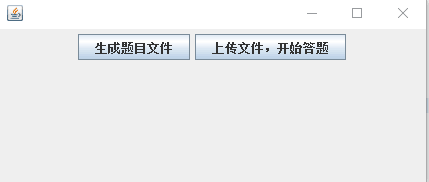
开始界面
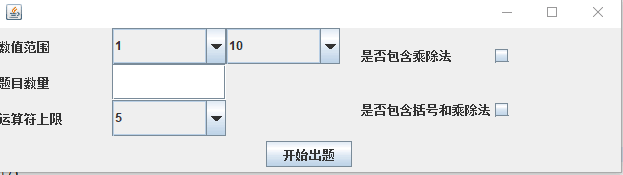
出题范围

做题状态

最后提示
三.总结
感觉这次作业比上次还要难,我和小伙伴两个人加起来一共做了有十个小时吧!我和我的搭档是室友,我俩有谁不会了就可以提出来一起解决,感觉这样提高了不少效率,这也让我感觉到了团队的力量吧!这次作业还是感到挺吃力的,原因还是基础不扎实,很多问题不懂,只好去查,去问。这次作业要不是有小伙伴一起,感觉自己都快写不下去了。
队友优点:认真负责,基础牢固,感觉就是很好!
我的优点:踏实肯干,有耐性吧!
这次作业我们俩应该算是合作的挺愉快了,我没时间的时候她写,她没时间的时候我写,有问题一起讨论,一起解决,合作的很愉快!
四则运算结对编程(GUI)的更多相关文章
- 2017-2018-2 165X 『Java程序设计』课程 结对编程练习_四则运算
2017-2018-2 165X 『Java程序设计』课程 结对编程练习_四则运算 经过第一阶段的学习,同学们已经熟悉了这门语言基本的用法.在一次又一次对着电脑编写并提交代码,进行练习的时候,有没有觉 ...
- 20172325『Java程序设计』课程 结对编程练习_四则运算第三周阶段总结
20172325『Java程序设计』课程 结对编程练习_四则运算第三周阶段总结 结对伙伴 学号:20172306 姓名:刘辰 在这次项目的完成过程中刘辰同学付出了很多,在代码的实践上完成的很出色,在技 ...
- 2017-2018-2 20172323 『Java程序设计』课程 结对编程练习_四则运算
结对编程的好丽友 - 20172323 王禹涵:中缀转后缀 - 20172314 方艺雯:后缀表达式的计算 - 20172305 谭鑫:中缀表达式的输出 需求分析 能随机生成由使用者确定的任意多道四则 ...
- 结对编程1 —— 基于GUI和Swing的四则运算题目生成器
合作伙伴 201421123102 王艳秋 201421123106 陈 雄 代码地址 题目描述 我们在个人作业1中,用各种语言实现了一个命令行的四则运算小程序.进一步,本次要求把这个程序做成GUI( ...
- 结对编程四则运算gui
码市地址:https://git.coding.net/linzhao/sizeyunsuangui.git 林 钊 -- 201421123105 吴世荣 -- 201421123119 王坤彬 - ...
- 结对编程-四则运算-GUI
201421123022 王若凡 201421123026 欧阳勇 https://git.coding.net/ttoyy/sizeyunsuan-GUI.git a.需求分析: ...
- 结对编程1——四则运算-GUI
码市链接:https://coding.net/u/hmhhh/p/hmh-homework/git/tree/master/ 201421123003 黄建英 201421123004 黄美海 题目 ...
- 第二次作业:结对编程,四则运算的GUI实现
小伙伴:201421123031 余洋 201421123044 潘志坚 题目要求: 我们在个人作业1中,用各种语言实现了一个命令行的四则运算小程序.进一步,本次要求把这个程序做成GUI(可以是W ...
- 结对编程-四则运算GUI的实现
一.项目成员以及coding地址: 洪灏捷(本人)201321122020 coding地址:https://git.coding.net/hoje/The-GUI-operation.git 白至 ...
随机推荐
- ASP.NET SQL 总结(2)
Sql常见面试题(总结) 1.用一条SQL语句 查询出每门课都大于80分的学生姓名 name kecheng fenshu 张三 语文 81 张三 数学 ...
- O - Combinations (组合数学)
Description Computing the exact number of ways that N things can be taken M at a time can be a great ...
- service: no such service mysqld 与MySQL的开启,关闭和重启
1.问题原因与解决办法 因为修改了MySQL临时文件的目录后,使用service mysqld restart重启MySQL出现如下错误: service: no such service mysql ...
- keystore找回密码
昨天准备给自己的应用发布一个新版本,在apk打包时,发现之前的用的keystore密码忘了. 蛋碎了一地,我把我所能想到的密码都试了一遍(注:我平常在各个门户网站注册基本上用的都是那几个字母和数字组合 ...
- c++利用jsoncpp libcurl 构造http 包(原)
我们手游要接入uc九游进行测试,要用http向uc那边的sdk 服务器post json数据. 虽然他们提供了php,java还有c#的服务端demo,但是我们服务器是C++写的,我实在不想中间再转 ...
- vue 父子组件双向绑定
vue组件有2大特性: 1.全局组件和局部组件 2.父子组件的数据传递 接下来直接用demo直接看如何传值(静态传值) father.vue <template> <div> ...
- IDEA 导入maven项目,显示:nothing to show
问题描述: IDEA 导入maven项目,import project,默认下一步,直到Select Maven projects to import界面无选项,提示:nothing to show ...
- Sqoop hive 和mysql 交互 完整案例
本文完成:在hive里建管理表:注入部分数据:利用sqoop导入mysql中 期间:解决中文乱码问题 飞行报告故障表 建表命令 查看表 人工灌入少量数据 Windows系统向Linux系统数据传输 ...
- 腾讯云 LNMP+wordpress 搭建个人网站
折腾了好几个小时才弄好(php nginx略知一二),其实一点都不难! 以此记录一下,献给首次搭建的朋友们!! 1)准备工作:(因为个人用的ubuntu16.04 LTS系统 所以这是debian版 ...
- CAD控件:梦想CAD控件功能更新 清除图上的所有高亮实体
1,修正得组里面的实体,把删除实体也返回的错误 2,修正代理实体改不了颜色问题. 3,修正捕捉块插入点,有时会跑到很远的位置问题. 4.MxDrawChange类增加ToBlockRefe ...