
详解SpringBoot集成jsp(附源码)+遇到的坑
本文介绍了SpringBoot集成jsp(附源码)+遇到的坑 ,分享给大家
1、大体步骤
(1)创建Maven web project;
(2)在pom.xml文件添加依赖;
(3)配置application.properties支持jsp
(4)编写测试Controller
(5)编写JSP页面
(6)编写启动类App.java
2、新建SpringInitialzr
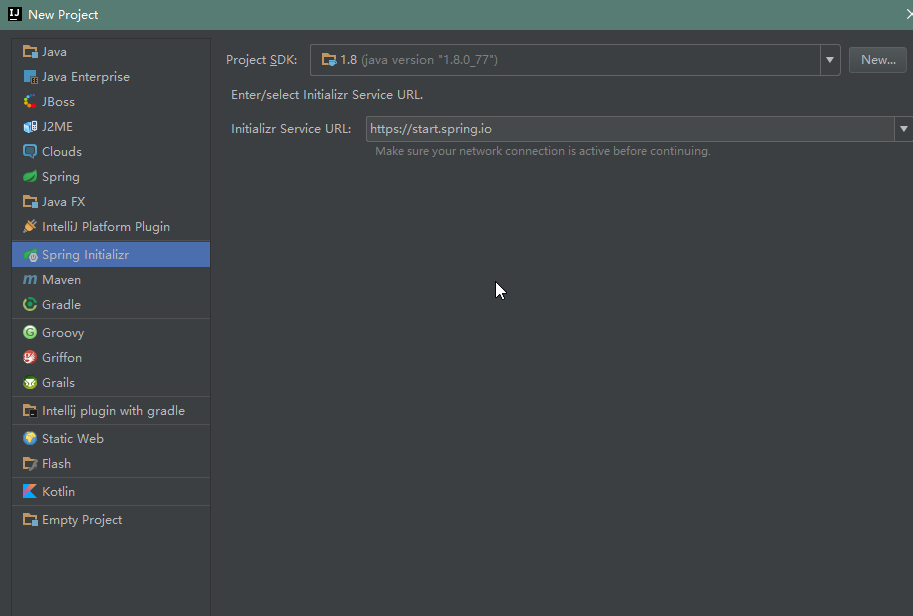

3、pom文件
 <dependencies>

  <dependency>

   <groupId>org.springframework.boot</groupId>

   <artifactId>spring-boot-starter-web</artifactId>

  </dependency>

  <dependency>

   <groupId>org.springframework.boot</groupId>

   <artifactId>spring-boot-starter-tomcat</artifactId>

   <scope>provided</scope>

  </dependency>

  <dependency>

   <groupId>org.apache.tomcat.embed</groupId>

   <artifactId>tomcat-embed-jasper</artifactId>

  </dependency>

  <dependency>

   <groupId>org.springframework.boot</groupId>

   <artifactId>spring-boot-starter-test</artifactId>

   <scope>test</scope>

  </dependency>

 </dependencies>
4、application.properties文件
# 页面默认前缀目录

spring.mvc.view.prefix=/WEB-INF/jsp/

# 响应页面默认后缀

spring.mvc.view.suffix=.jsp

# 自定义属性,可以在Controller中读取

application.hello=Hello GOD
5、Controller文件
package com.example;

import org.springframework.beans.factory.annotation.Value;

import org.springframework.stereotype.Controller;

import org.springframework.web.bind.annotation.RequestMapping;

import java.util.Map;

/**

 * Created by Gensis on 2016/9/9.

 */

@Controller

public class HelloController {

 // 从 application.properties 中读取配置,如取不到默认值为Hello

 @Value("${application.hello:Hello}")

 private String hello;

 @RequestMapping("/helloJsp")

 public String helloJsp(Map<String, Object> map) {

  System.out.println("HelloController.helloJsp().hello=" + hello);

  map.put("hello", hello);

  return "helloJsp";


 }


}
6、jsp页面
<%@ page language="java" contentType="text/html; charset=UTF-8"pageEncoding="UTF-8" %>

<!DOCTYPE html PUBLIC "-//W3C//DTD HTML 4.01 Transitional//EN""http://www.w3.org/TR/html4/loose.dtd">

<html>

<head><meta http-equiv="Content-Type" content="text/html; charset=UTF-8"><title>GOD</title></head>

<body>

helloJsp

<hr>

${hello}

</body>

</html>
7、遇到的问题
1、Spring Boot: Unable to start EmbeddedWebApplicationContext due to missing EmbeddedServletContainerFactory bean
把pom中所有的<scope>provided</scope>注释掉
2、报404
<1>注意controller和restcontroller区别
<2>检查application.properties
<3>检查pom是否缺支持jsp包
3、Failed to introspect annotated methods on class org.springframework.boot.web.support.SpringBootServletInitializer
org.springframework.beans.factory.BeanDefinitionStoreException: Failed to parse configuration class [com.example.SampleWebJspApplication]; nested exception is java.lang.IllegalStateException: Failed to introspect annotated methods on class org.springframework.boot.web.support.SpringBootServletInitializer

 at org.springframework.context.annotation.ConfigurationClassParser.parse(ConfigurationClassParser.java:187) ~[spring-context-4.3.2.RELEASE.jar:4.3.2.RELEASE]

 at org.springframework.context.annotation.ConfigurationClassPostProcessor.processConfigBeanDefinitions(ConfigurationClassPostProcessor.java:321) ~[spring-context-4.3.2.RELEASE.jar:4.3.2.RELEASE]

 at org.springframework.context.annotation.ConfigurationClassPostProcessor.postProcessBeanDefinitionRegistry(ConfigurationClassPostProcessor.java:243) ~[spring-context-4.3.2.RELEASE.jar:4.3.2.RELEASE]

 at org.springframework.context.support.PostProcessorRegistrationDelegate.invokeBeanDefinitionRegistryPostProcessors(PostProcessorRegistrationDelegate.java:273) ~[spring-context-4.3.2.RELEASE.jar:4.3.2.RELEASE]

 at org.springframework.context.support.PostProcessorRegistrationDelegate.invokeBeanFactoryPostProcessors(PostProcessorRegistrationDelegate.java:98) ~[spring-context-4.3.2.RELEASE.jar:4.3.2.RELEASE]

 at org.springframework.context.support.AbstractApplicationContext.invokeBeanFactoryPostProcessors(AbstractApplicationContext.java:681) ~[spring-context-4.3.2.RELEASE.jar:4.3.2.RELEASE]

 at org.springframework.context.support.AbstractApplicationContext.refresh(AbstractApplicationContext.java:523) ~[spring-context-4.3.2.RELEASE.jar:4.3.2.RELEASE]

 at org.springframework.boot.SpringApplication.refresh(SpringApplication.java:759) [spring-boot-1.4.0.RELEASE.jar:1.4.0.RELEASE]

 at org.springframework.boot.SpringApplication.refreshContext(SpringApplication.java:369) [spring-boot-1.4.0.RELEASE.jar:1.4.0.RELEASE]

 at org.springframework.boot.SpringApplication.run(SpringApplication.java:313) [spring-boot-1.4.0.RELEASE.jar:1.4.0.RELEASE]

 at org.springframework.boot.SpringApplication.run(SpringApplication.java:1185) [spring-boot-1.4.0.RELEASE.jar:1.4.0.RELEASE]

 at org.springframework.boot.SpringApplication.run(SpringApplication.java:1174) [spring-boot-1.4.0.RELEASE.jar:1.4.0.RELEASE]

 at com.example.SampleWebJspApplication.main(SampleWebJspApplication.java:20) [classes/:na]

 at sun.reflect.NativeMethodAccessorImpl.invoke0(Native Method) ~[na:1.8.0_77]

 at sun.reflect.NativeMethodAccessorImpl.invoke(NativeMethodAccessorImpl.java:62) ~[na:1.8.0_77]

 at sun.reflect.DelegatingMethodAccessorImpl.invoke(DelegatingMethodAccessorImpl.java:43) ~[na:1.8.0_77]

 at java.lang.reflect.Method.invoke(Method.java:498) ~[na:1.8.0_77]

 at com.intellij.rt.execution.application.AppMain.main(AppMain.java:147) [idea_rt.jar:na]

Caused by: java.lang.IllegalStateException: Failed to introspect annotated methods on class org.springframework.boot.web.support.SpringBootServletInitializer

 at org.springframework.core.type.StandardAnnotationMetadata.getAnnotatedMethods(StandardAnnotationMetadata.java:163) ~[spring-core-4.3.2.RELEASE.jar:4.3.2.RELEASE]

 at org.springframework.context.annotation.ConfigurationClassParser.doProcessConfigurationClass(ConfigurationClassParser.java:301) ~[spring-context-4.3.2.RELEASE.jar:4.3.2.RELEASE]

 at org.springframework.context.annotation.ConfigurationClassParser.processConfigurationClass(ConfigurationClassParser.java:237) ~[spring-context-4.3.2.RELEASE.jar:4.3.2.RELEASE]

 at org.springframework.context.annotation.ConfigurationClassParser.parse(ConfigurationClassParser.java:204) ~[spring-context-4.3.2.RELEASE.jar:4.3.2.RELEASE]

 at org.springframework.context.annotation.ConfigurationClassParser.parse(ConfigurationClassParser.java:173) ~[spring-context-4.3.2.RELEASE.jar:4.3.2.RELEASE]

 ... 17 common frames omitted
解决方案:添加以下依赖
<dependency>
<groupId>org.apache.tomcat.embed</groupId>
<artifactId>tomcat-embed-jasper</artifactId>
</dependency>
4、java.lang.NoClassDefFoundError: javax/servlet/ServletContext
Caused by: java.lang.NoClassDefFoundError: javax/servlet/ServletContext

 at java.lang.Class.getDeclaredMethods0(Native Method) ~[na:1.8.0_77]

 at java.lang.Class.privateGetDeclaredMethods(Class.java:2701) ~[na:1.8.0_77]

 at java.lang.Class.getDeclaredMethods(Class.java:1975) ~[na:1.8.0_77]

 at org.springframework.core.type.StandardAnnotationMetadata.getAnnotatedMethods(StandardAnnotationMetadata.java:152) ~[spring-core-4.3.2.RELEASE.jar:4.3.2.RELEASE]

 ... 21 common frames omitted

Caused by: java.lang.ClassNotFoundException: javax.servlet.ServletContext

 at java.net.URLClassLoader.findClass(URLClassLoader.java:381) ~[na:1.8.0_77]

 at java.lang.ClassLoader.loadClass(ClassLoader.java:424) ~[na:1.8.0_77]

 at sun.misc.Launcher$AppClassLoader.loadClass(Launcher.java:331) ~[na:1.8.0_77]

 at java.lang.ClassLoader.loadClass(ClassLoader.java:357) ~[na:1.8.0_77]

 ... 25 common frames omitted
解决方案:添加
  <dependency>

   <groupId>javax.servlet</groupId>

   <artifactId>javax.servlet-api</artifactId>

  </dependency>

  <dependency>

   <groupId>javax.servlet</groupId>

   <artifactId>jstl</artifactId>

  </dependency>
删除其他依赖中的<scope>provided</scope>
8、源码地址
https://github.com/Genesisxu/SpringSeries/tree/master/SpringBoot-jsp
详解SpringBoot集成jsp(附源码)+遇到的坑的更多相关文章
- 详解Go语言调度循环源码实现
转载请声明出处哦~,本篇文章发布于luozhiyun的博客: https://www.luozhiyun.com/archives/448 本文使用的go的源码15.7 概述 提到"调度&q ...
- 玩转Android之Picasso使用详详详详详详解,从入门到源码剖析!!!!
Picasso是Squareup公司出的一款图片加载框架,能够解决我们在Android开发中加载图片时遇到的诸多问题,比如OOM,图片错位等,问题主要集中在加载图片列表时,因为单张图片加载谁都会写.如 ...
- 多图详解Go的sync.Pool源码
转载请声明出处哦~,本篇文章发布于luozhiyun的博客:https://www.luozhiyun.com 本文使用的go的源码时14.4 Pool介绍 总所周知Go 是一个自动垃圾回收的编程语言 ...
- Android事件分发详解(三)——ViewGroup的dispatchTouchEvent()源码学习
package cc.aa; import android.os.Environment; import android.view.MotionEvent; import android.view.V ...
- 【Java入门提高篇】Day26 Java容器类详解(八)HashSet源码分析
前面花了好几篇的篇幅把HashMap里里外外说了个遍,大家可能对于源码分析篇已经讳莫如深了.别慌别慌,这一篇来说说集合框架里最偷懒的一个家伙——HashSet,为什么说它是最偷懒的呢,先留个悬念,看完 ...
- 【Java入门提高篇】Day22 Java容器类详解(五)HashMap源码分析(上)
准备了很长时间,终于理清了思路,鼓起勇气,开始介绍本篇的主角——HashMap.说实话,这家伙能说的内容太多了,要是像前面ArrayList那样翻译一下源码,稍微说说重点,肯定会让很多人摸不着头脑,不 ...
- 【Java入门提高篇】Day21 Java容器类详解(四)ArrayList源码分析
今天要介绍的是List接口中最常用的实现类——ArrayList,本篇的源码分析基于JDK8,如果有不一致的地方,可先切换到JDK8后再进行操作. 本篇的内容主要包括这几块: 1.源码结构介绍 2.源 ...
- Geth命令用法-参数详解 and 以太坊源码文件目录
本文是对以太坊客户端geth命令的解析 命令用法 geth [选项] 命令 [命令选项] [参数-] 版本 1.7.3-stable 命令 account 管理账户 attach 启动交互式JavaS ...
- 详解Tomcat系列(一)-从源码分析Tomcat的启动
在整个Tomcat系列文章讲解之前, 我想说的是虽然整个Tomcat体系比较复杂, 但是Tomcat中的代码并不难读, 只要认真花点功夫, 一定能啃下来. 由于篇幅的原因, 很难把Tomcat所有的知 ...
随机推荐
- 每天学点linux命令之locate 与 find 命令
定位某个文件的位置 方法一 sudo find / -name libGLEW.so.1.13 -type f 方法二 sudo updatedb && locate libopenc ...
- JS filters-ul li简单过滤
功能要求:在input中输入字母,显示ul li中匹配的元素,隐藏不匹配的 <!DOCTYPE html> <html> <head> <meta chars ...
- Elasticsearch--集群&时光之门和恢复控制
节点发现 启动一个Elasticsearch节点时,该节点会开始寻找具有相同集群名字并且可见的主节点.如果找到主节点,该节点加入一个已经组成了的集群:如果没有找到,该节点成为主节点(如果配置允许).形 ...
- H5 canvas 之乱画
<!DOCTYPE html> <html lang="en"> <head> <meta charset="UTF-8&quo ...
- STL:set的使用
关于set set是以特定的顺序存储相异元素的容器. set是关联式容器,C++ STL中标准关联容器set, multiset, map, multimap内部采用的就是一种非常高效的平衡检索二叉树 ...
- COMMENT - 定义或者改变一个对象的评注
SYNOPSIS COMMENT ON { TABLE object_name | COLUMN table_name.column_name | AGGREGATE agg_name (agg_ty ...
- 2019年,Linux运维行业的趋势,跟不上学习就被淘汰
运维行业经历了多年的发展,已经有了很大的变化,最开始的机房.网线.人肉,到现在一步步的自动化.智能化.容器化,运维人员的职业技能要求越来越高,稍不注意就可能被淘汰. 今天马小哥就来盘点一下2019年运 ...
- JFinal项目eclipse出现Unknown column 'createtime' in 'order clause' 的错误
JFinal项目eclipse出现Unknown column 'createtime' in 'order clause' 的错误,在本次项目中的原因是我的表中的字段信息中创建时间的字段是creat ...
- joda-time时间操作组件
今天看到了学习到了一个不错的操作时间的jar包,很方便的,以后操作时间运算就可以直接使用jar包中的方法了,再也不用自己写操作时间的方法了.懒的不行不行的 <!-- 时间操作组件 --> ...
- vue 全局组件的注册
第一步 在main.js里面 引入需要注册的组件例如: //引入组件 import header from './components/header.vue' import footer from ...