
【Python】分析自己的博客 https://www.cnblogs.com/xiandedanteng/p/?page=XX,看每个月发帖量是多少
要执行下面程序,需要安装Beautiful Soup和requests,具体安装方法请见:https://www.cnblogs.com/xiandedanteng/p/8668492.html
# 分析自己的博客 https://www.cnblogs.com/xiandedanteng/p/?page=XX,看每个月发帖量是多少
from bs4 import BeautifulSoup
import requests
import re

user_agent='Mozilla/4.0 (compatible;MEIE 5.5;windows NT)'
headers={'User-Agent':user_agent}

dic={}; #定义个字典对象,存月份和个数

#把2013年8月以来的每个月都放进去
for i in range(8,13):
     yearMonth="2013-"+"{:0>2d}".format(i)
     dic[yearMonth]=0

for i in range(1,13):
     yearMonth="2014-"+"{:0>2d}".format(i)
     dic[yearMonth]=0

for i in range(1,13):
     yearMonth="2015-"+"{:0>2d}".format(i)
     dic[yearMonth]=0

for i in range(1,13):
     yearMonth="2016-"+"{:0>2d}".format(i)
     dic[yearMonth]=0

for i in range(1,13):
     yearMonth="2017-"+"{:0>2d}".format(i)
     dic[yearMonth]=0

for i in range(1,13):
     yearMonth="2018-"+"{:0>2d}".format(i)
     dic[yearMonth]=0

for i in range(1,12):
     yearMonth="2019-"+"{:0>2d}".format(i)
     dic[yearMonth]=0

for i in range(1,90):
    html=requests.get('http://www.cnblogs.com/xiandedanteng/p/?page='+str(i),headers=headers)
    soup= BeautifulSoup(html.text,'html.parser',from_encoding='utf-8');

    for descDiv in soup.find_all(class_="postDesc2"):
         rawInfo=descDiv.text #得到class="postDesc2"的div的内容
         yearMonth=re.search(r'\d{4}-\d{2}',rawInfo).group() #用正则表达式去匹配年月并取其值

         # 将年月存入字典,如果存在就在原基础上加一
         if yearMonth in dic:
               dic[yearMonth]=dic[yearMonth]+1
         else:
               dic[yearMonth]=1

# 打印字典,需要再放开
for item in dic.items():
    print(item)
得到的结果是:
('2013-08', 28)
('2013-09', 43)
('2013-10', 14)
('2013-11', 15)
('2013-12', 4)
('2014-01', 8)
('2014-02', 5)
('2014-03', 3)
('2014-04', 14)
('2014-05', 14)
('2014-06', 1)
('2014-07', 26)
('2014-08', 15)
('2014-09', 2)
('2014-10', 7)
('2014-11', 12)
('2014-12', 22)
('2015-01', 14)
('2015-02', 4)
('2015-03', 0)
('2015-04', 6)
('2015-05', 4)
('2015-06', 5)
('2015-07', 10)
('2015-08', 7)
('2015-09', 0)
('2015-10', 0)
('2015-11', 1)
('2015-12', 2)
('2016-01', 0)
('2016-02', 9)
('2016-03', 15)
('2016-04', 0)
('2016-05', 1)
('2016-06', 1)
('2016-07', 17)
('2016-08', 12)
('2016-09', 0)
('2016-10', 1)
('2016-11', 0)
('2016-12', 0)
('2017-01', 20)
('2017-02', 3)
('2017-03', 2)
('2017-04', 1)
('2017-05', 1)
('2017-06', 21)
('2017-07', 9)
('2017-08', 38)
('2017-09', 80)
('2017-10', 5)
('2017-11', 32)
('2017-12', 21)
('2018-01', 7)
('2018-02', 0)
('2018-03', 19)
('2018-04', 56)
('2018-05', 45)
('2018-06', 2)
('2018-07', 2)
('2018-08', 0)
('2018-09', 0)
('2018-10', 0)
('2018-11', 0)
('2018-12', 0)
('2019-01', 0)
('2019-02', 0)
('2019-03', 37)
('2019-04', 1)
('2019-05', 2)
('2019-06', 0)
('2019-07', 1)
('2019-08', 18)
('2019-09', 42)
('2019-10', 66)
('2019-11', 17)
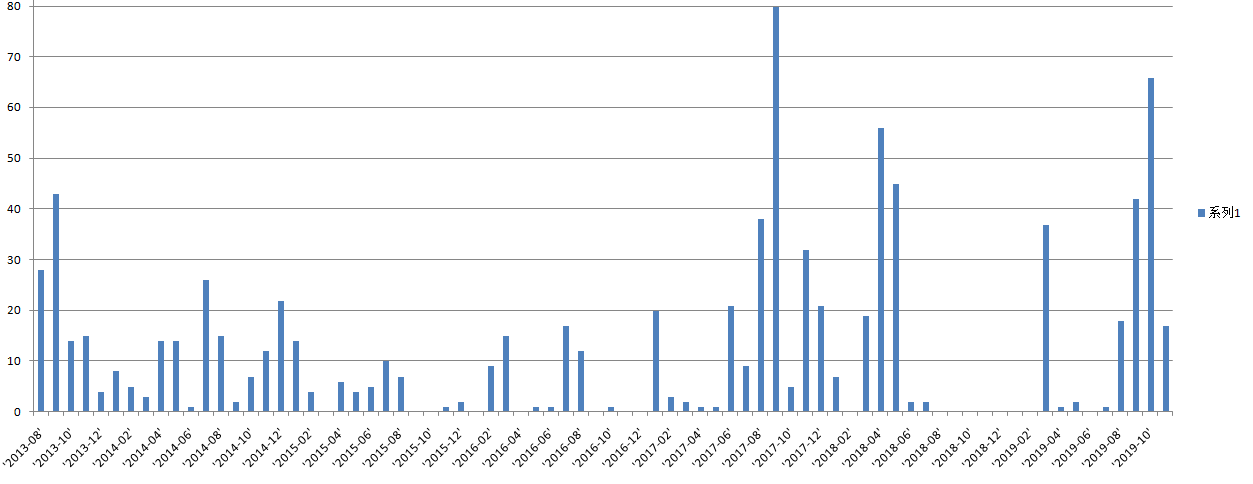
把这个文本拷贝到Notepad++里面,将括号替换掉,然后另存为csv文件。再用Excel打开文件生成图表如下:
工程下载:https://files.cnblogs.com/files/xiandedanteng/6.everyMonthMyblog20191104.rar
--END-- 2019年11月4日09:06:52
【Python】分析自己的博客 https://www.cnblogs.com/xiandedanteng/p/?page=XX,看每个月发帖量是多少的更多相关文章
- python学习大纲目录(转自alex博客https://www.cnblogs.com/alex3714/)
day01: 介绍.基本语法.流程控制 Python介绍 发展史 Python 2 or 3? 安装 Hello World程序 变量 用户输入 模块初识 .pyc是个什么鬼? 数据类型初识 数据运算 ...
- crontab 问题分析 - CSDN博客 https://blog.csdn.net/tengdazhang770960436/article/details/50997297
cd /mnt/tools/trunk/plugins/personas; python update_keywords.py crontab 问题分析 crontab 问题分析 - CSDN博客 ...
- python实现文章或博客的自动摘要(附java版开源项目)
python实现文章或博客的自动摘要(附java版开源项目) 写博客的时候,都习惯给文章加入一个简介.现在可以自动完成了!TF-IDF与余弦相似性的应用(三):自动摘要 - 阮一峰的网络日志http: ...
- Python课程设计 搭建博客
安装包Github地址 Python综合设计 233博客 注意还有个email文件是需要填入自己信息的,比如最高权限账号和要发送邮件的账号密码 请安装Python2.7环境,本服务器所用环境为 设置环 ...
- 用python爬虫监控CSDN博客阅读量
作为一个博客新人,对自己博客的访问量也是很在意的,刚好在学python爬虫,所以正好利用一下,写一个python程序来监控博客文章访问量 效果 代码会自动爬取文章列表,并且获取标题和访问量,写入exc ...
- mongodb丢失数据的原因剖析 - 迎风飘来的专栏 - CSDN博客 https://blog.csdn.net/yibing548/article/details/50844310
mongodb丢失数据的原因剖析 - 迎风飘来的专栏 - CSDN博客 https://blog.csdn.net/yibing548/article/details/50844310
- FFMPEG推流到RTMP服务器命令 - weixin_37897683的博客 - CSDN博客 https://blog.csdn.net/weixin_37897683/article/details/81225228
FFMPEG推流到RTMP服务器命令 - weixin_37897683的博客 - CSDN博客 https://blog.csdn.net/weixin_37897683/article/detai ...
- python抓取51CTO博客的推荐博客的全部博文,对标题分词存入mongodb中
原文地址: python抓取51CTO博客的推荐博客的全部博文,对标题分词存入mongodb中
- 新博客 https://k8gege.org
新博客 https://k8gege.org 于2019/12/3启用,忘了发 由于博客园长期被Google误报屏蔽,导致Firefox/Chrome等浏览器无法访问博客 发现将被Google误报的文 ...
随机推荐
- js回调函数的理解
js回调函数(callback)理解 Mark! 讲之前说一句 function say(){ alert(,,,,,,,,) } var say=function (){ alert(,,,,,,, ...
- 前端框架开始学习Vue(三)
初步安装.与搭建 https://www.cnblogs.com/yanxulan/p/8978732.html ----如何搭建一个vue项目 安装 nodejs,,, npm i == np ...
- Android驱动之设备树简介
目录 一. 设备树简介 2 1. 问题一:为什么需要设备树? 2 ①名词解释: 2 ②DT详细介绍: 2 ③DTS是DT的源文件,描述Device Tree中的设备 ...
- unittest 运行slenium(一)---创建配置类
文章主要是创建: log : 日志文件 excel :文档的读写 ini 及 yaml :文件的读取 一:创建log日志文件 主要是对logging框架进行二次封装并输出自己需要的日志格式 1. 首先 ...
- Django drf:手撸自定义跨域
项目需求: 1.用域名8000向8001发送请求,用django框架解决跨域问题 2.用上自定义中间件配置,支持get.post.put.detele和非简单请求 3.支持版本控制 4.在settin ...
- AD19新功能之跟随走线
跟随走线 AD19新增跟随走线,比如需要按照特定的轨迹进行走线,比如要绕着一个圆进行走线,或者靠着边框走线,普通模式下的效果如下图所示,线会跟着指针跑: 在走线模式下,按住 shift + f ,然后 ...
- 从Retrofit的源码来看 HTTP
关于Retrofit是啥,这里就不多解释了,还是先来瞅下官网: 而这次主要是了解它的底层动作机制,而在了解底层之前先来回顾一下官网的整体使用步骤: 咱们也以官网的这个例子为例,先从简单的使用开始逐步深 ...
- sql 索引的使用 转载:https://www.cnblogs.com/xiaoyangjia/p/11267191.html#mysql_performance
B-Tree索引的3个限制: 如果不是按照索引的最左列开始查找,则无法使用索引 不能跳过索引中的列.如果联合索引(a,b,c) ,如果使用条件a和c条件查询,那么只能使用索引的第一列a 如果查询中有某 ...
- python 杂记-unittest
介绍单元测试的好文:https://mp.weixin.qq.com/s/njxc8GXSlc3z_RibK70ROg setUpModule/tearDownModule:在整个模块的开始和结束时被 ...
- c++之:new与malloc
#include <iostream> using namespace std; void spacealloc_c() { //开辟内存空间---C语言风格 int *p = (int ...