
VueRouter案列
案列内容,包含,模板,路由传参,路由重定向,路由嵌套,能够复习路由基本使用,成果如图:
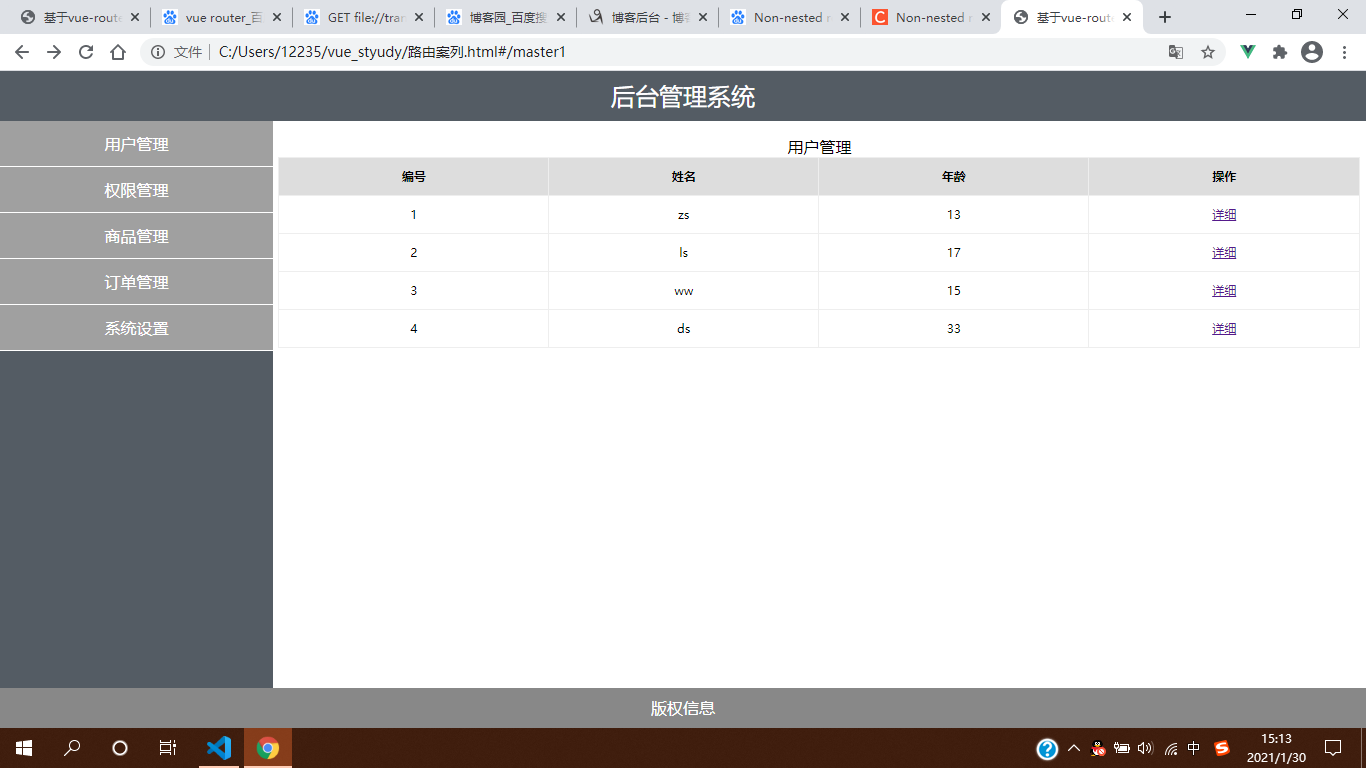
完整代码:
  1 <!DOCTYPE html>

  2 <html lang="en">

  3

  4 <head>

  5     <meta charset="UTF-8" />

  6     <title>基于vue-router的案例</title>

  7     <style type="text/css">

  8         html,

  9         body,

 10         #app {

 11             margin: 0;

 12             padding: 0px;

 13             height: 100%;

 14         }

 15

 16         .header {

 17             height: 50px;

 18             background-color: #545c64;

 19             line-height: 50px;

 20             text-align: center;

 21             font-size: 24px;

 22             color: #fff;

 23         }

 24

 25         .footer {

 26             height: 40px;

 27             line-height: 40px;

 28             background-color: #888;

 29             position: absolute;

 30             bottom: 0;

 31             width: 100%;

 32             text-align: center;

 33             color: #fff;

 34         }

 35

 36         .main {

 37             display: flex;

 38             position: absolute;

 39             top: 50px;

 40             bottom: 40px;

 41             width: 100%;

 42         }

 43

 44         .content {

 45             flex: 1;

 46             text-align: center;

 47             height: 100%;

 48         }

 49

 50         .left {

 51             flex: 0 0 20%;

 52             background-color: #545c64;

 53         }

 54

 55         .left a {

 56             color: white;

 57             text-decoration: none;

 58         }

 59

 60         .right {

 61             margin: 5px;

 62         }

 63

 64         .btns {

 65             width: 100%;

 66             height: 35px;

 67             line-height: 35px;

 68             background-color: #f5f5f5;

 69             text-align: left;

 70             padding-left: 10px;

 71             box-sizing: border-box;

 72         }

 73

 74         button {

 75             height: 30px;

 76             background-color: #ecf5ff;

 77             border: 1px solid lightskyblue;

 78             font-size: 12px;

 79             padding: 0 20px;

 80         }

 81

 82         .main-content {

 83             margin-top: 10px;

 84         }

 85

 86         ul {

 87             margin: 0;

 88             padding: 0;

 89             list-style: none;

 90         }

 91

 92         ul li {

 93             height: 45px;

 94             line-height: 45px;

 95             background-color: #a0a0a0;

 96             color: #fff;

 97             cursor: pointer;

 98             border-bottom: 1px solid #fff;

 99         }

100

101         table {

102             width: 100%;

103             border-collapse: collapse;

104         }

105

106         td,

107         th {

108             border: 1px solid #eee;

109             line-height: 35px;

110             font-size: 12px;

111         }

112

113         th {

114             background-color: #ddd;

115         }

116     </style>

117     <script src="https://cdn.jsdelivr.net/npm/vue@2.5.16/dist/vue.js"></script>

118     <script src="https://unpkg.com/vue-router/dist/vue-router.js"></script>

119 </head>

120

121 <body>

122     <div class="app">

123

124         <a href=""></a>

125         <router-view></router-view>

126

127     </div>

128     <script>

129         var info = {

130             props: ['id'],

131             template: '<div>用户id为{{id}}<button @click="go">返回</button></div>',

132             methods: {

133                 go() {

134                     this.$router.go(-1)

135                 }

136             }

137         }

138         var a = {

139             template: '<div><!-- 头部区域 --><header class="header">后台管理系统</header><!-- 中间主体区域 --><div class="main"><!-- 左侧菜单栏 --><div class="content left"><ul><li><router-link to="/master1">用户管理</router-link></li><li><router-link to="/master2">权限管理</router-link></li><li><router-link to="/master3">商品管理</router-link></li><li><router-link to="/master4">订单管理</router-link></li><li><router-link to="/master5">系统设置</router-link></li></ul></div><!-- 右侧内容区域 --><div class="content right"><div class="main-content"><router-view /></div></div></div><!-- 尾部区域 --><footer class="footer">版权信息</footer></div>'

140         }

141         var master1 = {

142             data() {

143                 return {

144                     userlist: [

145                         {

146                             id: 1, name: 'zs', age: 13

147                         },

148                         {

149                             id: 2, name: 'ls', age: 17

150                         },

151                         {

152                             id: 3, name: 'ww', age: 15

153                         },

154                         {

155                             id: 4, name: 'ds', age: 33

156                         },

157                     ]

158                 }

159

160             },

161             methods: {

162                 go: function (id) {

163                     this.$router.push('/info/' + id)

164                 },

165             },

166

167             template: '<div><div>用户管理</div><table><thead><tr><th>编号</th><th>姓名</th><th>年龄</th><th>操作</th></tr></thead><tbody><tr v-for="item in userlist" :key=item.id><td>{{item.id}}</td><td>{{item.name}}</td><td>{{item.age}}</td><td><a href="#" @click=go(item.id)>详细</a></td></tr></tbody></table></div>'

168         }

169         var master2 = {

170             template: '<div>权限管理</div>'

171         }

172         var master3 = {

173             template: '<div>商品管理</div>'

174         }

175         var master4 = {

176             template: '<div>订单管理</div>'

177         }

178         var master5 = {

179             template: '<div>系统设置</div>'

180         }

181

182         var router = new VueRouter({

183             routes: [

184                 {

185                     path: '/', component: a,

186                     redirect: '/master1',//路由重定向,默认先加载master1

187                     children: [

188                         { path: '/', component: master1 },

189                         { path: '/master1', component: master1 },

190                         { path: '/master2', component: master2 },

191                         { path: '/master3', component: master3 },

192                         { path: '/master4', component: master4 },

193                         { path: '/master5', component: master5 },

194                         { path: '/info/:id', component: info, props: true }

195                     ]

196                 },

197

198

199             ]

200         })

201         var app = new Vue({

202             el: '.app',

203             router: router,

204             components: {

205

206             }

207         })

208     </script>

209 </body>

210

211 </html>
VueRouter案列的更多相关文章
- Spring MVC的配置文件(XML)的几个经典案列
1.既然是配置文件版的,那配置文件自然是必不可少,且应该会很复杂,那我们就以一个一个的来慢慢分析这些个经典案列吧! 01.实现Controller /* * 控制器 */ public class M ...
- js闭包的作用域以及闭包案列的介绍:
转载▼ 标签: it js闭包的作用域以及闭包案列的介绍: 首先我们根据前面的介绍来分析js闭包有什么作用,他会给我们编程带来什么好处? 闭包是为了更方便我们在处理js函数的时候会遇到以下的几 ...
- SAMSUNG某型号一千短信成功记录!对比其他软件恢复不成功的案列!
Hello! 大家好欢迎再次来到Dr.wonde的博客, 下面谈一下今天的案列,今年11月26号收到了一客户寄来的三星S4手机恢复里面短信, 如下图所示,用其他软件恢复以后,数据为零,没有恢复,,这下 ...
- php知识案列分享
今天再跟大家分享一下,以下案列. 使用array_flip函数生成随机数,可以去掉重复值. 1 2 3 4 5 6 7 8 9 10 11 12 13 14 15 16 17 18 19 20 < ...
- linux下mysql函数的详细案列
MYSQL * STDCALL mysql_real_connect(MYSQL *mysql, const char *host, const char *user, const char *pas ...
- axis1,xfire,jUnit 测试案列+开Web Service开发指南+axis1.jar下载 代码
axis1,xfire,jUnit 测试案列+Web Service开发指南(中).pdf+axis1.jar下载 代码 项目和资源文档+jar 下载:http://download.csdn. ...
- 大数据技术之_14_Oozie学习_Oozie 的简介+Oozie 的功能模块介绍+Oozie 的部署+Oozie 的使用案列
第1章 Oozie 的简介第2章 Oozie 的功能模块介绍2.1 模块2.2 常用节点第3章 Oozie 的部署3.1 部署 Hadoop(CDH版本的)3.1.1 解压缩 CDH 版本的 hado ...
- react 的安装和案列Todolist
react 的安装和案列Todolist 1.react的安装和环境的配置 首先检查有没有安装node.js和npm node -v npm -v 查看相关版本 2.安装脚手架工具 2.构建:crea ...
- SpringCloud断路器(Hystrix)和服务降级案列
断路器(Hystrix) 为什么需要 Hystrix? 在微服务架构中,我们将业务拆分成一个个的服务,服务与服务之间可以相互调用(RPC).为了保证其高可用,单个服务又必须集群部署.由于网络原因或者自 ...
- Tensorflow 中(批量)读取数据的案列分析及TFRecord文件的打包与读取
内容概要: 单一数据读取方式: 第一种:slice_input_producer() # 返回值可以直接通过 Session.run([images, labels])查看,且第一个参数必须放在列表中 ...
随机推荐
- chrome浏览器自定义安装方法
chrome浏览器有很多比较好的方面,也是很多人首选的浏览器.对于想自定义安装chrome浏览器的小伙伴来说,关于chrome浏览器默认安装到C盘让人很无奈.网上有说直接将C盘的文件夹放到想安装的文件 ...
- 一文彻底弄懂JUC工具包的Semaphore
Semaphore 是 Java 并发包 (java.util.concurrent) 中的重要工具,主要用于控制多线程对共享资源的并发访问量.它可以设置"许可证"(permit) ...
- Java核心知识体系10-线程管理
Java系列 Java核心知识体系1:泛型机制详解 Java核心知识体系2:注解机制详解 Java核心知识体系3:异常机制详解 Java核心知识体系4:AOP原理和切面应用 Java核心知识体系5:反 ...
- el-upload上传文件 需要在请求之前加一个校验文件内容格式请求
before-upload data(){ return { ... //判断是否需要做文件检查 checkFileFormat:false } }, beforeUpload(rawFile) { ...
- Java的多线程编程模型5--从AtomicInteger开始(自增长实现)
AtomicInteger,一个提供原子操作的Integer的类.在Java语言中,++i和i++操作并不是线程安全的,在使用的时候,不可避免的会用到synchronized关键字.而AtomicIn ...
- SQL SERVER日常运维巡检系列——结构设计
前言 做好日常巡检是数据库管理和维护的重要步骤,而且需要对每次巡检日期.结果进行登记,同时可能需要出一份巡检报告. 本系列旨在解决一些常见的困扰: 不知道巡检哪些东西不知道怎么样便捷体检机器太多体检麻 ...
- kali 安装 shodan
声明! 学习视频来自B站up主 泷羽sec 有兴趣的师傅可以关注一下,如涉及侵权马上删除文章,笔记只是方便各位师傅的学习和探讨,文章所提到的网站以及内容,只做学习交流,其他均与本人以及泷羽sec团队无 ...
- 基于surging的木舟平台如何分布式接入设备
一.概述 上篇文章介绍了木舟通过基于木舟平台浅谈surging 的热点KEY的解决方法,那么此篇文章将介绍基于surging的木舟平台如何分布式接入设备. 木舟 (Kayak) 是什么? 木舟(Kay ...
- 使用 Jmeter进行压测
一.环境配置 因为jmeter需要java环境,所以需要下载Jdk和Jmeter.需要注意jdk的版本和jmeter的匹配问题 推荐大家观看Furion的作者百小僧的视频来学习,讲的很细 https: ...
- Qt No Target Architecture
在QT中引入processthreadsapi.h,如果出现 "No Target Architecture",需要在processthreadsapi.h前引入windows.h ...