
单点登录-CAS原理
1.首先了解几个概念
1)、TGC:Ticket-granting cookie,存放用户身份认证凭证的cookie,在浏览器和CAS Server间通讯时使用。
2)、TGT:ticket granting ticket,TGT对象的ID就是TGC的值,在服务器端,通过TGC查询TGT。TGT封装了TGC值以及此Cookie值对应的用户信息。
3)、ST:service ticket,CAS为用户签发的访问某一service的票据,ST是TGT签发的。
2.单点登录的流程
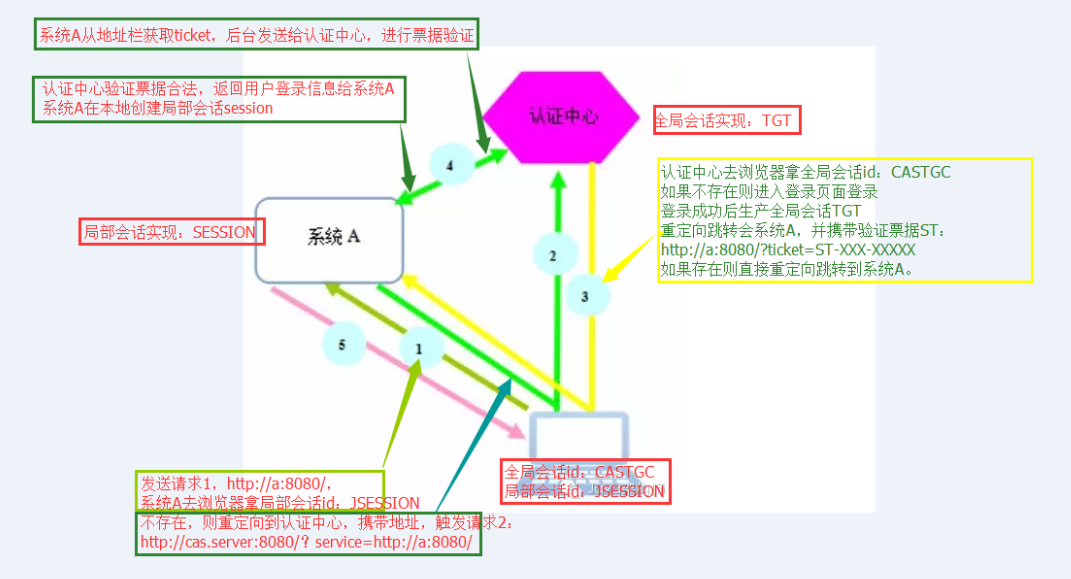
现在有系统A、系统B、认证中心。
用户首次访问系统A的时候:
1)用户通过浏览器访问系统A https://localhost:8443/spring-shiro-cas/index,系统A取不到局部session,这时候系统A需要做一个额外的操作,就是重定向到认证中心
2)请求 https://localhost:8443/cas-server/login?service=https://localhost:8443/spring-shiro-cas/cas,认证中心看浏览器有没有携带TGC,一看没有,返回cas login form让用户登录。
service 参数的作用其实可以认为是一个回调的 url(在cas客户端也就是系统A配置),将来通过服务端认证后,还要重定向到系统A。/cas是拦截器的地址,接收cas服务端票据,拦截之后交由casFilter处理验证票据
但是在这里还有一个作用就是注册服务,简单来说注册服务为的是让我们的认证中心能够知道有哪些系统在我们这里完成过登录,注册时会保存两个信息,一是service地址,二是对应的ticket。其重要目的是为了完成单点退出的功能。
3)用户输入用户名密码,验证正确,在服务端创建全局session TGT,并且set cookie TGC,path=/cas-server
重定向跳转到系统A,并且携带验证票据ST,https://localhost:8443/spring-shiro-cas/cas?ticket=ST-39-2Vh3Ee6xYUs4y0XTy4bw-cas01.example.org
系统A看访问地址是/cas,交给casFilter处理。
查看casFilter的源码可以知道,在casFillter中首先会将ticket包装成一个casToken,然后去执行登录executeLogin(request, response);这样执行认证的域就交到了casRealm中,
// contact CAS server to validate service ticket
Assertion casAssertion = ticketValidator.validate(ticket, getCasService()); //validate Attempts to validate a ticket for the provided service.; ticket the ticket to attempt to validate; service the service this ticket is valid for.
casRealm的ticketValidator会访问cas服务器验证ticket。CASRealm实际上充当的就是第一个CAS Client,让它将由ticket包装好的CAS token传送到CAS去验证。验证成功后就会返回登录信息(用户名和一些属性信息),这些信息将会包装成认证信息AuthenticationInfo,供后续使用。
casFilter源码:
package org.apache.shiro.cas;

import org.apache.shiro.authc.AuthenticationException;

import org.apache.shiro.authc.AuthenticationToken;

import org.apache.shiro.subject.Subject;

import org.apache.shiro.web.filter.authc.AuthenticatingFilter;

import org.apache.shiro.web.util.WebUtils;

import org.slf4j.Logger;

import org.slf4j.LoggerFactory;

import javax.servlet.ServletRequest;

import javax.servlet.ServletResponse;

import javax.servlet.http.HttpServletRequest;

import java.io.IOException;

/**

 * This filter validates the CAS service ticket to authenticate the user.  It must be configured on the URL recognized

 * by the CAS server.  For example, in {@code shiro.ini}:

 * <pre>

 * [main]

 * casFilter = org.apache.shiro.cas.CasFilter

 * ...

 *

 * [urls]

 * /shiro-cas = casFilter

 * ...

 * </pre>

 * (example : http://host:port/mycontextpath/shiro-cas)

 *

 * @since 1.2

 */

public class CasFilter extends AuthenticatingFilter {

    private static Logger logger = LoggerFactory.getLogger(CasFilter.class);

    // the name of the parameter service ticket in url

    private static final String TICKET_PARAMETER = "ticket";

    // the url where the application is redirected if the CAS service ticket validation failed (example : /mycontextpatch/cas_error.jsp)

    private String failureUrl;

    /**

     * The token created for this authentication is a CasToken containing the CAS service ticket received on the CAS service url (on which

     * the filter must be configured).

     *

     * @param request the incoming request

     * @param response the outgoing response

     * @throws Exception if there is an error processing the request.

     */

    @Override

    protected AuthenticationToken createToken(ServletRequest request, ServletResponse response) throws Exception {

        HttpServletRequest httpRequest = (HttpServletRequest) request;

        String ticket = httpRequest.getParameter(TICKET_PARAMETER);

        return new CasToken(ticket);

    }

    /**

     * Execute login by creating {@link #createToken(javax.servlet.ServletRequest, javax.servlet.ServletResponse) token} and logging subject

     * with this token.

     *

     * @param request the incoming request

     * @param response the outgoing response

     * @throws Exception if there is an error processing the request.

     */

    @Override

    protected boolean onAccessDenied(ServletRequest request, ServletResponse response) throws Exception {

        return executeLogin(request, response);

    }

    /**

     * Returns <code>false</code> to always force authentication (user is never considered authenticated by this filter).

     *

     * @param request the incoming request

     * @param response the outgoing response

     * @param mappedValue the filter-specific config value mapped to this filter in the URL rules mappings.

     * @return <code>false</code>

     */

    @Override

    protected boolean isAccessAllowed(ServletRequest request, ServletResponse response, Object mappedValue) {

        return false;

    }

    /**

     * If login has been successful, redirect user to the original protected url.

     *

     * @param token the token representing the current authentication

     * @param subject the current authenticated subjet

     * @param request the incoming request

     * @param response the outgoing response

     * @throws Exception if there is an error processing the request.

     */

    @Override

    protected boolean onLoginSuccess(AuthenticationToken token, Subject subject, ServletRequest request,

                                     ServletResponse response) throws Exception {

        issueSuccessRedirect(request, response);

        return false;

    }

    /**

     * If login has failed, redirect user to the CAS error page (no ticket or ticket validation failed) except if the user is already

     * authenticated, in which case redirect to the default success url.

     *

     * @param token the token representing the current authentication

     * @param ae the current authentication exception

     * @param request the incoming request

     * @param response the outgoing response

     */

    @Override

    protected boolean onLoginFailure(AuthenticationToken token, AuthenticationException ae, ServletRequest request,

                                     ServletResponse response) {

        // is user authenticated or in remember me mode ?

        Subject subject = getSubject(request, response);

        if (subject.isAuthenticated() || subject.isRemembered()) {

            try {

                issueSuccessRedirect(request, response);

            } catch (Exception e) {

                logger.error("Cannot redirect to the default success url", e);

            }

        } else {

            try {

                WebUtils.issueRedirect(request, response, failureUrl);

            } catch (IOException e) {

                logger.error("Cannot redirect to failure url : {}", failureUrl, e);

            }

        }

        return false;

    }

    public void setFailureUrl(String failureUrl) {

        this.failureUrl = failureUrl;

    }

}

/*

 * Licensed to the Apache Software Foundation (ASF) under one

 * or more contributor license agreements.  See the NOTICE file

 * distributed with this work for additional information

 * regarding copyright ownership.  The ASF licenses this file

 * to you under the Apache License, Version 2.0 (the

 * "License"); you may not use this file except in compliance

 * with the License.  You may obtain a copy of the License at

 *

 *     http://www.apache.org/licenses/LICENSE-2.0

 *

 * Unless required by applicable law or agreed to in writing,

 * software distributed under the License is distributed on an

 * "AS IS" BASIS, WITHOUT WARRANTIES OR CONDITIONS OF ANY

 * KIND, either express or implied.  See the License for the

 * specific language governing permissions and limitations

 * under the License.

 */

package org.apache.shiro.cas;

import org.apache.shiro.authc.AuthenticationException;

import org.apache.shiro.authc.AuthenticationToken;

import org.apache.shiro.subject.Subject;

import org.apache.shiro.web.filter.authc.AuthenticatingFilter;

import org.apache.shiro.web.util.WebUtils;

import org.slf4j.Logger;

import org.slf4j.LoggerFactory;

import javax.servlet.ServletRequest;

import javax.servlet.ServletResponse;

import javax.servlet.http.HttpServletRequest;

import java.io.IOException;

/**

 * This filter validates the CAS service ticket to authenticate the user.  It must be configured on the URL recognized

 * by the CAS server.  For example, in {@code shiro.ini}:

 * <pre>

 * [main]

 * casFilter = org.apache.shiro.cas.CasFilter

 * ...

 *

 * [urls]

 * /shiro-cas = casFilter

 * ...

 * </pre>

 * (example : http://host:port/mycontextpath/shiro-cas)

 *

 * @since 1.2

 */

public class CasFilter extends AuthenticatingFilter {

    private static Logger logger = LoggerFactory.getLogger(CasFilter.class);

    // the name of the parameter service ticket in url

    private static final String TICKET_PARAMETER = "ticket";

    // the url where the application is redirected if the CAS service ticket validation failed (example : /mycontextpatch/cas_error.jsp)

    private String failureUrl;

    /**

     * The token created for this authentication is a CasToken containing the CAS service ticket received on the CAS service url (on which

     * the filter must be configured).

     *

     * @param request the incoming request

     * @param response the outgoing response

     * @throws Exception if there is an error processing the request.

     */

    @Override

    protected AuthenticationToken createToken(ServletRequest request, ServletResponse response) throws Exception {

        HttpServletRequest httpRequest = (HttpServletRequest) request;

        String ticket = httpRequest.getParameter(TICKET_PARAMETER);

        return new CasToken(ticket);

    }

    /**

     * Execute login by creating {@link #createToken(javax.servlet.ServletRequest, javax.servlet.ServletResponse) token} and logging subject

     * with this token.

     *

     * @param request the incoming request

     * @param response the outgoing response

     * @throws Exception if there is an error processing the request.

     */

    @Override

    protected boolean onAccessDenied(ServletRequest request, ServletResponse response) throws Exception {

        return executeLogin(request, response);

    }

    /**

     * Returns <code>false</code> to always force authentication (user is never considered authenticated by this filter).

     *

     * @param request the incoming request

     * @param response the outgoing response

     * @param mappedValue the filter-specific config value mapped to this filter in the URL rules mappings.

     * @return <code>false</code>

     */

    @Override

    protected boolean isAccessAllowed(ServletRequest request, ServletResponse response, Object mappedValue) {

        return false;

    }

    /**

     * If login has been successful, redirect user to the original protected url.

     *

     * @param token the token representing the current authentication

     * @param subject the current authenticated subjet

     * @param request the incoming request

     * @param response the outgoing response

     * @throws Exception if there is an error processing the request.

     */

    @Override

    protected boolean onLoginSuccess(AuthenticationToken token, Subject subject, ServletRequest request,

                                     ServletResponse response) throws Exception {

        issueSuccessRedirect(request, response);

        return false;

    }

    /**

     * If login has failed, redirect user to the CAS error page (no ticket or ticket validation failed) except if the user is already

     * authenticated, in which case redirect to the default success url.

     *

     * @param token the token representing the current authentication

     * @param ae the current authentication exception

     * @param request the incoming request

     * @param response the outgoing response

     */

    @Override

    protected boolean onLoginFailure(AuthenticationToken token, AuthenticationException ae, ServletRequest request,

                                     ServletResponse response) {

        // is user authenticated or in remember me mode ?

        Subject subject = getSubject(request, response);

        if (subject.isAuthenticated() || subject.isRemembered()) {

            try {

                issueSuccessRedirect(request, response);

            } catch (Exception e) {

                logger.error("Cannot redirect to the default success url", e);

            }

        } else {

            try {

                WebUtils.issueRedirect(request, response, failureUrl);

            } catch (IOException e) {

                logger.error("Cannot redirect to failure url : {}", failureUrl, e);

            }

        }

        return false;

    }

    public void setFailureUrl(String failureUrl) {

        this.failureUrl = failureUrl;

    }

}
casRealm源码:
package org.apache.shiro.cas;

import org.apache.shiro.authc.AuthenticationException;

import org.apache.shiro.authc.AuthenticationInfo;

import org.apache.shiro.authc.AuthenticationToken;

import org.apache.shiro.authc.SimpleAuthenticationInfo;

import org.apache.shiro.authz.AuthorizationInfo;

import org.apache.shiro.authz.SimpleAuthorizationInfo;

import org.apache.shiro.realm.AuthorizingRealm;

import org.apache.shiro.subject.PrincipalCollection;

import org.apache.shiro.subject.SimplePrincipalCollection;

import org.apache.shiro.util.CollectionUtils;

import org.apache.shiro.util.StringUtils;

import org.jasig.cas.client.authentication.AttributePrincipal;

import org.jasig.cas.client.validation.*;

import org.slf4j.Logger;

import org.slf4j.LoggerFactory;

import java.util.ArrayList;

import java.util.List;

import java.util.Map;

/**

 * This realm implementation acts as a CAS client to a CAS server for authentication and basic authorization.

 * <p/>

 * This realm functions by inspecting a submitted {@link org.apache.shiro.cas.CasToken CasToken} (which essentially

 * wraps a CAS service ticket) and validates it against the CAS server using a configured CAS

 * {@link org.jasig.cas.client.validation.TicketValidator TicketValidator}.

 * <p/>

 * The {@link #getValidationProtocol() validationProtocol} is {@code CAS} by default, which indicates that a

 * a {@link org.jasig.cas.client.validation.Cas20ServiceTicketValidator Cas20ServiceTicketValidator}

 * will be used for ticket validation.  You can alternatively set

 * or {@link org.jasig.cas.client.validation.Saml11TicketValidator Saml11TicketValidator} of CAS client. It is based on

 * {@link AuthorizingRealm AuthorizingRealm} for both authentication and authorization. User id and attributes are retrieved from the CAS

 * service ticket validation response during authentication phase. Roles and permissions are computed during authorization phase (according

 * to the attributes previously retrieved).

 *

 * @since 1.2

 * @see <a href="https://github.com/bujiio/buji-pac4j">buji-pac4j</a>

 * @deprecated replaced with Shiro integration in <a href="https://github.com/bujiio/buji-pac4j">buji-pac4j</a>.

 */

@Deprecated

public class CasRealm extends AuthorizingRealm {

    // default name of the CAS attribute for remember me authentication (CAS 3.4.10+)

    public static final String DEFAULT_REMEMBER_ME_ATTRIBUTE_NAME = "longTermAuthenticationRequestTokenUsed";

    public static final String DEFAULT_VALIDATION_PROTOCOL = "CAS";

    private static Logger log = LoggerFactory.getLogger(CasRealm.class);

    // this is the url of the CAS server (example : http://host:port/cas)

    private String casServerUrlPrefix;

    // this is the CAS service url of the application (example : http://host:port/mycontextpath/shiro-cas)

    private String casService;

    /* CAS protocol to use for ticket validation : CAS (default) or SAML :

       - CAS protocol can be used with CAS server version < 3.1 : in this case, no user attributes can be retrieved from the CAS ticket validation response (except if there are some customizations on CAS server side)

       - SAML protocol can be used with CAS server version >= 3.1 : in this case, user attributes can be extracted from the CAS ticket validation response

    */

    private String validationProtocol = DEFAULT_VALIDATION_PROTOCOL;

    // default name of the CAS attribute for remember me authentication (CAS 3.4.10+)

    private String rememberMeAttributeName = DEFAULT_REMEMBER_ME_ATTRIBUTE_NAME;

    // this class from the CAS client is used to validate a service ticket on CAS server

    private TicketValidator ticketValidator;

    // default roles to applied to authenticated user

    private String defaultRoles;

    // default permissions to applied to authenticated user

    private String defaultPermissions;

    // names of attributes containing roles

    private String roleAttributeNames;

    // names of attributes containing permissions

    private String permissionAttributeNames;

    public CasRealm() {

        setAuthenticationTokenClass(CasToken.class);

    }

    @Override

    protected void onInit() {

        super.onInit();

        ensureTicketValidator();

    }

    protected TicketValidator ensureTicketValidator() {

        if (this.ticketValidator == null) {

            this.ticketValidator = createTicketValidator();

        }

        return this.ticketValidator;

    }

    protected TicketValidator createTicketValidator() {

        String urlPrefix = getCasServerUrlPrefix();

        if ("saml".equalsIgnoreCase(getValidationProtocol())) {

            return new Saml11TicketValidator(urlPrefix);

        }

        return new Cas20ServiceTicketValidator(urlPrefix);

    }

    /**

     * Authenticates a user and retrieves its information.

     *

     * @param token the authentication token

     * @throws AuthenticationException if there is an error during authentication.

     */

    @Override

    @SuppressWarnings("unchecked")

    protected AuthenticationInfo doGetAuthenticationInfo(AuthenticationToken token) throws AuthenticationException {

        CasToken casToken = (CasToken) token;

        if (token == null) {

            return null;

        }

        String ticket = (String)casToken.getCredentials();

        if (!StringUtils.hasText(ticket)) {

            return null;

        }

        TicketValidator ticketValidator = ensureTicketValidator();

        try {

            // contact CAS server to validate service ticket

            Assertion casAssertion = ticketValidator.validate(ticket, getCasService());

            // get principal, user id and attributes

            AttributePrincipal casPrincipal = casAssertion.getPrincipal();

            String userId = casPrincipal.getName();

            log.debug("Validate ticket : {} in CAS server : {} to retrieve user : {}", new Object[]{

                    ticket, getCasServerUrlPrefix(), userId

            });

            Map<String, Object> attributes = casPrincipal.getAttributes();

            // refresh authentication token (user id + remember me)

            casToken.setUserId(userId);

            String rememberMeAttributeName = getRememberMeAttributeName();

            String rememberMeStringValue = (String)attributes.get(rememberMeAttributeName);

            boolean isRemembered = rememberMeStringValue != null && Boolean.parseBoolean(rememberMeStringValue);

            if (isRemembered) {

                casToken.setRememberMe(true);

            }

            // create simple authentication info

            List<Object> principals = CollectionUtils.asList(userId, attributes);

            PrincipalCollection principalCollection = new SimplePrincipalCollection(principals, getName());

            return new SimpleAuthenticationInfo(principalCollection, ticket);

        } catch (TicketValidationException e) {

            throw new CasAuthenticationException("Unable to validate ticket [" + ticket + "]", e);

        }

    }

    /**

     * Retrieves the AuthorizationInfo for the given principals (the CAS previously authenticated user : id + attributes).

     *

     * @param principals the primary identifying principals of the AuthorizationInfo that should be retrieved.

     * @return the AuthorizationInfo associated with this principals.

     */

    @Override

    @SuppressWarnings("unchecked")

    protected AuthorizationInfo doGetAuthorizationInfo(PrincipalCollection principals) {

        // retrieve user information

        SimplePrincipalCollection principalCollection = (SimplePrincipalCollection) principals;

        List<Object> listPrincipals = principalCollection.asList();

        Map<String, String> attributes = (Map<String, String>) listPrincipals.get(1);

        // create simple authorization info

        SimpleAuthorizationInfo simpleAuthorizationInfo = new SimpleAuthorizationInfo();

        // add default roles

        addRoles(simpleAuthorizationInfo, split(defaultRoles));

        // add default permissions

        addPermissions(simpleAuthorizationInfo, split(defaultPermissions));

        // get roles from attributes

        List<String> attributeNames = split(roleAttributeNames);

        for (String attributeName : attributeNames) {

            String value = attributes.get(attributeName);

            addRoles(simpleAuthorizationInfo, split(value));

        }

        // get permissions from attributes

        attributeNames = split(permissionAttributeNames);

        for (String attributeName : attributeNames) {

            String value = attributes.get(attributeName);

            addPermissions(simpleAuthorizationInfo, split(value));

        }

        return simpleAuthorizationInfo;

    }

    /**

     * Split a string into a list of not empty and trimmed strings, delimiter is a comma.

     *

     * @param s the input string

     * @return the list of not empty and trimmed strings

     */

    private List<String> split(String s) {

        List<String> list = new ArrayList<String>();

        String[] elements = StringUtils.split(s, ',');

        if (elements != null && elements.length > 0) {

            for (String element : elements) {

                if (StringUtils.hasText(element)) {

                    list.add(element.trim());

                }

            }

        }

        return list;

    }

    /**

     * Add roles to the simple authorization info.

     *

     * @param simpleAuthorizationInfo

     * @param roles the list of roles to add

     */

    private void addRoles(SimpleAuthorizationInfo simpleAuthorizationInfo, List<String> roles) {

        for (String role : roles) {

            simpleAuthorizationInfo.addRole(role);

        }

    }

    /**

     * Add permissions to the simple authorization info.

     *

     * @param simpleAuthorizationInfo

     * @param permissions the list of permissions to add

     */

    private void addPermissions(SimpleAuthorizationInfo simpleAuthorizationInfo, List<String> permissions) {

        for (String permission : permissions) {

            simpleAuthorizationInfo.addStringPermission(permission);

        }

    }

    public String getCasServerUrlPrefix() {

        return casServerUrlPrefix;

    }

    public void setCasServerUrlPrefix(String casServerUrlPrefix) {

        this.casServerUrlPrefix = casServerUrlPrefix;

    }

    public String getCasService() {

        return casService;

    }

    public void setCasService(String casService) {

        this.casService = casService;

    }

    public String getValidationProtocol() {

        return validationProtocol;

    }

    public void setValidationProtocol(String validationProtocol) {

        this.validationProtocol = validationProtocol;

    }

    public String getRememberMeAttributeName() {

        return rememberMeAttributeName;

    }

    public void setRememberMeAttributeName(String rememberMeAttributeName) {

        this.rememberMeAttributeName = rememberMeAttributeName;

    }

    public String getDefaultRoles() {

        return defaultRoles;

    }

    public void setDefaultRoles(String defaultRoles) {

        this.defaultRoles = defaultRoles;

    }

    public String getDefaultPermissions() {

        return defaultPermissions;

    }

    public void setDefaultPermissions(String defaultPermissions) {

        this.defaultPermissions = defaultPermissions;

    }

    public String getRoleAttributeNames() {

        return roleAttributeNames;

    }

    public void setRoleAttributeNames(String roleAttributeNames) {

        this.roleAttributeNames = roleAttributeNames;

    }

    public String getPermissionAttributeNames() {

        return permissionAttributeNames;

    }

    public void setPermissionAttributeNames(String permissionAttributeNames) {

        this.permissionAttributeNames = permissionAttributeNames;

    }

}
/*

 * Licensed to the Apache Software Foundation (ASF) under one

 * or more contributor license agreements.  See the NOTICE file

 * distributed with this work for additional information

 * regarding copyright ownership.  The ASF licenses this file

 * to you under the Apache License, Version 2.0 (the

 * "License"); you may not use this file except in compliance

 * with the License.  You may obtain a copy of the License at

 *

 *     http://www.apache.org/licenses/LICENSE-2.0

 *

 * Unless required by applicable law or agreed to in writing,

 * software distributed under the License is distributed on an

 * "AS IS" BASIS, WITHOUT WARRANTIES OR CONDITIONS OF ANY

 * KIND, either express or implied.  See the License for the

 * specific language governing permissions and limitations

 * under the License.

 */

package org.apache.shiro.cas;

import org.apache.shiro.authc.AuthenticationException;

import org.apache.shiro.authc.AuthenticationInfo;

import org.apache.shiro.authc.AuthenticationToken;

import org.apache.shiro.authc.SimpleAuthenticationInfo;

import org.apache.shiro.authz.AuthorizationInfo;

import org.apache.shiro.authz.SimpleAuthorizationInfo;

import org.apache.shiro.realm.AuthorizingRealm;

import org.apache.shiro.subject.PrincipalCollection;

import org.apache.shiro.subject.SimplePrincipalCollection;

import org.apache.shiro.util.CollectionUtils;

import org.apache.shiro.util.StringUtils;

import org.jasig.cas.client.authentication.AttributePrincipal;

import org.jasig.cas.client.validation.*;

import org.slf4j.Logger;

import org.slf4j.LoggerFactory;

import java.util.ArrayList;

import java.util.List;

import java.util.Map;

/**

 * This realm implementation acts as a CAS client to a CAS server for authentication and basic authorization.

 * <p/>

 * This realm functions by inspecting a submitted {@link org.apache.shiro.cas.CasToken CasToken} (which essentially

 * wraps a CAS service ticket) and validates it against the CAS server using a configured CAS

 * {@link org.jasig.cas.client.validation.TicketValidator TicketValidator}.

 * <p/>

 * The {@link #getValidationProtocol() validationProtocol} is {@code CAS} by default, which indicates that a

 * a {@link org.jasig.cas.client.validation.Cas20ServiceTicketValidator Cas20ServiceTicketValidator}

 * will be used for ticket validation.  You can alternatively set

 * or {@link org.jasig.cas.client.validation.Saml11TicketValidator Saml11TicketValidator} of CAS client. It is based on

 * {@link AuthorizingRealm AuthorizingRealm} for both authentication and authorization. User id and attributes are retrieved from the CAS

 * service ticket validation response during authentication phase. Roles and permissions are computed during authorization phase (according

 * to the attributes previously retrieved).

 *

 * @since 1.2

 * @see <a href="https://github.com/bujiio/buji-pac4j">buji-pac4j</a>

 * @deprecated replaced with Shiro integration in <a href="https://github.com/bujiio/buji-pac4j">buji-pac4j</a>.

 */

@Deprecated

public class CasRealm extends AuthorizingRealm {

    // default name of the CAS attribute for remember me authentication (CAS 3.4.10+)

    public static final String DEFAULT_REMEMBER_ME_ATTRIBUTE_NAME = "longTermAuthenticationRequestTokenUsed";

    public static final String DEFAULT_VALIDATION_PROTOCOL = "CAS";

    private static Logger log = LoggerFactory.getLogger(CasRealm.class);

    // this is the url of the CAS server (example : http://host:port/cas)

    private String casServerUrlPrefix;

    // this is the CAS service url of the application (example : http://host:port/mycontextpath/shiro-cas)

    private String casService;

    /* CAS protocol to use for ticket validation : CAS (default) or SAML :

       - CAS protocol can be used with CAS server version < 3.1 : in this case, no user attributes can be retrieved from the CAS ticket validation response (except if there are some customizations on CAS server side)

       - SAML protocol can be used with CAS server version >= 3.1 : in this case, user attributes can be extracted from the CAS ticket validation response

    */

    private String validationProtocol = DEFAULT_VALIDATION_PROTOCOL;

    // default name of the CAS attribute for remember me authentication (CAS 3.4.10+)

    private String rememberMeAttributeName = DEFAULT_REMEMBER_ME_ATTRIBUTE_NAME;

    // this class from the CAS client is used to validate a service ticket on CAS server

    private TicketValidator ticketValidator;

    // default roles to applied to authenticated user

    private String defaultRoles;

    // default permissions to applied to authenticated user

    private String defaultPermissions;

    // names of attributes containing roles

    private String roleAttributeNames;

    // names of attributes containing permissions

    private String permissionAttributeNames;

    public CasRealm() {

        setAuthenticationTokenClass(CasToken.class);

    }

    @Override

    protected void onInit() {

        super.onInit();

        ensureTicketValidator();

    }

    protected TicketValidator ensureTicketValidator() {

        if (this.ticketValidator == null) {

            this.ticketValidator = createTicketValidator();

        }

        return this.ticketValidator;

    }

    protected TicketValidator createTicketValidator() {

        String urlPrefix = getCasServerUrlPrefix();

        if ("saml".equalsIgnoreCase(getValidationProtocol())) {

            return new Saml11TicketValidator(urlPrefix);

        }

        return new Cas20ServiceTicketValidator(urlPrefix);

    }

    /**

     * Authenticates a user and retrieves its information.

     *

     * @param token the authentication token

     * @throws AuthenticationException if there is an error during authentication.

     */

    @Override

    @SuppressWarnings("unchecked")

    protected AuthenticationInfo doGetAuthenticationInfo(AuthenticationToken token) throws AuthenticationException {

        CasToken casToken = (CasToken) token;

        if (token == null) {

            return null;

        }

        String ticket = (String)casToken.getCredentials();

        if (!StringUtils.hasText(ticket)) {

            return null;

        }

        TicketValidator ticketValidator = ensureTicketValidator();

        try {

            // contact CAS server to validate service ticket

            Assertion casAssertion = ticketValidator.validate(ticket, getCasService());

            // get principal, user id and attributes

            AttributePrincipal casPrincipal = casAssertion.getPrincipal();

            String userId = casPrincipal.getName();

            log.debug("Validate ticket : {} in CAS server : {} to retrieve user : {}", new Object[]{

                    ticket, getCasServerUrlPrefix(), userId

            });

            Map<String, Object> attributes = casPrincipal.getAttributes();

            // refresh authentication token (user id + remember me)

            casToken.setUserId(userId);

            String rememberMeAttributeName = getRememberMeAttributeName();

            String rememberMeStringValue = (String)attributes.get(rememberMeAttributeName);

            boolean isRemembered = rememberMeStringValue != null && Boolean.parseBoolean(rememberMeStringValue);

            if (isRemembered) {

                casToken.setRememberMe(true);

            }

            // create simple authentication info

            List<Object> principals = CollectionUtils.asList(userId, attributes);

            PrincipalCollection principalCollection = new SimplePrincipalCollection(principals, getName());

            return new SimpleAuthenticationInfo(principalCollection, ticket);

        } catch (TicketValidationException e) {

            throw new CasAuthenticationException("Unable to validate ticket [" + ticket + "]", e);

        }

    }

    /**

     * Retrieves the AuthorizationInfo for the given principals (the CAS previously authenticated user : id + attributes).

     *

     * @param principals the primary identifying principals of the AuthorizationInfo that should be retrieved.

     * @return the AuthorizationInfo associated with this principals.

     */

    @Override

    @SuppressWarnings("unchecked")

    protected AuthorizationInfo doGetAuthorizationInfo(PrincipalCollection principals) {

        // retrieve user information

        SimplePrincipalCollection principalCollection = (SimplePrincipalCollection) principals;

        List<Object> listPrincipals = principalCollection.asList();

        Map<String, String> attributes = (Map<String, String>) listPrincipals.get(1);

        // create simple authorization info

        SimpleAuthorizationInfo simpleAuthorizationInfo = new SimpleAuthorizationInfo();

        // add default roles

        addRoles(simpleAuthorizationInfo, split(defaultRoles));

        // add default permissions

        addPermissions(simpleAuthorizationInfo, split(defaultPermissions));

        // get roles from attributes

        List<String> attributeNames = split(roleAttributeNames);

        for (String attributeName : attributeNames) {

            String value = attributes.get(attributeName);

            addRoles(simpleAuthorizationInfo, split(value));

        }

        // get permissions from attributes

        attributeNames = split(permissionAttributeNames);

        for (String attributeName : attributeNames) {

            String value = attributes.get(attributeName);

            addPermissions(simpleAuthorizationInfo, split(value));

        }

        return simpleAuthorizationInfo;

    }

    /**

     * Split a string into a list of not empty and trimmed strings, delimiter is a comma.

     *

     * @param s the input string

     * @return the list of not empty and trimmed strings

     */

    private List<String> split(String s) {

        List<String> list = new ArrayList<String>();

        String[] elements = StringUtils.split(s, ',');

        if (elements != null && elements.length > 0) {

            for (String element : elements) {

                if (StringUtils.hasText(element)) {

                    list.add(element.trim());

                }

            }

        }

        return list;

    }

    /**

     * Add roles to the simple authorization info.

     *

     * @param simpleAuthorizationInfo

     * @param roles the list of roles to add

     */

    private void addRoles(SimpleAuthorizationInfo simpleAuthorizationInfo, List<String> roles) {

        for (String role : roles) {

            simpleAuthorizationInfo.addRole(role);

        }

    }

    /**

     * Add permissions to the simple authorization info.

     *

     * @param simpleAuthorizationInfo

     * @param permissions the list of permissions to add

     */

    private void addPermissions(SimpleAuthorizationInfo simpleAuthorizationInfo, List<String> permissions) {

        for (String permission : permissions) {

            simpleAuthorizationInfo.addStringPermission(permission);

        }

    }

    public String getCasServerUrlPrefix() {

        return casServerUrlPrefix;

    }

    public void setCasServerUrlPrefix(String casServerUrlPrefix) {

        this.casServerUrlPrefix = casServerUrlPrefix;

    }

    public String getCasService() {

        return casService;

    }

    public void setCasService(String casService) {

        this.casService = casService;

    }

    public String getValidationProtocol() {

        return validationProtocol;

    }

    public void setValidationProtocol(String validationProtocol) {

        this.validationProtocol = validationProtocol;

    }

    public String getRememberMeAttributeName() {

        return rememberMeAttributeName;

    }

    public void setRememberMeAttributeName(String rememberMeAttributeName) {

        this.rememberMeAttributeName = rememberMeAttributeName;

    }

    public String getDefaultRoles() {

        return defaultRoles;

    }

    public void setDefaultRoles(String defaultRoles) {

        this.defaultRoles = defaultRoles;

    }

    public String getDefaultPermissions() {

        return defaultPermissions;

    }

    public void setDefaultPermissions(String defaultPermissions) {

        this.defaultPermissions = defaultPermissions;

    }

    public String getRoleAttributeNames() {

        return roleAttributeNames;

    }

    public void setRoleAttributeNames(String roleAttributeNames) {

        this.roleAttributeNames = roleAttributeNames;

    }

    public String getPermissionAttributeNames() {

        return permissionAttributeNames;

    }

    public void setPermissionAttributeNames(String permissionAttributeNames) {

        this.permissionAttributeNames = permissionAttributeNames;

    }

}
4)认证中心验证票据合法,返回用户登录信息给系统A,这个登录信息包括之前输入的用户名和一些属性信息(需要在cas server中配置)
系统A在本地创建局部会话session。并且set cookie,path=/spring-shiro-cas,再重定向请求资源。
5)请求https://localhost:8443/spring-shiro-cas/index,携带cookie,系统验证cookie session,通过后返回资源页面给浏览器。
用户第二次访问系统A的时候:
1)用户再次访问 https://localhost:8443/spring-shiro-cas/index,并且带着cookie,系统A通过cookie找到局部session,证明之前用户已经登录过系统。
2)系统A返回受限资源给用户。
用户首次访问系统B的时候:
1)用户通过浏览器访问系统B https://localhost:8443/spring-shiro-cas-2/index,系统A取不到局部session,这时候系统B需要做一个额外的操作,就是重定向到认证中心
2)请求 https://localhost:8443/cas-server/login?service=https://localhost:8443/spring-shiro-cas-2/cas,认证中心看浏览器有没有携带TGC,一看有,获取到全局session TGT,证明已经登录过。
3)重定向跳转到系统B,并且携带验证票据ST,https://localhost:8443/spring-shiro-cas-2/cas?ticket=ST-56-2bb3Ee6xYUskkdTy4bw-cas01.example.org
4)系统B将地址栏获取的ticket发送给认证中心,进行票据的验证。认证中心验证票据合法,返回用户登录信息给系统B,系统B在本地创建局部会话session。并且set cookie,path=/spring-shiro-cas-2
再重定向请求资源。
5)请求https://localhost:8443/spring-shiro-cas-2/index,携带cookie,系统验证cookie session,通过后返回资源页面给浏览器。
------------------------------------------------------------------
1、基于Cookie的单点登录的回顾

基于Cookie的单点登录核心原理:
将用户名密码加密之后存于Cookie中,之后访问网站时在过滤器(filter)中校验用户权限,如果没有权限则从Cookie中取出用户名密码进行登录,让用户从某种意义上觉得只登录了一次。
该方式缺点就是多次传送用户名密码,增加被盗风险,以及不能跨域。同时www.qiandu.com与mail.qiandu.com同时拥有登录逻辑的代码,如果涉及到修改操作,则需要修改两处。
2、统一认证中心方案原理
在生活中我们也有类似的相关生活经验,例如你去食堂吃饭,食堂打饭的阿姨(www.qiandu.com)告诉你,不收现金。并且告诉你,你去门口找换票的(passport.com)换小票。于是你换完票之后,再去找食堂阿姨,食堂阿姨拿着你的票,问门口换票的,这个票是真的吗?换票的说,是真的,于是给你打饭了。
基于上述生活中的场景,我们将基于Cookie的单点登录改良以后的方案如下:

经过分析,Cookie单点登录认证太过于分散,每个网站都持有一份登陆认证代码。于是我们将认证统一化,形成一个独立的服务。当我们需要登录操作时,则重定向到统一认证中心http://passport.com。于是乎整个流程就如上图所示:
第一步:用户访问www.qiandu.com。过滤器判断用户是否登录,没有登录,则重定向(302)到网站http://passport.com。
第二步:重定向到passport.com,输入用户名密码。passport.com将用户登录的信息记录到服务器的session中。
第三步:passport.com给浏览器发送一个特殊的凭证,浏览器将凭证交给www.qiandu.com,www.qiandu.com则拿着浏览器交给他的凭证去passport.com验证凭证是否有效,从而判断用户是否登录成功。
第四步:登录成功,浏览器与网站之间进行正常的访问。
3、Yelu大学研发的CAS(Central Authentication Server)
下面就以耶鲁大学研发的CAS为分析依据,分析其工作原理。首先看一下最上层的项目部署图:

部署项目时需要部署一个独立的认证中心(cas.qiandu.com),以及其他N个用户自己的web服务。
认证中心:也就是cas.qiandu.com,即cas-server。用来提供认证服务,由CAS框架提供,用户只需要根据业务实现认证的逻辑即可。
用户web项目:只需要在web.xml中配置几个过滤器,用来保护资源,过滤器也是CAS框架提供了,即cas-client,基本不需要改动可以直接使用。
4、CAS的详细登录流程

上图是3个登录场景,分别为:第一次访问www.qiandu.com、第二次访问、以及登录状态下第一次访问mail.qiandu.com。
下面就详细说明上图中每个数字标号做了什么,以及相关的请求内容,响应内容。
4.1、第一次访问www.qiandu.com
标号1:用户访问http://www.qiandu.com,经过他的第一个过滤器(cas提供,在web.xml中配置)AuthenticationFilter。
过滤器全称:org.jasig.cas.client.authentication.AuthenticationFilter
主要作用:判断是否登录,如果没有登录则重定向到认证中心。
标号2:www.qiandu.com发现用户没有登录,则返回浏览器重定向地址。

首先可以看到我们请求www.qiandu.com,之后浏览器返回状态码302,然后让浏览器重定向到cas.qiandu.com并且通过get的方式添加参数service,该参数目的是登录成功之后会要重定向回来,因此需要该参数。并且你会发现,其实server的值就是编码之后的我们请求www.qiandu.com的地址。
标号3:浏览器接收到重定向之后发起重定向,请求cas.qiandu.com。
标号4:认证中心cas.qiandu.com接收到登录请求,返回登陆页面。

上图就是标号3的请求,以及标号4的响应。请求的URL是标号2返回的URL。之后认证中心就展示登录的页面,等待用户输入用户名密码。
标号5:用户在cas.qiandu.com的login页面输入用户名密码,提交。
标号6:服务器接收到用户名密码,则验证是否有效,验证逻辑可以使用cas-server提供现成的,也可以自己实现。

上图就是标号5的请求,以及标号6的响应了。当cas.qiandu.com即csa-server认证通过之后,会返回给浏览器302,重定向的地址就是Referer中的service参数对应的值。后边并通过get的方式挟带了一个ticket令牌,这个ticket就是ST(数字3处)。同时会在Cookie中设置一个CASTGC,该cookie是网站cas.qiandu.com的cookie,只有访问这个网站才会携带这个cookie过去。
Cookie中的CASTGC:向cookie中添加该值的目的是当下次访问cas.qiandu.com时,浏览器将Cookie中的TGC携带到服务器,服务器根据这个TGC,查找与之对应的TGT。从而判断用户是否登录过了,是否需要展示登录页面。TGT与TGC的关系就像SESSION与Cookie中SESSIONID的关系。
TGT:Ticket Granted Ticket(俗称大令牌,或者说票根,他可以签发ST)
TGC:Ticket Granted Cookie(cookie中的value),存在Cookie中,根据他可以找到TGT。
ST:Service Ticket (小令牌),是TGT生成的,默认是用一次就生效了。也就是上面数字3处的ticket值。
标号7:浏览器从cas.qiandu.com哪里拿到ticket之后,就根据指示重定向到www.qiandu.com,请求的url就是上面返回的url。

标号8:www.qiandu.com在过滤器中会取到ticket的值,然后通过http方式调用cas.qiandu.com验证该ticket是否是有效的。
标号9:cas.qiandu.com接收到ticket之后,验证,验证通过返回结果告诉www.qiandu.com该ticket有效。
标号10:www.qiandu.com接收到cas-server的返回,知道了用户合法,展示相关资源到用户浏览器上。

至此,第一次访问的整个流程结束,其中标号8与标号9的环节是通过代码调用的,并不是浏览器发起,所以没有截取到报文。
4.2、第二次访问www.qiandu.com
上面以及访问过一次了,当第二次访问的时候发生了什么呢?
标号11:用户发起请求,访问www.qiandu.com。会经过cas-client,也就是过滤器,因为第一次访问成功之后www.qiandu.com中会在session中记录用户信息,因此这里直接就通过了,不用验证了。
标号12:用户通过权限验证,浏览器返回正常资源。
4.3、访问mail.qiandu.com
标号13:用户在www.qiandu.com正常上网,突然想访问mail.qiandu.com,于是发起访问mail.qiandu.com的请求。
标号14:mail.qiandu.com接收到请求,发现第一次访问,于是给他一个重定向的地址,让他去找认证中心登录。

上图可以看到,用户请求mail.qiandu.com,然后返回给他一个网址,状态302重定向,service参数就是回来的地址。
标号15:浏览器根据14返回的地址,发起重定向,因为之前访问过一次了,因此这次会携带上次返回的Cookie:TGC到认证中心。
标号16:认证中心收到请求,发现TGC对应了一个TGT,于是用TGT签发一个ST,并且返回给浏览器,让他重定向到mail.qiandu.com

可以发现请求的时候是携带Cookie:CASTGC的,响应的就是一个地址加上TGT签发的ST也就是ticket。
标号17:浏览器根据16返回的网址发起重定向。
标号18:mail.qiandu.com获取ticket去认证中心验证是否有效。
标号19:认证成功,返回在mail.qiandu.com的session中设置登录状态,下次就直接登录。
标号20:认证成功之后就反正用想要访问的资源了。

5、总结
至此,CAS登录的整个过程就完毕了,以后有时间总结下如何使用CAS,并运用到项目中。
------------------------------------------------------------------
CAS4.0 SERVER登录后用户信息的返回
我们先了解下有关相关的几个接口
- Credentials
- Principal
- IPersonAttributeDao
- PrincipalResolver
Credentials
Credentials (org.jasig.cas.authentication.Credentials)接口,我们在上一篇其实有使用过,我们当时有用过一个叫 UsernamePasswordCredential 的类,就是实现了Credentials接口。这个接口是用来定义我们登录页上输入的认证信息的,比如用户名、密码、验证码等,可以理解为用户认证的相关凭据。
Principal
Principal (org.jasig.cas.authentication.principal.Principal) 接口,这个主要是用来保存用户认证后的用户信息,信息保存在一个Map中。
IPersonAttributeDao
IPersonAttributeDao (org.jasig.services.persondir.IPersonAttributeDao) 接口,这个是用来定义我们需要返回给客户端相关信息的接口,CAS SERVER 默认有提供许多实现,比如
- LdapPersonAttributeDao :通过查询 LDAP 目录 ,来返回信息
- SingleRowJdbcPersonAttributeDao : 通过JDBC SQL查询,来返回信息
等等,还有许多,大家可以参考源码中的实现,CAS SERVER 提供了各种功能的实现,有时候我们可以直接使用这个现成的就行了。
PrincipalResolver
PrincipalResolver(org.jasig.cas.authentication.principal.PrincipalResolver) 接口,上面有说到 Credentials 是从登录页面上进行获取相关用户信息的。那么认证成功后,怎么把Credentials里面的信息转换到 Principal 中呢,这就是这个接口的作用了。由于认证本身是没有返回用户信息的,只是确定认证是通过还是没有通过。这时还要用到我们上面的IPersonAttributeDao 接口,在这接口中我们就可以定义我们需要返回的信息了。
这接口中有两个方法
- resolve : 解析Credentials中的信息,返回 Principal 接口
- supports : 判断Credentials 是否支持 Principal 协议。
ps: 在3.x版本中没有 PrincipalResolver接口,对应的是CredentialsToPrincipalResolver, PrincipalResolver这个是在4.0版本中加入的,大家要注意。
首先打开 deployerConfigContext.xml 文件,看下面的定义:
<!--

       | Resolves a principal from a credential using an attribute repository that is configured to resolve

       | against a deployer-specific store (e.g. LDAP).

       -->

    <bean id="primaryPrincipalResolver"

          class="org.jasig.cas.authentication.principal.PersonDirectoryPrincipalResolver" >

        <property name="attributeRepository" ref="attributeRepository" />

    </bean>

    <!--

    Bean that defines the attributes that a service may return.  This example uses the Stub/Mock version.  A real implementation

    may go against a database or LDAP server.  The id should remain "attributeRepository" though.

    +-->

    <bean id="attributeRepository" class="org.jasig.services.persondir.support.StubPersonAttributeDao"

            p:backingMap-ref="attrRepoBackingMap" />

    <util:map id="attrRepoBackingMap">

        <entry key="uid" value="uid" />

        <entry key="eduPersonAffiliation" value="eduPersonAffiliation" />

        <entry key="groupMembership" value="groupMembership" />

    </util:map>
//PersonDirectoryPrincipalResolver 部分源码
public final Principal resolve(final Credential credential) {

        logger.debug("Attempting to resolve a principal...");


        String principalId = extractPrincipalId(credential);  //extractPrincipalId 方法从credential中抽取id

       //省略...

        final IPersonAttributes personAttributes = this.attributeRepository.getPerson(principalId);  //根据IPersonAttributeDao 中的getPerson 获取返回的属性

        final Map<String, List<Object>> attributes;

       //最终返回 Principal

        return new SimplePrincipal(principalId, convertedAttributes);

    }
具体流程:
1.从上面的deployerConfigContext.xml 配置我们可以看到,CAS 默认配置了一个叫做 PersonDirectoryPrincipalResolver 的类,在 这个类的 resolve 方法中有调用 extractPrincipalId 这个方法,这个方法传入一个 Credentials 类型的参数,默认调用的是Credentials 的getId() 方法,CAS默认是返回用户的userName,即登录账号。不过getId() 这个方法的实现我们可以在上一章中指定的UsernamePasswordCredential 类中自定义,一般是定义成返回用户的userId或者其他唯一键,因为我们如果知道了用户的userId,那么就可以根据这个从数据库中查询中用户的一些具体信息了,进而就可以组成我们需要返回的信息。
2. 继续往下看源码,接着在 PersonDirectoryPrincipalResolver 中有注入一个 attributeRepository 属性,这个就是上面的IPersonAttributeDao 接口,然后在resolve方法中调用了 IPersonAttributeDao 接口 的getPerson方法,还传入了一个参数principalId,其实这个传入的参数就是我们上面 getId() 返回的值。
所以其实我们只要实现我们需要的 IPersonAttributeDao 就可以了。 下面给一个简单的IPersonAttributeDao 例子:
public class BlogStubPersonAttributeDao extends StubPersonAttributeDao {

    @Override

    public IPersonAttributes getPerson(String uid) {

        Map<String, List<Object>> attributes = new HashMap<String, List<Object>>();

        attributes.put("userid", Collections.singletonList((Object)uid));

        attributes.put("cnblogUsername", Collections.singletonList((Object)"http://www.cnblogs.com/vhua"));

        attributes.put("cnblogPassword", Collections.singletonList((Object)"123456"));

        attributes.put("test", Collections.singletonList((Object)"test"));

        return new AttributeNamedPersonImpl(attributes);

    }

}
这边传入的uid 默认是用户的登录名,我们这边没有做修改,直接用默认的。
这边是只是测试用,所以就直接写死了,实际开发肯定是需要在数据库或者LDAP中进行查询后,然后组装成需要的信息 。
然后在 deployerConfigContext.xml 中修改
<bean id="primaryPrincipalResolver"

          class="org.jasig.cas.authentication.principal.PersonDirectoryPrincipalResolver" >

        <property name="attributeRepository" ref="attributeRepository" />

    </bean>

<!-- 修改前 -->

    <bean id="attributeRepository" class="org.jasig.services.persondir.support.StubPersonAttributeDao"

            p:backingMap-ref="attrRepoBackingMap" />

    <util:map id="attrRepoBackingMap">

        <entry key="uid" value="uid" />

        <entry key="eduPersonAffiliation" value="eduPersonAffiliation" />

        <entry key="groupMembership" value="groupMembership" />

    </util:map>

<!-- 修改前 end-->

<!--修改后-->

    <bean id="attributeRepository" class="org.jasig.services.persondir.support.BlogStubPersonAttributeDao" />

<!--修改后  end-->
3. 修改完成后,我们还需要在 casServiceValidationSuccess.jspcas-server-webapp\src\main\webapp\WEB-INF\view\jsp\protocol\2.0\casServiceValidationSuccess.jsp)
添加一段代码(下面红色部分):
<cas:serviceResponse xmlns:cas='http://www.yale.edu/tp/cas'>

    <cas:authenticationSuccess>

        <cas:user>${fn:escapeXml(assertion.primaryAuthentication.principal.id)}</cas:user>

    <!-- 这段 -- >

        <c:if test="${fn:length(assertion.chainedAuthentications[fn:length(assertion.chainedAuthentications)-1].principal.attributes) > 0}">

            <cas:attributes>

                <c:forEach var="attr" items="${assertion.chainedAuthentications[fn:length(assertion.chainedAuthentications)-1].principal.attributes}">

                    <cas:${fn:escapeXml(attr.key)}>${fn:escapeXml(attr.value)}</cas:${fn:escapeXml(attr.key)}>

                </c:forEach>

            </cas:attributes>

        </c:if>

        <!-- 这段 end-- >

        <c:if test="${not empty pgtIou}">

                <cas:proxyGrantingTicket>${pgtIou}</cas:proxyGrantingTicket>

        </c:if>

        <c:if test="${fn:length(assertion.chainedAuthentications) > 1}">

          <cas:proxies>

            <c:forEach var="proxy" items="${assertion.chainedAuthentications}" varStatus="loopStatus" begin="0" end="${fn:length(assertion.chainedAuthentications)-2}" step="1">

                 <cas:proxy>${fn:escapeXml(proxy.principal.id)}</cas:proxy>

            </c:forEach>

          </cas:proxies>

        </c:if>

    </cas:authenticationSuccess>

</cas:serviceResponse>
4. 接下来 在客户端设置信息的接收,我们直接在index.jsp中测试一下:
在java中可以通过下面的方式获取
AttributePrincipal principal = (AttributePrincipal) request.getUserPrincipal();
Map attributes = principal.getAttributes();
String xxx=attributes .get("xxx");
...
<!DOCTYPE html">

<html>

<head>

<meta http-equiv="Content-Type" content="text/html; charset=UTF-8">

<title>返回值测试</title>

</head>

<body>

    <%

    request.setCharacterEncoding("UTF-8");

    AttributePrincipal principal = (AttributePrincipal) request.getUserPrincipal();

    Map attributes = principal.getAttributes();

    String userid=(String)attributes.get("userid");

    String cnblogUsername = (String)attributes.get("cnblogUsername");

    String cnblogPassword = (String)attributes.get("cnblogPassword");

    String test=(String)attributes.get("test");

    %>

    <div>飞奔的蜗牛博客:返回值演示</div>

    <ul>

        <li>userid:<%= userid%></li>

        <li>username:<%= cnblogUsername%></li>

        <li>password:<%= cnblogPassword%></li>

        <li>test:<%= test%></li>

    </ul>

</body>

</html>
问题:CAS是如何解决cookie不能跨域问题的?
在前面描述的认证过程已经提到,认证中心验证用户登录通过后生成传给浏览器的cookie TGC的路径在/cas-server,只要请求的路径包括https://localhost:8443/cas-server,那么CAS就可以知道当前用户是已经登录过的,但是由于跨域的原因,客户端(应用系统)无法直接获取cookie,所以客户端是无法直接信任当前用户的。
所以过程就是浏览器访问客户端,客户端说我没法知道你是谁(没有cookie),你去找认证中心看他那有没有你的资料。
浏览器找到认证中心(这时携带身份凭证cookie TGC了),认证中心说:“我知道你是谁,你拿着这个登录票据ticket去找客户端。”
浏览器把ticket给了客户端,客户端说:“你稍等,我向认证中心确认下你这个票据是不是他给的”,得到确认后客户端终于把浏览器请求的资源返回给它。
这个地方不理解原理的时候很容易认为用户登录系统A之后,系统A会存放登录状态session,生成cookie给浏览器path=/spring-shiro-cas,但是由于跨域的原因,在访问系统B的时候,系统B又拿不到这个cookie.那怎么知道它有没有登录过呢?
这种想法就是错误的!!
要清楚首次单点登录的时候是会产生两个cookie的,一个是CAS和浏览器的全局会话,一个是应用系统和浏览器的局部会话。
系统A和浏览器的session-cookie是局部会话,确实访问系统B的时候不起作用了。
但是!!因为登录系统A的时候是去的认证中心,身份凭证是存放在CAS 服务器中,是全局会话,用户再首次访问任何一个系统都会要求去认证中心看有没有这个东西,所以只要登录过一次,后面都会带上。
我们再来回顾下这个过程
1. 单点登录的过程中,第一步应用服务器将请求重定向到认证服务器,用户输入账号密码认证成功后,只是在浏览器和认证服务器之间建立了信任(TGC),但是浏览器和应用系统之间并没有建立信任。
2. ST是CAS认证中心认证成功后返回给浏览器,浏览器带着它去访问应用系统,应用系统再凭它去认证中心验证你这个用户是否合法。只有这样,浏览器和应用系统才能建立信任的会话。
3. 而TGC的作用主要是用于实现单点登录,就是当浏览器要访问应用系统2时,应用系统2也会重定向到认证中心,但是此时由于TGC的存在,认证中心信任了该浏览器,就不需要用户再输入账号密码了,直接返回给浏览器ST,重复2中的步骤。
理解这个要清楚cookie的path是怎么回事,参考这篇博文
cookie的路径和域
最后来个官方详细图解:
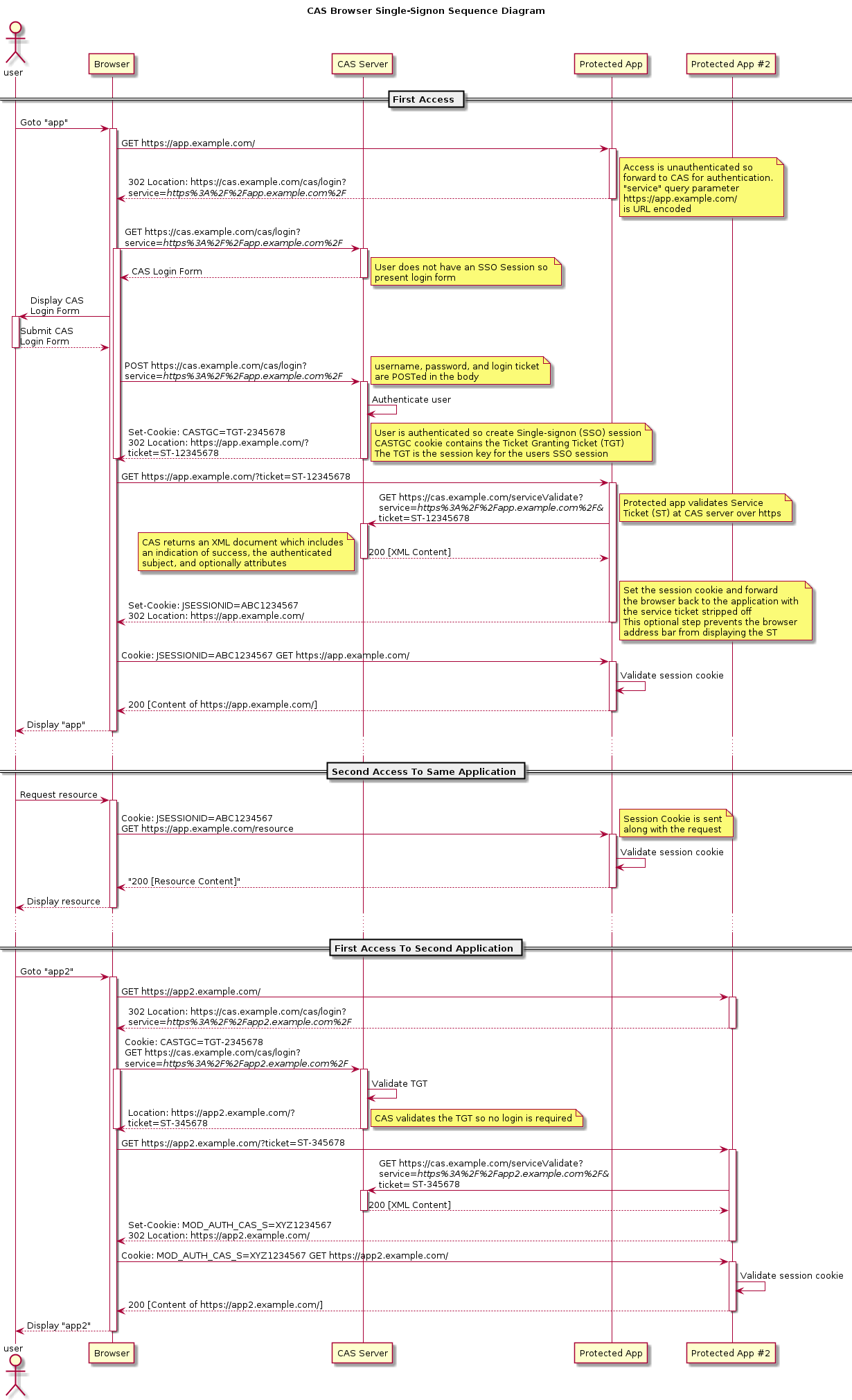
3.单点登录的时候各个类运行的流程
cas单点的流程是由spring webflow来处理。
单点登录-CAS原理的更多相关文章
- 单点登录CAS系列第06节之客户端配置单点登录
原理 纯web.xml 借助Spring 注意 代码 测试 原理 这里用的是:cas-client-core-3.4.0.jar(2015-07-21发布的) 下载地址为:http://mvnrepo ...
- SSO单点登录实现原理与总结
一.什么是单点登录SSO(Single Sign-On) SSO是一种统一认证和授权机制,指访问同一服务器不同应用中的受保护资源的同一用户,只需要登录一次,即通过一个应用中的安全验证后,再访问其他应用 ...
- portal单点登录的原理与实现还有ESB
portal单点登录的原理与实现还有ESB 在毕业论文中有描述到这一点.我给我出的截图
- cas sso单点登录系列7_ 单点登录cas常见问题系列汇总
转:http://blog.csdn.net/matthewei6/article/details/50709252 单点登录cas常见问题(一) - 子系统是否还要做session处理?单点登录ca ...
- 单点登录CAS使用记(一):前期准备以及为CAS-Server配置SSL协议
知识点: SSO:单点登录(Single Sign On),是目前比较流行的企业业务整合的解决方案之一.SSO的定义是在多个应用系统中,用户只需要登录一次就可以访问所有相互信任的应用系统. CAS:耶 ...
- 单点登录CAS使用记(二):部署CAS服务器以及客户端
CAS-Server下载地址:https://www.apereo.org/projects/cas/download-cas CAS-Client下载地址:http://developer.jasi ...
- 单点登录CAS使用记(三):实现自定义验证用户登录
问题: CAS自带的用户验证逻辑太过简单,如何像正常网站一样,通过验证DB中的用户数据,来验证用户以及密码的合法性呢? 方案1:CAS默认的JDBC扩展方案: CAS自带了两种简单的通过JDBC方式验 ...
- 单点登录CAS使用记(四):为登录页面加上验证码
CAS默认的登录页面样式如下,只有用户名与密码两项验证项目. 现在需要为首页登录加上验证码功能. 第一步:首页对默认登录页面的样式进行了调整,使其看上去还算美观. 在页面上加上了验证码项目. 第二步: ...
- 单点登录CAS使用记(五):cas-client不拦截静态资源以及无需登录的请求。
一.问题在哪? 在配置cas-client中,有这么一段配置: <filter> <filter-name>CAS Filter</filter-name> < ...
- 单点登录CAS使用记(六):单点登出、单点注销
单点登出基本上没有啥配置 直接在原来logout的时候,重定向到Cas-Server的logout方法 @RequestSecurity @RequestMapping(value = "l ...
随机推荐
- 【2024.09.15】NOIP2024 赛前集训(2)
[2024.09.15]NOIP2024 赛前集训(2) A 最大的难点戏剧性地变成了二叉搜索树是什么. 先根据已知序列把二叉树建出来,忘了二叉搜索树的移步 二叉搜索树 & 平衡树 - OI ...
- Surface pro 11二合一平板参数调研
最近研究了下Surface pro 11,记录下相关参数,矩阵我以表格列出来.可能不够细,大家作个参考吧 模块 技术项 参数 备注 处理器 型号 Snapdragon X Elite(X1E-80-1 ...
- n皇后编程问题
n皇后编程问题是一个经典问题,记得2018年北京航空航天大学计算机学院的博士招聘的上机题目就是这个,这里给出几种实现方法: import time import itertools Num = 8 # ...
- 高性能计算-gemm-openmp效率测试(10)
1. 目标 设计一个程序,使用OpenMP并行化实现矩阵乘法.给定两个矩阵 A 和 B,矩阵大小均为1024*1024,你的任务是计算它们的乘积 C. 要求: (1).使用循环结构体的知识点,包括fo ...
- Chrome控制台中network底部概要参数
概要参数 1.requests => 资源请求总数: 2.transferred => 网络加载资源大小: 3.resources => 页面所有资源总大小(包含网络资源.浏览器缓存 ...
- Clickhouse之数据删除方式
什么是TTL? TTL的意思是Time To Live表示数据的存活时间.由于数据的价值会根据保存的时间成反比,出于存储成本的考虑通常只会保留近一年的数据.而在MergeTree (合并树)引擎中,可 ...
- JDBC【4】-- jdbc预编译与拼接sql对比
在jdbc中,有三种方式执行sql,分别是使用Statement(sql拼接),PreparedStatement(预编译),还有一种CallableStatement(存储过程),在这里我就不介绍C ...
- 【架构】整理了一份通用的MVP框架示例代码
最近回顾了一下MVP框架,结合阅读到的几篇不错的博客,自己整理了一份可用于实际工作的MVP框架示例代码,这里做个记录,也顺便和网友们分享一下. 代码示例演示的是一个输入员工号查询员工信息并显示的场景, ...
- 中电金信:院长寄语|关于源启AI+行动的思考
自2022年8月19日发布以来,源启已经走上了她第三年的征途.今天,源启已经成为公司战略的支点,中电金信正致力于用"源启底座""源启+咨询""源启+应 ...
- 渗透测试-前端加密分析之RSA加密登录(密钥来源服务器)
本文是高级前端加解密与验签实战的第6篇文章,本系列文章实验靶场为Yakit里自带的Vulinbox靶场,本文讲述的是绕过RSA加密来爆破登录. 分析 这里的代码跟上文的类似,但是加密的公钥是通过请求服 ...