
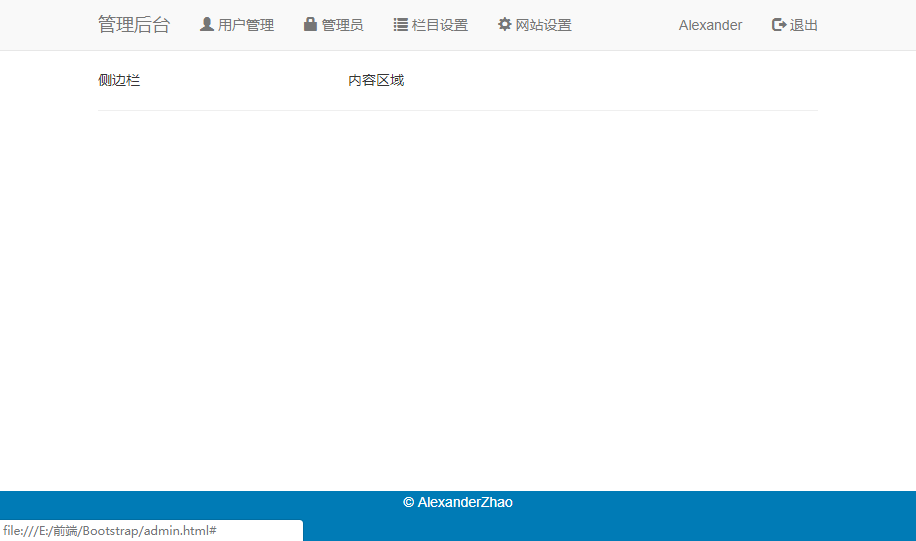
Bootstrap导航栏示例
<!DOCTYPE html>

<html>

   <head>

      <meta charset="utf-8">

      <title>Admin后台</title>

      <meta name="viewport" content="width=device-width, initial-scale=1.0">

      <!-- 引入 Bootstrap -->

      <link href="https://cdn.staticfile.org/twitter-bootstrap/3.3.7/css/bootstrap.min.css" rel="stylesheet">

      <style>

        body {

            padding-top: 50px;

            padding-bottom: 20px;

        }

        .body-content {

            margin-top:20px;

            padding-left: 15px;

            padding-right: 15px;

        }

      </style>

      <!-- HTML5 Shiv 和 Respond.js 用于让 IE8 支持 HTML5元素和媒体查询 -->

      <!-- 注意: 如果通过 file://  引入 Respond.js 文件,则该文件无法起效果 -->

      <!--[if lt IE 9]>

         <script src="https://oss.maxcdn.com/libs/html5shiv/3.7.0/html5shiv.js"></script>

         <script src="https://oss.maxcdn.com/libs/respond.js/1.3.0/respond.min.js"></script>

      <![endif]-->

   </head>

   <body>

     <div class="navbar navbar-default navbar-fixed-top">

       <div class="container">

         <div class="navbar-header">

           <button type="button" data-toggle="collapse" data-target=".navbar-collapse" class="navbar-toggle">

             <span class="icon-bar"></span>

             <span class="icon-bar"></span>

             <span class="icon-bar"></span>

           </button>

           <a href="#" class="navbar-brand">管理后台</a>

         </div>

        <div class="navbar-collapse collapse">

          <ul class="nav navbar-nav">

            <li><a href="#"><span class="glyphicon glyphicon-user"></span> 用户管理</a></li>

            <li><a href="#"><span class="glyphicon glyphicon-lock"></span> 管理员</a></li>

            <li><a href="#"><span class="glyphicon glyphicon-list"></span> 栏目设置</a></li>

            <li><a href="#"><span class="glyphicon glyphicon-cog"></span> 网站设置</a></li>

          </ul>

          <ul class="nav navbar-nav navbar-right">

            <li>

              <a href="#">

                <span class="glyphicon glyphicon-envelop"></span> Alexander

              </a>

            </li>

            <li>

              <a href="#">

                <span class="glyphicon glyphicon-log-out"></span> 退出

              </a>

            </li>

          </ul>

        </div>

       </div>

     </div>

    <div class="container body-content">

      <div class="row">

        <div class="col-lg-3 col-md-3 col-sm-4">

          侧边栏

        </div>

        <div class="col-lg-9 col-md-9 col-sm-8">

          内容区域

        </div>

      </div>

      <hr>

      <footer class="navbar navbar-fixed-bottom text-center bg-primary">

        <p>© AlexanderZhao </p>

      </footer>

    </div>

      <!-- jQuery (Bootstrap 的 JavaScript 插件需要引入 jQuery) -->

      <script src="https://cdn.staticfile.org/jquery/2.1.1/jquery.min.js"></script>

      <!-- 包括所有已编译的插件 -->

      <script src="https://cdn.staticfile.org/twitter-bootstrap/3.3.7/js/bootstrap.min.js"></script>

   </body>

</html>
Bootstrap导航栏示例的更多相关文章
- BootStrap导航栏的使用
默认的导航栏 创建一个默认的导航栏的步骤如下: 向 <nav> 标签添加 class .navbar..navbar-default. 向上面的元素添加 role="naviga ...
- 自定义bootstrap样式-9行样式自定义漂亮大气bootstrap导航栏
有人说前端发展太快,框架太多,各有所需,各有所长.看看这幅图,估计都知道这些框架,但是大部分公司中实际要用到的也就那么几个. 发展再快,框架再多.还是得回到原点,不就是Html+Css+JavaScr ...
- Bootstrap -- 导航栏样式、分页样式、标签样式、徽章样式
Bootstrap -- 导航栏样式.分页样式.标签样式.徽章样式 1. 使用图标的导航栏 使用导航栏样式: <!DOCTYPE html> <html> <head&g ...
- Bootstrap导航栏实例讲解
导航栏是一个很好的功能,是 Bootstrap 网站的一个突出特点.导航栏是响应式元组件就,作为应用程序或网站的导航标题.导航栏在移动设备的视图中是折叠的,随着可用视口宽度的增加,导航栏也会水平展开. ...
- Bootstrap导航栏navbar源码分析
1.本文目地:分析bootstrap导航栏及其响应式的实现方式,提升自身css水平 先贴一个bootstrap的导航栏模板 http://v3.bootcss.com/examples/navbar- ...
- html 小米商城导航栏示例
1.小米导航栏示例 <!DOCTYPE html> <html lang="zh-CN"> <head> <meta charset=&q ...
- eclipse Maven Bootstrap 导航栏
1.在pom.xml添加两个依赖 Bootstrap 依赖和jQuery依赖 代码如下 <!-- https://mvnrepository.com/artifact/org.webjars/b ...
- bootstrap导航栏.nav与.navbar区别
刚刚看了bootstrap的导航栏,发现有点弄混了,现在来整理一下: 一.简单的ul,li组成的导航: <ul class="nav nav-pills justify-content ...
- Bootstrap导航栏
导航栏: <div id="menu-nav" class="navbar navbar-default navbar-inverse navbar-fixed-t ...
随机推荐
- VMware虚拟机可与Win10物理机互ping并可访问互联网的设置方法
一.系统环境: VMware 15.Windows 10 1903.Windows 7 虚拟机 二.具体步骤: 1.Win10物理机,控制面板-所有控制面板项-网络连接-物理网卡适配器右键-属性-共 ...
- Echarts 柱状图组
通过Echarts可以实现柱状图组,如下图:是一个学生三次模考成绩对比结果 源码 <!DOCTYPE html> <html> <head> <meta ch ...
- Linux下CPU利用率和负载的关系
1.CPU利用率和负载 CPU利用率显示的是程序在运行期间实时占用的CPU百分比:cpu使用率反映的是当前cpu的繁忙程度,忽高忽低的原因在于占用cpu处理时间的进程可能处于io等待状态但却还未释放进 ...
- 201971010131-张兴盼《面向对象程序设计(java)》第十二周学习总结
内容 这个作业属于哪个课程 https://www.cnblogs.com/nwnu-daizh/ 这个作业的要求在哪里 https://www.cnblogs.com/nwnu-daizh/p/ ...
- No archetypes currently available. The archetype list will refresh when the indexes finish updating
配置方法: 1. 在卡住的而画面点击"config" 2. 点击"Add remote catalog", 然后设置华为云的maven仓库地址, 然后点击&qu ...
- day39_8_23mysql的其他内容(视图等)
一.视图 MySQL中有一种比较方便的表,就是视图(view). 什么是视图? 视图就是通过查询获得一张虚拟表,然后将其保存,下次可以直接使用这个视图. 使用视图就可以不需要重复查询/连接表,在代码层 ...
- python27期day12:推导式、内置函数、高阶函数、匿名函数、作业题
1.推导式:做一些有规律的数据结构 列表推导式: 普通循环模式: [加工后的变量 for 循环] 示例一:print([i for i in range(1,51)]) 结果:[1, 2, 3, 4, ...
- djang项目中的疑问及解决办法(ValueError: Invalid model reference 'apps.user.User'. String model references must be of the form 'app_label.ModelName'.)
这个问题其实就是apps.user.User这种用法是不对的,就在下面的模型中,我本来是绑定apps.user.User,但是试了一下,由于order和user是在同一个apps中,所以直接用user ...
- es6模块化规范
在 es6 之前是没有块这个概念的,es6zhong 引入:实际如下: 若 xx1 和 xx2 中有变量名相同,且引入在同一 html 下,需要为引入的 script 标签加上 type=“modul ...
- Flask-Login中装饰器@login_manager.user_loader的作用及原理
Flask-Login通过装饰器@login_required来检查访问视图函数的用户是否已登录,没有登录时会跳转到login_manager.login_view = 'auth.login'所注册 ...