
MySQL插入大批量数据时报错“The total number of locks exceeds the lock table size”的解决办法
事情的原因是:我执行了一个load into语句的SQL将一个很大的文件导入到我的MySQL数据库中,执行了一段时间后报错“The total number of locks exceeds the lock table size”。
首先使用命令 show variables like '%storage_engine%' 查看MySQL的存储引擎:
mysql> show variables like '%storage_engine%';

+----------------------------------+--------+

| Variable_name                    | Value  |

+----------------------------------+--------+

| default_storage_engine           | InnoDB |

| default_tmp_storage_engine       | InnoDB |

| disabled_storage_engines         |        |

| internal_tmp_disk_storage_engine | InnoDB |

+----------------------------------+--------+

4 rows in set, 1 warning (0.00 sec)
可以看到InnoDB是MySQL的默认引擎。
报错“The total number of locks exceeds the lock table size”说明MySQL的默认配置已经无法满足你的需求了,
InnoDB表执行大批量数据的更新,插入,删除操作时会出现这个问题,
需要调整InnoDB全局的innodb_buffer_pool_size的值来解决这个问题,并且重启mysql服务。
首先我们通过命令 show variables like "%_buffer_pool_size%" 查看MySQL缓存池的大小:
mysql> show variables like "%_buffer_pool_size%";

+-------------------------+---------+

| Variable_name           | Value   |

+-------------------------+---------+

| innodb_buffer_pool_size | 8388608 |

+-------------------------+---------+

1 row in set, 1 warning (0.00 sec)
可以看到,默认的缓存池大小是 8388608 = 8 * 1024 * 1024 = 8 MB。我们需要把它改大一点。
那么到底是多少呢,就是说你剩多少内存,用多少内存咯,我估计我有个3个G的内存可以用,
那么我可以将innodb_buffer_pool_size的值设成310241024*1024=3221225472。
然后我们配置一下``文件(MySQL Installer安装的话,这个是配置文件的默认位置),将
innodb_buffer_pool_size=8M
修改为:
innodb_buffer_pool_size=3G
对于这个值的配置,其实在配置文件中也给了说明:
# InnoDB, unlike MyISAM, uses a buffer pool to cache both indexes and

# row data. The bigger you set this the less disk I/O is needed to

# access data in tables. On a dedicated database server you may set this

# parameter up to 80% of the machine physical memory size. Do not set it

# too large, though, because competition of the physical memory may

# cause paging in the operating system.  Note that on 32bit systems you

# might be limited to 2-3.5G of user level memory per process, so do not

# set it too high.
然后重启mysqld服务。(可通过命令行执行services.msc进入服务窗口)
然后在命令行执行命令查看此时的缓存池大小:
mysql> show variables like "%_buffer_pool_size%";

+-------------------------+------------+

| Variable_name           | Value      |

+-------------------------+------------+

| innodb_buffer_pool_size | 3221225472 |

+-------------------------+------------+

1 row in set, 1 warning (0.00 sec)
可以看到这个值已经修改成了我们想要的大小 —— 3GB。
再次运行我的导入文件的SQL,发现可以了,而且还很快呢。
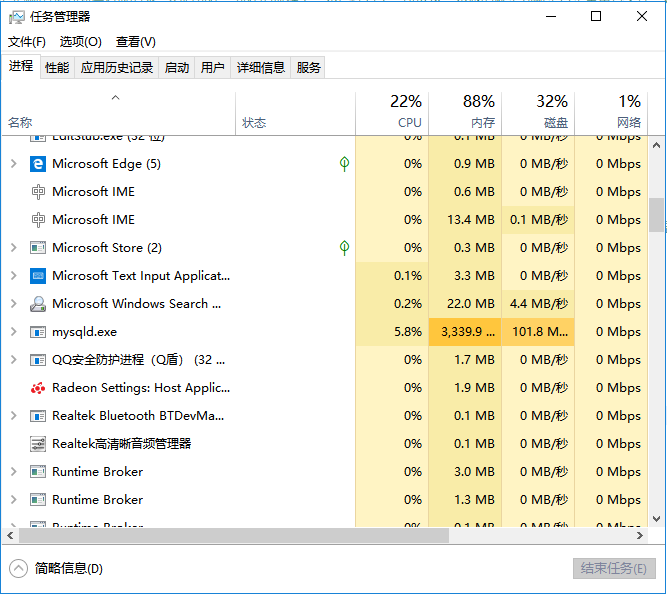
但是内存也是有些吃紧的。
MySQL插入大批量数据时报错“The total number of locks exceeds the lock table size”的解决办法的更多相关文章
- 【MySQL笔记】mysql报错"ERROR 1206 (HY000): The total number of locks exceeds the lock table size"的解决方法
step1:查看 1.1 Mysql命令行里输入"show engines:"查看innoddb数据引擎状态, 1.2 show variables "%_buffer% ...
- mysql报错"ERROR 1206 (HY000): The total number of locks exceeds the lock table size"的解决方法
1. 问题背景 InnoDB是新版MySQL(v5.5及以后)默认的存储引擎,之前版本的默认引擎为MyISAM,因此,低于5.5版本的mysql配置文件.my.cnf中,关于InnoD ...
- MySQL配置文件路径及‘The total number of locks exceeds the lock table size’问题
在删除mysql中的数据时,遇到报错: ERROR 1206 (HY000): The total number of locks exceeds the lock table size 查了查,发现 ...
- mysql 数据库缓存调优之解决The total number of locks exceeds the lock table size错误
环境: mysql5.6.2 主从同步(备注:需操作主库和从库) 一.InnoDB表执行大批量数据的更新,插入,删除操作时会出现这个问题,需要调整InnoDB全局的innodb_buffer_poo ...
- MYSQL 遭遇 THE TOTAL NUMBER OF LOCKS EXCEEDS THE LOCK TABLE SIZE
今天进行MySql 一个表数据的清理,经过漫长等待后出现 The total number of locks exceeds the lock table size 提示.以为是table_cache ...
- mysql:The total number of locks exceeds the lock table size
使用mysql InnoDB存储引擎进行大量数据的更新,删除的时候容易引发”The total number of locks exceeds the lock table size”问题,解决方法之 ...
- MySQL解决[Err] 1206 - The total number of locks exceeds the lock table size问题
MySQL解决[Err] 1206 - The total number of locks exceeds the lock table size问题 查看MySQL版本:mysql>show ...
- MYSQL碰到The total number of locks exceeds the lock table size 问题解决记录
解决记录如下: 在mysql里面进行修改操作时提示:The total number of locks exceeds the lock table size ,通过百度搜到innodb_buffer ...
- Mysql_解决The total number of locks exceeds the lock table size错误
在操作mysql数据库表时出现以下错误. 网上google搜索相关问题,发现一位外国牛人这么解释: If you're running an operation on a large number o ...
随机推荐
- 洛谷 P2401 不等数列 题解
每日一题 day25 打卡 Analysis dp[i][j]=dp[i-1][j-1]*(i-j)+dp[i-1][j]*(j+1); 其中i和j是表示前i个数中有j个小于号,j<=i-1 要 ...
- linux 文件解压缩
转载 https://blog.csdn.net/qq_27803491/article/details/52785838 01-.tar格式 解包:[*******]$ tar xvf FileNa ...
- C利用time函数实现简单的定时器
//定时器 #include <stdio.h> #include <time.h> #include <stdlib.h> int main(int num, c ...
- JS学习之--比较两个Object数组是否相等
一.问题 在js中是不能直接用“==”或者“===”来计算两个数组是否相等的,那么就需要对数组的值进行比较: 二.次解决方案 对于比较两个数组次要的方法有如下几种,为什么说是次要解决方案呢?因为它不能 ...
- top,free,df,iostat,netstat
服务器程序员除了编写功能之外,若想往上走需要在外网环境打磨很久,以下是行走江湖的制胜法宝. top(综合查看) free(查看内存占用) ps aux|sort -nk6 (查看内存占用具体使用物理内 ...
- datagrid其中某列需要动态隐藏或显示的mvvm绑定方式,也可以用在其他表格类型控件上
版权归原作者所有. 引用地址 [WPF] HOW TO BIND TO DATA WHEN THE DATACONTEXT IS NOT INHERITED MARCH 21, 2011 THOMAS ...
- Sphinx全文索引引擎
一.什么是sphinx 原理:sphinx将数据库中的表建立索引,php操作sphinx时,将要查询的关键字进行匹配,返回一个id,php通过id到数据库中查询数据. 二.下载 链接:https:// ...
- sturts标签中
struts中的s标签中textfield和textarea中不需要加上value和中间值,通过name可以直接取到. textfield和textarea标签没有value属性,需要加上${ylqx ...
- spark_API
1.概述 总的来讲,每一个spark驱动程序应用都由一个驱动程序组成,该驱动程序包含一个由用户编写的main方法,该方法会在集群上执行一些并行计算操作.Spark最重要的一个概念是弹性分布式数据集,简 ...
- Mininet系列实验(七):Mininet脚本实现控制交换机行为
1 实验目的 熟悉Mininet自定义拓扑脚本的编写: 掌握使用“ovs-vsctl”命令直接控制Open vSwitch. 2 实验原理 在SDN环境中,控制器可以通过对交换机下发流表操作来控制交换 ...