
zookeeper的安装使用
转载从:https://blog.csdn.net/shenlan211314/article/details/6170717
一、zookeeper 介绍
ZooKeeper 是一个为分布式应用所设计的分布的、开源的协调服务。它的文件系统使用我们所熟悉的目录树结构。ZooKeeper 使用 Java 所编写,但是支持 Java 和 C 两种编程语言。我们设计 ZooKeeper 的目的是为了减轻分布式应用程序所承担的协调任务。
二、zookeeper的安装
首先linux系统需要安装jdk8
下载
https://mirrors.tuna.tsinghua.edu.cn/apache/zookeeper/
下载:apache-zookeeper-3.4.14.tar,上传至服务器
单机模式:通俗,就是只安装在同一台机子上面
解压:
tar -xvf apache-zookeeper-3.4.14.tar.gz
删除安装包:
rm -rf apache-zookeeper-3.4.14.tar.gz
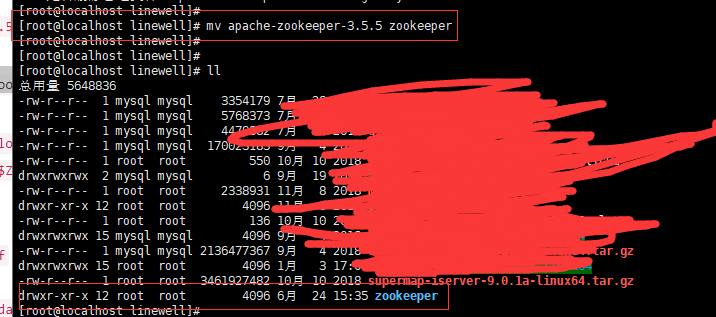
重命名:
配置环境变量:
export ZOOKEEPER_HOME=/home/linewell/zookeeper

export PATH=$JAVA_HOME/bin:$ZOOKEEPER_HOME/bin:$PATH
source /etc/profile
配置zookeeper

修改配置文件的名字:

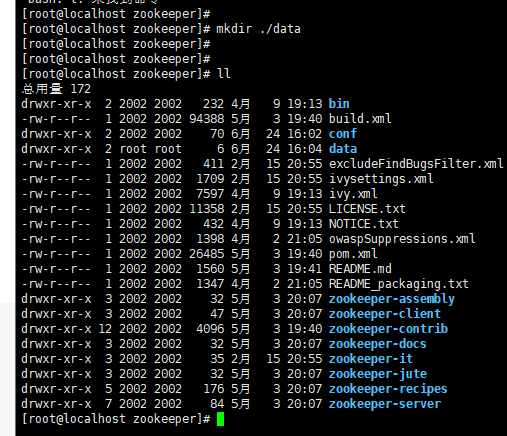
创建data目录:
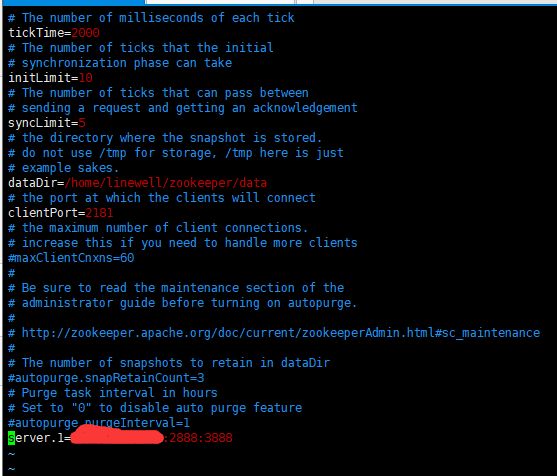
配置zookeeper:
vim zoo.cfg
tickTime:心跳时间,为了确保连接存在的,以毫秒为单位,最小超时时间为两个心跳时间
initLimit:多少个心跳时间内,允许其他server连接并初始化数据,如果ZooKeeper管理的数据较大,则应相应增大这个值
clientPort:服务的监听端口
dataDir:用于存放内存数据库快照的文件夹,同时用于集群的myid文件也存在这个文件夹里(注意:一个配置文件只能包含一个dataDir字样,即使它被注释掉了。)
dataLogDir:用于单独设置transaction log的目录,transaction log分离可以避免和普通log还有快照的竞争
syncLimit:多少个tickTime内,允许follower同步,如果follower落后太多,则会被丢弃。
server.A=B:C:D:
A是一个数字,表示这个是第几号服务器,B是这个服务器的ip地址
C第一个端口用来集群成员的信息交换,表示的是这个服务器与集群中的Leader服务器交换信息的端口
D是在leader挂掉时专门用来进行选举leader所用
配置如下:
# The number of milliseconds of each tick
tickTime=2000
# The number of ticks that the initial
# synchronization phase can take
initLimit=10
# The number of ticks that can pass between
# sending a request and getting an acknowledgement
syncLimit=5
# the directory where the snapshot is stored.
# do not use /tmp for storage, /tmp here is just
# example sakes.
#dataDir=/tmp/zookeeper
# the port at which the clients will connect
clientPort=2181
# the maximum number of client connections.
# increase this if you need to handle more clients
maxClientCnxns=0
#
minSessionTimeout=4000
maxSessionTimeout=10000
# Be sure to read the maintenance section of the
# administrator guide before turning on autopurge.
#
# http://zookeeper.apache.org/doc/current/zookeeperAdmin.html#sc_maintenance
#
# The number of snapshots to retain in dataDir
#autopurge.snapRetainCount=3
# Purge task interval in hours
# Set to "0" to disable auto purge feature
#autopurge.purgeInterval=1
dataDir=/usr/local/zookeeper/data
server.1=ip:2888:3888
启动:
/home/linewell/zookeeper/bin/zkServer.sh start /home/linewell/zookeeper/conf/zoo.cfg

查看状态:
zkServer.sh status
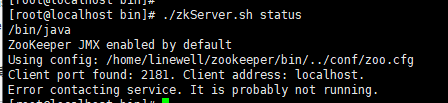
启动报错:
切换成前台启动:
./bin/zkServer.sh start-foreground
然后就可以查看打印的信息。
搭建zookeeper集群,搭建zookeeper集群的方式和单机的方式大同小异。需要在datadir所指向的目录创建一个叫做myid的文件。上面写下当前服务器的编号。
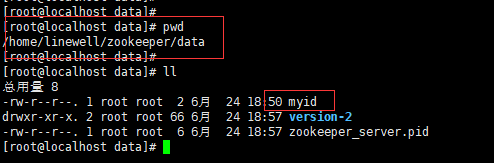
然后myid里面写下当前服务器的编号。然后配置到zoo.cfg当中。
zoo.cfg的服务器配置:
server.1=ip:2888:3888

server.2=ip:2888:3888
zookeeper 四字命令的使用
先yum安装nc
yum install -y nc

然后测试:
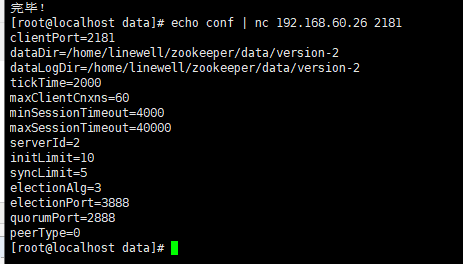
就可以得到配置信息了。
zookeeper的命令行工具使用
输入
zkCli.sh –server 10.77.20.23:2181
进入命令行工具
输入 help 之后,屏幕会输出可用的 ZooKeeper 命令
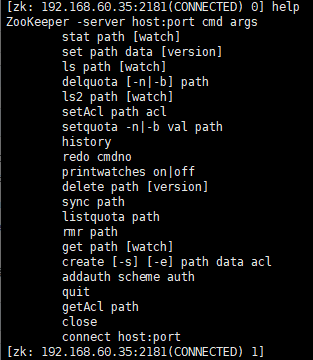
相关命令使用:
查看特定的路径下,的节点信息,就是查兰特定路径下的节点:

创建一个节点,并添加数据:

查看节点的字符串信息:
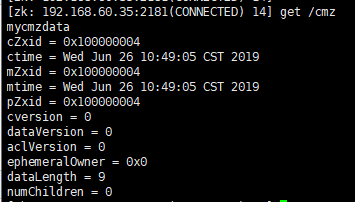
重置节点的字符串信息:
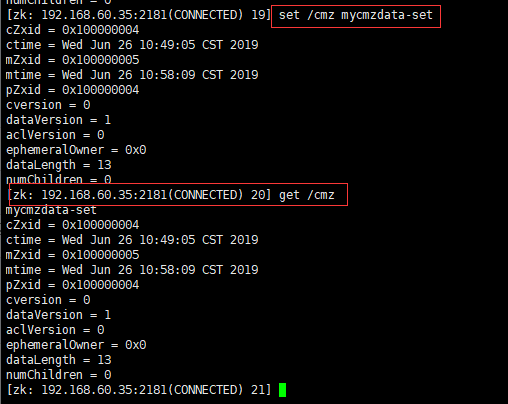
然后从新查看,可以发现,已经被重置了。
delete操作删除对应的节点:

删除后用ls命令查看,发现没有了对应的节点了。
zookeeper相关的api介绍:
maven依赖:
<dependency>

    <groupId>org.apache.zookeeper</groupId>

    <artifactId>zookeeper</artifactId>

    <version>3.4.13</version>

</dependency>
demo:
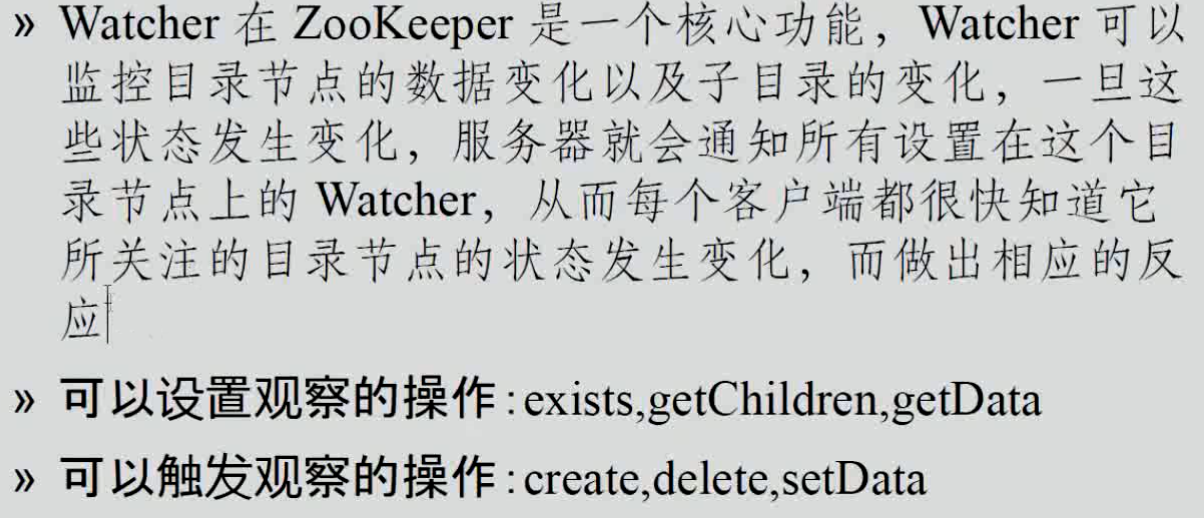
图片copy从:https://blog.csdn.net/asd54090/article/details/80920489
zookeeper的安装使用的更多相关文章
- zookeeper的安装(图文详解。。。来点击哦!)
zookeeper的安装(图文详解...来点击哦!) 一.服务器的配置 三台服务器: 192.168.83.133 sunshine 192.168.83.134 sunshineMin 19 ...
- (原) 1.1 Zookeeper单机安装
本文为原创文章,转载请注明出处,谢谢 zookeeper 单机安装配置 1.安装前准备 linux系统(此文环境为Centos6.5) Zookeeper安装包,官网https://zookeeper ...
- ZooKeeper的安装、配置、启动和使用(一)——单机模式
ZooKeeper的安装.配置.启动和使用(一)——单机模式 ZooKeeper的安装非常简单,它的工作模式分为单机模式.集群模式和伪集群模式,本博客旨在总结ZooKeeper单机模式下如何安装.配置 ...
- ZooKeeper 的安装和配置---单机和集群
如题本文介绍的是ZooKeeper 的安装和配置过程,此过程非常简单,关键是如何应用(将放在下节及相关节中介绍). 单机安装.配置: 安装非常简单,只要获取到 Zookeeper 的压缩包并解压到某个 ...
- JDK+Tomcat+Zookeeper+DubboAdmin安装教程
JDK+Tomcat+Zookeeper+DubboAdmin安装教程 1. 安装内容: JDK 1.8.131 Tomcat 7.0.77 Zookeeper 3.4.9 Dubbo admin 2 ...
- Zookeeper的安装的配置
详见:http://blog.yemou.net/article/query/info/tytfjhfascvhzxcyt192 安装和配置详解 本文介绍的 Zookeeper 是以 3.2.2 这个 ...
- Zookeeper的安装部署
1.Zookeeper的安装部署 7.1 Zookeeper工作机制 7.1.1.Zookeeper集群角色 Zookeeper集群的角色: Leader 和 follower (Observer ...
- Zookeeper的安装配置及基本开发
一.简介 Zookeeper 是分布式服务框架,主要是用来解决分布式应用中经常遇到的一些数据管理问题,如:统一命名服务.状态同步服务.集群管理.分布式应用配置项的管理等等. ZooKeeper的目标就 ...
- ZooKeeper的安装
一.准备 需要提前安装好Java 准备好zookeeper的软件包:软件包地址 二.部署 解压zookeeper压缩包到指定目录 执行如下命令: .tar.gz -C /opt/ 三.修改配置 ...
- ZooKeeper的安装与部署
本文讲述如何安装和部署ZooKeeper. 一.系统要求 ZooKeeper可以运行在多种系统平台上面,表1展示了zk支持的系统平台,以及在该平台上是否支持开发环境或者生产环境. 表1:ZooKeep ...
随机推荐
- FreeSWITCH视频直播
大家都知道,如今,视频直播比较火啊. 今天,在FreeSWITCH精英群里分享了FreeSWITCH做视频直播相关的技术. 首先,要做直播就得有好机器.笔者买了一台阿里云的主机,买的是按量付费的,4核 ...
- golang几种常用配置文件使用方法总结(yaml、toml、json、xml、ini)
原文连接: https://blog.csdn.net/wade3015/article/details/83351776 yaml配置文件的使用方法总结 首先介绍使用yaml配置文件,这里使用的是g ...
- CSAGAN的几大重点 - 2
1.生成器 1)MRU(SketchyGAN) 计算过程为: 与DCGAN[46]和ResNet生成架构的定性和定量比较可以在5.3节中找到.MRU块有两个输入:输入特征图xi和图像I,输出特征图yi ...
- Corrupt JPEG data: 1 extraneous bytes before marker 0xd9 JPEG datastream contains no image
Corrupt JPEG data: 1 extraneous bytes before marker 0xd9 JPEG datastream contains no image 对比发送时的全部数 ...
- k8s记录-k8s部署参考
一.环境准备 yum -y install epel-release yum -y install wget nmap lsof iotop lrzsz ntpdate tree rm -rf /et ...
- python初级(302) 6 对象(四)
一.复习 1.什么是多态 2.复习上一节课内容 class Triangle: """ 三角形类 """ def __init__(self ...
- shell基础知识5-函数
函数的定义 function fname(){ } 或者 function_name(){ } 对于简单的函数,甚至可以是这样做 fname() { statement; } 函数调用 直接写函数名即 ...
- [转]Gnome桌面的录屏插件easyscreencast
原文地址:https://www.linuxprobe.com/gnome-easyscreencast.html
- ORA-01126: 数据库必须已装载到此实例并且不在任何实例中打开
原因:修改归档模式的操作只能在 mount 状态下进行,不能处于 open 状态. SQL> alter database archivelog;alter database archivelo ...
- SpringBoot小技巧:Jar包换War包
SpringBoot小技巧:Jar包换War包 情景 我们都知道springBoot中已经内置了tomcat,是不需要我们额外的配置tomcat服务器的,但是有时这也可能是我们的一个瓶颈,因为如果我们 ...