
AntDesign vue学习笔记(二)axios使用
之前在vue页面中引入axios使用,本篇在mainjs中引入,这样就不用单独在每个页面引入
1、mainjs中引入axios,设置基础url
import axios from 'axios'

axios.defaults.baseURL = 'https://localhost:8080/'

Vue.prototype.axios = axios
2、在vue页面中,注意axios前需要加this.
methods: {

    login () {

      let that = this

      console.log(this.userName)

      console.log(this.password)

      this.axios

        .get('/api/login', {

          params: {

            userName: that.userName,

            password: that.password

          }

        })

        .then(function (response) {

          console.log(response)

          if (response.data.data.result === 'success') {

            that.$router.push('second')

          } else {

            alert(response.data.data.message)

          }

        })

        .catch(function (error) {

          console.log(error)

        })

    }

  }
3、function (response)中必须使用that才能获取到$router对象,有没有办法直接获取到呢,代码如下
 methods: {

    login () {

      let that = this

      console.log(this.userName)

      console.log(this.password)

      this.axios

        .get('/api/login', {

          params: {

            userName: that.userName,

            password: that.password

          }

        })

        .then((response) => {

          console.log(response)

          if (response.data.data.result === 'success') {

            this.$router.push('second')

          } else {

            alert(response.data.data.message)

          }

        })

        .catch(function (error) {

          console.log(error)

        })

    }

  }
ES6中的 箭头函数 "=>" 内部的this是词法作用域,由上下文确定(也就是由外层调用者vue来确定)。
4、关于api/login,api login是模拟的一个json数据
4.1在项目根目录下添加data.json,内容如下
{

    "loginresult": {

      "result": "success",

      "message": ""

    }

}
4.2修改webpack.dev.conf.js文件,添加红色部分代码,关闭服务器重新npm run dev.
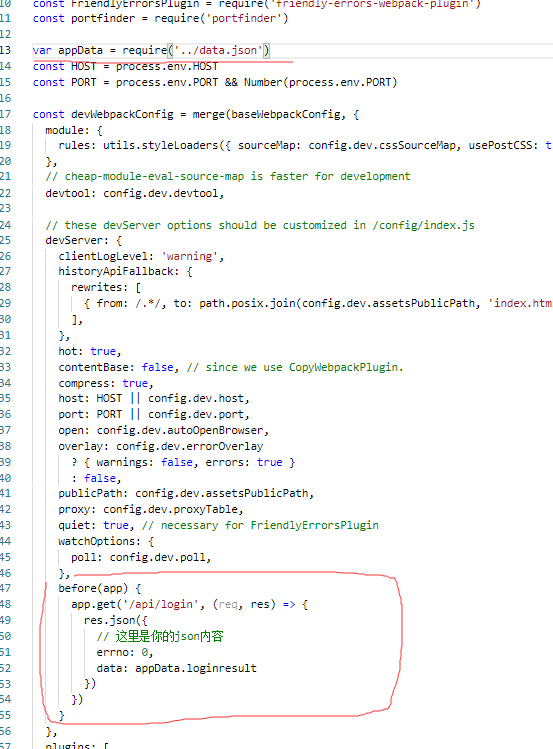
4.3、点击登录按钮就可以工作了。
5、如果传递比较复杂的请求,比如header添加数据,方法如下
this.axios(

        {

          method:"post",

          url:'/api/Login',

          data:{

            username: that.userName,

            password: that.password

          },

          headers: {

            'Content-Type':'application/json;charset=UTF-8'

          }

        })

        .then((response) => {

          console.log(response)

        })

        .catch(function (error) {

          console.log(error)

        })

    }
6、配置跨域的方法
找到config/index.js添加如下代码
proxyTable: {

        '/api': {

            target: 'http://xx.xx.xx.xx:8080/',

            changeOrigin: true,

            pathRewrite: {'^/api': '' }

        }

  }
这样所有访问api接口都会走这个重定向。
7、跨域下接口两次请求处理屏蔽方法
1、可以在后端设置Access-Control-Max-Age

2、或者请求限制只允许Post,Get.
AntDesign vue学习笔记(二)axios使用的更多相关文章
- AntDesign vue学习笔记(七)Form 读写与图片上传
AntDesign Form使用布局相比传统Jquery有点繁琐 (一)先读写一个简单的input为例 <a-form :form="form" layout="v ...
- AntDesign vue学习笔记(九)自定义文件上传
第七节时提到,上传文件时实际可能需要传输一个token. 1.查看vue antdesign文档https://vue.ant.design/components/upload-cn/ 2.使用cus ...
- AntDesign vue学习笔记(四)使用组件切换
同样实现上一篇功能, 改为使用组件切换,实现方法如下 1.修改MainFrm中的<router-view/>如下代码 2.注册局部组件 export default { name: 'Ma ...
- AntDesign vue学习笔记(一)初始化项目
最近学习AntDesign组件使用,官方Pro例子集成度太高,不容易学习,将从最基础组件一个一个搭建. 1.创建Vue Cli项目 2.引入ant design组件 $ cnpm i --save a ...
- vue学习笔记(二)vue的生命周期和钩子函数
前言 通过上一章的学习,我们已经初步的了解了vue到底是什么东西,可以干什么,而这一篇博客主要介绍vue的生命周期和它常用的钩子函数,如果有学过java的园友可能有接触到在学习servlet的时候学过 ...
- vue3 学习笔记 (二)——axios 的使用有变化吗?
本篇文章主要目的就是想告诉我身边,正在学 vue3 或者 准备学 vue3 的同学,vue3中网络请求axios该如何使用,防止接触了一点点 vue3 的同学会有个疑问?生命周期.router .vu ...
- Vue学习笔记二:v-cloak,v-text,v-html的使用
目录 v-cloak:解决插值表达式闪烁问题 安装插件Live Server 右键以HTTP形式运行HTML v-text:以属性方式使用插值表达式 v-cloak和v-text的区别 v-html: ...
- VUE 学习笔记 二 生命周期
1.除了数据属性,Vue 实例还暴露了一些有用的实例属性与方法.它们都有前缀 $,以便与用户定义的属性区分开来 var data = { a: 1 } var vm = new Vue({ el: ' ...
- AntDesign vue学习笔记(八)Table服务端分页使用
本文是AntDesign后端分页方法 1.设置pagination <a-table :columns="columns" :dataSource="data&qu ...
随机推荐
- MYSQL中IN,INSTR,FIND_IN_SET函数效率比较(转)
今天写代码时前台传过来类似‘1,2,3,4,5,6’的字符串,这种情况直接用IN是无效的,需要把字符串分割成数组或者组装成列表,然后再利用mabatis的foreach函数 <select id ...
- 判读是不是对象字面量(纯对象)。对象字面量创建方式有{}、new Object()创建
//判读是否是自身属性 function isHasPro(obj,pro){ return obj.hasOwnProperty(pro) ? true : false; } //判读是不是对象字面 ...
- 实验吧——who are you?(insert into注入 二分法 时间盲注)
题目地址:http://ctf5.shiyanbar.com/web/wonderkun/index.php 根据提示 “我要把攻击我的人都记录db中去!” 猜测这是insert into注入,会 ...
- 完整且易读的最新版小程序登录态和检验注册过没的app.js写法
目录 0.可参考的官方页面 1.流程 2.app.js代码 3.java后台怎么通过code获取openId 0.可参考的官方页面 获取登录凭证:https://developers.weixin.q ...
- Class版本号和Java版本对应关系
1.背景 版本号不对,会报错,如下 2.版本对应情况 JDK 1.8 = 52 JDK 1.7 = 51 JDK 1.6 =50 JDK 1.5 = 49 JDK 1.4 = 48 JDK 1. ...
- 人生物语——哲海拾贝
如今的这个社会,物欲横流.纸醉金迷.浮躁不安是这个时代的主旋律,在这样一个浮华年代的大染缸里,每个人内心都有那么一颗浮躁不安分的种子,或许它才开始发芽,或许它已经占据了你的心灵,人生当中追求 ...
- OpenSSL生成私钥和公钥
1.生成私钥 -- 生成 RSA 私钥(传统格式的) openssl genrsa -out rsa_private_key.pem 1024 -- 将传统格式的私钥转换成 PKCS#8 格式的(JA ...
- Windows 2016 & Windows 10 中IIS安装和配置PHP的步骤
Windows 2016 和 Windows 10 内核是相同的,我们首先需要安装 Internet Information Services (IIS),当然 Win2016 跟 Win10 安装 ...
- 一文教你如何使用miniconda
安装python 之前安装python包,导致了python里面的包不兼容,用管理工具卸载也下载不掉,重新安装也安装不上,没有办法只能卸掉python重装. 安装Anaconda Anaconda指的 ...
- springBoot配置druid监控报错Failed to bind properties under 'spring.datasource.druid' to javax.sql.DataSource
报错信息: Description: Failed to bind properties under 'spring.datasource.druid' to javax.sql.DataSource ...