
jq + 面向对象实现拼图游戏
jq + 面向对象实现拼图游戏
知识点
- 拖拽事件
- es6面向对象
- jquery事件
- 效果图
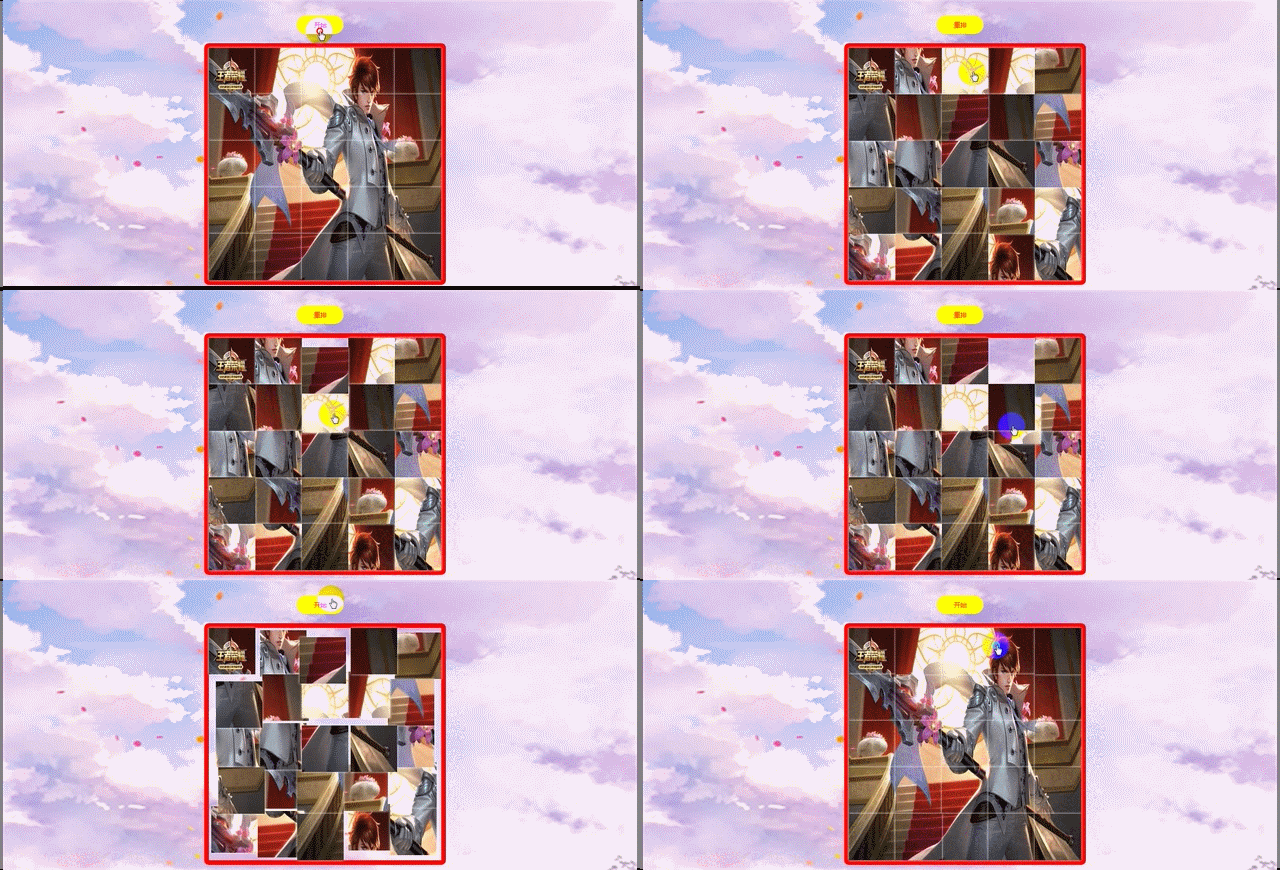
html:
    <div class="wraper">

        <div class="btn">

            <button class="start">开始</button>

        </div>

        <div class="box"></div>

    </div>
css:
    * {

        margin: 0;

        padding: 0;

        list-style: none;

    }

    html,

    body {

        width: 100%;

        height: 100%;

        background: url('../img/bg_pic.jpg') no-repeat;

        background-size: 100% 100%;

        display: flex;

        justify-content: center;

        align-items: center;

        flex-direction: column;

    }

    .wraper {

        width: 500px;

        height: 600px;

        position: relative;

    }

    .wraper .btn {

        text-align: center;

        line-height: 80px;

    }

    .wraper .btn button {

        width: 100px;

        height: 40px;

        background: yellow;

        border: none;

        outline: none;

        font-size: 14px;

        color: red;

        border-radius: 20px;

        cursor: pointer;

    }

    .wraper .box {

        width: 100%;

        height: 500px;

        position: relative;

        border: 10px solid red;

        border-radius: 10px;

    }

    .wraper .box .pic {

        position: absolute;

        background: url('../img/zy.jpg') no-repeat;

        box-shadow: 0 0 5px #fff;

        background-size: 500px 500px;

        cursor: pointer;

    }
js:
   class Game {

        constructor() {

            this.boxW = parseInt($('.box').css('width'));

            this.boxH = parseInt($('.box').css('height'));

            this.imgW = this.boxW / 5;

            this.imgH = this.boxH / 5;

            this.flag = true; //true为开始 false为重排

            this.orArr = []; //标准数组

            this.randArr = []; //乱序数组

            this.init();

        }

        init() {

            this.createDom();

            this.getState();

        }

        createDom() {

            //行

            for (var i = 0; i < 5; i++) {

                //列

                for (var j = 0; j < 5; j++) {

                    this.orArr.push(i * 5 + j);

                    let imgs = $("<div class='pic'></div>").css({

                        width: this.imgW + 'px',

                        height: this.imgH + 'px',

                        left: j * this.imgW + 'px',

                        top: i * this.imgH + 'px',

                        backgroundPosition: -j * this.imgW + 'px ' + -i * this.imgH + 'px'

                    });

                    $('.box').append(imgs);

                }

            }

        }

        getState() {

            let btn = $('.btn .start');

            let imgs = $('.pic');

            let _this = this;

            btn.on('click', function() {

                if (_this.flag) {

                    _this.flag = false;

                    btn.text('重排');

                    _this.getRandom();

                    _this.getOrder(_this.randArr);

                    imgs.on('mousedown', function(e) {

                        let index = $(this).index();

                        let left = e.pageX - imgs.eq(index).offset().left;

                        let top = e.pageY - imgs.eq(index).offset().top;

                        $(document).on('mousemove', function(e1) {

                            let left1 = e1.pageX - left - $('.box').offset().left - 10;

                            let top1 = e1.pageY - top - $('.box').offset().top - 10;

                            imgs.eq(index).css({

                                'z-index': '40',

                                'left': left1,

                                'top': top1

                            })

                        }).on('mouseup', function(e2) {

                            let left2 = e2.pageX - left - $('.box').offset().left - 10;

                            let top2 = e2.pageY - top - $('.box').offset().top - 10;

                            let index2 = _this.changeIndex(left2, top2, index);

                            if (index === index2) {

                                _this.picReturn(index);

                            } else {

                                _this.picChange(index, index2);

                            }

                            $(document).off('mousemove').off('mouseup').off('mousedown');

                        })

                        return false;

                    })

                } else {

                    _this.flag = true;

                    btn.text('开始');

                    _this.getOrder(_this.orArr);

                    imgs.off('mousemove').off('mouseup').off('mousedown');

                }

            })

        }

        changeIndex(left, top, index) {

            if (left < 0 || left > this.boxW || top < 0 || top > this.boxH) {

                return index;

            } else {

                let col = Math.floor(left / this.imgW);

                let row = Math.floor(top / this.imgH);

                let moveIndex = 5 * row + col;

                let i = 0;

                let len = this.randArr.length;

                while ((i < len) && this.randArr[i] !== moveIndex) {

                    i++;

                }

                return i;

            }

        }

        picReturn(index) {

            let j = this.randArr[index] % 5;

            let i = Math.floor(this.randArr[index] / 5);

            $('.pic').eq(index).css('z-index', '40').animate({

                'left': j * this.imgW,

                'top': i * this.imgH

            }, 300, function() {

                $(this).css('z-index', '10');

            })

        }

        picChange(index, index2) {

            let _this = this;

            let fromJ = _this.randArr[index] % 5;

            let fromI = Math.floor(_this.randArr[index] / 5);

            let toJ = _this.randArr[index2] % 5;

            let toI = Math.floor(_this.randArr[index2] / 5);

            let temp = _this.randArr[index];

            $('.pic').eq(index).css('z-index', '40').animate({

                'left': toJ * _this.imgW + 'px',

                'top': toI * _this.imgH + 'px'

            }, 300, function() {

                $(this).css('z-index', '10');

            })

            $('.pic').eq(index2).css('z-index', '40').animate({

                'left': fromJ * _this.imgW + 'px',

                'top': fromI * _this.imgH + 'px'

            }, 300, function() {

                $(this).css('z-index', '10');

                _this.randArr[index] = _this.randArr[index2];

                _this.randArr[index2] = temp;

                _this.check();

            })

        }

        getRandom() {

            this.randArr = [...this.orArr];

            this.randArr.sort(function() {

                return Math.random() - 0.5;

            })

        }

        getOrder(arr) {

            let len = arr.length;

            for (var i = 0; i < len; i++) {

                $('.box .pic').eq(i).animate({

                    left: arr[i] % 5 * this.imgW,

                    top: Math.floor(arr[i] / 5) * this.imgH

                }, 400)

            }

        }

        check() { //判断是否成功

            if (this.randArr.toString() == this.orArr.toString()) {

                alert('拼图成功');

                this.flag = true;

                $('.btn .start').text('开始');

                $('.pic').off('mousemove').off('mouseup').off('mousedown');

            }

        }

    }

    new Game();
参考至腾讯课堂渡一教育
jq + 面向对象实现拼图游戏的更多相关文章
- JavaScript写一个拼图游戏
拼图游戏的代码400行, 有点多了, 在线DEMO的地址是:打开: 因为使用canvas,所以某些浏览器是不支持的: you know: 为什么要用canvas(⊙o⊙)? 因为图片是一整张jpg或 ...
- 利用Vue.js实现拼图游戏
之前写过一篇<基于Vue.js的表格分页组件>的文章,主要介绍了Vue组件的编写方法,有兴趣的可以访问这里进行阅读:http://www.cnblogs.com/luozhihao/p/5 ...
- JavaScript拼图游戏
今天是2016年最后一天上班了.最近几天都比较休闲,有时间空闲下来写写文档之类的. 2016过得真是快.感觉没做什么就过去了.想到之前想坚持每个月写一写博客都没坚持到.希望2017年可以吧. 无聊之余 ...
- SDL制作拼图游戏
看完教程第三集后,好像自己能用这个来写一个简单的拼图游戏,第一次写出个带界面的游戏,好有成就感. 图片是自己慢慢截左上部分8个脸. #include <stdio.h> #include ...
- 拼图游戏(js,C#,java三种语言)
<html> <head> <meta charset="utf-8"> <style type="text/css" ...
- atitit.html5 拼图游戏的解决之道.
atitit.html5 拼图游戏的解决之道. 1. 拼图游戏的操作(点击法and 拖动法) 1 1. 支持键盘上.下.左.右键移动: 1 2. 支持点击空白模块中的上下左右箭头移动: 1 3. 支持 ...
- [CareerCup] 8.6 Jigsaw Puzzle 拼图游戏
8.6 Implement a jigsaw puzzle. Design the data structures and explain an algorithm to solve the puzz ...
- Android拼图游戏
效果如下 游戏的设计 首先我们分析下如何设计这款游戏: 1.我们需要一个容器,可以放这些图片的块块,为了方便,我们准备使用RelativeLayout配合addRule实现 2.每个图片的块块,我们准 ...
- 拼图游戏 v1.1
我一直对拼图游戏比较有兴趣,市面上卖的所谓“1000块拼图”也玩过不少,不过玩那个太占地方,后来也不再买了,同时也就萌生了在电脑上玩拼图的想法. 现在虽然有很多拼图游戏,但能大多数只能支持几十或几百块 ...
随机推荐
- tomcat启动控制台中文乱码问题解决方法
tomcat启动控制台中文乱码问题解决方法,修改tomcat安装路径/conf/logging.properties文件 java.util.logging.ConsoleHandler.encodi ...
- golang rabbitmq 的学习
https://www.rabbitmq.com/tutorials/tutorial-one-go.html Rabbitmq的任务分发机制 producer_task.go package mai ...
- 【转载】 【TensorFlow】static_rnn 和dynamic_rnn的区别
原文地址: https://blog.csdn.net/qq_20135597/article/details/88980975 ----------------------------------- ...
- ISO/IEC 9899:2011 条款6.9.2——外部对象定义
6.9.2 外部对象定义 语义 1.如果对一个对象的标识符的声明具有文件作用域以及一个初始化器,那么该声明是对该标识符的一个外部定义. 2.对于具有文件作用域且没有一个初始化器.没有一个存储类说明符, ...
- [LeetCode] 168. Excel Sheet Column Title 求Excel表列名称
Given a positive integer, return its corresponding column title as appear in an Excel sheet. For exa ...
- Java面试题大汇总(附答案)
下列面试题都是在网上收集的,本人抱着学习的态度找了下参考答案,有不足的地方还请指正,更多精彩内容可以关注我的微信公众号:Java团长 相关概念 面向对象的三个特征 封装,继承,多态.这个应该是人人皆知 ...
- Java设置文件权限
今天遇到一个问题: java写的API,ppt转图片生成的目录及文件 在使用php调用API完成后,再使用php进行删除时,遇到了删除失败的问题(php删除的部分 查看) 部署的环境是Ubuntu ...
- app内嵌h5页面在ios手机端滑动卡顿的解决方法
1.带滚动条的dom需加样式 -webkit-overflow-scrolling: touch;2.去掉 width:100%; height:100%
- phpexcel无法导出的解决方法
phpexcel无法导出的解决方法 <pre> set_time_limit(0); ini_set("memory_limit","512M"); ...
- Python: ImportRequestsError: No module named 'requests'解决方法
运行Python程序时,出现下面错误: import requests ModuleNotFoundError: No module named ‘requests’ 原因:没有导入requests ...