
Vue脚手架创建项目
创建一个基于webpack模板的新项目
D:\Git

$ vue -V

2.9.

D:\Git

$ vue init webpack my-project

? Project name my-project

? Project description A Vue.js project

? Author hongda <hongda159505@qq.com>

? Vue build (Use arrow keys)

? Vue build standalone

? Install vue-router? Yes

? Use ESLint to lint your code? Yes

? Pick an ESLint preset Standard

? Set up unit tests Yes

? Pick a test runner jest

? Setup e2e tests with Nightwatch? Yes

? Should we run `npm install` for you after the project has been created? (recommended) npm

   vue-cli · Generated "my-project".

# Installing project dependencies ...

# ========================

npm WARN deprecated socks@1.1.: If using .x branch, please upgrade to at least 2.1. to avoid a serious bug with socket data flow and an import issue introduced in 2.1.

> chromedriver@2.38. install D:\Git\my-project\node_modules\chromedriver

> node install.js

Downloading https://chromedriver.storage.googleapis.com/2.38/chromedriver_win32.zip

Saving to C:\Users\qhong\AppData\Local\Temp\chromedriver\chromedriver_win32.zip

Received 782K...

Received 1568K...

Received 2352K...

Received 3136K...

Received 3299K total.

Extracting zip contents

Copying to target path D:\Git\my-project\node_modules\chromedriver\lib\chromedriver

Done. ChromeDriver binary available at D:\Git\my-project\node_modules\chromedriver\lib\chromedriver\chromedriver.exe

> uglifyjs-webpack-plugin@0.4. postinstall D:\Git\my-project\node_modules\webpack\node_modules\uglifyjs-webpack-plugin > node lib/post_install.js

npm notice created a lockfile as package-lock.json. You should commit this file.

npm WARN optional SKIPPING OPTIONAL DEPENDENCY: fsevents@1.2. (node_modules\fsevents):

npm WARN notsup SKIPPING OPTIONAL DEPENDENCY: Unsupported platform for fsevents@1.2.: wanted {"os":"darwin","arch":"any"} (current: {"os":"win32","arch":"x64"})

added  packages in .032s

Running eslint --fix to comply with chosen preset rules...

# ========================

> my-project@1.0. lint D:\Git\my-project

> eslint --ext .js,.vue src test/unit test/e2e/specs "--fix"

# Project initialization finished!

# ========================

To get started:

  cd my-project

  npm run dev

Documentation can be found at https://vuejs-templates.github.io/webpack
需要注意的是项目的名称不能大写,不然会报错。
Project name (my-project) # 项目名称(我的项目)
Project description (A Vue.js project) # 项目描述一个Vue.js 项目
Author 作者(你的名字)
Install vue-router? (Y/n) # 是否安装Vue路由,也就是以后是spa(但页面应用需要的模块)
Use ESLint to lint your code? (Y/n) # 使用 ESLint 到你的代码? (Y [ yes ] / N [ no ])
Pick an ESLint preset (Use arrow keys) # 选择一个预置ESLint(使用箭头键)
Setup unit tests with Karma + Mocha? (Y/n) # 设置单元测Karma + Mocha? (Y/ N)
Setup e2e tests with Nightwatch? (Y/n) # 设置端到端测试,Nightwatch? (Y/ N)
当然这些都看你自己个人的情况,我这里是全选了是。

各目录用途:
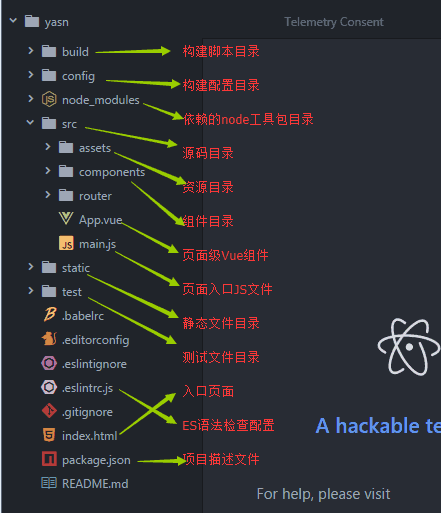
安装项目所需要的依赖
npm install
运行:
$ npm run dev

> my-project@1.0. dev D:\Git\my-project

> webpack-dev-server --inline --progress --config build/webpack.dev.conf.js

 % emitting

 DONE  Compiled successfully in 4030ms                                                                          ::

 I  Your application is running here: http://localhost:8080
提示已运行在8080端口
修改运行时自动打开浏览器:
目录中config下的index.js修改,将autoOpenBrowser:false 改为true
意思是是否默认打开浏览器改为是。就好了

https://segmentfault.com/a/1190000011275993
https://www.jianshu.com/p/1626b8643676
Vue脚手架创建项目的更多相关文章
- 小白6步搞定vue脚手架创建项目
1.安装node及npm node -v (测试node是否安装成功)npm -v(测试npm是否安装成功) 2.安装cnpm npm install -g cnpm --registry=http: ...
- Vue脚手架创建项目出现 (Failed to download repo vuejs-templates/webpack: Response code 404)
搭建好(脚手架2.X版本)环境像往常一样使用vue init webpack xxxx 创建项目可以是没多久就开始报错了 报错结果就是:vue-cli · Failed to download rep ...
- vue脚手架创建项目后使用路由报错Object(...) is not a function问题
在这之前我做过的vue项目没有这种问题,今天突然出现这个问题,也检查了很久的代码,最后解决我也不知道我是哪一步做错了 首先我是创建的vue2项目,基本操作跟平常一样,在运用路由跳转的时候遇到这个问题 ...
- vue脚手架创建项目名字报错
vue inti webpack TimeManger 报错 Sorry, name can no longer contain capital letters 原来这个capital是大写的意思,上 ...
- vue脚手架创建项目及常用配置
首先安装配置这两篇挺好的 https://www.cnblogs.com/lgx5/p/10732016.html https://blog.csdn.net/qiang510939237/artic ...
- 用vue脚手架创建bootstrap-vue项目
用vue脚手架创建bootstrap-vue项目 框架的地址:https://bootstrap-vue.js.org/docs/ 第一步 vue init webpack demo第二步 cd de ...
- Vue.js用脚手架创建项目
安装全局脚手架 cnpm install vue-cli -g vue --version 用脚手架创建项目 创建项目 运行项目 停止项目:Ctrl+C 修改端口 config - index.js ...
- Vue脚手架搭建项目
全局安装vue脚手架 $ npm install -g vue-cli 卸载方法 $ npm uninstall -g vue-cli 查看vue版本(注意:大写的V) $ vue -V 创建项目 $ ...
- redis列表,字典,管道,vue安装,创建项目
redis mysql,redis,mogondb 1.mysql,oracle:关系型数据库,有表概念 2.redis,mongodb/nosql:非关系型数据库 没有表概念 mongodb存储在硬 ...
随机推荐
- kali linux dns劫持
1,確定局域網ip 2,修改/etc/ettercap/etter.dns 添加自己的ip和劫持域名 3,/var/www/index.html (修改html页面替换被劫持的 ...
- url组成
- Quick-Cocos2d-x 新建项目
开发工具准备就绪以后,下面我们就可以开始创建我们的项目了. 首先启动 Quick 下的 player3,在这儿的示例标签下你可以看到很多Quick自带的示例,对于初学者来说,看看这些示例的使用方法会对 ...
- python XML文件解析:用ElementTree解析XML
Python标准库中,提供了ET的两种实现.一个是纯Python实现的xml.etree.ElementTree,另一个是速度更快的C语言实现xml.etree.cElementTree.请记住始终使 ...
- js相关(easyUI),触发器,ant,jbpm,hibernate二级缓存ehcache,Javamail,Lucene,jqplot,WebService,regex,struts2,oracle表空间
*********************************************js相关********************************************* // 在指 ...
- Symfony2学习笔记之事件分配器
----EventDispatcher组件使用 简介: 面向对象编程已经在确保代码的可扩展性方面走过了很长一段路.它是通过创建一些责任明确的类,让它们之间变得更加灵活,开发者可以通过继承这 ...
- <转>jmeter(十三)常见问题及解决方法
本博客转载自:http://www.cnblogs.com/imyalost/category/846346.html 个人感觉不错,对jmeter讲解非常详细,担心以后找不到了,所以转发出来,留着慢 ...
- 10分钟看懂!基于Zookeeper的分布式锁
实现分布式锁目前有三种流行方案,分别为基于数据库.Redis.Zookeeper的方案,其中前两种方案网络上有很多资料可以参考,本文不做展开.我们来看下使用Zookeeper如何实现分布式锁. 什么是 ...
- Servlet上传下载
下面是一个jsp页面(method和enctype必须要有) //页面<form action="file?file=upLoadByjs" method="pos ...
- Eloquent JavaScript #07# Project: A Robot
索引 Notes Excercise Measuring a robot Robot efficiency Persistent group 注释即笔记: const roads = [ " ...