
scrapy 下载图片 from cuiqingcai
import scrapy

class MzituScrapyItem(scrapy.Item):

    # define the fields for your item here like:

    # name = scrapy.Field()

    name = scrapy.Field()

    image_urls = scrapy.Field()

    url = scrapy.Field()

    pass
官方的:
https://doc.scrapy.org/en/latest/topics/media-pipeline.html?highlight=item_complete#scrapy.pipelines.images.ImagesPipeline.item_completed
https://doc.scrapy.org/en/latest/topics/media-pipeline.html?highlight=item_complete
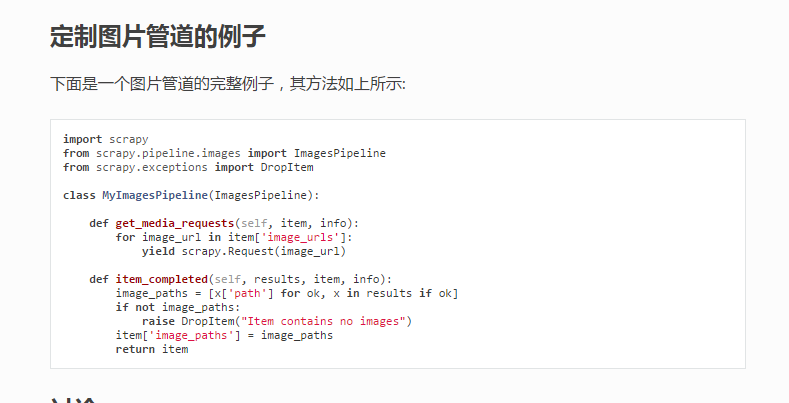
没有分类,很难看, 再重写一下ImagesPipeline中的file_path方法!
# -*- coding: utf-8 -*-

# Define your item pipelines here

#

# Don't forget to add your pipeline to the ITEM_PIPELINES setting

# See: http://doc.scrapy.org/en/latest/topics/item-pipeline.html

from scrapy import Request

from scrapy.pipelines.images import ImagesPipeline

from scrapy.exceptions import DropItem

import re

class MzituScrapyPipeline(ImagesPipeline):

    def file_path(self, request, response=None, info=None):

        """

        :param request: 每一个图片下载管道请求

        :param response:

        :param info:

        :param strip :清洗Windows系统的文件夹非法字符,避免无法创建目录

        :return: 每套图的分类目录

        """

        item = request.meta['item']

        folder = item['name']

        folder_strip = strip(folder)

        image_guid = request.url.split('/')[-1]

        filename = u'full/{0}/{1}'.format(folder_strip, image_guid)

        return filename

    def get_media_requests(self, item, info):

        """

        :param item: spider.py中返回的item

        :param info:

        :return:

        """

        for img_url in item['image_urls']:

            referer = item['url']

            yield Request(img_url, meta={'item': item,

                                         'referer': referer})

    def item_completed(self, results, item, info):

        image_paths = [x['path'] for ok, x in results if ok]

        if not image_paths:

            raise DropItem("Item contains no images")

        return item

    # def process_item(self, item, spider):

    #     return item

def strip(path):

    """

    :param path: 需要清洗的文件夹名字

    :return: 清洗掉Windows系统非法文件夹名字的字符串

    """

    path = re.sub(r'[?\\*|“<>:/]', '', str(path))

    return path

if __name__ == "__main__":

    a = '我是一个?\*|“<>:/错误的字符串'

    print(strip(a))
写一个中间件来处理图片下载的防盗链:
class MeiZiTu(object):

    def process_request(self, request, spider):

        '''设置headers和切换请求头

        :param request: 请求体

        :param spider: spider对象

        :return: None

        '''

        referer = request.meta.get('referer', None)

        if referer:

            request.headers['referer'] = referer
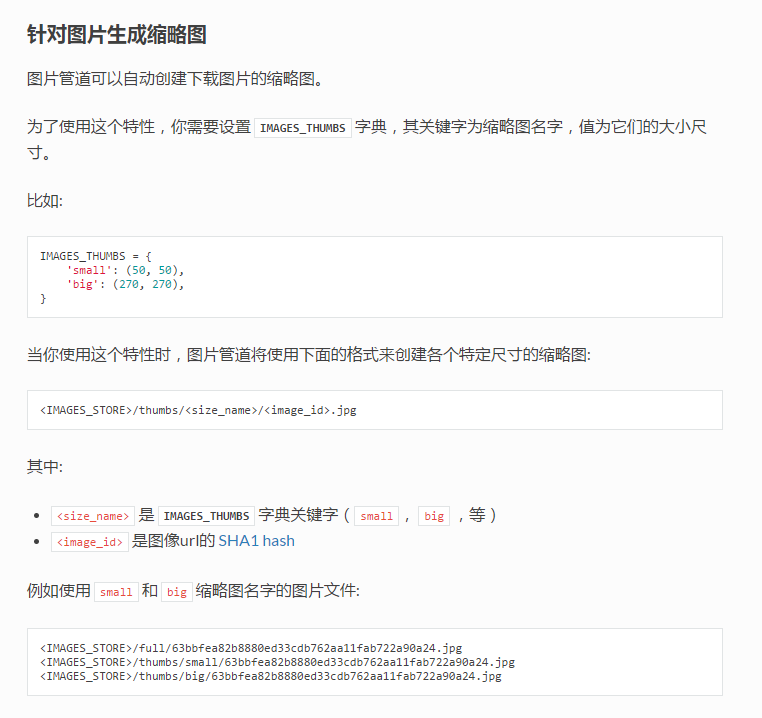
最后一步设置ImagesPipeline的存储目录!
在settings.py中写入:
IMAGES_STORE = 'F:\mzitu\\'
在settings.py中写入以下配置。
# 30 days of delay for images expiration
DOWNLOADER_MIDDLEWARES = {
scrapy 下载图片 from cuiqingcai的更多相关文章
- scrapy下载图片到自己的目录,创建缩略图,存储入库
环境和工具:python2.7,scrapy 实验网站:http://www.27270.com/tag/333.html 爬去所有兔女郎图片,下面的推荐需要过滤 逻辑:分析网站信息,下载图片和入库 ...
- Scrapy下载图片及自定义分类下载路径
配置下载图片的流程如下 在items中定义两个属性,image_urls 和images .image_urls是用来存储需要下载的图片url链接,列表类型: 当文件下载完成后会把相关下载信息存入im ...
- 利用scrapy下载图片保存到本地
1.先声明一下,起始位置已经是将所有的图片链接都能到pipelines.py中 2.创建一个类,继承于ImagesPipeline,因此也就需要导入ImagesPipeline from scrapy ...
- [转]解决scrapy下载图片时相对路径转绝对路径的问题
专注自:http://blog.csdn.net/hjy_six/article/details/6862648 这段时间一直在研究利用scrapy抓取图片的问题,我发觉,用官网的http://doc ...
- Scrapy 下载图片时 ModuleNotFoundError: No module named'PIL'
使用scrapy的下载模块需要PIL(python图像处理模块)的支持,使用pip安装即可
- Scrapy 下载图片
参考 : https://www.jianshu.com/p/6c8d2730d088 https://docs.scrapy.org/en/latest/topics/item-pipeline.h ...
- scrapy下载图片报[scrapy.downloadermiddlewares.robotstxt] DEBUG: Forbidden by robots.txt:错误
本文转自:http://blog.csdn.net/zzk1995/article/details/51628205 先说结论,关闭scrapy自带的ROBOTSTXT_OBEY功能,在setting ...
- Day3-scrapy爬虫下载图片自定义名称
学习Scrapy过程中发现用Scrapy下载图片时,总是以他们的URL的SHA1 hash值为文件名,如: 图片URL:http://www.example.com/image.jpg 它的SHA1 ...
- 用Scrapy爬虫下载图片(豆瓣电影图片)
用Scrapy爬虫的安装和入门教程,这里有,这篇链接的博客也是我这篇博客的基础. 其实我完全可以直接在上面那篇博客中的代码中直接加入我要下载图片的部分代码的,但是由于上述博客中的代码已运行,已爬到快九 ...
随机推荐
- 71A
#include <iostream> #include <string> using namespace std; int main() { string word; int ...
- Java 基础 常用API (Object类,String类,StringBuffer类)
Java API Java 的API(API: Application(应用) Programming(程序) Interface(接口)) Java API就是JDK中提供给我们使用的类,这些类将底 ...
- Apache与Tomcat整合的配置
下载jk连接器地址:http://archive.apache.org/dist/tomcat/tomcat-connectors/jk/binaries/windows/ 把jk连接器即“mod_j ...
- 【LeetCode每天一题】Combination Sum(组合和)
Given a set of candidate numbers (candidates) (without duplicates) and a target number (target), fin ...
- xxx.app已损坏,打不开.你应该将它移到废纸篓-已解决
到这种情况可能不是你的软件包的问题,可能是macos安全设置问题. 解决办法就是: 1.系统偏好设置... -> 安全性与隐私-->修改为任何来源 2.serria里面没有“任何来源”这一 ...
- node服务开发环境判断和启动端口指定---process.env.NODE_ENV
在node启动的时候我们需要在代码里面判断服务器运行环境 可以根据process.env.NODE_ENV来判断 一.开发环境的判断 1.安装 npm i -g cross-env 2.启动 cros ...
- 要求根据RandomStr.java:使用类型转换生成六位验证字符串,示例程序每次运 行时,都会生成不同的字符串。
1.程序设计思想验证码 ①定义一个字符串变量来保存随机生成的. ②利用循环产生六位随机数,在产生每一位时将其转换为char类型并写在字符串后面. ③利用对话框显示生成的验证码,并提示用户输入验证码. ...
- phpstorm 用法
同时打开多个工程,多项目并存 File -> settings -> Directories -> Add Content Root 中添加目录 快速模板 输入fore,按下Tab, ...
- android 流程跟踪
#记录一下 Thread cur_thread = Thread.currentThread(); StackTraceElement stack[] = cur_thread.getStackTra ...
- jenkins构建多个项目执行顺序设置
通常我们会在jenkins中构建多个项目,那么如果项目有依赖,或者有关联怎么办? 例: 如下图: ,有两个构建项目,posWeb是个web项目,welife是接口项目. 由于接口项目数据会影响pos ...