
Android TextWatcher的使用方法(监听ExitText的方法)
我做了一个查询单词的简单app, 当在EditText中输入单词的时候,点击lookup,则在TextView区域显示出该单词的意思,当EditText中没有任何字符时,显示"word definition result", 注意,单词的最大长度限制是20个字符,且禁止回车键(换行键);
这个里面需要用到读文件操作、禁止键盘回车键、Textwatcher监听、限制输入长度、提示语等操作!
1. 首先需要一个Lookup的button, 一个可以输入字符的EditText 和一个显示单词结果的TextView;
<?xml version="1.0" encoding="utf-8"?>

<LinearLayout xmlns:android="http://schemas.android.com/apk/res/android"

    xmlns:tools="http://schemas.android.com/tools"

    android:layout_width="match_parent"

    android:layout_height="match_parent"

    android:orientation="vertical"

    tools:context="com.chenye.dictionary.MainActivity">

    <LinearLayout

        android:layout_width="match_parent"

        android:layout_height="wrap_content">

        <EditText

            android:id="@+id/wordEditText"

            android:layout_width="match_parent"

            android:layout_height="wrap_content"

            android:layout_weight="1"

            android:hint="input a word"

            android:maxLength="20"

            android:singleLine="true"/>

        <Button

            android:layout_width="wrap_content"

            android:layout_height="wrap_content"

            android:text="lookup"

            android:onClick="lookup"/>

    </LinearLayout>

    <TextView

        android:id="@+id/result"

        android:layout_width="match_parent"

        android:layout_height="match_parent"

        android:text="word definition result"

        android:textSize="20dp"/>

</LinearLayout>
其中android:singleLine="true"为禁止虚拟键盘的操作; android:maxLength="20"为限制最大长度;android:hint="input a word"为提示语;这里EditText和button部分是水平布局,而它俩与TextView显示结果区域是垂直布局;
2. java代码;
package com.chenye.dictionary;

import android.support.v7.app.AppCompatActivity;

import android.os.Bundle;

import android.text.Editable;

import android.text.TextWatcher;

import android.util.Log;

import android.view.View;

import android.widget.EditText;

import android.widget.TextView;

import android.widget.Toast;

import java.util.HashMap;

import java.util.Scanner;

public class MainActivity extends AppCompatActivity {

    private HashMap<String, String> dictionary;

    EditText wordEditText;

    TextView resultTextView;

    public  void readAllDefinition() {

        Scanner scanner = new Scanner(getResources().openRawResource(R.raw.gre_words));

        if(this.dictionary == null){

            this.dictionary = new HashMap<>();

        }

        while (scanner.hasNext()){

            String line = scanner.nextLine();

            String[] pieces = line.split("\t");

            this.dictionary.put(pieces[0], pieces[1]);

        }

        scanner.close();

    }

    @Override

    protected void onCreate (Bundle savedInstanceState) {

        super.onCreate(savedInstanceState);

        setContentView(R.layout.activity_main);

        readAllDefinition();

        wordEditText = findViewById(R.id.wordEditText);

        resultTextView = findViewById(R.id.result);

        wordEditText.addTextChangedListener(new TextWatcher() {

            private CharSequence word;

            @Override

            public void beforeTextChanged(CharSequence charSequence, int start, int count, int after) {

                word = charSequence;

            }

            @Override

            public void onTextChanged(CharSequence charSequence, int start, int before, int count) {

                //resultTextView.setText("");

            }

            @Override

            public void afterTextChanged(Editable editable) {

                if(word.length()==0) {

                    resultTextView.setText("word definition result");

                }

                else if (word.length() == 20){

                    Toast.makeText(MainActivity.this, "已到达输入的最大长度!", Toast.LENGTH_SHORT).show();

                }

            }

        });

    }

// button的方法

    public void lookup(View view) {

        EditText wordText = findViewById(R.id.wordEditText);

        String word = wordText.getText().toString();

        if(this.dictionary == null){

            readAllDefinition();

        }

        String def = this.dictionary.get(word);

        TextView defTextView = findViewById(R.id.result);

        if(def == null){

            defTextView.setText("word not fond!");

        }else{

            defTextView.setText(def);

        }

    }

}
readAllDefinition()是在app启动的时候就会被调用的方法,此时已经将所有的单词,以及其对应的含义放在了map中;
其中,getResources().openRawResource(R.raw.gre_words)方法获取到InputStream流, gre_words是存放单词及对应含义的文本文件;
onCreate()方法中,分别采用wordEditText = findViewById(R.id.wordEditText);resultTextView = findViewById(R.id.result)方法获取id
最重要的是addTextChangedListener这个方法,是监听EditText的方法,里面有三个方法:
beforeTextChange()是在EditText改变之前里面可以做一些操作;
onTextChanged()是改变中;

afterTextChanged()是改变后;
参数:charSequence是这串字符串;start表示开始变化的位置,count表示变化的字符串长度,after表示变化之后该位置的字符数量, before表示变化之前该位置的字符数量;
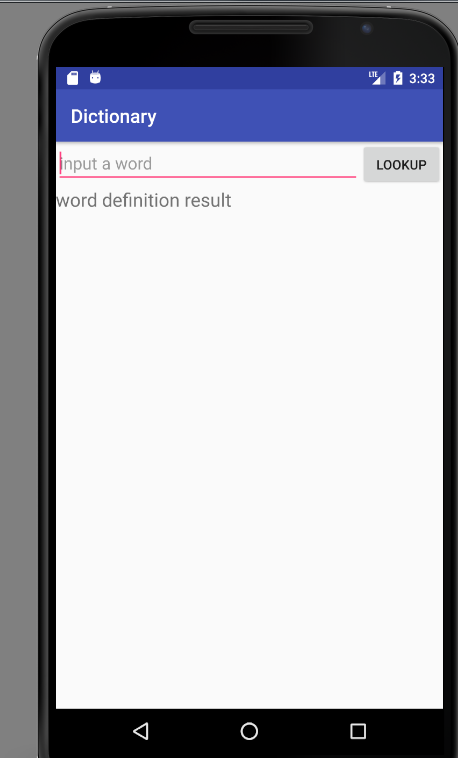
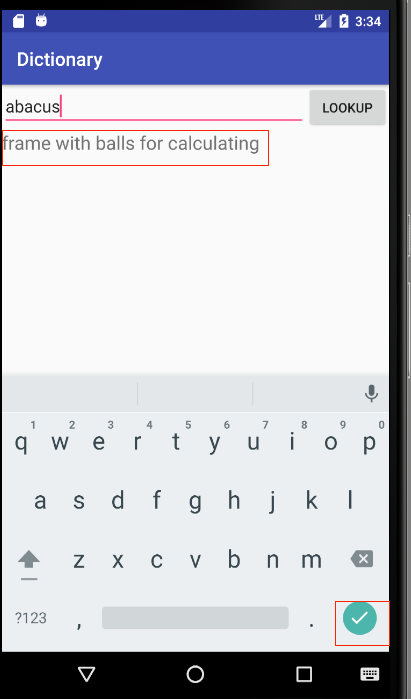
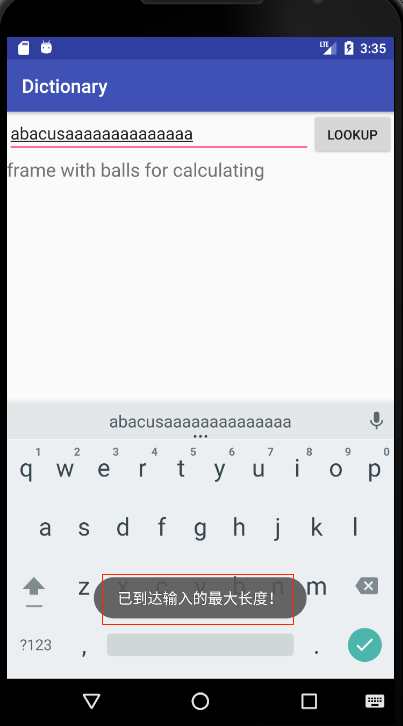
3. 结果如下:
初始情况:                                                    查询单词如下:                                    删除单词中间结果如下:

长度超出情况如下:
ps: 本宝也是刚开始学习android, 记录一下自己的学习过程,好记性不如烂笔头!
Android TextWatcher的使用方法(监听ExitText的方法)的更多相关文章
- Oracle Net Manager 的使用方法(监听的配置方法)
一,在服务端配置oracle端口 win+R 输入netca 弹出如下窗口后 选择监听程序配置,点击下一步 二.配置端口后使用Telnet工具调试端口是否联通 在命令行输入telnet 服务器ip ...
- android -- 小问题 关于ListView设置了OnScrollListener之后onScrollStateChanged()和onScroll方法监听不到的问题
关于ListView设置了OnScrollListener之后onScrollStateChanged()和onScroll方法监听不到的问题: 原因: 首先OnScrollListener是焦点滚动 ...
- 关于scrollview监听的一些方法
一 package cn.testscrollview; import android.os.Bundle; import android.view.MotionEvent; import andro ...
- android BroadcastReceiver ACTION_TIME_TICK 系统时间监听不到
android BroadcastReceiver ACTION_TIME_TICK 系统时间监听不到 今天做android上的消息推送,启动了一个独立service,然后在里面监听系统的ACTION ...
- javascript 原生方法监听DOM结构改变事件
js原生方法监听DOM结构改变事件 document.addEventListener('DOMNodeInserted',function(){alert(1)},false);document.a ...
- android的Home键的监听封装工具类(一)
android的Home键的监听封装: package com.gzcivil.utils; import android.content.BroadcastReceiver; import andr ...
- v-on可以监听多个方法吗?
原文地址 v-on可以监听多个方法 <template> <div class="about"> <button @click="mycli ...
- 【Android】添加菜单和监听菜单方法详解
添加菜单 可以在onCreateOptionsMenu或者onPrepareOptionsMenu方法中来添加菜单 代码添加: menu.add((int groupId, int itemId, i ...
- Android 另类方法监听软键盘的弹出收起事件
http://www.cnblogs.com/csonezp/p/5065624.html 最近做的项目碰到个问题,a界面是fragment+recyclerview,b界面带个edittext,并且 ...
随机推荐
- CocoStudio UIButton setPressedActionEnabled(true) 子控件不跟着缩放
具体情况是这样的:美术给了我 一个按钮的背景图片 一个按钮的文字图片,用背景图片创建一个button,然后把文字图片添加进去(注意关闭文字图片的交互功能) 设置UIButton setPressed ...
- safenet 超级狗 加密狗
1.CS程序可以工作正常: 2.BS程序,服务器验证狗,IIS设置32位兼容方法1: dog.SetLibPath,设置查找依赖dll路径: 方法2:默认系统目录 C:\Windows\SysWOW6 ...
- Mysql数据库插入时乱码问题解决
我们在利用cmd的黑屏界面进行mysql数据的插入时往往会出现不能插入的情况,这个原因是因为我们系统虽然和服务器端即mysql的数据库采用的都是统一的utf8的编码,但是在传输的过程中会变成iso88 ...
- 访问FTP站点下载文件,提示“当前的安全设置不允许从该位置下载文件”的解决方案
访问FTP站点下载文件,提示“当前的安全设置不允许从该位置下载文件”的解决方案: 打开客戶端浏览器--工具---internet-安全-自定义级别-选择到低到中低. 然后点受信任站点,把你要访问的站点 ...
- tomcat 启动显示指定的服务未安装
解决方法: 命令行进入tomcat的bin目录 输入“service.bat install” 重启,OK
- MySQL设计规范与性能优化
引言 MySQL是目前使用最为广泛的关系型数据库之一,如果使用得当,可支撑企业级高并发.高可靠服务,使用不当甚至连并发量略高的个人网站都难以支撑: 就算使用了缓存,大量的数据库访问依旧在所难免,即使设 ...
- UVA 11990 ``Dynamic'' Inversion (线段树套BIT,分治)
题目要求可转化为查询一个区间内有多少数比val大(或者小). 区间用线段树分解(logN),每个区间维护一rank树. rank可用BIT查询,往BIT里面插值,为了保证不同区间的BIT互不影响要先离 ...
- 2017.12.11 String 类中常用的方法
1.编写程序将 "jdk" 全部变为大写,并输出到屏幕,截取子串"DK" 并输出到屏幕 package demo; import java.util.Scann ...
- theano支持的数组、向量、矩阵表达式
1)theano主要支持符号矩阵表达式 (2)theano与numpy中都有broadcasting:numpy中是动态的,而theano需要在这之前就知道是哪维需要被广播.针对不同类型的数据给出如下 ...
- wing ide 注释
ctrl-.是批量注视 ctrl->向前缩进 ctrl-<向后缩进