
DesignSurface简介
Dinesh Chandnani - 三月 2006 (MSDN Magazine: C#)
- Understanding designers and services
- Creating a hosting form
- Building and using a toolbox
- Loading and managing designers
Code download available at: DesignerHosting.exe (官网VS2005) (VS2010)
DesignSurface and DesignSurfaceManager
The Hosting Form
The Toolbox
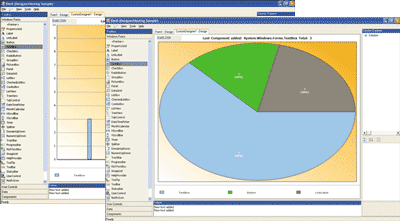
Multiple DesignSurfaces
DesignerLoaders
CodeDomDesignerLoader
Conclusion

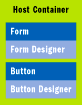
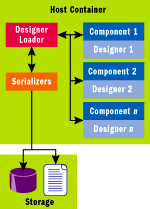
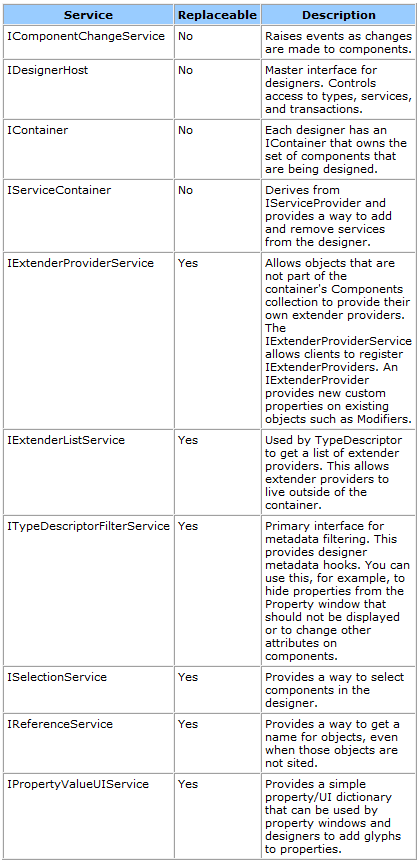
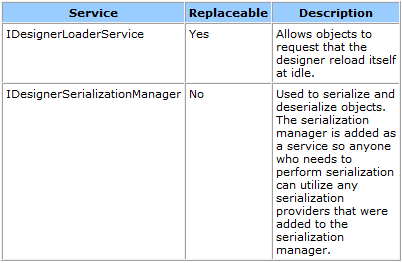
Figure 5 DesignSurfaceManager Design-Time Services
| Service | Description |
|---|---|
| IUIService | Provides a way for components to show a UI such as error messages and dialog boxes |
| IDesignerEventService | Provides a global eventing mechanism for designer events |
// Create the DesignSurface and load it with a form

DesignSurface ds = new DesignSurface();

ds.BeginLoad(typeof(Form));

// Get the View of the DesignSurface, host it in a form, and show it

Control c = ds.View as Control;

Form f = new Form();

c.Parent = f;

c.Dock = DockStyle.Fill;

f.Show();
// Add a Button to the Form

IDesignerHost idh = (IDesignerHost)ds.GetService(typeof(IDesignerHost));

Button b = (Button)idh.CreateComponent(typeof(Button));

// Set the Parent of this Button to the RootComponent (the Form)

b.Parent = (Form)idh.RootComponent;

// Use ComponentChangeService to announce changing of the

// Form's Controls collection */

IComponentChangeService icc = (IComponentChangeService)

    idh.GetService(typeof(IComponentChangeService));

    icc.OnComponentChanging(idh.RootComponent,

    TypeDescriptor.GetProperties(idh.RootComponent)["Controls");
/* Add a Button to the Form using IToolboxUser */

IDesignerHost idh = (IDesignerHost)ds.GetService(typeof(IDesignerHost));

IToolboxUser itu = (IToolboxUser)idh.GetDesigner(idh.RootComponent);

itu.ToolPicked(new ToolboxItem(typeof(Button)));
| Method or Property | Description |
|---|---|
| GetSelectedToolboxItem | Returns the selected toolbox item |
| SerializeToolboxItem | Creates a binary serialized object (DataObject) from ToolboxItem |
| DeserializeToolboxItem | Returns the ToolboxItem from a binary serialized object (DataObject) |
protected override DesignSurface CreateDesignSurfaceCore(

    IServiceProvider parentProvider)

{

    return new HostSurface(parentProvider);

}
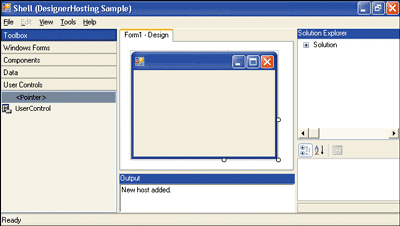
void HostSurfaceManager_ActiveDesignSurfaceChanged(

    object sender, ActiveDesignSurfaceChangedEventArgs e)

{

    ToolWindows.OutputWindow o =

        this.GetService(typeof(ToolWindows.OutputWindow)) as

        ToolWindows.OutputWindow;

    o.RichTextBox.Text += "New host added./n";

}
// Load it using a Loader

ds.BeginLoad(new MyLoader());
<Object type="System.Windows.Forms.Form, System.Windows.Forms,

    Version=2.0.0.0, Culture=neutral, PublicKeyToken=b77a5c561934e089"

    name="Form1" children="Controls">

  <Property name="Name">Form1</Property>

  <Property name="DataBindings">

    <Property name="DefaultDataSourceUpdateMode">OnValidation</Property>

  </Property>

  <Property name="ClientSize">292, 273</Property>

</Object>

CompilerParameters cp = new CompilerParameters();

AssemblyName[] assemblyNames =

    Assembly.GetExecutingAssembly().GetReferencedAssemblies();

foreach (AssemblyName an in assemblyNames)

{

    Assembly assembly = Assembly.Load(an);

    cp.ReferencedAssemblies.Add(assembly.Location);

}

cp.GenerateExecutable = true;

cp.OutputAssembly = executable;

cp.MainClass = "DesignerHostSample." +

    this.LoaderHost.RootComponent.Site.Name;

// Compile CodeCompileUnit using CodeProvider

CSharpCodeProvider cc = new CSharpCodeProvider();

CompilerResults cr = cc.CompileAssemblyFromDom(cp, codeCompileUnit);

if (cr.Errors.HasErrors)

{

    string errors = string.Empty;

    foreach (CompilerError error in cr.Errors)

    {

        errors += error.ErrorText + "/n";

    }

    MessageBox.Show(errors, "Errors during compile.");

}
DesignSurface简介的更多相关文章
- ASP.NET Core 1.1 简介
ASP.NET Core 1.1 于2016年11月16日发布.这个版本包括许多伟大的新功能以及许多错误修复和一般的增强.这个版本包含了多个新的中间件组件.针对Windows的WebListener服 ...
- MVVM模式和在WPF中的实现(一)MVVM模式简介
MVVM模式解析和在WPF中的实现(一) MVVM模式简介 系列目录: MVVM模式解析和在WPF中的实现(一)MVVM模式简介 MVVM模式解析和在WPF中的实现(二)数据绑定 MVVM模式解析和在 ...
- Cassandra简介
在前面的一篇文章<图形数据库Neo4J简介>中,我们介绍了一种非常流行的图形数据库Neo4J的使用方法.而在本文中,我们将对另外一种类型的NoSQL数据库——Cassandra进行简单地介 ...
- REST简介
一说到REST,我想大家的第一反应就是“啊,就是那种前后台通信方式.”但是在要求详细讲述它所提出的各个约束,以及如何开始搭建REST服务时,却很少有人能够清晰地说出它到底是什么,需要遵守什么样的准则. ...
- Microservice架构模式简介
在2014年,Sam Newman,Martin Fowler在ThoughtWorks的一位同事,出版了一本新书<Building Microservices>.该书描述了如何按照Mic ...
- const,static,extern 简介
const,static,extern 简介 一.const与宏的区别: const简介:之前常用的字符串常量,一般是抽成宏,但是苹果不推荐我们抽成宏,推荐我们使用const常量. 执行时刻:宏是预编 ...
- HTTPS简介
一.简单总结 1.HTTPS概念总结 HTTPS 就是对HTTP进行了TLS或SSL加密. 应用层的HTTP协议通过传输层的TCP协议来传输,HTTPS 在 HTTP和 TCP中间加了一层TLS/SS ...
- 【Machine Learning】机器学习及其基础概念简介
机器学习及其基础概念简介 作者:白宁超 2016年12月23日21:24:51 摘要:随着机器学习和深度学习的热潮,各种图书层出不穷.然而多数是基础理论知识介绍,缺乏实现的深入理解.本系列文章是作者结 ...
- Cesium简介以及离线部署运行
Cesium简介 cesium是国外一个基于JavaScript编写的使用WebGL的地图引擎,一款开源3DGIS的js库.cesium支持3D,2D,2.5D形式的地图展示,可以自行绘制图形,高亮区 ...
随机推荐
- Leetcode 654.最大二叉树
最大二叉树 给定一个不含重复元素的整数数组.一个以此数组构建的最大二叉树定义如下: 二叉树的根是数组中的最大元素. 左子树是通过数组中最大值左边部分构造出的最大二叉树. 右子树是通过数组中最大值右边部 ...
- 软工实践 - 第十次作业 Alpha 冲刺 (2 / 10)
队名:起床一起肝活队 组长博客:https://www.cnblogs.com/dawnduck/p/9960710.html 作业博客:班级博客本次作业的链接 组员情况 组员1(队长):白晨曦 过去 ...
- jquery版手风琴效果
<!DOCTYPE html> <html> <head lang="en"> <meta charset="UTF-8&quo ...
- 在iBatis中操作Blob数据类型
这里的Blob数据类型指的是保存了文本的blob数据类型 直接读取blob类型存储的文本,可能会出现乱码,所以需要读取完后进行手动转码 这里使用ibatis作为持久层 SELECT urlconten ...
- 【神题】AtCoder 028 C Min Cost Cycle
TO BE DONE 思维题 十分巧妙的转化
- Codeforces 954E Water Taps
题目大意 有 $n$($1\le n\le 200000$)个变量 $x_1, x_2, \dots, x_n$,满足 \begin{equation} 0\le x_i \le a_i \label ...
- HDU 1392 Surround the Trees(凸包入门)
Surround the Trees Time Limit: 2000/1000 MS (Java/Others) Memory Limit: 65536/32768 K (Java/Other ...
- nodeJS学习(2)--- NPM 使用介绍
前言:express 推出了4.X,自己尝试了一下,出现了各种问题.结果查看了各种文档和问题,现在在这个给大家分享下4.X版本的安装. NPM 使用介绍 NPM是随同NodeJS一起安装的包管理工具, ...
- Maven构建多模块项目
使用Maven构建多模块项目 转自:http://www.cnblogs.com/xdp-gacl/p/4242221.html 在平时的Javaweb项目 开发中为了便于后期的维护,我们一般会进行分 ...
- 标准IO与文件IO 的区别
先来了解下什么是标准IO以及文件IO. 标准IO:标准I/O是ANSI C建立的一个标准I/O模型,是一个标准函数包和stdio.h头文件中的定义,具有一定的可移植性.标准IO库处理很多细节.例如缓存 ...