
[Python Cookbook] Numpy: Multiple Ways to Create an Array
Convert from list
Apply np.array() method to convert a list to a numpy array:
 import numpy as np

 mylist = [1, 2, 3]

 x = np.array(mylist)

 x
Output: array([1, 2, 3])
Or just pass in a list directly:
y = np.array([4, 5, 6])

y
Output: array([4, 5, 6])
Pass in a list of lists to create a multidimensional array:
m = np.array([[7, 8, 9], [10, 11, 12]])

m
Output:
array([[ 7, 8, 9],
[10, 11, 12]])
Array Generation Functions
arange returns evenly spaced values within a given interval.
n = np.arange(0, 30, 2) # start at 0 count up by 2, stop before 30

n
Output:
array([ 0, 2, 4, 6, 8, 10, 12, 14, 16, 18, 20, 22, 24, 26, 28])
reshape returns an array with the same data with a new shape.
n = n.reshape(3, 5) # reshape array to be 3x5

n
Output:
array([[ 0, 2, 4, 6, 8],
[10, 12, 14, 16, 18],
[20, 22, 24, 26, 28]])
linspace returns evenly spaced numbers over a specified interval.
o = np.linspace(0, 4, 9) # return 9 evenly spaced values from 0 to 4

o
Output:
array([0. , 0.5, 1. , 1.5, 2. , 2.5, 3. , 3.5, 4. ])
resize changes the shape and size of array in-place.
o.resize(3, 3)

o
Output:
array([[0. , 0.5, 1. ],
[1.5, 2. , 2.5],
[3. , 3.5, 4. ]])
ones returns a new array of given shape and type, filled with ones.
np.ones((3, 2))
Output:
array([[1., 1.],
[1., 1.],
[1., 1.]])
zeros returns a new array of given shape and type, filled with zeros.
np.zeros((2, 3))
Output:
array([[0., 0., 0.],
[0., 0., 0.]])
eye returns a 2-D array with ones on the diagonal and zeros elsewhere.
np.eye(3)
Output:
array([[1., 0., 0.],
[0., 1., 0.],
[0., 0., 1.]])
diag extracts a diagonal or constructs a diagonal array.
np.diag(y)
Output:
array([[4, 0, 0],
[0, 5, 0],
[0, 0, 6]])
Create an array using repeating list (or see np.tile)
np.array([1, 2, 3] * 3)
Output:
array([1, 2, 3, 1, 2, 3, 1, 2, 3])
Repeat elements of an array using repeat.
np.repeat([1, 2, 3], 3)
Output:
array([1, 1, 1, 2, 2, 2, 3, 3, 3])
Random Number Generator
The numpy.random subclass provides many methods for random sampling. The following tabels list funtions in the module to generate random numbers.
Simple random data
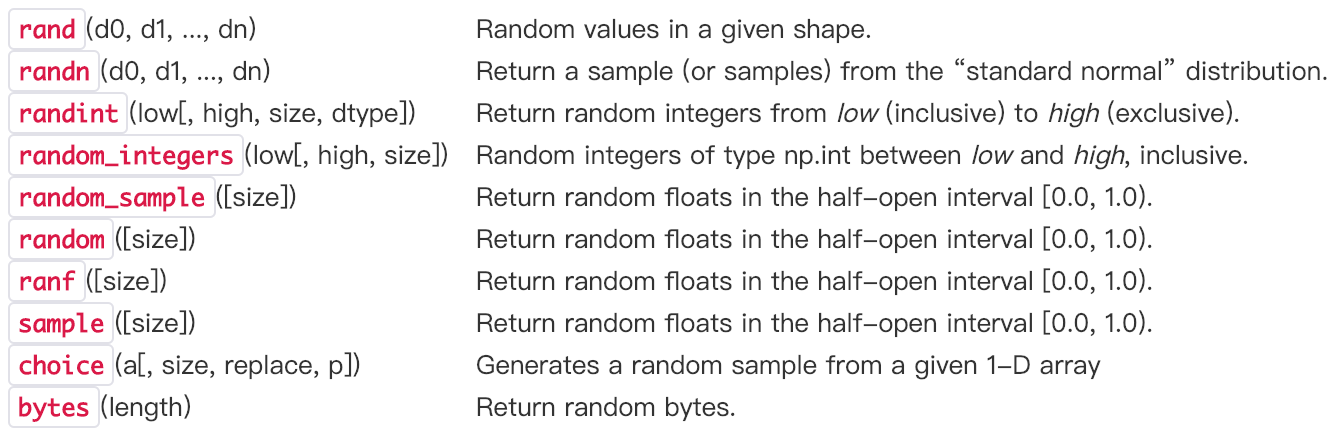
Now I will summarize the usage of the first three funtions which I have met frequently.
numpy.random.rand creates an array of the given shape and populate it with random samples from a uniform distribution over [0, 1). Parameters d0, d1, ..., dn define dimentions of returned array.
np.random.rand(2,3)
Output:
array([[0.20544659, 0.23520889, 0.11680902],
[0.56246922, 0.60270525, 0.75224416]])
numpy.random.randn creates an array of the given shape and populate it with random samples from a strandard normal distribution N(0,1). If any of the  are floats, they are first converted to integers by truncation. A single float randomly sampled from the distribution is returned if no argument is provided.
 # single random variable

 print(np.random.randn(),'\n')

 # N(0,1)

 print(np.random.randn(2, 4),'\n')

 # N(3,6.26)

 print(2.5 * np.random.randn(2, 4) + 3,'\n')
Output:
-1.613647405772221
[[ 1.13147436 0.19641141 -0.62034454 0.61118876]
[ 0.95742223 1.91138142 0.2736291 0.29787331]]
[[ 1.997092 2.6460653 3.2408004 -0.81586404]
[ 0.15120766 1.23676426 6.59249789 -1.04078213]]
numpy. random.randint returns random integers from the “discrete uniform” distribution of the specified dtype in the interval [low, high). If high is None (the default), then results are from [0, low). The specific format is
numpy.random.randint(low, high=None, size=None, dtype='l')
np.random.seed(10)

np.random.randint(100,200,(3,4))
np.random.randint(100,200)
Output:
array([[109, 115, 164, 128],
[189, 193, 129, 108],
[173, 100, 140, 136]])
109
Permutation
There are another two funtions used for permutations. Both of them can randomly permute an array. The only difference is that shuffle changes the original array but permutation doesn't.

Here are some examples of permutation.
np.random.permutation([1, 4, 9, 12, 15])
Output: array([ 9, 4, 1, 12, 15])
np.random.permutation(10)
Output: array([3, 7, 4, 6, 8, 2, 1, 5, 0, 9])
Usually, we use the following statements to perform random sampling:
permutation = list(np.random.permutation(m))  #m is the number of samples

shuffled_X = X[:, permutation]

shuffled_Y = Y[:, permutation].reshape((1,m))
[Python Cookbook] Numpy: Multiple Ways to Create an Array的更多相关文章
- 「Python」Numpy equivalent of MATLAB's cell array
转自Stackoverflow.备忘用. Question I want to create a MATLAB-like cell array in Numpy. How can I accompli ...
- [Python Cookbook] Numpy Array Slicing and Indexing
1-D Array Indexing Use bracket notation [ ] to get the value at a specific index. Remember that inde ...
- [Python Cookbook] Numpy: Iterating Over Arrays
1. Using for-loop Iterate along row axis: import numpy as np x=np.array([[1,2,3],[4,5,6]]) for i in ...
- [Python Cookbook] Numpy Array Joint Methods: Append, Extend & Concatenate
数组拼接方法一 思路:首先将数组转成列表,然后利用列表的拼接函数append().extend()等进行拼接处理,最后将列表转成数组. 示例1: import numpy as np a=np.arr ...
- [Python Cookbook] Numpy: How to Apply a Function to 1D Slices along the Given Axis
Here is a function in Numpy module which could apply a function to 1D slices along the Given Axis. I ...
- [Python Cookbook] Pandas: 3 Ways to define a DataFrame
Using Series (Row-Wise) import pandas as pd purchase_1 = pd.Series({'Name': 'Chris', 'Item Purchased ...
- [Python Cookbook] Numpy Array Manipulation
1. Reshape: The np.reshape() method will give a new shape to an array without changing its data. Not ...
- [转]python与numpy基础
来源于:https://github.com/HanXiaoyang/python-and-numpy-tutorial/blob/master/python-numpy-tutorial.ipynb ...
- 【Python】numpy 数组拼接、分割
摘自https://docs.scipy.org 1.The Basics 1.1 numpy 数组基础 NumPy’s array class is called ndarray. ndarray. ...
随机推荐
- Maven使用入门
Maven使用POM文件管理项目资源,pom.xml文件位于项目根目录下,结构如下: <?xml version="1.0" encoding="UTF-8&quo ...
- dotnet core 2.2 安装后在vs2017中无法选择 dotnet core 2.2 为目标框架
可能有效的解决方案: 无法完全保证有效,因为我本地装上没问题,只帮同事解决过一次,貌似有效 方案就是多装几个 .net core 2.2.xxx 版本,然后可能就正常识别了. 在安装之前,先把 vs ...
- 13、jQueryMobile知识总结
1.jQueryMobile与jQuery的区别 jQueryMobile是一个为触控优化的框架,用于创建移动Web应用程序:构建于jQuery之上,适用于流行的智能手机和平板 基于jQuery的手机 ...
- MFC深入浅出读书笔记第二部分2
第七章 MFC骨干程序 所谓骨干程序就是指有AppWizard生成的MFC程序.如下图的层次关系是程序中常用的几个类,一定要熟记于心. 1 Document/View应用程序 CDocument存放 ...
- 获取完整的URL request.getQueryString()
public String codeToString(String str) { String strString = str; try { byte tempB[] = strString.getB ...
- iptables端口转发命令
需求很简单,把本地81端口映射到8080端口上 1. 所有的81请求转发到了8080上. 1 # iptables -t nat -A PREROUTING -p tcp --dport 81 - ...
- Android实现金额显示小数点后两位
代码改变世界 Android实现金额显示小数点后两位 NumberFormat nf = new DecimalFormat("##.##"); Double d = 554545 ...
- 写js时常见错误
最近几天写js时出现好多相同的错误,确实应该记下来了 ReferenceError: invalid assignment left-hand side 判断相等时把"=="写成& ...
- POJ 2763 Housewife Wind(DFS序+LCA+树状数组)
Housewife Wind Time Limit: 4000MS Memory Limit: 65536K Total Submissions: 11419 Accepted: 3140 D ...
- 妹子(girls)
妹子(girls) 题目描述 万人迷皮皮轩收到了很多妹子的礼物,由于皮皮轩觉得每个妹子都不错,所以将她们礼物的包装盒都好好保存,但长此以往皮皮轩的房间里都堆不下了,所以只能考虑将一些包装盒放进其他包装 ...