
linux iptables:安全应用,防火墙
iptables:安全应用,防火墙

windows和linux都有防火墙,企业的边缘会部署防火墙保证企业内部的局域网是安全的。针对个人电脑会有防火墙保证系统是安全的。

防火墙是唯一通道。

防火墙分类(这里的分类只是一个简单的分类,还有很多种):

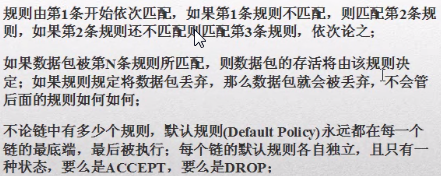
1.包过滤防火墙,速度快,但是只检查包头,不检查数据区,不建立连接状态表,安全性能低。

2.应用代理防火墙。安全高,性能高。只检查包头,不检查数据区,建立连接状态表。

防火墙还可以分为硬件和软件防火墙。硬件防火墙就是一个硬件设备,软件防火墙比如windows的360和linux的开源的iptables。
iptables是linux自带的小型的防火墙。
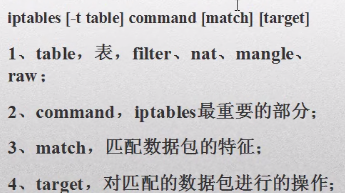
table有4张表,filter过滤表,写的是防火墙的策略。nat表做网络相关的。mangle和raw是内核部分,不用管。

command:过滤表的策略。不允许哪个网卡进去或者出来,

match:匹配条件。匹配数据包来做。

target:匹配的数据包进行操作。就2种可能性,通过和不通过。如果没问题就通过,有问题就不通过。
表

filter表:针对本机,itables的默认表有:input,forward,output链。

nat表:转换数据包的源地址和目的地址。包括:prerouting,postrouting,out链。

https://www.linuxidc.com/Linux/2017-02/140556.htm
以下是centos的:

(ubuntu没有这些命令)

service iptables stop

service iptables start

service iptables restart
root@ubuntu:/# iptables -L  (查看iptables防火墙的默认策略)

Chain INPUT (policy DROP)

target     prot opt source               destination

ufw-before-logging-input  all  --  anywhere             anywhere

ufw-before-input  all  --  anywhere             anywhere

ufw-after-input  all  --  anywhere             anywhere

ufw-after-logging-input  all  --  anywhere             anywhere

ufw-reject-input  all  --  anywhere             anywhere

ufw-track-input  all  --  anywhere             anywhere

Chain FORWARD (policy DROP)

target     prot opt source               destination

DOCKER-ISOLATION  all  --  anywhere             anywhere

DOCKER     all  --  anywhere             anywhere

ACCEPT     all  --  anywhere             anywhere             ctstate RELATED,ESTABLISHED

ACCEPT     all  --  anywhere             anywhere

ACCEPT     all  --  anywhere             anywhere
以下是centos的:

vim sysconfig/iptables :防火墙主配置文件,这里面存储的都是防火墙的策略,如果要添加策略,建议通过命令行来添加,而不是修改这个文件来添加。

*filter  : 表示是一个过滤表

:INPUT  ACCEPT  [0:0]   :这3个链都是开的

:FORWARD  ACCEPT  [0:0]

:OUTPUT  ACCEPT  [0:0]

: RH_Firewall-1-INPUT - [0:0]   : RH_Firewall-1-INPUT是防火墙当前策略的一个名字

-A INPUT -j RH_Firewall-1-INPUT

-A FORWARD -j RH_Firewall-1-INPUT

-A RH_Firewall-1-INPUT -p lo -j ACCEPT  (lo同意)

-A RH_Firewall-1-INPUT -p icmp --icmp-type any -j ACCEPT  (icmp同意)

-A RH_Firewall-1-INPUT -p 50 -j ACCEPT  (50.51端口可以访问)

-A RH_Firewall-1-INPUT -p 51 -j ACCEPT

-A RH_Firewall-1-INPUT -p udp --dport 5353 -d 224.0.0251 -j ACCEPT  (udp可以访问)
写策略:

查看规则-L:iptables -L ,iptables  -L -n ,iptables -L -n --line-number

修改默认规则-P:iptables -P INPUT DROP (备注:为链设置默认的target可用的是DROP和ACCEPT,作为最后一条规则被执行)

追加规则-A:作为最后一条规则,iptables -A INPUT -p tcp --dport 22 -j ACCEPT

删除规则-D:iptables -D INPUT 3 ,iptables -D INPUT -s 192.168.0.1 DROP

修改规则-R:iptables -R INPUT 3 -s 192.168.0.1 -j ACCEPT

清空规则-F:iptables -F ,iptables -F INPUT ,iptables -t nat -F
root@ubuntu:/# iptables -L  (默认策略,和iptables配置文件的信息是一致的)

Chain INPUT (policy DROP)

target     prot opt source   destination

ufw-before-logging-input  all  --  anywhere  anywhere

ufw-before-input  all  --  anywhere  anywhere

ufw-after-input  all  --  anywhere   anywhere

root@ubuntu:/# iptables -L -n (会把目标信息以地址的形式显示出来)

iptables -L -n --line-number  (显示行号,删除规则是基于行号删除的)
INPUT属于进入的概念,iptables -P INPUT DROP,-P是修改规则,规则只有3种inout,output,forward, -P表示针对inout或output或forward进行调整。vim sysconfig/iptables文件里面的:INPUT ACCEPT [0:0] :FORWARD ACCEPT [0:0] : OUTPUT ACCEPT [0:0] 默认都是ACCEPT的,iptables -P INPUT DROP,iptables-save(修改了要保存),这样INPUT就是DROP了。
root@ubuntu:/# iptables -L

Chain INPUT (policy DROP)  :input链,都进不来

target     prot opt source               destination

ufw-before-logging-input  all  --  anywhere             anywhere

Chain FORWARD (policy DROP) :forward链,都不能跳转

target     prot opt source               destination

DOCKER-ISOLATION  all  --  anywhere             anywhere

DOCKER     all  --  anywhere             anywhere

ACCEPT     all  --  anywhere             anywhere             ctstate RELATED,ESTABLISHED

ACCEPT     all  --  anywhere             anywhere

ACCEPT     all  --  anywhere             anywhere

ufw-before-logging-forward  all  --  anywhere             anywhere

Chain OUTPUT (policy ACCEPT) :output链,都出得去

target     prot opt source               destination

ufw-before-logging-output  all  --  anywhere             anywhere

ufw-before-output  all  --  anywhere             anywhere

Chain DOCKER (1 references)

target     prot opt source               destination

Chain DOCKER-ISOLATION (1 references)

target     prot opt source               destination

RETURN     all  --  anywhere             anywhere

Chain ufw-after-input (1 references)

target     prot opt source               destination

ufw-skip-to-policy-input  udp  --  anywhere  anywhere   udp dpt:netbios-ns

ufw-skip-to-policy-input  udp  --  anywhere   anywhere  udp dpt:netbios-dgm

ufw-skip-to-policy-input  tcp  --  anywhere    anywhere   tcp dpt:netbios-ssn
Chain是链,input和output是输入和输出,input链是从外面进来到主机这里来,针对进来的信息做什么策略,output链是从主机出去,针对出去的做什么策略,forward是指当要访问资源的时候必须通过我这台计算机转向,A要访问C必须经过B主机,就要通过B主机转向,B直接重定向到C上面去。

input和output是针对当前主机而言的,forward是针对其他电脑的。 iptables -L是打印当前3个链的策略信息。INPUT是DROP表示任何人访问这台电脑都是禁止的,OUTPUT是DROP表示当前电脑不能访问外部。

root@ubuntu:/# iptables -P  INPUT  ACCEPT  (-P修改input链)

root@ubuntu:/# iptables -L

Chain INPUT (policy ACCEPT)

target     prot opt source               destination

ufw-before-logging-input  all  --  anywhere             anywhere

ufw-before-input  all  --  anywhere             anywhere
追加规则:要往input链或者output链或者forward链里面来追加规则。

root@ubuntu:/# iptables -A INPUT -p tcp --dport 22 -j ACCEPT (-p表示要使用tcp相关的协议,)

root@ubuntu:/# iptables -L --line-number

Chain INPUT (policy DROP)

num  target     prot opt source               destination

1    ufw-before-logging-input  all  --  anywhere             anywhere

7    ACCEPT     tcp  --  anywhere             anywhere             tcp dpt:ssh  (通过tcp协议在任意地方连接ssh都是同意)
修改规则-R:iptables -R INPUT 3 -s 192.168.0.1 -j ACCEPT

root@ubuntu:/# iptables -R INPUT  7   -s  192.168.0.1     -j  DROP (7表示input链里面的第7行,-s表示不是原来的任意地址了,192.168.0.1进来的要拒绝)

root@ubuntu:/# iptables -L --line-number

Chain INPUT (policy DROP)

num  target     prot opt source               destination

7    DROP       all  --  192.168.0.1          anywhere
删除规则-D:iptables -D INPUT 3 ,iptables -D INPUT -s 192.168.0.1 DROP

root@ubuntu:/# iptables -D INPUT 7  (根据行号删除)

root@ubuntu:/# iptables -L --line-number

Chain INPUT (policy DROP)   :就没有7了

num  target     prot opt source               destination
root@ubuntu:/#  iptables -A INPUT -p  SFTP --dport 22 -j ACCEPT

root@ubuntu:/#  iptables -A INPUT -p  FTP  --dport 21 -j ACCEPT

root@ubuntu:/# iptables -L --line-number

Chain INPUT (policy ACCEPT)

num  target     prot opt source               destination

7    ACCEPT     tcp  --  anywhere             anywhere             tcp dpt:ssh

8    ACCEPT     tcp  --  anywhere             anywhere             tcp dpt:ftp

清空规则-F:iptables -F (清空所有链),iptables -F INPUT (清空input链),iptables -t nat -F
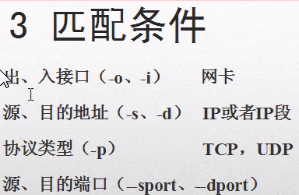
匹配条件:是从最大的范围到最小范围划分的。计算机上网是要通过网卡上网的,网卡连接的是网线,出入接口是从网卡出去进来,对应的是input和output链。源地址和目的地址是不允许某个ip进来或者访问某个ip。
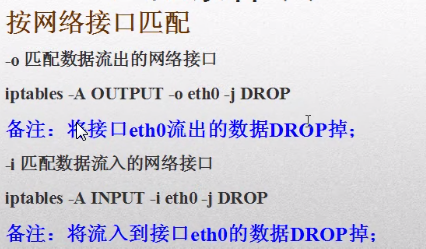
-A追加规则,output链,将从网卡eth0出去和进来的都拒绝。

root@ubuntu:/# iptables -A OUTPUT -o ens33 -j DROP

root@ubuntu:/# iptables -L --line-number

Chain OUTPUT (policy ACCEPT)

num  target     prot opt source               destination

7    DROP       all  --  anywhere             anywhere

root@ubuntu:/# ping www.baidu.com (出不去了)(删除后就可以ping了)

PING www.a.shifen.com (163.177.151.110) 56(84) bytes of data.

ping: sendmsg: Operation not permitted

ping: sendmsg: Operation not permitted
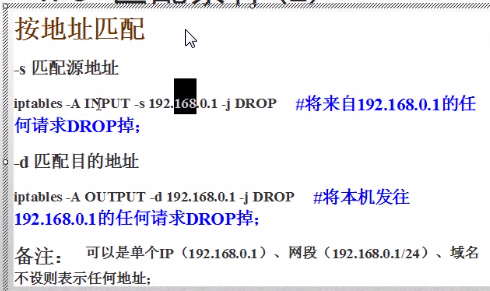
root@ubuntu:/# iptables -A INPUT -s 192.168.2.114 -j DROP

root@ubuntu:/# iptables -L

Chain INPUT (policy ACCEPT)

target     prot opt source               destination

DROP       all  --  192.168.2.114        anywhere

root@ubuntu:/# iptables  -A  OUTPUT  -d  www.baidu.com  -j  DROP

root@ubuntu:/# iptables -L

Chain OUTPUT (policy ACCEPT)

num  target     prot opt source               destination

7    DROP       all  --  anywhere             163.177.151.110

8  DROP  all  --  anywhere  163.177.151.109    root@ubuntu:/# ping www.baidu.com

PING www.a.shifen.com (163.177.151.109) 56(84) bytes of data.

ping: sendmsg: Operation not permitted

root@ubuntu:/# iptables -D OUTPUT 7

root@ubuntu:/# iptables -D OUTPUT 8

iptables: Index of deletion too big.

root@ubuntu:/# iptables -D OUTPUT 7

root@ubuntu:/# ping www.baidu.com

PING www.a.shifen.com (163.177.151.110) 56(84) bytes of data.

64 bytes from 163.177.151.110: icmp_seq=1 ttl=128 time=13.7 ms
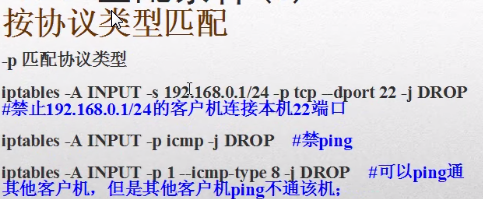
-A追加一个规则,来自于192.168.0.1网段的,tcp协议的22端口的,都禁止。
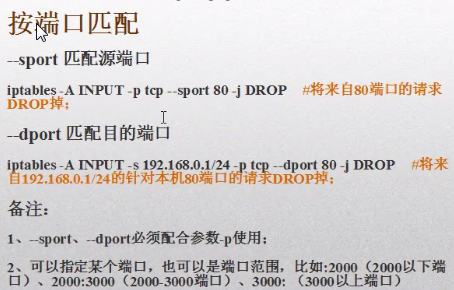
按照ip地址加端口加协议用的比较多。禁网卡用的少。
iptables的匹配规则:
不建议修改配置文件:iptables命令方式改的规则,如果不保存到配置文件,则重启后就没有了,service iptables save就是将命令行方式改的规则保存到配置文件。
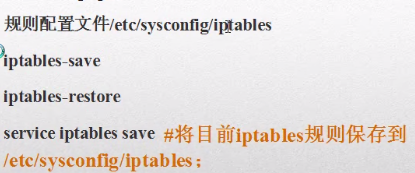
linux:如果既有配置文件又有命令参数,如果通过命令方式执行的都是临时的,通过配置文件都是永久的。
linux iptables:安全应用,防火墙的更多相关文章
- CentOS Linux iptables 防火墙
快速安装,配置,启动,检查 - 关闭 5002 - 5011 端口开放所有其它 yum install iptables iptables -F iptables -X iptables -Z ipt ...
- 在新安装的Linux系统中,防火墙默认是被禁掉的,一般也没有配置过任何防火墙的策略,所有不存在/etc/sysconfig/iptables文件。
原因:在新安装的Linux系统中,防火墙默认是被禁掉的,一般也没有配置过任何防火墙的策略,所有不存在/etc/sysconfig/iptables文件. 解决办法: .随便写一条iptables命令配 ...
- linux iptables常用命令之配置生产环境iptables及优化
在了解iptables的详细原理之前,我们先来看下如何使用iptables,以终为始,有可能会让你对iptables了解更深 所以接下来我们以配置一个生产环境下的iptables为例来讲讲它的常用命令 ...
- Linux iptables
一.简介 http://liaoph.com/iptables/ 二.操作 1)查看规则 iptables -t filter -L -n iptables -t nat -L -n iptables ...
- LINUX系统怎么关闭防火墙?
所谓防火墙指的是一个由软件和硬件设备组合而成.在内部网和外部网之间.专用网与公共网之间的界面上构造的保护屏障.是一种获取安全性方法的形象说法,它是一种计算机硬件和软件的结合,使Internet与Int ...
- Linux iptables 配置规则
Linux iptables 防火墙配置规则 前言:把网上我感觉不错iptables的访问规则都统一在这里,以后做参考. modprobe ipt_MASQUERADE modprobe ip_con ...
- Linux iptables用法与NAT
1.相关概念 2.iptables相关用法 3.NAT(DNAT与SNAT) 相关概念 防火墙除了软件及硬件的分类,也可对数据封包的取得方式来分类,可分为代理服务器(Proxy)及封包过滤机制(IP ...
- Centos中iptables和firewall防火墙开启、关闭、查看状态、基本设置等(转)
iptables防火墙 1.基本操作 # 查看防火墙状态 service iptables status # 停止防火墙 service iptables stop # 启动防火墙 servi ...
- Linux iptables:场景实战一
<Linux iptables:规则原理和基础>和<Linux iptables:规则组成>介绍了iptables的基础及iptables规则的组成,本篇通过实际操作进行ipt ...
- 第7章 Iptables与Firewalld防火墙。
第7章 Iptables与Firewalld防火墙. Chapter7_听较强节奏的音乐能够让您更长时间的投入在学习中. <Linux就该这么学> 00:00/00:00 ...
随机推荐
- css-通过css让块显示或隐藏
<!DOCTYPE html> <html lang="en"> <head> <meta charset="UTF-8&quo ...
- IDEA连接linux服务器
idea连接linux(完成了xshell和xftp连接linux的功能,可以直接卸载这俩了..) File->settings->Deployment左侧加号添加 选择传输类型ftp或者 ...
- Linux字符模式下如何设置/删除环境变量
Linux字符模式下设置/删除环境变量方法: bash下 设置:export 变量名=变量值 删除:unset 变量名 csh下 设置:setenv 变量名 变量值 删除:unsetenv 变量名 h ...
- H264码率设置
转帖 http://blog.csdn.net/jefry_xdz/article/details/8299901 一.什么是视频码率? 视频码率是视频数据(视频色彩量.亮度量.像素量)每秒输出的位数 ...
- 第三章 poj 1064——关于带精度的二分法
/* 题意:给定n个实数l[i],给定一个k 问:求最大的ans,使得sum l[i]/ans i=1 to n >=k,且ans最大*/ #include <iostream> # ...
- python解析xml文件时使用ElementTree和cElementTree的不同点;iter
在python中,解析xml文件时,会选用ElementTree或者cElementTree,那么两者有什么不同呢? 1.cElementTree速度上要比ElementTree快,比较cElemen ...
- webstorm中使用java的块凝视
webstorm中使用java的块凝视 有图有真相 使用java中非常方便得/**+enter就能高速创建类凝视.可是webstrom中没有现成的,所以我们得自己去创建一个,详细方法例如以下: 博主w ...
- matplotlib简易新手教程及动画
做数据分析,首先是要熟悉和理解数据.所以掌握一个趁手的可视化工具是很重要的,否则对数据连个主要的感性认识都没有,怎样进行下一步的design 点击打开链接 还有一个非常棒的资料 Matplotlib ...
- LeetCode85 Maximal Rectangle java题解
public static int maximalRectangle(char[][] matrix) { int rowNum=matrix.length; if(rowNum==0) return ...
- redis 3.0.1 在CentOS上的安装
一.下载 wget http://download.redis.io/releases/redis-3.0.1.tar.gz 二.解压 tar xzf redis-3.0.1.tar.gz 三.进入 ...