
linux iptables:安全应用,防火墙
iptables:安全应用,防火墙

windows和linux都有防火墙,企业的边缘会部署防火墙保证企业内部的局域网是安全的。针对个人电脑会有防火墙保证系统是安全的。

防火墙是唯一通道。

防火墙分类(这里的分类只是一个简单的分类,还有很多种):

1.包过滤防火墙,速度快,但是只检查包头,不检查数据区,不建立连接状态表,安全性能低。

2.应用代理防火墙。安全高,性能高。只检查包头,不检查数据区,建立连接状态表。

防火墙还可以分为硬件和软件防火墙。硬件防火墙就是一个硬件设备,软件防火墙比如windows的360和linux的开源的iptables。
iptables是linux自带的小型的防火墙。
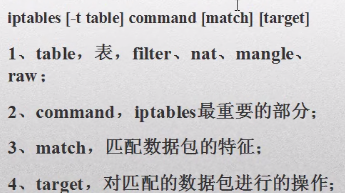
table有4张表,filter过滤表,写的是防火墙的策略。nat表做网络相关的。mangle和raw是内核部分,不用管。

command:过滤表的策略。不允许哪个网卡进去或者出来,

match:匹配条件。匹配数据包来做。

target:匹配的数据包进行操作。就2种可能性,通过和不通过。如果没问题就通过,有问题就不通过。
表

filter表:针对本机,itables的默认表有:input,forward,output链。

nat表:转换数据包的源地址和目的地址。包括:prerouting,postrouting,out链。

https://www.linuxidc.com/Linux/2017-02/140556.htm
以下是centos的:

(ubuntu没有这些命令)

service iptables stop

service iptables start

service iptables restart
root@ubuntu:/# iptables -L  (查看iptables防火墙的默认策略)

Chain INPUT (policy DROP)

target     prot opt source               destination

ufw-before-logging-input  all  --  anywhere             anywhere

ufw-before-input  all  --  anywhere             anywhere

ufw-after-input  all  --  anywhere             anywhere

ufw-after-logging-input  all  --  anywhere             anywhere

ufw-reject-input  all  --  anywhere             anywhere

ufw-track-input  all  --  anywhere             anywhere

Chain FORWARD (policy DROP)

target     prot opt source               destination

DOCKER-ISOLATION  all  --  anywhere             anywhere

DOCKER     all  --  anywhere             anywhere

ACCEPT     all  --  anywhere             anywhere             ctstate RELATED,ESTABLISHED

ACCEPT     all  --  anywhere             anywhere

ACCEPT     all  --  anywhere             anywhere
以下是centos的:

vim sysconfig/iptables :防火墙主配置文件,这里面存储的都是防火墙的策略,如果要添加策略,建议通过命令行来添加,而不是修改这个文件来添加。

*filter  : 表示是一个过滤表

:INPUT  ACCEPT  [0:0]   :这3个链都是开的

:FORWARD  ACCEPT  [0:0]

:OUTPUT  ACCEPT  [0:0]

: RH_Firewall-1-INPUT - [0:0]   : RH_Firewall-1-INPUT是防火墙当前策略的一个名字

-A INPUT -j RH_Firewall-1-INPUT

-A FORWARD -j RH_Firewall-1-INPUT

-A RH_Firewall-1-INPUT -p lo -j ACCEPT  (lo同意)

-A RH_Firewall-1-INPUT -p icmp --icmp-type any -j ACCEPT  (icmp同意)

-A RH_Firewall-1-INPUT -p 50 -j ACCEPT  (50.51端口可以访问)

-A RH_Firewall-1-INPUT -p 51 -j ACCEPT

-A RH_Firewall-1-INPUT -p udp --dport 5353 -d 224.0.0251 -j ACCEPT  (udp可以访问)
写策略:

查看规则-L:iptables -L ,iptables  -L -n ,iptables -L -n --line-number

修改默认规则-P:iptables -P INPUT DROP (备注:为链设置默认的target可用的是DROP和ACCEPT,作为最后一条规则被执行)

追加规则-A:作为最后一条规则,iptables -A INPUT -p tcp --dport 22 -j ACCEPT

删除规则-D:iptables -D INPUT 3 ,iptables -D INPUT -s 192.168.0.1 DROP

修改规则-R:iptables -R INPUT 3 -s 192.168.0.1 -j ACCEPT

清空规则-F:iptables -F ,iptables -F INPUT ,iptables -t nat -F
root@ubuntu:/# iptables -L  (默认策略,和iptables配置文件的信息是一致的)

Chain INPUT (policy DROP)

target     prot opt source   destination

ufw-before-logging-input  all  --  anywhere  anywhere

ufw-before-input  all  --  anywhere  anywhere

ufw-after-input  all  --  anywhere   anywhere

root@ubuntu:/# iptables -L -n (会把目标信息以地址的形式显示出来)

iptables -L -n --line-number  (显示行号,删除规则是基于行号删除的)
INPUT属于进入的概念,iptables -P INPUT DROP,-P是修改规则,规则只有3种inout,output,forward, -P表示针对inout或output或forward进行调整。vim sysconfig/iptables文件里面的:INPUT ACCEPT [0:0] :FORWARD ACCEPT [0:0] : OUTPUT ACCEPT [0:0] 默认都是ACCEPT的,iptables -P INPUT DROP,iptables-save(修改了要保存),这样INPUT就是DROP了。
root@ubuntu:/# iptables -L

Chain INPUT (policy DROP)  :input链,都进不来

target     prot opt source               destination

ufw-before-logging-input  all  --  anywhere             anywhere

Chain FORWARD (policy DROP) :forward链,都不能跳转

target     prot opt source               destination

DOCKER-ISOLATION  all  --  anywhere             anywhere

DOCKER     all  --  anywhere             anywhere

ACCEPT     all  --  anywhere             anywhere             ctstate RELATED,ESTABLISHED

ACCEPT     all  --  anywhere             anywhere

ACCEPT     all  --  anywhere             anywhere

ufw-before-logging-forward  all  --  anywhere             anywhere

Chain OUTPUT (policy ACCEPT) :output链,都出得去

target     prot opt source               destination

ufw-before-logging-output  all  --  anywhere             anywhere

ufw-before-output  all  --  anywhere             anywhere

Chain DOCKER (1 references)

target     prot opt source               destination

Chain DOCKER-ISOLATION (1 references)

target     prot opt source               destination

RETURN     all  --  anywhere             anywhere

Chain ufw-after-input (1 references)

target     prot opt source               destination

ufw-skip-to-policy-input  udp  --  anywhere  anywhere   udp dpt:netbios-ns

ufw-skip-to-policy-input  udp  --  anywhere   anywhere  udp dpt:netbios-dgm

ufw-skip-to-policy-input  tcp  --  anywhere    anywhere   tcp dpt:netbios-ssn
Chain是链,input和output是输入和输出,input链是从外面进来到主机这里来,针对进来的信息做什么策略,output链是从主机出去,针对出去的做什么策略,forward是指当要访问资源的时候必须通过我这台计算机转向,A要访问C必须经过B主机,就要通过B主机转向,B直接重定向到C上面去。

input和output是针对当前主机而言的,forward是针对其他电脑的。 iptables -L是打印当前3个链的策略信息。INPUT是DROP表示任何人访问这台电脑都是禁止的,OUTPUT是DROP表示当前电脑不能访问外部。

root@ubuntu:/# iptables -P  INPUT  ACCEPT  (-P修改input链)

root@ubuntu:/# iptables -L

Chain INPUT (policy ACCEPT)

target     prot opt source               destination

ufw-before-logging-input  all  --  anywhere             anywhere

ufw-before-input  all  --  anywhere             anywhere
追加规则:要往input链或者output链或者forward链里面来追加规则。

root@ubuntu:/# iptables -A INPUT -p tcp --dport 22 -j ACCEPT (-p表示要使用tcp相关的协议,)

root@ubuntu:/# iptables -L --line-number

Chain INPUT (policy DROP)

num  target     prot opt source               destination

1    ufw-before-logging-input  all  --  anywhere             anywhere

7    ACCEPT     tcp  --  anywhere             anywhere             tcp dpt:ssh  (通过tcp协议在任意地方连接ssh都是同意)
修改规则-R:iptables -R INPUT 3 -s 192.168.0.1 -j ACCEPT

root@ubuntu:/# iptables -R INPUT  7   -s  192.168.0.1     -j  DROP (7表示input链里面的第7行,-s表示不是原来的任意地址了,192.168.0.1进来的要拒绝)

root@ubuntu:/# iptables -L --line-number

Chain INPUT (policy DROP)

num  target     prot opt source               destination

7    DROP       all  --  192.168.0.1          anywhere
删除规则-D:iptables -D INPUT 3 ,iptables -D INPUT -s 192.168.0.1 DROP

root@ubuntu:/# iptables -D INPUT 7  (根据行号删除)

root@ubuntu:/# iptables -L --line-number

Chain INPUT (policy DROP)   :就没有7了

num  target     prot opt source               destination
root@ubuntu:/#  iptables -A INPUT -p  SFTP --dport 22 -j ACCEPT

root@ubuntu:/#  iptables -A INPUT -p  FTP  --dport 21 -j ACCEPT

root@ubuntu:/# iptables -L --line-number

Chain INPUT (policy ACCEPT)

num  target     prot opt source               destination

7    ACCEPT     tcp  --  anywhere             anywhere             tcp dpt:ssh

8    ACCEPT     tcp  --  anywhere             anywhere             tcp dpt:ftp

清空规则-F:iptables -F (清空所有链),iptables -F INPUT (清空input链),iptables -t nat -F
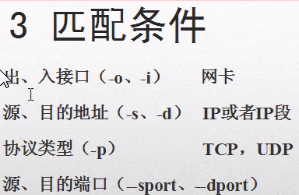
匹配条件:是从最大的范围到最小范围划分的。计算机上网是要通过网卡上网的,网卡连接的是网线,出入接口是从网卡出去进来,对应的是input和output链。源地址和目的地址是不允许某个ip进来或者访问某个ip。
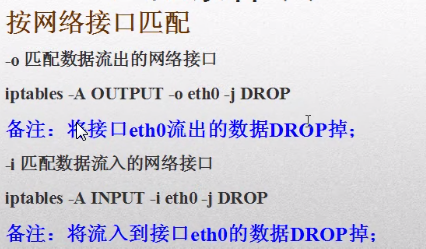
-A追加规则,output链,将从网卡eth0出去和进来的都拒绝。

root@ubuntu:/# iptables -A OUTPUT -o ens33 -j DROP

root@ubuntu:/# iptables -L --line-number

Chain OUTPUT (policy ACCEPT)

num  target     prot opt source               destination

7    DROP       all  --  anywhere             anywhere

root@ubuntu:/# ping www.baidu.com (出不去了)(删除后就可以ping了)

PING www.a.shifen.com (163.177.151.110) 56(84) bytes of data.

ping: sendmsg: Operation not permitted

ping: sendmsg: Operation not permitted
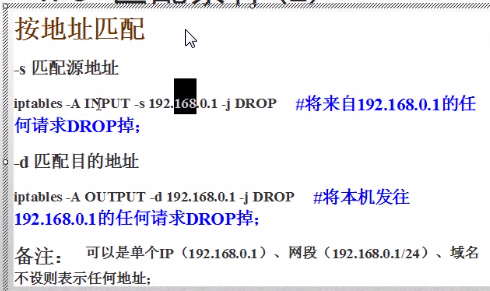
root@ubuntu:/# iptables -A INPUT -s 192.168.2.114 -j DROP

root@ubuntu:/# iptables -L

Chain INPUT (policy ACCEPT)

target     prot opt source               destination

DROP       all  --  192.168.2.114        anywhere

root@ubuntu:/# iptables  -A  OUTPUT  -d  www.baidu.com  -j  DROP

root@ubuntu:/# iptables -L

Chain OUTPUT (policy ACCEPT)

num  target     prot opt source               destination

7    DROP       all  --  anywhere             163.177.151.110

8  DROP  all  --  anywhere  163.177.151.109    root@ubuntu:/# ping www.baidu.com

PING www.a.shifen.com (163.177.151.109) 56(84) bytes of data.

ping: sendmsg: Operation not permitted

root@ubuntu:/# iptables -D OUTPUT 7

root@ubuntu:/# iptables -D OUTPUT 8

iptables: Index of deletion too big.

root@ubuntu:/# iptables -D OUTPUT 7

root@ubuntu:/# ping www.baidu.com

PING www.a.shifen.com (163.177.151.110) 56(84) bytes of data.

64 bytes from 163.177.151.110: icmp_seq=1 ttl=128 time=13.7 ms
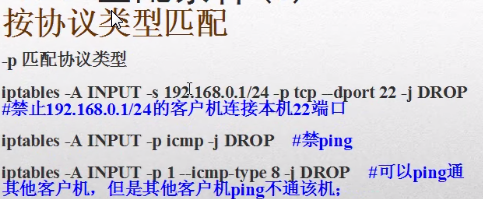
-A追加一个规则,来自于192.168.0.1网段的,tcp协议的22端口的,都禁止。
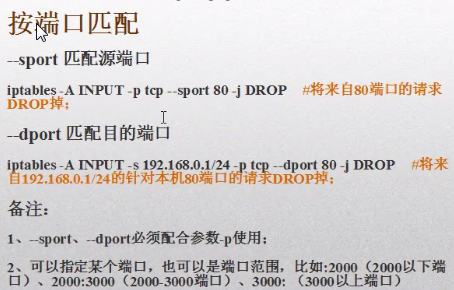
按照ip地址加端口加协议用的比较多。禁网卡用的少。
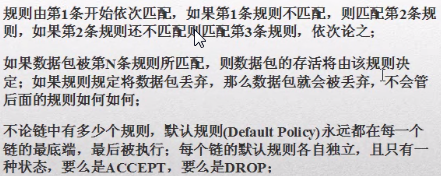
iptables的匹配规则:
不建议修改配置文件:iptables命令方式改的规则,如果不保存到配置文件,则重启后就没有了,service iptables save就是将命令行方式改的规则保存到配置文件。
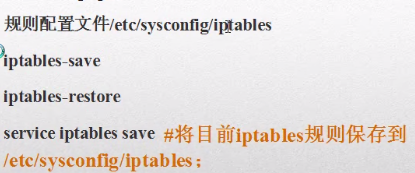
linux:如果既有配置文件又有命令参数,如果通过命令方式执行的都是临时的,通过配置文件都是永久的。
linux iptables:安全应用,防火墙的更多相关文章
- CentOS Linux iptables 防火墙
快速安装,配置,启动,检查 - 关闭 5002 - 5011 端口开放所有其它 yum install iptables iptables -F iptables -X iptables -Z ipt ...
- 在新安装的Linux系统中,防火墙默认是被禁掉的,一般也没有配置过任何防火墙的策略,所有不存在/etc/sysconfig/iptables文件。
原因:在新安装的Linux系统中,防火墙默认是被禁掉的,一般也没有配置过任何防火墙的策略,所有不存在/etc/sysconfig/iptables文件. 解决办法: .随便写一条iptables命令配 ...
- linux iptables常用命令之配置生产环境iptables及优化
在了解iptables的详细原理之前,我们先来看下如何使用iptables,以终为始,有可能会让你对iptables了解更深 所以接下来我们以配置一个生产环境下的iptables为例来讲讲它的常用命令 ...
- Linux iptables
一.简介 http://liaoph.com/iptables/ 二.操作 1)查看规则 iptables -t filter -L -n iptables -t nat -L -n iptables ...
- LINUX系统怎么关闭防火墙?
所谓防火墙指的是一个由软件和硬件设备组合而成.在内部网和外部网之间.专用网与公共网之间的界面上构造的保护屏障.是一种获取安全性方法的形象说法,它是一种计算机硬件和软件的结合,使Internet与Int ...
- Linux iptables 配置规则
Linux iptables 防火墙配置规则 前言:把网上我感觉不错iptables的访问规则都统一在这里,以后做参考. modprobe ipt_MASQUERADE modprobe ip_con ...
- Linux iptables用法与NAT
1.相关概念 2.iptables相关用法 3.NAT(DNAT与SNAT) 相关概念 防火墙除了软件及硬件的分类,也可对数据封包的取得方式来分类,可分为代理服务器(Proxy)及封包过滤机制(IP ...
- Centos中iptables和firewall防火墙开启、关闭、查看状态、基本设置等(转)
iptables防火墙 1.基本操作 # 查看防火墙状态 service iptables status # 停止防火墙 service iptables stop # 启动防火墙 servi ...
- Linux iptables:场景实战一
<Linux iptables:规则原理和基础>和<Linux iptables:规则组成>介绍了iptables的基础及iptables规则的组成,本篇通过实际操作进行ipt ...
- 第7章 Iptables与Firewalld防火墙。
第7章 Iptables与Firewalld防火墙. Chapter7_听较强节奏的音乐能够让您更长时间的投入在学习中. <Linux就该这么学> 00:00/00:00 ...
随机推荐
- 腾讯IM的那些坑
项目中接入腾讯IM,在这里记录下,以便大家解决问题时少走弯路 1.首先讲一下IM返回对象的问题: /** * 消息工厂方法 */ public static Message getMessage(TI ...
- react-native 适配问题
const ScreenWidth = Dimensions.get('window').width; static DimensionsTransform(px) { // 设计图纸以750为基准 ...
- Codeforces Gym101606 A.Alien Sunset (2017 United Kingdom and Ireland Programming Contest (UKIEPC 2017))
2017 United Kingdom and Ireland Programming Contest (UKIEPC 2017) 寒假第一次组队训练赛,和学长一起训练,题目难度是3颗星,我和猪队友写 ...
- Intellij从无到有创建项目
Intellij虽然提供了很多模板可以创建maven web javaee等等各种项目,但是你知道项目从无到有到底怎么来的,各个配置分别是做什么的?现在就来一步步说明. 1.idea打开一个空文件夹: ...
- ZSTU 4241 圣杯战争(ST表+二分)
题目链接 ZSTU 4241 问题转化为有很多区间,现在每次给定一个区间求这个区间和之前所有区间中的某一个的交集的最大长度. 强制在线. 首先我们把所有的区间预处理出来. 然后去重(那些被包含的小区 ...
- TCP server和client的一些测试
一.TCP server和client测试 socket设置 测试项/测试情景 send recv 测 server block client bloc ...
- 邁向IT專家成功之路的三十則鐵律 鐵律十五:IT人生活之道-赤子之心
人的年齡與身體可以因歲月的無情不斷老化,但我們的這一顆心可千萬不要跟著老化.身為IT工作者的我們,每天除了要面對那死板僵硬的電腦挑戰之外,可能還要面臨許多人事方面的紛擾.這時候如果在平日的生活之中,仍 ...
- tensorflow提示出错'module' object has no attribute 'pack'
编译旧的代码,会像下面这样提示出错: deconv_shape3 = tf.pack([shape[0], shape[1], shape[2], NUM_OF_CLASSESS]) Attribut ...
- poj-3744-Scout YYF I-矩阵乘法
f[i]=f[i-1]*p+f[i-2]*(1-p); 正好能够用矩阵加速. . . . #include<stdio.h> #include<string.h> #inclu ...
- 【翻译自mos文章】检查$ORACLE_HOME是否是RAC的HOME的方法以及relink RAC的Oracle binary的方法
检查$ORACLE_HOME是否是RAC的HOME的方法以及relink RAC的Oracle binary的方法 来源于: How to Check Whether Oracle Binary/In ...