
Android 完美解决bundle实现页面跳转并保留之前数据+传值
1.前言
前言:
昨天碰到了一个问题,我想实现页面跳转,采用了Bundle之后,再回到原来的页面,发现数据也没有了,
而且一直报错,网上查找了很多资料,发现要用一个startActivityForResult(),然而好景不长,
我又想在后面的页面把后面页面的数据和前面传过来的数据都传递给中间页面的数据,这样听起来有些复杂,
我简单写了一个Demo。
2.第一个活动+布局
2.1.第一个活动源代码
package com.example.kk.test1.Demo;

import android.content.Intent;

import android.support.v7.app.AppCompatActivity;

import android.os.Bundle;

import android.view.View;

import android.widget.Button;

import android.widget.TextView;

import com.example.kk.test1.R;

public class Main1Activity extends AppCompatActivity {

    private Button but1;

    private TextView txt1;

    private TextView txt2;

    private TextView txt3;

    @Override

    protected void onCreate(Bundle savedInstanceState) {

        super.onCreate(savedInstanceState);

        setContentView(R.layout.activity_main1);

        initView();

        butOnClick();

    }

    private void initView(){

        but1=(Button) findViewById(R.id.main1_but1);

        txt1=(TextView)findViewById(R.id.main1_txt1);

        txt2=(TextView)findViewById(R.id.main1_txt2);

        txt3=(TextView)findViewById(R.id.main1_txt3);

    }

    private void butOnClick(){

        but1.setOnClickListener(new View.OnClickListener() {

            @Override

            public void onClick(View v) {

                Intent intent=new Intent(Main1Activity.this,Main2Activity.class);

                Bundle bundle=new Bundle();

                String s_txt1=txt1.getText().toString();

                String s_txt2=txt1.getText().toString();

                String s_txt3=txt1.getText().toString();

                bundle.putString("first",s_txt1);

                bundle.putString("second",s_txt2);

                bundle.putString("third",s_txt3);

                intent.putExtras(bundle);

                startActivity(intent);

            }

        });

    }

}
2.2.第一个活动布局
<?xml version="1.0" encoding="utf-8"?>

<LinearLayout xmlns:android="http://schemas.android.com/apk/res/android"

    xmlns:app="http://schemas.android.com/apk/res-auto"

    xmlns:tools="http://schemas.android.com/tools"

    android:layout_width="match_parent"

    android:layout_height="match_parent"

    android:background="@color/colorAccent"

    android:orientation="vertical"

    tools:context="com.example.kk.test1.Demo.Main1Activity">

    <Button

        android:id="@+id/main1_but1"

        android:layout_height="wrap_content"

        android:layout_width="wrap_content"

        android:text="第一个活动"

        android:layout_gravity="center"

        />

    <TextView

        android:id="@+id/main1_txt1"

        android:layout_height="50dp"

        android:layout_width="100dp"

        android:text="第一个活动1"

        android:layout_gravity="center"

        android:background="@color/colorPrimary"

        />

    <TextView

        android:id="@+id/main1_txt2"

        android:layout_height="50dp"

        android:layout_width="100dp"

        android:text="第一个活动2"

        android:layout_gravity="center"

        android:background="@color/colorPrimary"

        />

    <TextView

        android:id="@+id/main1_txt3"

        android:layout_height="50dp"

        android:layout_width="100dp"

        android:text="第一个活动3"

        android:layout_gravity="center"

        android:background="@color/colorPrimary"

        />

</LinearLayout>
3.第二个活动+布局
3.1.第二个活动源代码
package com.example.kk.test1.Demo;

import android.content.Intent;

import android.support.v7.app.AppCompatActivity;

import android.os.Bundle;

import android.view.View;

import android.widget.Button;

import android.widget.TextView;

import com.example.kk.test1.R;

public class Main2Activity extends AppCompatActivity {

    private Button but1;

    private TextView txt1;

    private TextView txt2;

    private TextView txt3;

    private Intent intent;

    private Bundle bundle;

    private Bundle bundleFrom3;

    @Override

    protected void onCreate(Bundle savedInstanceState) {

        super.onCreate(savedInstanceState);

        setContentView(R.layout.activity_main2);

        initView();

        intent=getIntent();

        bundle=intent.getExtras();

        change_txt();

        butOnclick();

    }

    private void initView(){

        but1=(Button) findViewById(R.id.main2_but1);

        txt1=(TextView)findViewById(R.id.main2_txt1);

        txt2=(TextView)findViewById(R.id.main2_txt2);

        txt3=(TextView)findViewById(R.id.main2_txt3);

    }

    private void change_txt(){//从第一个页面拿来的东西

        String s_txt1=bundle.getString("first");

        String s_txt2=bundle.getString("second");

        String s_txt3=bundle.getString("third");

        txt1.setText(s_txt1);

        txt2.setText(s_txt2);

        txt3.setText(s_txt3);

    }

    private void butOnclick(){//记录跳转前第二个页面的数据

        but1.setOnClickListener(new View.OnClickListener() {

            @Override

            public void onClick(View v) {

                Intent intent=new Intent(Main2Activity.this,Main3Activity.class);

                Bundle bundle2=new Bundle();

                bundle2.putString("first_1",txt1.getText().toString());

                bundle2.putString("first_2",txt2.getText().toString());

                bundle2.putString("first_3",txt3.getText().toString());

                intent.putExtras(bundle2);//这里测试一下用之前的可不可以

                startActivityForResult(intent,0x717);

            }

        });

    }

    @Override

    protected void onActivityResult(int requestCode,int resultCode,Intent data){

        super.onActivityResult(requestCode,resultCode,data);

        if(resultCode==0x717){

            bundleFrom5=data.getExtras();

            txt3.setText(bundleFrom3.getString("main3_txt3"));

            txt1.setText(bundleFrom3.getString("first_1"));

            txt2.setText(bundleFrom3.getString("first_2"));

        }

    }

}
3.2.第二个活动布局
<?xml version="1.0" encoding="utf-8"?>

<LinearLayout xmlns:android="http://schemas.android.com/apk/res/android"

    xmlns:app="http://schemas.android.com/apk/res-auto"

    xmlns:tools="http://schemas.android.com/tools"

    android:layout_width="match_parent"

    android:layout_height="match_parent"

    android:background="@color/green"

    android:orientation="vertical"

    tools:context="com.example.kk.test1.Demo.Main2Activity">

    <Button

        android:id="@+id/main2_but1"

        android:layout_height="wrap_content"

        android:layout_width="wrap_content"

        android:text="第2个活动"

        android:layout_gravity="center"

        />

    <TextView

        android:id="@+id/main2_txt1"

        android:layout_height="50dp"

        android:layout_width="100dp"

        android:text="第2个活动1"

        android:layout_gravity="center"

        android:background="@color/colorPrimary"

        />

    <TextView

        android:id="@+id/main2_txt2"

        android:layout_height="50dp"

        android:layout_width="100dp"

        android:text="第2个活动2"

        android:layout_gravity="center"

        android:background="@color/colorPrimary"

        />

    <TextView

        android:id="@+id/main2_txt3"

        android:layout_height="50dp"

        android:layout_width="100dp"

        android:text="第2个活动3"

        android:layout_gravity="center"

        android:background="@color/colorPrimary"

        />

</LinearLayout>
4.第三个活动+布局
4.1.第三个活动源代码
package com.example.kk.test1.Demo;

import android.content.Intent;

import android.support.v7.app.AppCompatActivity;

import android.os.Bundle;

import android.view.View;

import android.widget.Button;

import android.widget.TextView;

import com.example.kk.test1.R;

public class Main3Activity extends AppCompatActivity {

    private Button but1;

    private TextView txt1;

    private TextView txt2;

    private TextView txt3;

    private Intent intent;

    private Bundle bundle;

    @Override

    protected void onCreate(Bundle savedInstanceState) {

        super.onCreate(savedInstanceState);

        setContentView(R.layout.activity_main3);

        initView();

        addIntent();

        butOnClick();

    }

    private void initView(){

        but1=(Button) findViewById(R.id.main3_but1);

        txt1=(TextView)findViewById(R.id.main3_txt1);

        txt2=(TextView)findViewById(R.id.main3_txt2);

        txt3=(TextView)findViewById(R.id.main3_txt3);

        intent=getIntent();

        bundle=intent.getExtras();

    }

    private void butOnClick(){

        but1.setOnClickListener(new View.OnClickListener() {

            @Override

            public void onClick(View v) {

                setResult(0x717,intent);//通过别人传过来的意图反向回去

                finish();

            }

        });

    }

    private void addIntent(){//把第三个中部分内容加到第二个页面传过来的bundle

        bundle.putString("main3_txt3",txt3.getText().toString());

        intent.putExtras(bundle);

    }

}
4.2.第三个活动布局
<?xml version="1.0" encoding="utf-8"?>

<LinearLayout xmlns:android="http://schemas.android.com/apk/res/android"

    xmlns:app="http://schemas.android.com/apk/res-auto"

    xmlns:tools="http://schemas.android.com/tools"

    android:layout_width="match_parent"

    android:layout_height="match_parent"

    android:background="@color/purple"

    android:orientation="vertical"

    tools:context="com.example.kk.test1.Demo.Main3Activity">

    <Button

        android:id="@+id/main3_but1"

        android:layout_height="wrap_content"

        android:layout_width="wrap_content"

        android:text="第3个活动"

        android:layout_gravity="center"

        />

    <TextView

        android:id="@+id/main3_txt1"

        android:layout_height="50dp"

        android:layout_width="100dp"

        android:text="第3个活动1"

        android:layout_gravity="center"

        android:background="@color/colorPrimary"

        />

    <TextView

        android:id="@+id/main3_txt2"

        android:layout_height="50dp"

        android:layout_width="100dp"

        android:text="第3个活动2"

        android:layout_gravity="center"

        android:background="@color/colorPrimary"

        />

    <TextView

        android:id="@+id/main3_txt3"

        android:layout_height="50dp"

        android:layout_width="100dp"

        android:text="第3个活动3"

        android:layout_gravity="center"

        android:background="@color/colorPrimary"

        />

</LinearLayout>
5.效果预览
5.1.从Main1Activity==>点击按钮==>Main2Activity
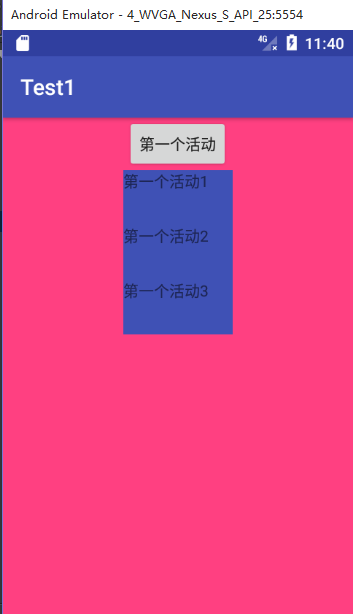
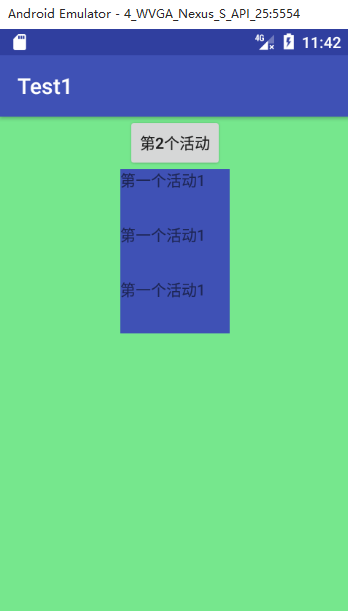
5.2 从Main2Activity==>点击按钮==>Main3Activity
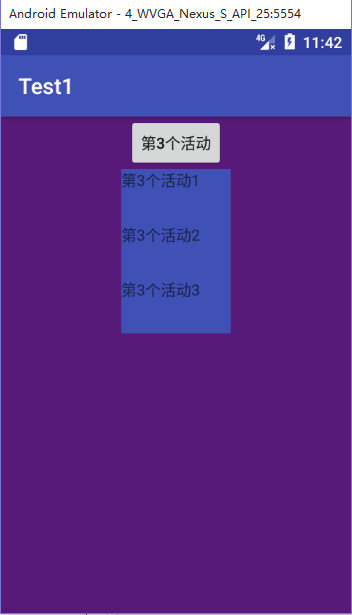
5.3.从Main3Activity==>点击按钮==>回到Main2Activity
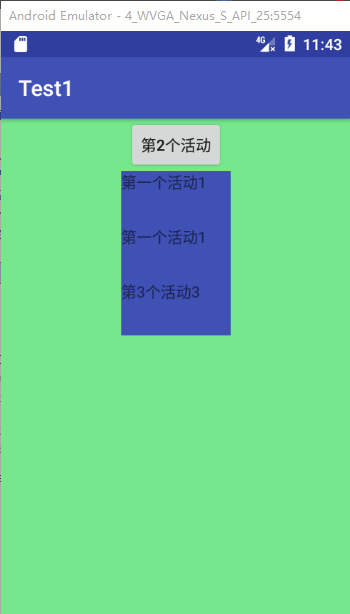
可以发现,第二个活动即保存了前面第一个活动传过来的值,也保存了第三个活动传过来的值。
6.简单总结一下
6.1.当然最重要的就是一个跳转的函数=====startActivityForResult=====它要和另外一个活动的SetResult
互相配合,用一个唯一标识符整型,随便选,我用了0x717。
6.2.个人觉得bundle用来传数据非常方便,以前以为就是这个bundle用来传递活动之间的数据,后来我发现我太局限了
6.3.真正传递数据的是意图=====intent=====它才是老大,bundle只是它传递数据的一个工具。
6.4.所以说,当你需要修改传递的数据时,先添加bundle,之后千万不要忘记+intent.putExtras(bundle)。
6.5.案例很简单,简单Copy一下,自己研究一下就能懂。
早安呐=====2017/7/15 7:56
Android 完美解决bundle实现页面跳转并保留之前数据+传值的更多相关文章
- Android中实现activity的页面跳转并传值
一个Android应用程序很少会只有一个Activity对象,如何在多个Activity之间进行跳转,而且能够互相传值是一个很基本的要求. 本次我们就讲一下,Android中页面跳转以及传值的几种方式 ...
- Android Jetpack - 使用 Navigation 管理页面跳转
在今年的 IO 大会上,发布了一套叫 Android Jetpack 的程序库.Android Jetpack 里的组件大部分我们都接触过了,其中也有一些全新的组件,其中一个就是 Navigation ...
- [转]使用storyboard实现页面跳转,简单的数据传递
由于最近才接触到IOS,苹果已经建议storyboard来搭建所有界面了,于是我也追随时尚,直接开始使用storyboard.(不料在涉及到页面跳转的时候,遇到的问题是:点击后没有任何反应)众所周知, ...
- 使用storyboard实现页面跳转,简单的数据传递
由于最近才接触到IOS,苹果已经建议storyboard来搭建所有界面了,于是我 也追随时尚,直接开始使用storyboard.(不料在涉及到页面跳转的时候,遇到的问题是:点击后没有任何反应)众所周知 ...
- 完美解决Webpack多页面热加载缓慢问题【转载】
版权声明:本文为博主原创文章,遵循CC 4.0 BY-SA版权协议,转载请附上原文出处链接和本声明. 本文链接:https://blog.csdn.net/localhost_1314/article ...
- Android完美解决输入框EditText隐藏密码打勾显示密码问题
长话短说,一共有两种方法.首先你需要在布局文件里面给EditText设置一个android:inputType="numberPassword"属性.我这里默认规定密码只能是数字了 ...
- 完美解决PYQT5登录界面跳转主界面方法
该问题,有很多种方法,但是很多方法要么这个有问题,要么那个有问题,最后终于找到一种没问题的方法.记录一下: Login.py(登录窗口)文件 import sys from PyQt5 import ...
- Notice: Trying to get property of non-object problem(PHP)解决办法 中间件只能跳转不能返任何数据
这里实际是调用了一个zend的数据库访问的方法,使用了fetchAll方法,但由于数据库中没有该记录,所以返回的对象是null,所以我就判断对象是否为null: 复制代码代码如下: if($obj== ...
- .Net程序猿玩转Android开发---(11)页面跳转
在不论什么程序开发中,都会遇到页面之间跳转的情况,Android开发也不例外.这一节,我们来认识下Android项目中如何进行页面跳转.页面跳转分为有參数和无參数页面跳转,已经接受还有一个页面的返回值 ...
随机推荐
- JavaSE_3_面向对象
1.wait方法底层原理 wait是object中的方法,可以暂停线程,会释放对象锁,不像sleep方法,线程休眠期依然持有锁,通过调用notify或notifyAll方法唤醒线程. lock.wai ...
- vs2013安装时提示核心功能错误
VS核心功能安装时发生严重错误:解决办法:计算机管理->设备管理器->非即插即用驱动程序->http改为自动.
- Browser Window
Window 对象 Window对象表示浏览器中打开的窗口. 如果文档包含框架(iframe或iframe标签),浏览器会被html文档创建一个window对象,并为每个框架创建一个额外的window ...
- Catch the moments of your life. Catch them while you're young and quick.
Catch the moments of your life. Catch them while you're young and quick.趁你还年轻利落,把握住生活中的美好瞬间吧!
- web端 css hack(一)
逢10月小长假,几天不敲键盘,浑身难受.也是有时间分享一下自己遇到的css问题.先说一下什么css hack 简单介绍一下css hack: 定义: 一般都是利用各浏览器的支持CSS的能力和BUG来进 ...
- eclipse, idea安装lombok插件
参考博客: https://www.cnblogs.com/quan-coder/p/8387040.html 一:在开发工具中安装插件: Eclipse: 下载地址:https://projectl ...
- centos6.5_64bit安装Redis3.2.8
一.去官网下载最新稳定版 https://redis.io/ 二.打开redis需要的端口 /sbin/iptables -I INPUT -p tcp --dport 6379 -j ACCEP ...
- ADO.net数据访问方法
ADO.NET是一组用于和数据源进行交互的面向对象的类库. 核心组件有两个: DataSet 是 ADO.NET 的非连接(断开)结构的核心组件.DataSet 的设计目的很明确:为了实现独立于任何数 ...
- hihoCoder hiho一下 第十二周 #1055 : 刷油漆 (树上DP)
思路: 只能刷部分节点数m,总节点数n.如果m>=n那么就可以全刷了,那就不用任何算法了.如果m<n那么就要有取舍了.用DP思路,记录下每个节点如果获得到1~m个选择所能获得的最大权值.这 ...
- CAsyncSocket create创建套接字失败
解决方法: 在继承CAsyncSocket 类的子类的构造函数中加入以下代码: if (!AfxSocketInit()) AfxMessageBox(IDP_SOCKETS_INIT_FAILED) ...