
Java:逐行读、写文件、文件目录过滤的用法
import java.io.BufferedReader;

import java.io.File;

import java.io.FileInputStream;

import java.io.IOException;

import java.io.InputStreamReader;

import java.util.ArrayList;

import java.util.List;

public class HelloWord {

    public static void main(String[] args) throws IOException {

        String filePath = "my File.txt";

        File file = new File(filePath);

        InputStreamReader inputStreamReader = new InputStreamReader(new FileInputStream(file),"utf-8");

        BufferedReader bufferedReader = new BufferedReader(inputStreamReader);

        List<String> lineItems=new ArrayList<String>();

        String line = null;

        while ((line = bufferedReader.readLine()) != null) {

            String[] items = line.split(",");

            String item= items[1];

            if(item.indexOf("花园")!=-1){

                lineItems.add(line);

            }

        }

        bufferedReader.close();

        inputStreamReader.close();

        for(String my : lineItems){

            System.out.println(my);

        }

    }

}
- 写文件用法:
     List<String> lines = new ArrayList<>();

     String wfilePath="e:\\1.txt";

        File wfile = new File(wfilePath);

        OutputStreamWriter outputStreamWriter = new OutputStreamWriter(new FileOutputStream(wfile), "utf-8");

        BufferedWriter bufferedWriter = new BufferedWriter(outputStreamWriter);

        for (String eLine : lines) {

            bufferedWriter.write(eLine);

            bufferedWriter.newLine();

        }

        bufferedWriter.close();

        outputStreamWriter.close();

        System.out.println("Complete...");
- 文件目录过滤:
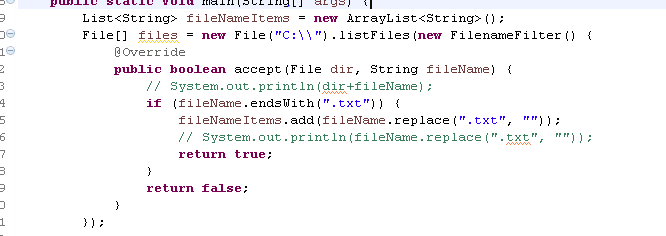
实例:
 package com.dx.hibernate5.test;

 import java.io.BufferedReader;

 import java.io.BufferedWriter;

 import java.io.File;

 import java.io.FileInputStream;

 import java.io.FileNotFoundException;

 import java.io.FileOutputStream;

 import java.io.IOException;

 import java.io.InputStreamReader;

 import java.io.OutputStreamWriter;

 import java.io.UnsupportedEncodingException;

 import java.util.ArrayList;

 import java.util.HashMap;

 import java.util.List;

 import java.util.Map;

 public class HelloWord {

     public static void main(String[] args) throws IOException {

         String filePath = "E:\\丽水";

         String wfilePath = "E:\\丽水_New";

         parserCountyVsCode(filePath);

         parseCityCounty(filePath, wfilePath);

         System.out.println("Complete...");

     }

     private static void parserCountyVsCode(String filePath)

             throws UnsupportedEncodingException, FileNotFoundException, IOException {

         File file = new File(filePath);

         InputStreamReader inputStreamReader = new InputStreamReader(new FileInputStream(file), "utf-8");

         BufferedReader bufferedReader = new BufferedReader(inputStreamReader);

         // 缙云县:5782

         // 云和县:5784

         // 开发区:578B

         // 龙泉市:5786

         // 景宁县:5789

         // 青田县:5783

         // 景宁畲族自治县:5789

         // 松阳县:5788

         // 庆元县:5785

         // 莲都区:5781

         // 遂昌县:5787

         List<String> countyList = new ArrayList<>();

         countyList.add("5782");

         countyList.add("5784");

         countyList.add("578B");

         countyList.add("5786");

         countyList.add("5789");

         countyList.add("5783");

         countyList.add("5788");

         countyList.add("5785");

         countyList.add("5781");

         countyList.add("5787");

         Map<String, String> lineItems = new HashMap<String, String>();

         String line = null;

         while ((line = bufferedReader.readLine()) != null) {

             String[] items = line.split(",");

             String address = items[3];

             String county = items[2];

             if (address.indexOf("莲都区") != -1) {

                 lineItems.put("莲都区", county);

             } else if (address.indexOf("开发区") != -1) {

                 lineItems.put("开发区", county);

             } else if (address.indexOf("青田县") != -1) {

                 lineItems.put("青田县", county);

             } else if (address.indexOf("缙云县") != -1) {

                 lineItems.put("缙云县", county);

             } else if (address.indexOf("遂昌县") != -1) {

                 lineItems.put("遂昌县", county);

             } else if (address.indexOf("松阳县") != -1) {

                 lineItems.put("松阳县", county);

             } else if (address.indexOf("云和县") != -1) {

                 lineItems.put("云和县", county);

             } else if (address.indexOf("庆元县") != -1) {

                 lineItems.put("庆元县", county);

             } else if (address.indexOf("景宁县") != -1 || address.indexOf("景宁畲族自治县") != -1) {

                 lineItems.put("景宁县", county);

             } else if (address.indexOf("龙泉市") != -1) {

                 lineItems.put("龙泉市", county);

             } else {

                 Boolean hasContains = false;

                 for (String coun : countyList) {

                     if (coun.equals(county)) {

                         hasContains = true;

                     }

                 }

                 if (!hasContains) {

                     System.out.println(line);

                 }

             }

         }

         bufferedReader.close();

         inputStreamReader.close();

         for (Map.Entry<String, String> kvEntry : lineItems.entrySet()) {

             System.out.println(kvEntry.getKey() + ":" + kvEntry.getValue());

         }

     }

     private static void parseCityCounty(String filePath, String wfilePath)

             throws UnsupportedEncodingException, FileNotFoundException, IOException {

         Map<String, String> idVsCountry = new HashMap<>();

         idVsCountry.put("5782", "缙云县");

         idVsCountry.put("5784", "云和县");

         idVsCountry.put("578B", "开发区");

         idVsCountry.put("5786", "龙泉市");

         idVsCountry.put("5789", "景宁县");

         idVsCountry.put("5783", "青田县");

         idVsCountry.put("5788", "松阳县");

         idVsCountry.put("5785", "庆元县");

         idVsCountry.put("5781", "莲都区");

         idVsCountry.put("5787", "遂昌县");

         List<String> lines = new ArrayList<>();

         lines.add("abc0");

         lines.add("abc1");

         lines.add("abc2");

         File file = new File(filePath);

         InputStreamReader inputStreamReader = new InputStreamReader(new FileInputStream(file), "utf-8");

         BufferedReader bufferedReader = new BufferedReader(inputStreamReader);

         String line = null;

         while ((line = bufferedReader.readLine()) != null) {

             String[] items = line.split(",");

             String address = items[3];

             String county = items[2];

             String newLine = items[0] + ",丽水市," + idVsCountry.get(county) + "," + address;

             // System.out.println(newLine);

             lines.add(newLine);

         }

         bufferedReader.close();

         inputStreamReader.close();

         File wfile = new File(wfilePath);

         OutputStreamWriter outputStreamWriter = new OutputStreamWriter(new FileOutputStream(wfile), "utf-8");

         BufferedWriter bufferedWriter = new BufferedWriter(outputStreamWriter);

         for (String eLine : lines) {

             bufferedWriter.write(eLine);

             bufferedWriter.newLine();

         }

         bufferedWriter.close();

         outputStreamWriter.close();

     }

 }
Java:逐行读、写文件、文件目录过滤的用法的更多相关文章
- 关于使用 Java 分片读\写文件
分片读取文件方法: /** * 分片读取文件块 * * @param path 文件路径 * @param position 角标 * @param blockSize 文件块大小 * @return ...
- java读/写文件
读取文件参考:https://blog.csdn.net/weixin_42129373/article/details/82154471 写入文件参考:https://blog.csdn.net/B ...
- Java基础之写文件——将素数写入文件中(PrimesToFile)
控制台程序,计算素数.创建文件路径.写文件. import static java.lang.Math.ceil; import static java.lang.Math.sqrt; import ...
- java中多种写文件方式的效率对比实验
一.实验背景 最近在考虑一个问题:“如果快速地向文件中写入数据”,java提供了多种文件写入的方式,效率上各有异同,基本上可以分为如下三大类:字节流输出.字符流输出.内存文件映射输出.前两种又可以分为 ...
- C++ 二进制文件 读 写文件
1 #include <iostream> 2 #include <string> 3 #include<fstream> 4 using namespace st ...
- read(),write() 读/写文件
read read()是一个系统调用函数.用来从一个文件中,读取指定长度的数据到 buf 中. 使用read()时需要包含的头文件: <unistd.h> 函数原型: ssize_t re ...
- 在Java中怎样逐行地写文件?
下边是写东西到一个文件里的Java代码. 执行后每一次,一个新的文件被创建,而且之前一个也将会被新的文件替代.这和给文件追加内容是不同的. public static void writeFile1( ...
- Java基础之写文件——从多个缓冲区写(GatheringWrite)
控制台程序,使用单个写操作将数据从多个缓冲区按顺序传输到文件,这称为集中写(GatheringWrite)操作.这个功能的优势是能够避免在将信息写入到文件中之前将信息复制到单个缓冲区中.从每个缓冲区写 ...
- java中IO写文件工具类
以下是一些依据经常使用java类进行组装的对文件进行操作的类,平时,我更喜欢使用Jodd.io中提供的一些对文件的操作类,里面的方法写的简单易懂. 当中jodd中提供的JavaUtil类中提供的方法足 ...
随机推荐
- poj-1131-(大数)八进制转化成十进制
Description Fractions in octal (base 8) notation can be expressed exactly in decimal notation. For e ...
- Java中==与equals()的区别
声明转载来源:http://blog.csdn.net/striverli/article/details/52997927 ==号和equals()方法都是比较是否相等的方法,那它们有什么区别和联系 ...
- Python中的PYTHONPATH环境变量
PYTHONPATH是Python中一个重要的环境变量,用于在导入模块的时候搜索路径.可以通过如下方式访问: >>> import sys >>> sys.path ...
- 北京工业大学耿丹学院2016下C作业学习总结
北京工业大学耿丹学院2016下C的班级地址在https://edu.cnblogs.com/campus/bjgygd/Sixteen-One . 第一次作业:两部分 第一部分:新建博客,书写第一篇随 ...
- 敏捷开发冲刺--day3
1 团队介绍 团队组成: PM:齐爽爽(258) 小组成员:马帅(248),何健(267),蔡凯峰(285) Git链接:https://github.com/WHUSE2017/C-team 2 ...
- C语言--第14.15周作业
一. 7-3 将数组中的数逆序存放 1.代码 #include 2<stdio.h> int main() { int a[10]; int i, n, s; scanf("%d ...
- ios swift例子源码网址总结
http://blog.csdn.net/woaifen3344/article/details/40079351 http://www.ruanman.net/swift/learn/4607.ht ...
- fflush(stdin)与fflush(stdout)
1.fflush(stdin): 作用:清理标准输入流,把多余的未被保存的数据丢掉.. 如: int main() { int num; char str[10]; cin>>num; c ...
- RESTful三问
我觉得学习一个技术,其实就是要弄明白三件事情:是什么(what),为什么(why),怎么用(how).正是所谓的三W方法. 所以打算总结一个"三问"系列.为了自己学习,也分享给别人 ...
- RAID 损坏后如何对物理硬盘做完整镜像
"磁盘阵列是由很多价格较便宜的磁盘,组合成一个容量巨大的磁盘组,利用个别磁盘提供数据所产生加成效果提升整个磁盘系统效能.利用这项技术,将数据切割成许多区段,分别存放在各个硬盘上." ...