
Spring + mybatis 集成
具体项目可参照:
https://github.com/LuoXiaoyi/springmvc
一、环境准备:
Spring4.3.5 + Mybatis3.4.6 + Mybatis-Spring 1.3.2
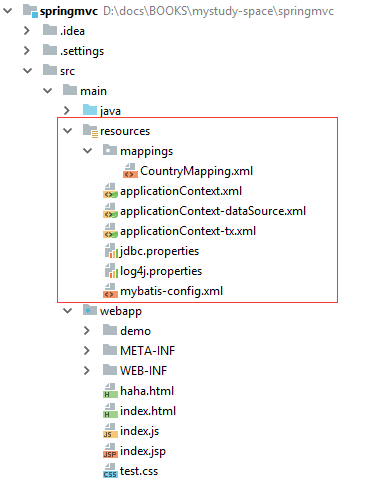
二、pom.xml
创建maven工程,加入如下配置到pom.xml中
<project xmlns="http://maven.apache.org/POM/4.0.0"

xmlns:xsi="http://www.w3.org/2001/XMLSchema-instance"

xsi:schemaLocation="http://maven.apache.org/POM/4.0.0 http://maven.apache.org/xsd/maven-4.0.0.xsd">

<modelVersion>4.0.0</modelVersion>

<groupId>lxy.study</groupId>

<artifactId>springmvc</artifactId>

<version>0.0.1-SNAPSHOT</version>

<packaging>war</packaging>

<dependencies>

<dependency>

<groupId>org.springframework</groupId>

<artifactId>spring-webmvc</artifactId>

</dependency>

<!-- https://mvnrepository.com/artifact/commons-dbcp/commons-dbcp , 数据源的配置依赖 -->

<dependency>

<groupId>commons-dbcp</groupId>

<artifactId>commons-dbcp</artifactId>

<version>1.4</version>

</dependency>

<dependency>

<groupId>org.springframework</groupId>

<artifactId>spring-jdbc</artifactId>

</dependency>

<dependency>

<groupId>mysql</groupId>

<artifactId>mysql-connector-java</artifactId>

<version>5.1.46</version>

</dependency>

<!-- 为支持restful请求中对application/json格式的数据进行处理 -->

<dependency>

<groupId>com.fasterxml.jackson.core</groupId>

<artifactId>jackson-core</artifactId>

<version>2.9.4</version>

</dependency>

<dependency>

<groupId>com.fasterxml.jackson.core</groupId>

<artifactId>jackson-databind</artifactId>

<version>2.9.4</version>

</dependency>

<dependency>

<groupId>com.fasterxml.jackson.core</groupId>

<artifactId>jackson-annotations</artifactId>

<version>2.9.4</version>

</dependency>

<!-- 为支持restful请求中对application/xml 格式的数据进行处理 -->

<dependency>

<groupId>com.fasterxml.jackson.dataformat</groupId>

<artifactId>jackson-dataformat-xml</artifactId>

<version>2.9.0</version>

</dependency>

<!-- For Log -->

<dependency>

<groupId>log4j</groupId>

<artifactId>log4j</artifactId>

<version>1.2.14</version>

</dependency>

<!-- Servlet 3.1 -->

<dependency>

<groupId>javax.servlet</groupId>

<artifactId>javax.servlet-api</artifactId>

<version>3.1.0</version>

<scope>provided</scope>

</dependency>

<!-- 添加对JSTL的支持,用于处理JSP页面 -->

<dependency>

<groupId>javax.servlet.jsp.jstl</groupId>

<artifactId>javax.servlet.jsp.jstl-api</artifactId>

<version>1.2.1</version>

</dependency>

<dependency>

<groupId>jstl</groupId>

<artifactId>jstl</artifactId>

<version>1.2</version>

</dependency>

<!-- mybatis 核心库 -->

<dependency>

<groupId>org.mybatis</groupId>

<artifactId>mybatis</artifactId>

<version>3.4.6</version>

</dependency>

<!-- https://mvnrepository.com/artifact/org.mybatis/mybatis-spring -->

<dependency>

<groupId>org.mybatis</groupId>

<artifactId>mybatis-spring</artifactId>

<version>1.3.2</version>

</dependency>

</dependencies>

<dependencyManagement>

<dependencies>

<dependency>

<groupId>org.springframework</groupId>

<artifactId>spring-framework-bom</artifactId>

<version>4.3.5.RELEASE</version>

<type>pom</type>

<scope>import</scope>

</dependency>

</dependencies>

</dependencyManagement>

<!-- 在项目中的pom.xml指定jdk版本 -->

<build>

<plugins>

<plugin>

<groupId>org.apache.maven.plugins</groupId>

<artifactId>maven-compiler-plugin</artifactId>

<version>3.1</version>

<configuration>

<source>1.8</source>

<target>1.8</target>

</configuration>

</plugin>

<!-- tomcat plugin -->

<plugin>

<groupId>org.apache.tomcat.maven</groupId>

<artifactId>tomcat7-maven-plugin</artifactId>

<version>2.1</version>

<configuration>

<port>9090</port>

<path>/springmvc</path>

<uriEncoding>UTF-8</uriEncoding>

<server>tomcat7</server>

<contextReloadable>true</contextReloadable>

</configuration>

</plugin>

</plugins>

</build>

</project>
三、applicationContext.xml
<?xml version="1.0" encoding="UTF-8"?>

<beans xmlns="http://www.springframework.org/schema/beans"

xmlns:xsi="http://www.w3.org/2001/XMLSchema-instance"

xmlns:aop="http://www.springframework.org/schema/aop"

xmlns:context="http://www.springframework.org/schema/context"

xmlns:mvc="http://www.springframework.org/schema/mvc"

xmlns:tx="http://www.springframework.org/schema/tx"

xmlns:jdbc="http://www.springframework.org/schema/jdbc"

xsi:schemaLocation="

http://www.springframework.org/schema/beans

http://www.springframework.org/schema/beans/spring-beans.xsd

http://www.springframework.org/schema/aop

http://www.springframework.org/schema/aop/spring-aop.xsd

http://www.springframework.org/schema/context

http://www.springframework.org/schema/context/spring-context.xsd

http://www.springframework.org/schema/mvc

http://www.springframework.org/schema/mvc/spring-mvc.xsd

http://www.springframework.org/schema/tx

http://www.springframework.org/schema/tx/spring-tx.xsd

http://www.springframework.org/schema/jdbc

http://www.springframework.org/schema/jdbc/spring-jdbc.xsd

">

<import resource="applicationContext-tx.xml"></import>

<!-- Enable the use of matrix variables -->

<mvc:annotation-driven enable-matrix-variables="true">

<!--mvc:async-support task-executor="" default-timeout=""> 异步执行的配置

<mvc:callable-interceptors>

<bean></bean>

</mvc:callable-interceptors>

<mvc:deferred-result-interceptors>

<bean></bean>

</mvc:deferred-result-interceptors>

</mvc:async-support-->

</mvc:annotation-driven>

<!-- 启动注解 -->

<context:annotation-config></context:annotation-config>

<!-- 配置自动扫描根目录 -->

<context:component-scan base-package="lxy.study">

<!-- 这个是表示要排除掉扫描annotation注解的所有Controller -->

<!--ontext:exclude-filter type="annotation"

expression="org.springframework.stereotype.Controller" /-->

</context:component-scan>

<!-- mvc中提供了默认的servlet来处理静态资源,即当所有的mapping都匹配不上的时候,

最后匹配到SimpleUrlHandlerMapping,这里主要是用于ModelAndView转发的时候,处理html/CSS等资源用 -->

<mvc:default-servlet-handler/>

</beans>
四、配置dataSource
<?xml version="1.0" encoding="UTF-8"?>

<beans xmlns="http://www.springframework.org/schema/beans"

xmlns:xsi="http://www.w3.org/2001/XMLSchema-instance"

xmlns:aop="http://www.springframework.org/schema/aop"

xmlns:context="http://www.springframework.org/schema/context"

xmlns:mvc="http://www.springframework.org/schema/mvc"

xmlns:tx="http://www.springframework.org/schema/tx"

xmlns:jdbc="http://www.springframework.org/schema/jdbc"

xsi:schemaLocation="

http://www.springframework.org/schema/beans

http://www.springframework.org/schema/beans/spring-beans.xsd

http://www.springframework.org/schema/aop

http://www.springframework.org/schema/aop/spring-aop.xsd

http://www.springframework.org/schema/context

http://www.springframework.org/schema/context/spring-context.xsd

http://www.springframework.org/schema/mvc

http://www.springframework.org/schema/mvc/spring-mvc.xsd

http://www.springframework.org/schema/tx

http://www.springframework.org/schema/tx/spring-tx.xsd

http://www.springframework.org/schema/jdbc

http://www.springframework.org/schema/jdbc/spring-jdbc.xsd

">

<import resource="applicationContext-dataSource.xml"></import>

<!-- 配置事务管理器 -->

<bean id="transactionManager" class="org.springframework.jdbc.datasource.DataSourceTransactionManager">

<property name="dataSource" ref="dataSource"></property>

</bean>

<!-- 配置自动事务管理 -->

<tx:annotation-driven transaction-manager="transactionManager"></tx:annotation-driven>

</beans>
五、配置事务管理
<?xml version="1.0" encoding="UTF-8"?>

<beans xmlns="http://www.springframework.org/schema/beans"

xmlns:xsi="http://www.w3.org/2001/XMLSchema-instance"

xmlns:aop="http://www.springframework.org/schema/aop"

xmlns:context="http://www.springframework.org/schema/context"

xmlns:mvc="http://www.springframework.org/schema/mvc"

xmlns:tx="http://www.springframework.org/schema/tx"

xmlns:jdbc="http://www.springframework.org/schema/jdbc"

xsi:schemaLocation="

http://www.springframework.org/schema/beans

http://www.springframework.org/schema/beans/spring-beans.xsd

http://www.springframework.org/schema/aop

http://www.springframework.org/schema/aop/spring-aop.xsd

http://www.springframework.org/schema/context

http://www.springframework.org/schema/context/spring-context.xsd

http://www.springframework.org/schema/mvc

http://www.springframework.org/schema/mvc/spring-mvc.xsd

http://www.springframework.org/schema/tx

http://www.springframework.org/schema/tx/spring-tx.xsd

http://www.springframework.org/schema/jdbc

http://www.springframework.org/schema/jdbc/spring-jdbc.xsd

">

<import resource="applicationContext-dataSource.xml"></import>

<!-- 配置事务管理器 -->

<bean id="transactionManager" class="org.springframework.jdbc.datasource.DataSourceTransactionManager">

<property name="dataSource" ref="dataSource"></property>

</bean>

<!-- 配置自动事务管理 -->

<tx:annotation-driven transaction-manager="transactionManager"></tx:annotation-driven>

</beans>
六、mybatis-config的配置
<?xml version="1.0" encoding="UTF-8" ?>

<!DOCTYPE configuration

PUBLIC "-//mybatis.org//DTD Config 3.0//EN"

"http://mybatis.org/dtd/mybatis-3-config.dtd">

<configuration>

<!-- 定义Mybatis的运行时行为 -->

<settings>

<!-- 自动映射配置:

NONE:取消自动映射

PARTIAL:对对象本身进行映射,不对嵌套进行映射,默认值

FULL:对嵌套进行映射

-->

<setting name="autoMappingBehavior" value="PARTIAL"/>

<!-- 开启延迟加载,默认是false -->

<setting name="lazyLoadingEnabled" value="true"/>

<!-- 默认的延迟加载是:层级延迟加载,如果开启aggressiveLazyLoading,

则会完全使用延迟加载,需要什么加载什么,默认为false -->

<setting name="aggressiveLazyLoading" value="true"/>

</settings>

<typeHandlers>

<!-- 同样可以通过配置包路径,扫描指定包下面的所有handler类 -->

<package name="com.lxy.study.core.typehandlers"/>

</typeHandlers>

<plugins>

<plugin interceptor="lxy.study.core.plugins.PagePlugin">

<property name="dialect" value="mysql"></property>

<property name="pageSqlId" value=".*ByPage"></property>

</plugin>

</plugins>

<!-- mapper映射器的引入包含多种方法

1. 通过mapper的resource属性导入xml的mapping配置文件 (推荐使用)

2. 通过mapper的class属性导入java类型的Interface接口

3. 通过mapper的url属性导入xml的mapping配置文件

4. 通过package标签,配置扫描的包路径,使mybatis自动装载包下面的所有mapper对象(@Mapper标注的)

需要注意的是,这里的方式可以混合使用,但是,同一个mapper不能在多种不同的方式中被包含,不然会有异常抛出 -->

<mappers>

<mapper resource="mappings/CountryMapping.xml"/>

</mappers>

</configuration>
Spring + mybatis 集成的更多相关文章
- maven,spring,mybatis集成错误
maven,spring,mybatis集成的时候单元测试junit测试没问题,但mvn jetty:run 就报错误 错误: org.apache.ibatis.binding.BindingExc ...
- SpringMVC+Spring+Mybatis -- 集成之旅
准备 首先介绍一下,我的工具使用的是STS, 需要的童鞋可以到官网下载:http://spring.io/tools/sts/all 使用STS是因为她集成了Maven进行 “包“ 管理以及自带 We ...
- Spring学习笔记--spring+mybatis集成
前言: 技术的发展, 真的是日新月异. 作为javaer, 都不约而同地抛弃裸写jdbc代码, 而用各种持久化框架. 从hibernate, Spring的JDBCTemplate, 到ibatis, ...
- Spring + Mybatis 集成原理分析
由于我之前是写在wizNote上的,迁移过来比较浪费时间,所以,这里我直接贴个图片,PDF文件我上传到百度云盘了,需要的可直接下载. 地址:https://pan.baidu.com/s/12ZJmw ...
- spring Mybatis集成
pom文件 <?xml version="1.0" encoding="UTF-8"?><project xmlns="http:/ ...
- MyBatis6:MyBatis集成Spring事物管理(下篇)
前言 前一篇文章<MyBatis5:MyBatis集成Spring事物管理(上篇)>复习了MyBatis的基本使用以及使用Spring管理MyBatis的事物的做法,本文的目的是在这个的基 ...
- MyBatis5:MyBatis集成Spring事物管理(上篇)
前言 有些日子没写博客了,主要原因一个是工作,另一个就是健身,因为我们不仅需要努力工作,也需要有健康的身体嘛. 那有看LZ博客的网友朋友们放心,LZ博客还是会继续保持更新,只是最近两三个月LZ写博客相 ...
- springmvc+spring+mybatis+maven项目集成shiro进行用户权限控制【转】
项目结构: 1.maven项目的pom中引入shiro所需的jar包依赖关系 ? 1 2 3 4 5 6 7 8 9 10 11 12 13 14 15 16 17 18 19 20 21 22 ...
- MyBatis6:MyBatis集成Spring事务管理(下篇)
前言 前一篇文章<MyBatis5:MyBatis集成Spring事务管理(上篇)>复习了MyBatis的基本使用以及使用Spring管理MyBatis的事务的做法,本文的目的是在这个的基 ...
随机推荐
- (Sqlyog或Navicat不友好处)SHOW ENGINE INNODB STATUS 结果为空或结果为=====================================
因为最近在学习innodb引擎,所以就在自己的sqlyog上执行上述命令: SHOW ENGINE INNODB STATUS 结果显示如下: 换了个客户端navicat,执行如下: 最后登录到服务器 ...
- Linux系统的基本使用
曾经在网上看到一个一篇文章,说到了Linux学习的入门与学习技巧,也就是:初学者可以自己安装虚拟机,然后把linux常用命令例如cd.ls.chmod.useradd.vi等等多练习几十遍,把自己敲打 ...
- flask开发用户管理系统wtf版
#coding=utf-8 from flask import Flask from flask import request from flask import redirect from flas ...
- packer的基本使用
工具的产生,一定是为了解决某些痛点,那么痛点是? 你们在工作中是不是经常用到各种云?aliyun, aws, digitalOcean and so on? 你们的规模不大不小,经常去云平台上点一点, ...
- Jenkins: Can't connect to Docker daemon解决办法
Jenkins安装后首次使用报错: Jenkins: Can't connect to Docker daemon 解决办法: 参照StackOverflow 添加jenkins用户到dockergr ...
- 前端之旅HTML与CSS篇之自己总结的关于居中的方法
1.text-align:center :在父容器里水平居中 inline 文字,或 inline 元素 2.line-height 与 height 相等时,垂直居中文字(文字垂直水平居中,同时 ...
- mongo 服务化与删除
MONGO 服务化 使用超级用户进入cmd到D:\mongodb\bin> 日志文件需要提前创建 mongod --bind_ip 0.0.0.0 --logpath D:\mongodb\d ...
- ●BZOJ 4518 [Sdoi2016]征途
题链: http://www.lydsy.com/JudgeOnline/problem.php?id=4518 题解: 斜率优化DP 首先看看最后答案的形式: 设a[i]为第i天走的距离,那么 $A ...
- hdu 5438(拓扑+bfs)
题意:建图,删掉所有连接点小于2的点,直到不能删为止,问最后剩余的联通块中,点的数量是奇数的联通块中的点的权值和. 思路:拓扑删点,bfs计算 #include <iostream> #i ...
- WebStorm配置node.js调试
最近因为工作关系,一直在做node.js的开发,学习了koa框架,orm框架sequelize,以及swagger文档的配置.但是,最近因为swagger文档使用了es6的修饰器那么个东西(在java ...