
python爬虫入门(八)Scrapy框架之CrawlSpider类
CrawlSpider类
通过下面的命令可以快速创建 CrawlSpider模板 的代码:
scrapy genspider -t crawl tencent tencent.com
CrawSpider是Spider的派生类,Spider类的设计原则是只爬取start_url列表中的网页,而CrawlSpider类定义了一些规则(rule)来提供跟进link的方便的机制,从爬取的网页中获取link并继续爬取的工作更适合。
CrawSpider源码详细解析
class CrawlSpider(Spider):

    rules = ()

    def __init__(self, *a, **kw):

        super(CrawlSpider, self).__init__(*a, **kw)

        self._compile_rules()

    #首先调用parse()来处理start_urls中返回的response对象

    #parse()则将这些response对象传递给了_parse_response()函数处理,并设置回调函数为parse_start_url()

    #设置了跟进标志位True

    #parse将返回item和跟进了的Request对象

    def parse(self, response):

        return self._parse_response(response, self.parse_start_url, cb_kwargs={}, follow=True)

    #处理start_url中返回的response,需要重写

    def parse_start_url(self, response):

        return []

    def process_results(self, response, results):

        return results

    #从response中抽取符合任一用户定义'规则'的链接,并构造成Resquest对象返回

    def _requests_to_follow(self, response):

        if not isinstance(response, HtmlResponse):

            return

        seen = set()

        #抽取之内的所有链接,只要通过任意一个'规则',即表示合法

        for n, rule in enumerate(self._rules):

            links = [l for l in rule.link_extractor.extract_links(response) if l not in seen]

            #使用用户指定的process_links处理每个连接

            if links and rule.process_links:

                links = rule.process_links(links)

            #将链接加入seen集合,为每个链接生成Request对象,并设置回调函数为_repsonse_downloaded()

            for link in links:

                seen.add(link)

                #构造Request对象,并将Rule规则中定义的回调函数作为这个Request对象的回调函数

                r = Request(url=link.url, callback=self._response_downloaded)

                r.meta.update(rule=n, link_text=link.text)

                #对每个Request调用process_request()函数。该函数默认为indentify,即不做任何处理,直接返回该Request.

                yield rule.process_request(r)

    #处理通过rule提取出的连接,并返回item以及request

    def _response_downloaded(self, response):

        rule = self._rules[response.meta['rule']]

        return self._parse_response(response, rule.callback, rule.cb_kwargs, rule.follow)

    #解析response对象,会用callback解析处理他,并返回request或Item对象

    def _parse_response(self, response, callback, cb_kwargs, follow=True):

        #首先判断是否设置了回调函数。(该回调函数可能是rule中的解析函数,也可能是 parse_start_url函数)

        #如果设置了回调函数(parse_start_url()),那么首先用parse_start_url()处理response对象,

        #然后再交给process_results处理。返回cb_res的一个列表

        if callback:

            #如果是parse调用的,则会解析成Request对象

            #如果是rule callback,则会解析成Item

            cb_res = callback(response, **cb_kwargs) or ()

            cb_res = self.process_results(response, cb_res)

            for requests_or_item in iterate_spider_output(cb_res):

                yield requests_or_item

        #如果需要跟进,那么使用定义的Rule规则提取并返回这些Request对象

        if follow and self._follow_links:

            #返回每个Request对象

            for request_or_item in self._requests_to_follow(response):

                yield request_or_item

    def _compile_rules(self):

        def get_method(method):

            if callable(method):

                return method

            elif isinstance(method, basestring):

                return getattr(self, method, None)

        self._rules = [copy.copy(r) for r in self.rules]

        for rule in self._rules:

            rule.callback = get_method(rule.callback)

            rule.process_links = get_method(rule.process_links)

            rule.process_request = get_method(rule.process_request)

    def set_crawler(self, crawler):

        super(CrawlSpider, self).set_crawler(crawler)

        self._follow_links = crawler.settings.getbool('CRAWLSPIDER_FOLLOW_LINKS', True)
CrawlSpider继承于Spider类,除了继承过来的属性外(name、allow_domains),还提供了新的属性和方法:
LinkExtractors
Link Extractors 的目的很简单: 提取链接。
每个LinkExtractor有唯一的公共方法是 extract_links(),它接收一个 Response 对象,并返回一个 scrapy.link.Link 对象。
Link Extractors要实例化一次,并且 extract_links 方法会根据不同的 response 调用多次提取链接。
class scrapy.linkextractors.LinkExtractor(

    allow = (),

    deny = (),

    allow_domains = (),

    deny_domains = (),

    deny_extensions = None,

    restrict_xpaths = (),

    tags = ('a','area'),

    attrs = ('href'),

    canonicalize = True,

    unique = True,

    process_value = None

)
主要参数:
allow:满足括号中“正则表达式”的值会被提取,如果为空,则全部匹配。deny:与这个正则表达式(或正则表达式列表)不匹配的URL一定不提取。allow_domains:会被提取的链接的domains。deny_domains:一定不会被提取链接的domains。restrict_xpaths:使用xpath表达式,和allow共同作用过滤链接
rules
在rules中包含一个或多个Rule对象,每个Rule对爬取网站的动作定义了特定操作。如果多个rule匹配了相同的链接,则根据规则在本集合中被定义的顺序,第一个会被使用。
class scrapy.spiders.Rule(

        link_extractor,

        callback = None,

        cb_kwargs = None,

        follow = None,

        process_links = None,

        process_request = None

)
主要参数:
link_extractor:是一个Link Extractor对象,用于定义需要提取的链接。callback: 从link_extractor中每获取到链接时,参数所指定的值作为回调函数,该回调函数接受一个response作为其第一个参数。注意:当编写爬虫规则时,避免使用parse作为回调函数。由于CrawlSpider使用parse方法来实现其逻辑,如果覆盖了 parse方法,crawl spider将会运行失败。
follow:是一个布尔(boolean)值,指定了根据该规则从response提取的链接是否需要跟进。 如果callback为None,follow 默认设置为True ,否则默认为False。process_links:指定该spider中哪个的函数将会被调用,从link_extractor中获取到链接列表时将会调用该函数。该方法主要用来过滤。process_request:指定该spider中哪个的函数将会被调用, 该规则提取到每个request时都会调用该函数。 (用来过滤request)
CrawlSpider 版本写腾讯职位招聘
# -*- coding: utf-8 -*-

import scrapy

class TencentItem(scrapy.Item):

    # define the fields for your item here like:

    # 职位名

    positionname = scrapy.Field()

    # 详情连接

    positionlink = scrapy.Field()

    # 职位类别

    positionType = scrapy.Field()

    # 招聘人数

    peopleNum = scrapy.Field()

    # 工作地点

    workLocation = scrapy.Field()

    # 发布时间

    publishTime = scrapy.Field()
items.py
# -*- coding: utf-8 -*-

import json

class TencentPipeline(object):

    def __init__(self):

        self.filename = open("tencent.json", "w")

    def process_item(self, item, spider):

        text = json.dumps(dict(item), ensure_ascii = False) + ",\n"

        self.filename.write(text.encode("utf-8"))

        return item

    def close_spider(self, spider):

        self.filename.close()
pipelines.py
tencent.py
#!/usr/bin/env python

# -*- coding:utf-8 -*-

import scrapy

# 导入CrawlSpider类和Rule

from scrapy.spiders import CrawlSpider, Rule

# 导入链接规则匹配类,用来提取符合规则的连接

from scrapy.linkextractors import LinkExtractor

from TencentSpider.items import TencentItem

class TencentSpider(CrawlSpider):

    name = "tencent"

    allow_domains = ["hr.tencent.com"]

    start_urls = ["http://hr.tencent.com/position.php?&start=0#a"]

    # Response里链接的提取规则,返回的符合匹配规则的链接匹配对象的列表

    pagelink = LinkExtractor(allow=("start=\d+"))

    rules = [

        # 获取这个列表里的链接,依次发送请求,并且继续跟进,调用指定回调函数处理

        Rule(pagelink, callback = "parseTencent", follow = True)

    ]

    # 指定的回调函数

    def parseTencent(self, response):

        for each in response.xpath("//tr[@class='even'] | //tr[@class='odd']"):

            item = TencentItem()

            # 职位名称

            item['positionname'] = each.xpath("./td[1]/a/text()").extract()[0]

            # 详情连接

            item['positionlink'] = each.xpath("./td[1]/a/@href").extract()[0]

            # 职位类别

            item['positionType'] = each.xpath("./td[2]/text()").extract()[0]

            # 招聘人数

            item['peopleNum'] =  each.xpath("./td[3]/text()").extract()[0]

            # 工作地点

            item['workLocation'] = each.xpath("./td[4]/text()").extract()[0]

            # 发布时间

            item['publishTime'] = each.xpath("./td[5]/text()").extract()[0]

            yield item
settings.py可以设置保存日志
通过在setting.py中进行以下设置可以被用来配置logging:

LOG_ENABLED 默认: True,启用logging

LOG_ENCODING 默认: 'utf-8',logging使用的编码

LOG_FILE 默认: None,在当前目录里创建logging输出文件的文件名

LOG_LEVEL 默认: 'DEBUG',log的最低级别

LOG_STDOUT 默认: False 如果为 True,进程所有的标准输出(及错误)将会被重定向到log中。例如,执行 print "hello" ,其将会在Scrapy log中显示。
logging 设置
Scrapy提供5层logging级别:

CRITICAL - 严重错误(critical)

ERROR - 一般错误(regular errors)

WARNING - 警告信息(warning messages)

INFO - 一般信息(informational messages)

DEBUG - 调试信息(debugging messages)
logging level
# 保存日志信息的文件名

LOG_FILE = "tencentlog.log"

# 保存日志等级,低于|等于此等级的信息都被保存

LOG_LEVEL = "DEBUG"
案例实战
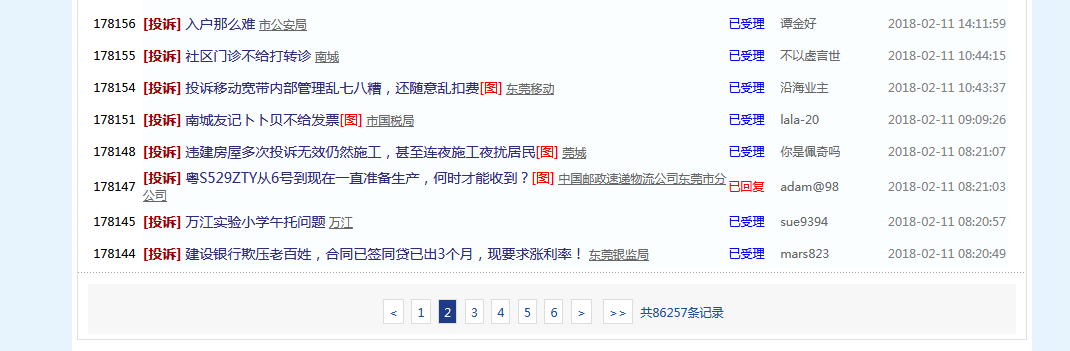
爬取问政平台 “http://wz.sun0769.com/index.php/question/questionType?type=4&page=” 投诉信息
每页的帖子
帖子里面的内容
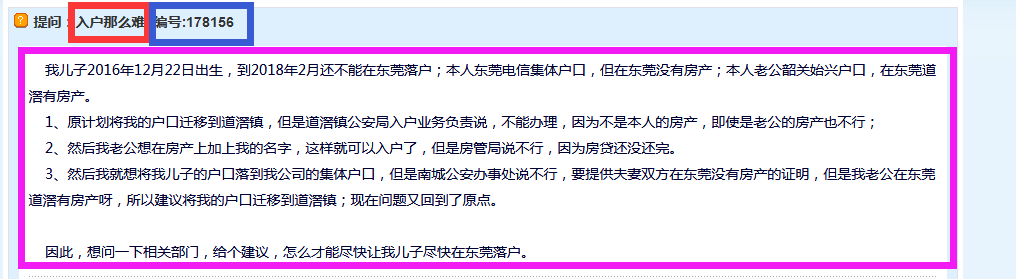
===《《《我们要爬取的是所有页的全部帖子的投诉主题、编号和内容===》》》
分别用Spider类和CrawlSpiders类两种方法实现
# -*- coding: utf-8 -*-

import scrapy

class NewdongguanItem(scrapy.Item):

    # define the fields for your item here like:

    # 标题

    title = scrapy.Field()

    # 编号

    number = scrapy.Field()

    # 内容

    content = scrapy.Field()

    # 链接

    url = scrapy.Field()
items.py
# -*- coding: utf-8 -*-

import scrapy

from scrapy.linkextractors import LinkExtractor

from scrapy.spiders import CrawlSpider, Rule

from newdongguan.items import NewdongguanItem

class DongdongSpider(CrawlSpider):

    name = 'dongdong'

    allowed_domains = ['wz.sun0769.com']

    start_urls = ['http://wz.sun0769.com/index.php/question/questionType?type=4&page=']

    # 每一页的匹配规则

    pagelink = LinkExtractor(allow=("type=4"))

    # 每一页里的每个帖子的匹配规则

    contentlink = LinkExtractor(allow=(r"/html/question/\d+/\d+.shtml"))

    rules = (

        # 本案例的url被web服务器篡改,需要调用process_links来处理提取出来的url

        Rule(pagelink, process_links = "deal_links"),

        Rule(contentlink, callback = "parse_item")

    )

    # links 是当前response里提取出来的链接列表

    def deal_links(self, links):

        for each in links:

            each.url = each.url.replace("?","&").replace("Type&","Type?")

        return links

    def parse_item(self, response):

        item = NewdongguanItem()

        # 标题

        item['title'] = response.xpath('//div[contains(@class, "pagecenter p3")]//strong/text()').extract()[0]

        # 编号

        item['number'] = item['title'].split(' ')[-1].split(":")[-1]

        # 内容,先使用有图片情况下的匹配规则,如果有内容,返回所有内容的列表集合

        content = response.xpath('//div[@class="contentext"]/text()').extract()

        # 如果没有内容,则返回空列表,则使用无图片情况下的匹配规则

        if len(content) == 0:

            content = response.xpath('//div[@class="c1 text14_2"]/text()').extract()

            item['content'] = "".join(content).strip()

        else:

            item['content'] = "".join(content).strip()

        # 链接

        item['url'] = response.url

        yield item
# -*- coding: utf-8 -*-

import codecs

import json

class NewdongguanPipeline(object):

    def __init__(self):

        # 创建一个文件

        self.filename = codecs.open("donggguan.json", "w", encoding = "utf-8")

    def process_item(self, item, spider):

        # 中文默认使用ascii码来存储,禁用后默认为Unicode字符串

        content = json.dumps(dict(item), ensure_ascii=False) + "\n"

        self.filename.write(content)

        return item

    def close_spider(self, spider):

        self.filename.close()
pipelines
用Spider类写的方法
# -*- coding: utf-8 -*-

import scrapy

from newdongguan.items import NewdongguanItem

class DongdongSpider(scrapy.Spider):

    name = 'xixi'

    allowed_domains = ['wz.sun0769.com']

    url = 'http://wz.sun0769.com/index.php/question/questionType?type=4&page='

    offset = 0

    start_urls = [url + str(offset)]

    def parse(self, response):

        # 每一页里的所有帖子的链接集合

        links = response.xpath('//div[@class="greyframe"]/table//td/a[@class="news14"]/@href').extract()

        # 迭代取出集合里的链接

        for link in links:

            # 提取列表里每个帖子的链接,发送请求放到请求队列里,并调用self.parse_item来处理

            yield scrapy.Request(link, callback = self.parse_item)

        # 页面终止条件成立前,会一直自增offset的值,并发送新的页面请求,调用parse方法处理

        if self.offset <= 71160:

            self.offset += 30

            # 发送请求放到请求队列里,调用self.parse处理response

            yield scrapy.Request(self.url + str(self.offset), callback = self.parse)

    # 处理每个帖子的response内容

    def parse_item(self, response):

        item = NewdongguanItem()

        # 标题

        item['title'] = response.xpath('//div[contains(@class, "pagecenter p3")]//strong/text()').extract()[0]

        # 编号

        item['number'] = item['title'].split(' ')[-1].split(":")[-1]

        # 内容,先使用有图片情况下的匹配规则,如果有内容,返回所有内容的列表集合

        content = response.xpath('//div[@class="contentext"]/text()').extract()

        # 如果没有内容,则返回空列表,则使用无图片情况下的匹配规则

        if len(content) == 0:

            content = response.xpath('//div[@class="c1 text14_2"]/text()').extract()

            item['content'] = "".join(content).strip()

        else:

            item['content'] = "".join(content).strip()

        # 链接

        item['url'] = response.url

        # 交给管道

        yield item
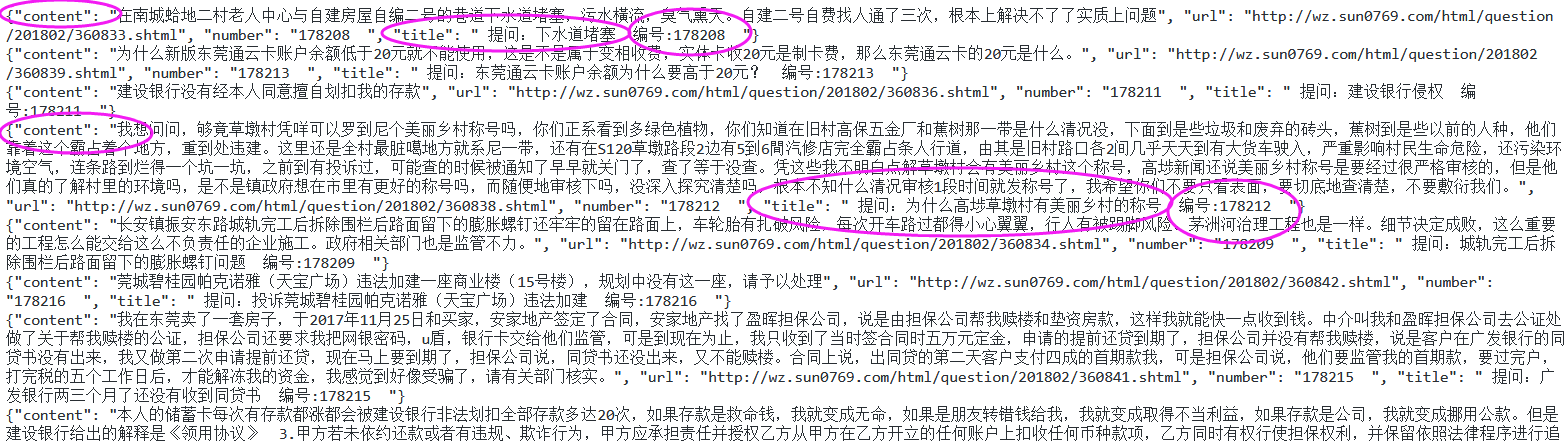
爬取的结果:
python爬虫入门(八)Scrapy框架之CrawlSpider类的更多相关文章
- python爬虫入门(六) Scrapy框架之原理介绍
Scrapy框架 Scrapy简介 Scrapy是用纯Python实现一个为了爬取网站数据.提取结构性数据而编写的应用框架,用途非常广泛. 框架的力量,用户只需要定制开发几个模块就可以轻松的实现一个爬 ...
- Python爬虫进阶之Scrapy框架安装配置
Python爬虫进阶之Scrapy框架安装配置 初级的爬虫我们利用urllib和urllib2库以及正则表达式就可以完成了,不过还有更加强大的工具,爬虫框架Scrapy,这安装过程也是煞费苦心哪,在此 ...
- 爬虫入门之Scrapy框架实战(新浪百科豆瓣)(十二)
一 新浪新闻爬取 1 爬取新浪新闻(全站爬取) 项目搭建与开启 scrapy startproject sina cd sina scrapy genspider mysina http://roll ...
- 爬虫入门之Scrapy 框架基础功能(九)
Scrapy是用纯Python实现一个为了爬取网站数据.提取结构性数据而编写的应用框架,用途非常广泛. 框架的力量,用户只需要定制开发几个模块就可以轻松的实现一个爬虫,用来抓取网页内容以及各种图片,非 ...
- 零基础写python爬虫之使用Scrapy框架编写爬虫
网络爬虫,是在网上进行数据抓取的程序,使用它能够抓取特定网页的HTML数据.虽然我们利用一些库开发一个爬虫程序,但是使用框架可以大大提高效率,缩短开发时间.Scrapy是一个使用Python编写的,轻 ...
- 爬虫开发11.scrapy框架之CrawlSpider操作
提问:如果想要通过爬虫程序去爬取”糗百“全站数据新闻数据的话,有几种实现方法? 方法一:基于Scrapy框架中的Spider的递归爬取进行实现(Request模块递归回调parse方法). 方法二:基 ...
- 爬虫入门之Scrapy框架基础rule与LinkExtractors(十一)
1 parse()方法的工作机制: 1. 因为使用的yield,而不是return.parse函数将会被当做一个生成器使用.scrapy会逐一获取parse方法中生成的结果,并判断该结果是一个什么样的 ...
- python爬虫学习之Scrapy框架的工作原理
一.Scrapy简介 Scrapy是一个为了爬取网站数据,提取结构性数据而编写的应用框架. 可以应用在包括数据挖掘,信息处理或存储历史数据等一系列的程序中. 其最初是为了 页面抓取 (更确切来说, 网 ...
- PYTHON 爬虫笔记十一:Scrapy框架的基本使用
Scrapy框架详解及其基本使用 scrapy框架原理 Scrapy是一个为了爬取网站数据,提取结构性数据而编写的应用框架. 其可以应用在数据挖掘,信息处理或存储历史数据等一系列的程序中.其最初是为了 ...
随机推荐
- Lambda的使用与实战
简介 (下面的简介也可以自己百度,一般进来的都是想知道怎么去用,所以这里主要也是重点在用法与实战上) Lambda表达式是Java SE 8中一个重要的新特性.lambda表达式允许你通过表达式来代替 ...
- C语言之任意进制的转换
我们都知道转换进制是一个让人比较头疼的事情,下面我的代码不是最好的,也就仅仅是一个思路而已,至少我认为使用栈来进行进制转换是比较合适的一种方法,好了,不多叙述了. #include<stdio. ...
- UIViewController/ApplicationSequ…
UIViewController ApplicationSequence UI-03 注意: NSLog(@"%s %d",__FUNCTION__,__LINE__); // ...
- oozie note
http://blog.sina.com.cn/s/blog_62a9902f01011ccd.html 实例:http://www.infoq.com/cn/articles/oozieexampl ...
- Material Design之CardView的使用
本文介绍CardView这个控件的使用,CardView继承至FrameLayout类,是support-v7包下的一个类,使用时必须引入cardview依赖包,可在下载的sdk文件夹中找到... 使 ...
- 【OpenCV学习】Kmean均值聚类对图片进行减色处理
#include <cv.h> #include <highgui.h> #include <iostream> #define MAX_CLUST ...
- OpenCV问题集锦,图片显示不出来,WaitKey(0),imread()不能读图片,未经处理的异常,等问题集合
昨天根据uc伯克利的人工图像分割文件.seg,显示图像的时候调用了OpenCV的库函数,图片都能用imwrite写好,但是imshow死活显示不出来. 今天早上发现原来是imshow()后面应该加上: ...
- SharePoint 列表项通过自定义WebService读取
简述:给其他系统提供集成,发现SharePoint自带的WebService各种不好使,索性就自己写一点,也当做自己学习的记录了.当然内容比较简单,希望大侠们不要介意,也不要骂我啊.好了,进入正题吧. ...
- Http的会话跟踪和跨站攻击(xss)
会话跟踪 什么是会话? 客户端打开与服务器的连接发出请求到服务器响应客户端请求的全过程称之为会话. 什么是会话跟踪? 会话跟踪指的是对同一个用户对服务器的连续的请求和接受响应的监视. 为什么需要会话跟 ...
- shc/unshc加/解密shell脚本
一.加密软件shcshc是linux的一款加密脚本的插件东西比较安全我们可以利用wget将文件放在root目录下也可以通过sftp放在root目录也可以直接利用cd命令选择目录一切随意shc官网:ht ...