
Spring注解AOP及单元测试junit(6)
2019-03-10/20:19:56
演示:将xml配置方式改为注解方式
静态以及动态代理推荐博客:https://blog.csdn.net/javazejian/article/details/56267036
junit单元测试jar包:https://share.weiyun.com/5pKuXVL
1.注解配置业务类
使用@Component("s") 注解ProductService 类表示业务类的Bean名字为 s
 package service;

 import org.springframework.stereotype.Component;

 @Component("s")
 public class ProductService {
     public void doSomeService(){
         System.out.println("doSomeService");
     }

 }
2.注解配置切面AOP
@Aspect 注解表示这是一个切面
@Component 表示这是一个bean,由Spring进行管理
在切面类的具体的方法前加上一句,表示这个切点被触发的时候,执行该函数,用Around方式,相当于把这个切点和这个切点的处理方法关联起来。
@Around(value = "execution(* service.ProductService.*(..))") 表示对service.ProductService 这个类中的所有方法进行切面操作.
含义就是,当expression中的函数被调用时,就会用around形式来触发切面函数,这条语句放在谁前面,谁就被定义为切面函数,也就是辅助功能。
 package aspect;
 import org.aspectj.lang.ProceedingJoinPoint;
 import org.aspectj.lang.annotation.Around;
 import org.aspectj.lang.annotation.Aspect;
 import org.springframework.stereotype.Component;

 @Aspect
 @Component
 public class LoggerAspect {

     @Around(value = "execution(* service.ProductService.*(..))")
     public Object log(ProceedingJoinPoint joinPoint) throws Throwable {
         System.out.println("start log:" + joinPoint.getSignature().getName());
         Object object = joinPoint.proceed();
         System.out.println("end log:" + joinPoint.getSignature().getName());
         return object;
     }
 }
3.配置文件applicationContext.xml
去掉原有的配置添加三行配置
 <?xml version="1.0" encoding="UTF-8"?>
 <beans xmlns="http://www.springframework.org/schema/beans"
     xmlns:xsi="http://www.w3.org/2001/XMLSchema-instance"
     xmlns:aop="http://www.springframework.org/schema/aop"
     xmlns:tx="http://www.springframework.org/schema/tx"
     xmlns:context="http://www.springframework.org/schema/context"
     xsi:schemaLocation="
    http://www.springframework.org/schema/beans
    http://www.springframework.org/schema/beans/spring-beans-3.0.xsd
    http://www.springframework.org/schema/aop
    http://www.springframework.org/schema/aop/spring-aop-3.0.xsd
    http://www.springframework.org/schema/tx
    http://www.springframework.org/schema/tx/spring-tx-3.0.xsd
    http://www.springframework.org/schema/context
    http://www.springframework.org/schema/context/spring-context-3.0.xsd">

     <context:component-scan base-package="aspect"/>
     <context:component-scan base-package="service"/>
     <aop:aspectj-autoproxy/>

 </beans>
4.单元测试junit
1.下载jar包地址在文章引用部分 junit-4.12.jar和hamcrest-all-1.3.jar 记得Add
2.修改TestSpring
@RunWith(SpringJUnit4ClassRunner.class) 表示这是一个Spring的测试类
@ContextConfiguration("classpath:applicationContext.xml")定位Spring的配置文件
@Autowired给这个测试类装配Category对象
@Test测试逻辑,打印c对象的名称
3.单元测试用的例子是博主SpringIOC/DI这篇文章中的例子参考链接https://www.cnblogs.com/bencoper/p/10494369.html
4.所有代码
TestSpring
 package test;

 import org.junit.Test;
 import org.junit.runner.RunWith;
 import org.springframework.beans.factory.annotation.Autowired;
 import org.springframework.test.context.ContextConfiguration;
 import org.springframework.test.context.junit4.SpringJUnit4ClassRunner;

 import pojo.Category;

 @RunWith(SpringJUnit4ClassRunner.class)
 @ContextConfiguration("classpath:applicationContext.xml")
 public class TestSpring {
     @Autowired
     Category c;

     @Test
     public void test(){
         System.out.println(c.getName());
     }
 }
 package com.how2java.test;

 import org.springframework.context.ApplicationContext;

 import org.springframework.context.support.ClassPathXmlApplicationContext;

 import pojo.Category;

 public class TestSpringOldWay {

     public static void main(String[] args) {
         ApplicationContext context = new ClassPathXmlApplicationContext(new String[] { "applicationContext.xml" });

         Category c = (Category) context.getBean("c");

         System.out.println(c.getName());
     }
 }
TestSpringOldWay
 <?xml version="1.0" encoding="UTF-8"?>
 <beans xmlns="http://www.springframework.org/schema/beans"
     xmlns:xsi="http://www.w3.org/2001/XMLSchema-instance"
     xmlns:aop="http://www.springframework.org/schema/aop"
     xmlns:tx="http://www.springframework.org/schema/tx"
     xmlns:context="http://www.springframework.org/schema/context"
     xsi:schemaLocation="
    http://www.springframework.org/schema/beans
    http://www.springframework.org/schema/beans/spring-beans-3.0.xsd
    http://www.springframework.org/schema/aop
    http://www.springframework.org/schema/aop/spring-aop-3.0.xsd
    http://www.springframework.org/schema/tx
    http://www.springframework.org/schema/tx/spring-tx-3.0.xsd
    http://www.springframework.org/schema/context
    http://www.springframework.org/schema/context/spring-context-3.0.xsd">

     <bean name="c" class="pojo.Category">
         <property name="name" value="category 1" />
     </bean>

 </beans>
applicationContext.xml
 package pojo;

 public class Category {
     private int id;
     private String name;

     public int getId() {
         return id;
     }
     public void setId(int id) {
         this.id = id;
     }
     public String getName() {
         return name;
     }
     public void setName(String name) {
         this.name = name;
     }

 }
Category.java
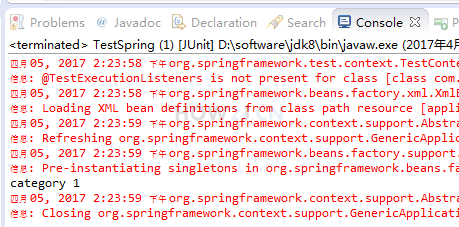
测试结果
Spring注解AOP及单元测试junit(6)的更多相关文章
- Spring注解 - AOP 面向切面编程
基本概念: AOP:Aspect Oriented Programming,即面向切面编程 指在程序运行期间动态的将某段代码切入到指定方法指定位置进行运行的编程方式 前置通知(@Before):在目标 ...
- 基于spring注解AOP的异常处理
一.前言 项目刚刚开发的时候,并没有做好充足的准备.开发到一定程度的时候才会想到还有一些问题没有解决.就比如今天我要说的一个问题:异常的处理.写程序的时候一般都会通过try...catch...fin ...
- spring 注解AOP
aspectAnnotation的切面信息,加到了AnnotationAwareAspectJAutoProxyCreator的advisorsCache属性里面去了. 解析annotationSe ...
- 重新学习Spring注解——AOP
面向切面编程——思想:在一个地方定义通用功能,但是可以通过声明的方式定义这个功能要以何种方式在何处运用,而无须修改受影响的类. 切面:横切关注点可以被模块化为特殊的类. 优点: 1.每个关注点都集中在 ...
- spring注解 aop
@Resource(name="as") 为空按类型装配 @autowired 按类型 @quafiler (name="xx") 按名称 spring继承关 ...
- spring 注解aop调用invoke()
public static void main(String[] args) { ClassPathXmlApplicationContext context = new ClassPathXmlAp ...
- JAVAEE——spring02:使用注解配置spring、sts插件、junit整合测试和aop演示
一.使用注解配置spring 1.步骤 1.1 导包4+2+spring-aop 1.2 为主配置文件引入新的命名空间(约束) 1.3 开启使用注解代替配置文件 1.4 在类中使用注解完成配置 2.将 ...
- Spring注解配置、Spring aop、整合Junit——Spring学习 day2
注解配置: 1.为主配置文件引入新的命名空间(约束) preference中引入文件 2.开启使用注解代理配置文件 <?xml version="1.0" encoding= ...
- 一步一步深入spring(5)--使用基于注解的spring实现 AOP
1.要利用spring aop,至少需要添加以下jar包 使用spring需要的jarspring.jar .commons-logging.jar 使用切面编程(AOP)需要的jar aspectj ...
随机推荐
- 卷积神经网络之LeNet
开局一张图,内容全靠编. 上图引用自 [卷积神经网络-进化史]从LeNet到AlexNet. 目前常用的卷积神经网络 深度学习现在是百花齐放,各种网络结构层出不穷,计划梳理下各个常用的卷积神经网络结构 ...
- 你需要知道的这几种 asp.net core 修改默认端口的方式
一般情况下,aspnetcore发布后的默认端口是5000,这个大家都知道,而且默认骨架代码中没有看到任何让你输入的ip地址和端口号,但作为程序员的我们,不希望 被框架所管制,那如何实现默认端口的修改 ...
- Python爬虫入门教程 38-100 教育部高校名单数据爬虫 scrapy
爬前叨叨 今天要爬取一下正规大学名单,这些名单是教育部公布具有招生资格的高校名单,除了这些学校以外,其他招生的单位,其所招学生的学籍.发放的毕业证书国家均不予承认,也就是俗称的野鸡大学! 网址是 ht ...
- WPF 小小案列(同步异步)
private void BtnButton_Click(object sender, RoutedEventArgs e) { MessageBox.Show("hello Word&qu ...
- 第13章 Base64 URL编码 - IdentityModel 中文文档(v1.0.0)
JWT令牌使用Base64 URL编码进行序列化. IdentityModel包括Base64Url帮助编码/解码的类: var text = "hello"; var b64ur ...
- html 中 xmp标记
HTML页面中显示HTML标签代码,可以使用<xmp>html标签内容</xmp>,这样,在网页中就会显示html标签 for(var i=0;i<columns.len ...
- 新手必看!Office Web Apps 2013 安装与配置(实战)
分享人:广州华软 星尘 一. 前言 Office Web Apps Server 是Office 服务器产品,它可提供在Sharepoint 2013网站中在线浏览和编辑 Word.PowerPoin ...
- U盘制作微pe工具箱(实战)
分享人:广州华软 浩言 前言 相信大家平时生活中还是工作上使用电脑的时间还是比较多的,有时候电脑出现故障,比如系统文件损坏,没办法正常开机,或者是开机密码忘了,想要重装系统等,下面我推荐一个U盘启动项 ...
- 骁龙735处理器细节曝光:7nm工艺加持,支持5G
骁龙700系列是高通公司的中高端芯片组系列,该系列包括10nm骁龙710和骁龙712 SoC:以及8nm骁龙730和骁龙730G SoC.最新消息显示,高通公司正在开发一款新的7nm芯片组,将被称为骁 ...
- 阿里巴巴excel工具easyexcel 助你快速简单避免OOM
Java解析.生成Excel比较有名的框架有Apache poi.jxl.但他们都存在一个严重的问题就是非常的耗内存,poi有一套SAX模式的API可以一定程度的解决一些内存溢出的问题,但POI还是有 ...