
iOS 原生地图 开发
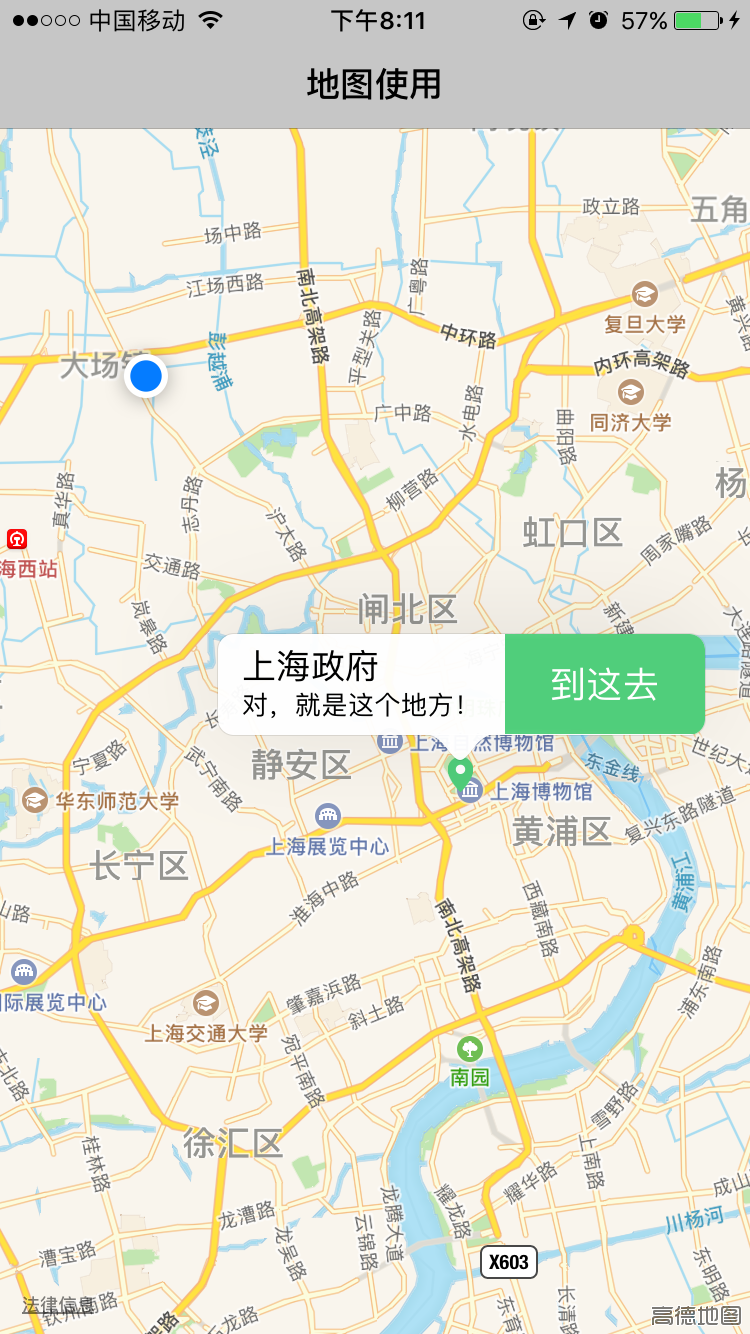
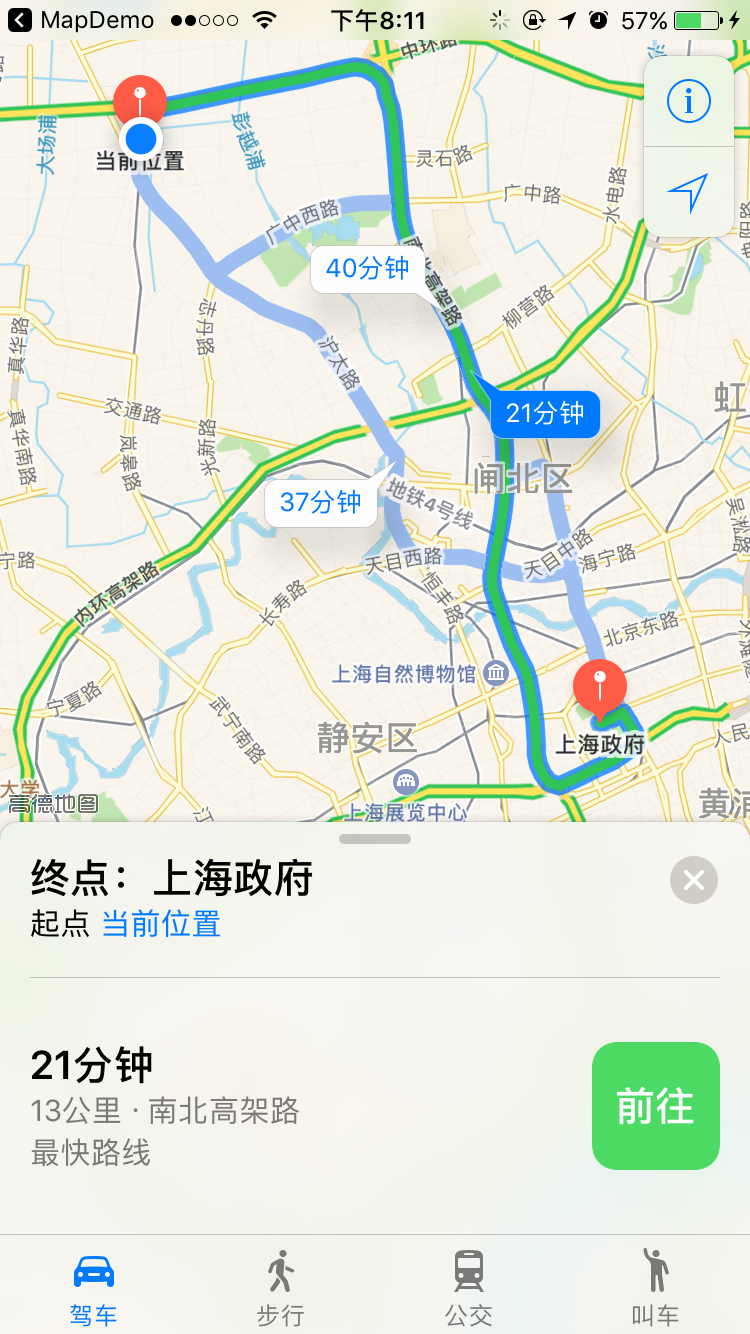
iOS开发有时候用到地图,不少人第一想到的是用第三方。当然有时候为了和安卓同步,可能会一起使用某一第三方。但有时候,我们是可以用原生地图开发的。上面两个示意图是原生地图的自定义开发。
运行demo,将展现图一界面,蓝色点是用户本人位置,弹出的大头针 是自己自定义 样式,另外 大头针是居中显示,我们同时可以设定地图放大的level效果。[maMapView setCenterCoordinate:location1 zoomLevel:10 animated:NO]; 我默认设置了 10, 你可以改变这个值,试试其他效果。
下面是核心代码以及git地址:
//

//  MapViewController.m

//  MapDemo

//

//  Copyright © 2016年 qiye. All rights reserved.

//

#define SCREEN_WIDTH ([[UIScreen mainScreen] bounds].size.width)

#define SCREEN_HEIGHT ([[UIScreen mainScreen] bounds].size.height)

#import "MapViewController.h"

#import <CoreLocation/CoreLocation.h>

#import <MapKit/MapKit.h>

#import <MapKit/MKAnnotationView.h>

#import "QYAnnotation.h"

#import "MKMapView+ZoomLevel.h"

#import "DestinationMode.h"

@interface MapViewController ()<MKMapViewDelegate>

@end

@implementation MapViewController{

    UIView            *   uiView;

    CLLocationManager *   locationManager;

    MKMapView         *   maMapView;

    MKAnnotationView  *   annotationView;

    DestinationMode   *   destinationMode;

}

- (void)viewDidLoad {

    [super viewDidLoad];

    self.title = @"地图使用";

    [self initMap];

}

-(void) initMap

{

    destinationMode = [DestinationMode initWithName:@"上海政府" desc:@"对,就是这个地方!" latitude:@"31.230344" longitude:@"121.47411346"];

    maMapView=[[MKMapView alloc]initWithFrame:CGRectMake(0, 64, SCREEN_WIDTH, SCREEN_HEIGHT-64)];

    [self.view addSubview:maMapView];

    //设置代理

    maMapView.delegate=self;

    //请求定位服务

    locationManager=[[CLLocationManager alloc]init];

    if(![CLLocationManager locationServicesEnabled]||[CLLocationManager authorizationStatus]!=kCLAuthorizationStatusAuthorizedWhenInUse){

        [locationManager requestWhenInUseAuthorization];

    }

    //用户位置追踪(用户位置追踪用于标记用户当前位置,此时会调用定位服务)

    maMapView.userTrackingMode = MKUserTrackingModeFollow;

    //设置地图类型

    maMapView.mapType=MKMapTypeStandard;

    //添加大头针

    [self addAnnotation];

}

-(void)addAnnotation{

    CLLocationCoordinate2D location1=CLLocationCoordinate2DMake(destinationMode.destinationLatitude.floatValue, destinationMode.destinationLongitude.floatValue);

    QYAnnotation *annotation1=[[QYAnnotation alloc]init];

    annotation1.title= destinationMode.destinationName;

    annotation1.subtitle= destinationMode.destinationDesc;

    annotation1.coordinate=location1;

    [maMapView setCenterCoordinate:location1 zoomLevel:10 animated:NO];

    [maMapView addAnnotation:annotation1];

    [maMapView selectAnnotation:annotation1 animated:YES];

}

- (void)mapView:(MKMapView *)mapView didSelectAnnotationView:(MKAnnotationView *)view

{

}

- (MKAnnotationView *)mapView:(MKMapView *)mapView viewForAnnotation:(id <MKAnnotation>)annotation

{

    //由于当前位置的标注也是一个大头针,所以此时需要判断,此代理方法返回nil使用默认大头针视图

    if ([annotation isKindOfClass:[QYAnnotation class]]) {

        static NSString *key1=@"QYAnnotation";

        annotationView=[mapView dequeueReusableAnnotationViewWithIdentifier:key1];

        //如果缓存池中不存在则新建

        if (!annotationView) {

            annotationView=[[MKAnnotationView alloc]initWithAnnotation:annotation reuseIdentifier:key1];

            annotationView.canShowCallout=true;//允许交互点击

            annotationView.calloutOffset=CGPointMake(0, 1);//定义详情视图偏移量

            UIButton * btn = [[UIButton alloc]initWithFrame:CGRectMake(0, 0, 100, 50)];

            [btn setBackgroundImage:[UIImage imageNamed:@"common_green_line"] forState:UIControlStateNormal];

            [btn setTitle:@"到这去" forState:UIControlStateNormal];

            [btn addTarget:self action:@selector(turnAction:) forControlEvents:UIControlEventTouchUpInside];

            annotationView.rightCalloutAccessoryView=btn;//定义详情左侧视图

            annotationView.selected = YES;

        }

        //修改大头针视图

        //重新设置此类大头针视图的大头针模型(因为有可能是从缓存池中取出来的,位置是放到缓存池时的位置)

        annotationView.annotation=annotation;

        annotationView.image=[UIImage imageNamed:@"common_map_site"];//设置大头针视图的图片

        return annotationView;

    }else {

        return nil;

    }

}

-(void)turnAction:(id)sender{

    [self doAppleNavigation];

}

-(void)doAppleNavigation{

    NSDictionary *options=@{MKLaunchOptionsMapTypeKey:@(MKMapTypeStandard),MKLaunchOptionsDirectionsModeKey:MKLaunchOptionsDirectionsModeDriving};

    CLLocationCoordinate2D fromCoordinate   = maMapView.userLocation.location.coordinate;

    CLLocationCoordinate2D toCoordinate   = CLLocationCoordinate2DMake(destinationMode.destinationLatitude.floatValue, destinationMode.destinationLongitude.floatValue);

    MKPlacemark *fromPlacemark = [[MKPlacemark alloc] initWithCoordinate:fromCoordinate

                                                       addressDictionary:nil];

    MKPlacemark *toPlacemark   = [[MKPlacemark alloc] initWithCoordinate:toCoordinate

                                                       addressDictionary:nil];

    MKMapItem *fromItem = [[MKMapItem alloc] initWithPlacemark:fromPlacemark];

    fromItem.name =@"当前位置";

    MKMapItem *toItem=[[MKMapItem alloc]initWithPlacemark:toPlacemark];

    toItem.name = destinationMode.destinationName;

    [MKMapItem openMapsWithItems:@[fromItem,toItem] launchOptions:options];

}

- (void)didReceiveMemoryWarning {

    [super didReceiveMemoryWarning];

}

@end
更多资料:
http://www.cnblogs.com/kenshincui/p/4125570.html#autoid-3-0-0
http://blog.csdn.net/nlforever/article/details/9075313
iOS 原生地图 开发的更多相关文章
- iOS原生地图开发指南续——大头针与自定义标注
iOS原生地图开发指南续——大头针与自定义标注 出自:http://www.sxt.cn/info-6042-u-7372.html 在上一篇博客中http://my.oschina.net/u/23 ...
- iOS原生地图开发详解
在上一篇博客中:http://my.oschina.net/u/2340880/blog/414760.对iOS中的定位服务进行了详细的介绍与参数说明,在开发中,地位服务往往与地图框架结合使用,这篇博 ...
- iOS原生地图开发进阶——使用导航和附近兴趣点检索
iOS原生地图开发进阶——使用导航和附近兴趣点检索 iOS中的mapKit框架对国际化的支持非常出色.在前些篇博客中,对这个地图框架的基础用法和标注与覆盖物的添加进行了详细的介绍,这篇博客将介绍两个更 ...
- IOS原生地图与高德地图
原生地图 1.什么是LBS LBS: 基于位置的服务 Location Based Service 实际应用:大众点评,陌陌,微信,美团等需要用到地图或定位的App 2.定位方式 1.GPS定位 ...
- iOS原生地图与高德地图的使用
原生地图 1.什么是LBS LBS: 基于位置的服务 Location Based Service 实际应用:大众点评,陌陌,微信,美团等需要用到地图或定位的App 2.定位方式 1.GPS定位 2. ...
- iOS 原生地图地理编码与反地理编码
当我们要在App实现功能:输入地名,编码为经纬度,实现导航功能. 那么,我需要用到原生地图中的地理编码功能,而在Core Location中主要包含了定位.地理编码(包括反编码)功能. 在文件中导入 ...
- iOS 原生地图(MapKit、MKMapView)轨迹渐变
WechatIMG2.png 项目已接入高德地图,并且大部分功能已经实现好,但BOSS觉得iOS自带的地图效果更好...本着面向老板编程的思想,换之.还好,高德地图是在MapKit上封装的,大部分ap ...
- 如何初始化一个iOS原生地图
/** 初始化一个mapView 需导入 #import <MapKit/MapKit.h> - returns: 返回一个mapView对象 */ mapView = [[MKMapV ...
- React Native Android原生模块开发实战|教程|心得|怎样创建React Native Android原生模块
尊重版权,未经授权不得转载 本文出自:贾鹏辉的技术博客(http://blog.csdn.net/fengyuzhengfan/article/details/54691503) 告诉大家一个好消息. ...
随机推荐
- Letter Combinations of a Phone Number 解答
Question Given a digit string, return all possible letter combinations that the number could represe ...
- 【LeetCode练习题】Reverse Words in a String
Reverse Words in a String Given an input string, reverse the string word by word. For example,Given ...
- BorderLayout布局,修改各个区域大小办法
摘自http://blog.csdn.net/zcsearching/article/details/50808446 BorderLayout控件大小的设置 使用BorderLayout时,中间的面 ...
- 什么是FastCGI?
什么是FastCGI? PHP的FastCGI使你的所有php应用软件通过mod_fastci运行,而不是mod_phpsusexec.FastCGI应用速度很快 是因为他们持久稳定.不必对每一个请求 ...
- [转]Traceroute网络排障实用指南(1)
注:本文是同事的大作,虽是翻译的一篇英文PPT,但内容实在精彩,小小的Traceroute竟包含如此大的信息量,真是让人感慨!内容不涉及公司机密,所以一直想转到自己的Blog上来,自己需要时可以再翻阅 ...
- Windows Server 2008 R2 开启Win7主题效果Aero
1.打开 开始---管理工具----服务器管理器--功能 2.点击 “添加功能”,选择“桌面体验”,这样就会安装上win7 主题和Windows media player 3.重启电脑后,在“服务”里 ...
- C++中的初始化列表中可以对那些变量或对象进行初始化
构造函数与其函数体之间可以添加初始化列表,能对某些对象进行初始化.格式为 类名() : 变量1(参数1),变量2(参数2) { } 1. 父类的对象的构造必须在初始化列表中,如: 子类名(): ...
- swift中通知的使用
1.发通知.(以这条通知为例,通知名字:gameOverNotification.通知参数:title) NSNotificationCenter.defaultCenter().postNotifi ...
- Javascript进阶篇——(JS基础语法)笔记整理
根据慕课网学习整理到一起的笔记,把东西整理到一起看起来比较方便 什么是变量字面意思:变量是可变的量:编程角度:变量是用于存储某种/某些数值的存储器.我们可以把变量看做一个盒子,盒子用来存放物品,物品可 ...
- EF查询数据库框架的搭建
一个简单的EF查询框架除了运行项目外,大概需要5个类库项目,当然这个不是一定要这样做,这可以根据自己的需要设置有多少个项目.这里介绍的方法步骤只适合EF零基础的人看看就是了. 在开始之前,先建立一个运 ...